Solved "Windows Defender" opens with each boot

bawldiggle

GrayGhost2 ret.
Pro User
VIP
Local time
12:29 PM
Messages
895
Location
Australia
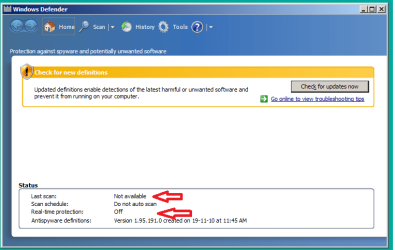
How do I stop the "Windows Defender" window from opening with every boot/logon.

Win7 64bit standalone PC
not connected to internet
no AV
firewall is irrelevant

Windows Defender 64bit.png

-----
EDIT: 19-Sep-2013
Solution at post #18 I recommend you read all posts -- a lot of generous helpers on this forum.
 
Last edited:

My Computer My Computer

At a glance

XP Pro (x86) | 7 HP (x86) & (x64) | 7 Pro (x64)
Computer type
PC/Desktop
Computer Manufacturer/Model Number
Toshiba, Lenovo (laptops) + 4 rigs
OS
XP Pro (x86) | 7 HP (x86) & (x64) | 7 Pro (x64)
How do I stop the "Windows Defender" window from opening with every boot/logon.

Win7 64bit standalone PC
not connected to internet
no AV
firewall is irrelevant

View attachment 262421
And you don't touch this computer with removable media - right?
No CDs, DVDs, USB flash drives....

Then you can disable the service named Windows Defender.
 

My Computer My Computer

At a glance

W7 Pro SP1 64biti78GBIntel HD Graphics
Computer type
Laptop
Computer Manufacturer/Model Number
Employer provided Dell Latitude
OS
W7 Pro SP1 64bit
CPU
i7
Memory
8GB
Graphics Card(s)
Intel HD Graphics
Hard Drives
crappy SSD
Antivirus
Employer mandated Symantec Endpoint Protection
Browser
Pale Moon 64bit, IE11 64bit & Chrome 64bit
Last edited by a moderator:

My Computer My Computer

At a glance

windows 7 ultimate x64AMD Athlon II X3 445 Rana 45nm Technology8gbram32MB GeForce 7025 / nForce 630a (Biostar Micr...
Computer Manufacturer/Model Number
custom
OS
windows 7 ultimate x64
CPU
AMD Athlon II X3 445 Rana 45nm Technology
Motherboard
BIOSTAR Group N68S3B
Memory
8gbram
Graphics Card(s)
32MB GeForce 7025 / nForce 630a (Biostar Microtech Int'l)
Screen Resolution
1280x1024
Hard Drives
488GB Seagate ST350041 3AS SCSI Disk Device (ATA)
PSU
400w ?
Keyboard
usb
Mouse
usb
Go to Start Orb and type inWindows Defender. Then tick on Windows Defender and you will get options to turn off Defender.

http://www.sevenforums.com/tutorials/6397-windows-defender-turn-off.html

If you ever go online or allow anything to be plugged into your computer you should have security.
A friends CD/DVD/Flash stick can be infected and should be checked.
Other examples would be going to a LAN party, connecting to a network or domain. Security is just not for internet.
 
Last edited by a moderator:

My Computer My Computer

At a glance

Windows 10 Pro. 64/ version 1709 Windows 7 Pr...Intel i7-6800K @ 4.3Corsair Platinum 16 gig @2400EVGA GTX 1070 OC
Computer type
PC/Desktop
Computer Manufacturer/Model Number
Home made Desktop
OS
Windows 10 Pro. 64/ version 1709 Windows 7 Pro/64
CPU
Intel i7-6800K @ 4.3
Motherboard
ASUS X-99 Deluxe II
Memory
Corsair Platinum 16 gig @2400
Graphics Card(s)
EVGA GTX 1070 OC
Monitor(s) Displays
Asus 27" LED LCD/VE278Q
Screen Resolution
1920-1080 or 1280-720 HDMI
Hard Drives
INTEL SSD 730-240 Gb Sata 3.0/
PSU
EVGA Platium 1200W
Case
Phanteks Luxe Tempered Glass 8 fans/ one radiator
Cooling
XSPC/ Water Cooled CPU
Keyboard
Das 4 Professional
Mouse
Logitech M705/MX Anywhere 2-S
Internet Speed
100 mbits
Antivirus
Microsoft Security Essentials/ Malwarebytes Premium 3.0/ SAS
Browser
I.E. 11 default/Firefox/ ISP Time Warner Cable/Spectrum
Other Info
LG BluRay Burner/
Sound system-KLipsch-THX/
Icy Dock ssd Hot Swap bays.
Windows Defender (nag)

@ deanolfc

Startup Programs - Change
http://www.sevenforums.com/tutorials/1401-startup-programs-change.html
Failed
Disabled/unchecked "Windows Defender" in ... System Configuration > Services
Applied > OK
Rebooted
"Windows Defender" opened with reboot
System Configuration > Services > [ ] Windows Defender ... is still unchecked after reboot
-----
@ Layback Bear
"Turn off Windows defender"
http://www.sevenforums.com/tutorials/6397-windows-defender-turn-off.html
- sevenforums images are nothing like my Win7-64bit
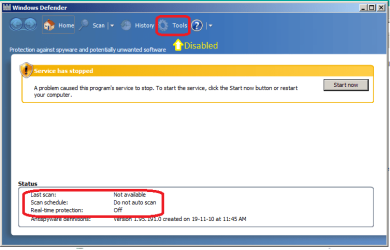
Control Panel > Windows Defender > Tools <<< is DISABLED
- cannot progress any further
-----
Windows Defender_2 64bit.png
I now suspect I should be "Administrator" ... BUT ...
There is no "Administrator" access via context menu. nor Login as Administrator
Admin-Password as empty-string fails, I have not created a admin-password.
PC is standalone one user, me.
Could I use a password hack tool?
 

My Computer My Computer

At a glance

XP Pro (x86) | 7 HP (x86) & (x64) | 7 Pro (x64)
Computer type
PC/Desktop
Computer Manufacturer/Model Number
Toshiba, Lenovo (laptops) + 4 rigs
OS
XP Pro (x86) | 7 HP (x86) & (x64) | 7 Pro (x64)
Account Recovery Disc

I suspect I am going to need a "Account Recovery Disc"

Am I too late if I don't already have one ? :cry:
I cannot login as administrator.

EDIT:
Can I make a "Recovery Disc" on my clean Win7 32bit PC
and use the CD to fix the Win7 64bit PC
 
Last edited:

My Computer My Computer

At a glance

XP Pro (x86) | 7 HP (x86) & (x64) | 7 Pro (x64)
Computer type
PC/Desktop
Computer Manufacturer/Model Number
Toshiba, Lenovo (laptops) + 4 rigs
OS
XP Pro (x86) | 7 HP (x86) & (x64) | 7 Pro (x64)
@ deanolfc

Startup Programs - Change
http://www.sevenforums.com/tutorials/1401-startup-programs-change.html
Failed
Disabled/unchecked "Windows Defender" in ... System Configuration > Services
Applied > OK
Rebooted
"Windows Defender" opened with reboot
System Configuration > Services > [ ] Windows Defender ... is still unchecked after reboot
-----
@ Layback Bear
"Turn off Windows defender"
http://www.sevenforums.com/tutorials/6397-windows-defender-turn-off.html
- sevenforums images are nothing like my Win7-64bit
Control Panel > Windows Defender > Tools <<< is DISABLED
- cannot progress any further
-----
View attachment 262559
I now suspect I should be "Administrator" ... BUT ...
There is no "Administrator" access via context menu. nor Login as Administrator
Admin-Password as empty-string fails, I have not created a admin-password.
PC is standalone one user, me.
Could I use a password hack tool?

Please read thru this entire novel before you take any actions.

First, I want say to everyone in this thread that it is not my intentions to be rude to anyone in this thread or to GrayGhost2 - I'll try and say these next two things as nicely as I can:

1) One of the problems in forums like this is you might get a lot of advice between when you first post and when you check back. In this case, the order that the advice was given has worked against you. To be clear, I am not saying to the others that are helping you: "Stay out of this thread, I'm helping this OP." And I'm not saying that the info suggested by others was wrong. To the contrary, I was wrong, others had better ideas.

2) Either you (GrayGhost2)...
...made an error as you detailed the actions that you took
...or you misread what deanolfc wrote
...or you assumed that deanolfc made a typo, so you took other actions
...or you did what I suggested but used deanolfc's method to do that
...or something else went wrong in the communications
...or I don't have a clue what is going on :-)


deanolfc suggested:
msconfig in start menu 'enter' and in start up tab untick windows defender.

You wrote that you:
Disabled/unchecked "Windows Defender" in ... System Configuration > Services

Since you have disabled the the Windows Defender (WD) service, you will not be able to complete the steps suggested by Layback Bear. The Tools option within the WD app will remain disabled until you re-enable and start the WD service. Please note, that the normal start method for the WD service is Automatic (Delayed). When you restart your computer, then logon and you see the WD app window, you will see an error in that window because the WD service has not had time to start. The window will look just like you showed in post #5. Just wait for it to start. It can take a several minutes. (Obviously, the WD service will never start if you leave it disabled. Please use msconfig to re-enable the WD service.)


I think that you were sort of quoting what deanolfc posted when you posted a link to the Startup Programs - Change tutorial. But right under link you wrote failed. (I added the red font to "failed" in your original post that I quoted above.)

Does this mean that you worked thru all six methods in the tutorial and that all six methods have failed to stop the Windows Defender app from opening each time the you boot/logon - please clarify.


Next, I would like tell you why I only posted the three lines that I did instead of jumping right to the part about stopping the Window Defender (WD) window from appearing.
1st post: you stated that you don't want/need security apps and that the WD window opens
2nd post: I mentioned paths to infections and suggest disabling the WD service
~~~I had hoped for this:
3rd post: you acknowledge the risks and say that you still want no protection via WD.
4th and subsequent posts: we look for WD in all of the many app startup places.

My suggestion to disable WD's service was not meant to stop the WD window from appearing. It is the first thing that I would do if I was not going to use WD on a computer like you described. There is no sense in the service running if you are not going to use WD. That said, I was wrong to suggest disabling the WD service since turning WD off (as Layback Bear suggested) is simpler and that prevents the WD service from running (unless some other app is starting it the service).

However, something is not normal with this computer of yours. So doing the normal things like turning WD off is not going to fix that anomaly. The WD window should not open each time the you boot/logon no matter if the WD app is turned on, turned off or the WD service is running, stopped or disabled.


Now, Let's work thru all six methods mentioned in the tutorial in deanolfc's post.
[The tutorial that Brink (forum admin) added to deanolf's post.]

1) Once you re-enable the WD service, then you can do what Layback Bear suggested. This is what method one in the tutorial is asking you to do. (Again, this will have no impact on the WD window appearing with each boot.)

2) For method two, you will need to check:
the folder mentioned in
method two > option one
and the folder mentioned in
method two > option two.

3) Method three is what deanolfc suggested. Please let us know if the WD app is listed in the startup tab.

4) Method four - be careful. Let us know if WD is starting from any of those locations. The exe that you are looking for is: C:\Program Files\Windows Defender\MSASCui.exe (unless some other app is starting WD)

5) You probably want to skip this one for this computer. Others might disagree.

6) Method 6 - let us know if you need help determining if a scheduled task to opening the WD window for you. Again, the exe that you are looking for is: C:\Program Files\Windows Defender\MSASCui.exe (unless some other app is starting WD)


Now to speak to the last part of the post that I quoted above:
Do not use a password hack tool and do not go searching for one on the internet. We can help you with that latter if need be. Just use whatever account you normally use and let us know if you have any problems doing the steps mentioned just above this paragraph.


Now to speak to the post that you made while I was writing this novel of a post:
I suspect I am going to need a "Account Recovery Disc"

Am I too late if I don't already have one ? :cry:
I cannot login as administrator.

EDIT:
Can I make a "Recovery Disc" on my clean Win7 32bit PC
and use the CD to fix the Win7 64bit PC

Please stop working on this and try the steps in the tutorial that I've detailed above. We can answer your questions pertaining to various accounts later. You do not need the built-in administrator account enabled in order to do the steps mentioned in my novel above. It already sounds like the one normal user account has the rights that it needs to get things done.

 
Last edited:

My Computer My Computer

At a glance

W7 Pro SP1 64biti78GBIntel HD Graphics
Computer type
Laptop
Computer Manufacturer/Model Number
Employer provided Dell Latitude
OS
W7 Pro SP1 64bit
CPU
i7
Memory
8GB
Graphics Card(s)
Intel HD Graphics
Hard Drives
crappy SSD
Antivirus
Employer mandated Symantec Endpoint Protection
Browser
Pale Moon 64bit, IE11 64bit & Chrome 64bit
Hi UsernamesIssues,

Thank for the enormous effort you have put into this problem I have.
I am so impressed with everyones efforts.

It is past my bedtime 9:45pm (I am recovering from tongue and throat cancer) so I run out of puff very quickly sometimes.

Just wanted to acknowledge you before another 24 hours disappears.

Regards
Russell
 

My Computer My Computer

At a glance

XP Pro (x86) | 7 HP (x86) & (x64) | 7 Pro (x64)
Computer type
PC/Desktop
Computer Manufacturer/Model Number
Toshiba, Lenovo (laptops) + 4 rigs
OS
XP Pro (x86) | 7 HP (x86) & (x64) | 7 Pro (x64)
GrayGhost2,

See if the following works for you and gets rid of your looking at WD every time you boot...:confused:

Please download: CCleaner - Standard
Double-click the program icon to install it.

Once installed, at the program console, on the left panel, go to: Tools
At the next window, click: Startup

Is the following entry present:
C:\Program Files\Windows Defender\MSASCui.exe -hide

If there, click: Delete

Close out of CCleaner.

If Windows Defender is enabled, it should not show up every time you boot.

Let us know.

If the entry above is not present, do you see a Windows Defender entry? If so, what path does it show?

If you like, use the Snipping tool to post an image of the entry found.

http://www.sevenforums.com/tutorials/274797-disk-management-post-screen-capture-image.html


not connected to internet
You are posting here, so you had to go on the Internet, if not on your computer, on another one.

If you do not use your pc to connect to the Internet, download CCleaner to a USB pendrive in another computer, and, then move the setup file to the Desktop of the computer that is not connected.
 
Last edited:

My Computer My Computer

At a glance

Windows 7 Home Premium
Computer type
PC/Desktop
Computer Manufacturer/Model Number
An ol' eMachines
OS
Windows 7 Home Premium
Internet Speed
Fine for me...I'm retired!
not connected

NOT CONNECTED TO INTERNET:(
everyone seems to have missed this statement
WD is part of the windows update function BITS etc.

if he does not use the internet???
how(why) did he post!!!
easiest way turn off in action centre

Roy
 

My Computer My Computer

At a glance

W7 home premium 32bit/W7HP 64bit/w10 tp insid...E5300 dual core3gbNvidia Geforce 7100 Nforce 630i
Computer type
PC/Desktop
Computer Manufacturer/Model Number
medionl/Aspire 6930G/acer x55a
OS
W7 home premium 32bit/W7HP 64bit/w10 tp insider ring
CPU
E5300 dual core
Motherboard
medion MS7366
Memory
3gb
Graphics Card(s)
Nvidia Geforce 7100 Nforce 630i
Monitor(s) Displays
avixc
Internet Speed
n (isp resticted to 72)
Antivirus
mse/pands
Browser
palemoon
Other Info
Belkin Fd7050 n USB using Railink RT2870 drivers, more upto date

My Computer My Computer

At a glance

Windows 10 Pro. 64/ version 1709 Windows 7 Pr...Intel i7-6800K @ 4.3Corsair Platinum 16 gig @2400EVGA GTX 1070 OC
Computer type
PC/Desktop
Computer Manufacturer/Model Number
Home made Desktop
OS
Windows 10 Pro. 64/ version 1709 Windows 7 Pro/64
CPU
Intel i7-6800K @ 4.3
Motherboard
ASUS X-99 Deluxe II
Memory
Corsair Platinum 16 gig @2400
Graphics Card(s)
EVGA GTX 1070 OC
Monitor(s) Displays
Asus 27" LED LCD/VE278Q
Screen Resolution
1920-1080 or 1280-720 HDMI
Hard Drives
INTEL SSD 730-240 Gb Sata 3.0/
PSU
EVGA Platium 1200W
Case
Phanteks Luxe Tempered Glass 8 fans/ one radiator
Cooling
XSPC/ Water Cooled CPU
Keyboard
Das 4 Professional
Mouse
Logitech M705/MX Anywhere 2-S
Internet Speed
100 mbits
Antivirus
Microsoft Security Essentials/ Malwarebytes Premium 3.0/ SAS
Browser
I.E. 11 default/Firefox/ ISP Time Warner Cable/Spectrum
Other Info
LG BluRay Burner/
Sound system-KLipsch-THX/
Icy Dock ssd Hot Swap bays.
NOT CONNECTED TO INTERNET:(
everyone seems to have missed this statement
WD is part of the windows update function BITS etc.

if he does not use the internet???
how(why) did he post!!!
easiest way turn off in action centre

Roy
>how did he post!!!
The OP has access to at least one device capable of getting online - maybe a cell phone, maybe at a library.

>why did he post!!!
The OP has a rather annoying window opening up each and every time he boots/logs on.

>easiest way turn off in action centre
I have a computer (virtual machine, VM) with the action center turned on and Windows Defender (WD) running normally. Nothing that I could do to to WD would cause its window to open each time I logged on. I have that VM doing stuff right now, so I cannot test your suggestion. Can you tell us how having the action center turned on would cause WD's window to open with each boot? What state would WD have to be in - maybe out of date definitions? Should the WD service running or not to recreate the interaction between WD's window and the action center that you have seen?

>NOT CONNECTED TO INTERNET
cottonball is pretty sharp. I doubt that he missed the fact that this computer is offline. Judging from other posts, cottonball appears to use some info the is pasted in or makes use of this forum's features that lets you insert info that you post over and over again. Maybe cottonball did miss that this computer is offline or maybe cottonball just failed to modify his instructions to include something like "download CCleaner using another computer - transfer the installer to the computer of interest". Either way, the OP is capable of mentally modifying cottonball's instructions.

@cottonball,
Since the other 5 methods that the OP and I are working thru in the tutorial already cover the start up points that CCleaner provides access to, I suggested that the OP skip method 5 (use CCleaner). I did mention that others might disagree. Is there some reason why you would like the OP to use CCleaner instead of the methods suggested by Brink in his edit of post #3?
 

My Computer My Computer

At a glance

W7 Pro SP1 64biti78GBIntel HD Graphics
Computer type
Laptop
Computer Manufacturer/Model Number
Employer provided Dell Latitude
OS
W7 Pro SP1 64bit
CPU
i7
Memory
8GB
Graphics Card(s)
Intel HD Graphics
Hard Drives
crappy SSD
Antivirus
Employer mandated Symantec Endpoint Protection
Browser
Pale Moon 64bit, IE11 64bit & Chrome 64bit
@UsernameIssues,

I just read the original question:

How do I stop the "Windows Defender" window from opening with every boot/logon.

GrayGhost2 mentioned: "...run out of puff very quickly sometimes"
Somebody who is recovering from tongue and throat cancer has one heck of a rough time. Can't even imagine.

From there, what is left of my old dog brain thought:
"He needs a break. The User can get rid of the WD window opening by using CCleaner and looking for: C:\Program Files\Windows Defender\MSASCui.exe -hide
...and that will be easy enough." :D

Other than that, I did not do an in-depth analysis of all the posts on this thread.

Sorry if I missed something. :eek:


BTW, have no clue as to what you are talking about:
Judging from other posts, cottonball appears to use some info the is pasted in or makes use of this forum's features that lets you insert info that you post over and over again.

I test just about every program recommended before asking someone to run it. There are times when programs change, and I am not aware of it, but, that is the way it goes...
 

My Computer My Computer

At a glance

Windows 7 Home Premium
Computer type
PC/Desktop
Computer Manufacturer/Model Number
An ol' eMachines
OS
Windows 7 Home Premium
Internet Speed
Fine for me...I'm retired!
5 PCs

Thanks to ...
@ cottonball
@ torchwood
... for your responses :D

I have 5 PCs
2 laptops + 3 boxes

Internet PCs:-
- email, browsing only (no games nor business progams)
- all text needs are copied from web pages onto TXT files
- Bitdefender Internet Security 2013, Malawarebytes (free, passive)

  • Acer laptop WinXP -- on its last gasp
    - age:- 2007
    - principle internet PC until Toshiba is custom setup

  • Toshiba laptop Win7 32bit -- new out of the box Jan-2013
    - only connected to internet in last few weeks
-----
Standalone PCs (3 of them) -- all custom built by others -- no network

  • pc2003, WinXP sp1 -- AutoCad 2006 -- MS Office 2003 -- QuickBooks Pro :cool:
    - never misses a beat (even with sp1), never crashes -- never internet connected

  • pc2008, Win7 sp1 -- AutoCad 2006 -- MS Office 2003 :cool:
    - never misses a beat, never crashes -- never internet connected
PROBLEM CHILD: :banghead:

  • PC2013, Win7 64bit -- custom box inc SSD
    - MS-Office click-to-run -- installed by over zealous IT tech (not me) :picnic:
    - Classic Shell Start -- to increase monitor real estate space for AutoCad
    - (its hard to let go of XP clean UI)
 

My Computer My Computer

At a glance

XP Pro (x86) | 7 HP (x86) & (x64) | 7 Pro (x64)
Computer type
PC/Desktop
Computer Manufacturer/Model Number
Toshiba, Lenovo (laptops) + 4 rigs
OS
XP Pro (x86) | 7 HP (x86) & (x64) | 7 Pro (x64)
GrayGhost2 please let us know when you can if you have tried to solve your problem; which methods used and what were the results. Please do at your own leisure. We are in no hurry.
 

My Computer My Computer

At a glance

Windows 10 Pro. 64/ version 1709 Windows 7 Pr...Intel i7-6800K @ 4.3Corsair Platinum 16 gig @2400EVGA GTX 1070 OC
Computer type
PC/Desktop
Computer Manufacturer/Model Number
Home made Desktop
OS
Windows 10 Pro. 64/ version 1709 Windows 7 Pro/64
CPU
Intel i7-6800K @ 4.3
Motherboard
ASUS X-99 Deluxe II
Memory
Corsair Platinum 16 gig @2400
Graphics Card(s)
EVGA GTX 1070 OC
Monitor(s) Displays
Asus 27" LED LCD/VE278Q
Screen Resolution
1920-1080 or 1280-720 HDMI
Hard Drives
INTEL SSD 730-240 Gb Sata 3.0/
PSU
EVGA Platium 1200W
Case
Phanteks Luxe Tempered Glass 8 fans/ one radiator
Cooling
XSPC/ Water Cooled CPU
Keyboard
Das 4 Professional
Mouse
Logitech M705/MX Anywhere 2-S
Internet Speed
100 mbits
Antivirus
Microsoft Security Essentials/ Malwarebytes Premium 3.0/ SAS
Browser
I.E. 11 default/Firefox/ ISP Time Warner Cable/Spectrum
Other Info
LG BluRay Burner/
Sound system-KLipsch-THX/
Icy Dock ssd Hot Swap bays.
@UsernameIssues,
~~~
"He needs a break. The User can get rid of the WD window opening by using CCleaner and looking for: C:\Program Files\Windows Defender\MSASCui.exe -hide
...and that will be easy enough." :D

Other than that, I did not do an in-depth analysis of all the posts on this thread.

Sorry if I missed something. :eek:
~~~
Thanks for explaining and no need to apologize. I hope that I did not sound rude... I just wanted to know, so I asked :-)


@UsernameIssues,
~~~
BTW, have no clue as to what you are talking about:
Judging from other posts, cottonball appears to use some info that is pasted in or makes use of this forum's features that lets you insert info that you post over and over again.
I test just about every program recommended before asking someone to run it. There are times when programs change, and I am not aware of it, but, that is the way it goes...
I was saying that some of your posts look like templates. If you do not use templates, then you should. It would save you lots of time. See your profile's control panel in this forum. Other people keep templates in documents on their computer, then paste the applicable info into a post.

Here are two posts of yours that look like they came from the same template:
http://www.sevenforums.com/system-security/284801-sacreware.html#post2348775
http://www.sevenforums.com/system-security/284445-ukash-virus-again.html

Now - in case you missed why I brought that up:
tourchwood seemed to be yelling at you for not understanding that the computer in this thread is not connected to the internet. (I could have that all wrong, perhaps the yelling was generic in nature and not directed at the post right above it where you mentioned downloading CCleaner.) I was suggesting to tourchwood that what you posted might have come from a template and that you did not modify the info to say (download CCleaner using another computer, transfer the installer to the problematic computer via USB or the like. Install CCleaner and.......)

To be clear - I don't think that you needed to modify any part of the post that you made, the OP can handle just what you wrote. And had I known that the OP tires easily, I would have shortened that novel of a post.
 

My Computer My Computer

At a glance

W7 Pro SP1 64biti78GBIntel HD Graphics
Computer type
Laptop
Computer Manufacturer/Model Number
Employer provided Dell Latitude
OS
W7 Pro SP1 64bit
CPU
i7
Memory
8GB
Graphics Card(s)
Intel HD Graphics
Hard Drives
crappy SSD
Antivirus
Employer mandated Symantec Endpoint Protection
Browser
Pale Moon 64bit, IE11 64bit & Chrome 64bit
NOT CONNECTED TO INTERNET:(
everyone seems to have missed this statement
WD is part of the windows update function BITS etc.

if he does not use the internet???
how(why) did he post!!!
easiest way turn off in action centre

Roy

I have Windows Defender disabled in Services and always have and I get on the Net just fine. Defender is IMHO a useless service that is not needed if you have an AV. I get Widows Updates just fine.
 

My Computer My Computer

At a glance

Win 10 Pro 64Intel Core i7 960 @3.20 GHz24.0 GB DDR3EVGA GTX 750Ti
Computer type
PC/Desktop
Computer Manufacturer/Model Number
Custom Build
OS
Win 10 Pro 64
CPU
Intel Core i7 960 @3.20 GHz
Motherboard
MSI MS7522
Memory
24.0 GB DDR3
Graphics Card(s)
EVGA GTX 750Ti
Monitor(s) Displays
LG E2341 23 Inch
Screen Resolution
1920x1080
Hard Drives
1TB Western Dgital 1002FAEX-00Y9A0
1TB Hitachi HDS721010CLA322
PSU
700 Watt
Case
Haf 912
Cooling
Fans
Keyboard
Logitech MK710
Mouse
Logitech M705
Internet Speed
Cable
Antivirus
AIS 2015 .10.0.2225
Browser
Firefox 49
Other Info
MalwareBytes Anti-Rootkit utility
To all contributors and supporters. Thank you. :D
(I wish I could respond to each of you -- you have all been very generous)
I have been back on my feet for about a month. But slow. :party:

Windows Defender nag screen !
The good news is I have found a solution sourced from my thread at "http://forum.bitdefender.com/" two days ago.
I had another PC that started showing "Windows Defender" with every boot. :mad:
Suspect Windows updates (but which one remains a mystery)

Repairing Bitdefender did not help either.

For noobies:-
For your PCs security this solution should only be applied if you have a current reliable AntiVirus program installed.


   Note

SOLUTION:
Two steps
Without step two "Windows Defender will continue to nag.

1. Services Setting:-
Start > Run:= services.msc
Services (dialog) > Services (Local)
- Name field can be sorted A-Z or Z-A ... by clicking the "Name" header
Scroll down to ... "Windows Defender"
RClick > Properties
Windows Defender Properties (Local Computer) ... dialog
General (tab)
Startup type:= Disabled ... selected from drop down list

2. CCleaner to disable Windows Defender at Startup
Open CCleaner ... I use installed free version
Tools (icon)
"Startup" mode (click) ... under "Uninstall"
Startup (mode)
Windows (tab)
- scroll down to "Windows Defender" > RClick > Disable
Close CCleaner
Reboot
- and you are done


Bitdefender advice:-
"open services.msc and disable the windows defender service.
then you need to check there are no startup entries for the defender GUI(msascui.exe).
ccleaner has the ability to disable or delete entries such as this without putting windows into diagnostic startup mode like msconfig does when you start unticking things. "
Regards to all
Russell :)
 

My Computer My Computer

At a glance

XP Pro (x86) | 7 HP (x86) & (x64) | 7 Pro (x64)
Computer type
PC/Desktop
Computer Manufacturer/Model Number
Toshiba, Lenovo (laptops) + 4 rigs
OS
XP Pro (x86) | 7 HP (x86) & (x64) | 7 Pro (x64)
Glad your fixed GrayGhost2.
Just for your information.
I have lately been reading a lot of post and have noticed that lately people using Bitdefender have been having all kinds of little problems. They vary from computer to computer and update to update. It seem that Windows 7 and Bitdefender are having little arguments. I don't remember any of the arguments being major just annoying to the owner/operator of the computers. I have not noticed any pattern to these arguments.
 

My Computer My Computer

At a glance

Windows 10 Pro. 64/ version 1709 Windows 7 Pr...Intel i7-6800K @ 4.3Corsair Platinum 16 gig @2400EVGA GTX 1070 OC
Computer type
PC/Desktop
Computer Manufacturer/Model Number
Home made Desktop
OS
Windows 10 Pro. 64/ version 1709 Windows 7 Pro/64
CPU
Intel i7-6800K @ 4.3
Motherboard
ASUS X-99 Deluxe II
Memory
Corsair Platinum 16 gig @2400
Graphics Card(s)
EVGA GTX 1070 OC
Monitor(s) Displays
Asus 27" LED LCD/VE278Q
Screen Resolution
1920-1080 or 1280-720 HDMI
Hard Drives
INTEL SSD 730-240 Gb Sata 3.0/
PSU
EVGA Platium 1200W
Case
Phanteks Luxe Tempered Glass 8 fans/ one radiator
Cooling
XSPC/ Water Cooled CPU
Keyboard
Das 4 Professional
Mouse
Logitech M705/MX Anywhere 2-S
Internet Speed
100 mbits
Antivirus
Microsoft Security Essentials/ Malwarebytes Premium 3.0/ SAS
Browser
I.E. 11 default/Firefox/ ISP Time Warner Cable/Spectrum
Other Info
LG BluRay Burner/
Sound system-KLipsch-THX/
Icy Dock ssd Hot Swap bays.
Thanks "Layback Bear" for your comments (and concerns) :)

What I dont get (a rhetorical question) is how WinDef is not initially a problem with Bitdefender (BD), but after a Windows update, somehow, windows unravels WinDef and WinDef starts to nag with every boot.
I wish I could narrow down to the KBxxxxx that causes the problem.

Even a Bitdefender repair does not help. I never tried a clean reinstall of Bitdefender.

One PC I had a PC guru fix for a fee. (He clean installed Win7) And then I had to re-instate all my programs.
When WinDef went pear shaped on a second PC in April last I created this thread "Windows Defender opens with each boot"

Then 3 days ago another PC I updated Windows, and WinDef went pear shaped too.
Windows Defender nag after Windows update

BDs email support is very regimented -- the most fruitful help I have had from them is their community forum
Phone support !! In OZ we are an outpost and not a big market.
So that is why we ozzies learn to wrestle 20foot crocs with with one arm tied behind our backs :roflmao:
And crocs' love ducks !! They use us as dental floss.
 

My Computer My Computer

At a glance

XP Pro (x86) | 7 HP (x86) & (x64) | 7 Pro (x64)
Computer type
PC/Desktop
Computer Manufacturer/Model Number
Toshiba, Lenovo (laptops) + 4 rigs
OS
XP Pro (x86) | 7 HP (x86) & (x64) | 7 Pro (x64)
Back
Top