Solved System restore from a USB stick does not work

Hi again. In reply to your question no. 39 - none of the WIN 7 code numbers you list is identical with my number.

The reason for disk C: being a little small is my need of shrinking the partition in order to make an image with my small number of DVD discs available at home during the Easter holiday, I wanted to make the image asap and did not want to wait until the shops opened today.

I did as you asked me, here´s the image of disk management.All updates are downloaded and also utility software that I nee with my netbook (very limited as it is basically a travel PC). Everything works fine at this point.
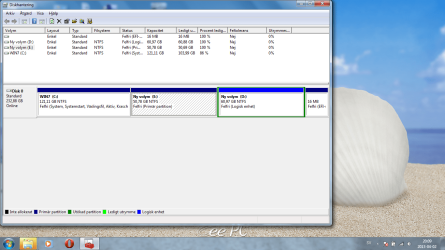
Diski management image with recovery partition.png
 

My Computer My Computer

OS
Windows 7 Home Premium
C: OS and boot paritition
D: for images, documents and so on??
E: for recovery???

Install Macrium Reflect FREE Edition - Information and download

Backup all parititions (expect the partition where you put the image) with it. Put the image in the parition special for recovery.
 

My Computer My Computer

Computer type
Laptop
Computer Manufacturer/Model Number
ACER ASPIRE 5742G
OS
Microsoft Windows 7 Home Premium 64-bits 7601 Multiprocessor Free Service Pack 1
CPU
Intel(R) Core(TM) i3 CPU M 370 @ 2.40GHz
Motherboard
Acer Aspire 5742G
Memory
4,00 GB
Graphics Card(s)
ATI Mobility Radeon HD 5400 Series
Sound Card
(1) AMD High Definition Audio Device (2) Realtek High Defi
Screen Resolution
1366 x 768 x 32 bits (4294967296 colors) @ 60 Hz
Hard Drives
WDC WD5000BEVT-22ZAT0
C: OS and boot paritition
D: for images, documents and so on??
E: for recovery???

Install Macrium Reflect FREE Edition - Information and download

Backup all parititions (expect the partition where you put the image) with it. Put the image in the parition special for recovery.

Kaktussoft, you are right in your assumptions.

Now Macrimum is installed on E:

By the way, you´ll have to teach me how to attach a bottle of wine to an e-mail, I already owe you one bottle of red Merlot, when I´m done with this task, I´ll owe you another bottle and I do not want to owe too much, so I´d like to solve the tricky part of sending a bottle of wine as attachment :D
 

My Computer My Computer

OS
Windows 7 Home Premium
C: OS and boot paritition
D: for images, documents and so on??
E: for recovery???

Install Macrium Reflect FREE Edition - Information and download

Backup all parititions (expect the partition where you put the image) with it. Put the image in the parition special for recovery.

Kaktussoft, you are right in your assumptions.

Now Macrimum is installed on E:

By the way, you´ll have to teach me how to attach a bottle of wine to an e-mail, I already owe you one bottle of red Merlot, when I´m done with this task, I´ll owe you another bottle and I do not want to owe too much, so I´d like to solve the tricky part of sending a bottle of wine as attachment :D
Don't install macrium on E!!! Just on C!!

C and D have the real data. E is for the image itself
 

My Computer My Computer

Computer type
Laptop
Computer Manufacturer/Model Number
ACER ASPIRE 5742G
OS
Microsoft Windows 7 Home Premium 64-bits 7601 Multiprocessor Free Service Pack 1
CPU
Intel(R) Core(TM) i3 CPU M 370 @ 2.40GHz
Motherboard
Acer Aspire 5742G
Memory
4,00 GB
Graphics Card(s)
ATI Mobility Radeon HD 5400 Series
Sound Card
(1) AMD High Definition Audio Device (2) Realtek High Defi
Screen Resolution
1366 x 768 x 32 bits (4294967296 colors) @ 60 Hz
Hard Drives
WDC WD5000BEVT-22ZAT0
So uninstall macrium reflect from E and install normally on C. Clean folders from E.... things that uninstall didn't remove. Now create backup of C and D and put the image on E.
 

My Computer My Computer

Computer type
Laptop
Computer Manufacturer/Model Number
ACER ASPIRE 5742G
OS
Microsoft Windows 7 Home Premium 64-bits 7601 Multiprocessor Free Service Pack 1
CPU
Intel(R) Core(TM) i3 CPU M 370 @ 2.40GHz
Motherboard
Acer Aspire 5742G
Memory
4,00 GB
Graphics Card(s)
ATI Mobility Radeon HD 5400 Series
Sound Card
(1) AMD High Definition Audio Device (2) Realtek High Defi
Screen Resolution
1366 x 768 x 32 bits (4294967296 colors) @ 60 Hz
Hard Drives
WDC WD5000BEVT-22ZAT0
So uninstall macrium reflect from E and install normally on C. Clean folders from E.... things that uninstall didn't remove. Now create backup of C and D and put the image on E.

Mea culpa, I´ll emove Macrimum from E: and wipe E:clean, put Macrimum on C. and then create a backup of C:(D: not necesary as there are no documents or other files on it so far?).

Will come back with the result in a while.
 

My Computer My Computer

OS
Windows 7 Home Premium
Not really necessary, but give D a label like DATA. And E a label like RECOVERY. Can be done in disk management.
If D really doesn't contain any files/folder.... no backup of that is needed.

Post back if macrium backup starts and if it really creates the file on E.
Also post backup when backup finished successfully
 

My Computer My Computer

Computer type
Laptop
Computer Manufacturer/Model Number
ACER ASPIRE 5742G
OS
Microsoft Windows 7 Home Premium 64-bits 7601 Multiprocessor Free Service Pack 1
CPU
Intel(R) Core(TM) i3 CPU M 370 @ 2.40GHz
Motherboard
Acer Aspire 5742G
Memory
4,00 GB
Graphics Card(s)
ATI Mobility Radeon HD 5400 Series
Sound Card
(1) AMD High Definition Audio Device (2) Realtek High Defi
Screen Resolution
1366 x 768 x 32 bits (4294967296 colors) @ 60 Hz
Hard Drives
WDC WD5000BEVT-22ZAT0
your laptop has a dvd drive, or do you boot from usb in case of non booting win7?
http://www.sevenforums.com/tutorials/73828-imaging-free-macrium.html

notesmall1.png
Note
The production of the WinPE recovery CD (which is highly recommended) may take up to 3 hours because Macrium needs to download the 1.7GB WAIK (Windows Application Installation Kit). For your convenience I have uploaded a ready made .iso of the WinPE recovery disc. That can be downloaded in appr. 8 minutes which clearly beats the WAIK download. Once you downloaded and unzipped the folder, you can burn it directly to a CD with e.g. ImgBurn.

Here is the link to my Skydrive site.

Here is an alternate link from FileSwap (courtesy of Gary - Britton30)

I draw your attention to the fact that this WinPE CD can also be used to make images. That may be convenient in case you do not want to install Macrium on your PC.
---
anyway download the ISO and burn to dvd. And check if it boots from it. From it you can easily browse to the image and restore it. Of course you can't restore C when in win7. C has opened many files then and restore is not possible.

If you want to put it on usb stick... tell me!
 

My Computer My Computer

Computer type
Laptop
Computer Manufacturer/Model Number
ACER ASPIRE 5742G
OS
Microsoft Windows 7 Home Premium 64-bits 7601 Multiprocessor Free Service Pack 1
CPU
Intel(R) Core(TM) i3 CPU M 370 @ 2.40GHz
Motherboard
Acer Aspire 5742G
Memory
4,00 GB
Graphics Card(s)
ATI Mobility Radeon HD 5400 Series
Sound Card
(1) AMD High Definition Audio Device (2) Realtek High Defi
Screen Resolution
1366 x 768 x 32 bits (4294967296 colors) @ 60 Hz
Hard Drives
WDC WD5000BEVT-22ZAT0
your laptop has a dvd drive, or do you boot from usb in case of non booting win7?
http://www.sevenforums.com/tutorials/73828-imaging-free-macrium.html

notesmall1.png
Note
The production of the WinPE recovery CD (which is highly recommended) may take up to 3 hours because Macrium needs to download the 1.7GB WAIK (Windows Application Installation Kit). For your convenience I have uploaded a ready made .iso of the WinPE recovery disc. That can be downloaded in appr. 8 minutes which clearly beats the WAIK download. Once you downloaded and unzipped the folder, you can burn it directly to a CD with e.g. ImgBurn.

Here is the link to my Skydrive site.

Here is an alternate link from FileSwap (courtesy of Gary - Britton30)

I draw your attention to the fact that this WinPE CD can also be used to make images. That may be convenient in case you do not want to install Macrium on your PC.
---
anyway download the ISO and burn to dvd. And check if it boots from it. From it you can easily browse to the image and restore it. Of course you can't restore C when in win7. C has opened many files then and restore is not possible.

If you want to put it on usb stick... tell me!

Quite a few things to be done, so far the backup (imaging) of C: to E: went fine, now I´ll continue with your last reply instructions. My netbook unfortunately lacks a DVD drive, so if I boot from a DVD, I have to do it with an external DVD drive connected through USB. I guess I´ll have to have the "start recovery" media an a USB stick, an external DVD drive is not practical when travelling... I´ll come back again when all is done.
 

My Computer My Computer

OS
Windows 7 Home Premium
So an macrium backup image of C is on E now... great
Get an usb stick. Make it totally clean and create a partition. It can be done in disk management as well

Code:
diskpart
list disk
select  disk  1 (or 0 or 2. Look at the output of previous command!)
clean
create  partition  primary
select partition 1
FORMAT  FS=NTFS  LABEL="MACRIUM"  QUICK
assign letter=P
active
exit

Now your usb disk has 1 primary partition with letter P. Partition is active so it's possible to boot from it.
Extract all files from ISO and put them in root folder of P. Extracting can be done using WINRAR
Now try to boot from usb stick. Post results. Of course don't do the actual restore!! Just check if you can see the main harddisk
 

My Computer My Computer

Computer type
Laptop
Computer Manufacturer/Model Number
ACER ASPIRE 5742G
OS
Microsoft Windows 7 Home Premium 64-bits 7601 Multiprocessor Free Service Pack 1
CPU
Intel(R) Core(TM) i3 CPU M 370 @ 2.40GHz
Motherboard
Acer Aspire 5742G
Memory
4,00 GB
Graphics Card(s)
ATI Mobility Radeon HD 5400 Series
Sound Card
(1) AMD High Definition Audio Device (2) Realtek High Defi
Screen Resolution
1366 x 768 x 32 bits (4294967296 colors) @ 60 Hz
Hard Drives
WDC WD5000BEVT-22ZAT0
So an macrium backup image of C is on E now... great
Get an usb stick. Make it totally clean and create a partition. It can be done in disk management as well

Code:
diskpart
list disk
select  disk  1 (or 0 or 2. Look at the output of previous command!)
clean
create  partition  primary
select partition 1
FORMAT  FS=NTFS  LABEL="MACRIUM"  QUICK
assign letter=P
active
exit

Now your usb disk has 1 primary partition with letter P. Partition is active so it's possible to boot from it.
Extract all files from ISO and put them in root folder of P. Extracting can be done using WINRAR
Now try to boot from usb stick. Post results. Of course don't do the actual restore!! Just check if you can see the main harddisk

Unfortunately my netbook refuses to boot from the USb stick, I suspect it is due to a BIOS issue of the netbook, maybe it can only boot from its own HDD and from an external DVD drive. It lists "boot from external media" as a 3rd alternative on the boot seuqence menu, but it does not show the name etc of the inserted USB stick, so the PC probably just ignores it. Anyway, I post three images of disc mangement etc, so that you can perhaps have an idea if anything is wrong.


Oversikt all discs.png

File on drive P.png[/ATTACH]


Image no three is not very good, sorry about that, anyway, the name of the file is "disc image".

I tried to boot from the USB stick on my desktop, the name and type of the USb is shown on the boot sequence. But it will not boot either, I get the following text on the screen:


Attempting boot from USB device

BOOTMGR missing.

Ctrl + Alt + Del for reboot
 
Last edited:

My Computer My Computer

OS
Windows 7 Home Premium
partition is primary and active...nice.

But don't put the ISO itself on usb device! You have to extract the files from iso. Use WINRAR to open the iso and extract the files to usb stick. remove the iso later if working

So usb as first boot device
 

My Computer My Computer

Computer type
Laptop
Computer Manufacturer/Model Number
ACER ASPIRE 5742G
OS
Microsoft Windows 7 Home Premium 64-bits 7601 Multiprocessor Free Service Pack 1
CPU
Intel(R) Core(TM) i3 CPU M 370 @ 2.40GHz
Motherboard
Acer Aspire 5742G
Memory
4,00 GB
Graphics Card(s)
ATI Mobility Radeon HD 5400 Series
Sound Card
(1) AMD High Definition Audio Device (2) Realtek High Defi
Screen Resolution
1366 x 768 x 32 bits (4294967296 colors) @ 60 Hz
Hard Drives
WDC WD5000BEVT-22ZAT0
partition is primary and active...nice.

But don't put the ISO itself on usb device! You have to extract the files from iso. Use WINRAR to open the iso and extract the files to usb stick. remove the iso later if working

So usb as first boot device

The USB stick boots now, but NOT on my netbook, nothing happens there. I suspect that it probably is a BIOS issue. There actually is no USB option on the boot sequence menu, the three options available are:

!.) SATA
2.) ATAPI CD-ROM (it must boot through a USB port though as it is external)
3.) Removable device

I select 3 and nothing happens. The USB stick DOES boot on my desktop and I get the Macrimum recovery interface, so now there´s no problem with the USB stick. Frankly, I now feel like throwing my netbook out of the window - both you and me wasted a lot of time and it seems now that it was to no avail. I´ll check on the web if anyone else had a USB drive NON-booting issue, maybe a BIOS flash would remedy the problem, but doubt so.
 

My Computer My Computer

OS
Windows 7 Home Premium
atapi is not usb as far as i know (not sure). Try to use another usb port. Are you sure the usb ports are working in normal windows?
 

My Computer My Computer

Computer type
Laptop
Computer Manufacturer/Model Number
ACER ASPIRE 5742G
OS
Microsoft Windows 7 Home Premium 64-bits 7601 Multiprocessor Free Service Pack 1
CPU
Intel(R) Core(TM) i3 CPU M 370 @ 2.40GHz
Motherboard
Acer Aspire 5742G
Memory
4,00 GB
Graphics Card(s)
ATI Mobility Radeon HD 5400 Series
Sound Card
(1) AMD High Definition Audio Device (2) Realtek High Defi
Screen Resolution
1366 x 768 x 32 bits (4294967296 colors) @ 60 Hz
Hard Drives
WDC WD5000BEVT-22ZAT0
Unfortunately no boot on any of the three USB ports (sockets). All three of them work normally under Windows though. Anyway, the external HDD is of course connected thru a USB port and of course it works. I have now read a post on the web about my netbook not being able to boot from a bootable LINUX OS USB stick (no answer to that question though) but this may have to do with the fact that my netbook just refuses to boot Linux (am not sure, have ´n t ever tried) but it may also mean that the generic BIOS do not allow boot from a USB.
 

My Computer My Computer

OS
Windows 7 Home Premium
Unfortunately no boot on any of the three USB ports (sockets). All three of them work normally under Windows though. Anyway, the external HDD is of course connected thru a USB port and of course it works. I have now read a post on the web about my netbook not being able to boot from a bootable LINUX OS USB stick (no answer to that question though) but this may have to do with the fact that my netbook just refuses to boot Linux (am not sure, have ´n t ever tried) but it may also mean that the generic BIOS do not allow boot from a USB.
Assume harddisk has many problems (as you have now). You can't boot from usb, you don't have external ATA. No dvd drive as well. How to restore in that case?

You can't even reinstall windows if you wanted to!
What is on E now?Only the macrium image itself? I know a trick to make to bootable.

But booting from external media is always better of course
 

My Computer My Computer

Computer type
Laptop
Computer Manufacturer/Model Number
ACER ASPIRE 5742G
OS
Microsoft Windows 7 Home Premium 64-bits 7601 Multiprocessor Free Service Pack 1
CPU
Intel(R) Core(TM) i3 CPU M 370 @ 2.40GHz
Motherboard
Acer Aspire 5742G
Memory
4,00 GB
Graphics Card(s)
ATI Mobility Radeon HD 5400 Series
Sound Card
(1) AMD High Definition Audio Device (2) Realtek High Defi
Screen Resolution
1366 x 768 x 32 bits (4294967296 colors) @ 60 Hz
Hard Drives
WDC WD5000BEVT-22ZAT0
Unfortunately no boot on any of the three USB ports (sockets). All three of them work normally under Windows though. Anyway, the external HDD is of course connected thru a USB port and of course it works. I have now read a post on the web about my netbook not being able to boot from a bootable LINUX OS USB stick (no answer to that question though) but this may have to do with the fact that my netbook just refuses to boot Linux (am not sure, have ´n t ever tried) but it may also mean that the generic BIOS do not allow boot from a USB.
Assume harddisk has many problems (as you have now). You can't boot from usb, you don't have external ATA. No dvd drive as well. How to restore in that case?

You can't even reinstall windows if you wanted to!
What is on E now?Only the macrium image itself? I know a trick to make to bootable.

But booting from external media is always better of course

No problem re-installing WIN7 or booting rescue DVD, just plug in the external HDD into ine of the three USB sockets, select USB:HL -DF ST DVDRA on the boot menu (the ATAPI changes to this text when HDD cable is inserted into the USB socket) and everything boots just fine. So this must be a BIOS problem - it just refuses to recognize a USb stick as a boot device! I had a similar problem a couple of yoears ago on another PC, did a BIOS flash to a more recent BIOS version and things changed. Of course, I can ´t be sure if it is the same problem and if a BIOS flash will remedy it.
 

My Computer My Computer

OS
Windows 7 Home Premium
I ´m getting somewhere, have just "cracked" the no-boot-from USB drive on my netbook after a few hours of searching info on the web - I have to tap the Esc button right on startup and it shows me a "special" boot menu with only two items - the HD drive and the USB stick - this time the USB stick correctly named and indicated. I wish the manuf. of my netbook had informed about this clearly, what a waste of time!
Anyway, the netbook still does not boot the Macrimum Rescue, I get a black screen saying : Attempting to load a 64-bit application, however, this CPU is not compatible with 64-bit mode. I made the rescue USB stick on my stationary PC ( everything goes much faster) ,which is a 64-bit and this may have made the rescue USB stick also a 64 bit thing. I´ll now try to do again the whole process of downloading( by the way the Skydrive site you recommended for making WINPE did not work, so I used the File Swap -courtesy of Garry Britton link) and making the WINPE on my USB stick on the 32 bit netbook and see what happens, I think it ´ll work now that I have cracked the no-USB-boot issue.
 
Last edited:

My Computer My Computer

OS
Windows 7 Home Premium
I ´m getting somewhere, have just "cracked" the no-boot-from USB drive on my netbook after a few hours of searching info on the web - I have to tap the Esc button right on startup and it shows me a "special" boot menu with only two items - the HD drive and the USB stick - this time the USB stick correctly named and indicated. I wish the manuf. of my netbook had informed about this clearly, what a waste of time!
Anyway, the netbook still does not boot the Macrimum Rescue, I get a black screen saying : Attempting to load a 64-bit application, however, this CPU is not compatible with 64-bit mode. I made the rescue USB stick on my stationary PC ( everything goes much faster) ,which is a 64-bit and this may have made the rescue USB stick also a 64 bit thing. I´ll now try to do again the whole process of downloading( by the way the Skydrive site you recommended for making WINPE did not work, so I used the File Swap -courtesy of Garry Britton link) and making the WINPE on my USB stick on the 32 bit netbook and see what happens, I think it ´ll work now that I have cracked the no-USB-boot issue.
I didn't even think of you have an old 32 bits cpu. I will post the 32bits ISO in a while
 

My Computer My Computer

Computer type
Laptop
Computer Manufacturer/Model Number
ACER ASPIRE 5742G
OS
Microsoft Windows 7 Home Premium 64-bits 7601 Multiprocessor Free Service Pack 1
CPU
Intel(R) Core(TM) i3 CPU M 370 @ 2.40GHz
Motherboard
Acer Aspire 5742G
Memory
4,00 GB
Graphics Card(s)
ATI Mobility Radeon HD 5400 Series
Sound Card
(1) AMD High Definition Audio Device (2) Realtek High Defi
Screen Resolution
1366 x 768 x 32 bits (4294967296 colors) @ 60 Hz
Hard Drives
WDC WD5000BEVT-22ZAT0
The ISO itself has 64 bits code... that's the problem! You made a macrium backup of C and D already on put the image on E. E has enough space to hold future backups? first delete the image and make a new one if it is not large enough to hold 2 backups. Make E not to small. E has only 1 file now? Maybe $RECYCLED (recycle bin) and "system volume information" (for system restore) as well but that's all there is? Empty the recycle bin after deleting something from E. Or press shift-delete to delete a file/folder and bypass sending it to recycle bin.

After I post the good 32bits ISO follow same procdure as for 64bits ISO. Just format the usb stick first. It already is active and primary!

Will post in 30 minutes
 

My Computer My Computer

Computer type
Laptop
Computer Manufacturer/Model Number
ACER ASPIRE 5742G
OS
Microsoft Windows 7 Home Premium 64-bits 7601 Multiprocessor Free Service Pack 1
CPU
Intel(R) Core(TM) i3 CPU M 370 @ 2.40GHz
Motherboard
Acer Aspire 5742G
Memory
4,00 GB
Graphics Card(s)
ATI Mobility Radeon HD 5400 Series
Sound Card
(1) AMD High Definition Audio Device (2) Realtek High Defi
Screen Resolution
1366 x 768 x 32 bits (4294967296 colors) @ 60 Hz
Hard Drives
WDC WD5000BEVT-22ZAT0
Back
Top