Can't run regsvr32 from .bat file, but can run from CMD

jamesaru

New member
Local time
9:41 AM
Messages
12
Hi All, I've been pulling my hair out trying to resolve this issue, but I'm stuck and hoping one of you can assist. I'm trying to install some software (an exe) which calls a batch file to register a dll. During the install it hangs on CMD.

The contents of the .bat file are:
Code:
regsvr32 /s CSEShellNsExt.dll
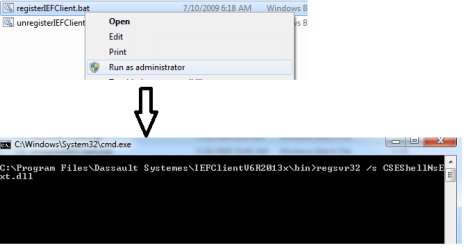
If I double click the .bat file it just hangs (please see the batch.png screenshot).

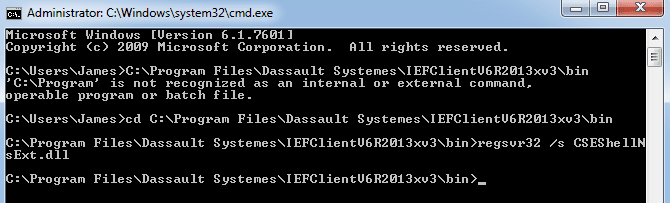
However, if I open a CMD prompt, cd to that location, and then run the command (regsvr32 /s CSEShellNsExt.dll) it works fine and returns me back to the prompt (please see cmd.png).

I've also tried running regsvr32 via the cmd.exe located in system32 and syswow64. Either way those return me to the command prompt and do not hang or throw an error message.

I can manually register those entries, however I believe another install of mine is not finishing due to this problem and I'm stuck. I should definitely be able to double click on the .bat file and it should just run the command, which I can manually run from the cmd prompt.

Thanks for any assistance you can provide, I REALLY appreciate it!
 

Attachments

  • batch.png
    batch.png
    6.4 KB · Views: 17
  • cmd.png
    cmd.png
    7.4 KB · Views: 17

My Computer My Computer

At a glance

Windows 7 Pro 64-bit
Computer type
PC/Desktop
OS
Windows 7 Pro 64-bit
Welcome to the Seven Forums.

Judging from your screenshots, the command prompt window needs to be run with elevated privileges (run as admin...).
 

My Computer My Computer

At a glance

W7 Pro SP1 64biti78GBIntel HD Graphics
Computer type
Laptop
Computer Manufacturer/Model Number
Employer provided Dell Latitude
OS
W7 Pro SP1 64bit
CPU
i7
Memory
8GB
Graphics Card(s)
Intel HD Graphics
Hard Drives
crappy SSD
Antivirus
Employer mandated Symantec Endpoint Protection
Browser
Pale Moon 64bit, IE11 64bit & Chrome 64bit
Thanks for taking a look and replying. If I run the .bat as an Admin I get the same results. The cmd.exe doesn't run as elevated. Weird!

By the way I've recently reformatted this machine since I had this problem before. It's a clean install and I'm the only user and a full Admin.
 

Attachments

  • problem.png
    problem.png
    10.7 KB · Views: 8

My Computer My Computer

At a glance

Windows 7 Pro 64-bit
Computer type
PC/Desktop
OS
Windows 7 Pro 64-bit
Hmm, I've never noticed that the title does not reflect the elevated status for such a batch file.

If I test an elevated and non-elevated bat file containing:
Code:
dir
pause
I do get "as expected" results - except for the window title.

The non-elevated bat file shows the folders/files on the desktop (since that is the where the test bat file was located).

The elevated bat file shows the folders/files in the windows system32 folder (since that is the default folder for elevated command prompts).

What happens if you change the directory (CD) to the folder of interest before attempting to register the DLL?
 
Last edited:

My Computer My Computer

At a glance

W7 Pro SP1 64biti78GBIntel HD Graphics
Computer type
Laptop
Computer Manufacturer/Model Number
Employer provided Dell Latitude
OS
W7 Pro SP1 64bit
CPU
i7
Memory
8GB
Graphics Card(s)
Intel HD Graphics
Hard Drives
crappy SSD
Antivirus
Employer mandated Symantec Endpoint Protection
Browser
Pale Moon 64bit, IE11 64bit & Chrome 64bit
If I create a bat file with dir and pause they both give me the desktop contents whether I run elevated or not.

The thing is that I can run regsvr32 just fine when I cd to the dll location. BUT, a bat file that calls (regsvr32 blah.dll) hangs every time (elevated or not).
 

My Computer My Computer

At a glance

Windows 7 Pro 64-bit
Computer type
PC/Desktop
OS
Windows 7 Pro 64-bit
post the bat file please
 

My Computer My Computer

At a glance

Microsoft Windows 7 Home Premium 64-bits 7601...Intel(R) Core(TM) i3 CPU M 370 @ 2.40GHz4,00 GBATI Mobility Radeon HD 5400 Series
Computer type
Laptop
Computer Manufacturer/Model Number
ACER ASPIRE 5742G
OS
Microsoft Windows 7 Home Premium 64-bits 7601 Multiprocessor Free Service Pack 1
CPU
Intel(R) Core(TM) i3 CPU M 370 @ 2.40GHz
Motherboard
Acer Aspire 5742G
Memory
4,00 GB
Graphics Card(s)
ATI Mobility Radeon HD 5400 Series
Sound Card
(1) AMD High Definition Audio Device (2) Realtek High Defi
Screen Resolution
1366 x 768 x 32 bits (4294967296 colors) @ 60 Hz
Hard Drives
WDC WD5000BEVT-22ZAT0
Remove /s from regsvr32 command so:

Code:
regsvr32  CSEShellNsExt.dll

and try again
 

My Computer My Computer

At a glance

Microsoft Windows 7 Home Premium 64-bits 7601...Intel(R) Core(TM) i3 CPU M 370 @ 2.40GHz4,00 GBATI Mobility Radeon HD 5400 Series
Computer type
Laptop
Computer Manufacturer/Model Number
ACER ASPIRE 5742G
OS
Microsoft Windows 7 Home Premium 64-bits 7601 Multiprocessor Free Service Pack 1
CPU
Intel(R) Core(TM) i3 CPU M 370 @ 2.40GHz
Motherboard
Acer Aspire 5742G
Memory
4,00 GB
Graphics Card(s)
ATI Mobility Radeon HD 5400 Series
Sound Card
(1) AMD High Definition Audio Device (2) Realtek High Defi
Screen Resolution
1366 x 768 x 32 bits (4294967296 colors) @ 60 Hz
Hard Drives
WDC WD5000BEVT-22ZAT0
The entire batch file is:

Code:
regsvr32 /s CSEShellNsExt.dll

The problem is double clicking the bat just hangs, but opening a CMD window and typing in the command works. All of this should technically be done by the actual installer but it ends up hanging and I've traced it to this issue.
 

My Computer My Computer

At a glance

Windows 7 Pro 64-bit
Computer type
PC/Desktop
OS
Windows 7 Pro 64-bit
try this as test in bat file:

regsvr32 CSEShellNsExt.dll

or

regsvr32 filenotfound.dll
 

My Computer My Computer

At a glance

Microsoft Windows 7 Home Premium 64-bits 7601...Intel(R) Core(TM) i3 CPU M 370 @ 2.40GHz4,00 GBATI Mobility Radeon HD 5400 Series
Computer type
Laptop
Computer Manufacturer/Model Number
ACER ASPIRE 5742G
OS
Microsoft Windows 7 Home Premium 64-bits 7601 Multiprocessor Free Service Pack 1
CPU
Intel(R) Core(TM) i3 CPU M 370 @ 2.40GHz
Motherboard
Acer Aspire 5742G
Memory
4,00 GB
Graphics Card(s)
ATI Mobility Radeon HD 5400 Series
Sound Card
(1) AMD High Definition Audio Device (2) Realtek High Defi
Screen Resolution
1366 x 768 x 32 bits (4294967296 colors) @ 60 Hz
Hard Drives
WDC WD5000BEVT-22ZAT0
Ok, in that case the real dll just hangs (no change). On filenotfound.dll I receive an error: the module filenotfound.dll failed to load...make sure the binary is stored at the specified path...
 

My Computer My Computer

At a glance

Windows 7 Pro 64-bit
Computer type
PC/Desktop
OS
Windows 7 Pro 64-bit
Code:
regsvr32 CSEShellNsExt.dll
Works in command prompt (impossible)?
Works in command prompt with admin rights?
 

My Computer My Computer

At a glance

Microsoft Windows 7 Home Premium 64-bits 7601...Intel(R) Core(TM) i3 CPU M 370 @ 2.40GHz4,00 GBATI Mobility Radeon HD 5400 Series
Computer type
Laptop
Computer Manufacturer/Model Number
ACER ASPIRE 5742G
OS
Microsoft Windows 7 Home Premium 64-bits 7601 Multiprocessor Free Service Pack 1
CPU
Intel(R) Core(TM) i3 CPU M 370 @ 2.40GHz
Motherboard
Acer Aspire 5742G
Memory
4,00 GB
Graphics Card(s)
ATI Mobility Radeon HD 5400 Series
Sound Card
(1) AMD High Definition Audio Device (2) Realtek High Defi
Screen Resolution
1366 x 768 x 32 bits (4294967296 colors) @ 60 Hz
Hard Drives
WDC WD5000BEVT-22ZAT0
Hi All, I've been pulling my hair out trying to resolve this issue, but I'm stuck and hoping one of you can assist. I'm trying to install some software (an exe) which calls a batch file to register a dll. During the install it hangs on CMD.

The contents of the .bat file are:
Code:
regsvr32 /s CSEShellNsExt.dll
If I double click the .bat file it just hangs (please see the batch.png screenshot).

However, if I open a CMD prompt, cd to that location, and then run the command (regsvr32 /s CSEShellNsExt.dll) it works fine and returns me back to the prompt (please see cmd.png).

I've also tried running regsvr32 via the cmd.exe located in system32 and syswow64. Either way those return me to the command prompt and do not hang or throw an error message.

I can manually register those entries, however I believe another install of mine is not finishing due to this problem and I'm stuck. I should definitely be able to double click on the .bat file and it should just run the command, which I can manually run from the cmd prompt.

Thanks for any assistance you can provide, I REALLY appreciate it!
The bat file has to bu run with admin rights!! So elevated!
 

My Computer My Computer

At a glance

Microsoft Windows 7 Home Premium 64-bits 7601...Intel(R) Core(TM) i3 CPU M 370 @ 2.40GHz4,00 GBATI Mobility Radeon HD 5400 Series
Computer type
Laptop
Computer Manufacturer/Model Number
ACER ASPIRE 5742G
OS
Microsoft Windows 7 Home Premium 64-bits 7601 Multiprocessor Free Service Pack 1
CPU
Intel(R) Core(TM) i3 CPU M 370 @ 2.40GHz
Motherboard
Acer Aspire 5742G
Memory
4,00 GB
Graphics Card(s)
ATI Mobility Radeon HD 5400 Series
Sound Card
(1) AMD High Definition Audio Device (2) Realtek High Defi
Screen Resolution
1366 x 768 x 32 bits (4294967296 colors) @ 60 Hz
Hard Drives
WDC WD5000BEVT-22ZAT0
Code:
regsvr32 CSEShellNsExt.dll
Works in command prompt (impossible)?
Works in command prompt with admin rights?

Every time I run cmd it's elevated so I'm not sure how to test if regsvr32 will run in a non-elevated command prompt.
 

My Computer My Computer

At a glance

Windows 7 Pro 64-bit
Computer type
PC/Desktop
OS
Windows 7 Pro 64-bit
The bat file has to bu run with admin rights!! So elevated!

Running it as Administrator doesn't change anything (right click run as Admin). I posted some screenshots earlier. Elevated or not any time I click on that batch file it hangs. Therefore if an installer is trying to call a batch file it also hangs.
 

My Computer My Computer

At a glance

Windows 7 Pro 64-bit
Computer type
PC/Desktop
OS
Windows 7 Pro 64-bit
~~~
If I test an elevated and non-elevated bat file containing:
Code:
dir
pause
I do get "as expected" results - except for the window title.

The non-elevated bat file shows the folders/files on the desktop (since that is the where the test bat file was located).

The elevated bat file shows the folders/files in the windows system32 folder (since that is the default folder for elevated command prompts).
~~~

If I create a bat file with dir and pause they both give me the desktop contents whether I run elevated or not......
The elevation process normally changes the directory to C:\Windows\system32 (unless you do something like this). Most likely, neither of the cmd windows shown in your OP went thru the elevation process. I should have noticed that the second screenshot in your OP (the one that has Administrator: in the title) is starting in a non-standard directory.

My guess is that both give you the desktop's contents because you are operating in a non-recommended way:

1) You have User Account Control turned off and...
...you are logged in using an account with admin rights*.

2) You are logged in using the built in Administrator account*.

3) You have User Account Control turned off and...
...you are logged in using an account with standard rights**.

*Thus everything runs at either the system integrity level or the high integrity level. The cmd window was launched via explorer. Explorer was already running at a high integrity level. The cmd prompt window inherited its high integrity level from explorer (desktop). The cmd prompt window did not go thru the elevation process. For an admin user with the UAC off (or for the built in Administrator account), both ways of starting the "dir" bat file would yield the desktop's contents.

**Not really plausible since post #3 states that you are "the only user and a full Admin", but a standard account would not be able to elevate a process if UAC is turned off - not without jumping thru some hoops. Double clicking on a the "dir" bat file would run it in at the medium integrity level. Right clicking and selecting "run as admin..." will transparently fail to elevate. The cmd window was launched via explorer. Explorer was running at a medium integrity level. The cmd prompt window inherited its medium integrity level from explorer (desktop). The cmd prompt window did not go thru the elevation process. For a standard user with the UAC off, both ways of starting the "dir" bat file would yield the desktop's contents.

Of course, I could be wrong about all of the above :-)


...The thing is that I can run regsvr32 just fine when I cd to the dll location....
So, like I asked before:

~~~
What happens if you change the directory (CD) to the folder of interest before attempting to register the DLL?
But maybe I was not clear. I wanted you to test this code in a bat file.

Code:
CD "C:\Program Files\Dassault Systemes\IEFClientV6R2013xv3\bin"
regsvr32 /s CSEShellNsExt.dll
 

My Computer My Computer

At a glance

W7 Pro SP1 64biti78GBIntel HD Graphics
Computer type
Laptop
Computer Manufacturer/Model Number
Employer provided Dell Latitude
OS
W7 Pro SP1 64bit
CPU
i7
Memory
8GB
Graphics Card(s)
Intel HD Graphics
Hard Drives
crappy SSD
Antivirus
Employer mandated Symantec Endpoint Protection
Browser
Pale Moon 64bit, IE11 64bit & Chrome 64bit
C:
CD "C:\Program Files\Dassault Systemes\IEFClientV6R2013xv3\bin"
regsvr32 CSEShellNsExt.dll


does work from bat file (elevated)?

the batfile is already in "C:\Program Files\Dassault Systemes\IEFClientV6R2013xv3\bin" ? that's why you see "C:\Program Files\Dassault Systemes\IEFClientV6R2013xv3\bin" in the output... quite normal.
 

My Computer My Computer

At a glance

Microsoft Windows 7 Home Premium 64-bits 7601...Intel(R) Core(TM) i3 CPU M 370 @ 2.40GHz4,00 GBATI Mobility Radeon HD 5400 Series
Computer type
Laptop
Computer Manufacturer/Model Number
ACER ASPIRE 5742G
OS
Microsoft Windows 7 Home Premium 64-bits 7601 Multiprocessor Free Service Pack 1
CPU
Intel(R) Core(TM) i3 CPU M 370 @ 2.40GHz
Motherboard
Acer Aspire 5742G
Memory
4,00 GB
Graphics Card(s)
ATI Mobility Radeon HD 5400 Series
Sound Card
(1) AMD High Definition Audio Device (2) Realtek High Defi
Screen Resolution
1366 x 768 x 32 bits (4294967296 colors) @ 60 Hz
Hard Drives
WDC WD5000BEVT-22ZAT0
......
the batfile is already in "C:\Program Files\Dassault Systemes\IEFClientV6R2013xv3\bin" ? that's why you see "C:\Program Files\Dassault Systemes\IEFClientV6R2013xv3\bin" in the output... quite normal.
Was that directed at me or the OP?
 

My Computer My Computer

At a glance

W7 Pro SP1 64biti78GBIntel HD Graphics
Computer type
Laptop
Computer Manufacturer/Model Number
Employer provided Dell Latitude
OS
W7 Pro SP1 64bit
CPU
i7
Memory
8GB
Graphics Card(s)
Intel HD Graphics
Hard Drives
crappy SSD
Antivirus
Employer mandated Symantec Endpoint Protection
Browser
Pale Moon 64bit, IE11 64bit & Chrome 64bit

My Computer My Computer

At a glance

Microsoft Windows 7 Home Premium 64-bits 7601...Intel(R) Core(TM) i3 CPU M 370 @ 2.40GHz4,00 GBATI Mobility Radeon HD 5400 Series
Computer type
Laptop
Computer Manufacturer/Model Number
ACER ASPIRE 5742G
OS
Microsoft Windows 7 Home Premium 64-bits 7601 Multiprocessor Free Service Pack 1
CPU
Intel(R) Core(TM) i3 CPU M 370 @ 2.40GHz
Motherboard
Acer Aspire 5742G
Memory
4,00 GB
Graphics Card(s)
ATI Mobility Radeon HD 5400 Series
Sound Card
(1) AMD High Definition Audio Device (2) Realtek High Defi
Screen Resolution
1366 x 768 x 32 bits (4294967296 colors) @ 60 Hz
Hard Drives
WDC WD5000BEVT-22ZAT0
~~~
What happens if you change the directory (CD) to the folder of interest before attempting to register the DLL?
But maybe I was not clear. I wanted you to test this code in a bat file.

Code:
CD "C:\Program Files\Dassault Systemes\IEFClientV6R2013xv3\bin"
regsvr32 /s CSEShellNsExt.dll
[/QUOTE]

Ahhh, sorry I guess I didn't catch that. When I create a batch file with that code it hangs just like it does when running from the original location.
 

My Computer My Computer

At a glance

Windows 7 Pro 64-bit
Computer type
PC/Desktop
OS
Windows 7 Pro 64-bit
Do you have UAC turned off?
Are you on an admin account or on the Administrator (built in) account?
 

My Computer My Computer

At a glance

W7 Pro SP1 64biti78GBIntel HD Graphics
Computer type
Laptop
Computer Manufacturer/Model Number
Employer provided Dell Latitude
OS
W7 Pro SP1 64bit
CPU
i7
Memory
8GB
Graphics Card(s)
Intel HD Graphics
Hard Drives
crappy SSD
Antivirus
Employer mandated Symantec Endpoint Protection
Browser
Pale Moon 64bit, IE11 64bit & Chrome 64bit
Back
Top