Solved sfc /scannow run from Installation Disk

Good news indeed. :D

Gary
 

My Computer My Computer

At a glance

Windows 7 Ultimate X64 SP1Intel i5-2550K, Differing ~4.4-4.8GHz No buil...16GB G.Skill Sniper 1866MHz @ 2133MHz 2x8GBASUS GTX650TIB-DC2OC-2GD5, (650TI Boost)
Computer type
PC/Desktop
Computer Manufacturer/Model Number
Home Built Desktop By DataTech
OS
Windows 7 Ultimate X64 SP1
CPU
Intel i5-2550K, Differing ~4.4-4.8GHz No built in GPU
Motherboard
ASUS P8Z68-V PRO/GEN3
Memory
16GB G.Skill Sniper 1866MHz @ 2133MHz 2x8GB
Graphics Card(s)
ASUS GTX650TIB-DC2OC-2GD5, (650TI Boost)
Sound Card
Onboard Realtek 5-1
Monitor(s) Displays
Samsung P2570HD
Screen Resolution
1920x1080
Hard Drives
Samsung 840 Pro 256GB SSD for OS, 500GB Seagate Constellation (Enterprise drive) for Data
PSU
Corsair HX650W
Case
Inwin Dragon Rider
Cooling
Hyper 212 EVO w/two Noctua fans, push-pull, @1300 RPM
Keyboard
E-Z Eyes, bright yellow keys with large characters
Mouse
steelseries SENSEI Laser Pro Gaming
Internet Speed
48-51Mbs Mbs down, 11 Mbs up Xfinity Cable
Antivirus
Norton Internet Security 2013
Browser
IE 10, Opera, Pale Moon if needed
Other Info
4 case fans, LG BluRay-RE, ASUS DVD-RW, Mr. Fusion power supply, 1.21 gigawatts.
I ran chkdsk and the the sfc again after replacing the two files. I replaced the files by putting a known good copy of the file on my desktop. Navigating to the corrupt file folder (system32) and take ownership of the folder. Then move the one on my desktop to the system32 folder. The option window "There is already a file named.." select replace. That should work correct?
 

Attachments

My Computer My Computer

At a glance

Windows 7 Home Premium 64 bitIntel i38 gigabytes 4x2 CorsairG-Force GTX650
Computer type
PC/Desktop
Computer Manufacturer/Model Number
Custom Build
OS
Windows 7 Home Premium 64 bit
CPU
Intel i3
Motherboard
Asus
Memory
8 gigabytes 4x2 Corsair
Graphics Card(s)
G-Force GTX650
Hard Drives
WD1001
Antivirus
Webroot SecureAnywhere
Browser
Mozilla FireFox-IE
Code:
[COLOR=red]2014-01-26 14:58:12, Info                  CSI    00000309 [SR] Cannot repair member file [l:38{19}]"NlsLexicons0416.dll" of Microsoft-Windows-NaturalLanguage6, Version = 6.1.7601.17514, pA = PROCESSOR_ARCHITECTURE_INTEL (0), Culture neutral, VersionScope = 1 nonSxS, PublicKeyToken = {l:8 b:31bf3856ad364e35}, Type neutral, TypeName neutral, PublicKey neutral in the store, hash mismatch
2014-01-26 14:58:15, Info                  CSI    0000030b [SR] Cannot repair member file [l:38{19}]"NlsLexicons0416.dll" of Microsoft-Windows-NaturalLanguage6, Version = 6.1.7601.17514, pA = PROCESSOR_ARCHITECTURE_INTEL (0), Culture neutral, VersionScope = 1 nonSxS, PublicKeyToken = {l:8 b:31bf3856ad364e35}, Type neutral, TypeName neutral, PublicKey neutral in the store, hash mismatch
[/COLOR]2014-01-26 14:58:15, Info                  CSI    0000030c [SR] This component was referenced by [l:202{101}]"Microsoft-Windows-Foundation-Package~31bf3856ad364e35~amd64~~6.1.7601.17514.WindowsFoundationDelivery"
2014-01-26 14:58:19, Info                  CSI    0000030e [SR] Repair complete
2014-01-26 14:58:19, Info                  CSI    0000030f [SR] Committing transaction
2014-01-26 14:58:19, Info                  CSI    00000313 [SR] Verify and Repair Transaction completed. All files and registry keys listed in this transaction  have been successfully repaired
What message did you get after running the SFC? Those in red didn't fix, but later it said they are.
 

My Computer My Computer

At a glance

Windows 7 Ultimate X64 SP1Intel i5-2550K, Differing ~4.4-4.8GHz No buil...16GB G.Skill Sniper 1866MHz @ 2133MHz 2x8GBASUS GTX650TIB-DC2OC-2GD5, (650TI Boost)
Computer type
PC/Desktop
Computer Manufacturer/Model Number
Home Built Desktop By DataTech
OS
Windows 7 Ultimate X64 SP1
CPU
Intel i5-2550K, Differing ~4.4-4.8GHz No built in GPU
Motherboard
ASUS P8Z68-V PRO/GEN3
Memory
16GB G.Skill Sniper 1866MHz @ 2133MHz 2x8GB
Graphics Card(s)
ASUS GTX650TIB-DC2OC-2GD5, (650TI Boost)
Sound Card
Onboard Realtek 5-1
Monitor(s) Displays
Samsung P2570HD
Screen Resolution
1920x1080
Hard Drives
Samsung 840 Pro 256GB SSD for OS, 500GB Seagate Constellation (Enterprise drive) for Data
PSU
Corsair HX650W
Case
Inwin Dragon Rider
Cooling
Hyper 212 EVO w/two Noctua fans, push-pull, @1300 RPM
Keyboard
E-Z Eyes, bright yellow keys with large characters
Mouse
steelseries SENSEI Laser Pro Gaming
Internet Speed
48-51Mbs Mbs down, 11 Mbs up Xfinity Cable
Antivirus
Norton Internet Security 2013
Browser
IE 10, Opera, Pale Moon if needed
Other Info
4 case fans, LG BluRay-RE, ASUS DVD-RW, Mr. Fusion power supply, 1.21 gigawatts.
It says the same thing after any sfc. I just ran this one:
 

Attachments

My Computer My Computer

At a glance

Windows 7 Home Premium 64 bitIntel i38 gigabytes 4x2 CorsairG-Force GTX650
Computer type
PC/Desktop
Computer Manufacturer/Model Number
Custom Build
OS
Windows 7 Home Premium 64 bit
CPU
Intel i3
Motherboard
Asus
Memory
8 gigabytes 4x2 Corsair
Graphics Card(s)
G-Force GTX650
Hard Drives
WD1001
Antivirus
Webroot SecureAnywhere
Browser
Mozilla FireFox-IE
OK, I meant what does it say in the CMD window upon completion.

Code:
Windows Resource Protection found corrupt files and successfully repaired
them. Details are included in the CBS.Log windir\Logs\CBS\CBS.log. For
example C:\Windows\Logs\CBS\CBS.log
The system file repair changes will take effect after the next reboot.

Or a message that no integrity violations were found.
Or that Windows Resource Protection found errors it cannot repair.[/QUOTE]
 

My Computer My Computer

At a glance

Windows 7 Ultimate X64 SP1Intel i5-2550K, Differing ~4.4-4.8GHz No buil...16GB G.Skill Sniper 1866MHz @ 2133MHz 2x8GBASUS GTX650TIB-DC2OC-2GD5, (650TI Boost)
Computer type
PC/Desktop
Computer Manufacturer/Model Number
Home Built Desktop By DataTech
OS
Windows 7 Ultimate X64 SP1
CPU
Intel i5-2550K, Differing ~4.4-4.8GHz No built in GPU
Motherboard
ASUS P8Z68-V PRO/GEN3
Memory
16GB G.Skill Sniper 1866MHz @ 2133MHz 2x8GB
Graphics Card(s)
ASUS GTX650TIB-DC2OC-2GD5, (650TI Boost)
Sound Card
Onboard Realtek 5-1
Monitor(s) Displays
Samsung P2570HD
Screen Resolution
1920x1080
Hard Drives
Samsung 840 Pro 256GB SSD for OS, 500GB Seagate Constellation (Enterprise drive) for Data
PSU
Corsair HX650W
Case
Inwin Dragon Rider
Cooling
Hyper 212 EVO w/two Noctua fans, push-pull, @1300 RPM
Keyboard
E-Z Eyes, bright yellow keys with large characters
Mouse
steelseries SENSEI Laser Pro Gaming
Internet Speed
48-51Mbs Mbs down, 11 Mbs up Xfinity Cable
Antivirus
Norton Internet Security 2013
Browser
IE 10, Opera, Pale Moon if needed
Other Info
4 case fans, LG BluRay-RE, ASUS DVD-RW, Mr. Fusion power supply, 1.21 gigawatts.
It says the same thing, found corrupt files but couldn't fix all of them check the log at CBS.log every time.
 

My Computer My Computer

At a glance

Windows 7 Home Premium 64 bitIntel i38 gigabytes 4x2 CorsairG-Force GTX650
Computer type
PC/Desktop
Computer Manufacturer/Model Number
Custom Build
OS
Windows 7 Home Premium 64 bit
CPU
Intel i3
Motherboard
Asus
Memory
8 gigabytes 4x2 Corsair
Graphics Card(s)
G-Force GTX650
Hard Drives
WD1001
Antivirus
Webroot SecureAnywhere
Browser
Mozilla FireFox-IE
I'll ask for help for the SFC issues.
 

My Computer My Computer

At a glance

Windows 7 Ultimate X64 SP1Intel i5-2550K, Differing ~4.4-4.8GHz No buil...16GB G.Skill Sniper 1866MHz @ 2133MHz 2x8GBASUS GTX650TIB-DC2OC-2GD5, (650TI Boost)
Computer type
PC/Desktop
Computer Manufacturer/Model Number
Home Built Desktop By DataTech
OS
Windows 7 Ultimate X64 SP1
CPU
Intel i5-2550K, Differing ~4.4-4.8GHz No built in GPU
Motherboard
ASUS P8Z68-V PRO/GEN3
Memory
16GB G.Skill Sniper 1866MHz @ 2133MHz 2x8GB
Graphics Card(s)
ASUS GTX650TIB-DC2OC-2GD5, (650TI Boost)
Sound Card
Onboard Realtek 5-1
Monitor(s) Displays
Samsung P2570HD
Screen Resolution
1920x1080
Hard Drives
Samsung 840 Pro 256GB SSD for OS, 500GB Seagate Constellation (Enterprise drive) for Data
PSU
Corsair HX650W
Case
Inwin Dragon Rider
Cooling
Hyper 212 EVO w/two Noctua fans, push-pull, @1300 RPM
Keyboard
E-Z Eyes, bright yellow keys with large characters
Mouse
steelseries SENSEI Laser Pro Gaming
Internet Speed
48-51Mbs Mbs down, 11 Mbs up Xfinity Cable
Antivirus
Norton Internet Security 2013
Browser
IE 10, Opera, Pale Moon if needed
Other Info
4 case fans, LG BluRay-RE, ASUS DVD-RW, Mr. Fusion power supply, 1.21 gigawatts.
Funny, I'm not having computer issues yet. Everything seems to be working normally.
 

My Computer My Computer

At a glance

Windows 7 Home Premium 64 bitIntel i38 gigabytes 4x2 CorsairG-Force GTX650
Computer type
PC/Desktop
Computer Manufacturer/Model Number
Custom Build
OS
Windows 7 Home Premium 64 bit
CPU
Intel i3
Motherboard
Asus
Memory
8 gigabytes 4x2 Corsair
Graphics Card(s)
G-Force GTX650
Hard Drives
WD1001
Antivirus
Webroot SecureAnywhere
Browser
Mozilla FireFox-IE
You need to replace the files in the proper manner for it to work.
Code:
2014-01-27 21:59:05, Info                  CSI    00000306 [SR] Repairing 1 components
2014-01-27 21:59:05, Info                  CSI    00000307 [SR] Beginning Verify and Repair transaction
2014-01-27 21:59:07, Info                  CSI    00000309 [SR] Cannot repair member file [l:38{19}]"NlsLexicons0416.dll" of Microsoft-Windows-NaturalLanguage6, Version = 6.1.7601.17514, pA = PROCESSOR_ARCHITECTURE_INTEL (0), Culture neutral, VersionScope = 1 nonSxS, PublicKeyToken = {l:8 b:31bf3856ad364e35}, Type neutral, TypeName neutral, PublicKey neutral in the store, hash mismatch
You've now messed with the permissions of a critical system folder - which may create problems later on.
I'll worry about that once we have the files sorted.
The reason this didn't work is almost certainly because you replaced the wrong copy of the file - the 'daughter' rather than the 'mother' which resides in the winsxs folder -and the one in the System32 folder may only exist as a hardlink to the mother file.
We therefore need to replace the mother file..
I'll post a fix a bit later.
 

My Computer My Computer

At a glance

Win 7 x64 Home Premium (and x86 VirtualBox VM...i3 370M/i7 6500U8GB - finally :)/8GBit's an i3, dude!/dual Intel&nVidia
Computer type
Laptop
Computer Manufacturer/Model Number
Asus K52F or Lenovo B51-80
OS
Win 7 x64 Home Premium (and x86 VirtualBox VM)/Win10
CPU
i3 370M/i7 6500U
Motherboard
Asus/Lenovo
Memory
8GB - finally :)/8GB
Graphics Card(s)
it's an i3, dude!/dual Intel&nVidia
Sound Card
onboard
Monitor(s) Displays
15.6" built-in
Screen Resolution
1366x768/1920x1080
Hard Drives
750GB Seagate internal
Sundry external drives attached to other computers on the local network
1TB SSD on the Lenovo
PSU
n/a
Internet Speed
as much as I can get - usually on a dongle/phone, so <1MB/s
Antivirus
MSE/Defender
Browser
IE11/12/Edge/Chrome/FF(if I must)
Thank you very much!
 

My Computer My Computer

At a glance

Windows 7 Home Premium 64 bitIntel i38 gigabytes 4x2 CorsairG-Force GTX650
Computer type
PC/Desktop
Computer Manufacturer/Model Number
Custom Build
OS
Windows 7 Home Premium 64 bit
CPU
Intel i3
Motherboard
Asus
Memory
8 gigabytes 4x2 Corsair
Graphics Card(s)
G-Force GTX650
Hard Drives
WD1001
Antivirus
Webroot SecureAnywhere
Browser
Mozilla FireFox-IE
I've uploaded a file - rbnaa.zip - to my SkyDrive at Noel's SkyDrive
Please download and save it.

Right-click on the saved file and select Extract all...
Change the target to C:\ and click on Extract
Close all windows (it would be a good idea to print these instructions!)
Now reboot to the Repair Environment - as soon as the machine restarts, start tapping F8 - this should bring up the Advanced Boot Menu, at the top of which should be the option 'Repair my Computer'
Pick that
You'll have to log in with your username and password.

Pick the option to use a Command Prompt
At the prompt type
DIR C:\rbnaa
hit the enter key - if you get a 'Not Found' error try
DIR D:\rbnaa
or
DIR E:\rbnaa


The drive letter in use when you find the folder will need to be substituted (for<drive>) into the following command...

XCOPY <drive>:\rbnaa <drive>:\windows\winsxs /y /i /s /v /h

(e.g. XCOPY P:\wfire P:\windows\winsxs /y /i /s /v /h )

run the command (it should take almost no time)and when the prompt returns, type
EXIT
and hit the Enter key to exit Command Prompt - reboot to Normal Mode Windows.

Now run SFC /SCANNOW in an Elevated Command Prompt
then reboot and upload the new CBS.log file to your reply.


Also - run the following commands in an Elevated Command Prompt, and post the results.

ICACLS C:\Windows\System32
ICACLS C:\Windows


Here are some instructions to make life easier :)
1) To open an Elevated Command Prompt Window (the ECP window), click on Start, All Programs, Accessories – then right-click on Command Prompt, and select Run as Administrator. Accept the UAC prompt.
2) To run the commands easier, highlight the block of commands, and right-click on the highlight – select Copy. In the CP Window, click on the black/white icon at top left – select Paste. The commands will run but may not complete the last command, so hit the Enter Key once.
3) To copy the results... click on the Black/White icon in the top left, and select Edit... 'Select All', and hit the Enter key - then use Ctrl+V or r-click+Paste to paste it into your response.


My Computer My Computer

At a glance

Win 7 x64 Home Premium (and x86 VirtualBox VM...i3 370M/i7 6500U8GB - finally :)/8GBit's an i3, dude!/dual Intel&nVidia
Computer type
Laptop
Computer Manufacturer/Model Number
Asus K52F or Lenovo B51-80
OS
Win 7 x64 Home Premium (and x86 VirtualBox VM)/Win10
CPU
i3 370M/i7 6500U
Motherboard
Asus/Lenovo
Memory
8GB - finally :)/8GB
Graphics Card(s)
it's an i3, dude!/dual Intel&nVidia
Sound Card
onboard
Monitor(s) Displays
15.6" built-in
Screen Resolution
1366x768/1920x1080
Hard Drives
750GB Seagate internal
Sundry external drives attached to other computers on the local network
1TB SSD on the Lenovo
PSU
n/a
Internet Speed
as much as I can get - usually on a dongle/phone, so <1MB/s
Antivirus
MSE/Defender
Browser
IE11/12/Edge/Chrome/FF(if I must)
Thank you my friend! That worked! sfc: "Windows Resource Protection did not find any integrity violations". I appreciate you taking the time to help me. Do you still want me to run the two ICACLS commands?
 

My Computer My Computer

At a glance

Windows 7 Home Premium 64 bitIntel i38 gigabytes 4x2 CorsairG-Force GTX650
Computer type
PC/Desktop
Computer Manufacturer/Model Number
Custom Build
OS
Windows 7 Home Premium 64 bit
CPU
Intel i3
Motherboard
Asus
Memory
8 gigabytes 4x2 Corsair
Graphics Card(s)
G-Force GTX650
Hard Drives
WD1001
Antivirus
Webroot SecureAnywhere
Browser
Mozilla FireFox-IE
Yes run them, Noel will help get your system back in shape.
 

My Computer My Computer

At a glance

Windows 7 Ultimate X64 SP1Intel i5-2550K, Differing ~4.4-4.8GHz No buil...16GB G.Skill Sniper 1866MHz @ 2133MHz 2x8GBASUS GTX650TIB-DC2OC-2GD5, (650TI Boost)
Computer type
PC/Desktop
Computer Manufacturer/Model Number
Home Built Desktop By DataTech
OS
Windows 7 Ultimate X64 SP1
CPU
Intel i5-2550K, Differing ~4.4-4.8GHz No built in GPU
Motherboard
ASUS P8Z68-V PRO/GEN3
Memory
16GB G.Skill Sniper 1866MHz @ 2133MHz 2x8GB
Graphics Card(s)
ASUS GTX650TIB-DC2OC-2GD5, (650TI Boost)
Sound Card
Onboard Realtek 5-1
Monitor(s) Displays
Samsung P2570HD
Screen Resolution
1920x1080
Hard Drives
Samsung 840 Pro 256GB SSD for OS, 500GB Seagate Constellation (Enterprise drive) for Data
PSU
Corsair HX650W
Case
Inwin Dragon Rider
Cooling
Hyper 212 EVO w/two Noctua fans, push-pull, @1300 RPM
Keyboard
E-Z Eyes, bright yellow keys with large characters
Mouse
steelseries SENSEI Laser Pro Gaming
Internet Speed
48-51Mbs Mbs down, 11 Mbs up Xfinity Cable
Antivirus
Norton Internet Security 2013
Browser
IE 10, Opera, Pale Moon if needed
Other Info
4 case fans, LG BluRay-RE, ASUS DVD-RW, Mr. Fusion power supply, 1.21 gigawatts.
Microsoft Windows [Version 6.1.7601]
Copyright (c) 2009 Microsoft Corporation. All rights reserved.
C:\Windows\system32>ICACLS C:\Windows\System32
C:\Windows\System32 NT SERVICE\TrustedInstaller:(F)
NT SERVICE\TrustedInstaller:(CI)(IO)(F)
NT AUTHORITY\SYSTEM:(M)
NT AUTHORITY\SYSTEM:(OI)(CI)(IO)(F)
BUILTIN\Administrators:(M)
BUILTIN\Administrators:(OI)(CI)(IO)(F)
BUILTIN\Users:(RX)
BUILTIN\Users:(OI)(CI)(IO)(GR,GE)
CREATOR OWNER:(OI)(CI)(IO)(F)
Successfully processed 1 files; Failed processing 0 files
C:\Windows\system32>ICACLS C:\Windows
C:\Windows NT SERVICE\TrustedInstaller:(F)
NT SERVICE\TrustedInstaller:(CI)(IO)(F)
NT AUTHORITY\SYSTEM:(M)
NT AUTHORITY\SYSTEM:(OI)(CI)(IO)(F)
BUILTIN\Administrators:(M)
BUILTIN\Administrators:(OI)(CI)(IO)(F)
BUILTIN\Users:(RX)
BUILTIN\Users:(OI)(CI)(IO)(GR,GE)
CREATOR OWNER:(OI)(CI)(IO)(F)
Successfully processed 1 files; Failed processing 0 files
C:\Windows\system32>
 
Last edited:

My Computer My Computer

At a glance

Windows 7 Home Premium 64 bitIntel i38 gigabytes 4x2 CorsairG-Force GTX650
Computer type
PC/Desktop
Computer Manufacturer/Model Number
Custom Build
OS
Windows 7 Home Premium 64 bit
CPU
Intel i3
Motherboard
Asus
Memory
8 gigabytes 4x2 Corsair
Graphics Card(s)
G-Force GTX650
Hard Drives
WD1001
Antivirus
Webroot SecureAnywhere
Browser
Mozilla FireFox-IE
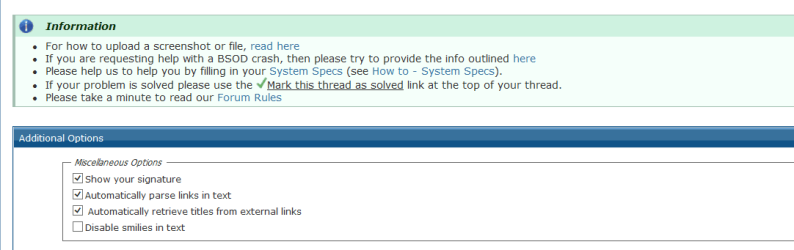
If you use either the big Post Reply or Go Advanced button, there is a box to check to Disable Smileys in text below the reply field.

smilies.PNG
 

My Computer My Computer

At a glance

Windows 7 Ultimate X64 SP1Intel i5-2550K, Differing ~4.4-4.8GHz No buil...16GB G.Skill Sniper 1866MHz @ 2133MHz 2x8GBASUS GTX650TIB-DC2OC-2GD5, (650TI Boost)
Computer type
PC/Desktop
Computer Manufacturer/Model Number
Home Built Desktop By DataTech
OS
Windows 7 Ultimate X64 SP1
CPU
Intel i5-2550K, Differing ~4.4-4.8GHz No built in GPU
Motherboard
ASUS P8Z68-V PRO/GEN3
Memory
16GB G.Skill Sniper 1866MHz @ 2133MHz 2x8GB
Graphics Card(s)
ASUS GTX650TIB-DC2OC-2GD5, (650TI Boost)
Sound Card
Onboard Realtek 5-1
Monitor(s) Displays
Samsung P2570HD
Screen Resolution
1920x1080
Hard Drives
Samsung 840 Pro 256GB SSD for OS, 500GB Seagate Constellation (Enterprise drive) for Data
PSU
Corsair HX650W
Case
Inwin Dragon Rider
Cooling
Hyper 212 EVO w/two Noctua fans, push-pull, @1300 RPM
Keyboard
E-Z Eyes, bright yellow keys with large characters
Mouse
steelseries SENSEI Laser Pro Gaming
Internet Speed
48-51Mbs Mbs down, 11 Mbs up Xfinity Cable
Antivirus
Norton Internet Security 2013
Browser
IE 10, Opera, Pale Moon if needed
Other Info
4 case fans, LG BluRay-RE, ASUS DVD-RW, Mr. Fusion power supply, 1.21 gigawatts.
That's OK - I read Smiley :)

It looks like the Ownership is the only thing that you changed? If that's the case, then just run the following command in an elevated Command Prompt

ICACLS C:\WIndows\System32 /setowner "NT Service\TrustedInstaller"

Did you also change the ownership of the subfolder and files? (which would make a repair a lot more complex).
 

My Computer My Computer

At a glance

Win 7 x64 Home Premium (and x86 VirtualBox VM...i3 370M/i7 6500U8GB - finally :)/8GBit's an i3, dude!/dual Intel&nVidia
Computer type
Laptop
Computer Manufacturer/Model Number
Asus K52F or Lenovo B51-80
OS
Win 7 x64 Home Premium (and x86 VirtualBox VM)/Win10
CPU
i3 370M/i7 6500U
Motherboard
Asus/Lenovo
Memory
8GB - finally :)/8GB
Graphics Card(s)
it's an i3, dude!/dual Intel&nVidia
Sound Card
onboard
Monitor(s) Displays
15.6" built-in
Screen Resolution
1366x768/1920x1080
Hard Drives
750GB Seagate internal
Sundry external drives attached to other computers on the local network
1TB SSD on the Lenovo
PSU
n/a
Internet Speed
as much as I can get - usually on a dongle/phone, so <1MB/s
Antivirus
MSE/Defender
Browser
IE11/12/Edge/Chrome/FF(if I must)
No, in all but one instance I only took ownership of the file, When replacing the file in the sysWOW64 folder I had to take ownership. I looked at the permissions, took ownership, replaced the file, and set permissions back to what they were. I thought I did.
 

My Computer My Computer

At a glance

Windows 7 Home Premium 64 bitIntel i38 gigabytes 4x2 CorsairG-Force GTX650
Computer type
PC/Desktop
Computer Manufacturer/Model Number
Custom Build
OS
Windows 7 Home Premium 64 bit
CPU
Intel i3
Motherboard
Asus
Memory
8 gigabytes 4x2 Corsair
Graphics Card(s)
G-Force GTX650
Hard Drives
WD1001
Antivirus
Webroot SecureAnywhere
Browser
Mozilla FireFox-IE
Microsoft Windows [Version 6.1.7601]
Copyright (c) 2009 Microsoft Corporation. All rights reserved.

C:\Windows\system32>sfc /scannow

Beginning system scan. This process will take some time.

Beginning verification phase of system scan.
Verification 100% complete.

Windows Resource Protection did not find any integrity violations.

C:\Windows\system32>ICACLS C:\WIndows\System32 /setowner "NT Service\TrustedInst
aller"
C:\WIndows\System32: Access is denied.
Successfully processed 0 files; Failed processing 1 files

C:\Windows\system32>
 

My Computer My Computer

At a glance

Windows 7 Home Premium 64 bitIntel i38 gigabytes 4x2 CorsairG-Force GTX650
Computer type
PC/Desktop
Computer Manufacturer/Model Number
Custom Build
OS
Windows 7 Home Premium 64 bit
CPU
Intel i3
Motherboard
Asus
Memory
8 gigabytes 4x2 Corsair
Graphics Card(s)
G-Force GTX650
Hard Drives
WD1001
Antivirus
Webroot SecureAnywhere
Browser
Mozilla FireFox-IE
OK - Please check using Windows Explorer who the current owner of the folder is (it should be TrustedInstaller, in which case no further action is required.)

Sorry- it's my mistake in the first place for forgetting that it was the SysWOW64 folder that needed ching rather than the System32 folder!


Just to double-check - please run the following command and post the results.

ICACLS C:\Windows\SysWOW64

(they should be identical to the System32 folder - I think!)
 

My Computer My Computer

At a glance

Win 7 x64 Home Premium (and x86 VirtualBox VM...i3 370M/i7 6500U8GB - finally :)/8GBit's an i3, dude!/dual Intel&nVidia
Computer type
Laptop
Computer Manufacturer/Model Number
Asus K52F or Lenovo B51-80
OS
Win 7 x64 Home Premium (and x86 VirtualBox VM)/Win10
CPU
i3 370M/i7 6500U
Motherboard
Asus/Lenovo
Memory
8GB - finally :)/8GB
Graphics Card(s)
it's an i3, dude!/dual Intel&nVidia
Sound Card
onboard
Monitor(s) Displays
15.6" built-in
Screen Resolution
1366x768/1920x1080
Hard Drives
750GB Seagate internal
Sundry external drives attached to other computers on the local network
1TB SSD on the Lenovo
PSU
n/a
Internet Speed
as much as I can get - usually on a dongle/phone, so <1MB/s
Antivirus
MSE/Defender
Browser
IE11/12/Edge/Chrome/FF(if I must)
Correct, Trusted Installer is owner.
Microsoft Windows [Version 6.1.7601]
Copyright (c) 2009 Microsoft Corporation. All rights reserved.

C:\Windows\system32>ICACLS C:\Windows\SysWOW64
C:\Windows\SysWOW64 CREATOR OWNER:(OI)(CI)(IO)(F)
NT AUTHORITY\SYSTEM:(OI)(CI)(F)
BUILTIN\Administrators:(OI)(CI)(F)
BUILTIN\Users:(OI)(CI)(RX)
NT SERVICE\TrustedInstaller:(CI)(F)

Successfully processed 1 files; Failed processing 0 files

C:\Windows\system32>
 

My Computer My Computer

At a glance

Windows 7 Home Premium 64 bitIntel i38 gigabytes 4x2 CorsairG-Force GTX650
Computer type
PC/Desktop
Computer Manufacturer/Model Number
Custom Build
OS
Windows 7 Home Premium 64 bit
CPU
Intel i3
Motherboard
Asus
Memory
8 gigabytes 4x2 Corsair
Graphics Card(s)
G-Force GTX650
Hard Drives
WD1001
Antivirus
Webroot SecureAnywhere
Browser
Mozilla FireFox-IE
Back
Top