Can't run regsvr32 from .bat file, but can run from CMD

regsvr32 ole32.dll
regsvr32 /s ole32.dll
pause


Both commands work in elevated command prompt?
Both command work in bat file (run it elevated)?
 

My Computer My Computer

At a glance

Microsoft Windows 7 Home Premium 64-bits 7601...Intel(R) Core(TM) i3 CPU M 370 @ 2.40GHz4,00 GBATI Mobility Radeon HD 5400 Series
Computer type
Laptop
Computer Manufacturer/Model Number
ACER ASPIRE 5742G
OS
Microsoft Windows 7 Home Premium 64-bits 7601 Multiprocessor Free Service Pack 1
CPU
Intel(R) Core(TM) i3 CPU M 370 @ 2.40GHz
Motherboard
Acer Aspire 5742G
Memory
4,00 GB
Graphics Card(s)
ATI Mobility Radeon HD 5400 Series
Sound Card
(1) AMD High Definition Audio Device (2) Realtek High Defi
Screen Resolution
1366 x 768 x 32 bits (4294967296 colors) @ 60 Hz
Hard Drives
WDC WD5000BEVT-22ZAT0
Do you have UAC turned off?
Are you on an admin account or on the Administrator (built in) account?

When I installed Windows (from the Lenovo factory recovery disks) I only created one user, which has Admin rights. I don't believe I'm using the actual built-in Admin account, and I'm logging in as 'James'.

UAC is off, so it kind of sounds like the first case you mentioned in a previous post. Admin user with UAC off.
 

My Computer My Computer

At a glance

Windows 7 Pro 64-bit
Computer type
PC/Desktop
OS
Windows 7 Pro 64-bit
When you right click on the cmd prompt shortcut, do you get a popup that has User Account Control in the title?

Try to register ole32 per post 21.
 

My Computer My Computer

At a glance

W7 Pro SP1 64biti78GBIntel HD Graphics
Computer type
Laptop
Computer Manufacturer/Model Number
Employer provided Dell Latitude
OS
W7 Pro SP1 64bit
CPU
i7
Memory
8GB
Graphics Card(s)
Intel HD Graphics
Hard Drives
crappy SSD
Antivirus
Employer mandated Symantec Endpoint Protection
Browser
Pale Moon 64bit, IE11 64bit & Chrome 64bit
regsvr32 ole32.dll
regsvr32 /s ole32.dll
pause


Both commands work in elevated command prompt?
Both command work in bat file (run it elevated)?

Both of those run fine from a cmd window or a batch file (elevated and also when I don't "run as admin"). I also receive a dll registration successful message, which is something I never receive when I manually register the program dll.
 

My Computer My Computer

At a glance

Windows 7 Pro 64-bit
Computer type
PC/Desktop
OS
Windows 7 Pro 64-bit
When you right click on the cmd prompt shortcut, do you get a popup that has User Account Control in the title?

Try to register ole32 per post 21.

No, I don't see UAC in the right click menu, is that what you mean?
 

Attachments

  • menu.png
    menu.png
    17.5 KB · Views: 3

My Computer My Computer

At a glance

Windows 7 Pro 64-bit
Computer type
PC/Desktop
OS
Windows 7 Pro 64-bit
regsvr32 ole32.dll
regsvr32 /s ole32.dll
pause


Both commands work in elevated command prompt?
Both command work in bat file (run it elevated)?

Both of those run fine from a cmd window or a batch file (elevated and also when I don't "run as admin"). I also receive a dll registration successful message, which is something I never receive when I manually register the program dll.

You get the successfull message only if you DON'T use /s as far as I know !!

regsvr32 command should run elevated otherwise it doesn't work. It has to set thing in HKLM or HKCR registry keys. It modifies part of registry normally unwriteable (but readable by all users).
 

My Computer My Computer

At a glance

Microsoft Windows 7 Home Premium 64-bits 7601...Intel(R) Core(TM) i3 CPU M 370 @ 2.40GHz4,00 GBATI Mobility Radeon HD 5400 Series
Computer type
Laptop
Computer Manufacturer/Model Number
ACER ASPIRE 5742G
OS
Microsoft Windows 7 Home Premium 64-bits 7601 Multiprocessor Free Service Pack 1
CPU
Intel(R) Core(TM) i3 CPU M 370 @ 2.40GHz
Motherboard
Acer Aspire 5742G
Memory
4,00 GB
Graphics Card(s)
ATI Mobility Radeon HD 5400 Series
Sound Card
(1) AMD High Definition Audio Device (2) Realtek High Defi
Screen Resolution
1366 x 768 x 32 bits (4294967296 colors) @ 60 Hz
Hard Drives
WDC WD5000BEVT-22ZAT0
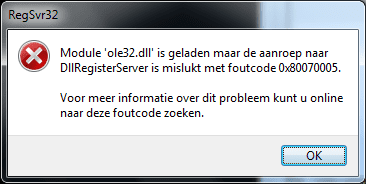
regsvr32 ole32.dll (unelevated) gives this popup.
regsvr32 /s ole32.dll (unelevated) gives no popup at all. It looks successfull.... but it isn't!

You have to do it with elevated privileges!! And remove the /s for troubleshooting
 

Attachments

  • Naamloos.png
    Naamloos.png
    6.8 KB · Views: 3

My Computer My Computer

At a glance

Microsoft Windows 7 Home Premium 64-bits 7601...Intel(R) Core(TM) i3 CPU M 370 @ 2.40GHz4,00 GBATI Mobility Radeon HD 5400 Series
Computer type
Laptop
Computer Manufacturer/Model Number
ACER ASPIRE 5742G
OS
Microsoft Windows 7 Home Premium 64-bits 7601 Multiprocessor Free Service Pack 1
CPU
Intel(R) Core(TM) i3 CPU M 370 @ 2.40GHz
Motherboard
Acer Aspire 5742G
Memory
4,00 GB
Graphics Card(s)
ATI Mobility Radeon HD 5400 Series
Sound Card
(1) AMD High Definition Audio Device (2) Realtek High Defi
Screen Resolution
1366 x 768 x 32 bits (4294967296 colors) @ 60 Hz
Hard Drives
WDC WD5000BEVT-22ZAT0
When you right click on the cmd prompt shortcut, do you get a popup that has User Account Control in the title?

Try to register ole32 per post 21.

No, I don't see UAC in the right click menu, is that what you mean?
Yes, that is what I mean. Then it appears that you have UAC turned off.

I'll leave you to work with Kaktussoft while I lurk.
 

My Computer My Computer

At a glance

W7 Pro SP1 64biti78GBIntel HD Graphics
Computer type
Laptop
Computer Manufacturer/Model Number
Employer provided Dell Latitude
OS
W7 Pro SP1 64bit
CPU
i7
Memory
8GB
Graphics Card(s)
Intel HD Graphics
Hard Drives
crappy SSD
Antivirus
Employer mandated Symantec Endpoint Protection
Browser
Pale Moon 64bit, IE11 64bit & Chrome 64bit
regsvr32 ole32.dll (unelevated) gives this popup.
regsvr32 /s ole32.dll (unelevated) gives no popup at all. It looks successfull.... but it isn't!

You have to do it with elevated privileges!! And remove the /s for troubleshooting

Isn't every cmd prompt window "elevated" when UAC is off in an admin account?

I do not think that it is possible for the OP to open an unelevated cmd prompt window.

If I'm wrong - let me know. If I'm right, then it matters how you interpret the results the OP sees.
 

My Computer My Computer

At a glance

W7 Pro SP1 64biti78GBIntel HD Graphics
Computer type
Laptop
Computer Manufacturer/Model Number
Employer provided Dell Latitude
OS
W7 Pro SP1 64bit
CPU
i7
Memory
8GB
Graphics Card(s)
Intel HD Graphics
Hard Drives
crappy SSD
Antivirus
Employer mandated Symantec Endpoint Protection
Browser
Pale Moon 64bit, IE11 64bit & Chrome 64bit
Yeah, I think everything is elevated. When I open a cmd prompt it always says "Administrator". Thanks for all of your assistance in trying to troubleshoot this. As a workaround I'm going to try to install the necessary software in a VM and see if I have any luck. A couple of my colleagues have been able to install without issue so it seems specific to my machine.
 

My Computer My Computer

At a glance

Windows 7 Pro 64-bit
Computer type
PC/Desktop
OS
Windows 7 Pro 64-bit
Back
Top