Howto rename file types in Explorer as default & not Software specific
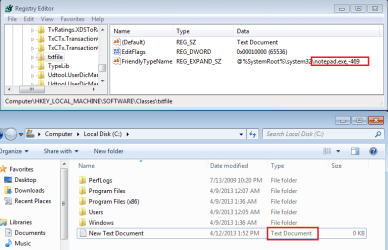
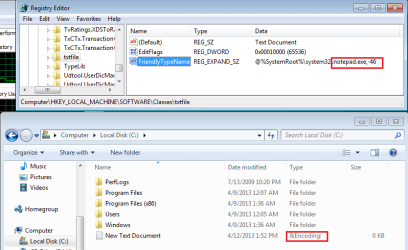
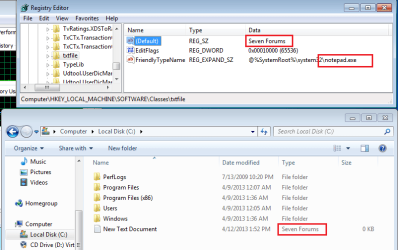
I don't like the fact that if, for ex. I own Microsoft Office, in Explorer under "Type" for a word document it says, "Microsoft Word Document" and if I were to change to say Open Office suddenly that same type of file would no longer be called, "Microsoft Word Document" but rather, "Open Office Document" (or something).
Is it possible to have Explorer name a file simply for what it is (A text file, an image file) etc.? regardless of what software is actually used to open it?
I don't like the fact that if, for ex. I own Microsoft Office, in Explorer under "Type" for a word document it says, "Microsoft Word Document" and if I were to change to say Open Office suddenly that same type of file would no longer be called, "Microsoft Word Document" but rather, "Open Office Document" (or something).
Is it possible to have Explorer name a file simply for what it is (A text file, an image file) etc.? regardless of what software is actually used to open it?
My Computer
At a glance
Windows 7 Home Premium 64Intel Core i5 760 @ 2800MHz12288MBAMD Radeon HD 7800 Series
- Computer type
- PC/Desktop
- Computer Manufacturer/Model Number
- OEM Designed by me :-)
- OS
- Windows 7 Home Premium 64
- CPU
- Intel Core i5 760 @ 2800MHz
- Motherboard
- Asus P7P55D-E LX
- Memory
- 12288MB
- Graphics Card(s)
- AMD Radeon HD 7800 Series
- Sound Card
- ASUS Xonar DG
- Monitor(s) Displays
- ViewSonic VX2453 Series, HDMI 1080p Full HD
- Screen Resolution
- 1920X1080
- Hard Drives
- Samsung SSD 840 EVO 250GB& two others
- PSU
- Tagan BZ Series, TG800-BZ 800W
- Keyboard
- Logitech MK250
- Mouse
- Logitech M310
- Internet Speed
- toppest, mostest :-) <-- bad, but fun English
- Browser
- Firefox, Crrome, IE