Solved Shadow thing that appears when cursor is over icon

MRem

New member
Local time
11:59 AM
Messages
7
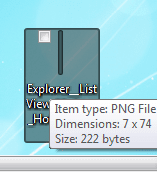
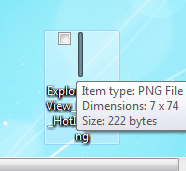
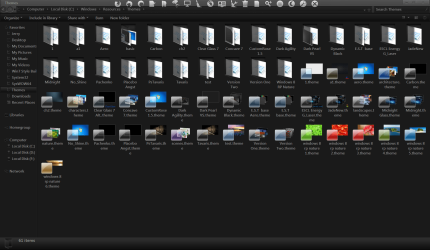
Can I change the color of the little blue translucent box that appears when the cursor is over the icon?
 

My Computer My Computer

Computer type
Laptop
Computer Manufacturer/Model Number
HP pavilion m6 notebook pc
OS
x64
CPU
AMD a10-4600M 2.3 ghz
Memory
6.00 gb
Graphics Card(s)
Radeon HD 7660g
Antivirus
Norton
Browser
Google Chrome
Can I change the color of the little blue translucent box that appears when the cursor is over the icon?

Welcome to the Seven Forums

Yes it's a images in the .msstyles.

Are you wanting the 1 on the desktop or in Windows explorer?

Jerry
 

My Computer My Computer

Computer type
Laptop
Computer Manufacturer/Model Number
Sager NP9170
OS
Win 7 Pro x64 / Win 10 Pro
CPU
Intel(R) Core(TM) i7-3630QM CPU @ 2.40GHz
Motherboard
CLEVO P170EM
Memory
12 GB
Graphics Card(s)
(1) Intel(R) HD Graphics 4000 (2) NVIDIA GeForce GTX 675M
Sound Card
(1) Realtek High Definition Audio (2) Intel(R) Display Aud
Monitor(s) Displays
17.3
Screen Resolution
1920x1080
Hard Drives
(1) Samsung 860 EVO 500GB(OS) (1) Samsung 860 EVO 500GB(Data)
Keyboard
Backlite
Antivirus
MSE, Malwarebytes Pro
Browser
Firefox
Other Info
DESKTOP: Custom-built.
OS: Win 10 Pro x64.
CASE: Rosewill R5.
CPU: Intel I5 4670K CPU @ 3.40GHz.
CPU COOLER: Cool Master Hyper 212 EVO.
MOTHERBOARD: Asus Z87-A.
MEMORY: Kingston HyperX 2x4 GB.
GPU: Nvidia Geforce 650 TI.
PSU: Corsair TX750.
DRIVES: (1) Samsung 840 120 GB SSD (2) Western Digital blue 500 GB 7200 RPM.

My Computer My Computer

Computer type
Laptop
Computer Manufacturer/Model Number
HP pavilion m6 notebook pc
OS
x64
CPU
AMD a10-4600M 2.3 ghz
Memory
6.00 gb
Graphics Card(s)
Radeon HD 7660g
Antivirus
Norton
Browser
Google Chrome
I would recommend starting a new theme so you do not corrupt the original aero.msstyles, look at Post #38 Here it will show you how.

You will need to do 1 of these 2 ways of Enabling custom themes for it to work.
http://www.sevenforums.com/tutorials/34579-enabling-custom-themes-windows-7-a.html
Or
http://www.sevenforums.com/tutorials/28377-theme-how-apply-custom-themes.html?filter

You should be able to use this tutorial http://www.sevenforums.com/tutorials/266336-taskbar-button-change-color-orange-flashing-button.html it shows the basics on how to edit the .msstyles, just edit the following numbers.

Desktop hover (this also will change the hovers in the navigation pane)
hover #602
Pressed #603
Selected #601

Jerry
 

My Computer My Computer

Computer type
Laptop
Computer Manufacturer/Model Number
Sager NP9170
OS
Win 7 Pro x64 / Win 10 Pro
CPU
Intel(R) Core(TM) i7-3630QM CPU @ 2.40GHz
Motherboard
CLEVO P170EM
Memory
12 GB
Graphics Card(s)
(1) Intel(R) HD Graphics 4000 (2) NVIDIA GeForce GTX 675M
Sound Card
(1) Realtek High Definition Audio (2) Intel(R) Display Aud
Monitor(s) Displays
17.3
Screen Resolution
1920x1080
Hard Drives
(1) Samsung 860 EVO 500GB(OS) (1) Samsung 860 EVO 500GB(Data)
Keyboard
Backlite
Antivirus
MSE, Malwarebytes Pro
Browser
Firefox
Other Info
DESKTOP: Custom-built.
OS: Win 10 Pro x64.
CASE: Rosewill R5.
CPU: Intel I5 4670K CPU @ 3.40GHz.
CPU COOLER: Cool Master Hyper 212 EVO.
MOTHERBOARD: Asus Z87-A.
MEMORY: Kingston HyperX 2x4 GB.
GPU: Nvidia Geforce 650 TI.
PSU: Corsair TX750.
DRIVES: (1) Samsung 840 120 GB SSD (2) Western Digital blue 500 GB 7200 RPM.
This is awesome! I am doing everything exactly how the tutorials said and I am confident in what I am doing, but the changes won't take affect. I even tried changing the original aero files (after making backups) and still nothing. any ideas?
 

My Computer My Computer

Computer type
Laptop
Computer Manufacturer/Model Number
HP pavilion m6 notebook pc
OS
x64
CPU
AMD a10-4600M 2.3 ghz
Memory
6.00 gb
Graphics Card(s)
Radeon HD 7660g
Antivirus
Norton
Browser
Google Chrome
Put the .msstyles you edited in a zip folder and post it here and I will look at it.

Jerry
 

My Computer My Computer

Computer type
Laptop
Computer Manufacturer/Model Number
Sager NP9170
OS
Win 7 Pro x64 / Win 10 Pro
CPU
Intel(R) Core(TM) i7-3630QM CPU @ 2.40GHz
Motherboard
CLEVO P170EM
Memory
12 GB
Graphics Card(s)
(1) Intel(R) HD Graphics 4000 (2) NVIDIA GeForce GTX 675M
Sound Card
(1) Realtek High Definition Audio (2) Intel(R) Display Aud
Monitor(s) Displays
17.3
Screen Resolution
1920x1080
Hard Drives
(1) Samsung 860 EVO 500GB(OS) (1) Samsung 860 EVO 500GB(Data)
Keyboard
Backlite
Antivirus
MSE, Malwarebytes Pro
Browser
Firefox
Other Info
DESKTOP: Custom-built.
OS: Win 10 Pro x64.
CASE: Rosewill R5.
CPU: Intel I5 4670K CPU @ 3.40GHz.
CPU COOLER: Cool Master Hyper 212 EVO.
MOTHERBOARD: Asus Z87-A.
MEMORY: Kingston HyperX 2x4 GB.
GPU: Nvidia Geforce 650 TI.
PSU: Corsair TX750.
DRIVES: (1) Samsung 840 120 GB SSD (2) Western Digital blue 500 GB 7200 RPM.
Ok so i figured out what happened. When I am using test my computer is still loading aero images. I changed aero but restorator saved it as aero1. I changed that to aero and replaced it with the old aero. No my computer wont load and resources from aero. when I use that then all windows and bars are like older windows versions. All the images are still in the Aero file but are not being loaded (including the image whose colors I changed)
 

My Computer My Computer

Computer type
Laptop
Computer Manufacturer/Model Number
HP pavilion m6 notebook pc
OS
x64
CPU
AMD a10-4600M 2.3 ghz
Memory
6.00 gb
Graphics Card(s)
Radeon HD 7660g
Antivirus
Norton
Browser
Google Chrome

My Computer My Computer

Computer type
Laptop
Computer Manufacturer/Model Number
Sager NP9170
OS
Win 7 Pro x64 / Win 10 Pro
CPU
Intel(R) Core(TM) i7-3630QM CPU @ 2.40GHz
Motherboard
CLEVO P170EM
Memory
12 GB
Graphics Card(s)
(1) Intel(R) HD Graphics 4000 (2) NVIDIA GeForce GTX 675M
Sound Card
(1) Realtek High Definition Audio (2) Intel(R) Display Aud
Monitor(s) Displays
17.3
Screen Resolution
1920x1080
Hard Drives
(1) Samsung 860 EVO 500GB(OS) (1) Samsung 860 EVO 500GB(Data)
Keyboard
Backlite
Antivirus
MSE, Malwarebytes Pro
Browser
Firefox
Other Info
DESKTOP: Custom-built.
OS: Win 10 Pro x64.
CASE: Rosewill R5.
CPU: Intel I5 4670K CPU @ 3.40GHz.
CPU COOLER: Cool Master Hyper 212 EVO.
MOTHERBOARD: Asus Z87-A.
MEMORY: Kingston HyperX 2x4 GB.
GPU: Nvidia Geforce 650 TI.
PSU: Corsair TX750.
DRIVES: (1) Samsung 840 120 GB SSD (2) Western Digital blue 500 GB 7200 RPM.
Put the .msstyles you edited in a zip folder and post it here and I will look at it.

Jerry

Ok so here is the aero file. I've changed the 601 602 and 603 images to be grey and black. I can't thank you enough. I think it is amazing this community will take time to help total strangers like this.
 

Attachments

My Computer My Computer

Computer type
Laptop
Computer Manufacturer/Model Number
HP pavilion m6 notebook pc
OS
x64
CPU
AMD a10-4600M 2.3 ghz
Memory
6.00 gb
Graphics Card(s)
Radeon HD 7660g
Antivirus
Norton
Browser
Google Chrome
I already had custom themes enabled but I ran those just to make sure. So yes
 

My Computer My Computer

Computer type
Laptop
Computer Manufacturer/Model Number
HP pavilion m6 notebook pc
OS
x64
CPU
AMD a10-4600M 2.3 ghz
Memory
6.00 gb
Graphics Card(s)
Radeon HD 7660g
Antivirus
Norton
Browser
Google Chrome
I'm really dumb and feel like I wasted your time. I ran the 32bit instead of the 64bit version of the "Theme-How to Apply Custom Themes". Which is weird because I was already using a custom theme called "Pink Glass". It works perfectly now. Thank you for your help!
 

My Computer My Computer

Computer type
Laptop
Computer Manufacturer/Model Number
HP pavilion m6 notebook pc
OS
x64
CPU
AMD a10-4600M 2.3 ghz
Memory
6.00 gb
Graphics Card(s)
Radeon HD 7660g
Antivirus
Norton
Browser
Google Chrome

My Computer My Computer

Computer type
Laptop
Computer Manufacturer/Model Number
Sager NP9170
OS
Win 7 Pro x64 / Win 10 Pro
CPU
Intel(R) Core(TM) i7-3630QM CPU @ 2.40GHz
Motherboard
CLEVO P170EM
Memory
12 GB
Graphics Card(s)
(1) Intel(R) HD Graphics 4000 (2) NVIDIA GeForce GTX 675M
Sound Card
(1) Realtek High Definition Audio (2) Intel(R) Display Aud
Monitor(s) Displays
17.3
Screen Resolution
1920x1080
Hard Drives
(1) Samsung 860 EVO 500GB(OS) (1) Samsung 860 EVO 500GB(Data)
Keyboard
Backlite
Antivirus
MSE, Malwarebytes Pro
Browser
Firefox
Other Info
DESKTOP: Custom-built.
OS: Win 10 Pro x64.
CASE: Rosewill R5.
CPU: Intel I5 4670K CPU @ 3.40GHz.
CPU COOLER: Cool Master Hyper 212 EVO.
MOTHERBOARD: Asus Z87-A.
MEMORY: Kingston HyperX 2x4 GB.
GPU: Nvidia Geforce 650 TI.
PSU: Corsair TX750.
DRIVES: (1) Samsung 840 120 GB SSD (2) Western Digital blue 500 GB 7200 RPM.
I'm really dumb and feel like I wasted your time. I ran the 32bit instead of the 64bit version of the "Theme-How to Apply Custom Themes". Which is weird because I was already using a custom theme called "Pink Glass". It works perfectly now. Thank you for your help!

Good to hear.

You're Welcome
 

My Computer My Computer

Computer type
Laptop
Computer Manufacturer/Model Number
Sager NP9170
OS
Win 7 Pro x64 / Win 10 Pro
CPU
Intel(R) Core(TM) i7-3630QM CPU @ 2.40GHz
Motherboard
CLEVO P170EM
Memory
12 GB
Graphics Card(s)
(1) Intel(R) HD Graphics 4000 (2) NVIDIA GeForce GTX 675M
Sound Card
(1) Realtek High Definition Audio (2) Intel(R) Display Aud
Monitor(s) Displays
17.3
Screen Resolution
1920x1080
Hard Drives
(1) Samsung 860 EVO 500GB(OS) (1) Samsung 860 EVO 500GB(Data)
Keyboard
Backlite
Antivirus
MSE, Malwarebytes Pro
Browser
Firefox
Other Info
DESKTOP: Custom-built.
OS: Win 10 Pro x64.
CASE: Rosewill R5.
CPU: Intel I5 4670K CPU @ 3.40GHz.
CPU COOLER: Cool Master Hyper 212 EVO.
MOTHERBOARD: Asus Z87-A.
MEMORY: Kingston HyperX 2x4 GB.
GPU: Nvidia Geforce 650 TI.
PSU: Corsair TX750.
DRIVES: (1) Samsung 840 120 GB SSD (2) Western Digital blue 500 GB 7200 RPM.
Back
Top