VMware Player - Install and Setup Zorin

How to Install and Setup Zorin in VMware Player

   Information
This tutorial is aimed at Windows users who want to try out a Linux distro and learn about a virtual OS installation at the same time. If you are not interested in the virtual part, you can skip directly to Chapter 2 which explains the Zorin setup.


Zorin is a Linux distro with an Ubuntu base. Of all the Linux distros I know, it comes the closest to Windows as far as the user interface (UI) is concerned.

If you are not familiar with Linux and want to experiment with it, I recommend you try Zorin. It can be downloaded from the Zorin site (click on the 'Get it' button). I suggest you take the 64bit version which is the one used in this tutorial.

Coming from Windows, you will not be too alienated using Zorin. It has a Start menu that can be customized to look like Windows 7 or XP and it has a familiar task bar. But there are, of course, differences.

I will explain how to make the basic setup in VMware Player and how to setup Zorin so that it is convenient to use. At one point that involves the command line (Terminal). But don't be scared, I have prepared everything such that this step can be easily mastered.

The setup in VMware player will be explained with text and pictures and the setup inside Zorin will be explained with a video. But I have also documented the essential steps in text format.

Chapter 1 - install Zorin in VMware Player

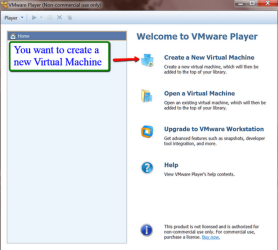
Download VMware Player from this site and install it on your system. Then start VMware Player and you will see this window.
1.png
Here you just click on 'Create a new virtual machine' and you get to this window.
2.png
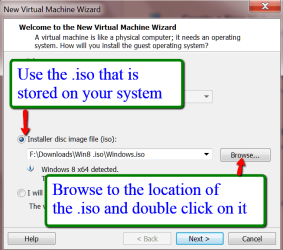
Here you select to install from the .iso image and navigate to the Zorin .iso file that you have downloaded. Then Next.

3.png
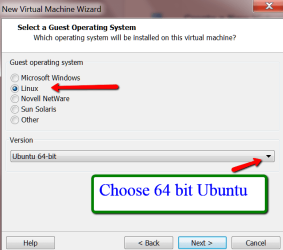
Mark Linux and choose the Ubuntu 64bit. Then Next.
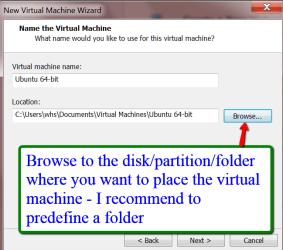
4.png

Browse to the disk/partition and folder where you want to install the virtual partition files. Default is Documents. I recommend predefining a folder for the VMware installation so that all VMware files are in one place. When you are done with the installation, there will be over 25 files and subfolders. Having those mixed with other folders would be messy.
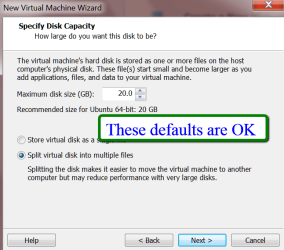
5.png

In this window you can take the defaults. Zorin will start out with less than 6GB of disk space usage so a maximum of 20GB for the dynamic virtual disk should suffice. Then Next.
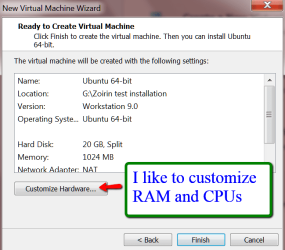
6.png

The default allocation is 1GB of RAM and 1 processor. I always assign 2GB of RAM and 2 processors. But you may take what is suitable for your PC. The defaults will work. Then Finish.
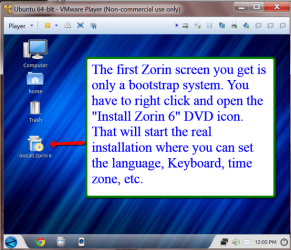
7.png

Now VMware Player will install the bootstrap system of Zorin. Once this is done, you need to right click on the "Install Zorin 6" DVD as shown in the picture and Open that. This will start the full installation of Zorin.

The Zorin installation process is very similar to the Windows installation process. You set the language, keyboard layout, time zone, and give the system a name. You must define a password - I always use 1234 because Linux distros ask many times for authentication with the password. A complicated password will make the operation more cumbersome. There is one big difference to a Windows installation - you do not need a product key. Zorin is freeware.

Once your installation is completed, restart Zorin - click on the Zorin Start button (bottom left) and then on the power symbol (bottom right in the start menu). That will bring up the various options (restart, shutdown, etc.)

I will explain the rest of the Zorin setup in the following video. The steps are also summarized in the text below the video. Read the note below because you may have to make an audio setting.


Chapter 2 - setting up Zorin

Note: If the audio of this video is too low, do the following:
Right click on the speaker icon in the task tray (bottom right) > Playback devices > double click on your output device > Enhancement tab > check the 'Loudness Equalizer' box


The synopsis of the settings discussed in the video

Screen resolution:Start > System Settings > Display
Full screen: VMware dock > Full screen icon
Hide/Unhide VMware dock: Leftmost icon on the dock
VMware Tools: VMware dock > Player > Manage > Install VMware Tools
Terminal (Command Prompt): Start > Accessories > Terminal
Terminal commands to install VMware Tools:

sudo mount /dev/cdrom /media/cdrom
cp /media/cdrom/VMware*.tar.gz /tmp
sudo umount /media/cdrom
cd /tmp
tar xzvf VMware*.gz
cd vmware-tools-distrib/
sudo ./vmware-install.pl

Those commands are posted on Sevenforums under: "VMware and Zorin"

Office Applications:Start > Office > Libre Office
GParted (Disk Mgmt): Start > System Tools > Administration > GParted
Software Center: Start > System Tools > Administration > Software Center
Firefox Installation: Start > Internet > Zorin Web Browser Manager
Help file: Start > Accessories > Help
Text Editor (Wordpad): Start > Accessories > Text Editor


Last edited:
Very good Wolfgang. I recently installed Zorin in VirtualBox. It is the most windows like of the Unix desktops I have come across.
 

My Computer My Computer

Computer type
Laptop
Computer Manufacturer/Model Number
Hewlett-Packard/G62-107SA Notebook
OS
Microsoft Windows 7 Home Premium 64-bit Service Pack 1
CPU
Intel(R) Core(TM) i3 CPU M 330 @ 2.13GHz
Motherboard
Hewlett-Packard 1425
Memory
8 GB DDR3
Graphics Card(s)
Intel(R) HD Graphics
Sound Card
Realtek High Definition Audio
Monitor(s) Displays
Builtin
Screen Resolution
1366 x 768 x 32 bits (4294967296 colors) @ 60 Hz
Hard Drives
250 GB SATA Hard Disk Drive 7200 rpm
2TB Seagate GoFlex USB 2 Drive
1TB Iomega Prestige USB 2 Drive
1.5TB Iomega Prestige USB 2 Drive (Samsung)
2TB WD MyBook Live NAS.
Mouse
Logitech Anywhere MX
Internet Speed
152 Mbs download 10 Mbs upload
Antivirus
Norton 360
Browser
Chrome
Great job on the tutorial, Wolfgang. Have to admit I never heard of Zorin before. Sounds even better than Ubuntu.
 

My Computer My Computer

Computer type
Laptop
Computer Manufacturer/Model Number
Sony Vaio VPCEB47GM Laptop
OS
Win 7 Pro 64-bit
CPU
Intel i5 2.4 Ghz
Memory
8GB DDR3
Graphics Card(s)
Intel HD 3000
Sound Card
IDT High Definition
Monitor(s) Displays
15.6 WGXA Anti-Glare LED
Screen Resolution
1280x800
Hard Drives
640Gb 7200rpm
Antivirus
MSE
Browser
Opera (primary) with IE9 backup
Thanks guys. Yes, it is much more Windows-like than any other distro that I have tried. And it is a good thing they did not go with that awful Unity UI of Ubuntu.

Fot the forum work, it has become my main OS now because it is faster than my Win7 and Win8. I run it from an external SSD so I can use it on all my PCs.
 

My Computer My Computer

Computer Manufacturer/Model Number
HP, Dell, Gateway, Toshiba - 4 laptops and 2 desktops
OS
Vista, Windows7, Mint Mate, Zorin, Windows 8
CPU
from 1.6GHz Duo to i7
Monitor(s) Displays
2x HP w2207
Hard Drives
5x HDD, 7x SSD, 12x Externals
Keyboard
with trackball - no mices
Mouse
Trackball mice
Internet Speed
DSL 6000
Good work Wolfgang. A silly question, will software for Windows run in Zorin? CCleaner, Photoshop, CPUz, etc.
 

My Computer My Computer

Computer type
PC/Desktop
Computer Manufacturer/Model Number
Home Built Desktop By DataTech
OS
Windows 7 Ultimate X64 SP1
CPU
Intel i5-2550K, Differing ~4.4-4.8GHz No built in GPU
Motherboard
ASUS P8Z68-V PRO/GEN3
Memory
16GB G.Skill Sniper 1866MHz @ 2133MHz 2x8GB
Graphics Card(s)
ASUS GTX650TIB-DC2OC-2GD5, (650TI Boost)
Sound Card
Onboard Realtek 5-1
Monitor(s) Displays
Samsung P2570HD
Screen Resolution
1920x1080
Hard Drives
Samsung 840 Pro 256GB SSD for OS, 500GB Seagate Constellation (Enterprise drive) for Data
PSU
Corsair HX650W
Case
Inwin Dragon Rider
Cooling
Hyper 212 EVO w/two Noctua fans, push-pull, @1300 RPM
Keyboard
E-Z Eyes, bright yellow keys with large characters
Mouse
steelseries SENSEI Laser Pro Gaming
Internet Speed
48-51Mbs Mbs down, 11 Mbs up Xfinity Cable
Antivirus
Norton Internet Security 2013
Browser
IE 10, Opera, Pale Moon if needed
Other Info
4 case fans, LG BluRay-RE, ASUS DVD-RW, Mr. Fusion power supply, 1.21 gigawatts.
No Gary. Windows programs do not run in any Linux distro. But Zorin has a huge program library from where you can get equivalent programs. Takes some scouting because the library is so big.

In Zorin, go to Start > Ubuntu Software Center and select the category in the left pane - as an example: go to 'Sound and Video'. There the first entry should be VLC. Click on it and click the 'more info' button. If you like what you see, click 'install' on the right side. That's all.

Once you found the program you like, it is a lot easier to install than in Windows. Just click 'install'
 

My Computer My Computer

Computer Manufacturer/Model Number
HP, Dell, Gateway, Toshiba - 4 laptops and 2 desktops
OS
Vista, Windows7, Mint Mate, Zorin, Windows 8
CPU
from 1.6GHz Duo to i7
Monitor(s) Displays
2x HP w2207
Hard Drives
5x HDD, 7x SSD, 12x Externals
Keyboard
with trackball - no mices
Mouse
Trackball mice
Internet Speed
DSL 6000
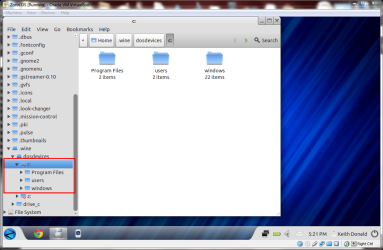
Or maybe yes. I noticed that it has Wine, the windows emulator installed.
 

My Computer My Computer

Computer type
Laptop
Computer Manufacturer/Model Number
Hewlett-Packard/G62-107SA Notebook
OS
Microsoft Windows 7 Home Premium 64-bit Service Pack 1
CPU
Intel(R) Core(TM) i3 CPU M 330 @ 2.13GHz
Motherboard
Hewlett-Packard 1425
Memory
8 GB DDR3
Graphics Card(s)
Intel(R) HD Graphics
Sound Card
Realtek High Definition Audio
Monitor(s) Displays
Builtin
Screen Resolution
1366 x 768 x 32 bits (4294967296 colors) @ 60 Hz
Hard Drives
250 GB SATA Hard Disk Drive 7200 rpm
2TB Seagate GoFlex USB 2 Drive
1TB Iomega Prestige USB 2 Drive
1.5TB Iomega Prestige USB 2 Drive (Samsung)
2TB WD MyBook Live NAS.
Mouse
Logitech Anywhere MX
Internet Speed
152 Mbs download 10 Mbs upload
Antivirus
Norton 360
Browser
Chrome
Good idea Keith. I have to try that one day.

Gary, see, Keith may have saved the day.
 

My Computer My Computer

Computer Manufacturer/Model Number
HP, Dell, Gateway, Toshiba - 4 laptops and 2 desktops
OS
Vista, Windows7, Mint Mate, Zorin, Windows 8
CPU
from 1.6GHz Duo to i7
Monitor(s) Displays
2x HP w2207
Hard Drives
5x HDD, 7x SSD, 12x Externals
Keyboard
with trackball - no mices
Mouse
Trackball mice
Internet Speed
DSL 6000
Update: I tried CCleaner but the Wine Program Loader did not like it. Says 'Error, wrong program name'. Will try something else.
 

My Computer My Computer

Computer Manufacturer/Model Number
HP, Dell, Gateway, Toshiba - 4 laptops and 2 desktops
OS
Vista, Windows7, Mint Mate, Zorin, Windows 8
CPU
from 1.6GHz Duo to i7
Monitor(s) Displays
2x HP w2207
Hard Drives
5x HDD, 7x SSD, 12x Externals
Keyboard
with trackball - no mices
Mouse
Trackball mice
Internet Speed
DSL 6000
I think Wine is a bit picky.
 

My Computer My Computer

Computer type
Laptop
Computer Manufacturer/Model Number
Hewlett-Packard/G62-107SA Notebook
OS
Microsoft Windows 7 Home Premium 64-bit Service Pack 1
CPU
Intel(R) Core(TM) i3 CPU M 330 @ 2.13GHz
Motherboard
Hewlett-Packard 1425
Memory
8 GB DDR3
Graphics Card(s)
Intel(R) HD Graphics
Sound Card
Realtek High Definition Audio
Monitor(s) Displays
Builtin
Screen Resolution
1366 x 768 x 32 bits (4294967296 colors) @ 60 Hz
Hard Drives
250 GB SATA Hard Disk Drive 7200 rpm
2TB Seagate GoFlex USB 2 Drive
1TB Iomega Prestige USB 2 Drive
1.5TB Iomega Prestige USB 2 Drive (Samsung)
2TB WD MyBook Live NAS.
Mouse
Logitech Anywhere MX
Internet Speed
152 Mbs download 10 Mbs upload
Antivirus
Norton 360
Browser
Chrome
Right Keith. I tried ImgBurn and that worked. I guess CCleaner would not have made a lot of sense anyhow because it works on the Windows file structure. One has to choose programs that do not depend on the specific Windows setup.
 

My Computer My Computer

Computer Manufacturer/Model Number
HP, Dell, Gateway, Toshiba - 4 laptops and 2 desktops
OS
Vista, Windows7, Mint Mate, Zorin, Windows 8
CPU
from 1.6GHz Duo to i7
Monitor(s) Displays
2x HP w2207
Hard Drives
5x HDD, 7x SSD, 12x Externals
Keyboard
with trackball - no mices
Mouse
Trackball mice
Internet Speed
DSL 6000
Yes, although it does emulate the Windows file structure.

screenshot241_2013-02-18.png
 

My Computer My Computer

Computer type
Laptop
Computer Manufacturer/Model Number
Hewlett-Packard/G62-107SA Notebook
OS
Microsoft Windows 7 Home Premium 64-bit Service Pack 1
CPU
Intel(R) Core(TM) i3 CPU M 330 @ 2.13GHz
Motherboard
Hewlett-Packard 1425
Memory
8 GB DDR3
Graphics Card(s)
Intel(R) HD Graphics
Sound Card
Realtek High Definition Audio
Monitor(s) Displays
Builtin
Screen Resolution
1366 x 768 x 32 bits (4294967296 colors) @ 60 Hz
Hard Drives
250 GB SATA Hard Disk Drive 7200 rpm
2TB Seagate GoFlex USB 2 Drive
1TB Iomega Prestige USB 2 Drive
1.5TB Iomega Prestige USB 2 Drive (Samsung)
2TB WD MyBook Live NAS.
Mouse
Logitech Anywhere MX
Internet Speed
152 Mbs download 10 Mbs upload
Antivirus
Norton 360
Browser
Chrome

My Computer My Computer

Computer Manufacturer/Model Number
HP, Dell, Gateway, Toshiba - 4 laptops and 2 desktops
OS
Vista, Windows7, Mint Mate, Zorin, Windows 8
CPU
from 1.6GHz Duo to i7
Monitor(s) Displays
2x HP w2207
Hard Drives
5x HDD, 7x SSD, 12x Externals
Keyboard
with trackball - no mices
Mouse
Trackball mice
Internet Speed
DSL 6000
It would only clean windows temps anyway.
 

My Computer My Computer

Computer type
Laptop
Computer Manufacturer/Model Number
Hewlett-Packard/G62-107SA Notebook
OS
Microsoft Windows 7 Home Premium 64-bit Service Pack 1
CPU
Intel(R) Core(TM) i3 CPU M 330 @ 2.13GHz
Motherboard
Hewlett-Packard 1425
Memory
8 GB DDR3
Graphics Card(s)
Intel(R) HD Graphics
Sound Card
Realtek High Definition Audio
Monitor(s) Displays
Builtin
Screen Resolution
1366 x 768 x 32 bits (4294967296 colors) @ 60 Hz
Hard Drives
250 GB SATA Hard Disk Drive 7200 rpm
2TB Seagate GoFlex USB 2 Drive
1TB Iomega Prestige USB 2 Drive
1.5TB Iomega Prestige USB 2 Drive (Samsung)
2TB WD MyBook Live NAS.
Mouse
Logitech Anywhere MX
Internet Speed
152 Mbs download 10 Mbs upload
Antivirus
Norton 360
Browser
Chrome
I installed BleachBit - it is very much like CCleaner. You get 2 versions (in Start > System tools). One as Root that you use to clean the temporary system files and one without root for the browsers, etc. temp files.

If you search in the Ubuntu Software Center for it, it will show up.
 

My Computer My Computer

Computer Manufacturer/Model Number
HP, Dell, Gateway, Toshiba - 4 laptops and 2 desktops
OS
Vista, Windows7, Mint Mate, Zorin, Windows 8
CPU
from 1.6GHz Duo to i7
Monitor(s) Displays
2x HP w2207
Hard Drives
5x HDD, 7x SSD, 12x Externals
Keyboard
with trackball - no mices
Mouse
Trackball mice
Internet Speed
DSL 6000
Thanks Wolfgang and Keith. I haven't installed antthing yet, but will give it a try out. The linux distros don't have any archaic registry, do they?
 

My Computer My Computer

Computer type
PC/Desktop
Computer Manufacturer/Model Number
Home Built Desktop By DataTech
OS
Windows 7 Ultimate X64 SP1
CPU
Intel i5-2550K, Differing ~4.4-4.8GHz No built in GPU
Motherboard
ASUS P8Z68-V PRO/GEN3
Memory
16GB G.Skill Sniper 1866MHz @ 2133MHz 2x8GB
Graphics Card(s)
ASUS GTX650TIB-DC2OC-2GD5, (650TI Boost)
Sound Card
Onboard Realtek 5-1
Monitor(s) Displays
Samsung P2570HD
Screen Resolution
1920x1080
Hard Drives
Samsung 840 Pro 256GB SSD for OS, 500GB Seagate Constellation (Enterprise drive) for Data
PSU
Corsair HX650W
Case
Inwin Dragon Rider
Cooling
Hyper 212 EVO w/two Noctua fans, push-pull, @1300 RPM
Keyboard
E-Z Eyes, bright yellow keys with large characters
Mouse
steelseries SENSEI Laser Pro Gaming
Internet Speed
48-51Mbs Mbs down, 11 Mbs up Xfinity Cable
Antivirus
Norton Internet Security 2013
Browser
IE 10, Opera, Pale Moon if needed
Other Info
4 case fans, LG BluRay-RE, ASUS DVD-RW, Mr. Fusion power supply, 1.21 gigawatts.
No registries in Linux.
 

My Computer My Computer

Computer Manufacturer/Model Number
HP, Dell, Gateway, Toshiba - 4 laptops and 2 desktops
OS
Vista, Windows7, Mint Mate, Zorin, Windows 8
CPU
from 1.6GHz Duo to i7
Monitor(s) Displays
2x HP w2207
Hard Drives
5x HDD, 7x SSD, 12x Externals
Keyboard
with trackball - no mices
Mouse
Trackball mice
Internet Speed
DSL 6000
Thanks for the You Yube tuts. I am running Mint Mate, Zprin and PCLinux OS in VMware player from an external esata SSD. You tuts have helped a lot, but it's still all Greek to me. I'm trying to familarize myself with them. But, everything seems to be working fine. I used your tuts to install the VMware tools, except in PClinux. I haven't figured out how to do it yet. I suspect the reason is it's written in Pearl. I'll probably whittle them down to one or two I like best. But, thanks again.
 

My Computers My Computers

System One System Two

  • Computer type
    PC/Desktop
    Computer Manufacturer/Model Number
    ALWAYS UNDER CONSTRUCTION
    OS
    Windows 11 Pro
    CPU
    Ryzen 9 5900X
    Motherboard
    Asus X570 Crosshair Viii Hero
    Memory
    32GB G Skill DDR4-3600
    Graphics Card(s)
    EVGA RTX 3080 FTW 3 Ultra
    Sound Card
    On Board/Sennheiser PC37X Headset
    Monitor(s) Displays
    3 X Asus 27"
    Screen Resolution
    2560x1440
    Hard Drives
    2 X 1 TB NVME drives
    PSU
    EVGA 850
    Case
    Phanteks Eclipse P400A
    Cooling
    EVGA 280 AIO
    Keyboard
    Logitech G510s/ Logitech G13
    Mouse
    Logitech G502
    Internet Speed
    24/1
    Antivirus
    ESET/MBAM Pro/SAS Pro
    Browser
    Chrome/ Firefox/ Edge
  • Computer type
    Laptop
    System Manufacturer/Model Number
    Dell 16 Plus
    OS
    Windows 11 Pro
    CPU
    Intel Ultra 9 288V
    Memory
    32 GB LPDDR5X 8533
    Monitor(s) Displays
    16" Mini-LED HDR600 Touch 90 Hz
    Screen Resolution
    2560X1600
    Hard Drives
    1 TB NVME
Thanks for the You Yube tuts. I am running Mint Mate, Zprin and PCLinux OS in VMware player from an external esata SSD. You tuts have helped a lot, but it's still all Greek to me. I'm trying to familarize myself with them. But, everything seems to be working fine. I used your tuts to install the VMware tools, except in PClinux. I haven't figured out how to do it yet. I suspect the reason is it's written in Pearl. I'll probably whittle them down to one or two I like best. But, thanks again.
Steve you are very welcome. Linux is fun but can also be very confusing. The VMware tools commands you need are different for most distros. I had to find them on the web too. You can also ask on the Linux forum ( Linux Forums ). These guys are always very helpful. For Mint there is a specialized forum ( Linux Mint Forums • Index page ) I got some good info from them too.

I reduced most of my activities to Mint Mate and Zorin now. But for Mint Mate I have to make a 32bit installation because you cannot get the Wine to install on the 64bit version. In Zorin, Wine comes with the default system.
 

My Computer My Computer

Computer Manufacturer/Model Number
HP, Dell, Gateway, Toshiba - 4 laptops and 2 desktops
OS
Vista, Windows7, Mint Mate, Zorin, Windows 8
CPU
from 1.6GHz Duo to i7
Monitor(s) Displays
2x HP w2207
Hard Drives
5x HDD, 7x SSD, 12x Externals
Keyboard
with trackball - no mices
Mouse
Trackball mice
Internet Speed
DSL 6000
I've tried Mint a few times over the last few years, but had trouble understanding it, and am still registered on their forums, I guess. I just don't give up that easily. I'm still trying. The PCLinux version I tried is called the 'full monty' which means it is quite large, but is everything but the kitchen sink version. It seems interesting but the ISO is about the same size as windows 7. I 'll end up doing the same as you and whittle it down to 1 or 2. But, thanks again for the You Tube tuts. It makes it much easier to see it done than reading instructions. I just wish they would name their software something I recognize. lol.
 

My Computers My Computers

System One System Two

  • Computer type
    PC/Desktop
    Computer Manufacturer/Model Number
    ALWAYS UNDER CONSTRUCTION
    OS
    Windows 11 Pro
    CPU
    Ryzen 9 5900X
    Motherboard
    Asus X570 Crosshair Viii Hero
    Memory
    32GB G Skill DDR4-3600
    Graphics Card(s)
    EVGA RTX 3080 FTW 3 Ultra
    Sound Card
    On Board/Sennheiser PC37X Headset
    Monitor(s) Displays
    3 X Asus 27"
    Screen Resolution
    2560x1440
    Hard Drives
    2 X 1 TB NVME drives
    PSU
    EVGA 850
    Case
    Phanteks Eclipse P400A
    Cooling
    EVGA 280 AIO
    Keyboard
    Logitech G510s/ Logitech G13
    Mouse
    Logitech G502
    Internet Speed
    24/1
    Antivirus
    ESET/MBAM Pro/SAS Pro
    Browser
    Chrome/ Firefox/ Edge
  • Computer type
    Laptop
    System Manufacturer/Model Number
    Dell 16 Plus
    OS
    Windows 11 Pro
    CPU
    Intel Ultra 9 288V
    Memory
    32 GB LPDDR5X 8533
    Monitor(s) Displays
    16" Mini-LED HDR600 Touch 90 Hz
    Screen Resolution
    2560X1600
    Hard Drives
    1 TB NVME
Back
Top