
I know this problem has been posted before, but they don't seem the same as mine, and the solutions didn't work (or I'm hesitant -- see below).
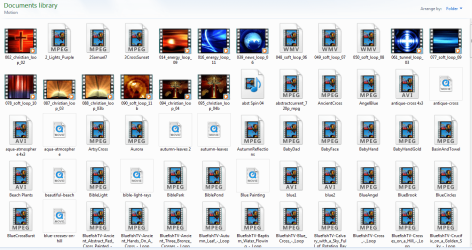
As you can see with the attached screen shot, not all the thumbnails for the videos are showing. What's less clear is the types that do display. The ones that show are WMV files. However, some WMV thumbs don't show.
This was working about 2-3 weeks ago, wherein all the video thumbs would show, but no longer. I have not installed or uninstalled any software during that time nor updated any codecs (unless it came with a Windows update).
I've tried the folder options and unticking/ticking the show thumbnails option. That made no difference. I've tried clearing the thumbnail cache via Disk Cleanup in System Tools, then rebooted. No change.
I've read about 'false' WMV or false MPG files, but these videos all showed their thumbs 2-3 weeks ago. So if they are false now, they were false then, negating that as the problem.
I haven't installed any additional third party software as a 'solution' because I'm hesitant about trying this or that software in the hopes it works.
Any thoughts? I'm baffled.
As you can see with the attached screen shot, not all the thumbnails for the videos are showing. What's less clear is the types that do display. The ones that show are WMV files. However, some WMV thumbs don't show.
This was working about 2-3 weeks ago, wherein all the video thumbs would show, but no longer. I have not installed or uninstalled any software during that time nor updated any codecs (unless it came with a Windows update).
I've tried the folder options and unticking/ticking the show thumbnails option. That made no difference. I've tried clearing the thumbnail cache via Disk Cleanup in System Tools, then rebooted. No change.
I've read about 'false' WMV or false MPG files, but these videos all showed their thumbs 2-3 weeks ago. So if they are false now, they were false then, negating that as the problem.
I haven't installed any additional third party software as a 'solution' because I'm hesitant about trying this or that software in the hopes it works.
Any thoughts? I'm baffled.
Attachments
Last edited:
My Computer
- Computer type
- PC/Desktop
- OS
- Windows 7 Home Premium x64


