How to print mp3 disc contents

NineWhileNine

New member
Local time
10:33 PM
Messages
6
Location
Hyde, Cheshire
Hi

All I want to be able to do is put an mp3 disc in and be able to print a list of its contents straight away without a lot of messing around.

Is there an application that can do this?

I wish Media Player did this to start with.

Cheers

Dave
 

My Computer My Computer

At a glance

Windows 7 Home Premium 64biti7-2670QM12GB (DDR3)NVIDIA GeForce GT635M 2GB
Computer type
Laptop
Computer Manufacturer/Model Number
ASUS N55SL-S1188V
OS
Windows 7 Home Premium 64bit
CPU
i7-2670QM
Memory
12GB (DDR3)
Graphics Card(s)
NVIDIA GeForce GT635M 2GB
Screen Resolution
1920x1080
Hard Drives
750GB

My Computer My Computer

At a glance

Windows 7 Ultimate x64Intel Core2 Quad Q8300 2.5GhzKingston HyperX 4x1GB DDR2 1066MhzAsus/Nvidia 9500GT 1GB
Computer type
PC/Desktop
Computer Manufacturer/Model Number
Self Build
OS
Windows 7 Ultimate x64
CPU
Intel Core2 Quad Q8300 2.5Ghz
Motherboard
Asus P5QD Turbo
Memory
Kingston HyperX 4x1GB DDR2 1066Mhz
Graphics Card(s)
Asus/Nvidia 9500GT 1GB
Sound Card
On-Board HD
Monitor(s) Displays
22" Widescreen TFT
Screen Resolution
1920x1080
Hard Drives
2x 320Gb Seagate SATAII RAID 0
2x 80Gb Seagate SATAII RAID 0
1x 1tb hybrid (8gb ssd)
PSU
650w
Case
ATX
Cooling
140mm front, 120mm Rear, 80mm Chipset + stock CPU and GPU
Keyboard
Plastic one
Mouse
Plastic one
Internet Speed
4Mbps
Other Info
Laptop: HP Elitebook 2560p
i5 @2.7Ghz 4GB DDR3
The best solution I've found is the program FileDir - it saves the file name content of a directory in a .txt file .
 

My Computer My Computer

At a glance

Win 7 Ult 64-bitAMD Athlon 455 3core6 Gb 1333MhzGForce 545 1,5Gb 192-bit
OS
Win 7 Ult 64-bit
CPU
AMD Athlon 455 3core
Memory
6 Gb 1333Mhz
Graphics Card(s)
GForce 545 1,5Gb 192-bit
Monitor(s) Displays
LG IPS234
Hard Drives
1tb
Case
Acer Predator
The best solution I've found is the program FileDir - it saves the file name content of a directory in a .txt file .

But if his files are labled, track 1, track 2, track 3, it wont reveal much.

The aforementioned tool will read theID3 tags and you can export the info in any format you like, Ablum + Artist + Title, or just Artist + Title etc
 

My Computer My Computer

At a glance

Windows 7 Ultimate x64Intel Core2 Quad Q8300 2.5GhzKingston HyperX 4x1GB DDR2 1066MhzAsus/Nvidia 9500GT 1GB
Computer type
PC/Desktop
Computer Manufacturer/Model Number
Self Build
OS
Windows 7 Ultimate x64
CPU
Intel Core2 Quad Q8300 2.5Ghz
Motherboard
Asus P5QD Turbo
Memory
Kingston HyperX 4x1GB DDR2 1066Mhz
Graphics Card(s)
Asus/Nvidia 9500GT 1GB
Sound Card
On-Board HD
Monitor(s) Displays
22" Widescreen TFT
Screen Resolution
1920x1080
Hard Drives
2x 320Gb Seagate SATAII RAID 0
2x 80Gb Seagate SATAII RAID 0
1x 1tb hybrid (8gb ssd)
PSU
650w
Case
ATX
Cooling
140mm front, 120mm Rear, 80mm Chipset + stock CPU and GPU
Keyboard
Plastic one
Mouse
Plastic one
Internet Speed
4Mbps
Other Info
Laptop: HP Elitebook 2560p
i5 @2.7Ghz 4GB DDR3

My Computer My Computer

At a glance

Windows 7 Home Premium 64biti7-2670QM12GB (DDR3)NVIDIA GeForce GT635M 2GB
Computer type
Laptop
Computer Manufacturer/Model Number
ASUS N55SL-S1188V
OS
Windows 7 Home Premium 64bit
CPU
i7-2670QM
Memory
12GB (DDR3)
Graphics Card(s)
NVIDIA GeForce GT635M 2GB
Screen Resolution
1920x1080
Hard Drives
750GB
Hi there
Use the FREE program mp3tag from Mp3tag - der universelle Tag Editor (ID3v2, MP4, OGG, FLAC, ...) This link is in German but available in English / Spanish etc too. (Click the UK flag at the right of the link for English -- at the download step choose the flag for the language you want to install the program in).

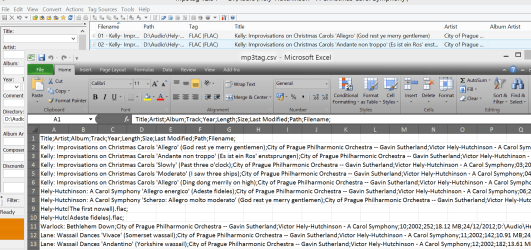
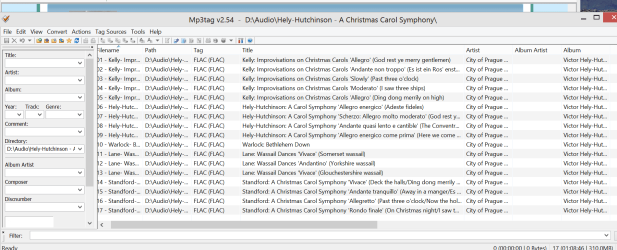
If your music is already tagged - should be if you either RIP from CD or get from ITunes etc then when you open the disc you'll see an output like my screenshots show. Read the programs documentation as you can select what fields you display etc etc. Otherwise you'll have to edit the music titles yourself - often accessing Gracenote or freedb will automatically download song titles / artist info but that's another topic.

Then export the mp3 directory as CSV say to EXCEL (or HTML - or RTF or whatever to IE / Word etc) and then simply print. The menu has the export option.

I like the export to EXCEL as CSV as I can then use it to build up a decent database of my music.

Screen shot enc. Just remove columns you don't want in the excel spread sheet.
2nd screenshot shows output of mp3tag BEFORE export to excel.

Cheers
jimbo
 

Attachments

  • moosik.png
    moosik.png
    91.7 KB · Views: 8
  • mp3tag.png
    mp3tag.png
    66.4 KB · Views: 7

My Computer My Computer

At a glance

Linux CENTOS 7 / various Windows OS'es and se...Intel i7 Intel i58GB, 16GBOn Motherboard
Computer type
PC/Desktop
Computer Manufacturer/Model Number
Custom built, several laptops HP/ASUS
OS
Linux CENTOS 7 / various Windows OS'es and servers
CPU
Intel i7 Intel i5
Memory
8GB, 16GB
Graphics Card(s)
On Motherboard
Sound Card
Realtek HD audio
Monitor(s) Displays
Apple Cinema display, Samsung LCD
Screen Resolution
1920 X 1080
Hard Drives
4 X 1TB SATA
Mouse
Toshiba wireless laser
Internet Speed
> 20MB up

My Computer My Computer

At a glance

Microsoft Windows 7 Home Premium 64-bit 7600IIx4 amd athelon 635 processor2x2gbati radeon HD 5450
Computer Manufacturer/Model Number
Hewlett packard/p6512uk
OS
Microsoft Windows 7 Home Premium 64-bit 7600
CPU
IIx4 amd athelon 635 processor
Motherboard
FOXCONN 2AA9
Memory
2x2gb
Graphics Card(s)
ati radeon HD 5450
Sound Card
(1) Realtek High Definition Audio (2) AMD High Definition
Monitor(s) Displays
samsung lcd tv 32"
Screen Resolution
1360x 768
Hard Drives
(1) WDC WD10 01FAES-60Z2A0 SATA Disk Device (2) Maxtor OneTouch USB Device (3) ST310003 33AS USB Device (4) WD My Book 1111 USB Device
PSU
?
Cooling
air!
Keyboard
wireless hp
Mouse
wireless Hp,optical
Internet Speed
1.10mb/s
Antivirus
MSE
Browser
Firefox
Back
Top