chigwells
New member
Hi guys,
Could anyone explain to me why Windows Firewall starts when I have Comodo Firewall installed and running?
It makes me nervous!
I have a fresh installation of Comodo Internet Security.
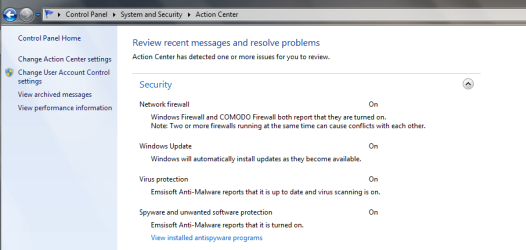
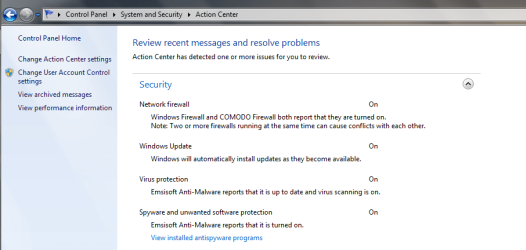
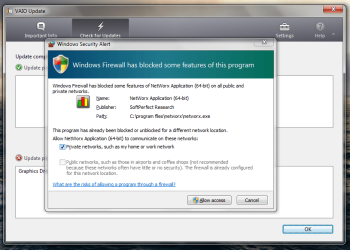
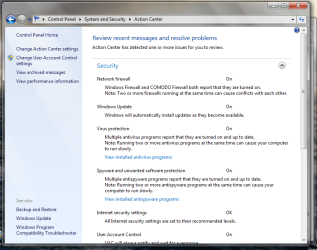
The only reason I knew it was running was because I got the message after a reboot, screenshot 1. When I went into control panel it confirmed I had two firewalls running, screenshot 2. So I have no idea why WF started or how long it had been running.
I seem to remember when I had BitDefender IS2013 it did the same thing, is it to do with my system maybe?
Why does it do that? Is there any way I can ensure Windows Firewall stays off?
BTW, in screenshot 2 you can see I have multiple antivirus programs. well they are Comodo and Emsisoft AM, as well as a rather annoying addition in Advanced System Care Ultimate. Am I right in thinking Emsi is more malware than virus oriented, and compatible with an AV. Also when I installed Advanced System Care Ultimate, they state that their AV is designed to work alongside the main AV. I have it turned off although it still shows up here.
Thanks for any ideas and support, Chig
Could anyone explain to me why Windows Firewall starts when I have Comodo Firewall installed and running?
It makes me nervous!
I have a fresh installation of Comodo Internet Security.
The only reason I knew it was running was because I got the message after a reboot, screenshot 1. When I went into control panel it confirmed I had two firewalls running, screenshot 2. So I have no idea why WF started or how long it had been running.
I seem to remember when I had BitDefender IS2013 it did the same thing, is it to do with my system maybe?
Why does it do that? Is there any way I can ensure Windows Firewall stays off?
BTW, in screenshot 2 you can see I have multiple antivirus programs. well they are Comodo and Emsisoft AM, as well as a rather annoying addition in Advanced System Care Ultimate. Am I right in thinking Emsi is more malware than virus oriented, and compatible with an AV. Also when I installed Advanced System Care Ultimate, they state that their AV is designed to work alongside the main AV. I have it turned off although it still shows up here.
Thanks for any ideas and support, Chig
Attachments
My Computer
At a glance
W8.1 Pro, x64Intel Core i78GB
- Computer type
- Laptop
- Computer Manufacturer/Model Number
- Lenovo Thinkpad T440s
- OS
- W8.1 Pro, x64
- CPU
- Intel Core i7
- Memory
- 8GB
- Monitor(s) Displays
- Built-in, nice matt job
- Hard Drives
- 250GB SSD
- Mouse
- built-in track-pad
- Antivirus
- Panda Dome free
- Browser
- Firefox
- Other Info
- Binisoft WFC Windows Firewall Control, MBAM on-demand, SandboxIE