Windows Firewall starts with 3rd party firewall installed and active

chigwells

New member
Local time
10:04 AM
Messages
19
Location
Currently residing on planet earth
Hi guys,

Could anyone explain to me why Windows Firewall starts when I have Comodo Firewall installed and running?

It makes me nervous! :confused:

I have a fresh installation of Comodo Internet Security.

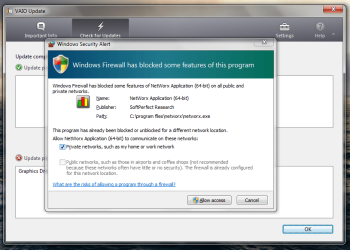
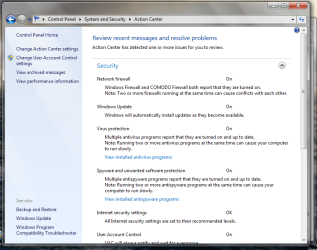
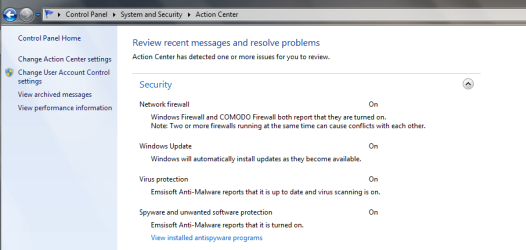
The only reason I knew it was running was because I got the message after a reboot, screenshot 1. When I went into control panel it confirmed I had two firewalls running, screenshot 2. So I have no idea why WF started or how long it had been running.

I seem to remember when I had BitDefender IS2013 it did the same thing, is it to do with my system maybe? :cry:

Why does it do that? Is there any way I can ensure Windows Firewall stays off?

BTW, in screenshot 2 you can see I have multiple antivirus programs. well they are Comodo and Emsisoft AM, as well as a rather annoying addition in Advanced System Care Ultimate. Am I right in thinking Emsi is more malware than virus oriented, and compatible with an AV. Also when I installed Advanced System Care Ultimate, they state that their AV is designed to work alongside the main AV. I have it turned off although it still shows up here.

Thanks for any ideas and support, Chig :thumbsup:
 

Attachments

  • Screenshot 1- W7 firewall after Vaio update.png
    Screenshot 1- W7 firewall after Vaio update.png
    55.3 KB · Views: 7
  • Screenshot 2- firewall W7 + Comodo.png
    Screenshot 2- firewall W7 + Comodo.png
    53.5 KB · Views: 6

My Computer My Computer

At a glance

W8.1 Pro, x64Intel Core i78GB
Computer type
Laptop
Computer Manufacturer/Model Number
Lenovo Thinkpad T440s
OS
W8.1 Pro, x64
CPU
Intel Core i7
Memory
8GB
Monitor(s) Displays
Built-in, nice matt job
Hard Drives
250GB SSD
Mouse
built-in track-pad
Antivirus
Panda Dome free
Browser
Firefox
Other Info
Binisoft WFC Windows Firewall Control, MBAM on-demand, SandboxIE
Personally I would scrap the lot and install Microsoft Security Essentials. You certainly do not need any third party "Advanced System Care" software with Windows 7. I think you are heading for all sorts of conflicts with what you have installed at the moment. You will find your system speeds up when you get rid of all that bloat. I bet if you check Start up they are all there jockeying for position and slowing your system down. Ughhhh!
 

My Computer My Computer

At a glance

Microsoft Windows 7 Home Premium 64-bit 7601 ...Intel(R) Core(TM) i7-3770 CPU @ 3.40GHz8.00 GBIntel(R) HD Graphics 4000
Computer type
PC/Desktop
OS
Microsoft Windows 7 Home Premium 64-bit 7601 Multiprocessor Free Service Pack 1
CPU
Intel(R) Core(TM) i7-3770 CPU @ 3.40GHz
Motherboard
ASUSTeK COMPUTER INC. P8H77-M
Memory
8.00 GB
Graphics Card(s)
Intel(R) HD Graphics 4000
Sound Card
On Board
Monitor(s) Displays
Dell 24"
Screen Resolution
1920 x 1080
Hard Drives
(1) INTEL SSDSC2CT180A3 ATA Device (2) ST500DM002-1BD142 ATA Device (3) WDC WD3200AAKS-75L9A0 ATA Device (4) Generic- Compact Flash USB Device (5) Generic- MS/MS-Pro USB Device (6) Generic- SD/MMC USB Device (7) Generic- SM/xD-Picture USB
PSU
500w Corsair
Case
Cooler Master
Cooling
3 Fans
Keyboard
Logitech MK300
Mouse
Logitech WOM
Internet Speed
75Mb
Antivirus
Norton 360
Browser
Firefox, Opera, IE
You certainly do not need any third party "Advanced System Care" software with Windows 7. Ughhhh!

Hi Mitchel65, thanks for that.

Thing is, as soon as I read your post I've uninstalled ASC-U in an instant, I must've known it needed to go. You're saying W7 takes care of itself and doesn't need all that extra so-called 'help'.

Personally I would scrap the lot and install Microsoft Security Essentials. Ughhhh!

Again you're suggesting I've got too much baggage/ bloat on board. I have had the best experience of all with Emsi AM, and have a couple of years left of subscription, so I'll be sticking with that. However your comments got me thinking, attached screenshot shows it already has both Emsi AM engine and BitDefender AV. I'm thinking at the moment to get rid of Comodo AV and settle with Comodo Firewall and Emsi AM.

I remember now, when I took out the Emsi AM three year sub (got it at a great rate), I was talking with one of the Emsi forum reps, and he was saying Emsi doesn't need to run beside another AV. I figured that was him just trying to sell their product. Now I realise, with the AM and AV dual engines, of course it doesn't need anything else.

Thanks very much for your comments, if you have any further thoughts (or anyone else of course) I'd be very happy to hear.

Cheers, Chig.
 

Attachments

  • Emsi 7 About.png
    Emsi 7 About.png
    11.6 KB · Views: 3

My Computer My Computer

At a glance

W8.1 Pro, x64Intel Core i78GB
Computer type
Laptop
Computer Manufacturer/Model Number
Lenovo Thinkpad T440s
OS
W8.1 Pro, x64
CPU
Intel Core i7
Memory
8GB
Monitor(s) Displays
Built-in, nice matt job
Hard Drives
250GB SSD
Mouse
built-in track-pad
Antivirus
Panda Dome free
Browser
Firefox
Other Info
Binisoft WFC Windows Firewall Control, MBAM on-demand, SandboxIE
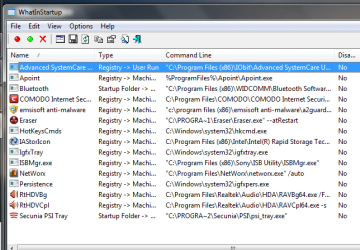
Have you cheked your start up applications as I suggested earlier?
 

My Computer My Computer

At a glance

Microsoft Windows 7 Home Premium 64-bit 7601 ...Intel(R) Core(TM) i7-3770 CPU @ 3.40GHz8.00 GBIntel(R) HD Graphics 4000
Computer type
PC/Desktop
OS
Microsoft Windows 7 Home Premium 64-bit 7601 Multiprocessor Free Service Pack 1
CPU
Intel(R) Core(TM) i7-3770 CPU @ 3.40GHz
Motherboard
ASUSTeK COMPUTER INC. P8H77-M
Memory
8.00 GB
Graphics Card(s)
Intel(R) HD Graphics 4000
Sound Card
On Board
Monitor(s) Displays
Dell 24"
Screen Resolution
1920 x 1080
Hard Drives
(1) INTEL SSDSC2CT180A3 ATA Device (2) ST500DM002-1BD142 ATA Device (3) WDC WD3200AAKS-75L9A0 ATA Device (4) Generic- Compact Flash USB Device (5) Generic- MS/MS-Pro USB Device (6) Generic- SD/MMC USB Device (7) Generic- SM/xD-Picture USB
PSU
500w Corsair
Case
Cooler Master
Cooling
3 Fans
Keyboard
Logitech MK300
Mouse
Logitech WOM
Internet Speed
75Mb
Antivirus
Norton 360
Browser
Firefox, Opera, IE
@chigwells A well written internet security software will work with the operating system (Windows Firewall). In Symantec/Norton's case, there were some confusion early on in my experience understanding who is in charge of the firewall. In the end, it is all good. In your case, Comodo provides the frontline and interior defense with its firewall, while Windows continues to provide the deep core defense through its Firewall. With all that said, it's not advisable to have more than one anti-virus engine running at the same time. "I'm thinking at the moment to get rid of Comodo AV and settle with Comodo Firewall and Emsi AM." That seems sensible.
 

My Computer My Computer

At a glance

Windows 7 Home Premium x64
OS
Windows 7 Home Premium x64
Hi guys thanks a lot for your thoughts.

@mitchell65, not sure what I'm looking for though, posted a screenshot, what am I looking for? (I kept Iobit Smart Defrag after uninstalling ASC-U, I assume that's why it's still listed)

@gigagiggles, yes that's exactly what I've done.

My system is so much 'calmer' now. It hums along without feeling or sounding stressed or bloated, really happy with the improvement.

Removed CIS via All programs > Comodo > Add & Remove components. Now when I boot up, Comodo doesn't always seem to start (tray icon and desktop widget don't show), so I start up with wireless off till I'm sure I have a firewall in place.

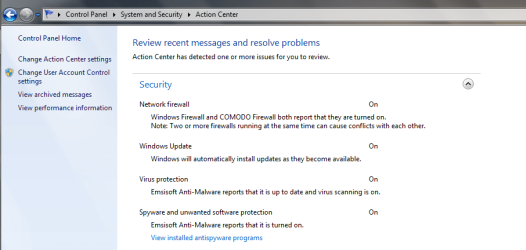
Also, had one instance where I went into Control Panel to check and found both firewalls running, can't remember what happened or why I went to check though.

All in all much happier with my system, still seems a little unstable??

Cheers, Chig
 

Attachments

  • Start ups 19.5.13.png
    Start ups 19.5.13.png
    22.4 KB · Views: 3
  • both firewalls turned on- cropped 18.5.13.png
    both firewalls turned on- cropped 18.5.13.png
    27.3 KB · Views: 2

My Computer My Computer

At a glance

W8.1 Pro, x64Intel Core i78GB
Computer type
Laptop
Computer Manufacturer/Model Number
Lenovo Thinkpad T440s
OS
W8.1 Pro, x64
CPU
Intel Core i7
Memory
8GB
Monitor(s) Displays
Built-in, nice matt job
Hard Drives
250GB SSD
Mouse
built-in track-pad
Antivirus
Panda Dome free
Browser
Firefox
Other Info
Binisoft WFC Windows Firewall Control, MBAM on-demand, SandboxIE
To completely uninstall (Comodo) CIS please do the following

Please note: All personal CIS settings will be lost,


  • Uninstall using the normal CIS uninstaller then reboot
  • Uninstall CIS using the forced uninstaller tool and reboot
  • Run the forced uninstaller tool a second time and reboot
All parts of CIS will now be removed.
 

My Computer My Computer

At a glance

Windows 7 Ultimate 32bit SP1Intel(R) Core(TM)2 Quad CPU @ 2.40GHz, 2400 MHz4 GBATI Radeon HD 2600 Pro
Computer type
PC/Desktop
Computer Manufacturer/Model Number
Bruce ... somewhere in his 40's
OS
Windows 7 Ultimate 32bit SP1
CPU
Intel(R) Core(TM)2 Quad CPU @ 2.40GHz, 2400 MHz
Motherboard
INTEL/D975XBX2
Memory
4 GB
Graphics Card(s)
ATI Radeon HD 2600 Pro
Monitor(s) Displays
Samsung SyncMaster 914v
Screen Resolution
1280 x 1024
Hard Drives
2/500GB each ... ST3500630AS ATA Device.
One is not connected
PSU
Rocketfish 700 W
Case
G.Skill Gigabyte Chassis
Keyboard
Standard PS/2 Keyboard
Mouse
Microsoft PS/2 Mouse
Internet Speed
DSL
Antivirus
Avira Internet Security
Browser
IE 11
Other Info
ATI HDMI Audio

My Computer My Computer

At a glance

Windows 7 Ultimate 32bit SP1Intel(R) Core(TM)2 Quad CPU @ 2.40GHz, 2400 MHz4 GBATI Radeon HD 2600 Pro
Computer type
PC/Desktop
Computer Manufacturer/Model Number
Bruce ... somewhere in his 40's
OS
Windows 7 Ultimate 32bit SP1
CPU
Intel(R) Core(TM)2 Quad CPU @ 2.40GHz, 2400 MHz
Motherboard
INTEL/D975XBX2
Memory
4 GB
Graphics Card(s)
ATI Radeon HD 2600 Pro
Monitor(s) Displays
Samsung SyncMaster 914v
Screen Resolution
1280 x 1024
Hard Drives
2/500GB each ... ST3500630AS ATA Device.
One is not connected
PSU
Rocketfish 700 W
Case
G.Skill Gigabyte Chassis
Keyboard
Standard PS/2 Keyboard
Mouse
Microsoft PS/2 Mouse
Internet Speed
DSL
Antivirus
Avira Internet Security
Browser
IE 11
Other Info
ATI HDMI Audio
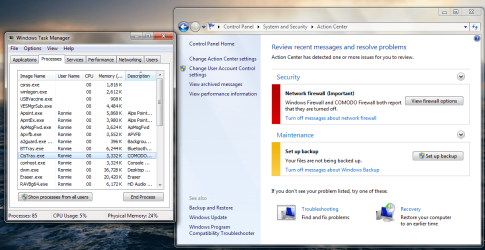
I'm having to start up now with wireless turned off, check Comodo firewall is running, and only then turn on wireless. :cry:

System is running sweet apart from that. :sick:

I'm gonna head over to Comodo forums to see if they have any suggestions.

@Jacee: thanks, I'll see what they say over there first, then I may well uninstall and reinstall :confused:

Please uninstall IObit!!! This program's developers tryed to steal Malwarebytes' Anti-malware definitions to claim as their own. :(
IOBit Steals Malwarebytes' Intellectual Property - Malwarebytes Forum

Hmm, I'd heard about Iobit back then. Iobit unistalled!
 

Attachments

  • both firewalls turned on- cropped 18.5.13.png
    both firewalls turned on- cropped 18.5.13.png
    27.3 KB · Views: 3
  • comodo turned off 21.3.13.png
    comodo turned off 21.3.13.png
    103.6 KB · Views: 3

My Computer My Computer

At a glance

W8.1 Pro, x64Intel Core i78GB
Computer type
Laptop
Computer Manufacturer/Model Number
Lenovo Thinkpad T440s
OS
W8.1 Pro, x64
CPU
Intel Core i7
Memory
8GB
Monitor(s) Displays
Built-in, nice matt job
Hard Drives
250GB SSD
Mouse
built-in track-pad
Antivirus
Panda Dome free
Browser
Firefox
Other Info
Binisoft WFC Windows Firewall Control, MBAM on-demand, SandboxIE
Back
Top