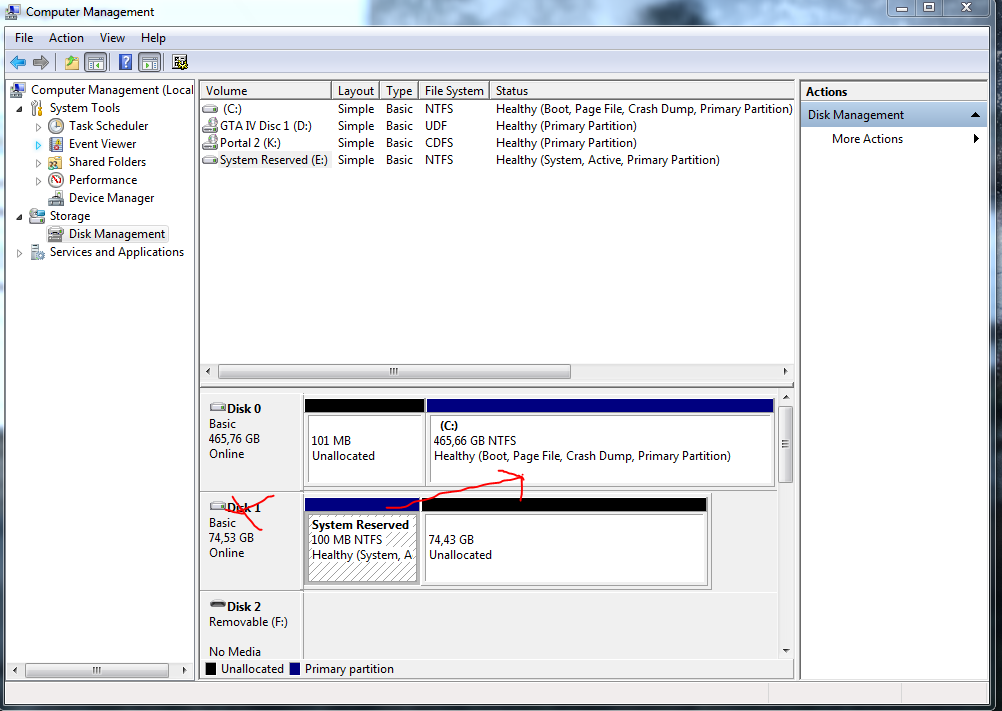
Solved System/Windows files scattered around 2 drives on windows 7.

estXcrew

New member
Member
Local time
1:32 PM
Messages
81
So, I have 2 HDDs. One of them is an old one that i wanted to remove from the start after grabbing the files onto the new one but then it got forgotten etc..

One another day my PC started having HDD problems so i tested both of the drives and the old one didn't work at all pretty much. I thought what the hell, gonna disconnect it from the pc.
After removing the drive i turned on my PC and it said that some kind of system files or such are missing. I went like Woooo wait a minute, i only ever installed my OS on the one main drive!
Then i connected the drive up again and the PC turned on once again. I went to see the computer management > disk management tab and there i saw it, my windows had system reserved space on the "Disk 1", the old drive but it all boots off the "Disk 0", the new drive.
So i ask if there is any ways i can get the system files off the old drive to the new drive without a need to reinstall windows completly.

Also i wonder why my windows has done such a thing.
 

My Computer My Computer

Computer type
PC/Desktop
Computer Manufacturer/Model Number
Ordi
OS
Windows 7 Home Premium SP1, 64 bit
CPU
Athlon 2 x2 250
Motherboard
ECS A740GM-M
Memory
4GB DDR2
Graphics Card(s)
nVida Geforce GT-440
Sound Card
onboard
Monitor(s) Displays
21'' Philips @ 1080p, 19,5''' Samsung @ 1440x900
Hard Drives
500GB SAMSUNG HD502HJ (SATA)
PSU
400w thermaltake
Cooling
Stock CPU fan, one fan on the back
Keyboard
A keyboard
Mouse
A mouse
Internet Speed
7 down 1 up
Antivirus
KIS 2014
Browser
Chrome

My Computer My Computer

Computer type
PC/Desktop
Computer Manufacturer/Model Number
Golden Mk. I.4
OS
Windows 10 Pro x64 ; Xubuntu x64
CPU
Intel i7 860 @ 2.80 GHz O/C'ed to 4.0GHz
Motherboard
Gigabyte P55A-UD3R Rev.1. Award BIOS F13
Memory
16GB Corsair Vengance DDR3 @ 661 MHz Dual Channel (9-9-9-24)
Graphics Card(s)
EVGA NVidia GTX 560 1024MB
Sound Card
Realtek Integrated
Monitor(s) Displays
Dual Samsung SyncMaster 2494HS
Screen Resolution
1920*1080 and 1920*1080
Hard Drives
1*Samsung 840 EVO 120GB SSD;
1*OCZ Vertex 2 60GB SSD;
2*Samsung F3 SpinPoint 1TB in RAID0;
1*Samsung F1 SpinPoint 1TB;
2*Western Digital 1TB External USB 3.0
1*Western Digital 500GB External USB 3.0
1*Seagate 500GB External USB 2.0
PSU
Thermaltake ToughPower QFan 750W
Case
Thermaltake Element S VK60001W2Z
Cooling
Corsair H60 Water Cooling, 2*230mm and 2*80mm case fans
Keyboard
Logitech G110
Mouse
Logitech MX518
Great thanks! I'll try it out right now. Hopefully this will fix my problems with my PC, otherwise im going to need a new system :l
 

My Computer My Computer

Computer type
PC/Desktop
Computer Manufacturer/Model Number
Ordi
OS
Windows 7 Home Premium SP1, 64 bit
CPU
Athlon 2 x2 250
Motherboard
ECS A740GM-M
Memory
4GB DDR2
Graphics Card(s)
nVida Geforce GT-440
Sound Card
onboard
Monitor(s) Displays
21'' Philips @ 1080p, 19,5''' Samsung @ 1440x900
Hard Drives
500GB SAMSUNG HD502HJ (SATA)
PSU
400w thermaltake
Cooling
Stock CPU fan, one fan on the back
Keyboard
A keyboard
Mouse
A mouse
Internet Speed
7 down 1 up
Antivirus
KIS 2014
Browser
Chrome
Sorry for double post but I'm in kind of a hurry.
I did it with the software , restarted, disconnected the old HDD,changed the boot drive in the BIOS Just in case.
it came up with this:
http://i.imgur.com/l5ZvEX4.jpg

Reconnecting the drive and my PC is back up once again
 

My Computer My Computer

Computer type
PC/Desktop
Computer Manufacturer/Model Number
Ordi
OS
Windows 7 Home Premium SP1, 64 bit
CPU
Athlon 2 x2 250
Motherboard
ECS A740GM-M
Memory
4GB DDR2
Graphics Card(s)
nVida Geforce GT-440
Sound Card
onboard
Monitor(s) Displays
21'' Philips @ 1080p, 19,5''' Samsung @ 1440x900
Hard Drives
500GB SAMSUNG HD502HJ (SATA)
PSU
400w thermaltake
Cooling
Stock CPU fan, one fan on the back
Keyboard
A keyboard
Mouse
A mouse
Internet Speed
7 down 1 up
Antivirus
KIS 2014
Browser
Chrome

My Computer My Computer

Computer type
PC/Desktop
Computer Manufacturer/Model Number
Golden Mk. I.4
OS
Windows 10 Pro x64 ; Xubuntu x64
CPU
Intel i7 860 @ 2.80 GHz O/C'ed to 4.0GHz
Motherboard
Gigabyte P55A-UD3R Rev.1. Award BIOS F13
Memory
16GB Corsair Vengance DDR3 @ 661 MHz Dual Channel (9-9-9-24)
Graphics Card(s)
EVGA NVidia GTX 560 1024MB
Sound Card
Realtek Integrated
Monitor(s) Displays
Dual Samsung SyncMaster 2494HS
Screen Resolution
1920*1080 and 1920*1080
Hard Drives
1*Samsung 840 EVO 120GB SSD;
1*OCZ Vertex 2 60GB SSD;
2*Samsung F3 SpinPoint 1TB in RAID0;
1*Samsung F1 SpinPoint 1TB;
2*Western Digital 1TB External USB 3.0
1*Western Digital 500GB External USB 3.0
1*Seagate 500GB External USB 2.0
PSU
Thermaltake ToughPower QFan 750W
Case
Thermaltake Element S VK60001W2Z
Cooling
Corsair H60 Water Cooling, 2*230mm and 2*80mm case fans
Keyboard
Logitech G110
Mouse
Logitech MX518
PXE is a boot from network.
In BIOS make sure you have Boot from Network disabled and your Hard Drive is the first boot device.
 

My Computer My Computer

Computer type
PC/Desktop
Computer Manufacturer/Model Number
home built
OS
Multi-Boot W7_Pro_x64 W8.1_Pro_x64 W10_Pro_x64 +Linux_VMs +Chromium_VM
CPU
AMD Athlon II x4 620
Motherboard
Gigabyte GA-MA785G-UD3H
Memory
6GB GSkill DDR2 800
Graphics Card(s)
AMD 4670 GPU + AMD 4200 IGP
Sound Card
on board Realtek ALC889A
Monitor(s) Displays
RCA 40" LCD TV, Insignia 32" LCD TV, HP 15" LCD monitor
Screen Resolution
1680 x 1050
Hard Drives
OCZ Vertex 3 120GB,
Samsung F3 1TB (3),
Several others - WD, Seagate, Hitachi, ...
PSU
Corsair 500 W
Case
Rosewill mid tower
Cooling
CM 90mm rifle
Keyboard
Gyration wireless, Logitech wireless, Dell USB wired
Mouse
Gyration wireless, Logitech wireless, V7 USB wired
Internet Speed
Spectrum - 100Mbps D / 10Mbps U
Antivirus
Avast, MBAM3, EMET, WinPatrol
Browser
Pale Moon, Firefox, IE
Other Info
2 multi-boot PC's
Mainly HTPC/Office/Gen purpose (no gaming).
Trendnet USB KVM.
LG DVD burner/Blue Ray Player.
Tray system for removable SATA backup drives.

Not currently OCd, under-volted.
I use Hybrid sleep, rarely re-boot or shutdown.

Hauppauge HD-PVR, Avermedia PCIe TV Tuner, Hauppauge PCI TV Tuner.
xVvBE2R.png


Also, you don't need to teach me everything from scratch, i know how to do the basic things, if things get complicated i get confused :P

Noow. Can i just delete the 100mb partition?
I was googling the issue further and got to this:
Transfer Win 7 System Files to another HD - Computers - Windows 7
 

My Computer My Computer

Computer type
PC/Desktop
Computer Manufacturer/Model Number
Ordi
OS
Windows 7 Home Premium SP1, 64 bit
CPU
Athlon 2 x2 250
Motherboard
ECS A740GM-M
Memory
4GB DDR2
Graphics Card(s)
nVida Geforce GT-440
Sound Card
onboard
Monitor(s) Displays
21'' Philips @ 1080p, 19,5''' Samsung @ 1440x900
Hard Drives
500GB SAMSUNG HD502HJ (SATA)
PSU
400w thermaltake
Cooling
Stock CPU fan, one fan on the back
Keyboard
A keyboard
Mouse
A mouse
Internet Speed
7 down 1 up
Antivirus
KIS 2014
Browser
Chrome

My Computer My Computer

Computer type
PC/Desktop
Computer Manufacturer/Model Number
home built
OS
Multi-Boot W7_Pro_x64 W8.1_Pro_x64 W10_Pro_x64 +Linux_VMs +Chromium_VM
CPU
AMD Athlon II x4 620
Motherboard
Gigabyte GA-MA785G-UD3H
Memory
6GB GSkill DDR2 800
Graphics Card(s)
AMD 4670 GPU + AMD 4200 IGP
Sound Card
on board Realtek ALC889A
Monitor(s) Displays
RCA 40" LCD TV, Insignia 32" LCD TV, HP 15" LCD monitor
Screen Resolution
1680 x 1050
Hard Drives
OCZ Vertex 3 120GB,
Samsung F3 1TB (3),
Several others - WD, Seagate, Hitachi, ...
PSU
Corsair 500 W
Case
Rosewill mid tower
Cooling
CM 90mm rifle
Keyboard
Gyration wireless, Logitech wireless, Dell USB wired
Mouse
Gyration wireless, Logitech wireless, V7 USB wired
Internet Speed
Spectrum - 100Mbps D / 10Mbps U
Antivirus
Avast, MBAM3, EMET, WinPatrol
Browser
Pale Moon, Firefox, IE
Other Info
2 multi-boot PC's
Mainly HTPC/Office/Gen purpose (no gaming).
Trendnet USB KVM.
LG DVD burner/Blue Ray Player.
Tray system for removable SATA backup drives.

Not currently OCd, under-volted.
I use Hybrid sleep, rarely re-boot or shutdown.

Hauppauge HD-PVR, Avermedia PCIe TV Tuner, Hauppauge PCI TV Tuner.
From your attachment it appears you didn't run EASYBCD ....... if you had, the SYSTEM would be on C! and it would be active. Can you try it again?
 

My Computer My Computer

Computer type
PC/Desktop
Computer Manufacturer/Model Number
Golden Mk. I.4
OS
Windows 10 Pro x64 ; Xubuntu x64
CPU
Intel i7 860 @ 2.80 GHz O/C'ed to 4.0GHz
Motherboard
Gigabyte P55A-UD3R Rev.1. Award BIOS F13
Memory
16GB Corsair Vengance DDR3 @ 661 MHz Dual Channel (9-9-9-24)
Graphics Card(s)
EVGA NVidia GTX 560 1024MB
Sound Card
Realtek Integrated
Monitor(s) Displays
Dual Samsung SyncMaster 2494HS
Screen Resolution
1920*1080 and 1920*1080
Hard Drives
1*Samsung 840 EVO 120GB SSD;
1*OCZ Vertex 2 60GB SSD;
2*Samsung F3 SpinPoint 1TB in RAID0;
1*Samsung F1 SpinPoint 1TB;
2*Western Digital 1TB External USB 3.0
1*Western Digital 500GB External USB 3.0
1*Seagate 500GB External USB 2.0
PSU
Thermaltake ToughPower QFan 750W
Case
Thermaltake Element S VK60001W2Z
Cooling
Corsair H60 Water Cooling, 2*230mm and 2*80mm case fans
Keyboard
Logitech G110
Mouse
Logitech MX518
Can't i just somehow move the system files to the new HDD? ._.

Cause i don't have a clue the installation disc's location in my house..
 

My Computer My Computer

Computer type
PC/Desktop
Computer Manufacturer/Model Number
Ordi
OS
Windows 7 Home Premium SP1, 64 bit
CPU
Athlon 2 x2 250
Motherboard
ECS A740GM-M
Memory
4GB DDR2
Graphics Card(s)
nVida Geforce GT-440
Sound Card
onboard
Monitor(s) Displays
21'' Philips @ 1080p, 19,5''' Samsung @ 1440x900
Hard Drives
500GB SAMSUNG HD502HJ (SATA)
PSU
400w thermaltake
Cooling
Stock CPU fan, one fan on the back
Keyboard
A keyboard
Mouse
A mouse
Internet Speed
7 down 1 up
Antivirus
KIS 2014
Browser
Chrome
From your attachment it appears you didn't run EASYBCD ....... if you had, the SYSTEM would be on C! and it would be active. Can you try it again?

Actually i did, but it appears it didnt work. :o
I'l.l try again
 

My Computer My Computer

Computer type
PC/Desktop
Computer Manufacturer/Model Number
Ordi
OS
Windows 7 Home Premium SP1, 64 bit
CPU
Athlon 2 x2 250
Motherboard
ECS A740GM-M
Memory
4GB DDR2
Graphics Card(s)
nVida Geforce GT-440
Sound Card
onboard
Monitor(s) Displays
21'' Philips @ 1080p, 19,5''' Samsung @ 1440x900
Hard Drives
500GB SAMSUNG HD502HJ (SATA)
PSU
400w thermaltake
Cooling
Stock CPU fan, one fan on the back
Keyboard
A keyboard
Mouse
A mouse
Internet Speed
7 down 1 up
Antivirus
KIS 2014
Browser
Chrome
Im really sorry that I'm doing multiple posts in a row, please dont mind
I've ran the software twice now, still has no effect whatsoever.
EasyBCD - Imgur
(note that i refreshed the disk management window inbetween)
edit:
When i disconnect the old HDD now it says that the windows isn't found, when i disconnect the new one it says that A part of windows is missing and im able to use the windows CD to fix it.

What has happened?
 
Last edited:

My Computer My Computer

Computer type
PC/Desktop
Computer Manufacturer/Model Number
Ordi
OS
Windows 7 Home Premium SP1, 64 bit
CPU
Athlon 2 x2 250
Motherboard
ECS A740GM-M
Memory
4GB DDR2
Graphics Card(s)
nVida Geforce GT-440
Sound Card
onboard
Monitor(s) Displays
21'' Philips @ 1080p, 19,5''' Samsung @ 1440x900
Hard Drives
500GB SAMSUNG HD502HJ (SATA)
PSU
400w thermaltake
Cooling
Stock CPU fan, one fan on the back
Keyboard
A keyboard
Mouse
A mouse
Internet Speed
7 down 1 up
Antivirus
KIS 2014
Browser
Chrome
So, I have 2 HDDs. One of them is an old one that i wanted to remove from the start after grabbing the files onto the new one but then it got forgotten etc..

One another day my PC started having HDD problems so i tested both of the drives and the old one didn't work at all pretty much. I thought what the hell, gonna disconnect it from the pc.
After removing the drive i turned on my PC and it said that some kind of system files or such are missing. I went like Woooo wait a minute, i only ever installed my OS on the one main drive!
Then i connected the drive up again and the PC turned on once again. I went to see the computer management > disk management tab and there i saw it, my windows had system reserved space on the "Disk 1", the old drive but it all boots off the "Disk 0", the new drive.
So i ask if there is any ways i can get the system files off the old drive to the new drive without a need to reinstall windows completly.

Also i wonder why my windows has done such a thing.

Did you ever do a Windows install on the 2nd hard drive?
You can't just "grab" files from one HD to another to use the new HD as an OS drive.
You need to do a clean install or restore a System Image (of the old drive) on the new HD.
 

My Computer My Computer

Computer type
PC/Desktop
Computer Manufacturer/Model Number
home built
OS
Multi-Boot W7_Pro_x64 W8.1_Pro_x64 W10_Pro_x64 +Linux_VMs +Chromium_VM
CPU
AMD Athlon II x4 620
Motherboard
Gigabyte GA-MA785G-UD3H
Memory
6GB GSkill DDR2 800
Graphics Card(s)
AMD 4670 GPU + AMD 4200 IGP
Sound Card
on board Realtek ALC889A
Monitor(s) Displays
RCA 40" LCD TV, Insignia 32" LCD TV, HP 15" LCD monitor
Screen Resolution
1680 x 1050
Hard Drives
OCZ Vertex 3 120GB,
Samsung F3 1TB (3),
Several others - WD, Seagate, Hitachi, ...
PSU
Corsair 500 W
Case
Rosewill mid tower
Cooling
CM 90mm rifle
Keyboard
Gyration wireless, Logitech wireless, Dell USB wired
Mouse
Gyration wireless, Logitech wireless, V7 USB wired
Internet Speed
Spectrum - 100Mbps D / 10Mbps U
Antivirus
Avast, MBAM3, EMET, WinPatrol
Browser
Pale Moon, Firefox, IE
Other Info
2 multi-boot PC's
Mainly HTPC/Office/Gen purpose (no gaming).
Trendnet USB KVM.
LG DVD burner/Blue Ray Player.
Tray system for removable SATA backup drives.

Not currently OCd, under-volted.
I use Hybrid sleep, rarely re-boot or shutdown.

Hauppauge HD-PVR, Avermedia PCIe TV Tuner, Hauppauge PCI TV Tuner.
1) I got a new PC
2) I rescued some old files from it (cat Pics, etc..)
3) Had problems with windows, reinstalled
4) Now having problems with the old HDD but cant get rid of it because windows put some shitty partition on my old HDD.
 

My Computer My Computer

Computer type
PC/Desktop
Computer Manufacturer/Model Number
Ordi
OS
Windows 7 Home Premium SP1, 64 bit
CPU
Athlon 2 x2 250
Motherboard
ECS A740GM-M
Memory
4GB DDR2
Graphics Card(s)
nVida Geforce GT-440
Sound Card
onboard
Monitor(s) Displays
21'' Philips @ 1080p, 19,5''' Samsung @ 1440x900
Hard Drives
500GB SAMSUNG HD502HJ (SATA)
PSU
400w thermaltake
Cooling
Stock CPU fan, one fan on the back
Keyboard
A keyboard
Mouse
A mouse
Internet Speed
7 down 1 up
Antivirus
KIS 2014
Browser
Chrome
Hi,

Mmm...I've never encountered a situation where EasyBCD could not move the System files into the C:.

However, looking at your Disk Management screen, I notice a 101MB Unallocated partition sitting in front of your C:. I wonder if that is causing a problem?

Try removing the 101MB Unallocated partition by resizing C: into the unallocated space, then running EasyBCD again.

Use Partition Wizard from a bootable USB/CD/DVD for this operation:
http://www.sevenforums.com/tutorials/93322-partition-wizard-use-bootable-cd.html

It should look similar to this when you are done - note the red arrows:
1.PNG
 

My Computer My Computer

Computer type
PC/Desktop
Computer Manufacturer/Model Number
Golden Mk. I.4
OS
Windows 10 Pro x64 ; Xubuntu x64
CPU
Intel i7 860 @ 2.80 GHz O/C'ed to 4.0GHz
Motherboard
Gigabyte P55A-UD3R Rev.1. Award BIOS F13
Memory
16GB Corsair Vengance DDR3 @ 661 MHz Dual Channel (9-9-9-24)
Graphics Card(s)
EVGA NVidia GTX 560 1024MB
Sound Card
Realtek Integrated
Monitor(s) Displays
Dual Samsung SyncMaster 2494HS
Screen Resolution
1920*1080 and 1920*1080
Hard Drives
1*Samsung 840 EVO 120GB SSD;
1*OCZ Vertex 2 60GB SSD;
2*Samsung F3 SpinPoint 1TB in RAID0;
1*Samsung F1 SpinPoint 1TB;
2*Western Digital 1TB External USB 3.0
1*Western Digital 500GB External USB 3.0
1*Seagate 500GB External USB 2.0
PSU
Thermaltake ToughPower QFan 750W
Case
Thermaltake Element S VK60001W2Z
Cooling
Corsair H60 Water Cooling, 2*230mm and 2*80mm case fans
Keyboard
Logitech G110
Mouse
Logitech MX518
Back
Top