UEFI (Unified Extensible Firmware Interface) - Install Windows 7 with

How to Install Windows 7 Using the "Unified Extensible Firmware Interface" (UEFI)


   Information
In addition to better interoperability, UEFI firmware provides several technical advantages:
  • Compatibility with operating systems that support only BIOS
  • Ability to boot from large disks
  • CPU-independent architecture
  • CPU-independent drivers
  • Flexible pre-OS environment
  • Modular design
Two of the most notable Windows features for UEFI systems are the following:
  • Multicast deployment, which enables large scale network-based image deployment in manufacturing and enterprise settings.
  • Fast boot and resume from hibernation, which improves user experience.
The rich UEFI interface provides ample room for innovation in the development of operating system features. Along with the other members of the Unified EFI Forum, Microsoft is investigating the following:
  • Rootkit prevention
  • Network authentication
-Microsoft Corporation
This method can also be used for the UEFI installation of Windows 8, Windows Server 2008 SP1, Windows Server 2008 R2, and Windows Vista SP1.

   Note
You will need to satisfy the following requirements in order to proceed:

  • A Windows 7 compatible system
  • A Windows 7 x64-bit installation media. 32-bit is not supported.
  • A UEFI v2.0+ compliant PC. Check your chipset manufacturer/firmware documentation.
  • A blank, partition-free, hard disk for installation.
   Warning

  • Disabling UEFI will make the system unbootable as there is no MBR on the disks.
  • You CANNOT make a sector-by-sector copy of GPT disks. The Disk and Partition GUIDs will no longer be unique. This must never happen. You can make a sector-by-sector copy of the contents of ESP or basic data partitions.
  • Disable secure boot before installing Windows 7.


Here's How:

1. Do step 2 or 3 below depending on what installation Media you are using.

2. If using a Retail 64-bit Windows 7 Installation DVD A) Insert the DVD, restart the computer, and go to step 4 below.
3. If using a 64-bit Windows 7 Installation USB Flash Drive with UEFI A) If you have not already, you will need to create a Windows 7 installation bootable USB flash drive for UEFI from either a Windows 7 installation ISO or DVD.

B) Connect the USB, restart the computer, and go to step 4 below.
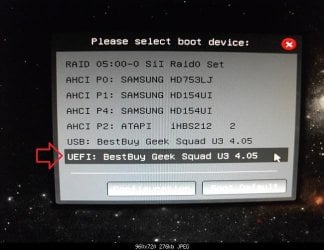
4. Press whatever key (ex: F11) it shows to boot to your motherboard's boot menu, and select to boot from the DVD or UEFI USB. (see screenshot below) UEFI_USB_Boot_Menu.jpg
5. Do steps 3 to 7 in the tutorial link below. http://www.sevenforums.com/tutorials/1649-clean-install-windows-7-a.html
6. Delete all partitions/volumes on the disk # (ex: Disk 0) that you want to install Windows 7 as UEFI on until that disk # shows as unallocated space. (see screenshot below) Step7.jpg
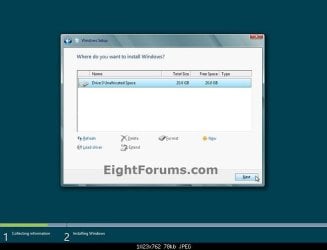
7. When you are finished, click/tap on New, Apply (for full size of disk), and OK. (see screenshot above)

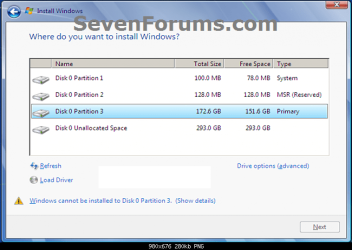
8. You will notice that the disk has now been formatted as GPT with 3 partitions. Select the "Primary" partition 3, and click/tap on Next. (see screenshot below)
NOTE: You might receive a "Windows can't be installed on drive 0" warning, but as long as you can click on the Next button, you're fine.
   Note
The 3 partitions are:
  • Partition 1 - System - The EFI System partition that contains the NTLDR, HAL, Boot.txt, and other files that are needed to boot the system, such as drivers.
  • Partition 2 - MSR - The Microsoft Reserved (MSR) partition that reserves space on each disk drive for subsequent use by operating system software.
  • Partition 3 - Primary - Where Windows is to be installed to.

    It is imperative that these 3 partitions remain in the exact order as they are


Windows7.PNG
9. You can now finish doing the steps in either tutorial below.

10. That's it. You have successfully installed Windows 7 on an UEFI system.


External Links:


Windows and GPT FAQ
Unified Extensible Firmware Interface - Wikipedia, the free encyclopedia
UEFI and Windows
 
Last edited by a moderator:
Thanks, Shawn - looking forward to trying it out once all the hardware gets here. Just wanted to make sure there weren't any 'gotchas' to trip me up.

You're most welcome. Please let us know how it went. :)
 

My Computer My Computer

At a glance

64-bit Windows 11 Pro for WorkstationsIntel i7-8700K OC'd to 5 GHz64 GB (4x16GB) G.SKILL TridentZ RGB DDR4 3600...ASUS ROG-STRIX-GTX1080TI-O11G-GAMING
Computer type
PC/Desktop
Computer Manufacturer/Model Number
Self built custom
OS
64-bit Windows 11 Pro for Workstations
CPU
Intel i7-8700K OC'd to 5 GHz
Motherboard
ASUS ROG Maximus XI Formula Z390
Memory
64 GB (4x16GB) G.SKILL TridentZ RGB DDR4 3600 MHz
Graphics Card(s)
ASUS ROG-STRIX-GTX1080TI-O11G-GAMING
Sound Card
Integrated
Monitor(s) Displays
2 x Samsung Odyssey G7 27"
Screen Resolution
2560x1440
Hard Drives
1TB Samsung 990 PRO M.2,
4TB Samsung 990 PRO PRO M.2,
TerraMaster F8 SSD Plus NAS
PSU
Seasonic Prime Titanium 850W
Case
Thermaltake Core P3
Cooling
Corsair Hydro H115i
Keyboard
Logitech wireless K800
Mouse
Logitech MX Master 4
Internet Speed
2 Gb/s Download and 100 Mb/s Upload
Antivirus
Malwarebyte Anti-Malware Premium
Browser
Google Chrome
Other Info
Logitech Z625 speaker system,
Logitech BRIO 4K Pro webcam,
HP Color LaserJet Pro MFP M477fdn,
APC SMART-UPS RT 1000 XL - SURT1000XLI,
Galaxy S23 Plus phone
Will do - planning on a full clean install using Kari's tutorial. Going to partition out the 2TB Seagate for media/backups. Not quite sure what to do with the existing SATA II SSD and platter drives, but I'm sure I'll figure something out!
 

My Computer My Computer

At a glance

Win7 Ultimate 64bitI3-32202x4GB DDR3 1600Nvidia 660 GTX Superclocked 2GB
Computer type
PC/Desktop
Computer Manufacturer/Model Number
Homebuild
OS
Win7 Ultimate 64bit
CPU
I3-3220
Motherboard
MSI H77MA-G43
Memory
2x4GB DDR3 1600
Graphics Card(s)
Nvidia 660 GTX Superclocked 2GB
Sound Card
n/a
Monitor(s) Displays
Hannspree HZ281HPB
Screen Resolution
1920x1200
Hard Drives
Samsung 840 Pro 128Gb SSD
Seagate Barracuda 2TB
Case
Antec Sonata
Cooling
OEM HS
Keyboard
MS Arc
Mouse
Logitech Wireless
Hi everyone,

Thanks for providing the tutorial, I made my way here through google :).
I bought new hardware some months ago and finally wanted to get everything running the way it was intended to run from the beginning (triple boot using Win8, Win7 and CentOS).

I own MSDNAA/Dreamspark copies of Windows 7 Professional 64bit and Windows 8 "N" and have been trying to get my Windows 7 UEFI install up and running since yesterday. It's really starting to drive me crazy, because I simply never get to complete the installation.

Some further detail about my Hardware:
Xeon E3-1230v2
asrock H77 Pro4/MVP
Seagate 3TB disk

I can access the "UEFI" boot mode for the DVD-drive through my boot menu, so it is indeed starting in EFI mode.
During my first run I kept all UEFI settings default (secure boot disabled, "boot mode" was set to "setup"). The disk was pre-initialized with a GPT (using gparted) and during the partitioning process of the Windows 7 installation procedure I was able to create 3 partitions, however, a warning displayed as also mentioned in the tutorial ("Windows cannot be installed to this disk. This computer's hardware may not support booting from this disk. Ensure that the disk's controller is enabled in the computer's BIOS.").
I disregarded the message and hit next, the installation then proceeds until right after the updates are installed, rebooting thereafter.

Whatsoever, the installation process does not continue from there on. In the UEFI boot menu it shows "Windows Boot Manager" as top priority and if firing that up I get an "unexpected error" (Status 0xc0000225) - it says that due to recent hardware or softwarechanges windows might not be bootable.

I reiterated several times, using diskpart instead of gparted, setting secure boot to enabled (thereby changing the "boot mode" to user), resetting it to disabled and so on and so forth - without any success.

I would be really glad if someone could help me out - has anyone gotten Windows 7 to run on that particular board? I figure the Z77 series should do as well (someone over here seems to have gotten it running).

Thanks a lot in advance for any advice.
 

My Computer My Computer

At a glance

Windows 7 Professional 64bit
Computer type
PC/Desktop
OS
Windows 7 Professional 64bit
Hi everyone,

....

Hello, i have same problem and same version of Windows 7 professional x64 MSDNaa without SP1. Does anyone know how to solve this?

Edit: Motherboard Asus Sabertooth 990FX
 
Last edited:

My Computer My Computer

At a glance

Windows 7 x64
Computer type
PC/Desktop
OS
Windows 7 x64
Hi all;
Just wanna ask for some advice. I am about to "downgrade" my Lenovo Y580 from Win8 to Win7 Home Premium (64 bits). Obviously, the Lenovo Y580 comes pre-installed with Win8 and UEFI enabled. After researching via Google, apparently, Win7 can be installed on both BIOS and UEFI. However, UEFI seems to be very complicated / daunting to me. I am just an average everyday computer user. Hence, does going the extra mile to install Win7 on UEFI brings any considerable benefits?

Also, in terms of doing a cold boot, which is faster? Win 7 on UEFI or on BIOS? Or the difference is just a few seconds and it is negligible?
 

My Computer My Computer

At a glance

Windows 7 Home Premium 64Bit
Computer type
Laptop
Computer Manufacturer/Model Number
Lenovo Ideapad Y580
OS
Windows 7 Home Premium 64Bit
Interesting YouTube video but it doesn't convince me to change. I thought the comment that went along the lines the old BIOS code was written in assembly language while the new was written in C a bit amusing. What do you think any high level language gets turned into (CPU instruction set). If anything this makes it easier for hackers to play around with your BIOS boot code.
 
Last edited:

My Computer My Computer

At a glance

Windows 7x64 Home Premium SP1Intel i7 2600kG.Skill Ripjaws (DDR3-1600) 2x4GBNvidia GeForce GTS 450; Intel HD Graphics 300...
Computer type
PC/Desktop
Computer Manufacturer/Model Number
Own build
OS
Windows 7x64 Home Premium SP1
CPU
Intel i7 2600k
Motherboard
ASUS P8Z68 Deluxe
Memory
G.Skill Ripjaws (DDR3-1600) 2x4GB
Graphics Card(s)
Nvidia GeForce GTS 450; Intel HD Graphics 3000(GT2+)
Monitor(s) Displays
Dell Ultrasharp IPS panel U2311H, Samsung SyncMaster P2350
Screen Resolution
1920x1080
Hard Drives
Samsung 850 Pro SSD 256GB, Samsung SSD 840 120GB, Seagates 1TB Barracuda ST31000528AS x2
PSU
Seasonic M12II 520W
Case
Lian Li Lancool PC-K60
Cooling
Case: 1x120mm, 3x140mm CPU: Hyper 212+
Keyboard
Logitech MK520 (wireless)
Mouse
Logitech MK520
Internet Speed
6-7 Mbps
Antivirus
Norton Security Premium, Malwarebytes on 2 (MSE on 3rd PC)
Browser
FireFox
Other Info
Audio: Logitech Z523 2.1
I see no real improvement with UEFI or Secure Boot which just upend all of the install and repair regimens we mostly developed here since beta. But I'm also wary to wholesale advise users to Bypass UEFI to Install WIn7 since the Best Practice isn't certain yet. It also caused Saltgrass who has the edge on UEFI help knowledge to storm out when I suggested BIOS/MBR installs too much. That is still a sore spot with me I feel guilty about.

Some users do brag about much faster boots and for some reason like the UEFI GUI which is useful how exactly?
 
My motherboard is UEFI BIOS and the GUI is definitely far better. However, I still do an MBR boot.
I must admit it was so long ago that I did the clean install I cannot remember how I chose MBR over UEFI for booting. Does it come up as an option or does it depend on whether your HDD is GPT formatted? What happens when installing to an unallocated drive with a UEFI BIOS. My memory must be going!
 
Last edited:

My Computer My Computer

At a glance

Windows 7x64 Home Premium SP1Intel i7 2600kG.Skill Ripjaws (DDR3-1600) 2x4GBNvidia GeForce GTS 450; Intel HD Graphics 300...
Computer type
PC/Desktop
Computer Manufacturer/Model Number
Own build
OS
Windows 7x64 Home Premium SP1
CPU
Intel i7 2600k
Motherboard
ASUS P8Z68 Deluxe
Memory
G.Skill Ripjaws (DDR3-1600) 2x4GB
Graphics Card(s)
Nvidia GeForce GTS 450; Intel HD Graphics 3000(GT2+)
Monitor(s) Displays
Dell Ultrasharp IPS panel U2311H, Samsung SyncMaster P2350
Screen Resolution
1920x1080
Hard Drives
Samsung 850 Pro SSD 256GB, Samsung SSD 840 120GB, Seagates 1TB Barracuda ST31000528AS x2
PSU
Seasonic M12II 520W
Case
Lian Li Lancool PC-K60
Cooling
Case: 1x120mm, 3x140mm CPU: Hyper 212+
Keyboard
Logitech MK520 (wireless)
Mouse
Logitech MK520
Internet Speed
6-7 Mbps
Antivirus
Norton Security Premium, Malwarebytes on 2 (MSE on 3rd PC)
Browser
FireFox
Other Info
Audio: Logitech Z523 2.1
That is the appeal of UEFI , it looks better. Is it more functional, no..well you can use your mouse, and view it from within windows.
 

My Computer My Computer

At a glance

Windows 10 Pro X64Intel(R) Core(TM) i5-3570K CPU OC@ 4.5GHZ Turbo8.00 GB DDR3 1600MhzMSI Gaming X GTX 1070
Computer type
PC/Desktop
Computer Manufacturer/Model Number
Dude Build
OS
Windows 10 Pro X64
CPU
Intel(R) Core(TM) i5-3570K CPU OC@ 4.5GHZ Turbo
Motherboard
MSI Z77A-G45 Gaming
Memory
8.00 GB DDR3 1600Mhz
Graphics Card(s)
MSI Gaming X GTX 1070
Sound Card
Realtek High Definition
Monitor(s) Displays
Dell S23O9W, HP L1710
Screen Resolution
DELL-1920 x 1080 HP-1280 x1024
Hard Drives
Crucial m4 256 SSD, WD 7200RPM 500GB WD 1TB
PSU
Seasonic X650 GOLD
Case
Zalman Z12
Cooling
Antec Kuhler 920
Keyboard
Logitech
Mouse
MSI DS100 Interceptor
Internet Speed
50 down and 5 up
Antivirus
MSE
Browser
Chrome, IE 11
Other Info
Logitech X-620 Speakers
My motherboard is UEFI BIOS and the GUI is definitely far better. However, I still do an MBR boot.
I must admit it was so long ago that I did the clean install I cannot remember how I chose MBR over UEFI for booting. Does it come up as an option or does it depend on whether your HDD is GPT formatted? What happens when installing to an unallocated drive with a UEFI BIOS. My memory must be going!

Every mobo is different but generally it requires booting UEFI DVD or flash stick choice from BIOS Boot Menu, wiping the HD or deleting all partitions during install in case it is MBR to have it install to GPT disk.

To Bypass UEFI requires changing BIOS to enable Legacy BIOS or Compatibility Support Module (CSM), then wiping the HD of deleting all partitions so it will configure it MBR.

Some mobos hide these settings or lock you out of them. In Win8 they are most often accessed from Advanced Recovery Options as shown in Downgrade Windows 8 to Windows 7.

11456d1353164712-downgrade-windows-8-windows-7-windows-8-downgrade-009-sb.png


An 8 machine also requires turning off Secure Boot.
 
Last edited:
I see nothing like that on my Asus P8Z68 or AsRock Z77M. The installs were carried out on MBR formatted drives. It appears the UEFI BIOS automatically MBR boots for MBR formatted drives. I'm only guessing that a GPT formatted drive with a UEFI BIOS would put in the MSR partition as well as system reserved when installing.
Any other views?
 

My Computer My Computer

At a glance

Windows 7x64 Home Premium SP1Intel i7 2600kG.Skill Ripjaws (DDR3-1600) 2x4GBNvidia GeForce GTS 450; Intel HD Graphics 300...
Computer type
PC/Desktop
Computer Manufacturer/Model Number
Own build
OS
Windows 7x64 Home Premium SP1
CPU
Intel i7 2600k
Motherboard
ASUS P8Z68 Deluxe
Memory
G.Skill Ripjaws (DDR3-1600) 2x4GB
Graphics Card(s)
Nvidia GeForce GTS 450; Intel HD Graphics 3000(GT2+)
Monitor(s) Displays
Dell Ultrasharp IPS panel U2311H, Samsung SyncMaster P2350
Screen Resolution
1920x1080
Hard Drives
Samsung 850 Pro SSD 256GB, Samsung SSD 840 120GB, Seagates 1TB Barracuda ST31000528AS x2
PSU
Seasonic M12II 520W
Case
Lian Li Lancool PC-K60
Cooling
Case: 1x120mm, 3x140mm CPU: Hyper 212+
Keyboard
Logitech MK520 (wireless)
Mouse
Logitech MK520
Internet Speed
6-7 Mbps
Antivirus
Norton Security Premium, Malwarebytes on 2 (MSE on 3rd PC)
Browser
FireFox
Other Info
Audio: Logitech Z523 2.1
I see nothing like that on my Asus P8Z68 or AsRock Z77M. The installs were carried out on MBR formatted drives. It appears the UEFI BIOS automatically MBR boots for MBR formatted drives. I'm only guessing that a GPT formatted drive with a UEFI BIOS would put in the MSR partition as well as system reserved when installing.
Any other views?

Hello Michael,

If your UEFI firmware settings has the Legacy BIOS or Compatibility Support Module (CSM) settings, they would need to be disabled before installing with UEFI.

When installing with UEFI, it needs to be done on an unallocated drive. This way when you install from a UEFI USB/DVD of a 64-bit Windows 7/8, it will format the drive as GPT with the MSR and other partitions for UEFI.

Hope this helps. :)
 

My Computer My Computer

At a glance

64-bit Windows 11 Pro for WorkstationsIntel i7-8700K OC'd to 5 GHz64 GB (4x16GB) G.SKILL TridentZ RGB DDR4 3600...ASUS ROG-STRIX-GTX1080TI-O11G-GAMING
Computer type
PC/Desktop
Computer Manufacturer/Model Number
Self built custom
OS
64-bit Windows 11 Pro for Workstations
CPU
Intel i7-8700K OC'd to 5 GHz
Motherboard
ASUS ROG Maximus XI Formula Z390
Memory
64 GB (4x16GB) G.SKILL TridentZ RGB DDR4 3600 MHz
Graphics Card(s)
ASUS ROG-STRIX-GTX1080TI-O11G-GAMING
Sound Card
Integrated
Monitor(s) Displays
2 x Samsung Odyssey G7 27"
Screen Resolution
2560x1440
Hard Drives
1TB Samsung 990 PRO M.2,
4TB Samsung 990 PRO PRO M.2,
TerraMaster F8 SSD Plus NAS
PSU
Seasonic Prime Titanium 850W
Case
Thermaltake Core P3
Cooling
Corsair Hydro H115i
Keyboard
Logitech wireless K800
Mouse
Logitech MX Master 4
Internet Speed
2 Gb/s Download and 100 Mb/s Upload
Antivirus
Malwarebyte Anti-Malware Premium
Browser
Google Chrome
Other Info
Logitech Z625 speaker system,
Logitech BRIO 4K Pro webcam,
HP Color LaserJet Pro MFP M477fdn,
APC SMART-UPS RT 1000 XL - SURT1000XLI,
Galaxy S23 Plus phone
Thanks Brink.
My Asus UEFI motherboard was top of the line when I bought it a couple of years ago and Ive scoured the BIOS and cannot see either "Legacy BIOS or Compatibility Support Module (CSM) settings".
I wonder if any other ASUS motherboard owners have these settings?

Now the only remaining puzzle is you refer to "UEFI USB/DVD of a 64-bit Windows 7/8". I have standard Windows 7 Installation discs. One retail and some OEM for PCs I built. Are you saying that you need UEFI specific installation media? - or create an install USB using
http://www.eightforums.com/tutorials/15458-uefi-bootable-usb-flash-drive-create-windows.html

Thanks for any help here.
 

My Computer My Computer

At a glance

Windows 7x64 Home Premium SP1Intel i7 2600kG.Skill Ripjaws (DDR3-1600) 2x4GBNvidia GeForce GTS 450; Intel HD Graphics 300...
Computer type
PC/Desktop
Computer Manufacturer/Model Number
Own build
OS
Windows 7x64 Home Premium SP1
CPU
Intel i7 2600k
Motherboard
ASUS P8Z68 Deluxe
Memory
G.Skill Ripjaws (DDR3-1600) 2x4GB
Graphics Card(s)
Nvidia GeForce GTS 450; Intel HD Graphics 3000(GT2+)
Monitor(s) Displays
Dell Ultrasharp IPS panel U2311H, Samsung SyncMaster P2350
Screen Resolution
1920x1080
Hard Drives
Samsung 850 Pro SSD 256GB, Samsung SSD 840 120GB, Seagates 1TB Barracuda ST31000528AS x2
PSU
Seasonic M12II 520W
Case
Lian Li Lancool PC-K60
Cooling
Case: 1x120mm, 3x140mm CPU: Hyper 212+
Keyboard
Logitech MK520 (wireless)
Mouse
Logitech MK520
Internet Speed
6-7 Mbps
Antivirus
Norton Security Premium, Malwarebytes on 2 (MSE on 3rd PC)
Browser
FireFox
Other Info
Audio: Logitech Z523 2.1
Correct. If you use a normal 64-bit Windows 7 installation disc it may not always support UEFI, so it would be best to create a UEFI USB to be sure.
 

My Computer My Computer

At a glance

64-bit Windows 11 Pro for WorkstationsIntel i7-8700K OC'd to 5 GHz64 GB (4x16GB) G.SKILL TridentZ RGB DDR4 3600...ASUS ROG-STRIX-GTX1080TI-O11G-GAMING
Computer type
PC/Desktop
Computer Manufacturer/Model Number
Self built custom
OS
64-bit Windows 11 Pro for Workstations
CPU
Intel i7-8700K OC'd to 5 GHz
Motherboard
ASUS ROG Maximus XI Formula Z390
Memory
64 GB (4x16GB) G.SKILL TridentZ RGB DDR4 3600 MHz
Graphics Card(s)
ASUS ROG-STRIX-GTX1080TI-O11G-GAMING
Sound Card
Integrated
Monitor(s) Displays
2 x Samsung Odyssey G7 27"
Screen Resolution
2560x1440
Hard Drives
1TB Samsung 990 PRO M.2,
4TB Samsung 990 PRO PRO M.2,
TerraMaster F8 SSD Plus NAS
PSU
Seasonic Prime Titanium 850W
Case
Thermaltake Core P3
Cooling
Corsair Hydro H115i
Keyboard
Logitech wireless K800
Mouse
Logitech MX Master 4
Internet Speed
2 Gb/s Download and 100 Mb/s Upload
Antivirus
Malwarebyte Anti-Malware Premium
Browser
Google Chrome
Other Info
Logitech Z625 speaker system,
Logitech BRIO 4K Pro webcam,
HP Color LaserJet Pro MFP M477fdn,
APC SMART-UPS RT 1000 XL - SURT1000XLI,
Galaxy S23 Plus phone
Brink,
If/when I go down the UEFI route I'll take your advice and go the USB way. I still find it irritationg I have no CSM or legacy BIOS control setting on my ASUS UEFI BIOS.
 

My Computer My Computer

At a glance

Windows 7x64 Home Premium SP1Intel i7 2600kG.Skill Ripjaws (DDR3-1600) 2x4GBNvidia GeForce GTS 450; Intel HD Graphics 300...
Computer type
PC/Desktop
Computer Manufacturer/Model Number
Own build
OS
Windows 7x64 Home Premium SP1
CPU
Intel i7 2600k
Motherboard
ASUS P8Z68 Deluxe
Memory
G.Skill Ripjaws (DDR3-1600) 2x4GB
Graphics Card(s)
Nvidia GeForce GTS 450; Intel HD Graphics 3000(GT2+)
Monitor(s) Displays
Dell Ultrasharp IPS panel U2311H, Samsung SyncMaster P2350
Screen Resolution
1920x1080
Hard Drives
Samsung 850 Pro SSD 256GB, Samsung SSD 840 120GB, Seagates 1TB Barracuda ST31000528AS x2
PSU
Seasonic M12II 520W
Case
Lian Li Lancool PC-K60
Cooling
Case: 1x120mm, 3x140mm CPU: Hyper 212+
Keyboard
Logitech MK520 (wireless)
Mouse
Logitech MK520
Internet Speed
6-7 Mbps
Antivirus
Norton Security Premium, Malwarebytes on 2 (MSE on 3rd PC)
Browser
FireFox
Other Info
Audio: Logitech Z523 2.1
That's ok. You don't need the Legacy BIOS or CSM settings. The Compatibility Support Module (CSM) is a component of the firmware that emulates a BIOS environment; allowing legacy operating systems and some option ROMs that do not support UEFI to still be used.

Unified Extensible Firmware Interface - Wikipedia, the free encyclopedia

You're motherboard has a modern UEFI firmware that fully supports running Windows with or without UEFI. It doesn't need these older settings. :)
 

My Computer My Computer

At a glance

64-bit Windows 11 Pro for WorkstationsIntel i7-8700K OC'd to 5 GHz64 GB (4x16GB) G.SKILL TridentZ RGB DDR4 3600...ASUS ROG-STRIX-GTX1080TI-O11G-GAMING
Computer type
PC/Desktop
Computer Manufacturer/Model Number
Self built custom
OS
64-bit Windows 11 Pro for Workstations
CPU
Intel i7-8700K OC'd to 5 GHz
Motherboard
ASUS ROG Maximus XI Formula Z390
Memory
64 GB (4x16GB) G.SKILL TridentZ RGB DDR4 3600 MHz
Graphics Card(s)
ASUS ROG-STRIX-GTX1080TI-O11G-GAMING
Sound Card
Integrated
Monitor(s) Displays
2 x Samsung Odyssey G7 27"
Screen Resolution
2560x1440
Hard Drives
1TB Samsung 990 PRO M.2,
4TB Samsung 990 PRO PRO M.2,
TerraMaster F8 SSD Plus NAS
PSU
Seasonic Prime Titanium 850W
Case
Thermaltake Core P3
Cooling
Corsair Hydro H115i
Keyboard
Logitech wireless K800
Mouse
Logitech MX Master 4
Internet Speed
2 Gb/s Download and 100 Mb/s Upload
Antivirus
Malwarebyte Anti-Malware Premium
Browser
Google Chrome
Other Info
Logitech Z625 speaker system,
Logitech BRIO 4K Pro webcam,
HP Color LaserJet Pro MFP M477fdn,
APC SMART-UPS RT 1000 XL - SURT1000XLI,
Galaxy S23 Plus phone
  • Like
Reactions: mjf
I think the evolution of the UEFI BIOS/motherboards explains it Shawn - thanks again.
 

My Computer My Computer

At a glance

Windows 7x64 Home Premium SP1Intel i7 2600kG.Skill Ripjaws (DDR3-1600) 2x4GBNvidia GeForce GTS 450; Intel HD Graphics 300...
Computer type
PC/Desktop
Computer Manufacturer/Model Number
Own build
OS
Windows 7x64 Home Premium SP1
CPU
Intel i7 2600k
Motherboard
ASUS P8Z68 Deluxe
Memory
G.Skill Ripjaws (DDR3-1600) 2x4GB
Graphics Card(s)
Nvidia GeForce GTS 450; Intel HD Graphics 3000(GT2+)
Monitor(s) Displays
Dell Ultrasharp IPS panel U2311H, Samsung SyncMaster P2350
Screen Resolution
1920x1080
Hard Drives
Samsung 850 Pro SSD 256GB, Samsung SSD 840 120GB, Seagates 1TB Barracuda ST31000528AS x2
PSU
Seasonic M12II 520W
Case
Lian Li Lancool PC-K60
Cooling
Case: 1x120mm, 3x140mm CPU: Hyper 212+
Keyboard
Logitech MK520 (wireless)
Mouse
Logitech MK520
Internet Speed
6-7 Mbps
Antivirus
Norton Security Premium, Malwarebytes on 2 (MSE on 3rd PC)
Browser
FireFox
Other Info
Audio: Logitech Z523 2.1
You're most welcome Michael.
 

My Computer My Computer

At a glance

64-bit Windows 11 Pro for WorkstationsIntel i7-8700K OC'd to 5 GHz64 GB (4x16GB) G.SKILL TridentZ RGB DDR4 3600...ASUS ROG-STRIX-GTX1080TI-O11G-GAMING
Computer type
PC/Desktop
Computer Manufacturer/Model Number
Self built custom
OS
64-bit Windows 11 Pro for Workstations
CPU
Intel i7-8700K OC'd to 5 GHz
Motherboard
ASUS ROG Maximus XI Formula Z390
Memory
64 GB (4x16GB) G.SKILL TridentZ RGB DDR4 3600 MHz
Graphics Card(s)
ASUS ROG-STRIX-GTX1080TI-O11G-GAMING
Sound Card
Integrated
Monitor(s) Displays
2 x Samsung Odyssey G7 27"
Screen Resolution
2560x1440
Hard Drives
1TB Samsung 990 PRO M.2,
4TB Samsung 990 PRO PRO M.2,
TerraMaster F8 SSD Plus NAS
PSU
Seasonic Prime Titanium 850W
Case
Thermaltake Core P3
Cooling
Corsair Hydro H115i
Keyboard
Logitech wireless K800
Mouse
Logitech MX Master 4
Internet Speed
2 Gb/s Download and 100 Mb/s Upload
Antivirus
Malwarebyte Anti-Malware Premium
Browser
Google Chrome
Other Info
Logitech Z625 speaker system,
Logitech BRIO 4K Pro webcam,
HP Color LaserJet Pro MFP M477fdn,
APC SMART-UPS RT 1000 XL - SURT1000XLI,
Galaxy S23 Plus phone
HI all;
This tutorial links us to the
http://www.sevenforums.com/tutorials/1649-clean-install-windows-7-a.html

There is a printscreen from the clean install windows 7 tutorial that i want to ask.
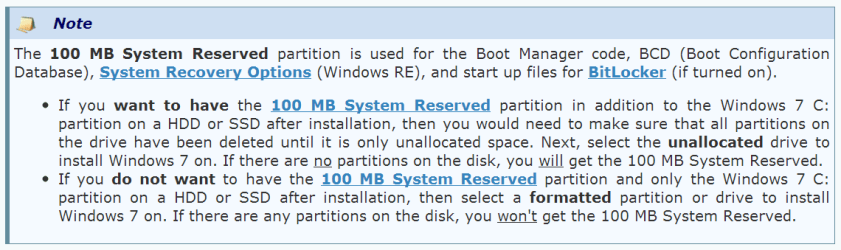
100 MB System Reserved.png

What happens to this 100MB system reserved partition if we install windows 7 in the UEFI system? Do we still need this 100MB system reserved partition in the UEFI system? Or it has been replaced by partition 2 under MSR (Microsoft reserved) in the UEFI setup?
 

My Computer My Computer

At a glance

Windows 7 Home Premium 64Bit
Computer type
Laptop
Computer Manufacturer/Model Number
Lenovo Ideapad Y580
OS
Windows 7 Home Premium 64Bit
Back
Top