

I am using a Samsung notebook with a 256 Gb SSD for the C: drive(the OS drive) and a 750 Gb HDD for the E: drive, which is the 2nd internal drive (my Data drive). I am the only user of this computer, and I'm also the administrator.
Soon after install of Win 7, I followed the instructions in this link: https://www.youtube.com/watch?v=COIbTlnPI7I
I went into my User Folder(My user name is Tripod-see snips below) and changed the location of Contacts, Desktop, Downloads, Favorites, Links, My Documents, My Music, My Pictures, My Videos, Saved Games, and Searches. I did this just for my user folder, not any others.
I right clicked each, clicked Location, and changed the location for each to E:\
I did not change the location of "AppData" or any other folders or files within my User folder, as instructed in the "Sean's Guide" I was following.
I did this because it is supposed to save a lot of space on the ssd which would have been used by game saves and other data.
After I finish this process, I go to my User folder on C: and it looks empty. (See first snip).
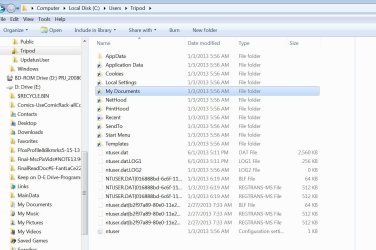
So far so good. But when I go into Windows Explorer-Tools-Folder Options-View, and if I uncheck "Hide protected operating system files" and CHECK "Show Hidden Files. folders, or drives", I now see what is in my 2nd snip. A "My Documents" icon, plus a bunch of others, and a bunch of NTuser files.
I have 3 short questions.
1) Is the hidden "My Documents" icon remaining in my User folder just a remnant which I should delete using safe mode, or should I still be seeing this icon? Sean says in his video there might be an icon left on C, but I don't know if he's referring to a normal folder or the hidden one I'm seeing.
2) Do the rest of the hidden files in my User folder look like they should, or do you see anything there which doesn't belong?
3) I'm setting up Macrium Reflect Free. Will I now have to include my E: Drive in my system images, or since I just redirected the folders, rather than moving them through registry hacks, will I just need what's on my OS drive?
Thanks!
Soon after install of Win 7, I followed the instructions in this link: https://www.youtube.com/watch?v=COIbTlnPI7I
I went into my User Folder(My user name is Tripod-see snips below) and changed the location of Contacts, Desktop, Downloads, Favorites, Links, My Documents, My Music, My Pictures, My Videos, Saved Games, and Searches. I did this just for my user folder, not any others.
I right clicked each, clicked Location, and changed the location for each to E:\
I did not change the location of "AppData" or any other folders or files within my User folder, as instructed in the "Sean's Guide" I was following.
I did this because it is supposed to save a lot of space on the ssd which would have been used by game saves and other data.
After I finish this process, I go to my User folder on C: and it looks empty. (See first snip).
So far so good. But when I go into Windows Explorer-Tools-Folder Options-View, and if I uncheck "Hide protected operating system files" and CHECK "Show Hidden Files. folders, or drives", I now see what is in my 2nd snip. A "My Documents" icon, plus a bunch of others, and a bunch of NTuser files.
I have 3 short questions.
1) Is the hidden "My Documents" icon remaining in my User folder just a remnant which I should delete using safe mode, or should I still be seeing this icon? Sean says in his video there might be an icon left on C, but I don't know if he's referring to a normal folder or the hidden one I'm seeing.
2) Do the rest of the hidden files in my User folder look like they should, or do you see anything there which doesn't belong?
3) I'm setting up Macrium Reflect Free. Will I now have to include my E: Drive in my system images, or since I just redirected the folders, rather than moving them through registry hacks, will I just need what's on my OS drive?
Thanks!
Attachments

My Computer
At a glance
Windows 7 Home Premium 64 bit SP1Intel Core i7-3610QM CPU @ 2.30GHz Max 3.3Ghz16MB PC3-12800(1600MHz) DDR3 SODIMM 4 Modules...NVIDIA GeForce GTX 675M 2048 MB GDDR5 Ram
- Computer Manufacturer/Model Number
- Samsung "Series 7 Gamer" Model: NP700G7C-S01US 17.3" Notebook
- OS
- Windows 7 Home Premium 64 bit SP1
- CPU
- Intel Core i7-3610QM CPU @ 2.30GHz Max 3.3Ghz
- Motherboard
- SAMSUNG_NP1234567890 SEC_SW_REVISION_1234567890ABCD
- Memory
- 16MB PC3-12800(1600MHz) DDR3 SODIMM 4 Modules of 4MB Each
- Graphics Card(s)
- NVIDIA GeForce GTX 675M 2048 MB GDDR5 Ram
- Sound Card
- NVIDIA Hi Def Audio(4x), Realtek Hi Def, DolbyVrs7.2.7000.7
- Monitor(s) Displays
- 17.3" LED full HD(1920 x 1080), HDMI to Philips47"TV Full HD
- Hard Drives
- Samsung 830 SSD 256GB MZ-7PC256N/AM - (drive 0) O.S. Drive:C
SanDisk iSSD P4 8GB (drive 1)- supposed to be for ExpresseCache, but EC is turned off, as I have an SSD, which is faster. I'll use the 8GB For Storage.
Hitachi Travelstar HDD 750GB 7K
- PSU
- NOTEBOOK
- Case
- NOTEBOOK
- Cooling
- NOTEBOOK Cooling Plus Cooling Stand W/2 Self Powered Fans


