Laptop won't boot & Recovery partition corrupt... Rootkit?

wwjd

New member
Local time
11:31 AM
Messages
17
My Toshiba laptop suddenly was unable to boot to Windows 7 Home yesterday... the post was generating an error "No operating system."

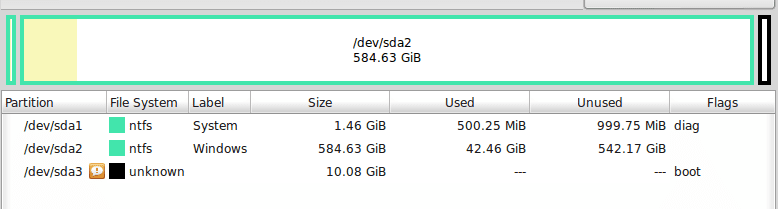
So then I booted into Linux via a live CD. From there, I could mount my Windows C-drive and see documents still intact. However, using the app GParted to look at my hard drive, I noticed that sda3, the Toshiba Recovery Partition, was of "unknown file format."

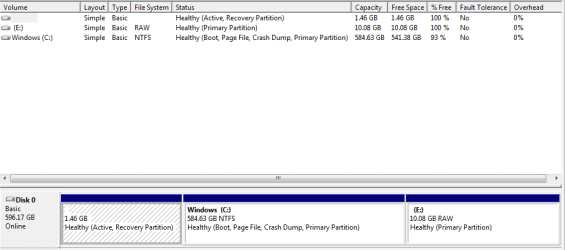
Also, it was missing its usual label "HDD RECOVERY" and no space was used out of its 10.08GB (usually, 9.49GB is filled). Strangely, the boot flag was set to that partition (sda3) instead of its usual location on sda1, the System partition.

I used GParted to move the boot flag back to sda1, and after that, the laptop was able to boot to Win7 again. However, Disk Management showed that the recovery partition was of "RAW" file format with 0GB used.

Any clue on whether this was caused by a destructive trojan or MBR rootkit? Perhaps attempting to hide in the recovery partition? I just returned from a 1-week visit to my cousin's house, which has a "suspect" network... she had 40 trojans removed from her laptop a month before. I was getting a few script error messages while on the internet there.

Or was this related to hardware failure? FYI, I did have a poor shutdown from Linux live CD right before (CD was ejected too early, shutdown failed, and I had to force Power button down. But after that, I cleared the memory with an unplug and battery removal). Could that mess up the MBR/boot AND corrupt an entire partition? I doubt it, as Linux was booted off a CD into memory, not installed.

I can no longer use the non-existent recovery partition to reinstall Windows7 (and wouldn't trust the hard drive without a 0-fill wipe first, anyway), but thankfully, I made 3 recovery DVDs last year. I just need to run those, correct? Thanks.
 

Attachments
  • Portege 2013-06 Recovery partition corrupt.png
    Portege 2013-06 Recovery partition corrupt.png
    8.3 KB · Views: 11
  • Portege 2013-06 Recovery partition corrupt (Win7 view).png
    Portege 2013-06 Recovery partition corrupt (Win7 view).png
    10 KB · Views: 1
Last edited:

My Computer My Computer

At a glance

Windows 7 Home 64-bit
OS
Windows 7 Home 64-bit
Do you get the Repair Your Computer option when you press F8 during boot? Also do you have a USB Flash Drive ?

   Warning

You will need a USB FLASH DRIVE


   Tip
Download the Tool from a non infected PC


Download Farbar Recovery Scan Tool


64-Bit Version OS :ar: Farbar Recovery Scan Tool x64


Plug the flash drive into the infected PC.

Enter System Recovery Options.

:ar: To enter System Recovery Options from the Advanced Boot Options:
Restart the computer.
As soon as the BIOS is loaded begin tapping the F8 key until Advanced Boot Options appears.
Use the arrow keys to select the Repair your computer menu item.
Select US as the keyboard language settings, and then click Next.
Select the operating system you want to repair, and then click Next.
Select your user account an click Next.

:ar: To enter System Recovery Options by using Windows installation disc:
Insert the installation disc.
Restart your computer.
If prompted, press any key to start Windows from the installation disc. If your computer is not configured to start from a CD or DVD, check your BIOS settings.
Click Repair your computer.
Select US as the keyboard language settings, and then click Next.
Select the operating system you want to repair, and then click Next.
Select your user account and click Next.

:ar: On the System Recovery Options menu you will get the following options:
Startup Repair

System Restore

Windows Complete PC Restore

Windows Memory Diagnostic Tool

Command Prompt

Select Command Prompt

In the command window type Z:\FRST64.exe and press Enter
   Note
Replace letter Z with the drive letter of your flash drive.

   Tip
Type the commands below to see what your letter is for the USB drive and press ENTER after each command

Code:
Diskpart
List volume
The tool will start to run.
When the tool opens click Yes to disclaimer.
Press Scan button.
FRST will let you know when the scan is complete and has written the FRST.txt to file
Please copy and paste both logs in your reply.(FRST.txt and Addition.txt)
 

My Computer My Computer

At a glance

Windows 7 Ultimate 32-Bit & Windows 7 Ultimat...Intel Core i7 CPU 950 @ 3.07GHzOCZ 6GB (3 x 2GB) 240-Pin DDR3 SDRAM DDR3 160...ATI Radeon HD 5700 Series
Computer Manufacturer/Model Number
Custom Built
OS
Windows 7 Ultimate 32-Bit & Windows 7 Ultimate 64-Bit
CPU
Intel Core i7 CPU 950 @ 3.07GHz
Motherboard
ASUS P6T DELUXE V2
Memory
OCZ 6GB (3 x 2GB) 240-Pin DDR3 SDRAM DDR3 1600 OCZ3X1600R2
Graphics Card(s)
ATI Radeon HD 5700 Series
Sound Card
OnBoard
Hard Drives
WD6400AACS-00M3B0 (640GB SATA )
PSU
CORSAIR 850w
Case
NZXT LEXA
Cooling
Intel Stock Heatsink Fan
Keyboard
Microsoft Wireless Laser Keyboard 7000
Mouse
Microsoft Wireless Laser Mouse 7000
"Do you get the Repair Your Computer option when you press F8 during boot?" No, I wasn't getting anything except the message "no operating system." There was no progress in boot at all.

Thanks for the FRST64.exe suggestion... What is the purpose of this scan?

I don't have a spare flash drive to sacrifice at this very moment (and don't trust plugging my other USB drives into this laptop). However, I'm booted into a Linux live CD and can download the exe... If I save the executable onto my C-drive, can I still follow your directions and run the scan from that filepath instead?

By the way, I had mentioned that I moved the boot flag to sda1, and the laptop now boots. Should I move the boot flag back to sda3, just for this scan? Or should I just run Avast or TDSS Killer while booted into Windows offline? That said, anti-virus scans are fairly useless when rootkits are present.
 
Last edited:

My Computer My Computer

At a glance

Windows 7 Home 64-bit
OS
Windows 7 Home 64-bit
You could try to run tdsskiller . The Frst64 was to see for viruses for reasons why you're not able to boot into your desktop .
 

My Computer My Computer

At a glance

Windows 7 Ultimate 32-Bit & Windows 7 Ultimat...Intel Core i7 CPU 950 @ 3.07GHzOCZ 6GB (3 x 2GB) 240-Pin DDR3 SDRAM DDR3 160...ATI Radeon HD 5700 Series
Computer Manufacturer/Model Number
Custom Built
OS
Windows 7 Ultimate 32-Bit & Windows 7 Ultimate 64-Bit
CPU
Intel Core i7 CPU 950 @ 3.07GHz
Motherboard
ASUS P6T DELUXE V2
Memory
OCZ 6GB (3 x 2GB) 240-Pin DDR3 SDRAM DDR3 1600 OCZ3X1600R2
Graphics Card(s)
ATI Radeon HD 5700 Series
Sound Card
OnBoard
Hard Drives
WD6400AACS-00M3B0 (640GB SATA )
PSU
CORSAIR 850w
Case
NZXT LEXA
Cooling
Intel Stock Heatsink Fan
Keyboard
Microsoft Wireless Laser Keyboard 7000
Mouse
Microsoft Wireless Laser Mouse 7000
Work through the steps for Troubleshooting Windows 7 Failure to Start

It would help to have a drive map snap of Partition Wizard bootable CD. If Recovery is truly ruined and the Boot flag on the Linux boot disk means that the System Active flags were there, then you might be able to start Win7 by Marking 7 Partition Active to run Startup Repair - Run up to 3 Separate Times.

However if the OS is heavily infected it might not repair until disinfected so work through the steps in the tutorial in order to disinfect then repair system files and attempt to repair the boot. If that fails there are steps to rescue your files then get the superior Clean Reinstall - Factory OEM Windows 7
 
I will try the suggestions above: FRST64, TDSS, and Windows 7 troubleshooting, and report back results.

Any thoughts on why or how my boot flag got moved from sda1 (system) to sda3 (recovery)? Was it simply because I had just tried booting from the Recovery partition; will such action cause the boot flag to move? Just wondering, because a boot flag move can also be nefarious... here's an interesting article about TDL4 Rootkit: http://secure-computer-solutions.com/blog/2011/11/using_gparted_to_edit_the_part_1.html

Is the purpose of Partition Wizard to move the boot flag to a working partition?

As mentioned in my post, I actually AM able to boot to Win7 again if I use GParted to move the boot flag back to sda1 (system) from sda3 (recovery), probably because the latter partition is, I suspect, corrupted. It shows as "RAW" or unknown file format and takes up 0 MB. Question is, what caused that... more likely the poor shutdown, or an MBR rootkit? If it's the latter, I can't trust the Recovery partition ever again, even if a boot flag or MBR is recoverable... agree?
 
Last edited:

My Computer My Computer

At a glance

Windows 7 Home 64-bit
OS
Windows 7 Home 64-bit
It is common for some OEM machines to have the Recovery partition contain the boot files and be marked Actve so it can be booted in case Recovery is needed. Others use the F8 System Recovery Options to boot Recovery which is more volatile.

So it may be required that Recovery is marked Active to run, or it may no longer run. But you can always get the vastly superior Clean Reinstall - Factory OEM Windows 7 when you're ready to settle down with a perfect install of Win7 which we specialize in here.

Since you can boot Win7 I would run a full scan with Malwarebytes, your AV and post up any questions about the findings in our Security forum if you need specialized help with rootkits. I have not yet seen the dreaded MBR virus.
 
Last edited:
Please copy and paste both logs in your reply.(FRST.txt and Addition.txt)

I've attached the FRST and Additions logs (VistaKing). Seems like a useful scan to do.

They were run while booted into Windows, but I also ran another set while booted from System Repair/command line. Let me know if you'd rather look at the other set. Or if you'd prefer that I paste the logs directly into this thread. Thanks again for any thoughts.
 

Attachments

My Computer My Computer

At a glance

Windows 7 Home 64-bit
OS
Windows 7 Home 64-bit
It is common for some OEM machines to have the Recovery partition contain the boot fails and be marked Actve so it can be booted in case Recovery is needed.

What I do know is that my Toshiba laptop's boot flag used to be on sda1 (System partition). What I don't know is if an attempt to boot from Recovery is supposed to cause that boot flag to move from there to the sda3 Recovery partition. Actually, I should test it (will let you know). The alternative explanation would be the nefarious one (rootkit), I guess!?

Since you can boot Win7 I would run a full scan with Malwarebytes, your AV and post up any questions about the findings in our Security forum if you need specialized help with rootkits. I have not yet seen the dreaded MBR virus.

TDSS scan was negative. Is it possible to download MalwareBytes in an updated form? If so, I can do so on my home network from Linux. If not, I'll have to try to get to a public network, unless you think it's safe to get online here just for a few minutes from my (potentially) hacked or infected computer.

But you can always get the vastly superior Clean Reinstall - Factory OEM Windows 7 when you're ready to settle down with a perfect install of Win7 which we specialize in here.

So these are trusted downloads for Windows 7 that one can burn to DVD? Very nice, especially if these ISOs are the same as the Technet website's, with the same hashes, so a person can even run checksums. Thank you!
 

My Computer My Computer

At a glance

Windows 7 Home 64-bit
OS
Windows 7 Home 64-bit
wwjd

Create a new thread inside the System Security and upload the FRST log that you ran inside Recovery Console ( pressing F8 choosing Repair Your Computer )
 

My Computer My Computer

At a glance

Windows 7 Ultimate 32-Bit & Windows 7 Ultimat...Intel Core i7 CPU 950 @ 3.07GHzOCZ 6GB (3 x 2GB) 240-Pin DDR3 SDRAM DDR3 160...ATI Radeon HD 5700 Series
Computer Manufacturer/Model Number
Custom Built
OS
Windows 7 Ultimate 32-Bit & Windows 7 Ultimate 64-Bit
CPU
Intel Core i7 CPU 950 @ 3.07GHz
Motherboard
ASUS P6T DELUXE V2
Memory
OCZ 6GB (3 x 2GB) 240-Pin DDR3 SDRAM DDR3 1600 OCZ3X1600R2
Graphics Card(s)
ATI Radeon HD 5700 Series
Sound Card
OnBoard
Hard Drives
WD6400AACS-00M3B0 (640GB SATA )
PSU
CORSAIR 850w
Case
NZXT LEXA
Cooling
Intel Stock Heatsink Fan
Keyboard
Microsoft Wireless Laser Keyboard 7000
Mouse
Microsoft Wireless Laser Mouse 7000
If you have the System Reserved partition then it most likely had the System boot files and Active flag on it. The Active flag may have moved there once you tried to run Recovery, or during a repair attempt. It's not known viral activity.

Once you have any infection cleaned up and the System Files checked, I'd move the Active back to System partition and run Startup Repair up to 3 separate times until Win7 starts.
 
If you have the System Reserved partition then it most likely had the System boot files and Active flag on it. The Active flag may have moved there once you tried to run Recovery, or during a repair attempt. It's not known viral activity.

When you write "moved there," do you mean the System partition, or the Recovery partition?

My boot flag was originally on the System partition, but it apparently got moved somehow to the Recovery partition (which happened to be missing or corrupt, and thus the inability to boot on Saturday).

I moved the boot flag back to System yesterday, so that we could boot again, to run the TDSS and FRST scans. I can attempt a reboot back into Recovery tomorrow (by pressing 0 during startup), to test if the boot flag will get moved from that action.
 

My Computer My Computer

At a glance

Windows 7 Home 64-bit
OS
Windows 7 Home 64-bit
The Boot flag means different things in different environments. In Disk Mgmt it means the partition currently booted. In Partition Wizard which we rely most heavily upon here it means where the System boot files reside - which is signified by the System flag in Disk Mgmt. I'm not sure what it means in the Linux app you used but likely System boot files reside there and it is booting the OS.

Active flag points which partition is to boot, and Recovery can be made to boot in some PC's by marking it Active. So the Active flag might have been moved there when you attempted to run Recovery.

To repair Win7 once it's disinfected (if so) and system files checked, we mark the partition intended to boot Win7 Active and run Startup Repair - Run up to 3 Separate Times
until Win7 starts and its boot partition holds the System flag meaning the System files are booting from there. It explains in the tutorial why it's run 3 times, and why this is the most comprehensive method to repair or rewrite the System boot files.
 
FYI, I tried booting from the Recovery partition again, and that still doesn't work. Nor did that action cause my boot flag to move from System to Recovery partition, which means that something else did.

In summary, my Toshiba laptop does boot right now, from System partition, because I had manually moved the boot flag back to it. TDSS and MWB scans were negative but run from regular (not safe) mode.

However, my Recovery partition is damaged/gone for whatever reason, and thus, I don't trust this hard drive anymore and feel compelled to run a 0-fill wipe and restore from my recovery DVDs (in order to re-install a clean OS).

@gregrocker: Can you please clarify your suggestion that I run Startup Repair 3 times? On or from which partition? Do you still feel that is helpful in my situation, because it will at least provide some info on what exactly happened?

What about the tutorial on Windows Failure to start? Do you still think I should go through those steps? Thanks.
 

My Computer My Computer

At a glance

Windows 7 Home 64-bit
OS
Windows 7 Home 64-bit
Startup Repair will check for any problems and attempt to repair them if it finds any, so yes it is a good idea even if its booting.

I would not be too worried about being hijacked since there isn't any infection known to move the Active flag. Do you have other symptoms more related to performance which make you think you've been infected?

However if you are still running factory preinstalled Win7 that is a corrupt install to begin with, larded with smothering bloatware and useless duplicate utilities that have much better versions built into Win7. So I would unleash Win7's native performance by doing what most tech enthusiasts do to Clean Reinstall - Factory OEM Windows 7.

Everything you need is in the link to get and keep a perfect install, as long as you stick with the tools and methods given.
 
Back
Top