Please Help.....CD/DVD/BR drive gone AWOL!!!!!

Birddude007

New member
Member
Local time
10:11 AM
Messages
70
Well folks this a ll started about two years ago involving possible issues with my "virtual CD" software that pretty much comes imbedded in my external WD hard drive. some how or another the "CD" drive disapeared back then, but it showed that I had a DVD drive and a Blue Ray drive.....well I went to burn some files on a DVD and all was going fine until it got near the end and finalizing the disk, it then told me to reboot my machine because it had some burning errors, I tried to eject the disk but it wouldnt open, so I just rebooted the machine anyways, when it came back up I STILL coundn't get the darn thing to open either by pushing the button on the CD drawer or by clicking on eject, plus now I can hear the disk just a spinning away in the drive AND it only shows a DVD drive and no longer a Blue Ray drive.
Question I have is, is how do I tell the computer that there IS a drive there, and is there a way I can manually eject the disk? it is an HP laptop dv7, I did manage to pop the front faceplate off of the door lol.
I just dont like the idea of this disk just spinning away even though it is not affecting my computer in any way, I would just feel better if it was not spinning. In fact I can probably live without the disc drive and just hop my operating system holds out so I dont have the need for a disc to do a recover or something like that.
Besides that I just send my diles to an SD card and burn disks on other computers in my house if need be.
any help will be apreciated, I just wanna get the dang thing opened up and get the disk out....might have to get the old screwdriver out and do some invasive sergury on the machine......do a little snipping and yanking
 

My Computer My Computer

At a glance

Windows 7 64 bitAMD Dual Core 2,2 GHZ4GB, upgrading to 8GBintegrated
OS
Windows 7 64 bit
CPU
AMD Dual Core 2,2 GHZ
Motherboard
dunno...its a laptop
Memory
4GB, upgrading to 8GB
Graphics Card(s)
integrated
Sound Card
does it need one?
Monitor(s) Displays
built in
Screen Resolution
lots
Hard Drives
2 x 250 GB
PSU
wall outlet
Case
plastic
Cooling
swamp cooler
Keyboard
finger operated
Mouse
cat got it
Internet Speed
1 meg
Geeeeez! not all at once folks! I am having a hard time following all the advice here!

Update, I managed to get the face plate off of the disk drive drawer and located a spot where I inserted a tiny screwdriver and it released the drawer, the DVD stopped spinning. I then put it back together after making sure it works on other DVDs, and then I rebooted the machine and it finally showed the drive when I went to my computer.
 

My Computer My Computer

At a glance

Windows 7 64 bitAMD Dual Core 2,2 GHZ4GB, upgrading to 8GBintegrated
OS
Windows 7 64 bit
CPU
AMD Dual Core 2,2 GHZ
Motherboard
dunno...its a laptop
Memory
4GB, upgrading to 8GB
Graphics Card(s)
integrated
Sound Card
does it need one?
Monitor(s) Displays
built in
Screen Resolution
lots
Hard Drives
2 x 250 GB
PSU
wall outlet
Case
plastic
Cooling
swamp cooler
Keyboard
finger operated
Mouse
cat got it
Internet Speed
1 meg
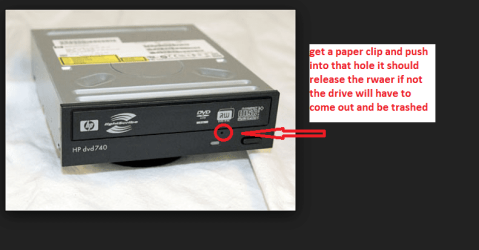
Hang on Birddude to get that drawer open did you try the manual pin hole?? see pic oh I should have aid straighten the clip out first
 

Attachments

  • BIRD.PNG
    BIRD.PNG
    55.1 KB · Views: 1

My Computer My Computer

At a glance

Desk1 7 Home Prem / Desk2 10 Pro / Main lap A...Desk1 i5 3750K / Laptop i7 GTX 860M / Desk2 i...Desk1 8GB (1866) / Desk2 16GB (1333) / Laptop...Desk 1& 2NVidia GTX 650 & Laptops on board Intel
Computer type
PC/Desktop
Computer Manufacturer/Model Number
Own build (new) Desk1 / Asus ROG Win 7 / Desk2 1st build
OS
Desk1 7 Home Prem / Desk2 10 Pro / Main lap Asus ROG 10 Pro 2 laptop Toshiba 7 Pro Asus P2520 7 & 10
CPU
Desk1 i5 3750K / Laptop i7 GTX 860M / Desk2 i5 2500
Motherboard
Desk1 Asus P877-V / Desk2 Gigabyte H67 UD3H / Laptop ?
Memory
Desk1 8GB (1866) / Desk2 16GB (1333) / Laptop 8Gb DDR3
Graphics Card(s)
Desk 1& 2NVidia GTX 650 & Laptops on board Intel
Sound Card
Desk 1 & 2 -XONAR DG Realtek High Def audio Laptop
Monitor(s) Displays
Desk 1 Benq HD 2450 / Desk2 Philips 24" / Laptop 17.5"
Screen Resolution
1920x1080 D1 & D2 & Laptop 1
Hard Drives
Desk1 Samsung 120GB 830 SSD
Asus ROG 256GB 850 Pro SSD
Desk2 Samsung 840 256 SSD
Toshiba 120GB EVO
PSU
Desk 1 Corsair HX 1050/ Laptop ? / Desk 2 Corsair HX 650
Case
Desk 1 Cooler HAF XM ? Toshiba laptop / Desk2 Coolermaster
Cooling
Fans on all Desk1 -2 Desk2 - all Coolermasters 5 Laptop ?
Keyboard
Desk 1 MS Sidewinder X6 Desk 2 MS Sidewinder X 4
Mouse
Desk 1&2 - Gigabyte MS 900 gamer - laptop - Logitec wireless
Internet Speed
ADSL2+
Other Info
One other Desktop (tester) and spare Toshba laptop both with SSD's
Running Kaspersky 2016 ISS on all machines config'd identically
Logitec audio stereo systems on each machine (x3)
Canon MG5250MFC
Router/modem TP-Link running WPA2SK
Hi Birddude007,

First of all I would advise you to get rid of the useless , troublesome and obnoxious VCD and smartware bundled with your Western Digital external hard drive.

If you are going to heed to the advice, back up all data in your external drive and then format the external drive with HP USB Disk Storage Format tool. HP USB Disk Storage Format Tool Free Download

Read through this: How to remove hidden Virtual CD (VCD) partitions on your Western Digital external disks

I would think that most of your problems should disappear with that cleansing.(After that you may perhaps be required to uninstall and reinstall your optical drives so that they get their rightful place.)
 

My Computer My Computer

At a glance

Windows 7 Home Premium 32 bit
OS
Windows 7 Home Premium 32 bit
Hi Birddude007,

First of all I would advise you to get rid of the useless , troublesome and obnoxious VCD and smartware bundled with your Western Digital external hard drive.

If you are going to heed to the advice, back up all data in your external drive and then format the external drive with HP USB Disk Storage Format tool. HP USB Disk Storage Format Tool Free Download

Read through this: How to remove hidden Virtual CD (VCD) partitions on your Western Digital external disks

I would think that most of your problems should disappear with that cleansing.(After that you may perhaps be required to uninstall and reinstall your optical drives so that they get their rightful place.)

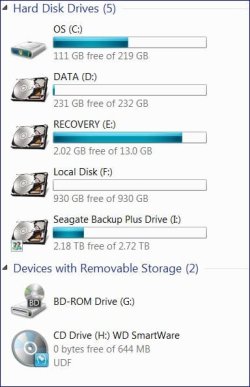
This is some awesome advice and I thank you for it, I reformatted my external drive and it is totally clear of that WD Smartware crap, .......however- the WD Smartware crapware managed to attach itself to my CD drive, I went into device driver and uninstalled the CD drive and rebooted the computer so that it would reinstall the drivers to the CD drive, here is a pic of what shows up in "My Computer"-
my computer.JPG

As you can see, local disk F is the WD MyBook all wiped clean, it used to be drive letter I, but since I cleaned it out with the USF reformatter tool it came up as F once I rebooted the machine, however I am happy knowing it is clean now.
Now I need some advice as to how to get this DANG WD Smartware removed, I cannot locate it anywhere on my machine in any of my uninstaller programs. Please Help! I just want this WD crapware off of my machine and just want my normal CD drive back
 

My Computer My Computer

At a glance

Windows 7 64 bitAMD Dual Core 2,2 GHZ4GB, upgrading to 8GBintegrated
OS
Windows 7 64 bit
CPU
AMD Dual Core 2,2 GHZ
Motherboard
dunno...its a laptop
Memory
4GB, upgrading to 8GB
Graphics Card(s)
integrated
Sound Card
does it need one?
Monitor(s) Displays
built in
Screen Resolution
lots
Hard Drives
2 x 250 GB
PSU
wall outlet
Case
plastic
Cooling
swamp cooler
Keyboard
finger operated
Mouse
cat got it
Internet Speed
1 meg
Also- if I double click the CD drive, the dang Smartware starts running
 

My Computer My Computer

At a glance

Windows 7 64 bitAMD Dual Core 2,2 GHZ4GB, upgrading to 8GBintegrated
OS
Windows 7 64 bit
CPU
AMD Dual Core 2,2 GHZ
Motherboard
dunno...its a laptop
Memory
4GB, upgrading to 8GB
Graphics Card(s)
integrated
Sound Card
does it need one?
Monitor(s) Displays
built in
Screen Resolution
lots
Hard Drives
2 x 250 GB
PSU
wall outlet
Case
plastic
Cooling
swamp cooler
Keyboard
finger operated
Mouse
cat got it
Internet Speed
1 meg
While you are at this task of removing the VCD and Smartware from your laptop/WD external drive, please remove and keep away all other USB drives.

Have you made the recovery CDs for your laptop? If not do it, so that you are prepared for the rainy day should the rains come in torrents.:)

I have noted that the VCD is still there. Now a couple of questions.

1. Did you install the Smartware on your laptop?

2. Is your optical drive able to take in and eject the media now? Can you read the CD/DVD now or is it still in the same state as before - locked up and spinning, requiring a manual poke-pin eject??

3. Does the VCD still show up after removing the external drive and rebooting? The process you should follow here is: Remove the external drive, uninstall the VCD and reboot. Does the VCD show up now? Yes/No.
If No, does it show up again only when you plug-in the WD external drive?

4. Did you format the external drive with the HP USB Disk Storage Format Tool running it as an administrator? ( I know that this question may annoy you a lil bit but I just want to make sure.;).)

5. Finally post a screenshot of the Disk Management with the VCD in place.

EDIT: I have already guessed something from the screenshot you had put out in post #5 and formulating a strategy to deal with the situation but require to confirm that my guess is right by your answers, before I post my thoughts on it.
 
Last edited:

My Computer My Computer

At a glance

Windows 7 Home Premium 32 bit
OS
Windows 7 Home Premium 32 bit
Back
Top