Solved DHCP Leashes - Fixing IP addresses

Uchiha

New member
Member
VIP
Local time
8:53 PM
Messages
126
Hello.
I have a D-Link DSL 2750U router set-up and 2 laptops and 2 Androids are connected to it.

Is there any way to release and renew the DHCP Leashes so as to get new IP addresses or even just fix the IP addresses for the 5 devices(including the router) ?
 

My Computer My Computer

Computer Manufacturer/Model Number
Lenovo Y560
OS
Windows 7 Home Premium x64
CPU
Intel Core i5
Motherboard
M460 @ 2.53GHz
Memory
4 GB
Graphics Card(s)
ATI Mobility Radeon HD 5370
You can release renew the IP addresses on the windows machines by running a command in command prompt. That being said may I ask why? Your computer will automatically re-lease the IP address after a set period of time automatically and really isn't needed.

Equally the phones will be more difficult to do. To refresh all IP addresses you can disable and then re enable the DHCP service on the router and restart the router. That being said, some devices will just use their original addresses to avoid conflict.

Command line is as follows:

ipconfig /release

ipconfig /renew

Hope this helps,
Josh :)
 

My Computer My Computer

Computer type
PC/Desktop
Computer Manufacturer/Model Number
Custom Built
OS
Windows 7 Professional x64 SP1 ; Windows Server 2012 R2 Standard
CPU
Intel Core i5 2400 @ 3.10GHz
Motherboard
Foxconn H67MP-S/-V/H67MP
Memory
8.0GB DDR3 @ 665MHz (2GBx4)
Graphics Card(s)
AMD Radeon HD 6870
Sound Card
Realtek High Definition Audio
Monitor(s) Displays
AOC 2243W & SMB1930NW
Screen Resolution
1440x900 & 1920x1080
Hard Drives
977GB Seagate ST31000524AS ATA Drive (SATA)
250GB WD iSCSI attached Drive
PSU
750W Gaming PSU
Case
Novatech Night
Cooling
Fan
Keyboard
Dell Standard PS/2 Keyboard
Mouse
R.A.T 07 Gaming Mouse
Internet Speed
Download: 10 Mbps Ping: 30ms Upload: 0.81 Mbps
Browser
Google Chrome
Other Info
Optiarc DVD RW AD-5260S ATA Device
To refresh all IP addresses you can disable and then re enable the DHCP service on the router and restart the router.

Tell me more about this..
The others don't work :P
 

My Computer My Computer

Computer Manufacturer/Model Number
Lenovo Y560
OS
Windows 7 Home Premium x64
CPU
Intel Core i5
Motherboard
M460 @ 2.53GHz
Memory
4 GB
Graphics Card(s)
ATI Mobility Radeon HD 5370

My Computer My Computer

Computer type
PC/Desktop
Computer Manufacturer/Model Number
Custom Built
OS
Windows 7 Professional x64 SP1 ; Windows Server 2012 R2 Standard
CPU
Intel Core i5 2400 @ 3.10GHz
Motherboard
Foxconn H67MP-S/-V/H67MP
Memory
8.0GB DDR3 @ 665MHz (2GBx4)
Graphics Card(s)
AMD Radeon HD 6870
Sound Card
Realtek High Definition Audio
Monitor(s) Displays
AOC 2243W & SMB1930NW
Screen Resolution
1440x900 & 1920x1080
Hard Drives
977GB Seagate ST31000524AS ATA Drive (SATA)
250GB WD iSCSI attached Drive
PSU
750W Gaming PSU
Case
Novatech Night
Cooling
Fan
Keyboard
Dell Standard PS/2 Keyboard
Mouse
R.A.T 07 Gaming Mouse
Internet Speed
Download: 10 Mbps Ping: 30ms Upload: 0.81 Mbps
Browser
Google Chrome
Other Info
Optiarc DVD RW AD-5260S ATA Device
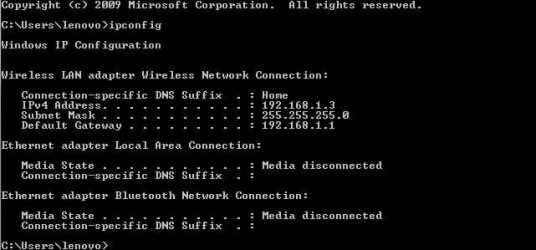
ipconfig.JPG
 

My Computer My Computer

Computer Manufacturer/Model Number
Lenovo Y560
OS
Windows 7 Home Premium x64
CPU
Intel Core i5
Motherboard
M460 @ 2.53GHz
Memory
4 GB
Graphics Card(s)
ATI Mobility Radeon HD 5370
To access your router settings, enter the following IP address into your browser - 192.168.1.1

Upon launch you should be presented with your router settings

To disable the DHCP service follow these steps on pages 46 and 47 to disable DHCP and save the settings. Restart your router and then enable the DHCP and finally restart your router again. Your devices should obtain new IP addresses however there is no guarantee that all or any will

ftp://support.dlink.co.in/broadband/DSL-2750U/manual/DSL-2750U_C1_Manual_IN_1.00.pdf

Hope This Helps,
Josh
 

My Computer My Computer

Computer type
PC/Desktop
Computer Manufacturer/Model Number
Custom Built
OS
Windows 7 Professional x64 SP1 ; Windows Server 2012 R2 Standard
CPU
Intel Core i5 2400 @ 3.10GHz
Motherboard
Foxconn H67MP-S/-V/H67MP
Memory
8.0GB DDR3 @ 665MHz (2GBx4)
Graphics Card(s)
AMD Radeon HD 6870
Sound Card
Realtek High Definition Audio
Monitor(s) Displays
AOC 2243W & SMB1930NW
Screen Resolution
1440x900 & 1920x1080
Hard Drives
977GB Seagate ST31000524AS ATA Drive (SATA)
250GB WD iSCSI attached Drive
PSU
750W Gaming PSU
Case
Novatech Night
Cooling
Fan
Keyboard
Dell Standard PS/2 Keyboard
Mouse
R.A.T 07 Gaming Mouse
Internet Speed
Download: 10 Mbps Ping: 30ms Upload: 0.81 Mbps
Browser
Google Chrome
Other Info
Optiarc DVD RW AD-5260S ATA Device
Thank you.
SOLVED !
 

My Computer My Computer

Computer Manufacturer/Model Number
Lenovo Y560
OS
Windows 7 Home Premium x64
CPU
Intel Core i5
Motherboard
M460 @ 2.53GHz
Memory
4 GB
Graphics Card(s)
ATI Mobility Radeon HD 5370
No worries, thank you for reporting back! I am glad your problem has been solved :party:

Josh! :)
 

My Computer My Computer

Computer type
PC/Desktop
Computer Manufacturer/Model Number
Custom Built
OS
Windows 7 Professional x64 SP1 ; Windows Server 2012 R2 Standard
CPU
Intel Core i5 2400 @ 3.10GHz
Motherboard
Foxconn H67MP-S/-V/H67MP
Memory
8.0GB DDR3 @ 665MHz (2GBx4)
Graphics Card(s)
AMD Radeon HD 6870
Sound Card
Realtek High Definition Audio
Monitor(s) Displays
AOC 2243W & SMB1930NW
Screen Resolution
1440x900 & 1920x1080
Hard Drives
977GB Seagate ST31000524AS ATA Drive (SATA)
250GB WD iSCSI attached Drive
PSU
750W Gaming PSU
Case
Novatech Night
Cooling
Fan
Keyboard
Dell Standard PS/2 Keyboard
Mouse
R.A.T 07 Gaming Mouse
Internet Speed
Download: 10 Mbps Ping: 30ms Upload: 0.81 Mbps
Browser
Google Chrome
Other Info
Optiarc DVD RW AD-5260S ATA Device
On a familiar note, now that you know my router model, can it create a hot-spot if my broadband flows through a WAN cable and not an ADSL cable ?
 

My Computer My Computer

Computer Manufacturer/Model Number
Lenovo Y560
OS
Windows 7 Home Premium x64
CPU
Intel Core i5
Motherboard
M460 @ 2.53GHz
Memory
4 GB
Graphics Card(s)
ATI Mobility Radeon HD 5370
I am slightly confused as to what you mean by 'WAN Cable' since an ADSL cable would technically be classed as a WAN cable :confused:

Are you able to provide a picture of such cable?

Josh
 

My Computer My Computer

Computer type
PC/Desktop
Computer Manufacturer/Model Number
Custom Built
OS
Windows 7 Professional x64 SP1 ; Windows Server 2012 R2 Standard
CPU
Intel Core i5 2400 @ 3.10GHz
Motherboard
Foxconn H67MP-S/-V/H67MP
Memory
8.0GB DDR3 @ 665MHz (2GBx4)
Graphics Card(s)
AMD Radeon HD 6870
Sound Card
Realtek High Definition Audio
Monitor(s) Displays
AOC 2243W & SMB1930NW
Screen Resolution
1440x900 & 1920x1080
Hard Drives
977GB Seagate ST31000524AS ATA Drive (SATA)
250GB WD iSCSI attached Drive
PSU
750W Gaming PSU
Case
Novatech Night
Cooling
Fan
Keyboard
Dell Standard PS/2 Keyboard
Mouse
R.A.T 07 Gaming Mouse
Internet Speed
Download: 10 Mbps Ping: 30ms Upload: 0.81 Mbps
Browser
Google Chrome
Other Info
Optiarc DVD RW AD-5260S ATA Device
Back
Top