Internet Explorer 10 - Install or Uninstall in Windows 7

How to Install or Uninstall Internet Explorer 10 (IE10) in Windows 7


   Information
This tutorial will show you how to either install or uninstall Internet Explorer 10 (IE10) to return to Internet Explorer 9 (IE9) for all users in Windows 7.

You must be logged in as an administrator to be able to install or uninstall IE10.

For more information about IE10, see:

   Note
In 32-bit Windows 7, Internet Explorer 10 (IE10) is still only a 32-bit browser.

In 64-bit Windows 7, Internet Explorer 10 (IE10) has 32-bit and 64-bit together in one browser now. The IE10 browser frame process runs 64-bit, but for compatibility with plug-ins, IE10 runs 32-bit tabs by default. If the user turns on “Enhanced Protected Mode”, they will have 64-bit tabs by default for IE10.

For more information about 32-bit and 64-bit IE10, see:
How to Enable 32-bit or 64-bit Internet Explorer 10 (IE10) in Windows 7


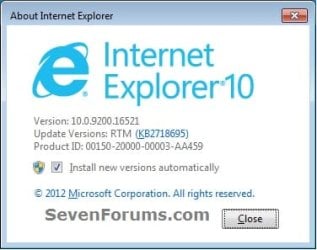
EXAMPLE: About Internet Explorer 10 (IE10)
NOTE: In Internet Explorer, click on Help (Menu bar) and About Internet Explorer to see this. You will notice that the about IE10 is the same whether you open iexplorer.exe from either the "Program Files" or "Program Files (x86)" location. about_IE10_W7.jpg


OPTION ONE

To Install IE10 in Windows 7 through Windows Update


NOTE: If you didn't want to install IE10, then you could hide the "Internet Explorer 10" update to not see it anymore in Windows Update instead. 1. Open the Control Panel (icons view), and click on the Windows Update icon.

2. Check for new Windows Updates. If not already installed, select (check) Internet Explorer 10 for Windows 7, click on OK and Install updates. (see screenshot below) IE10_Windows_Update-1.jpg
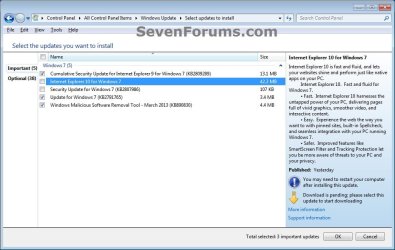
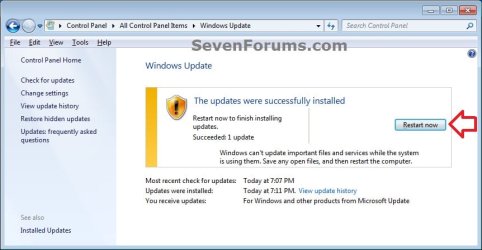
3. When Windows Update is finished, you will need to restart the computer to finish installing IE10. (see screenshot below) IE10_Windows_Update-2.jpg


OPTION TWO

To Download a Standalone IE10 .exe File to Install in Windows 7

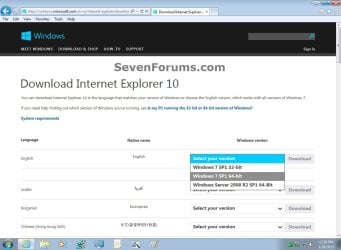
1. Click on the Download button below to go to the Microsoft site below to download the standalone IE10 .exe file to your desktop, and run the .exe file.
NOTE: You can download Internet Explorer 10 in the language that matches your version of Windows or choose the English version, which works with all versions of Windows 7.
   Note
If you have 64-bit Windows 7, then you need to use the Windows 7 SP1 64-bit installer for IE10.

If you have 32-bit Windows 7, then you need to use the Windows 7 SP1 32-bit installer for IE10.

Download


Windows_7_Download_IE10.jpg
2. If prompted by UAC, click on Yes.

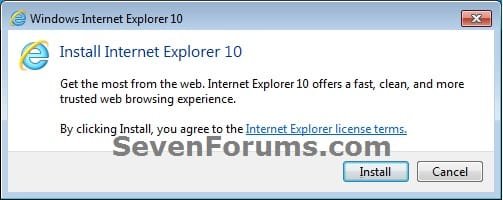
3. Click on Install to start installing IE10. (see screenshot below) IE10_StandAlone_Install-1.jpg
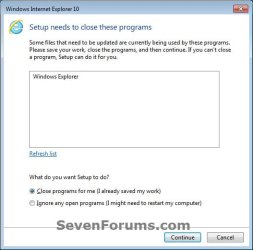
4. If prompted, click on Continue. (see screenshot below) IE10_StandAlone_Install-2.jpg
5. When IE10 has finished installing, Explorer will be restarted automatically. (see screenshot below) IE10_StandAlone_Install-3.jpg


OPTION THREE

To Uninstall IE10 in "View installed updates" Windows 7

1. Open the Control Panel (icons view), and click/tap on the Programs and Features icon.

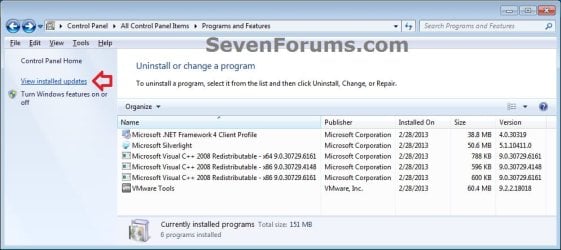
2. In Programs and Features, click on the View installed updates link on the left side. (see screenshot below) IE10_Uninstall-1.jpg
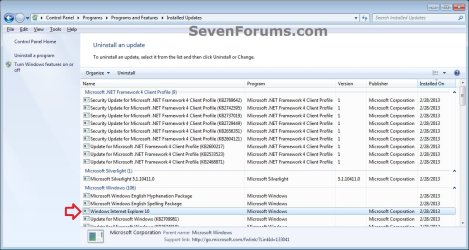
3. In Installed Updates, double click on Windows Internet Explorer 10. (see screenshot below) IE10_Uninstall-2.jpg
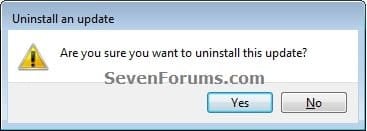
4. Click on Yes. (see screenshot below) IE10_Uninstall-3.jpg
5. If prompted by UAC, click on Yes.

6. When IE10 has finished being uninstalled, click on Restart Now to apply. (see screenshots below) IE10_Uninstall-4.jpg
   Tip
You may now also wish to hide the IE10 update to prevent it from being reinstalled.

http://www.sevenforums.com/tutorials/24376-windows-update-hide-restore-hidden-updates.html


OPTION FOUR

To Uninstall IE10 in an Elevated Command Prompt

1. Open an elevated command prompt.

2. Copy the command below, and close all instances of IE10.

Code:
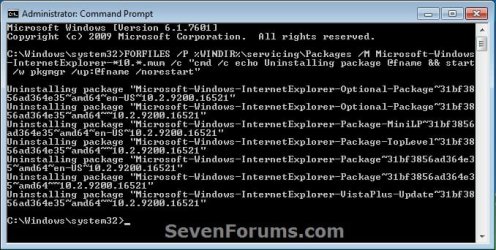
FORFILES /P %WINDIR%\servicing\Packages /M Microsoft-Windows-InternetExplorer-*10.*.mum /c "cmd /c echo Uninstalling package @fname && start /w pkgmgr /up:@fname /norestart"
3. In the elevated command prompt, paste the command from above, and press Enter in the command prompt. (see screenshot below step 5)

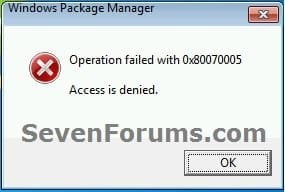
4. If you get any error messages like below, then click on OK to continue. You may get a few. These are fine. (see screenshot below) Uninstall_IE10_CMD-2.jpg
5. When finished, restart the computer. (see screenshot below) Uninstall_IE10_CMD-1.jpg
   Tip
You may now also wish to hide the IE10 update to prevent it from being reinstalled.

http://www.sevenforums.com/tutorials/24376-windows-update-hide-restore-hidden-updates.html


That's it,
Shawn


Last edited:
Getting closer to the answer. I disabled the overnight Norton scan and my IE10 username/password info was intact this morning.

After posting at the Norton forum to see if anyone's seeing similar issues with their Norton utilities, a member posted suggesting that I disable my Norton "remove tracking cookies" option when I run the next unattended scan.

I'm still not sure what component of the Norton scan is removing the IE10 password history but process of elimination over the next few scans should nail it down.
 

My Computer My Computer

Computer type
PC/Desktop
Computer Manufacturer/Model Number
Built at Micro Center Richardson, TX
OS
Windows 7 Home Premium 64 bit
CPU
Intel i5 650 Dual Core 3.20 GHz Cache 4MB Threads: 4
Motherboard
ASUS PRO P7P55D-E
Memory
Corsair 16GB DDR3 1600MHz 9-9-9-24 P/N: CMZ8GX3M2A1600C
Graphics Card(s)
ZOTAC GeFORCE 9500 ZT-95TEK2M-FSL 1GB GDDR2
Sound Card
Mother Bd
Monitor(s) Displays
ASUS V228H 21.5” Diag
Screen Resolution
1440 x 900
Hard Drives
SEAGATE BARRACUDA (2ea) 3.5” INTERNAL 1Tb 16 MB SATA ST1000DM003-9YN162 7200RPM, 64MB, SATA 6Gb/s ** 2 Sata Hot-Swap Racks installed in Tower
PSU
Thermaltake Model TR2 RX 750W
Cooling
2 Tower Fans
Keyboard
Dell Quietkey PS/2 Windows 104 P/N 0463CD
Mouse
Kensington Mechanical Trackball USB Model 64217
Internet Speed
35/35
Antivirus
Norton 360 & MBAM Pro
Browser
IE10
Other Info
Printer: HP DeskJet 3520 USB 2.0 **
Speakers: ALTEC Model VS4621 2.1 28 W/Channel w/Sub-woofer **
IOGEAR HDMI Monitor Switcher Swx3 MODEL GHDSW3 ** Addonics ZDRWESU3 eSata/USB 3.0 external DVD Read/Write DVD Drive** SEAGATE GoFlex USB 2.0 Portable HD 500GB 5400 RPM P/N: 9ZF2A2-570
Great news. You should have it nailed down soon then. :)
 

My Computer My Computer

Computer type
PC/Desktop
Computer Manufacturer/Model Number
Self built custom
OS
64-bit Windows 11 Pro for Workstations
CPU
Intel i7-8700K OC'd to 5 GHz
Motherboard
ASUS ROG Maximus XI Formula Z390
Memory
64 GB (4x16GB) G.SKILL TridentZ RGB DDR4 3600 MHz
Graphics Card(s)
ASUS ROG-STRIX-GTX1080TI-O11G-GAMING
Sound Card
Integrated
Monitor(s) Displays
2 x Samsung Odyssey G7 27"
Screen Resolution
2560x1440
Hard Drives
1TB Samsung 990 PRO M.2,
4TB Samsung 990 PRO PRO M.2,
TerraMaster F8 SSD Plus NAS
PSU
Seasonic Prime Titanium 850W
Case
Thermaltake Core P3
Cooling
Corsair Hydro H115i
Keyboard
Logitech wireless K800
Mouse
Logitech MX Master 4
Internet Speed
2 Gb/s Download and 100 Mb/s Upload
Antivirus
Malwarebyte Anti-Malware Premium
Browser
Google Chrome
Other Info
Logitech Z625 speaker system,
Logitech BRIO 4K Pro webcam,
HP Color LaserJet Pro MFP M477fdn,
APC SMART-UPS RT 1000 XL - SURT1000XLI,
Galaxy S23 Plus phone
Great news. You should have it nailed down soon then. :)

Thanks. I like IE10's speed on my PC and will revert back to IE9 only as a last resort.

The Norton forum member mentioned that they have been getting reports regarding Norton & IE10 glitches. That's when he mentioned the tracking cookie suggestion.

I guess it always takes some time to iron out some things with browser upgrades, etc, and the 3rd-party AV's.

I know I could have gone the easy route, uninstalling IE10, back to IE9, but I guess the "tech" part in me is curious about what is causing the issue. I'm certainly no "tech" when it comes to Windows stuff. I was in another field for years and habits are hard to break :D
 

My Computer My Computer

Computer type
PC/Desktop
Computer Manufacturer/Model Number
Built at Micro Center Richardson, TX
OS
Windows 7 Home Premium 64 bit
CPU
Intel i5 650 Dual Core 3.20 GHz Cache 4MB Threads: 4
Motherboard
ASUS PRO P7P55D-E
Memory
Corsair 16GB DDR3 1600MHz 9-9-9-24 P/N: CMZ8GX3M2A1600C
Graphics Card(s)
ZOTAC GeFORCE 9500 ZT-95TEK2M-FSL 1GB GDDR2
Sound Card
Mother Bd
Monitor(s) Displays
ASUS V228H 21.5” Diag
Screen Resolution
1440 x 900
Hard Drives
SEAGATE BARRACUDA (2ea) 3.5” INTERNAL 1Tb 16 MB SATA ST1000DM003-9YN162 7200RPM, 64MB, SATA 6Gb/s ** 2 Sata Hot-Swap Racks installed in Tower
PSU
Thermaltake Model TR2 RX 750W
Cooling
2 Tower Fans
Keyboard
Dell Quietkey PS/2 Windows 104 P/N 0463CD
Mouse
Kensington Mechanical Trackball USB Model 64217
Internet Speed
35/35
Antivirus
Norton 360 & MBAM Pro
Browser
IE10
Other Info
Printer: HP DeskJet 3520 USB 2.0 **
Speakers: ALTEC Model VS4621 2.1 28 W/Channel w/Sub-woofer **
IOGEAR HDMI Monitor Switcher Swx3 MODEL GHDSW3 ** Addonics ZDRWESU3 eSata/USB 3.0 external DVD Read/Write DVD Drive** SEAGATE GoFlex USB 2.0 Portable HD 500GB 5400 RPM P/N: 9ZF2A2-570
~~~
I know I could have gone the easy route, uninstalling IE10, back to IE9, but I guess the "tech" part in me is curious about what is causing the issue. I'm certainly no "tech" when it comes to Windows stuff. I was in another field for years and habits are hard to break :D
If you are willing to work with IE10 (as I am)...
...then you might want to read this tutorial about enabling "64bit tabs" as I call it:
http://www.sevenforums.com/tutorial...10-enable-32-bit-64-bit-ie10-windows-7-a.html

And this might be of interest to you too:
http://www.sevenforums.com/news/294816-internet-explorer-10-provides-safer-browsing.html
 

My Computer My Computer

Computer type
Laptop
Computer Manufacturer/Model Number
Employer provided Dell Latitude
OS
W7 Pro SP1 64bit
CPU
i7
Memory
8GB
Graphics Card(s)
Intel HD Graphics
Hard Drives
crappy SSD
Antivirus
Employer mandated Symantec Endpoint Protection
Browser
Pale Moon 64bit, IE11 64bit & Chrome 64bit
~~~
I know I could have gone the easy route, uninstalling IE10, back to IE9, but I guess the "tech" part in me is curious about what is causing the issue. I'm certainly no "tech" when it comes to Windows stuff. I was in another field for years and habits are hard to break :D
If you are willing to work with IE10 (as I am)...
...then you might want to read this tutorial about enabling "64bit tabs" as I call it:
http://www.sevenforums.com/tutorial...10-enable-32-bit-64-bit-ie10-windows-7-a.html

And this might be of interest to you too:
http://www.sevenforums.com/news/294816-internet-explorer-10-provides-safer-browsing.html

Thanks for the info :). I checked the links and have a question about enabling 64-bit mode in IE10.

I'm currently running 32-bit mode since my "enabled enhanced protected mode" option is unchecked in the Internet Options/Advanced Tab/Security section.

Will my IE10 64-bit version work as the 32-bit version? In other words, would I experience incompatibility issues that I don't currently see with the 32-bit mode?

I read this part in your link and that's why I was wondering about it.

"The IE10 browser frame process runs 64-bit, but for compatibility with plug-ins, IE10 runs 32-bit tabs by default. If the user turns onEnhanced Protected Mode, they will have 64-bit tabs by default for IE10."

I read this in a link provided in Brink's post in the "IE10 Provides Safer Browsing" thread:

"After you enable Enhanced Protected Mode, incompatible add-ons will automatically be disabled. If you encounter a site that needs an add-on such as Flash in order to work, you can disable Enhanced Protected Mode just for that particular Web site. "

That's good to know, if I switch to 64-bit mode. I can then disable it for a specific 'net page if needed.
 

My Computer My Computer

Computer type
PC/Desktop
Computer Manufacturer/Model Number
Built at Micro Center Richardson, TX
OS
Windows 7 Home Premium 64 bit
CPU
Intel i5 650 Dual Core 3.20 GHz Cache 4MB Threads: 4
Motherboard
ASUS PRO P7P55D-E
Memory
Corsair 16GB DDR3 1600MHz 9-9-9-24 P/N: CMZ8GX3M2A1600C
Graphics Card(s)
ZOTAC GeFORCE 9500 ZT-95TEK2M-FSL 1GB GDDR2
Sound Card
Mother Bd
Monitor(s) Displays
ASUS V228H 21.5” Diag
Screen Resolution
1440 x 900
Hard Drives
SEAGATE BARRACUDA (2ea) 3.5” INTERNAL 1Tb 16 MB SATA ST1000DM003-9YN162 7200RPM, 64MB, SATA 6Gb/s ** 2 Sata Hot-Swap Racks installed in Tower
PSU
Thermaltake Model TR2 RX 750W
Cooling
2 Tower Fans
Keyboard
Dell Quietkey PS/2 Windows 104 P/N 0463CD
Mouse
Kensington Mechanical Trackball USB Model 64217
Internet Speed
35/35
Antivirus
Norton 360 & MBAM Pro
Browser
IE10
Other Info
Printer: HP DeskJet 3520 USB 2.0 **
Speakers: ALTEC Model VS4621 2.1 28 W/Channel w/Sub-woofer **
IOGEAR HDMI Monitor Switcher Swx3 MODEL GHDSW3 ** Addonics ZDRWESU3 eSata/USB 3.0 external DVD Read/Write DVD Drive** SEAGATE GoFlex USB 2.0 Portable HD 500GB 5400 RPM P/N: 9ZF2A2-570
IE10 (with 64bit tabs enabled) will try and launch a 32bit tab when needed. There may be times when it does not get that right. I've not had many problems, but I also moved to SumatraPDF because of IE10/64bit tabs.
 

My Computer My Computer

Computer type
Laptop
Computer Manufacturer/Model Number
Employer provided Dell Latitude
OS
W7 Pro SP1 64bit
CPU
i7
Memory
8GB
Graphics Card(s)
Intel HD Graphics
Hard Drives
crappy SSD
Antivirus
Employer mandated Symantec Endpoint Protection
Browser
Pale Moon 64bit, IE11 64bit & Chrome 64bit
IE10 (with 64bit tabs enabled) will try and launch a 32bit tab when needed. There may be times when it does not get that right. I've not had many problems, but I also moved to SumatraPDF because of IE10/64bit tabs.

Thanks for the info. I think I recall my nephew mentioning Sumatra as well. Sounds interesting to check out.

Brink,

It looks like the Norton "cookie cleaner" was the culprit with my IE10 username/password issue. My unattended scan ran last night with the cookie-removal option disabled and all of my 'net username/password info was intact this morning in IE10.

I'm going to keep an eye on it for a couple more nights but I think that one's history.
 

My Computer My Computer

Computer type
PC/Desktop
Computer Manufacturer/Model Number
Built at Micro Center Richardson, TX
OS
Windows 7 Home Premium 64 bit
CPU
Intel i5 650 Dual Core 3.20 GHz Cache 4MB Threads: 4
Motherboard
ASUS PRO P7P55D-E
Memory
Corsair 16GB DDR3 1600MHz 9-9-9-24 P/N: CMZ8GX3M2A1600C
Graphics Card(s)
ZOTAC GeFORCE 9500 ZT-95TEK2M-FSL 1GB GDDR2
Sound Card
Mother Bd
Monitor(s) Displays
ASUS V228H 21.5” Diag
Screen Resolution
1440 x 900
Hard Drives
SEAGATE BARRACUDA (2ea) 3.5” INTERNAL 1Tb 16 MB SATA ST1000DM003-9YN162 7200RPM, 64MB, SATA 6Gb/s ** 2 Sata Hot-Swap Racks installed in Tower
PSU
Thermaltake Model TR2 RX 750W
Cooling
2 Tower Fans
Keyboard
Dell Quietkey PS/2 Windows 104 P/N 0463CD
Mouse
Kensington Mechanical Trackball USB Model 64217
Internet Speed
35/35
Antivirus
Norton 360 & MBAM Pro
Browser
IE10
Other Info
Printer: HP DeskJet 3520 USB 2.0 **
Speakers: ALTEC Model VS4621 2.1 28 W/Channel w/Sub-woofer **
IOGEAR HDMI Monitor Switcher Swx3 MODEL GHDSW3 ** Addonics ZDRWESU3 eSata/USB 3.0 external DVD Read/Write DVD Drive** SEAGATE GoFlex USB 2.0 Portable HD 500GB 5400 RPM P/N: 9ZF2A2-570
Hey Scoop,

Thank you for posting back with the confirmation. I would agree. :)
 

My Computer My Computer

Computer type
PC/Desktop
Computer Manufacturer/Model Number
Self built custom
OS
64-bit Windows 11 Pro for Workstations
CPU
Intel i7-8700K OC'd to 5 GHz
Motherboard
ASUS ROG Maximus XI Formula Z390
Memory
64 GB (4x16GB) G.SKILL TridentZ RGB DDR4 3600 MHz
Graphics Card(s)
ASUS ROG-STRIX-GTX1080TI-O11G-GAMING
Sound Card
Integrated
Monitor(s) Displays
2 x Samsung Odyssey G7 27"
Screen Resolution
2560x1440
Hard Drives
1TB Samsung 990 PRO M.2,
4TB Samsung 990 PRO PRO M.2,
TerraMaster F8 SSD Plus NAS
PSU
Seasonic Prime Titanium 850W
Case
Thermaltake Core P3
Cooling
Corsair Hydro H115i
Keyboard
Logitech wireless K800
Mouse
Logitech MX Master 4
Internet Speed
2 Gb/s Download and 100 Mb/s Upload
Antivirus
Malwarebyte Anti-Malware Premium
Browser
Google Chrome
Other Info
Logitech Z625 speaker system,
Logitech BRIO 4K Pro webcam,
HP Color LaserJet Pro MFP M477fdn,
APC SMART-UPS RT 1000 XL - SURT1000XLI,
Galaxy S23 Plus phone
I've been able to run Nitro PDF Reader3 with IE10 (with 64bit tabs enabled - Enhanced Protection Mode).

Your mileage may vary (YMMV).
 

My Computer My Computer

Computer type
PC/Desktop
Computer Manufacturer/Model Number
Gateway DX4831-01e (Mid-Tower Desktop)
OS
Originally Win 7 Hm Prem x64 Ver 6.1.7600 Build 7601-SP1 | Upgraded to Windows 10 December 14, 2019
CPU
Intel i3 530 2.93GHz, 2933MHz 2 Cores 4 Logical Processors
Motherboard
Gateway H57M01 133 megahertz
Memory
6GB of 1,333MHz DDR3 SDRAM
Graphics Card(s)
32MB Intel Graphics Media Accelerator HD IGChip
Sound Card
Realtek High Definition Audio
Monitor(s) Displays
Gateway HX2000 20inch TFT active matrix TN
Screen Resolution
1600 x 900 x 59 hertz
Hard Drives
WDC WD10EADS-00M2B0 [HDD] (1000.20 GB) -- drive 0,
HL-DT-ST DVDRAM GH41N [CD-ROM dr]
Four card readers, and Four USB 2.0
PSU
300watts.
Case
Mid-Tower Desktop
Cooling
Stock from Gateway
Keyboard
Natural Ergonomic Keyboard 4000, see Other Info
Mouse
Orig. Gateway wore out now using Insignia USB wired optical
Internet Speed
Vz FIOS 10ms png 57.64Mbps down 65.53Mbps up Speedtest.org
Antivirus
Zamana Anti-logger with Anti-malware, MSE, Windows Firewall,
Browser
IE11.0.9600.19399-Upd ver11.0.135, Firefox 68.0.1 x64
Other Info
System Specs by Belarc.

BIOS: American Megatrends Inc. P01-A0 11/17/2009

Replaced the MS 'Natural' Standard PS/2 Enhanced 101-102 Keyboard with a new Natural Ergonomic Keyboard 4000 on August 1st 2014.

Canon Pixma MG3222 Printer.

Updated to IE11 on 12102015 | Fios Quantum Router g1100

Additional AV: SpywareBlaster, manual Mbam, SAS
IE10 (with 64bit tabs enabled) will try and launch a 32bit tab when needed. There may be times when it does not get that right. I've not had many problems, but I also moved to SumatraPDF because of IE10/64bit tabs.

I've been able to run Nitro PDF Reader3 with IE10 (with 64bit tabs enabled - Enhanced Protection Mode).

Your mileage may vary (YMMV).
I should add that part of my move away from Adobe was fueled by recent changes to their reader.

Does Nitro PDF Reader have the ability to print current view? I miss that feature at times.
 

My Computer My Computer

Computer type
Laptop
Computer Manufacturer/Model Number
Employer provided Dell Latitude
OS
W7 Pro SP1 64bit
CPU
i7
Memory
8GB
Graphics Card(s)
Intel HD Graphics
Hard Drives
crappy SSD
Antivirus
Employer mandated Symantec Endpoint Protection
Browser
Pale Moon 64bit, IE11 64bit & Chrome 64bit
Is that the current view/page of the document?

Let me check, and I'll get back to you.


EDIT:

That was quicker than I thought......

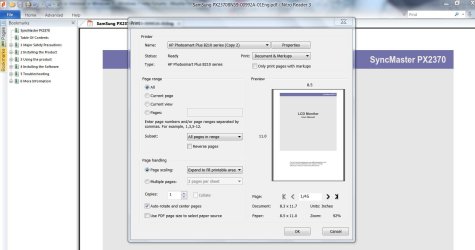
I opened a pdf in Nitro, selected print and here is the screenshot:

current view.JPG

Helpful?

I'm going for supper check back in a bit.......
 

My Computer My Computer

Computer type
PC/Desktop
Computer Manufacturer/Model Number
Gateway DX4831-01e (Mid-Tower Desktop)
OS
Originally Win 7 Hm Prem x64 Ver 6.1.7600 Build 7601-SP1 | Upgraded to Windows 10 December 14, 2019
CPU
Intel i3 530 2.93GHz, 2933MHz 2 Cores 4 Logical Processors
Motherboard
Gateway H57M01 133 megahertz
Memory
6GB of 1,333MHz DDR3 SDRAM
Graphics Card(s)
32MB Intel Graphics Media Accelerator HD IGChip
Sound Card
Realtek High Definition Audio
Monitor(s) Displays
Gateway HX2000 20inch TFT active matrix TN
Screen Resolution
1600 x 900 x 59 hertz
Hard Drives
WDC WD10EADS-00M2B0 [HDD] (1000.20 GB) -- drive 0,
HL-DT-ST DVDRAM GH41N [CD-ROM dr]
Four card readers, and Four USB 2.0
PSU
300watts.
Case
Mid-Tower Desktop
Cooling
Stock from Gateway
Keyboard
Natural Ergonomic Keyboard 4000, see Other Info
Mouse
Orig. Gateway wore out now using Insignia USB wired optical
Internet Speed
Vz FIOS 10ms png 57.64Mbps down 65.53Mbps up Speedtest.org
Antivirus
Zamana Anti-logger with Anti-malware, MSE, Windows Firewall,
Browser
IE11.0.9600.19399-Upd ver11.0.135, Firefox 68.0.1 x64
Other Info
System Specs by Belarc.

BIOS: American Megatrends Inc. P01-A0 11/17/2009

Replaced the MS 'Natural' Standard PS/2 Enhanced 101-102 Keyboard with a new Natural Ergonomic Keyboard 4000 on August 1st 2014.

Canon Pixma MG3222 Printer.

Updated to IE11 on 12102015 | Fios Quantum Router g1100

Additional AV: SpywareBlaster, manual Mbam, SAS
Thanks for checking.

"Current view" should let you resize the window that is displaying the PDF so that only a coupon (for example) is in view and not the whole advert... that saves considerable ink when printing.
 

My Computer My Computer

Computer type
Laptop
Computer Manufacturer/Model Number
Employer provided Dell Latitude
OS
W7 Pro SP1 64bit
CPU
i7
Memory
8GB
Graphics Card(s)
Intel HD Graphics
Hard Drives
crappy SSD
Antivirus
Employer mandated Symantec Endpoint Protection
Browser
Pale Moon 64bit, IE11 64bit & Chrome 64bit
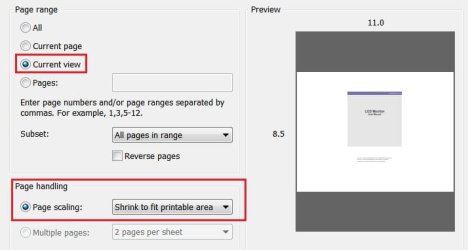
I hope you can tell the difference from my 1st pix to this:

Current view 1.jpg

I found the selection "Current View" in red on the Print page, it is somewhat smaller.
 

My Computer My Computer

Computer type
PC/Desktop
Computer Manufacturer/Model Number
Gateway DX4831-01e (Mid-Tower Desktop)
OS
Originally Win 7 Hm Prem x64 Ver 6.1.7600 Build 7601-SP1 | Upgraded to Windows 10 December 14, 2019
CPU
Intel i3 530 2.93GHz, 2933MHz 2 Cores 4 Logical Processors
Motherboard
Gateway H57M01 133 megahertz
Memory
6GB of 1,333MHz DDR3 SDRAM
Graphics Card(s)
32MB Intel Graphics Media Accelerator HD IGChip
Sound Card
Realtek High Definition Audio
Monitor(s) Displays
Gateway HX2000 20inch TFT active matrix TN
Screen Resolution
1600 x 900 x 59 hertz
Hard Drives
WDC WD10EADS-00M2B0 [HDD] (1000.20 GB) -- drive 0,
HL-DT-ST DVDRAM GH41N [CD-ROM dr]
Four card readers, and Four USB 2.0
PSU
300watts.
Case
Mid-Tower Desktop
Cooling
Stock from Gateway
Keyboard
Natural Ergonomic Keyboard 4000, see Other Info
Mouse
Orig. Gateway wore out now using Insignia USB wired optical
Internet Speed
Vz FIOS 10ms png 57.64Mbps down 65.53Mbps up Speedtest.org
Antivirus
Zamana Anti-logger with Anti-malware, MSE, Windows Firewall,
Browser
IE11.0.9600.19399-Upd ver11.0.135, Firefox 68.0.1 x64
Other Info
System Specs by Belarc.

BIOS: American Megatrends Inc. P01-A0 11/17/2009

Replaced the MS 'Natural' Standard PS/2 Enhanced 101-102 Keyboard with a new Natural Ergonomic Keyboard 4000 on August 1st 2014.

Canon Pixma MG3222 Printer.

Updated to IE11 on 12102015 | Fios Quantum Router g1100

Additional AV: SpywareBlaster, manual Mbam, SAS
I think that it does the same thing as Adobe's reader...
...but the real work is done before you select print.

Set Nitro to show you the PDF at 100%.

Now drag the edges of the Nitro window so that only see the letters LCD Monitor.

You should still be seeing the document at 100% zoom level...
...but you can only see a tiny part of the page.

That tiny part is what you want to print... like it was a coupon that you wanted to hand a cashier. Why print the entire advert, then cut out the coupon and toss the rest of what you just printed into the recycle bin? See what I miss having?
 

My Computer My Computer

Computer type
Laptop
Computer Manufacturer/Model Number
Employer provided Dell Latitude
OS
W7 Pro SP1 64bit
CPU
i7
Memory
8GB
Graphics Card(s)
Intel HD Graphics
Hard Drives
crappy SSD
Antivirus
Employer mandated Symantec Endpoint Protection
Browser
Pale Moon 64bit, IE11 64bit & Chrome 64bit
Unless it is in the Pro version I can't drag the edges of the screen, I can select LCD Monitor like a snip-it tool, copy that elsewhere and print.

I'd love to stay and figure this out, but it's been a long day. I look into this later and post back tomorrow.

Later......
 

My Computer My Computer

Computer type
PC/Desktop
Computer Manufacturer/Model Number
Gateway DX4831-01e (Mid-Tower Desktop)
OS
Originally Win 7 Hm Prem x64 Ver 6.1.7600 Build 7601-SP1 | Upgraded to Windows 10 December 14, 2019
CPU
Intel i3 530 2.93GHz, 2933MHz 2 Cores 4 Logical Processors
Motherboard
Gateway H57M01 133 megahertz
Memory
6GB of 1,333MHz DDR3 SDRAM
Graphics Card(s)
32MB Intel Graphics Media Accelerator HD IGChip
Sound Card
Realtek High Definition Audio
Monitor(s) Displays
Gateway HX2000 20inch TFT active matrix TN
Screen Resolution
1600 x 900 x 59 hertz
Hard Drives
WDC WD10EADS-00M2B0 [HDD] (1000.20 GB) -- drive 0,
HL-DT-ST DVDRAM GH41N [CD-ROM dr]
Four card readers, and Four USB 2.0
PSU
300watts.
Case
Mid-Tower Desktop
Cooling
Stock from Gateway
Keyboard
Natural Ergonomic Keyboard 4000, see Other Info
Mouse
Orig. Gateway wore out now using Insignia USB wired optical
Internet Speed
Vz FIOS 10ms png 57.64Mbps down 65.53Mbps up Speedtest.org
Antivirus
Zamana Anti-logger with Anti-malware, MSE, Windows Firewall,
Browser
IE11.0.9600.19399-Upd ver11.0.135, Firefox 68.0.1 x64
Other Info
System Specs by Belarc.

BIOS: American Megatrends Inc. P01-A0 11/17/2009

Replaced the MS 'Natural' Standard PS/2 Enhanced 101-102 Keyboard with a new Natural Ergonomic Keyboard 4000 on August 1st 2014.

Canon Pixma MG3222 Printer.

Updated to IE11 on 12102015 | Fios Quantum Router g1100

Additional AV: SpywareBlaster, manual Mbam, SAS
No problem, snip and print works too, just with fewer print options.
 

My Computer My Computer

Computer type
Laptop
Computer Manufacturer/Model Number
Employer provided Dell Latitude
OS
W7 Pro SP1 64bit
CPU
i7
Memory
8GB
Graphics Card(s)
Intel HD Graphics
Hard Drives
crappy SSD
Antivirus
Employer mandated Symantec Endpoint Protection
Browser
Pale Moon 64bit, IE11 64bit & Chrome 64bit
Hey Scoop,

Thank you for posting back with the confirmation. I would agree. :)

No problem. I just checked this morning after another overnight Norton scan.
6gfuwz.jpg
 

My Computer My Computer

Computer type
PC/Desktop
Computer Manufacturer/Model Number
Built at Micro Center Richardson, TX
OS
Windows 7 Home Premium 64 bit
CPU
Intel i5 650 Dual Core 3.20 GHz Cache 4MB Threads: 4
Motherboard
ASUS PRO P7P55D-E
Memory
Corsair 16GB DDR3 1600MHz 9-9-9-24 P/N: CMZ8GX3M2A1600C
Graphics Card(s)
ZOTAC GeFORCE 9500 ZT-95TEK2M-FSL 1GB GDDR2
Sound Card
Mother Bd
Monitor(s) Displays
ASUS V228H 21.5” Diag
Screen Resolution
1440 x 900
Hard Drives
SEAGATE BARRACUDA (2ea) 3.5” INTERNAL 1Tb 16 MB SATA ST1000DM003-9YN162 7200RPM, 64MB, SATA 6Gb/s ** 2 Sata Hot-Swap Racks installed in Tower
PSU
Thermaltake Model TR2 RX 750W
Cooling
2 Tower Fans
Keyboard
Dell Quietkey PS/2 Windows 104 P/N 0463CD
Mouse
Kensington Mechanical Trackball USB Model 64217
Internet Speed
35/35
Antivirus
Norton 360 & MBAM Pro
Browser
IE10
Other Info
Printer: HP DeskJet 3520 USB 2.0 **
Speakers: ALTEC Model VS4621 2.1 28 W/Channel w/Sub-woofer **
IOGEAR HDMI Monitor Switcher Swx3 MODEL GHDSW3 ** Addonics ZDRWESU3 eSata/USB 3.0 external DVD Read/Write DVD Drive** SEAGATE GoFlex USB 2.0 Portable HD 500GB 5400 RPM P/N: 9ZF2A2-570
Can't install IE 10 (or 11)

I've never been able to install IE 10, and I just tried to install IE11 and had the same issue.

Whether it's from a Windows update or from the .exe file....I run the install setup and after it's done it opens up IE9. It never asks me to restart, and if I do restart it still opens up IE 9.

Also, when I go into the Turn On or Off Windows Features...it shows that IE 11 is turned ON. Weird.

Any suggestions?
 

My Computer My Computer

Computer type
PC/Desktop
OS
Windows 7
Hello McZwick, and welcome to Seven Forums.

Did you get any error messages?
 

My Computer My Computer

Computer type
PC/Desktop
Computer Manufacturer/Model Number
Self built custom
OS
64-bit Windows 11 Pro for Workstations
CPU
Intel i7-8700K OC'd to 5 GHz
Motherboard
ASUS ROG Maximus XI Formula Z390
Memory
64 GB (4x16GB) G.SKILL TridentZ RGB DDR4 3600 MHz
Graphics Card(s)
ASUS ROG-STRIX-GTX1080TI-O11G-GAMING
Sound Card
Integrated
Monitor(s) Displays
2 x Samsung Odyssey G7 27"
Screen Resolution
2560x1440
Hard Drives
1TB Samsung 990 PRO M.2,
4TB Samsung 990 PRO PRO M.2,
TerraMaster F8 SSD Plus NAS
PSU
Seasonic Prime Titanium 850W
Case
Thermaltake Core P3
Cooling
Corsair Hydro H115i
Keyboard
Logitech wireless K800
Mouse
Logitech MX Master 4
Internet Speed
2 Gb/s Download and 100 Mb/s Upload
Antivirus
Malwarebyte Anti-Malware Premium
Browser
Google Chrome
Other Info
Logitech Z625 speaker system,
Logitech BRIO 4K Pro webcam,
HP Color LaserJet Pro MFP M477fdn,
APC SMART-UPS RT 1000 XL - SURT1000XLI,
Galaxy S23 Plus phone
Thanks!

No...nothing. No errors messages and no "updates have successfully installed" or anything.

When I try to install it from a Windows update, it immediately suggests I download the update again after it's finished.
 

My Computer My Computer

Computer type
PC/Desktop
OS
Windows 7
Back
Top