xStarEclipse
New member
- Local time
- 10:50 AM
- Messages
- 12
I've been having an odd problem as of late and am not entirely sure on what to do about it. you see, I've been having some slow down issues with my p/c and the process that I've discovered to cause the slow down is svchost.exe. I know that svchost.exe is an important process for the computer, but the odd thing is that one of the svchost.exe processes seems to run at very high rates, and usually doesn't come down. Its strange, but it seems the more I do certain things on my p/c, the more this processes cpu usage goes up, and stays there. It wouldn't be a problem if it weren't for the fact that it doesn't reset until I restart my computer.
Usually it starts at about 100k on my task manager, but will usually go up to 200-300k and stay there until my computer is restarted. Unfortunately, during a virus scan with my avast! antivirus scanner, the svchost.exe process goes up to 600k+ cpu usage, where it then causes slow down.
I've done research but nothing seems to yield helpful results. The process, when traced to its roots, is located in the system32 folder. I can't seem to find the root of the problem, and I am unsure whether or not this could be because of, or even if it may be causing my recent BSODs (BSOD link here: http://www.sevenforums.com/bsod-help-support/295196-few-bsods-last-month.html#post2445961).
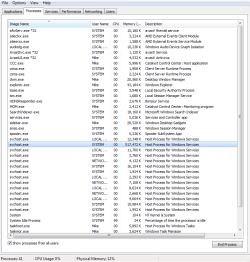
I've attached an image of the task manager with the svchost.exe process highlighted and running at 300k+. This is the only things I know how to do that may help as of right now. If there are any ways of assisting you further, please tell me and I will do my up most best to provide you with assistance.
Usually it starts at about 100k on my task manager, but will usually go up to 200-300k and stay there until my computer is restarted. Unfortunately, during a virus scan with my avast! antivirus scanner, the svchost.exe process goes up to 600k+ cpu usage, where it then causes slow down.
I've done research but nothing seems to yield helpful results. The process, when traced to its roots, is located in the system32 folder. I can't seem to find the root of the problem, and I am unsure whether or not this could be because of, or even if it may be causing my recent BSODs (BSOD link here: http://www.sevenforums.com/bsod-help-support/295196-few-bsods-last-month.html#post2445961).
I've attached an image of the task manager with the svchost.exe process highlighted and running at 300k+. This is the only things I know how to do that may help as of right now. If there are any ways of assisting you further, please tell me and I will do my up most best to provide you with assistance.
Attachments

Last edited:
My Computer
At a glance
Windows 7 Ultimate 64xIntel Core i5-3570 3.4GHz Quad-CoreCorsair Vengeance 16GB (2 x 8GB) DDR3-1600Asus HD7850-DC2-2GD5-V2
- Computer type
- PC/Desktop
- Computer Manufacturer/Model Number
- Custom Build
- OS
- Windows 7 Ultimate 64x
- CPU
- Intel Core i5-3570 3.4GHz Quad-Core
- Motherboard
- Gigabyte GA-Z77X-D3H ATX LGA1155
- Memory
- Corsair Vengeance 16GB (2 x 8GB) DDR3-1600
- Graphics Card(s)
- Asus HD7850-DC2-2GD5-V2
- Hard Drives
- Western Digital Caviar Blue 500GB 3.5" 7200RPM
- Antivirus
- Avast! Internet Security
- Browser
- Firefox