svchost.exe taking up too much CPU?

xStarEclipse

New member
Local time
8:46 AM
Messages
12
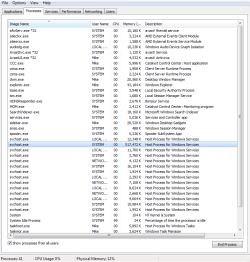
I've been having an odd problem as of late and am not entirely sure on what to do about it. you see, I've been having some slow down issues with my p/c and the process that I've discovered to cause the slow down is svchost.exe. I know that svchost.exe is an important process for the computer, but the odd thing is that one of the svchost.exe processes seems to run at very high rates, and usually doesn't come down. Its strange, but it seems the more I do certain things on my p/c, the more this processes cpu usage goes up, and stays there. It wouldn't be a problem if it weren't for the fact that it doesn't reset until I restart my computer.

Usually it starts at about 100k on my task manager, but will usually go up to 200-300k and stay there until my computer is restarted. Unfortunately, during a virus scan with my avast! antivirus scanner, the svchost.exe process goes up to 600k+ cpu usage, where it then causes slow down.

I've done research but nothing seems to yield helpful results. The process, when traced to its roots, is located in the system32 folder. I can't seem to find the root of the problem, and I am unsure whether or not this could be because of, or even if it may be causing my recent BSODs (BSOD link here: http://www.sevenforums.com/bsod-help-support/295196-few-bsods-last-month.html#post2445961).

I've attached an image of the task manager with the svchost.exe process highlighted and running at 300k+. This is the only things I know how to do that may help as of right now. If there are any ways of assisting you further, please tell me and I will do my up most best to provide you with assistance.
 

Attachments

  • Too Much CPU Usage.png
    Too Much CPU Usage.png
    21.5 KB · Views: 25
Last edited:

My Computer My Computer

At a glance

Windows 7 Ultimate 64xIntel Core i5-3570 3.4GHz Quad-CoreCorsair Vengeance 16GB (2 x 8GB) DDR3-1600Asus HD7850-DC2-2GD5-V2
Computer type
PC/Desktop
Computer Manufacturer/Model Number
Custom Build
OS
Windows 7 Ultimate 64x
CPU
Intel Core i5-3570 3.4GHz Quad-Core
Motherboard
Gigabyte GA-Z77X-D3H ATX LGA1155
Memory
Corsair Vengeance 16GB (2 x 8GB) DDR3-1600
Graphics Card(s)
Asus HD7850-DC2-2GD5-V2
Hard Drives
Western Digital Caviar Blue 500GB 3.5" 7200RPM
Antivirus
Avast! Internet Security
Browser
Firefox
The numbers quoted and showing in Task Manager are memory usage, not CPU usage which is 0 throughout the list. There is no relationship whatsoever between CPU and memory usage. While these numbers do seem high it is unlikely that this alone would cause your problem.

More information is needed. A screenshot of Task Manager - Performance tab would be very useful. Do this when the problem occurs.
 

My Computer My Computer

At a glance

Windows 7 Pro 64 bitXeon W35208 GBNvidia Geforce 210
Computer type
PC/Desktop
Computer Manufacturer/Model Number
HP
OS
Windows 7 Pro 64 bit
CPU
Xeon W3520
Memory
8 GB
Graphics Card(s)
Nvidia Geforce 210
Also svchost.exe is just a program that launches services. It tells you nothing that svchost.exe is using exhorbitant resources unless you track down the particular service being hosted. See Task Manager help how to trace the service that the particular instance of svchost.exe is associated with.

It's similar to the system loader launching applications. You need to find the service that's the resource hog.
 

My Computer My Computer

At a glance

Windows 7 32 bitAMD 5200+ dual core2 GBNVidia GeForce 6150SE 128 MB
Computer Manufacturer/Model Number
HP Media Center
OS
Windows 7 32 bit
CPU
AMD 5200+ dual core
Memory
2 GB
Graphics Card(s)
NVidia GeForce 6150SE 128 MB
Monitor(s) Displays
CRT
Screen Resolution
1280x1024
Hard Drives
500 GB Sata internal :

SIIG USB 3.0 docking stations w/WD Caviar Black 6 Gb/s drives
Keyboard
PS/2
Mouse
PS/2 Wheel Mouse
Other Info
SIIG USB 3.0 PCIexpress card.
You have far to much memory to be concerning yourself over memory usage. Ignore memory usage it is not the cause of your issue.
 

My Computer My Computer

At a glance

Windows 10 Pro (x64)Intel Core i7-3930K (3.2GHz - 4.5GHz)4x Samsung 4GB PC3-12800 DDR3 (16GB 1600MHz)Nvidia Geforce GTX 690
Computer type
PC/Desktop
Computer Manufacturer/Model Number
Alienware Aurora ALX R4
OS
Windows 10 Pro (x64)
CPU
Intel Core i7-3930K (3.2GHz - 4.5GHz)
Motherboard
Alienware Aurora-R4 x79
Memory
4x Samsung 4GB PC3-12800 DDR3 (16GB 1600MHz)
Graphics Card(s)
Nvidia Geforce GTX 690
Sound Card
SteelSeries Siberia Elite
Monitor(s) Displays
Dell UltraSharp U3011
Screen Resolution
2560x1600
Hard Drives
Samsung 850 Pro 256 GB, Seagate 1TB Desktop Hybrid HDD, 2x Western Digital 4TB Green HDD
PSU
875W Some Dell PSU <.<
Case
Alienware Aurora ALX
Cooling
Custom Liquid Cooling (EK CPU & GPU blocks) dual EK 480RAD
Keyboard
Logitech G710+ Mechanical
Mouse
Logitech G700s
Internet Speed
Verizon Fios (50 mbps average)
Other Info
Server: Intel NUC D54250WYK: i5-4250U, 16GB, 256 GB mSATA, Windows Server 2012 R2
It's my understanding that svchost.exe can host malware. Might wanna run some thorough scans.
 

My Computer My Computer

At a glance

Windows 7 Professional x64Intel Core 2 Duo E7200, 2.53GHz @ 3.3GHz4GB Corsair XMS2 DDR2-800 @ 933MHzMSI GeForce GTX 460 v2 OC
Computer Manufacturer/Model Number
Custom
OS
Windows 7 Professional x64
CPU
Intel Core 2 Duo E7200, 2.53GHz @ 3.3GHz
Motherboard
EVGA 750i SLi FTW
Memory
4GB Corsair XMS2 DDR2-800 @ 933MHz
Graphics Card(s)
MSI GeForce GTX 460 v2 OC
Sound Card
Creative Labs Sound Blaster X-Fi Titanium PCI-E
Monitor(s) Displays
ASUS VH202T-P, 20"
Screen Resolution
1600x900
Hard Drives
500GB Seagate Barracuda SATA-II
120GB Seagate Barracuda ATA/133
PSU
Antec EA-750
Case
NZXT Tempest
Cooling
All stock air-cooling
Keyboard
Logitech K350
Mouse
Logitech M510
Internet Speed
20Mb/s / 4Mb/s
It is possible that the computer is infected and reasonable steps need to be taken to ensure this is not the case. But we don't have any real evidence that the memory usage of the svchost.exe instance is the cause of the problem. Considering that the system has 16 GB of RAM that would seem unlikely. At the present time what is going on in the computer is pretty much a mystery and the process list provides little information of value.

A good place to start would be a screenshot of Task Manager -Performance tab. This would provide a great deal of information about the system that is currently lacking. This helps to avoid pointless speculation and much wasted time.
 

My Computer My Computer

At a glance

Windows 7 Pro 64 bitXeon W35208 GBNvidia Geforce 210
Computer type
PC/Desktop
Computer Manufacturer/Model Number
HP
OS
Windows 7 Pro 64 bit
CPU
Xeon W3520
Memory
8 GB
Graphics Card(s)
Nvidia Geforce 210
xStarEclipse welcome SevenForums

Lets run TDSSKILLER


download link :ar: TDSSKiller


Save onto your Desktop.

Right-click the program and select:
mawket.jpg


When the TDSSKiller console opens, click on: Change Parameters

Under Additional Options, place a check in the box next to: Detect TDLFS File System

Click: OK


Press: Start Scan


If a suspicious object is detected, the default action is Skip, leave it as is, and click on: Continue
If malicious objects are found, they show in the Scan results.
Ensure Cure (the default) is selected, then click: Continue > Reboot now, to finish the cleaning process.
(Note: If Cure is not available, select Skip, >>Do not select: Delete<<)


When done, the tool outputs its log to the disk with the Windows Operating System, normally C:\


Logs have a name like:
C:\TDSSKiller.X.X.X_12.04.2013_15.31.43_log.txt


Please post the TDSSKiller log in your reply.
 

My Computer My Computer

At a glance

Windows 7 Ultimate 32-Bit & Windows 7 Ultimat...Intel Core i7 CPU 950 @ 3.07GHzOCZ 6GB (3 x 2GB) 240-Pin DDR3 SDRAM DDR3 160...ATI Radeon HD 5700 Series
Computer Manufacturer/Model Number
Custom Built
OS
Windows 7 Ultimate 32-Bit & Windows 7 Ultimate 64-Bit
CPU
Intel Core i7 CPU 950 @ 3.07GHz
Motherboard
ASUS P6T DELUXE V2
Memory
OCZ 6GB (3 x 2GB) 240-Pin DDR3 SDRAM DDR3 1600 OCZ3X1600R2
Graphics Card(s)
ATI Radeon HD 5700 Series
Sound Card
OnBoard
Hard Drives
WD6400AACS-00M3B0 (640GB SATA )
PSU
CORSAIR 850w
Case
NZXT LEXA
Cooling
Intel Stock Heatsink Fan
Keyboard
Microsoft Wireless Laser Keyboard 7000
Mouse
Microsoft Wireless Laser Mouse 7000
This is a non-problem. Just forget about it.
 

My Computer My Computer

At a glance

Vista, Windows7, Mint Mate, Zorin, Windows 8from 1.6GHz Duo to i7
Computer Manufacturer/Model Number
HP, Dell, Gateway, Toshiba - 4 laptops and 2 desktops
OS
Vista, Windows7, Mint Mate, Zorin, Windows 8
CPU
from 1.6GHz Duo to i7
Monitor(s) Displays
2x HP w2207
Hard Drives
5x HDD, 7x SSD, 12x Externals
Keyboard
with trackball - no mices
Mouse
Trackball mice
Internet Speed
DSL 6000
This is a non-problem. Just forget about it.

I tend to agree. A multi-GB ram machine using a few hundred MB for SYSTEM... what's the issue?
 

My Computer My Computer

At a glance

Windows 7 32 bitAMD 5200+ dual core2 GBNVidia GeForce 6150SE 128 MB
Computer Manufacturer/Model Number
HP Media Center
OS
Windows 7 32 bit
CPU
AMD 5200+ dual core
Memory
2 GB
Graphics Card(s)
NVidia GeForce 6150SE 128 MB
Monitor(s) Displays
CRT
Screen Resolution
1280x1024
Hard Drives
500 GB Sata internal :

SIIG USB 3.0 docking stations w/WD Caviar Black 6 Gb/s drives
Keyboard
PS/2
Mouse
PS/2 Wheel Mouse
Other Info
SIIG USB 3.0 PCIexpress card.
I"m basing my speculation off of the topic title: "svchost.exe taking up too much CPU?"
 

My Computer My Computer

At a glance

Windows 7 Professional x64Intel Core 2 Duo E7200, 2.53GHz @ 3.3GHz4GB Corsair XMS2 DDR2-800 @ 933MHzMSI GeForce GTX 460 v2 OC
Computer Manufacturer/Model Number
Custom
OS
Windows 7 Professional x64
CPU
Intel Core 2 Duo E7200, 2.53GHz @ 3.3GHz
Motherboard
EVGA 750i SLi FTW
Memory
4GB Corsair XMS2 DDR2-800 @ 933MHz
Graphics Card(s)
MSI GeForce GTX 460 v2 OC
Sound Card
Creative Labs Sound Blaster X-Fi Titanium PCI-E
Monitor(s) Displays
ASUS VH202T-P, 20"
Screen Resolution
1600x900
Hard Drives
500GB Seagate Barracuda SATA-II
120GB Seagate Barracuda ATA/133
PSU
Antec EA-750
Case
NZXT Tempest
Cooling
All stock air-cooling
Keyboard
Logitech K350
Mouse
Logitech M510
Internet Speed
20Mb/s / 4Mb/s
Lets see what the OP says . Let him run tdsskiller and see the results .
 

My Computer My Computer

At a glance

Windows 7 Ultimate 32-Bit & Windows 7 Ultimat...Intel Core i7 CPU 950 @ 3.07GHzOCZ 6GB (3 x 2GB) 240-Pin DDR3 SDRAM DDR3 160...ATI Radeon HD 5700 Series
Computer Manufacturer/Model Number
Custom Built
OS
Windows 7 Ultimate 32-Bit & Windows 7 Ultimate 64-Bit
CPU
Intel Core i7 CPU 950 @ 3.07GHz
Motherboard
ASUS P6T DELUXE V2
Memory
OCZ 6GB (3 x 2GB) 240-Pin DDR3 SDRAM DDR3 1600 OCZ3X1600R2
Graphics Card(s)
ATI Radeon HD 5700 Series
Sound Card
OnBoard
Hard Drives
WD6400AACS-00M3B0 (640GB SATA )
PSU
CORSAIR 850w
Case
NZXT LEXA
Cooling
Intel Stock Heatsink Fan
Keyboard
Microsoft Wireless Laser Keyboard 7000
Mouse
Microsoft Wireless Laser Mouse 7000
And the OP has 2 posts, 2 threads, and hasn't replied to any help offered in either thread...
:rolleyes:
 

My Computer My Computer

At a glance

Multi-Boot W7_Pro_x64 W8.1_Pro_x64 W10_Pro_x6...AMD Athlon II x4 6206GB GSkill DDR2 800AMD 4670 GPU + AMD 4200 IGP
Computer type
PC/Desktop
Computer Manufacturer/Model Number
home built
OS
Multi-Boot W7_Pro_x64 W8.1_Pro_x64 W10_Pro_x64 +Linux_VMs +Chromium_VM
CPU
AMD Athlon II x4 620
Motherboard
Gigabyte GA-MA785G-UD3H
Memory
6GB GSkill DDR2 800
Graphics Card(s)
AMD 4670 GPU + AMD 4200 IGP
Sound Card
on board Realtek ALC889A
Monitor(s) Displays
RCA 40" LCD TV, Insignia 32" LCD TV, HP 15" LCD monitor
Screen Resolution
1680 x 1050
Hard Drives
OCZ Vertex 3 120GB,
Samsung F3 1TB (3),
Several others - WD, Seagate, Hitachi, ...
PSU
Corsair 500 W
Case
Rosewill mid tower
Cooling
CM 90mm rifle
Keyboard
Gyration wireless, Logitech wireless, Dell USB wired
Mouse
Gyration wireless, Logitech wireless, V7 USB wired
Internet Speed
Spectrum - 100Mbps D / 10Mbps U
Antivirus
Avast, MBAM3, EMET, WinPatrol
Browser
Pale Moon, Firefox, IE
Other Info
2 multi-boot PC's
Mainly HTPC/Office/Gen purpose (no gaming).
Trendnet USB KVM.
LG DVD burner/Blue Ray Player.
Tray system for removable SATA backup drives.

Not currently OCd, under-volted.
I use Hybrid sleep, rarely re-boot or shutdown.

Hauppauge HD-PVR, Avermedia PCIe TV Tuner, Hauppauge PCI TV Tuner.
Guess we just sit back and wait for an answer
 

My Computer My Computer

At a glance

Windows 7 Ultimate 32-Bit & Windows 7 Ultimat...Intel Core i7 CPU 950 @ 3.07GHzOCZ 6GB (3 x 2GB) 240-Pin DDR3 SDRAM DDR3 160...ATI Radeon HD 5700 Series
Computer Manufacturer/Model Number
Custom Built
OS
Windows 7 Ultimate 32-Bit & Windows 7 Ultimate 64-Bit
CPU
Intel Core i7 CPU 950 @ 3.07GHz
Motherboard
ASUS P6T DELUXE V2
Memory
OCZ 6GB (3 x 2GB) 240-Pin DDR3 SDRAM DDR3 1600 OCZ3X1600R2
Graphics Card(s)
ATI Radeon HD 5700 Series
Sound Card
OnBoard
Hard Drives
WD6400AACS-00M3B0 (640GB SATA )
PSU
CORSAIR 850w
Case
NZXT LEXA
Cooling
Intel Stock Heatsink Fan
Keyboard
Microsoft Wireless Laser Keyboard 7000
Mouse
Microsoft Wireless Laser Mouse 7000
xStarEclipse welcome SevenForums

Lets run TDSSKILLER


download link :ar: TDSSKiller


Save onto your Desktop.

Right-click the program and select:
mawket.jpg


When the TDSSKiller console opens, click on: Change Parameters

Under Additional Options, place a check in the box next to: Detect TDLFS File System

Click: OK


Press: Start Scan


If a suspicious object is detected, the default action is Skip, leave it as is, and click on: Continue
If malicious objects are found, they show in the Scan results.
Ensure Cure (the default) is selected, then click: Continue > Reboot now, to finish the cleaning process.
(Note: If Cure is not available, select Skip, >>Do not select: Delete<<)


When done, the tool outputs its log to the disk with the Windows Operating System, normally C:\


Logs have a name like:
C:\TDSSKiller.X.X.X_12.04.2013_15.31.43_log.txt


Please post the TDSSKiller log in your reply.


Attached to this post on bottom, as well as a view of the task manager after a virus scan. I didn't think to screen shot my performance during the scan, sorry!

But it says nothings wrong... however the process usually acts strange/runs high when I'm running avast antivirus! scans (custom scan, all hard drisks, rootkits, auto start programs all users, modules loaded into memory). During and after the scan my p/c, despite being new with decent hardware, runs as if its 5+ years old until its restarted, which is strange because I have programs run up to 900,000ks and does nothing to my p/c... I'm not sure if somethings just wrong with my software and/or hardware, or if there's an infection on my p/c, though I have been experiencing blue screens when putting my p/c into sleep mode and occasionally during virus scans.
 

Attachments

My Computer My Computer

At a glance

Windows 7 Ultimate 64xIntel Core i5-3570 3.4GHz Quad-CoreCorsair Vengeance 16GB (2 x 8GB) DDR3-1600Asus HD7850-DC2-2GD5-V2
Computer type
PC/Desktop
Computer Manufacturer/Model Number
Custom Build
OS
Windows 7 Ultimate 64x
CPU
Intel Core i5-3570 3.4GHz Quad-Core
Motherboard
Gigabyte GA-Z77X-D3H ATX LGA1155
Memory
Corsair Vengeance 16GB (2 x 8GB) DDR3-1600
Graphics Card(s)
Asus HD7850-DC2-2GD5-V2
Hard Drives
Western Digital Caviar Blue 500GB 3.5" 7200RPM
Antivirus
Avast! Internet Security
Browser
Firefox
And the OP has 2 posts, 2 threads, and hasn't replied to any help offered in either thread...
:rolleyes:


Sorry, have been busy. The BSOD thread... I honestly didn't think I needed to post a reply... I mean I figured since I described the situation and posted/reuploaded the .zip file it would have been responded to, and I could have given more information from then on, but I guess not. As for this one, yea I was busy. I apologize. :confused:
 

My Computer My Computer

At a glance

Windows 7 Ultimate 64xIntel Core i5-3570 3.4GHz Quad-CoreCorsair Vengeance 16GB (2 x 8GB) DDR3-1600Asus HD7850-DC2-2GD5-V2
Computer type
PC/Desktop
Computer Manufacturer/Model Number
Custom Build
OS
Windows 7 Ultimate 64x
CPU
Intel Core i5-3570 3.4GHz Quad-Core
Motherboard
Gigabyte GA-Z77X-D3H ATX LGA1155
Memory
Corsair Vengeance 16GB (2 x 8GB) DDR3-1600
Graphics Card(s)
Asus HD7850-DC2-2GD5-V2
Hard Drives
Western Digital Caviar Blue 500GB 3.5" 7200RPM
Antivirus
Avast! Internet Security
Browser
Firefox
RogueKiller for 32bit <==== Download Link

RogueKiller for 64bit <==== Download Link

:ar: Click on one of the links above that goes with your Windows 7 bit versions

:ar: Save to the Desktop.

:ar: Close all windows and browsers

:ar: Right click on
332trud.png
and choose
mawket.jpg


:ar: Press: SCAN

:ar: provide the RKreport.txt (Mode: Scan) in your reply.
 

My Computer My Computer

At a glance

Windows 7 Ultimate 32-Bit & Windows 7 Ultimat...Intel Core i7 CPU 950 @ 3.07GHzOCZ 6GB (3 x 2GB) 240-Pin DDR3 SDRAM DDR3 160...ATI Radeon HD 5700 Series
Computer Manufacturer/Model Number
Custom Built
OS
Windows 7 Ultimate 32-Bit & Windows 7 Ultimate 64-Bit
CPU
Intel Core i7 CPU 950 @ 3.07GHz
Motherboard
ASUS P6T DELUXE V2
Memory
OCZ 6GB (3 x 2GB) 240-Pin DDR3 SDRAM DDR3 1600 OCZ3X1600R2
Graphics Card(s)
ATI Radeon HD 5700 Series
Sound Card
OnBoard
Hard Drives
WD6400AACS-00M3B0 (640GB SATA )
PSU
CORSAIR 850w
Case
NZXT LEXA
Cooling
Intel Stock Heatsink Fan
Keyboard
Microsoft Wireless Laser Keyboard 7000
Mouse
Microsoft Wireless Laser Mouse 7000
Here's the RKreport.txt
 

Attachments

My Computer My Computer

At a glance

Windows 7 Ultimate 64xIntel Core i5-3570 3.4GHz Quad-CoreCorsair Vengeance 16GB (2 x 8GB) DDR3-1600Asus HD7850-DC2-2GD5-V2
Computer type
PC/Desktop
Computer Manufacturer/Model Number
Custom Build
OS
Windows 7 Ultimate 64x
CPU
Intel Core i5-3570 3.4GHz Quad-Core
Motherboard
Gigabyte GA-Z77X-D3H ATX LGA1155
Memory
Corsair Vengeance 16GB (2 x 8GB) DDR3-1600
Graphics Card(s)
Asus HD7850-DC2-2GD5-V2
Hard Drives
Western Digital Caviar Blue 500GB 3.5" 7200RPM
Antivirus
Avast! Internet Security
Browser
Firefox
Rerun RogueKiller and click on the delete button .
 

My Computer My Computer

At a glance

Windows 7 Ultimate 32-Bit & Windows 7 Ultimat...Intel Core i7 CPU 950 @ 3.07GHzOCZ 6GB (3 x 2GB) 240-Pin DDR3 SDRAM DDR3 160...ATI Radeon HD 5700 Series
Computer Manufacturer/Model Number
Custom Built
OS
Windows 7 Ultimate 32-Bit & Windows 7 Ultimate 64-Bit
CPU
Intel Core i7 CPU 950 @ 3.07GHz
Motherboard
ASUS P6T DELUXE V2
Memory
OCZ 6GB (3 x 2GB) 240-Pin DDR3 SDRAM DDR3 1600 OCZ3X1600R2
Graphics Card(s)
ATI Radeon HD 5700 Series
Sound Card
OnBoard
Hard Drives
WD6400AACS-00M3B0 (640GB SATA )
PSU
CORSAIR 850w
Case
NZXT LEXA
Cooling
Intel Stock Heatsink Fan
Keyboard
Microsoft Wireless Laser Keyboard 7000
Mouse
Microsoft Wireless Laser Mouse 7000
Alright, it's done. Do you want the new report it made?
 

My Computer My Computer

At a glance

Windows 7 Ultimate 64xIntel Core i5-3570 3.4GHz Quad-CoreCorsair Vengeance 16GB (2 x 8GB) DDR3-1600Asus HD7850-DC2-2GD5-V2
Computer type
PC/Desktop
Computer Manufacturer/Model Number
Custom Build
OS
Windows 7 Ultimate 64x
CPU
Intel Core i5-3570 3.4GHz Quad-Core
Motherboard
Gigabyte GA-Z77X-D3H ATX LGA1155
Memory
Corsair Vengeance 16GB (2 x 8GB) DDR3-1600
Graphics Card(s)
Asus HD7850-DC2-2GD5-V2
Hard Drives
Western Digital Caviar Blue 500GB 3.5" 7200RPM
Antivirus
Avast! Internet Security
Browser
Firefox
Yes please
 

My Computer My Computer

At a glance

Windows 7 Ultimate 32-Bit & Windows 7 Ultimat...Intel Core i7 CPU 950 @ 3.07GHzOCZ 6GB (3 x 2GB) 240-Pin DDR3 SDRAM DDR3 160...ATI Radeon HD 5700 Series
Computer Manufacturer/Model Number
Custom Built
OS
Windows 7 Ultimate 32-Bit & Windows 7 Ultimate 64-Bit
CPU
Intel Core i7 CPU 950 @ 3.07GHz
Motherboard
ASUS P6T DELUXE V2
Memory
OCZ 6GB (3 x 2GB) 240-Pin DDR3 SDRAM DDR3 1600 OCZ3X1600R2
Graphics Card(s)
ATI Radeon HD 5700 Series
Sound Card
OnBoard
Hard Drives
WD6400AACS-00M3B0 (640GB SATA )
PSU
CORSAIR 850w
Case
NZXT LEXA
Cooling
Intel Stock Heatsink Fan
Keyboard
Microsoft Wireless Laser Keyboard 7000
Mouse
Microsoft Wireless Laser Mouse 7000
Back
Top