WLAN and Lan - Invalid IP Config and Problem with wireless adapter

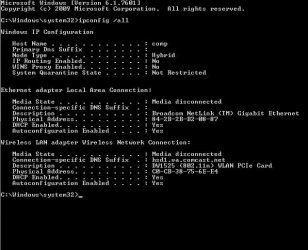
Sure thing. It's below.

As to the router, when this issue surfaced we had Comcast internet. In the middle of the thread we were able to switch to Fios, so the router changed. The current router is an Actiontec MI424WR.
 

Attachments

  • 123.jpg
    123.jpg
    69.4 KB · Views: 6

My Computer My Computer

At a glance

Windows 7 64
Computer type
PC/Desktop
Computer Manufacturer/Model Number
Dell Studio XPS
OS
Windows 7 64
Sure thing. It's below.

As to the router, when this issue surfaced we had Comcast internet. In the middle of the thread we were able to switch to Fios, so the router changed. The current router is an Actiontec MI424WR.

It looks like some thing is missing from this ipconfig, nothing at all from the router this time. I can only assume that you have the Fios set up correctly.

Try resetting the Network stack, flush the DNS cache etc. by running the file below, your machine will reboot automatically after it's done.
 

Attachments

Last edited:

My Computer My Computer

At a glance

Windows 7 Ult, Windows 8.1 Pro,Q9650-4.275GHz, E8600 4.5GHz, E6750-3.8GHzG.Skill PC2 9600 1200Mhz 5 5 5 15 2TGTX480
Computer type
PC/Desktop
Computer Manufacturer/Model Number
Home built
OS
Windows 7 Ult, Windows 8.1 Pro,
CPU
Q9650-4.275GHz, E8600 4.5GHz, E6750-3.8GHz
Motherboard
Evga 780i FTW
Memory
G.Skill PC2 9600 1200Mhz 5 5 5 15 2T
Graphics Card(s)
GTX480
Sound Card
Asus Xonar D2
Monitor(s) Displays
HannsG
Screen Resolution
1680X1050
Hard Drives
GSkill Phoenix Pro 120GB SSD
PSU
ThermalTake Toughpower 1000Watt modular
Case
ThermalTake XaserV
Cooling
Xigmatek S1283
Keyboard
Logitech G15
Mouse
Logitech G9
Internet Speed
T1
OK, did that. It is currently connected to and "Unidentified network" with "No Internet access".

I'm guessing that it is connecting up with the router at this point be can't seem to get past it. I tried to access the router with the default gateway on the problem machine with no success. All other machines and gadgets have no issue linking up with the Fios router.
 

My Computer My Computer

At a glance

Windows 7 64
Computer type
PC/Desktop
Computer Manufacturer/Model Number
Dell Studio XPS
OS
Windows 7 64
Ok

Go to Control Panel
click on "Network and Sharing Centre"
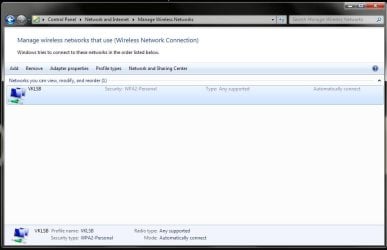
and the click on "Manage Wireless Network" and
could post a screenshot of what you see there....

Also whats you FIOS router SSID... meaning the name for the Wireless router
 

My Computer My Computer

At a glance

Windows 7 ultimate x64
Computer Manufacturer/Model Number
Nothing specific....what ever the clients provide for Repair
OS
Windows 7 ultimate x64
My SSID: VKLSB
 

Attachments

  • 123.jpg
    123.jpg
    70.6 KB · Views: 3

My Computer My Computer

At a glance

Windows 7 64
Computer type
PC/Desktop
Computer Manufacturer/Model Number
Dell Studio XPS
OS
Windows 7 64
My SSID: VKLSB

If you can define the encryption type it may help, you should set it to use AES encryption which your fios router should be set up for.

It also looks like the Msoft virtual WiFi miniport driver has vanished from the ipconfig along with tunnel adaptors etc. something is messed up there so reinstalling the driver for the wireless NIC DW-1525 would be required. http://en.community.dell.com/support-forums/default.aspx

If you can connect using a wired connection then visit the Windows Update Center it should install the missing driver for you or you can try going to the Dell support site in the link.
 

My Computer My Computer

At a glance

Windows 7 Ult, Windows 8.1 Pro,Q9650-4.275GHz, E8600 4.5GHz, E6750-3.8GHzG.Skill PC2 9600 1200Mhz 5 5 5 15 2TGTX480
Computer type
PC/Desktop
Computer Manufacturer/Model Number
Home built
OS
Windows 7 Ult, Windows 8.1 Pro,
CPU
Q9650-4.275GHz, E8600 4.5GHz, E6750-3.8GHz
Motherboard
Evga 780i FTW
Memory
G.Skill PC2 9600 1200Mhz 5 5 5 15 2T
Graphics Card(s)
GTX480
Sound Card
Asus Xonar D2
Monitor(s) Displays
HannsG
Screen Resolution
1680X1050
Hard Drives
GSkill Phoenix Pro 120GB SSD
PSU
ThermalTake Toughpower 1000Watt modular
Case
ThermalTake XaserV
Cooling
Xigmatek S1283
Keyboard
Logitech G15
Mouse
Logitech G9
Internet Speed
T1
Back
Top