
Need some help removing Vista from my laptop

Gripen

New member
Local time
3:47 PM
Messages
2
Hey all,

Last night I installed Windows 7 Ultimate (32bit) on my Dell Inspiron 1545 (previously running Vista Home Premium 32bit). I backed up all my files, and then popped in the Win7 disk and pretty much followed the prompts from then on. Thought that'd be safest, since I don't know all that much about computers. Anyway, the installation worked great, but now I have the option to boot into either 7 or Vista, when I thought 7 would totally replace Vista. How can I remove Vista now? I turned off the dual boot option, but I need Vista gone ASAP since I'm now down to like 7MB on my recovery drive (used to be 8GB of space left). It seems that Vista and 7 are installed on the same partition, so I don't know what to do. Any help would be greatly appreciated.


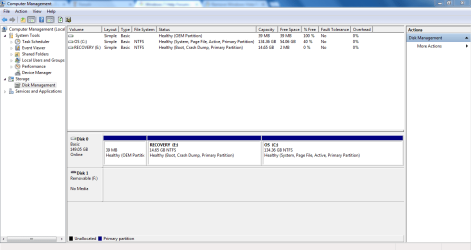
Attached is a screenshot of my computer management page, in case it helps anyone.
 

Attachments
  • 1.PNG
    1.PNG
    29.3 KB · Views: 20

My Computer My Computer

At a glance

Windows 7 Ultimate 32 bit
Computer type
Laptop
Computer Manufacturer/Model Number
Dell
OS
Windows 7 Ultimate 32 bit
Browser
Google Chrome
Looks like you installed Win7 to the Recovery partition, as signified by the "Boot" label on it which can only mean its the booted OS at the moment. It also is stuck with the letter E since you ran the installer from Vista instead of correctly booting it to install, thereby locking out the letter C from being available.

To correct this I would do it over, this time deleting all partitions in Steps 7 and 8 of Clean Install Windows 7 to create and format new one(s) as you wish or just click Next to let the installer create and format the install partition and begin install.

If you really want to keep what you have then Mark E Partition Active and boot the Win7 installer to run Startup Repair - Run up to 3 Separate Times until it boots and the System Active flags are all on E, which you can relabel in Disk Mgmt Properties. You'd also need to move the Paging File back to E: Virtual Memory Paging File - Change

You can then delete C in Disk Mgmt when you're sure everything you need is off of it: Partition or Volume - Delete and Extend E if you want to the right: Partition or Volume - Extend
 
Hey all,

Last night I installed Windows 7 Ultimate (32bit) on my Dell Inspiron 1545 (previously running Vista Home Premium 32bit). I backed up all my files, and then popped in the Win7 disk and pretty much followed the prompts from then on. Thought that'd be safest, since I don't know all that much about computers. Anyway, the installation worked great, but now I have the option to boot into either 7 or Vista, when I thought 7 would totally replace Vista. How can I remove Vista now? I turned off the dual boot option, but I need Vista gone ASAP since I'm now down to like 7MB on my recovery drive (used to be 8GB of space left). It seems that Vista and 7 are installed on the same partition, so I don't know what to do. Any help would be greatly appreciated.


Attached is a screenshot of my computer management page, in case it helps anyone.

Hi Gripen,

You should follow the instructions by Brink for removing Vista from the boot menu so that you can boot to Windows 7 directly.

However, the recovery partition on your system is a partition where Dell Datasafe software makes periodical backup of the system.

It saves the complete backup of system and applications periodically and that is the reason it show full. You can open the Recovery drive and Navigate to the backup folder and delete the old backups which should free up some space on the Recovery drive.

You can either keep this partition or delete the same if you are not planning to use Dell Datasafe Local Backup.

If you have any further queries, please feel free to contact us.
 

My Computer My Computer

At a glance

Winndows 7 32 bit
Computer type
PC/Desktop
OS
Winndows 7 32 bit
SanDeep, he installed Win7 to the Recovery partition which is shown in the screenshot by the Boot label (presently booted OS) on that partition.

I gave him the steps to remedy this.
 
Thanks for the help, and sorry I took so long to respond. Gregrocker is correct, I accidentally installed Win7 in the recovery partition. So after work yesterday I went in and deleted that partition, then did a clean install of Windows 7. That seemed to do the trick.
 

My Computer My Computer

At a glance

Windows 7 Ultimate 32 bit
Computer type
Laptop
Computer Manufacturer/Model Number
Dell
OS
Windows 7 Ultimate 32 bit
Browser
Google Chrome
SanDeep, he installed Win7 to the Recovery partition which is shown in the screenshot by the Boot label (presently booted OS) on that partition.

I gave him the steps to remedy this.

Hi gregrocker,

Thanks alot for pointing that out. Great to hear that your steps resolved the issue for the user.

However, one query I have: Recovery drive partition that we send on system does have factory image so user can perform a DELL factory restore anytime.

So doesn't recovery drive should also show as boot partition as users can boot from it to perform a factory restore.

That was the reason I believe recovery partition should also show as boot. Any inputs would highly appreciated.
 

My Computer My Computer

At a glance

Winndows 7 32 bit
Computer type
PC/Desktop
OS
Winndows 7 32 bit
Thanks for the help, and sorry I took so long to respond. Gregrocker is correct, I accidentally installed Win7 in the recovery partition. So after work yesterday I went in and deleted that partition, then did a clean install of Windows 7. That seemed to do the trick.


Hi Gripen,

Its great to hear that clean re-installation resolved the issue to your satisfaction. If you have any queries in future feel free to contact us.
 

My Computer My Computer

At a glance

Winndows 7 32 bit
Computer type
PC/Desktop
OS
Winndows 7 32 bit
SanDeep, he installed Win7 to the Recovery partition which is shown in the screenshot by the Boot label (presently booted OS) on that partition.

I gave him the steps to remedy this.

Hi gregrocker,

Thanks alot for pointing that out. Great to hear that your steps resolved the issue for the user.

However, one query I have: Recovery drive partition that we send on system does have factory image so user can perform a DELL factory restore anytime.

So doesn't recovery drive should also show as boot partition as users can boot from it to perform a factory restore.

That was the reason I believe recovery partition should also show as boot. Any inputs would highly appreciated.

Hi Sandeep -

As stated earlier, in Disk Management the "Boot" flag only means it is the partition that is currently booted. So we know for sure the partition labeled "Recovery" was booted when the screenshot was made.

"System" flag is what tells us where the boot files reside which are currently booting the System. So they may have originally been on Recovery and were moved during this (Dual Boot) install or during a previous repair or reinstall.

We need to see Disk Mgmt to understand what the OP means when he says he deleted Recovery and where he installed Win7.
 
Hi gregrocker,

Thanks alot for a this clear explanation. I understood the partition which shows the boot label is the one which systems booted from.

Would definitely keep this in mind for future troubleshooting for our users.
 

My Computer My Computer

At a glance

Winndows 7 32 bit
Computer type
PC/Desktop
OS
Winndows 7 32 bit
If OP had upgrade Vista to Windows 7, the boot would still be on Recovery Partition without the Dual boot menu.
 

My Computer My Computer

At a glance

ME/XP/Vista/Win7
OS
ME/XP/Vista/Win7
Back
Top