Solved External Hard disk Iomega 2 Tb recognized by pc but can't be formatted

gabriel70

New member
Local time
7:11 AM
Messages
23
Hi everyone
I'm new here and even though i have been reading a lot of usueful threads , i couldn't solve my problem at all.

Well i have an external HDD Iomega 2Tb , that after a while stopped to work entirely.
At first i would get "corrupted data " messages on windows 7, but now i can't access any of its content, even though as soon as i connect it to my pc it DOES get recognized and has a letter assigned, but i just can't do anything on it.

I tried formatting it via windows but the proccess fails before even starting( it looks like any pc i connect it to, detect it at first(like a couple of seconds) but then its connection goes off even though its usb cable is perfect and i also tried connecting with several different cables just to be sure.

Then i used several programs, like "hard disk low level format tool" which as soon as i start the formatting process gives error strings and doesn't even start the process at all( remains stuck at 0%)

I also tried to use "Hard disk sentinel" program which gives it a status of 0% health and suggests me to back its data up. Too bad i just can't access it at all. it also states "REALLOCATED SECTORS COUNT"


I tried booting my pc with gparted and seeing if it could somehow formatting it and assign a new partition but it's like each program can access for a very short amount of time( the hdd led blinks as well) then it can't be accessed anymore and "gets lost" (its led stops blinking as well).
 

My Computer My Computer

At a glance

windows 7
Computer type
PC/Desktop
OS
windows 7
Welcome to SF gabriel,

I would double check the connection by trying another USB port and changing the cable and let us know if that helps.

Sorry you tried different cables I see, does the drive show up in the bios? Does the drive have an alternate connection like esata or firewire you could try?
 

My Computer My Computer

At a glance

Windows 7 Ultimate 64i7 3770k OC'd 4.6 @ 1.17v, also FX 8120 & i5 ...32 gb G.Skill Sniper DDR3 10-12-12-31 @ 2133XFX Radeon 7870 2GB DDR5
Computer type
PC/Desktop
Computer Manufacturer/Model Number
A blend of brains, brawn and dumb luck.
OS
Windows 7 Ultimate 64
CPU
i7 3770k OC'd 4.6 @ 1.17v, also FX 8120 & i5 miniITX
Motherboard
MSI P67A-GD80 b3
Memory
32 gb G.Skill Sniper DDR3 10-12-12-31 @ 2133
Graphics Card(s)
XFX Radeon 7870 2GB DDR5
Sound Card
Sound Blaster Z Series Card
Monitor(s) Displays
(2) LG LED 23" 1920 x 1080 2ms Monitors via mini d-port
Screen Resolution
1680 X 1050 p
Hard Drives
Samsung 256 gb 830 SSD sata III
(1) 1 tb WD Black
(2) 1 tb Hitachi deskmates/sata II
(2) 1 tb WD green/sata II
(2) 3 tb Seagate Barracuda
(1) 120 gb OCZ Vertex SS
(1) Drobo 5N w/5 Seagate 3tb
PSU
EVGA modular 1000G2 80% gold rating & APC 1200 RS
Case
CoolerMaster Storm Styker
Cooling
7 case fans 140mm & 120mm, NZXT Kraken X60
Keyboard
(2) Logitech Illuminated Keyboards (1) usb (1) wireless
Mouse
Logitech G700 & T-BC21 - nano nx for the laptop
Internet Speed
Basic 120mbps down
Antivirus
Trend Micro Titanium Max Security & Malwarebytes Premium
Browser
Chrome and IE 10
Other Info
5 Noctua case fans + 3 Noctua in p/p on NZXT cooler
Integrated hot swap drive bays for 2.5" Drives
(2) Lite-on dvd/cd/Blu Ray optical 22X
Integrated fan controller and led on/off
HP Officejet Pro 8630 all-n-one
Hot-swappable 3.5" hard drive bay
Netgear Nighthawk router
Asus USB 3 & sata 6 PCIe card
Vantec IDE to sata adptr./Ultra sata adptr
Lenovo L420 i5 lappy with m sata
Drobo 5N advanced NAS
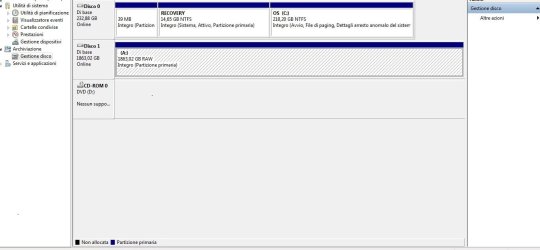
aalright i attached a pic just like you asked.

i tried connceting it to another pc but the results are the same.
it doesn't have an alternative way to be connected beside via usb.

oh and the pics language is Italian i hope it's not a big deal. It's the disk drive 1 , status online, primary partition.


alright i removed it from its case and this is what i got:

SEAGATE BARRACUDA LP 2TB
FIRMWARE CC34
DATA CODE 10201
SITE CODE SU

thank you very much for your help

cheers
 

Attachments

  • hdd.jpg
    hdd.jpg
    58.9 KB · Views: 7
Last edited:

My Computer My Computer

At a glance

windows 7
Computer type
PC/Desktop
OS
windows 7
OMG! Why did you take the HDD out of its casing? By handling the bare HDD you are likely to make matters worse.

OK, never mind. Put it back into its casing, connect your ext. HDD to your PC and check whether it looks the same (RAW) as in your previous screenshot.

If so you will run Partition Wizard bootable CD version booting from the CD/pen drive and run Partittion Recovery Wizard in it to recover the partition.

Download Partition Wizard Bootable CD ISO from Free download Magic Partition Manager Software, partition magic alternative, free partition magic, partition magic Windows 7 and server partition software - Partition Wizard Online

a) Burn the ISO to a CD and boot from the CD to run Partition Wizard

or b.) create a bootable pen drive with the ISO as indicated in my post http://www.sevenforums.com/hardware...re-sony-vio-laptop-vpcsb38ga.html#post2467909 ( only that part dealing with creating a bootable pen drive with Rufus)

Now boot from the CD or pen drive and run Partition Wizard.

Follow the steps under Recovery with Partition Wizard: SanDisk Cruzer Blade 16GB in my thread http://www.sevenforums.com/software...ive-turned-raw-partition-wizard-testdisk.html

( In your case it will be your Iomega 2TB external drive. To avoid confusion, Remove all other USB drives and connect only the Iomega which you want to recover.)
 
Last edited:

My Computer My Computer

At a glance

Windows 7 Home Premium 32 bit
OS
Windows 7 Home Premium 32 bit
alright mate i'm on it

i'll let you know how things turn out

thanks and bye for now
 

My Computer My Computer

At a glance

windows 7
Computer type
PC/Desktop
OS
windows 7
Hi there
once you start getting up to 2TB disk sizes you need to change / convert it to a GPT drive -- 2TB is around the limit for standard "MBR" drives and at the limit you'll get problems.

Have a read of this for more info.

http://www.tomshardware.co.uk/forum/250878-32-limit-master-boot-record

The other solution is to boot up something like a strand alone version of Partition Wizard and split the HDD into smaller partitions.

Cheers
jimbo
 

My Computer My Computer

At a glance

Linux CENTOS 7 / various Windows OS'es and se...Intel i7 Intel i58GB, 16GBOn Motherboard
Computer type
PC/Desktop
Computer Manufacturer/Model Number
Custom built, several laptops HP/ASUS
OS
Linux CENTOS 7 / various Windows OS'es and servers
CPU
Intel i7 Intel i5
Memory
8GB, 16GB
Graphics Card(s)
On Motherboard
Sound Card
Realtek HD audio
Monitor(s) Displays
Apple Cinema display, Samsung LCD
Screen Resolution
1920 X 1080
Hard Drives
4 X 1TB SATA
Mouse
Toshiba wireless laser
Internet Speed
> 20MB up
Hi jimbo45,

This is an extract from Microsoft Support article from Windows_support_for_hard_disks_that_are_larger_than_2TB

"In order for an operating system to fully support storage devices that have capacities that exceed 2 terabytes (2 TB, or 2 trillion bytes), the device must be initialized by using the GUID partition table (GPT) partitioning scheme............

Note that this article refers to disk capacity in powers of two instead of powers of 10, which is the more common designation on storage device capacity labels. Therefore, references to “2 TB” actually refer to a product that is labeled as having “2.2 TB” of capacity....................."

Hi Gabriel,

Inasmuch as your external HDD is only 1863.02GB (your screenshot) much less than 2.2TB you need not be concerned about this.

The only thing I am concerned now is that you had tried various methods to format your ext. drive and whether this has turned your ext. HDD, RAW. Never mind.

Run the Partition Recovery Wizard in Partition Wizard and check whether you can recover the partition. If partition recovery is successful, your ext. HDD will be restored to its former condition and you will be able to access all data in it.

If Partittion Recovery is not successful, you can try to format it with Partition Wizard.(if you don't want to recover data)
 
Last edited:

My Computer My Computer

At a glance

Windows 7 Home Premium 32 bit
OS
Windows 7 Home Premium 32 bit
Thanks for your help and explaination JUMANJI

As of right now i'm Running the Partition Recovery Wizard in Partition Wizard as suggested to see if anything can be done.
The process is taking sooo long though.
Is it normal it's still stuck at 0% after several hours?
At this rate how long should it take? couple of weeks? wow just wow

Thanks everyone

as soon as partition wizard has finished i'll update my hdd status

cheers
 

My Computer My Computer

At a glance

windows 7
Computer type
PC/Desktop
OS
windows 7
How is your ext. HDD being shown in Partition Wizard?

If it is shown as "Bad Disk" ( and not as "unallocated"), then the prognosis is not good.

Since it is a 2TB HDD even Quick scan, may take quite some time. Wait for an hour or two and if it does not show any progress in the progress bar you may abort.

You have already tried Low Level Format and formatting with other Linux utilities without success. So I have to conclude that it is a BAD DISK.

As a last ditch attempt you can try to format it with HP USB Disk Storage Format Tool v2.2.3 HP USB Disk Storage Format Tool Free Download

It is an exe file. Right click on it and run as administrator. If it fails to recognise it or format it I would take it as a confirmation of bad disk.

In rare cases, it may a fault in the interface electronics of the enclosure. Since you had already taken out the Seagate drive ( which I normally do not recommend before trying out all possible means in the enclosure), you can hook it up as a second internal drive in a desktop and run Seagate Sea Tools for Windows. It will be the ultimate test for the integrity of the hard drive.

SeaTools | Seagate# Also read the guide by clicking on the link at right.

Run the Quick Test and if it fails, run the long test. If it can, it will repair your drive.
 

My Computer My Computer

At a glance

Windows 7 Home Premium 32 bit
OS
Windows 7 Home Premium 32 bit
well no it's not displayed as bad disk.
it looks like everything is going fine and dandy however the process bar doesn't move.
it's stuck to 0%

Another thing i think is important to mention is that as soon as i connect this hdd to any pc, or a sp3 for that matter, its files gets displayed and can be browsed as well.
However as soon as any kind of peration gets done( like opening a folder, or trying to format it , any kind of operation) then it goes dead.
gets unallocated and the error message : REALLOCATED SECTORS COUNT
appears avoiding windows or any system to recognize it anymore( and its led stops blinking as well)
 

My Computer My Computer

At a glance

windows 7
Computer type
PC/Desktop
OS
windows 7
Again OMG!:) In your post no.4 in response to my query to connect it to another PC and report you had said "i tried connecting it to another pc but the results are the same."
Now you are throwing me completely out of track. I am surprised and confused.:)

Please connect it to another PC and post the Disk Management screenshot.

And you mean PS3?(sp3) What happens when you try to play or save a few files to the PS3?

Can you please put out a screenshot of the error message on the PC?

I am retiring for the day. Wait to see if others here have any idea as to what is happening and continue.( May be I have completely misunderstood your narration. Let me read it again tomorrow from the beginning after finishing my medical checkup.)
 

My Computer My Computer

At a glance

Windows 7 Home Premium 32 bit
OS
Windows 7 Home Premium 32 bit
with PS3 I MEANT PLAYSTATION3
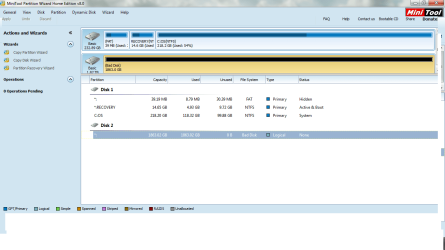
anyway the partition wizaed process was going fine but after several hours it was atill at 2%

since i didn't feel like waiting 1 month and half i stopped and the hdd status turned into bad(see screenshot).

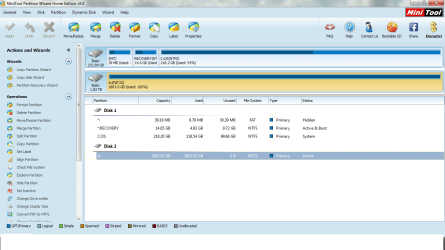
then i turned it off and on again and it's displayed as active just like everything is good(see screenshot).

Same thing as i explained before.
As soon as i connect it to any pc it's displayed fine and i can access to its file (afor a couple of secs).
But then it's not recognized anymore and the various programs i used display it as bad( and its led stops blinking).

i tried to format its partition instead, but as soon as the partition wizard program access it , the same results happen.
it doesn't get formatted and it turns into bad state, can't be accessed anymore and its led stops blinking.

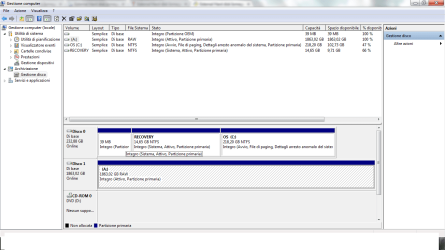
then i turn it off and on and its displayed as good again(look at my last pic)
 

Attachments

  • hdd2.png
    hdd2.png
    33.5 KB · Views: 4
  • hdd3.png
    hdd3.png
    49.4 KB · Views: 4
  • hdd4.png
    hdd4.png
    34.8 KB · Views: 3

My Computer My Computer

At a glance

windows 7
Computer type
PC/Desktop
OS
windows 7
Yes. Your ext. HDD looks fine in the second screenshot with FAT32 and 100% full.

Somehow it is alternating between good and bad state. And this happens in every PC as you aver. jumanji is stumped!

Coming to PS3, you had mentioned it as sp3 and that is why I asked whether it is PS3.:)

What happens when you connect it to the PS3? Are you able to play the files? Try copying a few files to the PS3 and tell us what exactly happens.

Another investigative question. How did you FAT32 format the 2TB external drive? Which program?

Now let me run away for my medical checkup leaving this thread open to other experts. At the moment, I have no clue on what exactly is happening.:)
 

My Computer My Computer

At a glance

Windows 7 Home Premium 32 bit
OS
Windows 7 Home Premium 32 bit
same thing if connected to a ps3 its files gets displayed and can be browsed as well.
However as soon as any kind of peration gets done( like opening a folder, or trying to cancel it , any kind of operation) then it goes dead.

i tried to format to fat 32 with partition wizard

but the process even though appears successfull actually isn't

it just takes like 1 sec to format it, but it's like it just closes the program instead.
after that the hdd is displayed as bad and i need to turn it off and then on in order to have it displayed again and has its led blinking
 

My Computer My Computer

At a glance

windows 7
Computer type
PC/Desktop
OS
windows 7
There are only two reasons ( as far as I know :)) why a HDD can appear RAW. a) the MBR is corrupt and b) the partition table is corrupt. But in either case the HDD will appear RAW in Windows all the time.

Now this is a strange condition where it appears fine to start with but turns RAW the moment you work on the data. The worst part is you are unable to do a low level format or regular format by any means. Those do not seem to have done anything and all the files are still visible.

OK, Now install and run Seatools for Windows (my post #10). Test it first with the drive inside the enclosure. Let us see what it brings.

(I am not asking what programs you have tried using to format the drive in its current state but how it was originally formatted to FAT32. Did you format it by using any programs that can FAT32 format drives larger than 32GB or it was in FAT32 format itself when you got it and you did nothing.)
 

My Computer My Computer

At a glance

Windows 7 Home Premium 32 bit
OS
Windows 7 Home Premium 32 bit
hey again mate

well i had originally formatted it using EaseUS Partition.
This happened about 2 months ago since when i put my hands on this hdd for the first time it was on ntfs.
Ok now i'll try using that program you mentioned on your last post.
you know at the moment i'm using Partition Wizard but i'm not doing a full partition scan, but only a partial of 1000000000 at a time.
that way it takes about one day to reach 100%.
Then i 'll proceed from 1000000000 to 2000000000 and see if things improve over time.
does it make sense to you?
cheers
 

My Computer My Computer

At a glance

windows 7
Computer type
PC/Desktop
OS
windows 7
I would suspect the USB enclosure at this point.
Can you take it off the enclosure and connect it to a PC as if it was an internal drive (as it is an internal drive in an external enclosure) and see if there are any issues or weird things?
 

My Computer My Computer

At a glance

Win 7 Pro 64-bit 7601AMD Phenom 9650 QuadCore, revision DR-B35 GB yes I run 2x 2GB and 1x 1GB, different b...NVIDIA GeForce 9800 GT 512 Mb, unknown manufa...
Computer type
PC/Desktop
Computer Manufacturer/Model Number
custom built
OS
Win 7 Pro 64-bit 7601
CPU
AMD Phenom 9650 QuadCore, revision DR-B3
Motherboard
ASUS M4A78
Memory
5 GB yes I run 2x 2GB and 1x 1GB, different brand, spank me.
Graphics Card(s)
NVIDIA GeForce 9800 GT 512 Mb, unknown manufacturer.
Sound Card
Crappy Realtek Integrated Audio
Monitor(s) Displays
Fujitsu Siemens P19-3P
Screen Resolution
1280 x 1024 x 32 bits @ 60 Hz Oh yeah, 4:3 rocks!
Hard Drives
(1) MAXTOR S TM3320613AS SATA Disk Device (2) STM35004 18AS SATA Disk Device (3) TOSHIBA USB 2.5"-HDD
PSU
whatever, around 450w
Case
Scavenged from old company PC, 10+ years old
Cooling
CPU fan, GPU fan, case fan, nothing fancy
Keyboard
Microsoft, PS/2, white.
Mouse
Optical, logitec.
Internet Speed
effective max speeds: 70-ish kB/s down 30-ish kB/s up
Antivirus
Avira, free edition.
Browser
Firefox with FXChrome to make it look like Google Chrome :P
Other Info
Was discarded by previous owner due to "horrible performance".
Was running Win Xp from a IDE drive. Yeah. Was a pain.
SATA II drive and Win7 and it zips away! Yay!
thanks but i don't really think it's likely the case of a faulty usb enclosure, since this hdd keeps having the same exact behaviour each single time.
As long as it stays connected to a pc but not a single operation gets done , it looks like it's working just fine.
However as soon as its files are somehow accessed, then this whole issue happens.
 

My Computer My Computer

At a glance

windows 7
Computer type
PC/Desktop
OS
windows 7
I would suspect the USB enclosure at this point.
Can you take it off the enclosure and connect it to a PC as if it was an internal drive (as it is an internal drive in an external enclosure) and see if there are any issues or weird things?

Yes, you are absolutely right. And that is what I had suggested in my post #10.

"In rare cases, it may a fault in the interface electronics of the enclosure. Since you had already taken out the Seagate drive ( which I normally do not recommend before trying out all possible means in the enclosure), you can hook it up as a second internal drive in a desktop and run Seagate Sea Tools for Windows. It will be the ultimate test for the integrity of the hard drive.

SeaTools | Seagate# Also read the guide by clicking on the link at right.

Run the Quick Test and if it fails, run the long test. If it can, it will repair your drive."


Since it is already in the enclosure, I want the OP to try Sea Tools for Windows as it is and see what results it gives.

Then finally out of the enclosure, attached as a secondary drive and run SeaTools. What results do we get?

Then this experience will serve as a template for helping others in future when similar problems are encountered.

thanks but i don't really think it's likely the case of a faulty usb enclosure, since this hdd keeps having the same exact behaviour each single time.
As long as it stays connected to a pc but not a single operation gets done , it looks like it's working just fine.
However as soon as its files are somehow accessed, then this whole issue happens.

In electronics, you can never say what happens and when. Sometimes the least suspected may turn out to be the cause. ( I also gave it least priority and hence the last to try. I had already stated that in rare cases it can be the cause and it may be that rare case here.)

I do not see any point in doing a partial scan. That is not going to help in anyway. We already know that all data is there. So abort it and go ahead with SeaTools first with the drive in its enclosure and then with the drive out and as a secondary drive in a desktop.

Request that you give us the feedback as elaborate as you can in both these tests so that it may be useful to help others.

We are almost clinching the issue, hopefully. Thanks to bobafethotmail for emphasizing what could be the ultimate cause.
 

My Computer My Computer

At a glance

Windows 7 Home Premium 32 bit
OS
Windows 7 Home Premium 32 bit
Back
Top