Hard drive partition can't be formatted, 142GB held hostage.

Skootchtheclock

New member
Local time
4:36 PM
Messages
4
I don't know when this happened. I bought my laptop a few years ago with 320 GB worth of space. I got a message a few days ago that I had run out of room on my computer and when i went to look in Administrative tools, I saw that there were now 4 partitions on my hard drive. One is my main 142GB C drive which is formatted as NTFS. Another one is a 13GB recovery partition. The other two are just listed as Healthy OEM Partitions and are unlettered and I cant seem to format them so basically half my hard drive space is sitting unused and unusable. Is there a way for me to format them for use? I tried booting the computer up as an Administrator but I couldn't format the partitions then either. When I right-click to format, the only option I get is 'Help' which is no hep at all. If anyone can help me that wold be awesome. Thanks
 

Attachments

My Computer My Computer

At a glance

Windows 7 Home Premium 64 bit
OS
Windows 7 Home Premium 64 bit
I suspect all 4 of those partitions have been there all the time.

For reasons known only to Acer, they seem to split up most of the drive into 2 partitions--142.54 GB and 139 GB in your case.

The 139 GB partition is apparently empty. I assume you save all of your files on the C drive.

I'd just delete the 139 GB partition, which would convert it into "unallocated space", and then "extend" C into that unallocated space. You would then be left with 3 partitions:

C of about 281 GB
13 GB recovery partition
3.54 OEM partition; not sure what this is; maybe tools of some kind.


You should be able to delete the 139 GB partition in Disk Management.

Confirm that you have not stored any data on that partition before you delete it. Your Disk Management picture says it is empty.
 

My Computer My Computer

At a glance

Windows 7 Home Premium SP1, 64-bitIntel Skylake i5-6600K, not overclocked8 GB HyperX DDR4-2666 (2 x 4 GB)none; graphics are integrated on CPU
Computer type
PC/Desktop
Computer Manufacturer/Model Number
Ignatz Special; 4 speed manual gearbox; factory air conditioning; one of one
OS
Windows 7 Home Premium SP1, 64-bit
CPU
Intel Skylake i5-6600K, not overclocked
Motherboard
AsRock Z170M Extreme 4, micro ATX
Memory
8 GB HyperX DDR4-2666 (2 x 4 GB)
Graphics Card(s)
none; graphics are integrated on CPU
Sound Card
onboard: Realtek ALC1150; external: USB Behringer UF0-202
Monitor(s) Displays
Dell S2340M 23 inch IPS
Screen Resolution
1600 x 900
Hard Drives
System: Crucial MX100 series SSD, 128 GB;
Data: Samsung Spinpoint 103SJ, 1 TB;
Backup: WD Caviar Green WD30EZRX-00D8PB0, 3 TB
PSU
Rosewill SilentNight 500 watt fanless, semi-modular
Case
Antec Solo II
Cooling
Noctua NH-U12S; Noctua F12 intake, Noctua S12A exhaust
Keyboard
Microsoft 200 6JH-00001 USB
Mouse
Dell or Microsoft optical wired; USB
Antivirus
Microsoft Security Essentials and Malwarebytes Premium
Browser
Pale Moon
Other Info
All fans PWM; speeds at idle: CPU circa 500 rpm; intake circa 600 rpm; exhaust circa 600 rpm; CPU temps 27 idle and 47 C load in a warm room (27 C/81 F) when running Intel Extreme Tuning Utility stress test.
How would I delete it? Disk management does not give me that option when I click on it.
 

My Computer My Computer

At a glance

Windows 7 Home Premium 64 bit
OS
Windows 7 Home Premium 64 bit
Highlight it and right click it.

What do you then see as menu options?

You may have to first give it a drive letter?

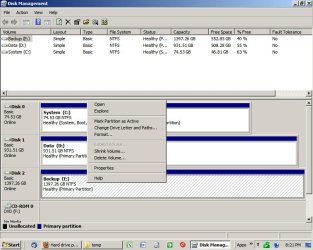
Below is what I see in Disk Management when I right click my E partition.
 

Attachments

  • Untitled-1.jpg
    Untitled-1.jpg
    93.2 KB · Views: 94

My Computer My Computer

At a glance

Windows 7 Home Premium SP1, 64-bitIntel Skylake i5-6600K, not overclocked8 GB HyperX DDR4-2666 (2 x 4 GB)none; graphics are integrated on CPU
Computer type
PC/Desktop
Computer Manufacturer/Model Number
Ignatz Special; 4 speed manual gearbox; factory air conditioning; one of one
OS
Windows 7 Home Premium SP1, 64-bit
CPU
Intel Skylake i5-6600K, not overclocked
Motherboard
AsRock Z170M Extreme 4, micro ATX
Memory
8 GB HyperX DDR4-2666 (2 x 4 GB)
Graphics Card(s)
none; graphics are integrated on CPU
Sound Card
onboard: Realtek ALC1150; external: USB Behringer UF0-202
Monitor(s) Displays
Dell S2340M 23 inch IPS
Screen Resolution
1600 x 900
Hard Drives
System: Crucial MX100 series SSD, 128 GB;
Data: Samsung Spinpoint 103SJ, 1 TB;
Backup: WD Caviar Green WD30EZRX-00D8PB0, 3 TB
PSU
Rosewill SilentNight 500 watt fanless, semi-modular
Case
Antec Solo II
Cooling
Noctua NH-U12S; Noctua F12 intake, Noctua S12A exhaust
Keyboard
Microsoft 200 6JH-00001 USB
Mouse
Dell or Microsoft optical wired; USB
Antivirus
Microsoft Security Essentials and Malwarebytes Premium
Browser
Pale Moon
Other Info
All fans PWM; speeds at idle: CPU circa 500 rpm; intake circa 600 rpm; exhaust circa 600 rpm; CPU temps 27 idle and 47 C load in a warm room (27 C/81 F) when running Intel Extreme Tuning Utility stress test.
This is the only option I get when I right click on it.
 

Attachments

My Computer My Computer

At a glance

Windows 7 Home Premium 64 bit
OS
Windows 7 Home Premium 64 bit
I'm not sure what is going on if all you see is "help".

Go to the "action" menu at the top of Disk Management and choose "refresh", "rescan", or both.

Then go to "all tasks" on the action menu. Do you then see any other choices?

If not, you may want to download Partition Wizard to see if it can do what you need.

You may have better luck if you boot into safe mode and then look at Disk Management.

Or you may be able to delete it in Diskpart.

Acer is cuckoo, no doubt about it.
 

My Computer My Computer

At a glance

Windows 7 Home Premium SP1, 64-bitIntel Skylake i5-6600K, not overclocked8 GB HyperX DDR4-2666 (2 x 4 GB)none; graphics are integrated on CPU
Computer type
PC/Desktop
Computer Manufacturer/Model Number
Ignatz Special; 4 speed manual gearbox; factory air conditioning; one of one
OS
Windows 7 Home Premium SP1, 64-bit
CPU
Intel Skylake i5-6600K, not overclocked
Motherboard
AsRock Z170M Extreme 4, micro ATX
Memory
8 GB HyperX DDR4-2666 (2 x 4 GB)
Graphics Card(s)
none; graphics are integrated on CPU
Sound Card
onboard: Realtek ALC1150; external: USB Behringer UF0-202
Monitor(s) Displays
Dell S2340M 23 inch IPS
Screen Resolution
1600 x 900
Hard Drives
System: Crucial MX100 series SSD, 128 GB;
Data: Samsung Spinpoint 103SJ, 1 TB;
Backup: WD Caviar Green WD30EZRX-00D8PB0, 3 TB
PSU
Rosewill SilentNight 500 watt fanless, semi-modular
Case
Antec Solo II
Cooling
Noctua NH-U12S; Noctua F12 intake, Noctua S12A exhaust
Keyboard
Microsoft 200 6JH-00001 USB
Mouse
Dell or Microsoft optical wired; USB
Antivirus
Microsoft Security Essentials and Malwarebytes Premium
Browser
Pale Moon
Other Info
All fans PWM; speeds at idle: CPU circa 500 rpm; intake circa 600 rpm; exhaust circa 600 rpm; CPU temps 27 idle and 47 C load in a warm room (27 C/81 F) when running Intel Extreme Tuning Utility stress test.
What is Diskpart and where do I download it? Also which version of Partition Wizard should I download? EaseUS or Minitool?
 

My Computer My Computer

At a glance

Windows 7 Home Premium 64 bit
OS
Windows 7 Home Premium 64 bit
Partition Wizard is a downloadable third party app.

Diskpart is included in Windows and is accessible from an administrator's command prompt.

Open an administrator's command prompt and enter these commands:

diskpart

list disk

You will probably see only 1 disk listed, probably disk 0.

If that's the case enter these commands:

select disk 0

list part

Then post a picture of what you see.

Regarding Partition Wizard, download the "bootable disk" version and be prepared to burn it to a disk. EaseUS is an unrelated company; not sure where you are seeing that.
 

My Computer My Computer

At a glance

Windows 7 Home Premium SP1, 64-bitIntel Skylake i5-6600K, not overclocked8 GB HyperX DDR4-2666 (2 x 4 GB)none; graphics are integrated on CPU
Computer type
PC/Desktop
Computer Manufacturer/Model Number
Ignatz Special; 4 speed manual gearbox; factory air conditioning; one of one
OS
Windows 7 Home Premium SP1, 64-bit
CPU
Intel Skylake i5-6600K, not overclocked
Motherboard
AsRock Z170M Extreme 4, micro ATX
Memory
8 GB HyperX DDR4-2666 (2 x 4 GB)
Graphics Card(s)
none; graphics are integrated on CPU
Sound Card
onboard: Realtek ALC1150; external: USB Behringer UF0-202
Monitor(s) Displays
Dell S2340M 23 inch IPS
Screen Resolution
1600 x 900
Hard Drives
System: Crucial MX100 series SSD, 128 GB;
Data: Samsung Spinpoint 103SJ, 1 TB;
Backup: WD Caviar Green WD30EZRX-00D8PB0, 3 TB
PSU
Rosewill SilentNight 500 watt fanless, semi-modular
Case
Antec Solo II
Cooling
Noctua NH-U12S; Noctua F12 intake, Noctua S12A exhaust
Keyboard
Microsoft 200 6JH-00001 USB
Mouse
Dell or Microsoft optical wired; USB
Antivirus
Microsoft Security Essentials and Malwarebytes Premium
Browser
Pale Moon
Other Info
All fans PWM; speeds at idle: CPU circa 500 rpm; intake circa 600 rpm; exhaust circa 600 rpm; CPU temps 27 idle and 47 C load in a warm room (27 C/81 F) when running Intel Extreme Tuning Utility stress test.
EaseUS is an unrelated company; not sure where you are seeing that.


I think the OP meant EASEUS partition master software.I have it installed on my system and its way better than in built windows disk management IMO.

@OP you can download EASEUS free version from this site Free Download Magic Partition Manager freeware: EaseUS Partition Manager, Disk & Partition Copy and Partition Recovery Software..

Install Easues,delete 139 GB partition and merge it with your main C drive.Right clicking on C drive within Easues partition software will show you the merge option.
This is easy and best way in my opinion and i have this EASUES without any problems for a while now.
 

My Computer My Computer

At a glance

Windows 8 Prointel i3 2.40 Ghz6 GB RAMIntegrated Intel HD
Computer Manufacturer/Model Number
DELL
OS
Windows 8 Pro
CPU
intel i3 2.40 Ghz
Motherboard
DELL inc
Memory
6 GB RAM
Graphics Card(s)
Integrated Intel HD
Sound Card
Realtek high definition SRS surround sound
Screen Resolution
1366*768
Hard Drives
320 GB
Internet Speed
1Mbps
Back
Top