
Craig Happe
New member
- Local time
- 9:55 PM
- Messages
- 8
Hi to all, I'm running Windows 7 Pro 64
I recently added a 2TB Seagate Barracuda to my newly built PC to be used as a backup Hard drive.
I have a 120GB Samsung SSD used for Windows, Steam etc and a 512GB Samsung SSD used for games.
I was trying to create a partition in the Seagate but i created one in the 120gb SSD by accident.
Here is a picture:
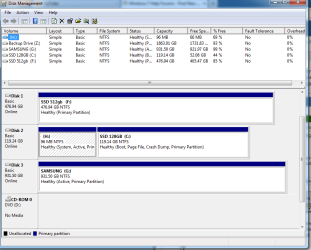
H drive is the one i have created by accident. I have tried right clicking and pressing delete but i get this message:
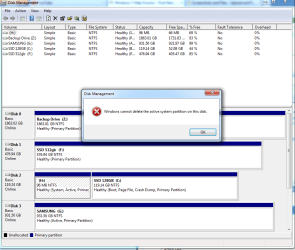
Any help would be greatly appreciated as my boot up time has definitely increased.
Thank You
I recently added a 2TB Seagate Barracuda to my newly built PC to be used as a backup Hard drive.
I have a 120GB Samsung SSD used for Windows, Steam etc and a 512GB Samsung SSD used for games.
I was trying to create a partition in the Seagate but i created one in the 120gb SSD by accident.
Here is a picture:
H drive is the one i have created by accident. I have tried right clicking and pressing delete but i get this message:
Any help would be greatly appreciated as my boot up time has definitely increased.
Thank You
My Computer
At a glance
Windows 7 Professional 64Intel I7 4770kCorsair Vengeance 2x8gb 1600mhzGigabyte GTX 780
- Computer type
- PC/Desktop
- Computer Manufacturer/Model Number
- Custom Build
- OS
- Windows 7 Professional 64
- CPU
- Intel I7 4770k
- Motherboard
- Asus Maximus 6 Hero
- Memory
- Corsair Vengeance 2x8gb 1600mhz
- Graphics Card(s)
- Gigabyte GTX 780
- Hard Drives
- Samsung 120gb SSD
Samsung 512gb SSD
Samsung 1TB External
Seagate Barracuda 2TB
- Antivirus
- Microsoft Security Essentials
- Browser
- Firefox

