
Created a new partition, would like to some help to remove it please

Craig Happe

New member
Local time
6:40 PM
Messages
8
Hi to all, I'm running Windows 7 Pro 64
I recently added a 2TB Seagate Barracuda to my newly built PC to be used as a backup Hard drive.
I have a 120GB Samsung SSD used for Windows, Steam etc and a 512GB Samsung SSD used for games.
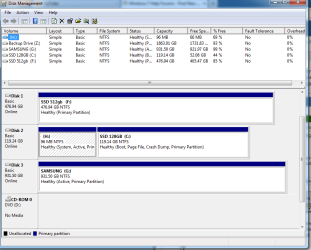
I was trying to create a partition in the Seagate but i created one in the 120gb SSD by accident.
Here is a picture:
hard drive.png
H drive is the one i have created by accident. I have tried right clicking and pressing delete but i get this message:
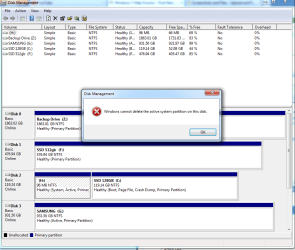
hard drive error.png
Any help would be greatly appreciated as my boot up time has definitely increased.
Thank You
 

My Computer My Computer

At a glance

Windows 7 Professional 64Intel I7 4770kCorsair Vengeance 2x8gb 1600mhzGigabyte GTX 780
Computer type
PC/Desktop
Computer Manufacturer/Model Number
Custom Build
OS
Windows 7 Professional 64
CPU
Intel I7 4770k
Motherboard
Asus Maximus 6 Hero
Memory
Corsair Vengeance 2x8gb 1600mhz
Graphics Card(s)
Gigabyte GTX 780
Hard Drives
Samsung 120gb SSD
Samsung 512gb SSD
Samsung 1TB External
Seagate Barracuda 2TB
Antivirus
Microsoft Security Essentials
Browser
Firefox
Hi to all, I'm running Windows 7 Pro 64
I recently added a 2TB Seagate Barracuda to my newly built PC to be used as a backup Hard drive.
I have a 120GB Samsung SSD used for Windows, Steam etc and a 512GB Samsung SSD used for games.
I was trying to create a partition in the Seagate but i created one in the 120gb SSD by accident.
Here is a picture:
View attachment 282506
H drive is the one i have created by accident. I have tried right clicking and pressing delete but i get this message:
View attachment 282507
Any help would be greatly appreciated as my boot up time has definitely increased.
Thank You

Hi Craig Happe,

Welcome to Seven forums.

It is difficult to change partition information of the drive when you are booted the OS with the same drive.

I had this issue earlier with the Normal SATA drive not the SSD one. You can use the EASE US Partion which worked without any issues for me. You can try this at the link below:

Free Download Magic Partition Manager freeware: EaseUS Partition Manager, Disk & Partition Copy and Partition Recovery Software.

It is easy to follow but you can check the instructions at the link below:

How to Change a Partition Size Using Easeus Partition Manager

Once you have deleted this partition and extended the same it would require a restart to make the changes in effect.

Keep us posted with the results so we can advise you further.
 

My Computer My Computer

At a glance

Winndows 7 32 bit
Computer type
PC/Desktop
OS
Winndows 7 32 bit
Welcome to the forum,

Actually that H partition should be there, it is the 100Mb system reserved created during install, it should not have a drive letter though, you can just remove the letter,

http://www.sevenforums.com/tutorials/82994-drive-letter-add-change-remove-windows-7-a.html

You do have two active partitions though, I believe you can mark the one on G inactive.

I would wait for further confirmation on that before doing anything there.
 

My Computer My Computer

At a glance

Win 10 Pro x64Intel I5-2500K @3.3GHz16GB G.Skill Ripjaws X (4x4GB)EVGA GeForce 750 Ti SC 2GB
Computer type
PC/Desktop
Computer Manufacturer/Model Number
Self Built
OS
Win 10 Pro x64
CPU
Intel I5-2500K @3.3GHz
Motherboard
Asrock P67 Extreme4
Memory
16GB G.Skill Ripjaws X (4x4GB)
Graphics Card(s)
EVGA GeForce 750 Ti SC 2GB
Sound Card
ASUS Xonar DG 5.1 Channels 24-bit 96KHz PCI Interface Sound
Monitor(s) Displays
auria eq2367
Screen Resolution
1920 x 1080
Hard Drives
250GB Samsung 850 EVO SSD
1TB WD Blue
1TB Hitachi
PSU
SeaSonic X 650W 80 Plus Gold
Case
Corsair Obsidian 750D
Cooling
Corsair H60, Three 140mm case fans
Keyboard
Logitech Wireless Keyboard K520
Mouse
Logitech Wireless Mouse M310
Internet Speed
Wave Broadband ~ 100 dn 5 up
Antivirus
Windows Defender, Malwarebytes Premium
Browser
Edge, IE11, Chrome
Other Info
Laptop specs: HP g7-1365dx /
CPU: AMD A6-3420M APU with Radeon(tm) HD Graphics /
RAM: Crucial 8Gb (2x4Gb) /
SSD: Crucial M4-CT128M4SSD2 ATA Device/ FW 000F /
GFX: AMD Radeon HD 6520G /
OS: Windows 10 Pro x64
Welcome to the forum,

Actually that H partition should be there, it is the 100Mb system reserved created during install, it should not have a drive letter though, you can just remove the letter,

http://www.sevenforums.com/tutorials/82994-drive-letter-add-change-remove-windows-7-a.html

You do have two active partitions though, I believe you can mark the one on G inactive.

I would wait for further confirmation on that before doing anything there.

I added the letter to it. I created it from drive C by accident. I thought i was partitioning my back up drive but i was doing to the C drive.
 

My Computer My Computer

At a glance

Windows 7 Professional 64Intel I7 4770kCorsair Vengeance 2x8gb 1600mhzGigabyte GTX 780
Computer type
PC/Desktop
Computer Manufacturer/Model Number
Custom Build
OS
Windows 7 Professional 64
CPU
Intel I7 4770k
Motherboard
Asus Maximus 6 Hero
Memory
Corsair Vengeance 2x8gb 1600mhz
Graphics Card(s)
Gigabyte GTX 780
Hard Drives
Samsung 120gb SSD
Samsung 512gb SSD
Samsung 1TB External
Seagate Barracuda 2TB
Antivirus
Microsoft Security Essentials
Browser
Firefox
Derek has it correct that the 100mb System Reserved partition which boots Win7 has been incorrectly given a drive letter which should be removed as shown in his link. We know it is the System Reserved partition because it correctly is labeled System and is Active. You would have to perform many steps to create it that way.

He also spotted that you have a non-boot partition G marked Active which is also incorrect and can cause problems. So mark it Inactive now: Partition - Mark as Inactive - Windows 7 Forums

If F is on the Seagate which you were trying to partition then I would shrink it in Disk Mgmt or use Partition Wizard boot CD to Resize Partition - Video Help.

However there can be problems with having primary partitions preceding the OS partition: if you run repairs or reinstall it will move the System boot files to the first available Primary partition. So I would either swap cables between Disk0 and Disk1, or convert F from Primary to Logical which is best for data partitions since it cannot receive the System Boot files.

If you swap cables make sure the Win7 HD remains set first to boot in BIOS setup. To convert Primary to Logical follow How to set partition as Primary or Logical. Then when you shrink F to add a new partition choose Logical as shown in Partition Wizard Create Partition - Video Help
 
I have just marked that partition as inactive like Derek said and now it is taking me straight to the bios when i restart. I can't get any further. Help!
 

My Computer My Computer

At a glance

Windows 7 Professional 64Intel I7 4770kCorsair Vengeance 2x8gb 1600mhzGigabyte GTX 780
Computer type
PC/Desktop
Computer Manufacturer/Model Number
Custom Build
OS
Windows 7 Professional 64
CPU
Intel I7 4770k
Motherboard
Asus Maximus 6 Hero
Memory
Corsair Vengeance 2x8gb 1600mhz
Graphics Card(s)
Gigabyte GTX 780
Hard Drives
Samsung 120gb SSD
Samsung 512gb SSD
Samsung 1TB External
Seagate Barracuda 2TB
Antivirus
Microsoft Security Essentials
Browser
Firefox
You must have instead marked H Inactive since it is the only partition booting Win7, as signified by the System Active flags on it. The G partition has no effect whatsoever on Win7 boot. Check now H is marked Active using Diskpart as shown in Mark Partition Active

If so and it still won't boot unplug all other HD's except Win7 HD, plug it into Disk0 cable where it should be anyway, boot into BIOS setup to set Win7 HD first to boot, save changes and Exit.

If it doesn't start up then assure the System Reserved partition which you lettered H is the Partition Marked Active and run Startup Repair - Run up to 3 Separate Times.

If that fails mark C Active and run the 3 Startup Repairs again.
 
You must have instead marked H Inactive since it is the only partition booting Win7, as signified by the System Active flags on it. The G partition has no effect whatsoever on Win7 boot. Check now H is marked Active using Diskpart as shown in Mark Partition Active

If so and it still won't boot unplug all other HD's except Win7 HD, plug it into Disk0 cable where it should be anyway, boot into BIOS setup to set Win7 HD first to boot, save changes and Exit.

If it doesn't start up then assure the System Reserved partition which you lettered H is the Partition Marked Active and run Startup Repair - Run up to 3 Separate Times.

If that fails mark C Active and run the 3 Startup Repairs again.

I unplugged all my other drives except the 120gb one and i still cant get past the bios. Have i screwed up my PC?
 

My Computer My Computer

At a glance

Windows 7 Professional 64Intel I7 4770kCorsair Vengeance 2x8gb 1600mhzGigabyte GTX 780
Computer type
PC/Desktop
Computer Manufacturer/Model Number
Custom Build
OS
Windows 7 Professional 64
CPU
Intel I7 4770k
Motherboard
Asus Maximus 6 Hero
Memory
Corsair Vengeance 2x8gb 1600mhz
Graphics Card(s)
Gigabyte GTX 780
Hard Drives
Samsung 120gb SSD
Samsung 512gb SSD
Samsung 1TB External
Seagate Barracuda 2TB
Antivirus
Microsoft Security Essentials
Browser
Firefox
I gave you a series of steps to follow in order. Did you do these? We don't wring our hands and run around like Chicken Little. We focus on the steps and get them done.

If H is still marked Active then it should boot if set first to boot in BIOS setup Boot Priority order.
 
I gave you a series of steps to follow in order. Did you do these? We don't wring our hands and run around like Chicken Little. We focus on the steps and get them done.

If H is still marked Active then it should boot if set first to boot in BIOS setup Boot Priority order.
I can't check to see what is inactive because i can't get past the bios. I am using my laptop to talk to you
And yes i did mark H inactive, I misread what you said
 

My Computer My Computer

At a glance

Windows 7 Professional 64Intel I7 4770kCorsair Vengeance 2x8gb 1600mhzGigabyte GTX 780
Computer type
PC/Desktop
Computer Manufacturer/Model Number
Custom Build
OS
Windows 7 Professional 64
CPU
Intel I7 4770k
Motherboard
Asus Maximus 6 Hero
Memory
Corsair Vengeance 2x8gb 1600mhz
Graphics Card(s)
Gigabyte GTX 780
Hard Drives
Samsung 120gb SSD
Samsung 512gb SSD
Samsung 1TB External
Seagate Barracuda 2TB
Antivirus
Microsoft Security Essentials
Browser
Firefox
It shows how in Mark Partition Active Method 2 to use the Command Line from System Recovery Options - Try Option 1 from the F8 options Command Line first.

If that won't work and you don't have a Win7 installer DVD or bootable flash stick, or System Repair Disk then you'll need to download the installer ISO from Step 1 and burn to DVD or write to stick from steps 2 of Clean Reinstall - Factory OEM Windows 7. Boot installer to access Repair My Computer on second screen.
http://www.sevenforums.com/tutorials/219487-clean-reinstall-factory-oem-windows-7-a.html#post1839164
 
I'm sorry Greg, I'm just panicking a bit and not thinking straight. I'm on the command prompt screen now, will let you know
 

My Computer My Computer

At a glance

Windows 7 Professional 64Intel I7 4770kCorsair Vengeance 2x8gb 1600mhzGigabyte GTX 780
Computer type
PC/Desktop
Computer Manufacturer/Model Number
Custom Build
OS
Windows 7 Professional 64
CPU
Intel I7 4770k
Motherboard
Asus Maximus 6 Hero
Memory
Corsair Vengeance 2x8gb 1600mhz
Graphics Card(s)
Gigabyte GTX 780
Hard Drives
Samsung 120gb SSD
Samsung 512gb SSD
Samsung 1TB External
Seagate Barracuda 2TB
Antivirus
Microsoft Security Essentials
Browser
Firefox
No problem. We're here to see you through it. We deal with these every day here since before Win7 was released.

Derek will be with you while I am out for a few hours. Don't panic. The worst case is you can rescue your files out and get a perfect Clean Reinstall - Factory OEM Windows 7 (same for retail). So your punishment is you have the best install of Win7 to be had.

Everything that possibly can be done to start unbootable Win7 is also compiled in Troubleshooting Windows 7 Failure to Start if the initial critical steps I gave you don't help.

If it gets started fall back to the early steps Derek and I gave you. These are known solutions based on countless thousands of installs we've helped with here.
 
I put my Windows disk in i managed to make it active again so i'm in windows now. Thanks for the help Greg
 

My Computer My Computer

At a glance

Windows 7 Professional 64Intel I7 4770kCorsair Vengeance 2x8gb 1600mhzGigabyte GTX 780
Computer type
PC/Desktop
Computer Manufacturer/Model Number
Custom Build
OS
Windows 7 Professional 64
CPU
Intel I7 4770k
Motherboard
Asus Maximus 6 Hero
Memory
Corsair Vengeance 2x8gb 1600mhz
Graphics Card(s)
Gigabyte GTX 780
Hard Drives
Samsung 120gb SSD
Samsung 512gb SSD
Samsung 1TB External
Seagate Barracuda 2TB
Antivirus
Microsoft Security Essentials
Browser
Firefox
Now fall back to the earliest steps Derek and I gave you to mark G Inactive,

Keep Win7 HD as Disk0 for the reasons I gave, to avoid having to convert the Data HD's partitions to Logical,

Remove drive letter H. Ignore scary message as it def needs no letter.
 
Cheers for the help, just one more thing. What would recommend shrinking my backup (Z) drive to?
 

My Computer My Computer

At a glance

Windows 7 Professional 64Intel I7 4770kCorsair Vengeance 2x8gb 1600mhzGigabyte GTX 780
Computer type
PC/Desktop
Computer Manufacturer/Model Number
Custom Build
OS
Windows 7 Professional 64
CPU
Intel I7 4770k
Motherboard
Asus Maximus 6 Hero
Memory
Corsair Vengeance 2x8gb 1600mhz
Graphics Card(s)
Gigabyte GTX 780
Hard Drives
Samsung 120gb SSD
Samsung 512gb SSD
Samsung 1TB External
Seagate Barracuda 2TB
Antivirus
Microsoft Security Essentials
Browser
Firefox
I guess that would depend on how many images and/or data copies you like to keep, personally, I just have a folder for my images on my external.
 

My Computer My Computer

At a glance

Win 10 Pro x64Intel I5-2500K @3.3GHz16GB G.Skill Ripjaws X (4x4GB)EVGA GeForce 750 Ti SC 2GB
Computer type
PC/Desktop
Computer Manufacturer/Model Number
Self Built
OS
Win 10 Pro x64
CPU
Intel I5-2500K @3.3GHz
Motherboard
Asrock P67 Extreme4
Memory
16GB G.Skill Ripjaws X (4x4GB)
Graphics Card(s)
EVGA GeForce 750 Ti SC 2GB
Sound Card
ASUS Xonar DG 5.1 Channels 24-bit 96KHz PCI Interface Sound
Monitor(s) Displays
auria eq2367
Screen Resolution
1920 x 1080
Hard Drives
250GB Samsung 850 EVO SSD
1TB WD Blue
1TB Hitachi
PSU
SeaSonic X 650W 80 Plus Gold
Case
Corsair Obsidian 750D
Cooling
Corsair H60, Three 140mm case fans
Keyboard
Logitech Wireless Keyboard K520
Mouse
Logitech Wireless Mouse M310
Internet Speed
Wave Broadband ~ 100 dn 5 up
Antivirus
Windows Defender, Malwarebytes Premium
Browser
Edge, IE11, Chrome
Other Info
Laptop specs: HP g7-1365dx /
CPU: AMD A6-3420M APU with Radeon(tm) HD Graphics /
RAM: Crucial 8Gb (2x4Gb) /
SSD: Crucial M4-CT128M4SSD2 ATA Device/ FW 000F /
GFX: AMD Radeon HD 6520G /
OS: Windows 10 Pro x64
Cheers for the help, just one more thing. What would recommend shrinking my backup (Z) drive to?

Hi Craig Happe,

As Greg suggested it is system reserved partition which would be required for the system to boot. You should continue with him as I am sure he would be able to answer all your queries.
 

My Computer My Computer

At a glance

Winndows 7 32 bit
Computer type
PC/Desktop
OS
Winndows 7 32 bit
Cheers for the help, just one more thing. What would recommend shrinking my backup (Z) drive to?

Hi Craig Happe,

As Greg suggested it is system reserved partition which would be required for the system to boot. You should continue with him as I am sure he would be able to answer all your queries.

Actually, (H) was the system reserved partition that has now had the letter removed, (Z) is the 2Tb drive.
 

My Computer My Computer

At a glance

Win 10 Pro x64Intel I5-2500K @3.3GHz16GB G.Skill Ripjaws X (4x4GB)EVGA GeForce 750 Ti SC 2GB
Computer type
PC/Desktop
Computer Manufacturer/Model Number
Self Built
OS
Win 10 Pro x64
CPU
Intel I5-2500K @3.3GHz
Motherboard
Asrock P67 Extreme4
Memory
16GB G.Skill Ripjaws X (4x4GB)
Graphics Card(s)
EVGA GeForce 750 Ti SC 2GB
Sound Card
ASUS Xonar DG 5.1 Channels 24-bit 96KHz PCI Interface Sound
Monitor(s) Displays
auria eq2367
Screen Resolution
1920 x 1080
Hard Drives
250GB Samsung 850 EVO SSD
1TB WD Blue
1TB Hitachi
PSU
SeaSonic X 650W 80 Plus Gold
Case
Corsair Obsidian 750D
Cooling
Corsair H60, Three 140mm case fans
Keyboard
Logitech Wireless Keyboard K520
Mouse
Logitech Wireless Mouse M310
Internet Speed
Wave Broadband ~ 100 dn 5 up
Antivirus
Windows Defender, Malwarebytes Premium
Browser
Edge, IE11, Chrome
Other Info
Laptop specs: HP g7-1365dx /
CPU: AMD A6-3420M APU with Radeon(tm) HD Graphics /
RAM: Crucial 8Gb (2x4Gb) /
SSD: Crucial M4-CT128M4SSD2 ATA Device/ FW 000F /
GFX: AMD Radeon HD 6520G /
OS: Windows 10 Pro x64
Back
Top