
Solved How do I reformat a HDD that W7 doesn't recognize?

lbeck

New member
Local time
8:37 AM
Messages
65
Location
Hillsborough, NC
I have an external 750GB HDD that I bought to to store programming from my Dish Network Receiver. The receiver software reformatted the virgin HDD to some proprietary system used by Dish. I think someone said it's a Linux based siystem.

I now want to reformat it for use with my Windows 7 computer. When I plug it into the USB port Win says device is ready to use, but it doesn't show in windows explorer.

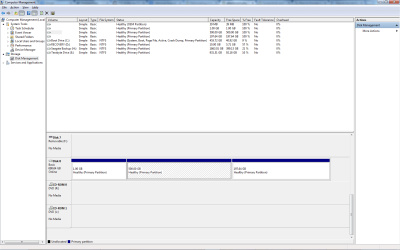
Disk Management shows the disk with 3 partitions, but I can't see any way to reformat it to NTFS.

How do I reformat it?
 

My Computer My Computer

Computer type
PC/Desktop
Computer Manufacturer/Model Number
Dell Inspiron 530
OS
Win 7 pro 64 bit
CPU
Intel Q6600 @ 2.4 GHz
Memory
4 MB RAM
Graphics Card(s)
Radeon 1 GB HD 4650
Hard Drives
500 GB boot drive Samsung HD 501J ATA
1 TB rive Samsung HD 103UJ ATA
2 TB Seagate GoFlex USB drive for backup
PSU
750 Watt
Internet Speed
25 Mbps down; 1.7 Mbps up
Antivirus
Avast free
Browser
Google Chrome / IE 9
Other Info
Acronis True Image 2012 for backups
The best way to do this will be to make a bootable Partition Wizard CD. With a desktop computer that has all HD's disconnected, except this external that you want to clean & format. Boot to PW, hopefully it will see the Ext HD. Then delete the 3 partitions, that you are aware of. ReBoot. Then boot again to the PW CD, see the total bare unallocated Ext HD. Then either setup several new partitions or one big one. Then proceed to format as NTFS. Reboot, again see if PW sees the formated EXT HD. Then shut down. Re-connect the desktop HD's as they were before. Then power up into win7 and see if the Ext HD shows up as an empty but formated ready to use HD.


:ar: http://www.sevenforums.com/tutorials/93322-partition-wizard-use-bootable-cd.html?ltr=P


;)
 

My Computer My Computer

Computer type
PC/Desktop
Computer Manufacturer/Model Number
Built them myself, Science Experiments !
OS
Win7 Enterprise, Win7 x86 (Ult 7600), Win7 x64 Ult 7600, TechNet RTM on AMD x64 (2.8Ghz)
CPU
AMD fx8350 4ghz, AMD-32 2400mhz, AMD-64 3200mhz, AMDx64 2.8G
Motherboard
SIS 755, ECS-K8M890M-M (Ult 7600), GigaByte & others
Memory
2gb, 4gb on the Ult 7600, 4gb on Technet RTM, 32gb on FX8350
Graphics Card(s)
Draw my own Graphics, several nVidia cards
Sound Card
on motherboard
Monitor(s) Displays
19" flat scr, 28" I-Inc widescr,22" Emprex Widescr, 23" Acer
Screen Resolution
1280 x 1024, 1440 x 900, 1920 x 1080
Hard Drives
6 pata Ide HD's & 2 Sata HD's
added 80gb external on Ult 7600 computer,
numerous extra 1tb, 2TB, 3Tb SATA HD's
A collection of ext HD Docks w/ HDs
PSU
430w, 550w, 600w, 700, 800, etc
Case
All Generic Full Towers
Cooling
Open Air & a few fans, some w/ colored LEDs
Keyboard
Compaq & Dell recycled from GoodWill
Mouse
Made in China Optical Wired Mouse
Internet Speed
Fast Cable InterNet
Antivirus
AVG Free on 24 different Desktops, NO Problems!
Browser
IE 8 is preferred, but use FireFox sometimes
Other Info
Linksys Routers, switches, & Hubs
Too Many USB Flash Drives to count, Biggest is 64GB !
Eight computers in my home network.
Sixteen computers at my business network.
Linked via TeamViewer !
Lots of old used spare computer parts everywhere!
While DocBrown's suggestion to use PW gets a nod, you may as well install PW on your system and do it without burning/creating a bootable CD/ pen drive.

Another formatting tool you can try is the simple HP USB Disk Storage Format Tool v2.2.3, a mere 96KB executable HP USB Disk Storage Format Tool Free Download (Just right click on the executable and run as administrator. Uncheck Quick Format option, to do a full format.)
 

My Computer My Computer

OS
Windows 7 Home Premium 32 bit

My Computer My Computer

Computer type
PC/Desktop
Computer Manufacturer/Model Number
Dell Inspiron 530
OS
Win 7 pro 64 bit
CPU
Intel Q6600 @ 2.4 GHz
Memory
4 MB RAM
Graphics Card(s)
Radeon 1 GB HD 4650
Hard Drives
500 GB boot drive Samsung HD 501J ATA
1 TB rive Samsung HD 103UJ ATA
2 TB Seagate GoFlex USB drive for backup
PSU
750 Watt
Internet Speed
25 Mbps down; 1.7 Mbps up
Antivirus
Avast free
Browser
Google Chrome / IE 9
Other Info
Acronis True Image 2012 for backups
Yes, Partiton Wizard can work from within win7. But, with some of these proprietary formats like the TIVO HD's I reformatted, I had better luck as I posted above. Plus you want to be very careful you don't accidentally format the wrong
HD since you have some others connected. ;)
 

My Computer My Computer

Computer type
PC/Desktop
Computer Manufacturer/Model Number
Built them myself, Science Experiments !
OS
Win7 Enterprise, Win7 x86 (Ult 7600), Win7 x64 Ult 7600, TechNet RTM on AMD x64 (2.8Ghz)
CPU
AMD fx8350 4ghz, AMD-32 2400mhz, AMD-64 3200mhz, AMDx64 2.8G
Motherboard
SIS 755, ECS-K8M890M-M (Ult 7600), GigaByte & others
Memory
2gb, 4gb on the Ult 7600, 4gb on Technet RTM, 32gb on FX8350
Graphics Card(s)
Draw my own Graphics, several nVidia cards
Sound Card
on motherboard
Monitor(s) Displays
19" flat scr, 28" I-Inc widescr,22" Emprex Widescr, 23" Acer
Screen Resolution
1280 x 1024, 1440 x 900, 1920 x 1080
Hard Drives
6 pata Ide HD's & 2 Sata HD's
added 80gb external on Ult 7600 computer,
numerous extra 1tb, 2TB, 3Tb SATA HD's
A collection of ext HD Docks w/ HDs
PSU
430w, 550w, 600w, 700, 800, etc
Case
All Generic Full Towers
Cooling
Open Air & a few fans, some w/ colored LEDs
Keyboard
Compaq & Dell recycled from GoodWill
Mouse
Made in China Optical Wired Mouse
Internet Speed
Fast Cable InterNet
Antivirus
AVG Free on 24 different Desktops, NO Problems!
Browser
IE 8 is preferred, but use FireFox sometimes
Other Info
Linksys Routers, switches, & Hubs
Too Many USB Flash Drives to count, Biggest is 64GB !
Eight computers in my home network.
Sixteen computers at my business network.
Linked via TeamViewer !
Lots of old used spare computer parts everywhere!
Best solution i found was to download gparted(linux OS) install it onto a usb or cd restart into that then use it to clean discs etc, Still need to be careful of which disc you clean though.

just realised similar solution to Doc browns, just a different system
 

My Computer My Computer

Computer Manufacturer/Model Number
home built PC. Laptop studio1557
OS
windows 7 64 bit and dual boot Pinguyos
CPU
PC, intel i7 920 2.7ghz, laptop i7 720
Motherboard
PC, Asus P6t .laptop probably rubbish from dell
Memory
PC 6GB, laptop 2GB, me 2 seconds after 6 pints
Graphics Card(s)
PC Asus eah5870,laptop, ati hd 4580
Monitor(s) Displays
Sharp 42" HD TV using HDMI + HDMI to onkyo surround amp
Screen Resolution
1920x1080
Hard Drives
1x ssd OCZ 60GB, 2x250GB raid0, 2x1TB (storage),2TB
PSU
OCZ 700w
Case
antec 902
Cooling
antec khuler h20 920
Keyboard
logitek wave
Mouse
x8 sidewinder
Internet Speed
dog slow
Thanks to all. I think I used gparted years ago with xp. I'll download it again. I only thought that with win seven that there may be a simple way to reformat the drive within the win os.

Also thanks for the warning about reformatting the wrong Hdd. Advice imtake seriously
 

My Computer My Computer

Computer type
PC/Desktop
Computer Manufacturer/Model Number
Dell Inspiron 530
OS
Win 7 pro 64 bit
CPU
Intel Q6600 @ 2.4 GHz
Memory
4 MB RAM
Graphics Card(s)
Radeon 1 GB HD 4650
Hard Drives
500 GB boot drive Samsung HD 501J ATA
1 TB rive Samsung HD 103UJ ATA
2 TB Seagate GoFlex USB drive for backup
PSU
750 Watt
Internet Speed
25 Mbps down; 1.7 Mbps up
Antivirus
Avast free
Browser
Google Chrome / IE 9
Other Info
Acronis True Image 2012 for backups
Just to follow up....

I used MiniTool Partition Wizard Home Edition which also is freeware after looking again at gparted. It's probably not as comprehensive but is simpler and allowed me to delete the Linux partitions and install ntfs.
 

My Computer My Computer

Computer type
PC/Desktop
Computer Manufacturer/Model Number
Dell Inspiron 530
OS
Win 7 pro 64 bit
CPU
Intel Q6600 @ 2.4 GHz
Memory
4 MB RAM
Graphics Card(s)
Radeon 1 GB HD 4650
Hard Drives
500 GB boot drive Samsung HD 501J ATA
1 TB rive Samsung HD 103UJ ATA
2 TB Seagate GoFlex USB drive for backup
PSU
750 Watt
Internet Speed
25 Mbps down; 1.7 Mbps up
Antivirus
Avast free
Browser
Google Chrome / IE 9
Other Info
Acronis True Image 2012 for backups
Back
Top