Take Ownership Shortcut

Add "Take Ownership" to Context Menu of Files, Folders, and Drives in Windows


   Information
This tutorial will show you how to add Take Ownership to the context menu of all files, folders, and drives for all users in Windows.

This will allow you to be able to instantly take ownership of a file, folder (and all contents), or drive (and all contents) by changing the owner to the current user and grant the Owner_Rights SID (current owner) full access permission.

You must be an administrator to be able to add, remove, and use the "Take Ownership" context menu.

   Note
Application files (ex: EXE, CMD, MSI) will continue to have Run as administrator instead of Take Ownership in their context menu.


When you right click or press and hold on a file, folder, or drive, and click/tap on Take Ownership, you may be prompted by UAC for permission to do so first.

If a user is logged in as an administrator, then the user would just click/tap on Yes to approve and take ownership. The owner of the file, folder, or drive would be changed to the current administrator user account. Permissions would be set to allow the Owner_Rights SID (current owner) full control of the file, folder, or drive.

If a user is logged in as a standard user, then the user would need to enter a selected administrator's password to approve and take ownership. The owner of the file, folder, or drive would be changed to the selected administrator account, and not the standard user. Permissions would be set to allow the Owner_Rights SID (current owner) full control of the file, folder, or drive.


The Take Ownership context menu will not be available when you right click on the C: drive, C:\Program Files folder, C:\Program Files (x86) folder, C:\ProgramData folder, C:\Users folder, and C:\Windows folder. This was done because taking ownership of these system folders can make Windows unstable since it would also take ownership of all the folder's content at the same time.

You will still be able to use the Take Ownership context menu of files inside the folder locations above.

If you would like to have a custom location(s) of your own to not have the context menu, then please feel free to post a request in this tutorial thread. I'll be happy to post back with a custom .reg file for it.

   Warning
This context menu will only work with English Windows installations.

If you have a different language, then please post a reply with what language you have instead. I'll be happy to post back a translated version for you.


EXAMPLE: Take Ownership in Context Menu
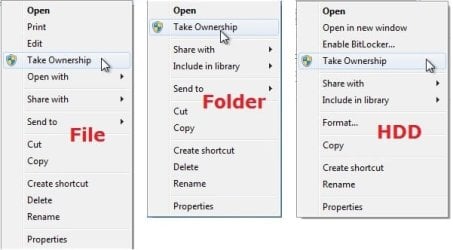
example.jpg


Here's How:

1. Do step 2, 3, or 4 below for what you would like to do.


2. To Add "Take Ownership" to Context Menu

   Note
Application files (ex: EXE, CMD, MSI) will still have Run as administrator instead of Take Ownership in the context menu when you use this step.

A) Click/tap on the Download button below to download the file below, and go to step 5 below.

Add_Take_Ownership_to_context_menu


Download


3. To Add "Take Ownership" with Pause to Context Menu

   Note
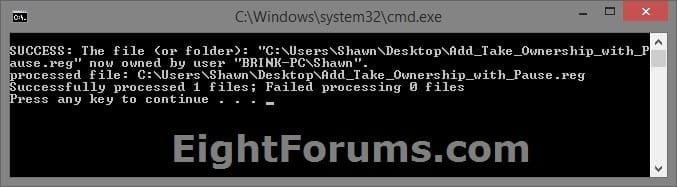
This option pauses the command when you use the "Take Ownership" context menu to be able to see the command results. This can be handy to verify setting ownership and permissions was successful or not.

Application files (ex: EXE, CMD, MSI) will still have Run as administrator instead of Take Ownership in the context menu when you use this step.


Take_Ownership_Pause.jpg


A) Click/tap on the Download button below to download the file below, and go to step 5 below.

Add_Take_Ownership_with_Pause_to_context_menu.reg


Download


4. To Remove "Take Ownership" from Context Menu

   Note
This is the default setting, and will also restore the default Run as administrator for .exe files.


A) Click/tap on the Download button below to download the file below, and go to step 5 below.

Remove_Take_Ownership_from_context_menu.reg


Download


5. Save the .reg file to your Desktop.

6. Double click on the downloaded .reg file to merge it.

7. If prompted, click on Run, Yes (UAC), Yes, and OK to approve the merge.

8. When finished, you can delete the downloaded .reg file if you like.


That's it,
Shawn


Attachments

Last edited:
The last week or so, most of my mkv files are locked my explorer.exe I just ran the above, with great hopes, but it didn't help. It did something, (the DOS window opened) but the file is still locked. I still get (when running "what's locking this file"): PID: 46324, C:\Windows\Explorer.EXE I can't rename, move or delete these files. I thought I was clever and changed the name of one of them from another PC, but that seemed to corrupt the file, so now I can't play it at all.
Any advice would be greatly appreciated. (this is happening on my 32 bit laptop, BTW, not on my 64 bit desktop)
 

My Computer My Computer

At a glance

Microsoft Windows 7 Professional 32-bit 7601 ...Intel(R) Pentium(R) Dual CPU T2390 @ 1.86GHz3.00 GB(1) Mobile Intel(R) 965 Express Chipset Famil...
Computer type
Laptop
Computer Manufacturer/Model Number
Toshiba Satellite Pro
OS
Microsoft Windows 7 Professional 32-bit 7601 Multiprocessor Free Service Pack 1
CPU
Intel(R) Pentium(R) Dual CPU T2390 @ 1.86GHz
Motherboard
Intel Corp. Base Board Product Name
Memory
3.00 GB
Graphics Card(s)
(1) Mobile Intel(R) 965 Express Chipset Family (2) Mobile
Sound Card
(1) Realtek High Definition Audio (2) Bluetooth Hands-free
Screen Resolution
1280 x 800 x 32 bits (4294967296 colors) @ 59 Hz
Hard Drives
M4-CT128M4SSD2
PSU
Silverstone Strider Plus 600W ST60F-P
Case
Silverstone TJ08-E Black M-ATX/ITX Case
Keyboard
Microsoft Natural Ergonomic Desktop 7000 Combo
Antivirus
MS Security Essentials
Browser
FF
Hello Csutak,

It sounds like it may be a permissions issue. Double check using OPTION THREE in the tutorial below to see if your account is the "owner", and that permissions is set to "Allow" your account "Full Control".
Take Ownership of file

Hope this helps, :)
Shawn
 
Last edited:

My Computer My Computer

At a glance

64-bit Windows 11 Pro for WorkstationsIntel i7-8700K OC'd to 5 GHz64 GB (4x16GB) G.SKILL TridentZ RGB DDR4 3600...ASUS ROG-STRIX-GTX1080TI-O11G-GAMING
Computer type
PC/Desktop
Computer Manufacturer/Model Number
Self built custom
OS
64-bit Windows 11 Pro for Workstations
CPU
Intel i7-8700K OC'd to 5 GHz
Motherboard
ASUS ROG Maximus XI Formula Z390
Memory
64 GB (4x16GB) G.SKILL TridentZ RGB DDR4 3600 MHz
Graphics Card(s)
ASUS ROG-STRIX-GTX1080TI-O11G-GAMING
Sound Card
Integrated
Monitor(s) Displays
2 x Samsung Odyssey G7 27"
Screen Resolution
2560x1440
Hard Drives
1TB Samsung 990 PRO M.2,
4TB Samsung 990 PRO PRO M.2,
TerraMaster F8 SSD Plus NAS
PSU
Seasonic Prime Titanium 850W
Case
Thermaltake Core P3
Cooling
Corsair Hydro H115i
Keyboard
Logitech wireless K800
Mouse
Logitech MX Master 4
Internet Speed
2 Gb/s Download and 100 Mb/s Upload
Antivirus
Malwarebyte Anti-Malware Premium
Browser
Google Chrome
Other Info
Logitech Z625 speaker system,
Logitech BRIO 4K Pro webcam,
HP Color LaserJet Pro MFP M477fdn,
APC SMART-UPS RT 1000 XL - SURT1000XLI,
Galaxy S23 Plus phone
Well, I sort of solved the problem. I found this:
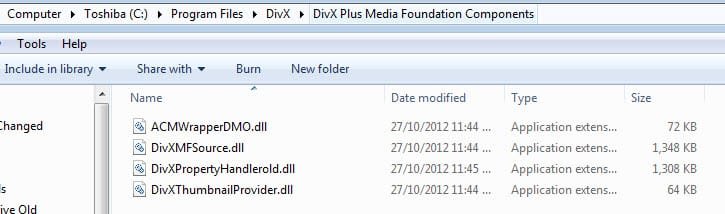
"The source of this problem is DivXPropertyHandler.dll attempting to determine the length of .mkv files. Windows 7 decides to automatically add the length column in detail view when there is a large amount of video files. Given a .mkv file DivXPropertyHandler.dll doesn't like (for whatever reason), the explorer handle on that .mkv will hang when DivXPropertyHandler.dll is unable to determine the length of that .mkv. And thus the file is locked."
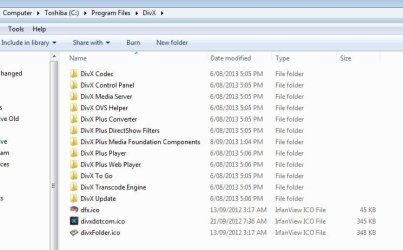
I attempted to uninstall DivX, (I only installed it recently, don't even remember what the reason was) but for some reason it didn't uninstall (gone from ControlPanel, but the folder with lots of stuff is still there) So, I renamed DivXPropertyHandler.dll in safe mode and that seemed to solve the problem.
Now, to decide if it is safe just to delete all the leftovers?:confused:
 

Attachments

  • 8-09-2013 1-14-34 PM.jpg
    8-09-2013 1-14-34 PM.jpg
    44.1 KB · Views: 171
  • 8-09-2013 1-15-55 PM.jpg
    8-09-2013 1-15-55 PM.jpg
    24.6 KB · Views: 183

My Computer My Computer

At a glance

Microsoft Windows 7 Professional 32-bit 7601 ...Intel(R) Pentium(R) Dual CPU T2390 @ 1.86GHz3.00 GB(1) Mobile Intel(R) 965 Express Chipset Famil...
Computer type
Laptop
Computer Manufacturer/Model Number
Toshiba Satellite Pro
OS
Microsoft Windows 7 Professional 32-bit 7601 Multiprocessor Free Service Pack 1
CPU
Intel(R) Pentium(R) Dual CPU T2390 @ 1.86GHz
Motherboard
Intel Corp. Base Board Product Name
Memory
3.00 GB
Graphics Card(s)
(1) Mobile Intel(R) 965 Express Chipset Family (2) Mobile
Sound Card
(1) Realtek High Definition Audio (2) Bluetooth Hands-free
Screen Resolution
1280 x 800 x 32 bits (4294967296 colors) @ 59 Hz
Hard Drives
M4-CT128M4SSD2
PSU
Silverstone Strider Plus 600W ST60F-P
Case
Silverstone TJ08-E Black M-ATX/ITX Case
Keyboard
Microsoft Natural Ergonomic Desktop 7000 Combo
Antivirus
MS Security Essentials
Browser
FF
Yeah, since you uninstalled DivX, it would be safe to delete the C:\ProgramFiles\DivX folder. :)

You might also use the free version of Revo Uninstaller to see if it may find any more left overs of DivX as well.
 

My Computer My Computer

At a glance

64-bit Windows 11 Pro for WorkstationsIntel i7-8700K OC'd to 5 GHz64 GB (4x16GB) G.SKILL TridentZ RGB DDR4 3600...ASUS ROG-STRIX-GTX1080TI-O11G-GAMING
Computer type
PC/Desktop
Computer Manufacturer/Model Number
Self built custom
OS
64-bit Windows 11 Pro for Workstations
CPU
Intel i7-8700K OC'd to 5 GHz
Motherboard
ASUS ROG Maximus XI Formula Z390
Memory
64 GB (4x16GB) G.SKILL TridentZ RGB DDR4 3600 MHz
Graphics Card(s)
ASUS ROG-STRIX-GTX1080TI-O11G-GAMING
Sound Card
Integrated
Monitor(s) Displays
2 x Samsung Odyssey G7 27"
Screen Resolution
2560x1440
Hard Drives
1TB Samsung 990 PRO M.2,
4TB Samsung 990 PRO PRO M.2,
TerraMaster F8 SSD Plus NAS
PSU
Seasonic Prime Titanium 850W
Case
Thermaltake Core P3
Cooling
Corsair Hydro H115i
Keyboard
Logitech wireless K800
Mouse
Logitech MX Master 4
Internet Speed
2 Gb/s Download and 100 Mb/s Upload
Antivirus
Malwarebyte Anti-Malware Premium
Browser
Google Chrome
Other Info
Logitech Z625 speaker system,
Logitech BRIO 4K Pro webcam,
HP Color LaserJet Pro MFP M477fdn,
APC SMART-UPS RT 1000 XL - SURT1000XLI,
Galaxy S23 Plus phone
You might also use the free version of Revo Uninstaller to see if it may find any more left overs of DivX as well.
Yeah I was actually using that. I found something that said that you need to install something else (AllInOneFix1_95) and run that, then re-install the DivX Player, then uninstall it again. This time it uninstalled everything, didn't even ask for a reboot. Crazy! :mad:
 

My Computer My Computer

At a glance

Microsoft Windows 7 Professional 32-bit 7601 ...Intel(R) Pentium(R) Dual CPU T2390 @ 1.86GHz3.00 GB(1) Mobile Intel(R) 965 Express Chipset Famil...
Computer type
Laptop
Computer Manufacturer/Model Number
Toshiba Satellite Pro
OS
Microsoft Windows 7 Professional 32-bit 7601 Multiprocessor Free Service Pack 1
CPU
Intel(R) Pentium(R) Dual CPU T2390 @ 1.86GHz
Motherboard
Intel Corp. Base Board Product Name
Memory
3.00 GB
Graphics Card(s)
(1) Mobile Intel(R) 965 Express Chipset Family (2) Mobile
Sound Card
(1) Realtek High Definition Audio (2) Bluetooth Hands-free
Screen Resolution
1280 x 800 x 32 bits (4294967296 colors) @ 59 Hz
Hard Drives
M4-CT128M4SSD2
PSU
Silverstone Strider Plus 600W ST60F-P
Case
Silverstone TJ08-E Black M-ATX/ITX Case
Keyboard
Microsoft Natural Ergonomic Desktop 7000 Combo
Antivirus
MS Security Essentials
Browser
FF
Yeah, I hate sloppy programming when a program's uninstaller doesn't work as it should.
 

My Computer My Computer

At a glance

64-bit Windows 11 Pro for WorkstationsIntel i7-8700K OC'd to 5 GHz64 GB (4x16GB) G.SKILL TridentZ RGB DDR4 3600...ASUS ROG-STRIX-GTX1080TI-O11G-GAMING
Computer type
PC/Desktop
Computer Manufacturer/Model Number
Self built custom
OS
64-bit Windows 11 Pro for Workstations
CPU
Intel i7-8700K OC'd to 5 GHz
Motherboard
ASUS ROG Maximus XI Formula Z390
Memory
64 GB (4x16GB) G.SKILL TridentZ RGB DDR4 3600 MHz
Graphics Card(s)
ASUS ROG-STRIX-GTX1080TI-O11G-GAMING
Sound Card
Integrated
Monitor(s) Displays
2 x Samsung Odyssey G7 27"
Screen Resolution
2560x1440
Hard Drives
1TB Samsung 990 PRO M.2,
4TB Samsung 990 PRO PRO M.2,
TerraMaster F8 SSD Plus NAS
PSU
Seasonic Prime Titanium 850W
Case
Thermaltake Core P3
Cooling
Corsair Hydro H115i
Keyboard
Logitech wireless K800
Mouse
Logitech MX Master 4
Internet Speed
2 Gb/s Download and 100 Mb/s Upload
Antivirus
Malwarebyte Anti-Malware Premium
Browser
Google Chrome
Other Info
Logitech Z625 speaker system,
Logitech BRIO 4K Pro webcam,
HP Color LaserJet Pro MFP M477fdn,
APC SMART-UPS RT 1000 XL - SURT1000XLI,
Galaxy S23 Plus phone
Thanks!

Thanks guys, the patch works very well and solved my problem. :)
 

My Computer My Computer

At a glance

Windows 7 64 bit
Computer type
PC/Desktop
Computer Manufacturer/Model Number
Dell Precision M65
OS
Windows 7 64 bit
Now working.. Thanks :)
 

My Computer My Computer

At a glance

Windows 7 Ulitmate x64
Computer type
PC/Desktop
Computer Manufacturer/Model Number
custom build
OS
Windows 7 Ulitmate x64
Just wanted to say thank you so much for writing this short cut code. It solved my problem where a ton of things in the Program Files (x86) folder were giving me lack of permission errors, and I kept on getting 'access denied' errors whenever I tried to take ownership the normal way.
 

My Computer My Computer

At a glance

Windows 7 Professional, 64 Bit16 GB RAM
Computer type
PC/Desktop
Computer Manufacturer/Model Number
Dell
OS
Windows 7 Professional, 64 Bit
Memory
16 GB RAM
Antivirus
Avast
Browser
Firefox
You're most welcome. I'm glad it could help. :)
 

My Computer My Computer

At a glance

64-bit Windows 11 Pro for WorkstationsIntel i7-8700K OC'd to 5 GHz64 GB (4x16GB) G.SKILL TridentZ RGB DDR4 3600...ASUS ROG-STRIX-GTX1080TI-O11G-GAMING
Computer type
PC/Desktop
Computer Manufacturer/Model Number
Self built custom
OS
64-bit Windows 11 Pro for Workstations
CPU
Intel i7-8700K OC'd to 5 GHz
Motherboard
ASUS ROG Maximus XI Formula Z390
Memory
64 GB (4x16GB) G.SKILL TridentZ RGB DDR4 3600 MHz
Graphics Card(s)
ASUS ROG-STRIX-GTX1080TI-O11G-GAMING
Sound Card
Integrated
Monitor(s) Displays
2 x Samsung Odyssey G7 27"
Screen Resolution
2560x1440
Hard Drives
1TB Samsung 990 PRO M.2,
4TB Samsung 990 PRO PRO M.2,
TerraMaster F8 SSD Plus NAS
PSU
Seasonic Prime Titanium 850W
Case
Thermaltake Core P3
Cooling
Corsair Hydro H115i
Keyboard
Logitech wireless K800
Mouse
Logitech MX Master 4
Internet Speed
2 Gb/s Download and 100 Mb/s Upload
Antivirus
Malwarebyte Anti-Malware Premium
Browser
Google Chrome
Other Info
Logitech Z625 speaker system,
Logitech BRIO 4K Pro webcam,
HP Color LaserJet Pro MFP M477fdn,
APC SMART-UPS RT 1000 XL - SURT1000XLI,
Galaxy S23 Plus phone
Help! I tried your Take Ownership shortcut, but now the file on which I used it has vanished.

I was trying to use the hard drive from my old computer as an external, but had trouble accessing the Programs and Settings folder. When I tried to open it, I was told I didn't have access. Right clicking and changing the access in the Security tab under Properties didn't help. So I used the Take Ownership shortcut on that folder. It did its thing on the DOS screen. Then when I tried to double-click and open the Documents and Settings folder, it froze up and I got a Not Responding message. I closed the program and restarted the computer. When I went back to the external hard drive, the Documents and Settings folder had disappeared. What happened? How do I get it back?
 

My Computer My Computer

At a glance

Windows 7 Professional 64-bitAMD Phenom II X4 820 2.8 Ghz8 GB
Computer type
PC/Desktop
Computer Manufacturer/Model Number
Dell Inspiron 570
OS
Windows 7 Professional 64-bit
CPU
AMD Phenom II X4 820 2.8 Ghz
Memory
8 GB
Antivirus
AVG
Browser
Firefox
Hello Chillicon, and welcome to Seven Forums.

The Take Ownership context menu only changes the owner to your account, and sets the Administrators group to have "Full control". It cannot and doesn't delete anything.

The "Documents and Settings" folder is not actually a folder, but only a junction point for backwards compatibility for older programs created for say XP. You will not be able to open a junction point such as this since it's not a folder. You do not want to mess with the permissions of junction points.

Check using step 4 in OPTION ONE of the tutorial below to see if you have hidden OS files set to show.

http://www.sevenforums.com/tutorials/394-hidden-files-folders-show-hide.html

Hope this helps, :)
Shawn
 

My Computer My Computer

At a glance

64-bit Windows 11 Pro for WorkstationsIntel i7-8700K OC'd to 5 GHz64 GB (4x16GB) G.SKILL TridentZ RGB DDR4 3600...ASUS ROG-STRIX-GTX1080TI-O11G-GAMING
Computer type
PC/Desktop
Computer Manufacturer/Model Number
Self built custom
OS
64-bit Windows 11 Pro for Workstations
CPU
Intel i7-8700K OC'd to 5 GHz
Motherboard
ASUS ROG Maximus XI Formula Z390
Memory
64 GB (4x16GB) G.SKILL TridentZ RGB DDR4 3600 MHz
Graphics Card(s)
ASUS ROG-STRIX-GTX1080TI-O11G-GAMING
Sound Card
Integrated
Monitor(s) Displays
2 x Samsung Odyssey G7 27"
Screen Resolution
2560x1440
Hard Drives
1TB Samsung 990 PRO M.2,
4TB Samsung 990 PRO PRO M.2,
TerraMaster F8 SSD Plus NAS
PSU
Seasonic Prime Titanium 850W
Case
Thermaltake Core P3
Cooling
Corsair Hydro H115i
Keyboard
Logitech wireless K800
Mouse
Logitech MX Master 4
Internet Speed
2 Gb/s Download and 100 Mb/s Upload
Antivirus
Malwarebyte Anti-Malware Premium
Browser
Google Chrome
Other Info
Logitech Z625 speaker system,
Logitech BRIO 4K Pro webcam,
HP Color LaserJet Pro MFP M477fdn,
APC SMART-UPS RT 1000 XL - SURT1000XLI,
Galaxy S23 Plus phone
Tutorial updated with more options. :)
 

My Computer My Computer

At a glance

64-bit Windows 11 Pro for WorkstationsIntel i7-8700K OC'd to 5 GHz64 GB (4x16GB) G.SKILL TridentZ RGB DDR4 3600...ASUS ROG-STRIX-GTX1080TI-O11G-GAMING
Computer type
PC/Desktop
Computer Manufacturer/Model Number
Self built custom
OS
64-bit Windows 11 Pro for Workstations
CPU
Intel i7-8700K OC'd to 5 GHz
Motherboard
ASUS ROG Maximus XI Formula Z390
Memory
64 GB (4x16GB) G.SKILL TridentZ RGB DDR4 3600 MHz
Graphics Card(s)
ASUS ROG-STRIX-GTX1080TI-O11G-GAMING
Sound Card
Integrated
Monitor(s) Displays
2 x Samsung Odyssey G7 27"
Screen Resolution
2560x1440
Hard Drives
1TB Samsung 990 PRO M.2,
4TB Samsung 990 PRO PRO M.2,
TerraMaster F8 SSD Plus NAS
PSU
Seasonic Prime Titanium 850W
Case
Thermaltake Core P3
Cooling
Corsair Hydro H115i
Keyboard
Logitech wireless K800
Mouse
Logitech MX Master 4
Internet Speed
2 Gb/s Download and 100 Mb/s Upload
Antivirus
Malwarebyte Anti-Malware Premium
Browser
Google Chrome
Other Info
Logitech Z625 speaker system,
Logitech BRIO 4K Pro webcam,
HP Color LaserJet Pro MFP M477fdn,
APC SMART-UPS RT 1000 XL - SURT1000XLI,
Galaxy S23 Plus phone

My Computer My Computer

At a glance

Vista/Win7/8/10/11 (x86/x64)i7
Computer type
PC/Desktop
Computer Manufacturer/Model Number
..all towers built from scratch
OS
Vista/Win7/8/10/11 (x86/x64)
CPU
i7
You're most welcome. :)
 

My Computer My Computer

At a glance

64-bit Windows 11 Pro for WorkstationsIntel i7-8700K OC'd to 5 GHz64 GB (4x16GB) G.SKILL TridentZ RGB DDR4 3600...ASUS ROG-STRIX-GTX1080TI-O11G-GAMING
Computer type
PC/Desktop
Computer Manufacturer/Model Number
Self built custom
OS
64-bit Windows 11 Pro for Workstations
CPU
Intel i7-8700K OC'd to 5 GHz
Motherboard
ASUS ROG Maximus XI Formula Z390
Memory
64 GB (4x16GB) G.SKILL TridentZ RGB DDR4 3600 MHz
Graphics Card(s)
ASUS ROG-STRIX-GTX1080TI-O11G-GAMING
Sound Card
Integrated
Monitor(s) Displays
2 x Samsung Odyssey G7 27"
Screen Resolution
2560x1440
Hard Drives
1TB Samsung 990 PRO M.2,
4TB Samsung 990 PRO PRO M.2,
TerraMaster F8 SSD Plus NAS
PSU
Seasonic Prime Titanium 850W
Case
Thermaltake Core P3
Cooling
Corsair Hydro H115i
Keyboard
Logitech wireless K800
Mouse
Logitech MX Master 4
Internet Speed
2 Gb/s Download and 100 Mb/s Upload
Antivirus
Malwarebyte Anti-Malware Premium
Browser
Google Chrome
Other Info
Logitech Z625 speaker system,
Logitech BRIO 4K Pro webcam,
HP Color LaserJet Pro MFP M477fdn,
APC SMART-UPS RT 1000 XL - SURT1000XLI,
Galaxy S23 Plus phone
I tried #4. It doesn't do the job. I had XP Pro 32 bit on a computer. Then I installed Win 7 Ultimate x64 on a different drive then deleted the old XP Windows, Documents and Settings and Program Files folders, and all files in the root of the old C: drive, which is now D:

The problem is there are many files created with the old XP which programs on 7 can open but are completely blocked from being able to re-save. A *copy* can be saved, usually have to save to a different folder because write access to the old folder is also blocked. BUT that new file can be moved into the old folder and overwrite the old file - from then on that file can be used normally on Windows 7 - even though other files in the folder can be opened but not written to.

It's like a bank where a teller won't allow you to withdraw your money, and on the vault door there's a sign that says "Absolutely No Admittance. Lock Broken. Press Button to Open Vault.". Security? What security? The front door is locked but there's a back door with a sign that says turn the knob and come in, and once you're inside, the front door unlocks. It doesn't do anything except annoy the user.

Another problem in these old folders is on the New right click menu, only New Folder is available. If I make a new folder and go into it, everything on the New menu is available.

What can I do to go through an entire drive and force out all the old XP file settings that Windows 7 is having problems with?
 

My Computer My Computer

At a glance

Win7 Ultimate 64bitT56004gig
Computer type
Laptop
Computer Manufacturer/Model Number
Dell Inspiron E1505
OS
Win7 Ultimate 64bit
CPU
T5600
Memory
4gig
Hard Drives
500 gig
Hello Galane,

If you like, temporarily copy what you want from the old XP drive to another location, format the XP drive to gain full NTFS permissions for it again, then copy the files back. :)

The New Folder issue is normal for system folders since they are protected.
 

My Computer My Computer

At a glance

64-bit Windows 11 Pro for WorkstationsIntel i7-8700K OC'd to 5 GHz64 GB (4x16GB) G.SKILL TridentZ RGB DDR4 3600...ASUS ROG-STRIX-GTX1080TI-O11G-GAMING
Computer type
PC/Desktop
Computer Manufacturer/Model Number
Self built custom
OS
64-bit Windows 11 Pro for Workstations
CPU
Intel i7-8700K OC'd to 5 GHz
Motherboard
ASUS ROG Maximus XI Formula Z390
Memory
64 GB (4x16GB) G.SKILL TridentZ RGB DDR4 3600 MHz
Graphics Card(s)
ASUS ROG-STRIX-GTX1080TI-O11G-GAMING
Sound Card
Integrated
Monitor(s) Displays
2 x Samsung Odyssey G7 27"
Screen Resolution
2560x1440
Hard Drives
1TB Samsung 990 PRO M.2,
4TB Samsung 990 PRO PRO M.2,
TerraMaster F8 SSD Plus NAS
PSU
Seasonic Prime Titanium 850W
Case
Thermaltake Core P3
Cooling
Corsair Hydro H115i
Keyboard
Logitech wireless K800
Mouse
Logitech MX Master 4
Internet Speed
2 Gb/s Download and 100 Mb/s Upload
Antivirus
Malwarebyte Anti-Malware Premium
Browser
Google Chrome
Other Info
Logitech Z625 speaker system,
Logitech BRIO 4K Pro webcam,
HP Color LaserJet Pro MFP M477fdn,
APC SMART-UPS RT 1000 XL - SURT1000XLI,
Galaxy S23 Plus phone
Brink can you please help me, I did step 3 and downloaded "To Add "Take Ownership" to Context Menu including EXE Files" and I cannot remove it. I deleted the file that I downloaded, even from the recycling bin, but "Take Ownership" still shows up instead of "Run as Administrator." The main problem I'm facing with this is, I cannot run any programs or do any actions that require admin rights. For example, I cannot see the "resource monitor", nor could I even try a system recovery, because that required admin rights too. What usually happens is, after I click run as admin for these things, the command prompt (the black sceen thing) opens up quickly and in like half a second closes and nothing happens. I'm pretty sure anything that requires admin rights I cannot do. Please help, I really want to fix this.
 

My Computer My Computer

At a glance

Windows 7
Computer type
PC/Desktop
OS
Windows 7
Hello Skilledspellz, and welcome to Seven Forums.

You can download and merge the .reg file from step 6 to restore your default settings to have .exe work again.

Afterwards, you could use step 2 or 3 instead without affecting .exe files if you like. :)
 

My Computer My Computer

At a glance

64-bit Windows 11 Pro for WorkstationsIntel i7-8700K OC'd to 5 GHz64 GB (4x16GB) G.SKILL TridentZ RGB DDR4 3600...ASUS ROG-STRIX-GTX1080TI-O11G-GAMING
Computer type
PC/Desktop
Computer Manufacturer/Model Number
Self built custom
OS
64-bit Windows 11 Pro for Workstations
CPU
Intel i7-8700K OC'd to 5 GHz
Motherboard
ASUS ROG Maximus XI Formula Z390
Memory
64 GB (4x16GB) G.SKILL TridentZ RGB DDR4 3600 MHz
Graphics Card(s)
ASUS ROG-STRIX-GTX1080TI-O11G-GAMING
Sound Card
Integrated
Monitor(s) Displays
2 x Samsung Odyssey G7 27"
Screen Resolution
2560x1440
Hard Drives
1TB Samsung 990 PRO M.2,
4TB Samsung 990 PRO PRO M.2,
TerraMaster F8 SSD Plus NAS
PSU
Seasonic Prime Titanium 850W
Case
Thermaltake Core P3
Cooling
Corsair Hydro H115i
Keyboard
Logitech wireless K800
Mouse
Logitech MX Master 4
Internet Speed
2 Gb/s Download and 100 Mb/s Upload
Antivirus
Malwarebyte Anti-Malware Premium
Browser
Google Chrome
Other Info
Logitech Z625 speaker system,
Logitech BRIO 4K Pro webcam,
HP Color LaserJet Pro MFP M477fdn,
APC SMART-UPS RT 1000 XL - SURT1000XLI,
Galaxy S23 Plus phone
I'm sorry, I should've read the initial post completely.. thank you so much for the help.
 

My Computer My Computer

At a glance

Windows 7
Computer type
PC/Desktop
OS
Windows 7
Back
Top