
Dump Files - Configure Windows to Create on BSOD

How to Configure Windows to Create a Dump File for when you get a BSOD


   Information
This will show you how to set to create either a Kernel memory dump, Small memory dump (minidump), Complete memory dump, or no memory dump file when you get a BSOD (Blue Screen of Death) in Vista, Windows 7, and Windows 8.

For more information about crash dump files, please see: Understanding Crash Dump Files - Ask the Performance Team - Site Home - TechNet Blogs

You must be logged in as an administrator to be able to do this tutorial.

   Note

Complete memory dump
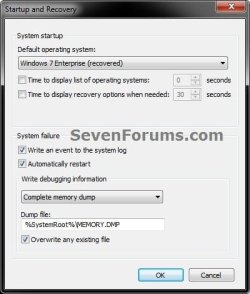
A complete memory dump records all the contents of physical memory (RAM) at the time of the crash. A complete memory dump may contain data from processes that were running when the memory dump was collected. If a second crash occurs and another complete memory dump (or kernel memory dump) file is created, the previous contents of the C:\Windows\MEMORY.DMP file are overwritten.

By default, the complete memory dump option is not available in Startup and Recovery on computers that have 2 gigabytes (GB) or more of RAM installed. You can still set Windows to create a Complete memory dump using the REG file in step 4 of Option Two below though.

The complete memory dump will require that there is a page file set to at least the size of physical memory installed plus 1MB (for the header).


Kernel memory dump
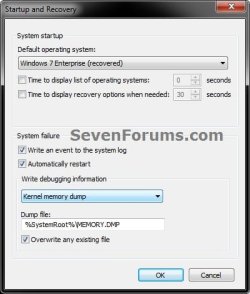
A kernel dump contains only the kernel-mode read / write pages present in physical memory at the time of the crash. Since this is a kernel-mode only dump, there are no pages belonging to user-mode processes. However, it is unlikely that the user-mode process pages would be required since a system crash (bugcheck) is usually caused by kernel-mode code. The list of running processes, state of the current thread and list of loaded drivers are stored in nonpaged memory that saves in a kernel memory dump. The size of a kernel memory dump will vary based on the amount of kernel-mode memory allocated by Windows and the drivers that are present on the system.

If a second crash occurs and another kernel memory dump (or complete memory dump) file is created, the previous contents of the C:\Windows\MEMORY.DMP file are overwritten.


Small memory dump
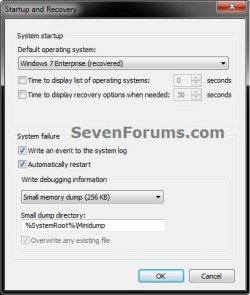
A small memory dump (Minidump) is a C:\Windows\Minidump dump file that contains the stop code, parameters, list of loaded device drivers, information about the current process and thread, and the kernel stack for the thread that caused the crash.


OPTION ONE

Configure Dump File Settings in "Startup and Recovery"


1. Open the Start Menu, copy and paste SystemPropertiesAdvanced.exe into the search box, and press Enter.

2. If prompted by UAC, then click on Yes (Windows 7) or Continue (Vista).

3. In the Advanced tab, click on the Settings button under Startup and Recovery. (see screenshot below)
Step2.jpg
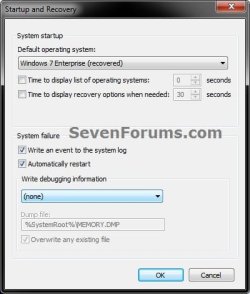
4. Check both the Write an event to the system log and Automatically restart boxes. (see screenshots below)

5. To Not have Windows Create a Dump File on BSOD
A) Select (none) from the Write debugging information drop down menu, and click on OK. (see screenshot below)
None.jpg
B) Go to step 9.
6. To have Windows Create a Small memory dump (Minidump) File on BSOD
A) Select Small memory dump (# KB) from the Write debugging information drop down menu. (see screenshot below)
MiniDump.jpg
B) Check to make sure that Small dump directory has the location below entered for it, and click on OK. (see screenshot above)
%SystemRoot%\Minidump
C) Go to step 9.
7. To have Windows Create a Kernel memory dump File on BSOD
NOTE: This is the default setting.
A) Select Kernel memory dump from the Write debugging information drop down menu. (see screenshot below)
Kernal_Memory_Dump.jpg
B) Check to make sure that Dump file has the location below entered for it. (see screenshot above)
%SystemRoot%\MEMORY.DMP
C) Check the Overwrite any existing file box, and click on OK. (see screenshot above)

D) Go to step 9.
8. To have Windows Create a Complete memory dump File on BSOD
WARNING: See the NOTE box at the top of the tutorial for important information about the page file requirements for this type of dump file to be created. This option will not be available if you have 2GB or more of RAM installed.
A) Select Complete memory dump from the Write debugging information drop down menu. (see screenshot below)
Complete_Memory_Dump.jpg
B) Check to make sure that Dump file has the location below entered for it. (see screenshot above)
%SystemRoot%\MEMORY.DMP
C) Check the Overwrite any existing file box, and click on OK. (see screenshot above)

D) If prompted, click on OK. (see screenshot below)
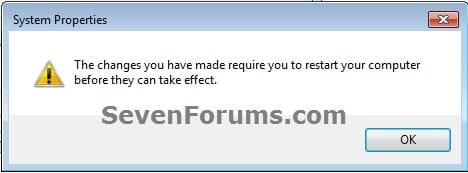
Complete_Memory_Dump2.jpg
E) Continue on to step 9.
9. Click on OK. (see screenshot below step 3)

10. If prompted, click on Restart after you save and close anything that you have open. (see screenshot below)
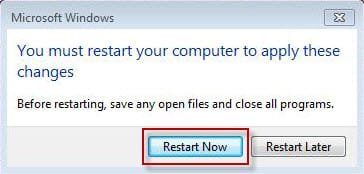
Complete_Memory_Dump3.jpg


OPTION TWO

Configure Dump File Settings with a REG File Download


1. To Not have Windows Create a Dump File on BSOD
A) Click on the Download button below to download the below.
Create_NO_Dump_File_on_BSOD.reg

Download


B) Go to step 5.
2. To have Windows Create a Small memory dump (Minidump) File on BSOD
A) Click on the Download button below to download the below.
Create_Minidump_on_BSOD.reg

Download


B) Go to step 5.
3. To have Windows Create a Kernel memory dump File on BSOD
NOTE: This is the default setting.
A) Click on the Download button below to download the below.
Create_Kernel_memory_dump_on_BSOD.reg

Download


B) Go to step 5.
4. To have Windows Create a Complete memory dump File on BSOD
WARNING: See the NOTE box at the top of the tutorial for important information about the page file requirements for this type of dump file to be created.
A) Click on the download button below to download the below.
Create_Complete_memory_dump_on_BSOD.reg

Download


B) Continue on to step 5.
5. Save the .reg file to your desktop.

6. Double click on the downloaded .reg file to merge it.

7. When prompted, click on Run, Yes (UAC-Windows 7/8) or Continue (UAC-Vista), Yes, and OK to approve merging the .reg file.

8. Restart the computer to apply.

9. You can now delete the downloaded .reg file if you like.


OPTION THREE

Configure Dump File Settings in Elevated Command Prompt


1. Open an elevated command prompt.

2. To View the Current Memory Dump Type Setting
A) Copy and paste the command below into the elevated command prompt, and press Enter. (see screenshot below)
NOTE: For example, it is set to 2 for a kernal memory dump.
wmic RECOVEROS get DebugInfoType
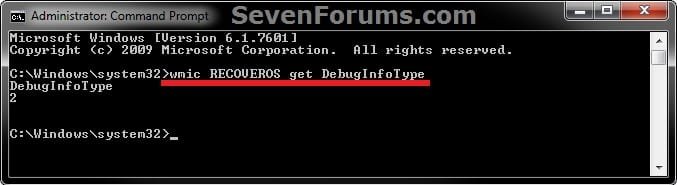
CMD-1.jpg
B) Do step 3, 4, 5, or 6 below for what type of memory dump you would like to have created if you get a BSOD.
3. To Not have Windows Create a Dump File on BSOD
A) Copy and paste the command below into the elevated command prompt, and press Enter. (see screenshot below step 7)
wmic RECOVEROS set DebugInfoType = 0
B) Go to step 7.
4. To have Windows Create a Small memory dump (Minidump) File on BSOD
A) Copy and paste the command below into the elevated command prompt, and press Enter. (see screenshot below step 7)
wmic RECOVEROS set DebugInfoType = 3
B) Go to step 7.
5. To have Windows Create a Kernel memory dump File on BSOD
NOTE: This is the default setting.
A) Copy and paste the command below into the elevated command prompt, and press Enter. (see screenshot below step 7)
wmic RECOVEROS set DebugInfoType = 2
B) Go to step 7.
6. To have Windows Create a Complete memory dump File on BSOD
WARNING: See the NOTE box at the top of the tutorial for important information about the page file requirements for this type of dump file to be created.
A) Copy and paste the command below into the elevated command prompt, and press Enter. (see screenshot below step 7)
wmic RECOVEROS set DebugInfoType = 1
B) Go to step 7.
7. Close the elevated command prompt.
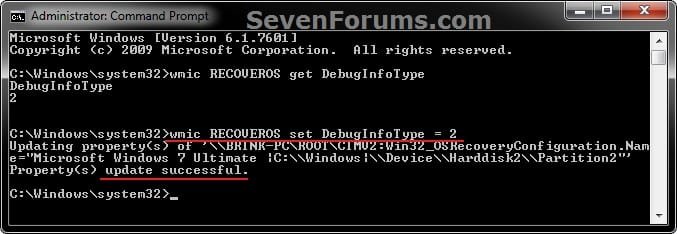
CMD-2.jpg
8. Restart the computer to apply.
That's it,
Shawn


Attachments

Last edited:

My Computer

Computer type
PC/Desktop
Computer Manufacturer/Model Number
Self built custom
OS
64-bit Windows 11 Pro for Workstations
CPU
Intel i7-8700K OC'd to 5 GHz
Motherboard
ASUS ROG Maximus XI Formula Z390
Memory
64 GB (4x16GB) G.SKILL TridentZ RGB DDR4 3600 MHz
Graphics Card(s)
ASUS ROG-STRIX-GTX1080TI-O11G-GAMING
Sound Card
Integrated
Monitor(s) Displays
2 x Samsung Odyssey G7 27"
Screen Resolution
2560x1440
Hard Drives
1TB Samsung 990 PRO M.2,
4TB Samsung 990 PRO PRO M.2,
TerraMaster F8 SSD Plus NAS
PSU
Seasonic Prime Titanium 850W
Case
Thermaltake Core P3
Cooling
Corsair Hydro H115i
Keyboard
Logitech wireless K800
Mouse
Logitech MX Master 4
Internet Speed
2 Gb/s Download and 100 Mb/s Upload
Antivirus
Malwarebyte Anti-Malware Premium
Browser
Google Chrome
Other Info
Logitech Z625 speaker system,
Logitech BRIO 4K Pro webcam,
HP Color LaserJet Pro MFP M477fdn,
APC SMART-UPS RT 1000 XL - SURT1000XLI,
Galaxy S23 Plus phone
Thanks -- is that the only way I can view them? I thought maybe I could just open and read them and maybe glean a little information for myself.

On the BSOD posting instructions listed above, it says that the file MUST be in the default location. My default location is %SystemRoot%\Memory.DMP and that isn't one that you have listed. Should I change the default to one that you have listed or are yours examples and not meant to be all inclusive?
 

My Computer

OS
MS Windows 7 Home Premium 64-bit SP1
CPU
AMD Athlon 64 X2 5000+ Brisbane 65nm Technology
Motherboard
XFX MI-A78S-8209 (CPU 1)
Memory
2.0GB Single-Channel DDR2 @ 371MHz 5-5-5-18
Graphics Card(s)
AL2002W @ 1680x1050 256MB GeForce 8200 (nVidia)
Sound Card
NVIDIA High Definition Audio
Hard Drives
Hitachi HDE721010SLA330 ATA Device Manufacturer Hitachi
Product Family Deskstar
Series prefix Enh. Availability (24x7)
Speed, expressed in Revolutions Per Minute (rpm) 7200
Model capacity for this specific drive 100GB
Interface IDE
Capacity 100
WJR,

Unfortunately, you will need to use the program in the link above to be able to make any sense out of it.

That's the same location to set it as in steps 7 an 8. You may be thinking about step 6 for a minidump instead.
 

My Computer

Computer type
PC/Desktop
Computer Manufacturer/Model Number
Self built custom
OS
64-bit Windows 11 Pro for Workstations
CPU
Intel i7-8700K OC'd to 5 GHz
Motherboard
ASUS ROG Maximus XI Formula Z390
Memory
64 GB (4x16GB) G.SKILL TridentZ RGB DDR4 3600 MHz
Graphics Card(s)
ASUS ROG-STRIX-GTX1080TI-O11G-GAMING
Sound Card
Integrated
Monitor(s) Displays
2 x Samsung Odyssey G7 27"
Screen Resolution
2560x1440
Hard Drives
1TB Samsung 990 PRO M.2,
4TB Samsung 990 PRO PRO M.2,
TerraMaster F8 SSD Plus NAS
PSU
Seasonic Prime Titanium 850W
Case
Thermaltake Core P3
Cooling
Corsair Hydro H115i
Keyboard
Logitech wireless K800
Mouse
Logitech MX Master 4
Internet Speed
2 Gb/s Download and 100 Mb/s Upload
Antivirus
Malwarebyte Anti-Malware Premium
Browser
Google Chrome
Other Info
Logitech Z625 speaker system,
Logitech BRIO 4K Pro webcam,
HP Color LaserJet Pro MFP M477fdn,
APC SMART-UPS RT 1000 XL - SURT1000XLI,
Galaxy S23 Plus phone
Thanks for your help. Sure would be nice if Microsoft made it easier in the first place:D
 

My Computer

OS
MS Windows 7 Home Premium 64-bit SP1
CPU
AMD Athlon 64 X2 5000+ Brisbane 65nm Technology
Motherboard
XFX MI-A78S-8209 (CPU 1)
Memory
2.0GB Single-Channel DDR2 @ 371MHz 5-5-5-18
Graphics Card(s)
AL2002W @ 1680x1050 256MB GeForce 8200 (nVidia)
Sound Card
NVIDIA High Definition Audio
Hard Drives
Hitachi HDE721010SLA330 ATA Device Manufacturer Hitachi
Product Family Deskstar
Series prefix Enh. Availability (24x7)
Speed, expressed in Revolutions Per Minute (rpm) 7200
Model capacity for this specific drive 100GB
Interface IDE
Capacity 100
I agree. Clear cut error messages in a plain txt file would be nicer.
 

My Computer

Computer type
PC/Desktop
Computer Manufacturer/Model Number
Self built custom
OS
64-bit Windows 11 Pro for Workstations
CPU
Intel i7-8700K OC'd to 5 GHz
Motherboard
ASUS ROG Maximus XI Formula Z390
Memory
64 GB (4x16GB) G.SKILL TridentZ RGB DDR4 3600 MHz
Graphics Card(s)
ASUS ROG-STRIX-GTX1080TI-O11G-GAMING
Sound Card
Integrated
Monitor(s) Displays
2 x Samsung Odyssey G7 27"
Screen Resolution
2560x1440
Hard Drives
1TB Samsung 990 PRO M.2,
4TB Samsung 990 PRO PRO M.2,
TerraMaster F8 SSD Plus NAS
PSU
Seasonic Prime Titanium 850W
Case
Thermaltake Core P3
Cooling
Corsair Hydro H115i
Keyboard
Logitech wireless K800
Mouse
Logitech MX Master 4
Internet Speed
2 Gb/s Download and 100 Mb/s Upload
Antivirus
Malwarebyte Anti-Malware Premium
Browser
Google Chrome
Other Info
Logitech Z625 speaker system,
Logitech BRIO 4K Pro webcam,
HP Color LaserJet Pro MFP M477fdn,
APC SMART-UPS RT 1000 XL - SURT1000XLI,
Galaxy S23 Plus phone
None of the options above worked for me, and "wmic" is not recognized as a internal or external command by the elevated command prompt. Still no .dmp files being created with the BSOD's I am getting randomly every day.
 

My Computer

Computer type
PC/Desktop
Computer Manufacturer/Model Number
Dell Studio XPS 435T / 9000
OS
Windows 7 64 bit
CPU
Intel Core i7 -920 processor (8MB L3 Cache 2 .66GHz)
Hello pe85000kg, and welcome to Seven Forums.

Go ahead and run a sfc /scannow command to see if it may find and repair any corrupted system files.

Next, double check to make sure that the Windows Management Instrumentation service is set to started and automatic.

Afterwards, try the tutorial again to see if you may be able to enable getting dump files.

Hope this helps, :)
Shawn
 

My Computer

Computer type
PC/Desktop
Computer Manufacturer/Model Number
Self built custom
OS
64-bit Windows 11 Pro for Workstations
CPU
Intel i7-8700K OC'd to 5 GHz
Motherboard
ASUS ROG Maximus XI Formula Z390
Memory
64 GB (4x16GB) G.SKILL TridentZ RGB DDR4 3600 MHz
Graphics Card(s)
ASUS ROG-STRIX-GTX1080TI-O11G-GAMING
Sound Card
Integrated
Monitor(s) Displays
2 x Samsung Odyssey G7 27"
Screen Resolution
2560x1440
Hard Drives
1TB Samsung 990 PRO M.2,
4TB Samsung 990 PRO PRO M.2,
TerraMaster F8 SSD Plus NAS
PSU
Seasonic Prime Titanium 850W
Case
Thermaltake Core P3
Cooling
Corsair Hydro H115i
Keyboard
Logitech wireless K800
Mouse
Logitech MX Master 4
Internet Speed
2 Gb/s Download and 100 Mb/s Upload
Antivirus
Malwarebyte Anti-Malware Premium
Browser
Google Chrome
Other Info
Logitech Z625 speaker system,
Logitech BRIO 4K Pro webcam,
HP Color LaserJet Pro MFP M477fdn,
APC SMART-UPS RT 1000 XL - SURT1000XLI,
Galaxy S23 Plus phone
Hello pe85000kg, and welcome to Seven Forums.

Go ahead and run a sfc /scannow command to see if it may find and repair any corrupted system files.

Next, double check to make sure that the Windows Management Instrumentation service is set to started and automatic.

Afterwards, try the tutorial again to see if you may be able to enable getting dump files.

Hope this helps, :)
Shawn


Did a sfc / scannow command and checked that Windows Management Instrumentation Service was set to Start and automatic, and retried the tutorial again.

But still no .dmp files showing up.

03526.png
 

My Computer

Computer type
PC/Desktop
Computer Manufacturer/Model Number
Dell Studio XPS 435T / 9000
OS
Windows 7 64 bit
CPU
Intel Core i7 -920 processor (8MB L3 Cache 2 .66GHz)
What message are you getting on the BSOD?

If these BSODs have just recently started happening, then you might see if doing a system restore using a restore point dated before this started may help.
 

My Computer

Computer type
PC/Desktop
Computer Manufacturer/Model Number
Self built custom
OS
64-bit Windows 11 Pro for Workstations
CPU
Intel i7-8700K OC'd to 5 GHz
Motherboard
ASUS ROG Maximus XI Formula Z390
Memory
64 GB (4x16GB) G.SKILL TridentZ RGB DDR4 3600 MHz
Graphics Card(s)
ASUS ROG-STRIX-GTX1080TI-O11G-GAMING
Sound Card
Integrated
Monitor(s) Displays
2 x Samsung Odyssey G7 27"
Screen Resolution
2560x1440
Hard Drives
1TB Samsung 990 PRO M.2,
4TB Samsung 990 PRO PRO M.2,
TerraMaster F8 SSD Plus NAS
PSU
Seasonic Prime Titanium 850W
Case
Thermaltake Core P3
Cooling
Corsair Hydro H115i
Keyboard
Logitech wireless K800
Mouse
Logitech MX Master 4
Internet Speed
2 Gb/s Download and 100 Mb/s Upload
Antivirus
Malwarebyte Anti-Malware Premium
Browser
Google Chrome
Other Info
Logitech Z625 speaker system,
Logitech BRIO 4K Pro webcam,
HP Color LaserJet Pro MFP M477fdn,
APC SMART-UPS RT 1000 XL - SURT1000XLI,
Galaxy S23 Plus phone
What message are you getting on the BSOD?

If these BSODs have just recently started happening, then you might see if doing a system restore using a restore point dated before this started may help.

IMAG0929.jpg


IMAG0930.jpg
 

My Computer

Computer type
PC/Desktop
Computer Manufacturer/Model Number
Dell Studio XPS 435T / 9000
OS
Windows 7 64 bit
CPU
Intel Core i7 -920 processor (8MB L3 Cache 2 .66GHz)

My Computer

Computer type
PC/Desktop
Computer Manufacturer/Model Number
Self built custom
OS
64-bit Windows 11 Pro for Workstations
CPU
Intel i7-8700K OC'd to 5 GHz
Motherboard
ASUS ROG Maximus XI Formula Z390
Memory
64 GB (4x16GB) G.SKILL TridentZ RGB DDR4 3600 MHz
Graphics Card(s)
ASUS ROG-STRIX-GTX1080TI-O11G-GAMING
Sound Card
Integrated
Monitor(s) Displays
2 x Samsung Odyssey G7 27"
Screen Resolution
2560x1440
Hard Drives
1TB Samsung 990 PRO M.2,
4TB Samsung 990 PRO PRO M.2,
TerraMaster F8 SSD Plus NAS
PSU
Seasonic Prime Titanium 850W
Case
Thermaltake Core P3
Cooling
Corsair Hydro H115i
Keyboard
Logitech wireless K800
Mouse
Logitech MX Master 4
Internet Speed
2 Gb/s Download and 100 Mb/s Upload
Antivirus
Malwarebyte Anti-Malware Premium
Browser
Google Chrome
Other Info
Logitech Z625 speaker system,
Logitech BRIO 4K Pro webcam,
HP Color LaserJet Pro MFP M477fdn,
APC SMART-UPS RT 1000 XL - SURT1000XLI,
Galaxy S23 Plus phone

My Computer

Computer type
PC/Desktop
Computer Manufacturer/Model Number
Self built custom
OS
64-bit Windows 11 Pro for Workstations
CPU
Intel i7-8700K OC'd to 5 GHz
Motherboard
ASUS ROG Maximus XI Formula Z390
Memory
64 GB (4x16GB) G.SKILL TridentZ RGB DDR4 3600 MHz
Graphics Card(s)
ASUS ROG-STRIX-GTX1080TI-O11G-GAMING
Sound Card
Integrated
Monitor(s) Displays
2 x Samsung Odyssey G7 27"
Screen Resolution
2560x1440
Hard Drives
1TB Samsung 990 PRO M.2,
4TB Samsung 990 PRO PRO M.2,
TerraMaster F8 SSD Plus NAS
PSU
Seasonic Prime Titanium 850W
Case
Thermaltake Core P3
Cooling
Corsair Hydro H115i
Keyboard
Logitech wireless K800
Mouse
Logitech MX Master 4
Internet Speed
2 Gb/s Download and 100 Mb/s Upload
Antivirus
Malwarebyte Anti-Malware Premium
Browser
Google Chrome
Other Info
Logitech Z625 speaker system,
Logitech BRIO 4K Pro webcam,
HP Color LaserJet Pro MFP M477fdn,
APC SMART-UPS RT 1000 XL - SURT1000XLI,
Galaxy S23 Plus phone

My Computer

Computer type
Laptop
Computer Manufacturer/Model Number
Dell Inspiron
OS
Windows 7 Professional x64
CPU
Core i7
Motherboard
Intel
Memory
8GB
Graphics Card(s)
1 gb Internal (intel shared graphics) , I gb external (AMD)
Hard Drives
1 Terabite
Antivirus
Bitdefender Total Security 2012
Browser
Firefox , IE

My Computer

Computer type
PC/Desktop
Computer Manufacturer/Model Number
Home Built Desktop By DataTech
OS
Windows 7 Ultimate X64 SP1
CPU
Intel i5-2550K, Differing ~4.4-4.8GHz No built in GPU
Motherboard
ASUS P8Z68-V PRO/GEN3
Memory
16GB G.Skill Sniper 1866MHz @ 2133MHz 2x8GB
Graphics Card(s)
ASUS GTX650TIB-DC2OC-2GD5, (650TI Boost)
Sound Card
Onboard Realtek 5-1
Monitor(s) Displays
Samsung P2570HD
Screen Resolution
1920x1080
Hard Drives
Samsung 840 Pro 256GB SSD for OS, 500GB Seagate Constellation (Enterprise drive) for Data
PSU
Corsair HX650W
Case
Inwin Dragon Rider
Cooling
Hyper 212 EVO w/two Noctua fans, push-pull, @1300 RPM
Keyboard
E-Z Eyes, bright yellow keys with large characters
Mouse
steelseries SENSEI Laser Pro Gaming
Internet Speed
48-51Mbs Mbs down, 11 Mbs up Xfinity Cable
Antivirus
Norton Internet Security 2013
Browser
IE 10, Opera, Pale Moon if needed
Other Info
4 case fans, LG BluRay-RE, ASUS DVD-RW, Mr. Fusion power supply, 1.21 gigawatts.
I've Created Small memory dump...Ok Now what to do with it
 

My Computer

Computer type
Laptop
Computer Manufacturer/Model Number
Dell Inspiron
OS
Windows 7 Professional x64
CPU
Core i7
Motherboard
Intel
Memory
8GB
Graphics Card(s)
1 gb Internal (intel shared graphics) , I gb external (AMD)
Hard Drives
1 Terabite
Antivirus
Bitdefender Total Security 2012
Browser
Firefox , IE

My Computer

Computer type
PC/Desktop
Computer Manufacturer/Model Number
Self built custom
OS
64-bit Windows 11 Pro for Workstations
CPU
Intel i7-8700K OC'd to 5 GHz
Motherboard
ASUS ROG Maximus XI Formula Z390
Memory
64 GB (4x16GB) G.SKILL TridentZ RGB DDR4 3600 MHz
Graphics Card(s)
ASUS ROG-STRIX-GTX1080TI-O11G-GAMING
Sound Card
Integrated
Monitor(s) Displays
2 x Samsung Odyssey G7 27"
Screen Resolution
2560x1440
Hard Drives
1TB Samsung 990 PRO M.2,
4TB Samsung 990 PRO PRO M.2,
TerraMaster F8 SSD Plus NAS
PSU
Seasonic Prime Titanium 850W
Case
Thermaltake Core P3
Cooling
Corsair Hydro H115i
Keyboard
Logitech wireless K800
Mouse
Logitech MX Master 4
Internet Speed
2 Gb/s Download and 100 Mb/s Upload
Antivirus
Malwarebyte Anti-Malware Premium
Browser
Google Chrome
Other Info
Logitech Z625 speaker system,
Logitech BRIO 4K Pro webcam,
HP Color LaserJet Pro MFP M477fdn,
APC SMART-UPS RT 1000 XL - SURT1000XLI,
Galaxy S23 Plus phone
Thanks Brink. All this works like a charm - I see I have option 2, the default option kernel dump (as expected) but as a bonus I also have the minidump (as in C:\Windows\Minidump). Thanks, David PS- Season's greetings :)!
 

My Computer

Computer type
PC/Desktop
Computer Manufacturer/Model Number
MEDION AKOYA E4360D
OS
Windows 7 Home Premium 32bit (French) Service Pack 1
Memory
4 GB (2.99 GB usable)
Graphics Card(s)
NVIDA Geoforce GT 330
Sound Card
RealTek High Definition Audio
Screen Resolution
1600 x 900 (default)
Hard Drives
1TB ; 700 GB free
Antivirus
AVIRA
Browser
Internet Explorer 11 ; Google Chrome
Other Info
Bought April 2009; reasonably trouble-free until 2012; computer freezes at random (everything stays clear on screen). Is this hardware or software or both?
Welcome to Seven Forums David. Happy Holidays. :)
 

My Computer

Computer type
PC/Desktop
Computer Manufacturer/Model Number
Self built custom
OS
64-bit Windows 11 Pro for Workstations
CPU
Intel i7-8700K OC'd to 5 GHz
Motherboard
ASUS ROG Maximus XI Formula Z390
Memory
64 GB (4x16GB) G.SKILL TridentZ RGB DDR4 3600 MHz
Graphics Card(s)
ASUS ROG-STRIX-GTX1080TI-O11G-GAMING
Sound Card
Integrated
Monitor(s) Displays
2 x Samsung Odyssey G7 27"
Screen Resolution
2560x1440
Hard Drives
1TB Samsung 990 PRO M.2,
4TB Samsung 990 PRO PRO M.2,
TerraMaster F8 SSD Plus NAS
PSU
Seasonic Prime Titanium 850W
Case
Thermaltake Core P3
Cooling
Corsair Hydro H115i
Keyboard
Logitech wireless K800
Mouse
Logitech MX Master 4
Internet Speed
2 Gb/s Download and 100 Mb/s Upload
Antivirus
Malwarebyte Anti-Malware Premium
Browser
Google Chrome
Other Info
Logitech Z625 speaker system,
Logitech BRIO 4K Pro webcam,
HP Color LaserJet Pro MFP M477fdn,
APC SMART-UPS RT 1000 XL - SURT1000XLI,
Galaxy S23 Plus phone
Hi there,
Just registered here, because I really can find a lot of usefull info!
At the moment I have a BSOD problem. It's something with uTorrent.
But to follow all the instructions on this board it started with a good DUMP FILE.
And there starts my first problem. I followed the instuctions in this post and on my PC the settings are to make a KERNEL MEMORY DUMP FILE. But the problem is I can nowhere find the dump file. Not in the windows directory and not in the minidump directory. And yes I can see my "hidden files".
But when I follow option ONE on this instruction I cannot choose or see my OS. And I have an original Windows 7 Home Premium 64bit.
In the startup and recovery/advanced/settings/.... in the entry of "my default operating system" shows blank. And when I click on the pull down menu, no option is showing.
But below I am able to select the write debuggin information and standard is selected the kernel dump.

So If no default OS is selected I can imagine no dump file is written.
Can someone help me with this problem?

Then I can come to my real problem with the BSOD/uTorrent. But first I have to find all the important info, like the dump file ;-)

Greetz,
Marco
 

My Computer

Computer type
PC/Desktop
Computer Manufacturer/Model Number
Medion
OS
Windows 7 Home Premium 64bit
CPU
Intel Core i7-3770
Motherboard
MEDION H77H2-EM / Intel H77 (Panther Point Base)
Memory
8192MB DDR3 SDRAM
Graphics Card(s)
MSI R7670 (MS-V253) / ATI/AMD Radeon HD 7670
Hard Drives
C-drive: SSD 256GB Samsung 840 EVO
D-drive: 3TB WD Green drive
E-drive: 3TB Seagate 7200RPM
Antivirus
Bitdefender 2013 (Official)
Browser
Chrome and Firefox (all latest versions)
Back
Top