Dump Files - Configure Windows to Create on BSOD

How to Configure Windows to Create a Dump File for when you get a BSOD


   Information
This will show you how to set to create either a Kernel memory dump, Small memory dump (minidump), Complete memory dump, or no memory dump file when you get a BSOD (Blue Screen of Death) in Vista, Windows 7, and Windows 8.

For more information about crash dump files, please see: Understanding Crash Dump Files - Ask the Performance Team - Site Home - TechNet Blogs

You must be logged in as an administrator to be able to do this tutorial.

   Note

Complete memory dump
A complete memory dump records all the contents of physical memory (RAM) at the time of the crash. A complete memory dump may contain data from processes that were running when the memory dump was collected. If a second crash occurs and another complete memory dump (or kernel memory dump) file is created, the previous contents of the C:\Windows\MEMORY.DMP file are overwritten.

By default, the complete memory dump option is not available in Startup and Recovery on computers that have 2 gigabytes (GB) or more of RAM installed. You can still set Windows to create a Complete memory dump using the REG file in step 4 of Option Two below though.

The complete memory dump will require that there is a page file set to at least the size of physical memory installed plus 1MB (for the header).


Kernel memory dump
A kernel dump contains only the kernel-mode read / write pages present in physical memory at the time of the crash. Since this is a kernel-mode only dump, there are no pages belonging to user-mode processes. However, it is unlikely that the user-mode process pages would be required since a system crash (bugcheck) is usually caused by kernel-mode code. The list of running processes, state of the current thread and list of loaded drivers are stored in nonpaged memory that saves in a kernel memory dump. The size of a kernel memory dump will vary based on the amount of kernel-mode memory allocated by Windows and the drivers that are present on the system.

If a second crash occurs and another kernel memory dump (or complete memory dump) file is created, the previous contents of the C:\Windows\MEMORY.DMP file are overwritten.


Small memory dump
A small memory dump (Minidump) is a C:\Windows\Minidump dump file that contains the stop code, parameters, list of loaded device drivers, information about the current process and thread, and the kernel stack for the thread that caused the crash.


OPTION ONE

Configure Dump File Settings in "Startup and Recovery"


1. Open the Start Menu, copy and paste SystemPropertiesAdvanced.exe into the search box, and press Enter.

2. If prompted by UAC, then click on Yes (Windows 7) or Continue (Vista).

3. In the Advanced tab, click on the Settings button under Startup and Recovery. (see screenshot below)
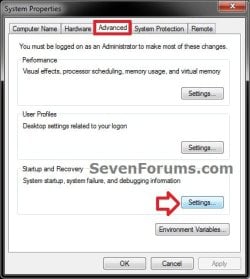
Step2.jpg
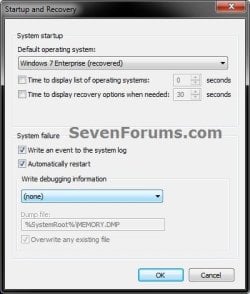
4. Check both the Write an event to the system log and Automatically restart boxes. (see screenshots below)

5. To Not have Windows Create a Dump File on BSOD
A) Select (none) from the Write debugging information drop down menu, and click on OK. (see screenshot below)
None.jpg
B) Go to step 9.
6. To have Windows Create a Small memory dump (Minidump) File on BSOD
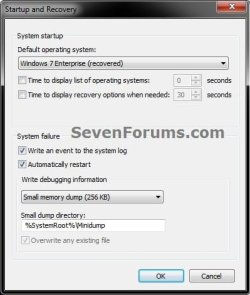
A) Select Small memory dump (# KB) from the Write debugging information drop down menu. (see screenshot below)
MiniDump.jpg
B) Check to make sure that Small dump directory has the location below entered for it, and click on OK. (see screenshot above)
%SystemRoot%\Minidump
C) Go to step 9.
7. To have Windows Create a Kernel memory dump File on BSOD
NOTE: This is the default setting.
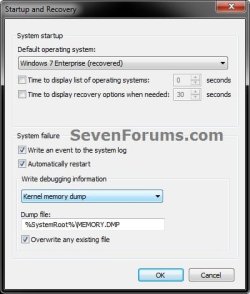
A) Select Kernel memory dump from the Write debugging information drop down menu. (see screenshot below)
Kernal_Memory_Dump.jpg
B) Check to make sure that Dump file has the location below entered for it. (see screenshot above)
%SystemRoot%\MEMORY.DMP
C) Check the Overwrite any existing file box, and click on OK. (see screenshot above)

D) Go to step 9.
8. To have Windows Create a Complete memory dump File on BSOD
WARNING: See the NOTE box at the top of the tutorial for important information about the page file requirements for this type of dump file to be created. This option will not be available if you have 2GB or more of RAM installed.
A) Select Complete memory dump from the Write debugging information drop down menu. (see screenshot below)
Complete_Memory_Dump.jpg
B) Check to make sure that Dump file has the location below entered for it. (see screenshot above)
%SystemRoot%\MEMORY.DMP
C) Check the Overwrite any existing file box, and click on OK. (see screenshot above)

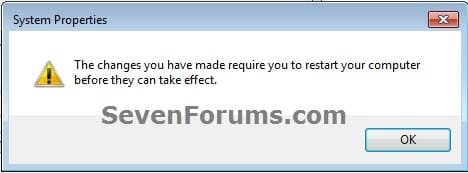
D) If prompted, click on OK. (see screenshot below)
Complete_Memory_Dump2.jpg
E) Continue on to step 9.
9. Click on OK. (see screenshot below step 3)

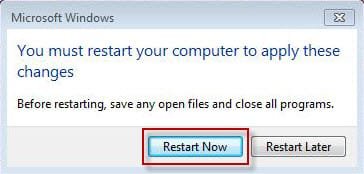
10. If prompted, click on Restart after you save and close anything that you have open. (see screenshot below)
Complete_Memory_Dump3.jpg


OPTION TWO

Configure Dump File Settings with a REG File Download


1. To Not have Windows Create a Dump File on BSOD
A) Click on the Download button below to download the below.
Create_NO_Dump_File_on_BSOD.reg

Download


B) Go to step 5.
2. To have Windows Create a Small memory dump (Minidump) File on BSOD
A) Click on the Download button below to download the below.
Create_Minidump_on_BSOD.reg

Download


B) Go to step 5.
3. To have Windows Create a Kernel memory dump File on BSOD
NOTE: This is the default setting.
A) Click on the Download button below to download the below.
Create_Kernel_memory_dump_on_BSOD.reg

Download


B) Go to step 5.
4. To have Windows Create a Complete memory dump File on BSOD
WARNING: See the NOTE box at the top of the tutorial for important information about the page file requirements for this type of dump file to be created.
A) Click on the download button below to download the below.
Create_Complete_memory_dump_on_BSOD.reg

Download


B) Continue on to step 5.
5. Save the .reg file to your desktop.

6. Double click on the downloaded .reg file to merge it.

7. When prompted, click on Run, Yes (UAC-Windows 7/8) or Continue (UAC-Vista), Yes, and OK to approve merging the .reg file.

8. Restart the computer to apply.

9. You can now delete the downloaded .reg file if you like.


OPTION THREE

Configure Dump File Settings in Elevated Command Prompt


1. Open an elevated command prompt.

2. To View the Current Memory Dump Type Setting
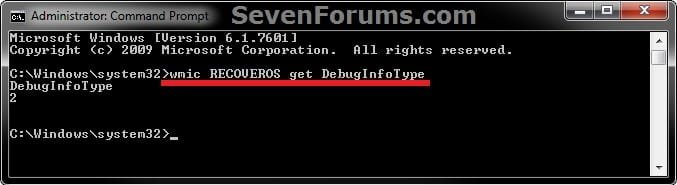
A) Copy and paste the command below into the elevated command prompt, and press Enter. (see screenshot below)
NOTE: For example, it is set to 2 for a kernal memory dump.
wmic RECOVEROS get DebugInfoType
CMD-1.jpg
B) Do step 3, 4, 5, or 6 below for what type of memory dump you would like to have created if you get a BSOD.
3. To Not have Windows Create a Dump File on BSOD
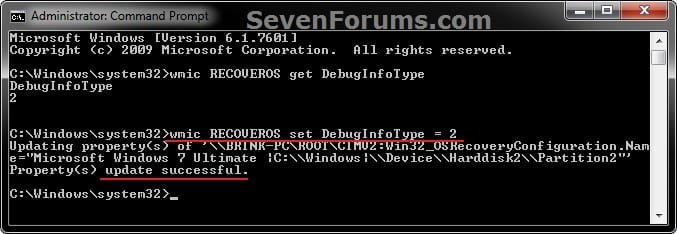
A) Copy and paste the command below into the elevated command prompt, and press Enter. (see screenshot below step 7)
wmic RECOVEROS set DebugInfoType = 0
B) Go to step 7.
4. To have Windows Create a Small memory dump (Minidump) File on BSOD
A) Copy and paste the command below into the elevated command prompt, and press Enter. (see screenshot below step 7)
wmic RECOVEROS set DebugInfoType = 3
B) Go to step 7.
5. To have Windows Create a Kernel memory dump File on BSOD
NOTE: This is the default setting.
A) Copy and paste the command below into the elevated command prompt, and press Enter. (see screenshot below step 7)
wmic RECOVEROS set DebugInfoType = 2
B) Go to step 7.
6. To have Windows Create a Complete memory dump File on BSOD
WARNING: See the NOTE box at the top of the tutorial for important information about the page file requirements for this type of dump file to be created.
A) Copy and paste the command below into the elevated command prompt, and press Enter. (see screenshot below step 7)
wmic RECOVEROS set DebugInfoType = 1
B) Go to step 7.
7. Close the elevated command prompt.
CMD-2.jpg
8. Restart the computer to apply.
That's it,
Shawn


Attachments

Last edited:
Hi there,
Just registered here, because I really can find a lot of usefull info!
At the moment I have a BSOD problem. It's something with uTorrent.
But to follow all the instructions on this board it started with a good DUMP FILE.
And there starts my first problem. I followed the instuctions in this post and on my PC the settings are to make a KERNEL MEMORY DUMP FILE. But the problem is I can nowhere find the dump file. Not in the windows directory and not in the minidump directory. And yes I can see my "hidden files".
But when I follow option ONE on this instruction I cannot choose or see my OS. And I have an original Windows 7 Home Premium 64bit.
In the startup and recovery/advanced/settings/.... in the entry of "my default operating system" shows blank. And when I click on the pull down menu, no option is showing.
But below I am able to select the write debuggin information and standard is selected the kernel dump.

So If no default OS is selected I can imagine no dump file is written.
Can someone help me with this problem?

Then I can come to my real problem with the BSOD/uTorrent. But first I have to find all the important info, like the dump file ;-)

Greetz,
Marco


Hello Marco, and welcome to Seven Forums.

Are you able to set everything under "System failure", "Write debugging information", and "Dump file"? This is what is key to be set instead.

Once that is set, see if you are able to do the instructions below to post your BSOD thread with.

http://www.sevenforums.com/bsod-help-support/96879-blue-screen-death-bsod-posting-instructions.html
 

My Computer

Computer type
PC/Desktop
Computer Manufacturer/Model Number
Self built custom
OS
64-bit Windows 11 Pro for Workstations
CPU
Intel i7-8700K OC'd to 5 GHz
Motherboard
ASUS ROG Maximus XI Formula Z390
Memory
64 GB (4x16GB) G.SKILL TridentZ RGB DDR4 3600 MHz
Graphics Card(s)
ASUS ROG-STRIX-GTX1080TI-O11G-GAMING
Sound Card
Integrated
Monitor(s) Displays
2 x Samsung Odyssey G7 27"
Screen Resolution
2560x1440
Hard Drives
1TB Samsung 990 PRO M.2,
4TB Samsung 990 PRO PRO M.2,
TerraMaster F8 SSD Plus NAS
PSU
Seasonic Prime Titanium 850W
Case
Thermaltake Core P3
Cooling
Corsair Hydro H115i
Keyboard
Logitech wireless K800
Mouse
Logitech MX Master 4
Internet Speed
2 Gb/s Download and 100 Mb/s Upload
Antivirus
Malwarebyte Anti-Malware Premium
Browser
Google Chrome
Other Info
Logitech Z625 speaker system,
Logitech BRIO 4K Pro webcam,
HP Color LaserJet Pro MFP M477fdn,
APC SMART-UPS RT 1000 XL - SURT1000XLI,
Galaxy S23 Plus phone
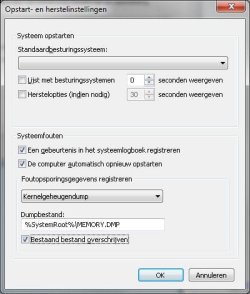
I can change all the settings in the part below. So yes, but everything in the above part I can not change.
It looks like the following picture:

http://ptpimg.me/8f39m9.jpg

It's in Dutch, but I hope that is not a problem.
Options are the same as written in this tutorial.

I'm now of to the instructions of my BSOD..........
I followed the instructions and the following ZIP file was created.
I uploaded it and hope you can see the zip file.
I am not sure if it is correct to post the ZIP file here, or in another post specially for BSOD, but please tell me.

FYI: the first message was that the program was not able to find any dump file.
 

Attachments

My Computer

Computer type
PC/Desktop
Computer Manufacturer/Model Number
Medion
OS
Windows 7 Home Premium 64bit
CPU
Intel Core i7-3770
Motherboard
MEDION H77H2-EM / Intel H77 (Panther Point Base)
Memory
8192MB DDR3 SDRAM
Graphics Card(s)
MSI R7670 (MS-V253) / ATI/AMD Radeon HD 7670
Hard Drives
C-drive: SSD 256GB Samsung 840 EVO
D-drive: 3TB WD Green drive
E-drive: 3TB Seagate 7200RPM
Antivirus
Bitdefender 2013 (Official)
Browser
Chrome and Firefox (all latest versions)

My Computer

Computer type
PC/Desktop
Computer Manufacturer/Model Number
Self built custom
OS
64-bit Windows 11 Pro for Workstations
CPU
Intel i7-8700K OC'd to 5 GHz
Motherboard
ASUS ROG Maximus XI Formula Z390
Memory
64 GB (4x16GB) G.SKILL TridentZ RGB DDR4 3600 MHz
Graphics Card(s)
ASUS ROG-STRIX-GTX1080TI-O11G-GAMING
Sound Card
Integrated
Monitor(s) Displays
2 x Samsung Odyssey G7 27"
Screen Resolution
2560x1440
Hard Drives
1TB Samsung 990 PRO M.2,
4TB Samsung 990 PRO PRO M.2,
TerraMaster F8 SSD Plus NAS
PSU
Seasonic Prime Titanium 850W
Case
Thermaltake Core P3
Cooling
Corsair Hydro H115i
Keyboard
Logitech wireless K800
Mouse
Logitech MX Master 4
Internet Speed
2 Gb/s Download and 100 Mb/s Upload
Antivirus
Malwarebyte Anti-Malware Premium
Browser
Google Chrome
Other Info
Logitech Z625 speaker system,
Logitech BRIO 4K Pro webcam,
HP Color LaserJet Pro MFP M477fdn,
APC SMART-UPS RT 1000 XL - SURT1000XLI,
Galaxy S23 Plus phone
Sorry about the picture. Hereby the first picture:
picture1.jpg

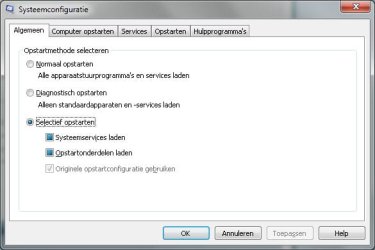
And in addition to your request another picture from my msconfig, first tab. I''m not sure if this is the tab you want to see:
picture2.jpg

I will create another post for my BSOD porblem, but first I want to post here to get clear why I am not able to make a dump file.
 

My Computer

Computer type
PC/Desktop
Computer Manufacturer/Model Number
Medion
OS
Windows 7 Home Premium 64bit
CPU
Intel Core i7-3770
Motherboard
MEDION H77H2-EM / Intel H77 (Panther Point Base)
Memory
8192MB DDR3 SDRAM
Graphics Card(s)
MSI R7670 (MS-V253) / ATI/AMD Radeon HD 7670
Hard Drives
C-drive: SSD 256GB Samsung 840 EVO
D-drive: 3TB WD Green drive
E-drive: 3TB Seagate 7200RPM
Antivirus
Bitdefender 2013 (Official)
Browser
Chrome and Firefox (all latest versions)
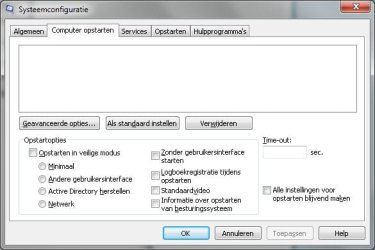
It should be the "Computer opstarten" tab in msconfig instead.

If it's empty as well, then type bcdedit in an elevated command prompt, and post the results to see what it says. :)
 

My Computer

Computer type
PC/Desktop
Computer Manufacturer/Model Number
Self built custom
OS
64-bit Windows 11 Pro for Workstations
CPU
Intel i7-8700K OC'd to 5 GHz
Motherboard
ASUS ROG Maximus XI Formula Z390
Memory
64 GB (4x16GB) G.SKILL TridentZ RGB DDR4 3600 MHz
Graphics Card(s)
ASUS ROG-STRIX-GTX1080TI-O11G-GAMING
Sound Card
Integrated
Monitor(s) Displays
2 x Samsung Odyssey G7 27"
Screen Resolution
2560x1440
Hard Drives
1TB Samsung 990 PRO M.2,
4TB Samsung 990 PRO PRO M.2,
TerraMaster F8 SSD Plus NAS
PSU
Seasonic Prime Titanium 850W
Case
Thermaltake Core P3
Cooling
Corsair Hydro H115i
Keyboard
Logitech wireless K800
Mouse
Logitech MX Master 4
Internet Speed
2 Gb/s Download and 100 Mb/s Upload
Antivirus
Malwarebyte Anti-Malware Premium
Browser
Google Chrome
Other Info
Logitech Z625 speaker system,
Logitech BRIO 4K Pro webcam,
HP Color LaserJet Pro MFP M477fdn,
APC SMART-UPS RT 1000 XL - SURT1000XLI,
Galaxy S23 Plus phone
Sorry for the wrong picture ;-)
Here is the correct one and indeed it is empty:
picture3.jpg

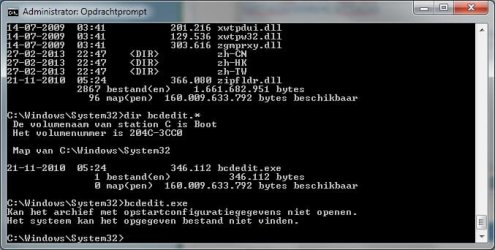
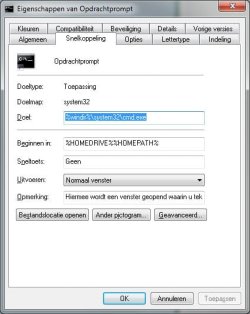
So I tried to execute bcdedit in the "elevated command prompt", but this doesn't work with me. I tried the 3 different options to get into the elevated command prompt. All the times my command opens in C:\Users\(user name) instead of C:\Windows\System32. When I go manually with dos commando's to the windows\system32 directory and execute bcdedit.exe I get the message that the archive with configuration options can not be opened.

picture4.jpg

info of my command prompt:
picture5.jpg
 

My Computer

Computer type
PC/Desktop
Computer Manufacturer/Model Number
Medion
OS
Windows 7 Home Premium 64bit
CPU
Intel Core i7-3770
Motherboard
MEDION H77H2-EM / Intel H77 (Panther Point Base)
Memory
8192MB DDR3 SDRAM
Graphics Card(s)
MSI R7670 (MS-V253) / ATI/AMD Radeon HD 7670
Hard Drives
C-drive: SSD 256GB Samsung 840 EVO
D-drive: 3TB WD Green drive
E-drive: 3TB Seagate 7200RPM
Antivirus
Bitdefender 2013 (Official)
Browser
Chrome and Firefox (all latest versions)
Last edited:

My Computer

Computer type
PC/Desktop
Computer Manufacturer/Model Number
Self built custom
OS
64-bit Windows 11 Pro for Workstations
CPU
Intel i7-8700K OC'd to 5 GHz
Motherboard
ASUS ROG Maximus XI Formula Z390
Memory
64 GB (4x16GB) G.SKILL TridentZ RGB DDR4 3600 MHz
Graphics Card(s)
ASUS ROG-STRIX-GTX1080TI-O11G-GAMING
Sound Card
Integrated
Monitor(s) Displays
2 x Samsung Odyssey G7 27"
Screen Resolution
2560x1440
Hard Drives
1TB Samsung 990 PRO M.2,
4TB Samsung 990 PRO PRO M.2,
TerraMaster F8 SSD Plus NAS
PSU
Seasonic Prime Titanium 850W
Case
Thermaltake Core P3
Cooling
Corsair Hydro H115i
Keyboard
Logitech wireless K800
Mouse
Logitech MX Master 4
Internet Speed
2 Gb/s Download and 100 Mb/s Upload
Antivirus
Malwarebyte Anti-Malware Premium
Browser
Google Chrome
Other Info
Logitech Z625 speaker system,
Logitech BRIO 4K Pro webcam,
HP Color LaserJet Pro MFP M477fdn,
APC SMART-UPS RT 1000 XL - SURT1000XLI,
Galaxy S23 Plus phone
It did take some time because I have a Win7 OEM so I had to create a system repair disc first.
After creating the disc I started my PC on the newly created disc and used the startup repair.
It came up with the message "startup repair could not detect a problem".

I tried again to get into the elevated command prompt without succes. But did not see the "lnk" that could be downloaded. I used the lnk on my desktop screen and yes the command prompt started up at the windows/system32 directory. But after giving the command bcdedit or even bcdedit.exe the following message came up; bcdedit is not recognized as an internal or external command, program or batch.

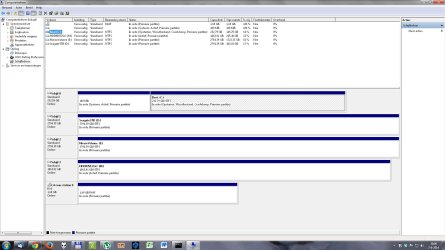
As you requested a picture of my disk management.
And FYI I have problems ther too ;-)
When a new external HD is connected I have to go into the disk management to point manually a specific drive letter. It is not down automaticly. When this is done, the next time the drive letter is recognized, but when another new external HD is connected I have to do the manual work again.
picture6.jpg
 

My Computer

Computer type
PC/Desktop
Computer Manufacturer/Model Number
Medion
OS
Windows 7 Home Premium 64bit
CPU
Intel Core i7-3770
Motherboard
MEDION H77H2-EM / Intel H77 (Panther Point Base)
Memory
8192MB DDR3 SDRAM
Graphics Card(s)
MSI R7670 (MS-V253) / ATI/AMD Radeon HD 7670
Hard Drives
C-drive: SSD 256GB Samsung 840 EVO
D-drive: 3TB WD Green drive
E-drive: 3TB Seagate 7200RPM
Antivirus
Bitdefender 2013 (Official)
Browser
Chrome and Firefox (all latest versions)
I don't see anything wrong in Disk Management for your Windows drive.

You're CD-rom-station 0 should not be RAW though. Could be an issue with the DVD in it.

For now, see if doing either a system restore using a restore point dated before this issue, or a sfc /scannow command may be able to let you get a dump file after a BSOD.

Afterwards, go ahead and pursue the BSOD issue in a new thread to see what may turn up about it.
 

My Computer

Computer type
PC/Desktop
Computer Manufacturer/Model Number
Self built custom
OS
64-bit Windows 11 Pro for Workstations
CPU
Intel i7-8700K OC'd to 5 GHz
Motherboard
ASUS ROG Maximus XI Formula Z390
Memory
64 GB (4x16GB) G.SKILL TridentZ RGB DDR4 3600 MHz
Graphics Card(s)
ASUS ROG-STRIX-GTX1080TI-O11G-GAMING
Sound Card
Integrated
Monitor(s) Displays
2 x Samsung Odyssey G7 27"
Screen Resolution
2560x1440
Hard Drives
1TB Samsung 990 PRO M.2,
4TB Samsung 990 PRO PRO M.2,
TerraMaster F8 SSD Plus NAS
PSU
Seasonic Prime Titanium 850W
Case
Thermaltake Core P3
Cooling
Corsair Hydro H115i
Keyboard
Logitech wireless K800
Mouse
Logitech MX Master 4
Internet Speed
2 Gb/s Download and 100 Mb/s Upload
Antivirus
Malwarebyte Anti-Malware Premium
Browser
Google Chrome
Other Info
Logitech Z625 speaker system,
Logitech BRIO 4K Pro webcam,
HP Color LaserJet Pro MFP M477fdn,
APC SMART-UPS RT 1000 XL - SURT1000XLI,
Galaxy S23 Plus phone
Thank you!
I'will try the sfc /scannow option.
After that I will open a new post in the BSOD forum and hope for a solution.
 

My Computer

Computer type
PC/Desktop
Computer Manufacturer/Model Number
Medion
OS
Windows 7 Home Premium 64bit
CPU
Intel Core i7-3770
Motherboard
MEDION H77H2-EM / Intel H77 (Panther Point Base)
Memory
8192MB DDR3 SDRAM
Graphics Card(s)
MSI R7670 (MS-V253) / ATI/AMD Radeon HD 7670
Hard Drives
C-drive: SSD 256GB Samsung 840 EVO
D-drive: 3TB WD Green drive
E-drive: 3TB Seagate 7200RPM
Antivirus
Bitdefender 2013 (Official)
Browser
Chrome and Firefox (all latest versions)
Hello,

I'm currently experiencing BSOD problems and currently unable to create dump files in order to help diagnose my problem by using dm log collector. My computer will ultimately freeze and produce a loud buzzing noise (I do not see a blue screen, it's a complete lock up and I will need to hard reset it from my tower). I've gone through the instructions on the first page of the thread but I haven't had any luck in my problem.

I've tried using option 1 (both small and kernel memory dumps) as well as using an elevated command prompt (option 3). If I've tried both, would there be any overlapping problems that could be because of it? If that was the case, would it be better to 'reset to default' in order to correct the problem?

Any help would be appreciated and thanks for your time.
 

My Computer

Computer type
PC/Desktop
Computer Manufacturer/Model Number
Self-built/custom
OS
Windows 7 64 bit
CPU
Intel(R) Core(TM) i5-3570K CPU @ 3.40GHz
Motherboard
ASUSTeK COMPUTER INC. P8Z77-V LK
Memory
Total memory: 8.00 GB, Usable: 7.94 GB
Graphics Card(s)
ASUS Nvidia GeForce GTX 660 (I believe 2GB)
Sound Card
High Definition Audio Device, Realtek High Definition Audio
Monitor(s) Displays
LG L245WP
Screen Resolution
1900x1200
Hard Drives
Western Digital Black Caviar 1TB
PSU
Corsair HX650
Case
Fractal Design Define R4
Cooling
Factory cooling for CPU, no others
Keyboard
Coolmaster CM Storm Brown
Mouse
Steelseries Rival
Internet Speed
75 mbps download & 10 mbps upload (500ms ping)
Antivirus
Avira Internet Security
Browser
Firefox & Chrome
Other Info
BIOS Date: 02/01/13 11:41:08 Ver: 10.01

My Computer

Computer type
PC/Desktop
Computer Manufacturer/Model Number
Self built custom
OS
64-bit Windows 11 Pro for Workstations
CPU
Intel i7-8700K OC'd to 5 GHz
Motherboard
ASUS ROG Maximus XI Formula Z390
Memory
64 GB (4x16GB) G.SKILL TridentZ RGB DDR4 3600 MHz
Graphics Card(s)
ASUS ROG-STRIX-GTX1080TI-O11G-GAMING
Sound Card
Integrated
Monitor(s) Displays
2 x Samsung Odyssey G7 27"
Screen Resolution
2560x1440
Hard Drives
1TB Samsung 990 PRO M.2,
4TB Samsung 990 PRO PRO M.2,
TerraMaster F8 SSD Plus NAS
PSU
Seasonic Prime Titanium 850W
Case
Thermaltake Core P3
Cooling
Corsair Hydro H115i
Keyboard
Logitech wireless K800
Mouse
Logitech MX Master 4
Internet Speed
2 Gb/s Download and 100 Mb/s Upload
Antivirus
Malwarebyte Anti-Malware Premium
Browser
Google Chrome
Other Info
Logitech Z625 speaker system,
Logitech BRIO 4K Pro webcam,
HP Color LaserJet Pro MFP M477fdn,
APC SMART-UPS RT 1000 XL - SURT1000XLI,
Galaxy S23 Plus phone
Hi Brink,

Well, that was embarrassing.. I initially thought it was a BSOD since a lot of people that have this problem associated it with a BSOD.

But thank you for the advice. I'm not sure how well it'll work since the problem becomes so intermittent at times and I can't incite it to happen(sometimes a month goes by without a problem...). I'll probably end up selecting half the services and take it from there.

If I'm having further problems with this, is there a specific sub-forum I should post in? Don't want to clutter up this thread :).

Thanks for your time.
 

My Computer

Computer type
PC/Desktop
Computer Manufacturer/Model Number
Self-built/custom
OS
Windows 7 64 bit
CPU
Intel(R) Core(TM) i5-3570K CPU @ 3.40GHz
Motherboard
ASUSTeK COMPUTER INC. P8Z77-V LK
Memory
Total memory: 8.00 GB, Usable: 7.94 GB
Graphics Card(s)
ASUS Nvidia GeForce GTX 660 (I believe 2GB)
Sound Card
High Definition Audio Device, Realtek High Definition Audio
Monitor(s) Displays
LG L245WP
Screen Resolution
1900x1200
Hard Drives
Western Digital Black Caviar 1TB
PSU
Corsair HX650
Case
Fractal Design Define R4
Cooling
Factory cooling for CPU, no others
Keyboard
Coolmaster CM Storm Brown
Mouse
Steelseries Rival
Internet Speed
75 mbps download & 10 mbps upload (500ms ping)
Antivirus
Avira Internet Security
Browser
Firefox & Chrome
Other Info
BIOS Date: 02/01/13 11:41:08 Ver: 10.01
It's no bother at all. If it happens again, then please feel free to post in "General Discussion" to see what we can do to help. :)
 

My Computer

Computer type
PC/Desktop
Computer Manufacturer/Model Number
Self built custom
OS
64-bit Windows 11 Pro for Workstations
CPU
Intel i7-8700K OC'd to 5 GHz
Motherboard
ASUS ROG Maximus XI Formula Z390
Memory
64 GB (4x16GB) G.SKILL TridentZ RGB DDR4 3600 MHz
Graphics Card(s)
ASUS ROG-STRIX-GTX1080TI-O11G-GAMING
Sound Card
Integrated
Monitor(s) Displays
2 x Samsung Odyssey G7 27"
Screen Resolution
2560x1440
Hard Drives
1TB Samsung 990 PRO M.2,
4TB Samsung 990 PRO PRO M.2,
TerraMaster F8 SSD Plus NAS
PSU
Seasonic Prime Titanium 850W
Case
Thermaltake Core P3
Cooling
Corsair Hydro H115i
Keyboard
Logitech wireless K800
Mouse
Logitech MX Master 4
Internet Speed
2 Gb/s Download and 100 Mb/s Upload
Antivirus
Malwarebyte Anti-Malware Premium
Browser
Google Chrome
Other Info
Logitech Z625 speaker system,
Logitech BRIO 4K Pro webcam,
HP Color LaserJet Pro MFP M477fdn,
APC SMART-UPS RT 1000 XL - SURT1000XLI,
Galaxy S23 Plus phone
A weird thing. After untagging "Automatically restart"
Control Panel->System and Security->System->Advanced system settings [tab] Advanced

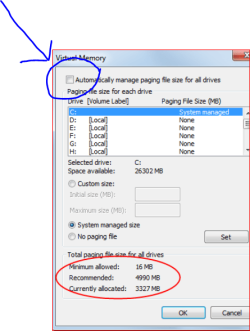
Windows got me this popup warning, telling me to set the pagefile or increase the size.

However, the pagefile is set and it is managed by Windows...

What am I doing wrong?

Thanks
-

wZUIXc.png
 

My Computer

OS
Windows 7 Ultimate x64
Hello sfwul,

Odd. Is you C drive real low on free space?

For now, you might restart the PC to see if that may toggle the page file to not give you this message anymore.

If not, then you could check "Automatically restart" again if you like.
 

My Computer

Computer type
PC/Desktop
Computer Manufacturer/Model Number
Self built custom
OS
64-bit Windows 11 Pro for Workstations
CPU
Intel i7-8700K OC'd to 5 GHz
Motherboard
ASUS ROG Maximus XI Formula Z390
Memory
64 GB (4x16GB) G.SKILL TridentZ RGB DDR4 3600 MHz
Graphics Card(s)
ASUS ROG-STRIX-GTX1080TI-O11G-GAMING
Sound Card
Integrated
Monitor(s) Displays
2 x Samsung Odyssey G7 27"
Screen Resolution
2560x1440
Hard Drives
1TB Samsung 990 PRO M.2,
4TB Samsung 990 PRO PRO M.2,
TerraMaster F8 SSD Plus NAS
PSU
Seasonic Prime Titanium 850W
Case
Thermaltake Core P3
Cooling
Corsair Hydro H115i
Keyboard
Logitech wireless K800
Mouse
Logitech MX Master 4
Internet Speed
2 Gb/s Download and 100 Mb/s Upload
Antivirus
Malwarebyte Anti-Malware Premium
Browser
Google Chrome
Other Info
Logitech Z625 speaker system,
Logitech BRIO 4K Pro webcam,
HP Color LaserJet Pro MFP M477fdn,
APC SMART-UPS RT 1000 XL - SURT1000XLI,
Galaxy S23 Plus phone
Just something I noticed.

From post #54

However, the pagefile is set and it is managed by Windows...

Capture.PNsystem managed.PNG
 

My Computer

Computer type
PC/Desktop
Computer Manufacturer/Model Number
Home made Desktop
OS
Windows 10 Pro. 64/ version 1709 Windows 7 Pro/64
CPU
Intel i7-6800K @ 4.3
Motherboard
ASUS X-99 Deluxe II
Memory
Corsair Platinum 16 gig @2400
Graphics Card(s)
EVGA GTX 1070 OC
Monitor(s) Displays
Asus 27" LED LCD/VE278Q
Screen Resolution
1920-1080 or 1280-720 HDMI
Hard Drives
INTEL SSD 730-240 Gb Sata 3.0/
PSU
EVGA Platium 1200W
Case
Phanteks Luxe Tempered Glass 8 fans/ one radiator
Cooling
XSPC/ Water Cooled CPU
Keyboard
Das 4 Professional
Mouse
Logitech M705/MX Anywhere 2-S
Internet Speed
100 mbits
Antivirus
Microsoft Security Essentials/ Malwarebytes Premium 3.0/ SAS
Browser
I.E. 11 default/Firefox/ ISP Time Warner Cable/Spectrum
Other Info
LG BluRay Burner/
Sound system-KLipsch-THX/
Icy Dock ssd Hot Swap bays.
Should that be set then?
I honestely would not know.

I would expect that Windows requires a pagefile so it would then be on the Windows partition.
Free space is roughly 22-23GB

=
 

My Computer

OS
Windows 7 Ultimate x64
A page file is not always required, but some programs require one no matter how much RAM is installed. It's recommended to leave the page file turned on and managed by the system to prevent possible low memory errors though.

Do you still get the message with the "Automatically manage paging file size for all drives" box is checked, and click on OK? You may be asked to restart the computer to apply after checking it.
 

My Computer

Computer type
PC/Desktop
Computer Manufacturer/Model Number
Self built custom
OS
64-bit Windows 11 Pro for Workstations
CPU
Intel i7-8700K OC'd to 5 GHz
Motherboard
ASUS ROG Maximus XI Formula Z390
Memory
64 GB (4x16GB) G.SKILL TridentZ RGB DDR4 3600 MHz
Graphics Card(s)
ASUS ROG-STRIX-GTX1080TI-O11G-GAMING
Sound Card
Integrated
Monitor(s) Displays
2 x Samsung Odyssey G7 27"
Screen Resolution
2560x1440
Hard Drives
1TB Samsung 990 PRO M.2,
4TB Samsung 990 PRO PRO M.2,
TerraMaster F8 SSD Plus NAS
PSU
Seasonic Prime Titanium 850W
Case
Thermaltake Core P3
Cooling
Corsair Hydro H115i
Keyboard
Logitech wireless K800
Mouse
Logitech MX Master 4
Internet Speed
2 Gb/s Download and 100 Mb/s Upload
Antivirus
Malwarebyte Anti-Malware Premium
Browser
Google Chrome
Other Info
Logitech Z625 speaker system,
Logitech BRIO 4K Pro webcam,
HP Color LaserJet Pro MFP M477fdn,
APC SMART-UPS RT 1000 XL - SURT1000XLI,
Galaxy S23 Plus phone
Likely I've found it:
Event log telling me:

EventID 1018
"The dump file at location: C:\Windows\MEMORY.DMP was deleted because the disk volume had less than 25 GB free space.
"

I've 'learned' that a dmp file is not created incase the pagefile is located on another drive or partition.

Have also noticed 'endless' lists of
"Microsoft-Windows-DriverFrameworks-UserMode" errors

Caused by Paragon Harddisk Manager

-
EVENTID 2010
The following information was included with the event (insertion strings):
{337FD740-514F-445E-9D4F-CB80476A1F80}
ROOT\PARAGONBLOCKDEVICE\0000
0

--

EventID 2004
The following information was included with the event (insertion strings):
{337FD740-514F-445E-9D4F-CB80476A1F80}
ROOT\PARAGONBLOCKDEVICE\0000
0
BlkMounter
{DD4E129F-D8B1-4A19-9B9E-59410353A2C5}

--
EventID 2005
The following information was included with the event (insertion strings):
{337FD740-514F-445E-9D4F-CB80476A1F80}
ROOT\PARAGONBLOCKDEVICE\0000
C:\Windows\System32\WUDFx.dll
Microsoft Corporation
WDF:UMDF Framework Library
6.2.9200.16384 (win8_rtm.120725-1247)

--
etc.etc.

--

Going to remove the software. Paragon does not seem to have a solution for this and I can run the software from CD-ROM only.

PARAGON BLOCK DEVICE has been reported on other forums as well. One might say, it doesn't do much harm except for filling the event log but .. I don't know.


IbbPCk.png
 

My Computer

OS
Windows 7 Ultimate x64
Back
Top