Now I'm not sure what's going on with Core Temp, as the machine was running idle and it read 0C, which is not a usual reading for a CPU cooled with a stock heatsink/fan. So I launched the ASRock Extreme Tuning Utilities and looked at my core temps there. Now how do I get my offsets to plug into Core Temp?
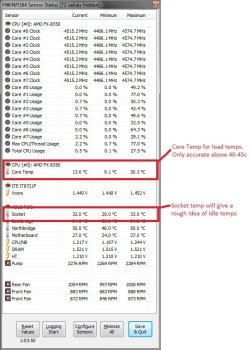
Core temp is not really any good with AMD cpu's due to the way the temp is measured. Have a butchers at this AMD Temp Information and Guide
I find the best programs for monitoring AMD cpu's are HWmonitor, HWinfo64 and Aida64 which will show a reading for the socket and core but due to the way they're measured the core temp is only accurate from about 40-45c. So use the socket temp to give you an idea of idle temps and the core for load temps.
I use HWinfo64 myself as i found HWinfo show's low voltages on the +12v rail.
Attachments
My Computer
At a glance
Win7 Home Premium x64 SP1i7 4770k8Gb Kingston HyperX Beast 2400MHz @2133MHz 11...MSI GTX 780ti Gaming Oc x2
- Computer type
- PC/Desktop
- Computer Manufacturer/Model Number
- Custom build
- OS
- Win7 Home Premium x64 SP1
- CPU
- i7 4770k
- Motherboard
- Asus maximus VI Hero
- Memory
- 8Gb Kingston HyperX Beast 2400MHz @2133MHz 11-12-11-30
- Graphics Card(s)
- MSI GTX 780ti Gaming Oc x2
- Sound Card
- Onboard ROG SupremeFX
- Monitor(s) Displays
- Asus VG248QE
- Screen Resolution
- 3840X1080 144Hz
- Hard Drives
- Samung Evo 256Gb, OCZ Agility4 128Gb
1x1TB hitachi storage
- PSU
- EVGA Supernova 1000w Platinum
- Case
- Corsair Air 540
- Cooling
- Corsair H100i
- Keyboard
- Coolermaster Quickfire Pro
- Mouse
- Corsair M65 RGB
- Internet Speed
- 74mb dwn/16up
- Antivirus
- MSE,Malwarebytes
- Browser
- Chrome