Solved Viewing pages side by side (from a single PDF)?

i think the others thought you wanted to open two instances of a one page pdf.
easy enough to misunderstand,
the level of skills the members here have (that perhaps misunderstood) would suggest they are not stupid in anyway and so perhaps you should drop the defence stance you seem to be taking with people, i posted to help clear up what people were misunderstanding,and to offer a solution to your question
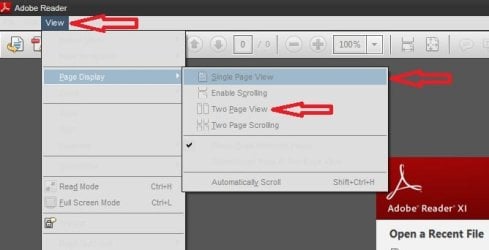
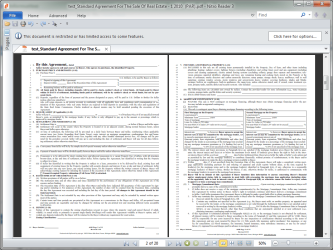
so in the spirit and style in which your are posting i will state that i didnt suggest you used adobe acrobat to view the pdf pages side by side but that i stated that adobe READER can do what you are after.
adobe reader being a lighter weight software than Acrobat,just making that clear so there is no misunderstanding
 

My Computer My Computer

Computer Manufacturer/Model Number
Hewlett packard/p6512uk
OS
Microsoft Windows 7 Home Premium 64-bit 7600
CPU
IIx4 amd athelon 635 processor
Motherboard
FOXCONN 2AA9
Memory
2x2gb
Graphics Card(s)
ati radeon HD 5450
Sound Card
(1) Realtek High Definition Audio (2) AMD High Definition
Monitor(s) Displays
samsung lcd tv 32"
Screen Resolution
1360x 768
Hard Drives
(1) WDC WD10 01FAES-60Z2A0 SATA Disk Device (2) Maxtor OneTouch USB Device (3) ST310003 33AS USB Device (4) WD My Book 1111 USB Device
PSU
?
Cooling
air!
Keyboard
wireless hp
Mouse
wireless Hp,optical
Internet Speed
1.10mb/s
Antivirus
MSE
Browser
Firefox
  • Like
Reactions: Arc
Nice post :)

Untitled.jpg
 

My Computer My Computer

Computer type
PC/Desktop
Computer Manufacturer/Model Number
Self Assembled
OS
Microsoft Windows 10 Pro Insider Preview 64-bit
CPU
Intel(R) Core(TM) i3-4130 CPU @ 3.40GHz
Motherboard
Gigabyte Technology Co., Ltd. B85M-D3H
Memory
Corsair Vengence 4GB x2 (8.00GB Dual-Channel DDR3 @ 798MHz)
Graphics Card(s)
2047MB GeForce GTS 450 (ZOTAC International)
Sound Card
Onboard (Realtek High Definition Audio)
Monitor(s) Displays
LG Flatron E2040T
Screen Resolution
1600x900
Hard Drives
Western Digital 1 TB
Seagate 500 GB
PSU
Corsair VS550
Case
Cooler Master K380
Cooling
Cooler Master Seidon 120V Plus
Keyboard
Logitech MK260r
Mouse
Logitech MK260r
Internet Speed
PMPL Broadband
Antivirus
Windows Defender + MBAM
Browser
Firefox
Other Info
Dell Studio 15" Laptop
Hmm i don't see which confusion it could generate. Yes it's a single PDF file, meaning only one... I've never ever seen a PDF with a single page by the way. And in that case i wouldn't ask to view page side by side anyways...
Really? You're a newbie, just found out what PDF is and that's why you do not know it so well? OK, let me tell you, there's a lot single page PDF documents out there. Short instructions, licence agreements, receipts etc. I don't even want to think how many hundreds or thousands I have those single page PDFs stored on my computers, receipts from online stores, transaction receipts from online banking and so on.

As is so often proved here at the Seven Forums, when a member does not know something it does not make it a fact.

What i want is not necessary ALL pages side by side, like a book, but maybe just 2, like Microsoft WORD let you do. I know Acrobat does that but... I prefer light weight apps.. :)
You tell us you state your request clearly, then you post like this? "What i want is not necessary ALL pages side by side..."? Not necessary but you'd prefer it? My mobile phone's manual is a 126 page PDF, so to use it as an example you would like to show those 126 pages side by side? Not necessary but rather?

If the last part of your request is enough ("...but maybe just 2"), I recommend you to install Adobe PDF reader, for it can show two pages simultaneously as my fellow geeks have already told you. If you are using a program that lacks features you need but insist in using it as it is "light weight" and refuse to use the original one which would do what you'd like to, you have no one else to blame than yourself.

Kari
 

My Computer My Computer

Computer type
Laptop
Computer Manufacturer/Model Number
HP ENVY 17-1150eg
OS
Windows 10 Pro x64 EN-GB
CPU
1.6 GHz Intel Core i7-720QM Processor
Memory
6 GB
Graphics Card(s)
ATI Mobility Radeon HD 5850 Graphics
Sound Card
Beats sound system with integrated subwoofer
Monitor(s) Displays
17" laptop display, 22" LED and 32" Full HD TV through HDMI
Screen Resolution
1600*900 (1), 1920*1080 (2&3)
Hard Drives
Internal: 2 x 500 GB SATA Hard Disk Drive 7200 rpm
External: 2TB for backups, 3TB USB3 network drive for media
Cooling
As Envy runs a bit warm, I have it on a Cooler Master pad
Keyboard
Logitech diNovo Media Desktop Laser (bluetooth)
Mouse
Logitech Performance Mouse MX
Internet Speed
50/10 Mbps VDSL
Antivirus
Windows Defender 4.3.9431.0
Browser
Maxthon 3.5.2., IE11
You can download the Viewer Manual here: Download PDF-XChange Viewer Help Manual.

Check your settings (sometimes apps have icon representation of pages on the bottom bar) and you might have to zoom out to get the pages side x side (zooming out farther can put more pages on the windows)

4)Initial View. Determines the settings of the page’s initial view. The settings can be modified according to the user’s preferences.
a)Layout and Magnification. Determines the appearance of the document.
i)
Navigation View. Specifies which panels and pages are displayed in the navigation pane.
(1)
Automatic. Uses the page display information from the PDF to determine how the PDF is displayed.
(2)
Page only. Displays only the page. No panels are displayed.
(3)
Bookmarks panel and page. Displays Bookmarks and PDF pages.
(4)
Thumbnails panel and page. Displays Thumbnails and PDF pages.
(5)
Layers panel and page. Displays Layers and PDF pages.
(6)
Attachments panel and page. Displays Attachments and PDF pages.
ii)
Page Layout. Specifies how document pages are arranged.
(1)
Automatic. Uses the page display information from the PDF to determine how the PDF is displayed.
(2)
Single Page. Displays only a single page at a time. It is not possible to scroll the pages to see part of one and part of
another.

(3)
Continuous. May display parts of two or more pages simultaneously.
(4)
Facing. Pages are displayed side by side in pairs, but only two pages may be scrolled.
(5)
Continuous - Facing. Pages are displayed side by side and more than two pages may be scrolled.

iii)Magnification. Sets the zoom level the document will appear at when opened.
iv)
Open to Page. Determines the page that appears when the document opens.


Edit:
I also found this KB for full screen two-page facing
Tracker Software Products :: Knowledgebase :: How do I use two-page facing view in fullscreen
 
Last edited:

My Computer My Computer

Computer type
Laptop
Computer Manufacturer/Model Number
HP Pavilion dv6-6c10us
OS
x64 (6.3.9600) Win8.1 Pro & soon dual boot x64 (6.1.7601) Win7_SP1 HomePrem
CPU
AMD A6-3420M APU with Radeon(tm) HD Graphics
Motherboard
Hewlett-Packard 1805
Memory
6.00 GB
Graphics Card(s)
AMD Radeon(TM) HD 6520G
Sound Card
(1) AMD High Definition Audio Device (2) IDT High Definiti
Monitor(s) Displays
HP W2072a 20" LCD (1600 x 900) @ 60 Hz
Screen Resolution
1366 x 768 x 32 bits (4294967296 colors) @ 60 Hz
Hard Drives
ST640LM0 00 HM641JI SATA Disk Device
Keyboard
Logitech k520 wireless KB
Mouse
Logitech m320 wireless mouse (bundled with KB)
Internet Speed
15/5 | 54 MB Wireless 'n'
Antivirus
Realtime: Defender or Avast | On-demand: Malwarebytes, ESET
Browser
IE 11 on Win8, IE 10 on win 7
Other Info
Media: [Gimp, Audacity, VLC] || Comm: [WEmail 2012, Skype] || Productivity: [OpenOffice,| Textpad] || Utils: [Sysinternals, cCleaner, Speccy, Defraggler]
Maxie has already posted the link for the KB article
 

My Computer My Computer

Computer type
PC/Desktop
Computer Manufacturer/Model Number
Golden Mk. I.4
OS
Windows 10 Pro x64 ; Xubuntu x64
CPU
Intel i7 860 @ 2.80 GHz O/C'ed to 4.0GHz
Motherboard
Gigabyte P55A-UD3R Rev.1. Award BIOS F13
Memory
16GB Corsair Vengance DDR3 @ 661 MHz Dual Channel (9-9-9-24)
Graphics Card(s)
EVGA NVidia GTX 560 1024MB
Sound Card
Realtek Integrated
Monitor(s) Displays
Dual Samsung SyncMaster 2494HS
Screen Resolution
1920*1080 and 1920*1080
Hard Drives
1*Samsung 840 EVO 120GB SSD;
1*OCZ Vertex 2 60GB SSD;
2*Samsung F3 SpinPoint 1TB in RAID0;
1*Samsung F1 SpinPoint 1TB;
2*Western Digital 1TB External USB 3.0
1*Western Digital 500GB External USB 3.0
1*Seagate 500GB External USB 2.0
PSU
Thermaltake ToughPower QFan 750W
Case
Thermaltake Element S VK60001W2Z
Cooling
Corsair H60 Water Cooling, 2*230mm and 2*80mm case fans
Keyboard
Logitech G110
Mouse
Logitech MX518
They are different KB articles.
Mazie references how to view two DOCUMENTS in the app window.
My reference answers the OP's question of how to view multiple pages of a single document side by side in the app window.

As it is, my reference points to the default action (and full screen), but the issue is easily resolved for the OP if they smply use the page control icons at the bottom. They might have to close other panes (navigation, etc) and adjust the m agnification for it to be a workable solution though.

I use Nitro PDF and I checked the PDF-XChange Viewer site - both have page control icons in the lower right area. If the OP still cannot get the desired view, perhaps there is a bug in PDF-XChange.

Facing.PNG


My Computer My Computer

Computer type
Laptop
Computer Manufacturer/Model Number
HP Pavilion dv6-6c10us
OS
x64 (6.3.9600) Win8.1 Pro & soon dual boot x64 (6.1.7601) Win7_SP1 HomePrem
CPU
AMD A6-3420M APU with Radeon(tm) HD Graphics
Motherboard
Hewlett-Packard 1805
Memory
6.00 GB
Graphics Card(s)
AMD Radeon(TM) HD 6520G
Sound Card
(1) AMD High Definition Audio Device (2) IDT High Definiti
Monitor(s) Displays
HP W2072a 20" LCD (1600 x 900) @ 60 Hz
Screen Resolution
1366 x 768 x 32 bits (4294967296 colors) @ 60 Hz
Hard Drives
ST640LM0 00 HM641JI SATA Disk Device
Keyboard
Logitech k520 wireless KB
Mouse
Logitech m320 wireless mouse (bundled with KB)
Internet Speed
15/5 | 54 MB Wireless 'n'
Antivirus
Realtime: Defender or Avast | On-demand: Malwarebytes, ESET
Browser
IE 11 on Win8, IE 10 on win 7
Other Info
Media: [Gimp, Audacity, VLC] || Comm: [WEmail 2012, Skype] || Productivity: [OpenOffice,| Textpad] || Utils: [Sysinternals, cCleaner, Speccy, Defraggler]
Hi there .. So this does not work ?

To view 2 instances of the same document side by side:
Allow multiple instances of the PDF-XChange Viewer Application:
Edit --> Preferences --> General --> Application --> Allow Multiple Instances
Click Apply --> OK
Open a new instance of the viewer by using a PDF-XChange Viewer Start Menu or Desktop shortcut.
Selecting the document from the recent list using the Open tool.
OR if you have PDF-XChange Viewer set as your system default PDF Viewing application you can open the file directly from it's location by double clicking on it.
I use PDF-XChange Viewer and the above way works for me. :D
 

My Computer My Computer

Computer type
PC/Desktop
Computer Manufacturer/Model Number
Dell Inspiron 530
OS
Windows 7 Professional SP1 64-bit
CPU
Intel Core 2 Duo Processor E8300 @ 2.83GHz
Motherboard
Dell Inc. 0RY007 (Socket 775)
Memory
4.00 GB Dual-Channel DDR2 @ 332MHz (5-5-5-15)
Graphics Card(s)
Intel(R) G33/G31 Express Chipset Family
Sound Card
Integrated 7.1 Channel Audio
Monitor(s) Displays
Acer G245HQL 23.6" LED(1920x1080@60Hz)
Screen Resolution
1920 x 1080
Hard Drives
Disk 0 HITACHI 1TB OS Installed - Disk 1 HITACHI 1TB For Backups
Keyboard
Dell USB Keyboard
Mouse
Dell Optical USB Mouse
Internet Speed
DSL 10 meg
Antivirus
Symantec(SEP)
Browser
Pale Moon
Thanks C-11

I use PDF-XChange Viewer and the above way works for me. :D

The OP expressed the problem as viewing two pages of the same document in the application window, not as viewing 2 instances of the same document side by side.

The difference is how you navigate the document. If you view multiple pages, you can simply page down or scroll down.

2x2.PNG


Last edited:

My Computer My Computer

Computer type
Laptop
Computer Manufacturer/Model Number
HP Pavilion dv6-6c10us
OS
x64 (6.3.9600) Win8.1 Pro & soon dual boot x64 (6.1.7601) Win7_SP1 HomePrem
CPU
AMD A6-3420M APU with Radeon(tm) HD Graphics
Motherboard
Hewlett-Packard 1805
Memory
6.00 GB
Graphics Card(s)
AMD Radeon(TM) HD 6520G
Sound Card
(1) AMD High Definition Audio Device (2) IDT High Definiti
Monitor(s) Displays
HP W2072a 20" LCD (1600 x 900) @ 60 Hz
Screen Resolution
1366 x 768 x 32 bits (4294967296 colors) @ 60 Hz
Hard Drives
ST640LM0 00 HM641JI SATA Disk Device
Keyboard
Logitech k520 wireless KB
Mouse
Logitech m320 wireless mouse (bundled with KB)
Internet Speed
15/5 | 54 MB Wireless 'n'
Antivirus
Realtime: Defender or Avast | On-demand: Malwarebytes, ESET
Browser
IE 11 on Win8, IE 10 on win 7
Other Info
Media: [Gimp, Audacity, VLC] || Comm: [WEmail 2012, Skype] || Productivity: [OpenOffice,| Textpad] || Utils: [Sysinternals, cCleaner, Speccy, Defraggler]
Slartybart, thank you so much! This is the answer i was waiting for. Actually the Nitro portable i tried to install was full of crap :( Should i make a new thread about that? Apparently it just added something to the boot list (msconfig) but that thing was removed by my AV automatically... Though if someone wanna try the exe on a vmware or something...
 

My Computer My Computer

Computer type
PC/Desktop
OS
Win7x64
Glad things got sorted out. So are you good now? Reading multipage docs side by side?

I use the full Nitro app[free], lightweight and very good text extraction - I never experienced any issue, but each machine is different.

Everyone here volunteers their time and if you aren't going to use the app, then you don't have an issue with the app. Why waste anyone's time.

I have not used the portable version, didn't even know there was such an animal. Open a new Thread? Maybe on Nitro's board.

My guess is that they'll tell you that you have to compensate your AV so the boot list can be modified for their application. This is not necessarily a bad thing as long as you limit the boot list to Nitro PDF or edit it by hand. And my guess is that it is only in the portable version, can't imagine why... being protable and all that. Nitro should be able to explain it better.

Slartybart, thank you so much! This is the answer i was waiting for. Actually the Nitro portable i tried to install was full of crap :( Should i make a new thread about that? Apparently it just added something to the boot list (msconfig) but that thing was removed by my AV automatically... Though if someone wanna try the exe on a vmware or something...
 

My Computer My Computer

Computer type
Laptop
Computer Manufacturer/Model Number
HP Pavilion dv6-6c10us
OS
x64 (6.3.9600) Win8.1 Pro & soon dual boot x64 (6.1.7601) Win7_SP1 HomePrem
CPU
AMD A6-3420M APU with Radeon(tm) HD Graphics
Motherboard
Hewlett-Packard 1805
Memory
6.00 GB
Graphics Card(s)
AMD Radeon(TM) HD 6520G
Sound Card
(1) AMD High Definition Audio Device (2) IDT High Definiti
Monitor(s) Displays
HP W2072a 20" LCD (1600 x 900) @ 60 Hz
Screen Resolution
1366 x 768 x 32 bits (4294967296 colors) @ 60 Hz
Hard Drives
ST640LM0 00 HM641JI SATA Disk Device
Keyboard
Logitech k520 wireless KB
Mouse
Logitech m320 wireless mouse (bundled with KB)
Internet Speed
15/5 | 54 MB Wireless 'n'
Antivirus
Realtime: Defender or Avast | On-demand: Malwarebytes, ESET
Browser
IE 11 on Win8, IE 10 on win 7
Other Info
Media: [Gimp, Audacity, VLC] || Comm: [WEmail 2012, Skype] || Productivity: [OpenOffice,| Textpad] || Utils: [Sysinternals, cCleaner, Speccy, Defraggler]
"Portable version" means a version that doesn't leaving any traces, firstly made to be carried and launched anywhere from your usb drive. They (normally) do not leave any trace in the registry/on the computer apart the folder which contains them. There are many other nice use of them...

Most of the portable apps are made by third party people, not the app dev. And of course some bad people make bad portable version which contains crap, and that's one of them i found sadly, it clearly seems it tried to install malware, that's why i talked about making a new thread.
 

My Computer My Computer

Computer type
PC/Desktop
OS
Win7x64
I see. My take is to only go with reputable vendors. I might be old school, but I take the data to the app, not the app to the data.... but everyone has their preferred methods.

If you decide to warn others in another thread, please indicate that you're not looking for a solution, only letting people know that there is an issue. also be clear that you're reference is to a third party "knock off". You shouldn't give Nitro PDF a bad rap based on something that isn't their product.

Personally, I wouldn't bother. I don't see much value or return from posting a new thread. That's yourcall though.

So, if this issue is resolved, please mark the thread as solved.

Thanks,

Bill
 

My Computer My Computer

Computer type
Laptop
Computer Manufacturer/Model Number
HP Pavilion dv6-6c10us
OS
x64 (6.3.9600) Win8.1 Pro & soon dual boot x64 (6.1.7601) Win7_SP1 HomePrem
CPU
AMD A6-3420M APU with Radeon(tm) HD Graphics
Motherboard
Hewlett-Packard 1805
Memory
6.00 GB
Graphics Card(s)
AMD Radeon(TM) HD 6520G
Sound Card
(1) AMD High Definition Audio Device (2) IDT High Definiti
Monitor(s) Displays
HP W2072a 20" LCD (1600 x 900) @ 60 Hz
Screen Resolution
1366 x 768 x 32 bits (4294967296 colors) @ 60 Hz
Hard Drives
ST640LM0 00 HM641JI SATA Disk Device
Keyboard
Logitech k520 wireless KB
Mouse
Logitech m320 wireless mouse (bundled with KB)
Internet Speed
15/5 | 54 MB Wireless 'n'
Antivirus
Realtime: Defender or Avast | On-demand: Malwarebytes, ESET
Browser
IE 11 on Win8, IE 10 on win 7
Other Info
Media: [Gimp, Audacity, VLC] || Comm: [WEmail 2012, Skype] || Productivity: [OpenOffice,| Textpad] || Utils: [Sysinternals, cCleaner, Speccy, Defraggler]
Creating a new thread was to provide the file to someone who'd be volunteer to explore it (under vmware or else) and see what crap it contains, therefore i'd be able to remove them all, cause AV/Malware Anti Bytes aren't detecting anything more, yet i'm sure some still left.
 

My Computer My Computer

Computer type
PC/Desktop
OS
Win7x64
If you want to clean up the install
1) 1st use Control Panel -> Features and Programs to uninstall the program.
2) Then you can use a tool such as Revo to clean up


Here' a video tuitorial: http://www.sevenforums.com/tutorials/106594-revo-uninstaller-freeware-uninstall-programs.html
This short video tutorial explains how to uninstall programs with Revo Uninstaller Freeware that also scans for leftovers after the standard uninstall. Note: If you click the link above the video window, the graphics resolution of the video is much better.

I don't use Revo, so I can't help is you have questions, but WHS knows his stuff - note that there is a text link above the embed.

Anyway, I see that you've mark this solved. I won't be checking this thread in the future.

Bill
 

My Computer My Computer

Computer type
Laptop
Computer Manufacturer/Model Number
HP Pavilion dv6-6c10us
OS
x64 (6.3.9600) Win8.1 Pro & soon dual boot x64 (6.1.7601) Win7_SP1 HomePrem
CPU
AMD A6-3420M APU with Radeon(tm) HD Graphics
Motherboard
Hewlett-Packard 1805
Memory
6.00 GB
Graphics Card(s)
AMD Radeon(TM) HD 6520G
Sound Card
(1) AMD High Definition Audio Device (2) IDT High Definiti
Monitor(s) Displays
HP W2072a 20" LCD (1600 x 900) @ 60 Hz
Screen Resolution
1366 x 768 x 32 bits (4294967296 colors) @ 60 Hz
Hard Drives
ST640LM0 00 HM641JI SATA Disk Device
Keyboard
Logitech k520 wireless KB
Mouse
Logitech m320 wireless mouse (bundled with KB)
Internet Speed
15/5 | 54 MB Wireless 'n'
Antivirus
Realtime: Defender or Avast | On-demand: Malwarebytes, ESET
Browser
IE 11 on Win8, IE 10 on win 7
Other Info
Media: [Gimp, Audacity, VLC] || Comm: [WEmail 2012, Skype] || Productivity: [OpenOffice,| Textpad] || Utils: [Sysinternals, cCleaner, Speccy, Defraggler]
Back
Top