Windows 7 Home Premium Installation Error...

Rawad

New member
Power User
VIP
Local time
7:50 PM
Messages
532
Windows 7 cannot be installed to disk 0 partition 2

Update 1 :When I turn on the Computer this is the display message I get , what does it mean?.I can still boot the Windows Installation Disc after that Display message by pressing F1 to boot. Is this why Windows isn't installing properly.
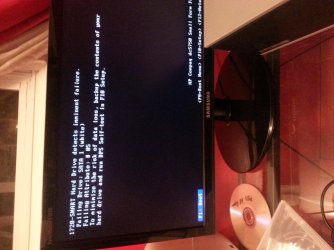
20130928_215711.jpg


Update 2 [Recent]

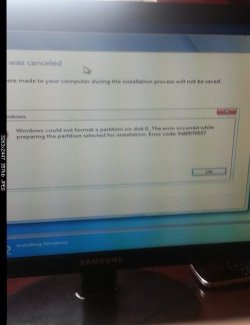
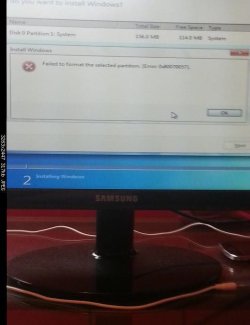
I was able to bypass the Windows Installation Error 0x80070057 by following the guide step by step , I posted below , however I have encountered another issue. It shows me a warning sign with the message "windows cannot be installed to partition 0 disk 2". I will post a picture soon.
Error 0x80070057 when you format a hard disk drive to install Windows 7
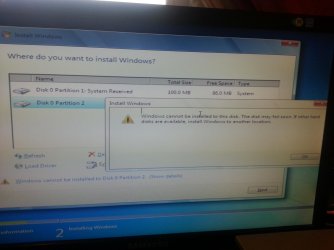
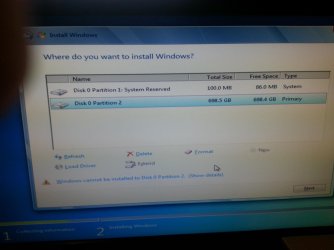
20130929_085528.jpg

20130929_093529.jpg
 
Last edited:

My Computer My Computer

At a glance

Windows 8.1 64 bitWindows 8.1 64-bit4096 MB RAMMicrosoft Basic Display Adapter
Computer type
Laptop
Computer Manufacturer/Model Number
Acer Aspire M5100
OS
Windows 8.1 64 bit
CPU
Windows 8.1 64-bit
Motherboard
Toshiba L745D
Memory
4096 MB RAM
Graphics Card(s)
Microsoft Basic Display Adapter
Sound Card
High Definition Audio Device
Monitor(s) Displays
1366x768
Screen Resolution
1366x768
Keyboard
Logitech Keyboard K800
Antivirus
MalwareBytes
Browser
Google Chrome

My Computer My Computer

At a glance

ME/XP/Vista/Win7
OS
ME/XP/Vista/Win7
Do you only have one drive plugged into the motherboard during installation?
 

My Computer My Computer

At a glance

Windows 7 Home Premium 32-Bit - Build 7600 SP1Intel Core i3-2120 3.30GhzKingston 4 GB DDR3 1333 mhzAMD Radeon HD6670
Computer type
PC/Desktop
Computer Manufacturer/Model Number
Custom Build
OS
Windows 7 Home Premium 32-Bit - Build 7600 SP1
CPU
Intel Core i3-2120 3.30Ghz
Motherboard
Asus P8Z68-V LX Intel Z68 Socket H2 ATX
Memory
Kingston 4 GB DDR3 1333 mhz
Graphics Card(s)
AMD Radeon HD6670
Sound Card
Sound Blaster Audigy SE 24-Bit
Monitor(s) Displays
Asus VE228
Screen Resolution
1440 X 900
Hard Drives
OCZ Vertex 3 120 GB Sata 3 SSD ==
Kingston SH103/S3 120 G Hyper X 120 GB SSD ==
Western Digital 500 GB Caviar Green 7200 RPM ==
PSU
Corsair CX600M == 600 Watt
Case
NZXT Apollo - Silver with Clear Side Panel
Cooling
Three 120 mm Fans
Keyboard
Microsoft Natural 4000
Mouse
Microsoft Custom Optical 3000
Internet Speed
AT&T Fiber Optic Wireless Network
Antivirus
Microsoft Security Essentials
Browser
Chrome
Other Info
120 mm Blue LED Fan -- Three Blue LED Lazer Light Sticks
Do you only have one drive plugged into the motherboard during installation?

I updated my post ,please take a look at it.
 

My Computer My Computer

At a glance

Windows 8.1 64 bitWindows 8.1 64-bit4096 MB RAMMicrosoft Basic Display Adapter
Computer type
Laptop
Computer Manufacturer/Model Number
Acer Aspire M5100
OS
Windows 8.1 64 bit
CPU
Windows 8.1 64-bit
Motherboard
Toshiba L745D
Memory
4096 MB RAM
Graphics Card(s)
Microsoft Basic Display Adapter
Sound Card
High Definition Audio Device
Monitor(s) Displays
1366x768
Screen Resolution
1366x768
Keyboard
Logitech Keyboard K800
Antivirus
MalwareBytes
Browser
Google Chrome
It's quite clear: your HD is failing.

To confirm this you can run the maker's HD Diagnostic extended CD scan, or you can just replace it now since the error is rarely wrong.
 
It's quite clear: your HD is failing.

To confirm this you can run the maker's HD Diagnostic extended CD scan, or you can just replace it now since the error is rarely wrong.

Which one do I download?, I have the HP Compac dc5750
 

My Computer My Computer

At a glance

Windows 8.1 64 bitWindows 8.1 64-bit4096 MB RAMMicrosoft Basic Display Adapter
Computer type
Laptop
Computer Manufacturer/Model Number
Acer Aspire M5100
OS
Windows 8.1 64 bit
CPU
Windows 8.1 64-bit
Motherboard
Toshiba L745D
Memory
4096 MB RAM
Graphics Card(s)
Microsoft Basic Display Adapter
Sound Card
High Definition Audio Device
Monitor(s) Displays
1366x768
Screen Resolution
1366x768
Keyboard
Logitech Keyboard K800
Antivirus
MalwareBytes
Browser
Google Chrome
Did you follow the instructions on the screen to run the HD self-test from the F10 prompt at boot? If not try that now.

Then you'll need the HD brand to choose the correct test. If there isn't one for your make then use Seatools DOS ISO burned to CD using Windows Image Burner, reboot to boot into CD using F12 key, run Full test.
 
Did you follow the instructions on the screen to run the HD self-test from the F10 prompt at boot? If not try that now.

Then you'll need the HD brand to choose the correct test. If there isn't one for your make then use Seatools DOS ISO burned to CD using Windows Image Burner, reboot to boot into CD using F12 key, run Full test.

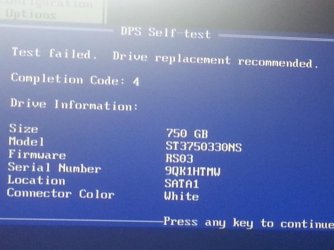
I just ran the DPS Self Test , got an error saying test failed with a display message "Drive replacement recommended", I believe this computer needs a new drive for the installation to work.


Does anyone have the link for the HD Diagnostic I need for my hp compact dc5750, can't find it.
 
Last edited:

My Computer My Computer

At a glance

Windows 8.1 64 bitWindows 8.1 64-bit4096 MB RAMMicrosoft Basic Display Adapter
Computer type
Laptop
Computer Manufacturer/Model Number
Acer Aspire M5100
OS
Windows 8.1 64 bit
CPU
Windows 8.1 64-bit
Motherboard
Toshiba L745D
Memory
4096 MB RAM
Graphics Card(s)
Microsoft Basic Display Adapter
Sound Card
High Definition Audio Device
Monitor(s) Displays
1366x768
Screen Resolution
1366x768
Keyboard
Logitech Keyboard K800
Antivirus
MalwareBytes
Browser
Google Chrome
Last edited:

My Computer My Computer

At a glance

Windows 8.1 64 bitWindows 8.1 64-bit4096 MB RAMMicrosoft Basic Display Adapter
Computer type
Laptop
Computer Manufacturer/Model Number
Acer Aspire M5100
OS
Windows 8.1 64 bit
CPU
Windows 8.1 64-bit
Motherboard
Toshiba L745D
Memory
4096 MB RAM
Graphics Card(s)
Microsoft Basic Display Adapter
Sound Card
High Definition Audio Device
Monitor(s) Displays
1366x768
Screen Resolution
1366x768
Keyboard
Logitech Keyboard K800
Antivirus
MalwareBytes
Browser
Google Chrome
What is the pat No next to SATA 1? (WD???????????????)
WD = Western Digital.
or
Look for the make on the HDD.

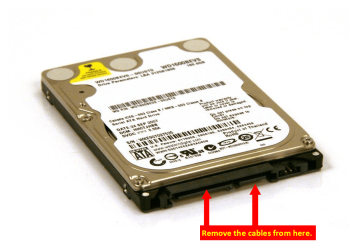
Sata HD plug.PNG
 

My Computer My Computer

At a glance

ME/XP/Vista/Win7
OS
ME/XP/Vista/Win7
What is the pat No next to SATA 1? (WD???????????????)
WD = Western Digital.
or
Look for the make on the HDD.

View attachment 287844

I have no choice but to remove the the hardrive and see for myself? , or could I find the No next to SATA 1 in the BIOS? , the reason I ask because I have no experience in that area unfortunately.
 

My Computer My Computer

At a glance

Windows 8.1 64 bitWindows 8.1 64-bit4096 MB RAMMicrosoft Basic Display Adapter
Computer type
Laptop
Computer Manufacturer/Model Number
Acer Aspire M5100
OS
Windows 8.1 64 bit
CPU
Windows 8.1 64-bit
Motherboard
Toshiba L745D
Memory
4096 MB RAM
Graphics Card(s)
Microsoft Basic Display Adapter
Sound Card
High Definition Audio Device
Monitor(s) Displays
1366x768
Screen Resolution
1366x768
Keyboard
Logitech Keyboard K800
Antivirus
MalwareBytes
Browser
Google Chrome

My Computer My Computer

At a glance

Windows 8.1 64 bitWindows 8.1 64-bit4096 MB RAMMicrosoft Basic Display Adapter
Computer type
Laptop
Computer Manufacturer/Model Number
Acer Aspire M5100
OS
Windows 8.1 64 bit
CPU
Windows 8.1 64-bit
Motherboard
Toshiba L745D
Memory
4096 MB RAM
Graphics Card(s)
Microsoft Basic Display Adapter
Sound Card
High Definition Audio Device
Monitor(s) Displays
1366x768
Screen Resolution
1366x768
Keyboard
Logitech Keyboard K800
Antivirus
MalwareBytes
Browser
Google Chrome

My Computer My Computer

At a glance

Windows 8.1 64 bitWindows 8.1 64-bit4096 MB RAMMicrosoft Basic Display Adapter
Computer type
Laptop
Computer Manufacturer/Model Number
Acer Aspire M5100
OS
Windows 8.1 64 bit
CPU
Windows 8.1 64-bit
Motherboard
Toshiba L745D
Memory
4096 MB RAM
Graphics Card(s)
Microsoft Basic Display Adapter
Sound Card
High Definition Audio Device
Monitor(s) Displays
1366x768
Screen Resolution
1366x768
Keyboard
Logitech Keyboard K800
Antivirus
MalwareBytes
Browser
Google Chrome

My Computer My Computer

At a glance

Windows 7 Home Premium 32-Bit - Build 7600 SP1Intel Core i3-2120 3.30GhzKingston 4 GB DDR3 1333 mhzAMD Radeon HD6670
Computer type
PC/Desktop
Computer Manufacturer/Model Number
Custom Build
OS
Windows 7 Home Premium 32-Bit - Build 7600 SP1
CPU
Intel Core i3-2120 3.30Ghz
Motherboard
Asus P8Z68-V LX Intel Z68 Socket H2 ATX
Memory
Kingston 4 GB DDR3 1333 mhz
Graphics Card(s)
AMD Radeon HD6670
Sound Card
Sound Blaster Audigy SE 24-Bit
Monitor(s) Displays
Asus VE228
Screen Resolution
1440 X 900
Hard Drives
OCZ Vertex 3 120 GB Sata 3 SSD ==
Kingston SH103/S3 120 G Hyper X 120 GB SSD ==
Western Digital 500 GB Caviar Green 7200 RPM ==
PSU
Corsair CX600M == 600 Watt
Case
NZXT Apollo - Silver with Clear Side Panel
Cooling
Three 120 mm Fans
Keyboard
Microsoft Natural 4000
Mouse
Microsoft Custom Optical 3000
Internet Speed
AT&T Fiber Optic Wireless Network
Antivirus
Microsoft Security Essentials
Browser
Chrome
Other Info
120 mm Blue LED Fan -- Three Blue LED Lazer Light Sticks
What number did you type?
 

My Computer My Computer

At a glance

Windows 8.1 64 bitWindows 8.1 64-bit4096 MB RAMMicrosoft Basic Display Adapter
Computer type
Laptop
Computer Manufacturer/Model Number
Acer Aspire M5100
OS
Windows 8.1 64 bit
CPU
Windows 8.1 64-bit
Motherboard
Toshiba L745D
Memory
4096 MB RAM
Graphics Card(s)
Microsoft Basic Display Adapter
Sound Card
High Definition Audio Device
Monitor(s) Displays
1366x768
Screen Resolution
1366x768
Keyboard
Logitech Keyboard K800
Antivirus
MalwareBytes
Browser
Google Chrome
ST = Seagate.
 

My Computer My Computer

At a glance

ME/XP/Vista/Win7
OS
ME/XP/Vista/Win7
ST = Seagate.

Alright got it, anyways guys I would like to thank you all for the great advice , I believe in all honestly I need a hardrive replacement which I don't have experience in unfortunately. This topic can be closed or leave it open, Thanks!
 

My Computer My Computer

At a glance

Windows 8.1 64 bitWindows 8.1 64-bit4096 MB RAMMicrosoft Basic Display Adapter
Computer type
Laptop
Computer Manufacturer/Model Number
Acer Aspire M5100
OS
Windows 8.1 64 bit
CPU
Windows 8.1 64-bit
Motherboard
Toshiba L745D
Memory
4096 MB RAM
Graphics Card(s)
Microsoft Basic Display Adapter
Sound Card
High Definition Audio Device
Monitor(s) Displays
1366x768
Screen Resolution
1366x768
Keyboard
Logitech Keyboard K800
Antivirus
MalwareBytes
Browser
Google Chrome
Back
Top