Solved Installing .Net 1.1 in Windows 7 Pro fails

rcdunbar

New member
Local time
3:17 AM
Messages
19
Location
Suburb of Philadelphia PA
To solve various problems for which I sought help earlier (thanks to those who tried) I recently did a clean reinstall of Win 7 Pro + SP1 (and all updates) and, of course, a whole bunch of apps. So far so good, and it did solve a lot of nagging issues of the kind that do build up in Windows over time.

However, an Excel application that uses DDE to access real time data from a remote server needs .Net Framework 1.1 (so says the service provider). The Win 7 reinstall included only .Net 4.0 (not 4.5). So far the .Net 1.1 downloads from Microsoft have failed to install - the setup process goes almost to completion, then says it "ended prematurely" and rolls back. There are no error codes or other indication as to why it failed. Here are the two files that I tried, both with the same result:

dotnetfx.exe NDP1.1sp1-KB867460-X86.exe both from the MS Download Center

How can I install .Net 1.1 and get it working on my machine? Do I need to uninstall 4.0 first, then do 1.1 and then 4.0?

Thanks for any words of wisdom on this matter.
 

My Computer My Computer

At a glance

Windows 7 Pro 32-bitIntel 3GHz dual-core4GBIntel on-board chip, no separate card
Computer type
PC/Desktop
Computer Manufacturer/Model Number
custom build
OS
Windows 7 Pro 32-bit
CPU
Intel 3GHz dual-core
Motherboard
Intel 5 yrs old
Memory
4GB
Graphics Card(s)
Intel on-board chip, no separate card
Hard Drives
Seagate 500 GB
Western Digital 500 GB
Antivirus
Norton Internet Security Suite
Browser
FireFox as default; also IE9
My Computer My Computer

At a glance

Win10 Pro 64-bitAMD Ryzen 7 3800X32 GB Kingston DDR4-2666MSI nVidia GT 710 (2GB)
Computer type
PC/Desktop
Computer Manufacturer/Model Number
Self-Built
OS
Win10 Pro 64-bit
CPU
AMD Ryzen 7 3800X
Motherboard
Gigabyte X570 UD
Memory
32 GB Kingston DDR4-2666
Graphics Card(s)
MSI nVidia GT 710 (2GB)
Sound Card
Creative Audigy FX 5.1
Monitor(s) Displays
ViewSonic VG2439Smh 24"
Screen Resolution
1920x1080
Hard Drives
3xWD1TB; 1xSeagate 1TB... all spinning rust
PSU
EVGA 100-W1-0500-KR (500w)
Case
SilverStone PS10 (modified)
Cooling
CPU:AMD Wraith Prism. Case:3x Noctua 120mm
Keyboard
Compaq Professional PS/2
Mouse
Microsoft Basic Optical Mouse 2.0
Internet Speed
Fiber 1Gbit/sec down/up
Antivirus
Avast Free
Browser
FF, Chrome
Other Info
2x LG GH24NSC0 DVD burners, Mackie CR3 monitor speakers

My Computer My Computer

At a glance

Windows 10 Home x64INTEL Core i5-750 Quad-Core 3.37GHzHyperX Fury Black Series 8GB (2 x 4GB) 1866MhzEVGA GeForce GTX 750 Superclocked 1GB 128-Bit...
Computer type
PC/Desktop
OS
Windows 10 Home x64
CPU
INTEL Core i5-750 Quad-Core 3.37GHz
Motherboard
ASUS P7P55D
Memory
HyperX Fury Black Series 8GB (2 x 4GB) 1866Mhz
Graphics Card(s)
EVGA GeForce GTX 750 Superclocked 1GB 128-Bit GDDR5
Monitor(s) Displays
LG 32MA68HY 32" IPS
Screen Resolution
1920 x 1080
Hard Drives
Samsung 840 Evo 120GB, SEAGATE 500GB Barracuda® 7200.12, SATA 3 Gb/s, 7200 RPM, 16MB cache
PSU
ANTEC TruePower New TP-550, 80 PLUS, 550W
Case
ANTEC Three Hundred Illusion
Cooling
COOLER MASTER Hyper 212 Plus, 4 x 120mm 1 x 140mm Noctua's
Internet Speed
85 + Mbps
Antivirus
Avast
Browser
Vivaldi
A Guy: my apologies for responding so late - I was away for about two weeks.

The procedure you cite shows up on several websites, so it must be valid. I need to get .Net 1.1 back onto my system after doing a clean re-install of Win 7 Pro SP1 (just a few weeks ago - it and all updates went well).

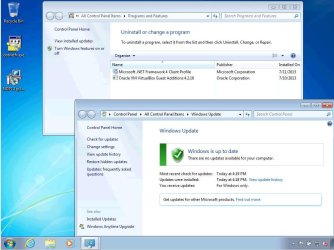
The 1.1 sequence, using new c:\DotNet folder as recommended, seemed to work flawlessly. There were no error, unhandled exceptions, or other failure reports. But .Net 1.1 isn't there! Netfx_Setupverifier.exe doesn't even list it to be verified (2.0, 3.0, 3.5 and 4.0 are listed and verified); and it doesn't show up in Control Panel > Programs and Features where, unlike 2.0 thru 3.5, I would expect it to be separately listed as it was before I reinstalled Win 7. I had also run sfc /scannow, which reported no issues.

What's missing? Is there another service that needs to be running? Is there some other Windows feature that needs to be turned on to let .Net 1.1 fully install? Is there a registry key that I can fix? I should also note that, when running netfix.msi (the final step in the procedure), at the very end the progress bar appeared to run backwards, as though a rollback were taking place. That lasted only a second or two, and there were no messages of any kind.

Can you (or anyone) anyone shed some light on this problem? I know that many people in the past have appealed to this and other forums for help regarding .Net 1.1 on Win 7. I'm also aware that Microsoft no longer supports 1.1 on Win 7. But there must be a way to make it happen.

Thanks in advance for any help and words of wisdom.
 

My Computer My Computer

At a glance

Windows 7 Pro 32-bitIntel 3GHz dual-core4GBIntel on-board chip, no separate card
Computer type
PC/Desktop
Computer Manufacturer/Model Number
custom build
OS
Windows 7 Pro 32-bit
CPU
Intel 3GHz dual-core
Motherboard
Intel 5 yrs old
Memory
4GB
Graphics Card(s)
Intel on-board chip, no separate card
Hard Drives
Seagate 500 GB
Western Digital 500 GB
Antivirus
Norton Internet Security Suite
Browser
FireFox as default; also IE9
Sorry, sorting through some PC issues myself at the moment. I'll post to the Gurus and see if I can't get you some more help. A Guy
 

My Computer My Computer

At a glance

Windows 10 Home x64INTEL Core i5-750 Quad-Core 3.37GHzHyperX Fury Black Series 8GB (2 x 4GB) 1866MhzEVGA GeForce GTX 750 Superclocked 1GB 128-Bit...
Computer type
PC/Desktop
OS
Windows 10 Home x64
CPU
INTEL Core i5-750 Quad-Core 3.37GHz
Motherboard
ASUS P7P55D
Memory
HyperX Fury Black Series 8GB (2 x 4GB) 1866Mhz
Graphics Card(s)
EVGA GeForce GTX 750 Superclocked 1GB 128-Bit GDDR5
Monitor(s) Displays
LG 32MA68HY 32" IPS
Screen Resolution
1920 x 1080
Hard Drives
Samsung 840 Evo 120GB, SEAGATE 500GB Barracuda® 7200.12, SATA 3 Gb/s, 7200 RPM, 16MB cache
PSU
ANTEC TruePower New TP-550, 80 PLUS, 550W
Case
ANTEC Three Hundred Illusion
Cooling
COOLER MASTER Hyper 212 Plus, 4 x 120mm 1 x 140mm Noctua's
Internet Speed
85 + Mbps
Antivirus
Avast
Browser
Vivaldi
Have you run all arounds of Important and Optional Windows Updates, after enabling Automatically deliver drivers via Windows Update (Step 3)?

This should deliver the latest Net Frameworks which are backwards compatible as well as other performance and security updates which may also be needed to give full functionality.

If you're saying however that you have a program that only can use such an old version of Net Framework and isn't backwards compatible with newer ones then the program may need to be installed in Compatibility Mode for XP SP2 or the OS it was written for.
 
  • Like
Reactions: Arc

My Computer My Computer

At a glance

x64 (6.3.9600) Win8.1 Pro & soon dual boot x6...AMD A6-3420M APU with Radeon(tm) HD Graphics6.00 GBAMD Radeon(TM) HD 6520G
Computer type
Laptop
Computer Manufacturer/Model Number
HP Pavilion dv6-6c10us
OS
x64 (6.3.9600) Win8.1 Pro & soon dual boot x64 (6.1.7601) Win7_SP1 HomePrem
CPU
AMD A6-3420M APU with Radeon(tm) HD Graphics
Motherboard
Hewlett-Packard 1805
Memory
6.00 GB
Graphics Card(s)
AMD Radeon(TM) HD 6520G
Sound Card
(1) AMD High Definition Audio Device (2) IDT High Definiti
Monitor(s) Displays
HP W2072a 20" LCD (1600 x 900) @ 60 Hz
Screen Resolution
1366 x 768 x 32 bits (4294967296 colors) @ 60 Hz
Hard Drives
ST640LM0 00 HM641JI SATA Disk Device
Keyboard
Logitech k520 wireless KB
Mouse
Logitech m320 wireless mouse (bundled with KB)
Internet Speed
15/5 | 54 MB Wireless 'n'
Antivirus
Realtime: Defender or Avast | On-demand: Malwarebytes, ESET
Browser
IE 11 on Win8, IE 10 on win 7
Other Info
Media: [Gimp, Audacity, VLC] || Comm: [WEmail 2012, Skype] || Productivity: [OpenOffice,| Textpad] || Utils: [Sysinternals, cCleaner, Speccy, Defraggler]
~~~
How can I install .Net 1.1 and get it working on my machine? Do I need to uninstall 4.0 first, then do 1.1 and then 4.0?

Thanks for any words of wisdom on this matter.
You have been given some good tips in the posts above. This post is to address your question about uninstalling 4.0 first. I did not have to do that... but I'm testing in W7 pro 64bit. Maybe W7 pro 32 bit has different issues with this 1.1 install.


There were no problems after the restart - but I don't have a way to test Excel and DDE for you.
 

My Computer My Computer

At a glance

W7 Pro SP1 64biti78GBIntel HD Graphics
Computer type
Laptop
Computer Manufacturer/Model Number
Employer provided Dell Latitude
OS
W7 Pro SP1 64bit
CPU
i7
Memory
8GB
Graphics Card(s)
Intel HD Graphics
Hard Drives
crappy SSD
Antivirus
Employer mandated Symantec Endpoint Protection
Browser
Pale Moon 64bit, IE11 64bit & Chrome 64bit
Thanks gregrocker,
According to Windows Update, all available updates have been successfully installed, except for a few minor optionals. I do have my system set for auto-updating. For drivers I also use Raxco Perfect Updater, which says that all drivers are current.

The program that needs .Net 1.1 is Sterling Trader Pro, a commercially available stock market trading application. It's free to download but, as you might expect, you pay to trade. This app provides linkage into Excel via DDE and the included Excel add-in. This is the part that that needs .Net 1.1. I have developed an Excel trading application (with extensive VBA content) that gets a real time market data feed from the Sterling servers via Trader Pro. This Excel app worked fine before I re-installed Win 7 Pro (a necessary last resort due to other accumulated system issues); and it works fine on a partner's PC. So I'm assuming that if I can just get 1.1 back onto my system I'll be back up and trading.

Thanks Slartybart,
I'm studying the instructions in the link you provided; I will try them very soon and let you know the results.

Question: I assume that .Net 1.1, when correctly installed, will show up in Programs and Features as a separate line item, unlike 2.0, 3.0 and 3.5, which are built into 4.0. Is this a correct assumption?

Exton PA is a town approximately 25 miles due west of Philadelphia. Has a lot of office parks. I live just north of Philly.
 

My Computer My Computer

At a glance

Windows 7 Pro 32-bitIntel 3GHz dual-core4GBIntel on-board chip, no separate card
Computer type
PC/Desktop
Computer Manufacturer/Model Number
custom build
OS
Windows 7 Pro 32-bit
CPU
Intel 3GHz dual-core
Motherboard
Intel 5 yrs old
Memory
4GB
Graphics Card(s)
Intel on-board chip, no separate card
Hard Drives
Seagate 500 GB
Western Digital 500 GB
Antivirus
Norton Internet Security Suite
Browser
FireFox as default; also IE9
I don't know much about your problem but I do have a couple of thoughts.

1. Check your partners computer and see if it shows Net Framework 1.1 or any other Net Framework that you don't have.

2. Check your partners computer and see if the version of this Sterling Trader Pro program is the same as your version.
 

My Computer My Computer

At a glance

Windows 10 Pro. 64/ version 1709 Windows 7 Pr...Intel i7-6800K @ 4.3Corsair Platinum 16 gig @2400EVGA GTX 1070 OC
Computer type
PC/Desktop
Computer Manufacturer/Model Number
Home made Desktop
OS
Windows 10 Pro. 64/ version 1709 Windows 7 Pro/64
CPU
Intel i7-6800K @ 4.3
Motherboard
ASUS X-99 Deluxe II
Memory
Corsair Platinum 16 gig @2400
Graphics Card(s)
EVGA GTX 1070 OC
Monitor(s) Displays
Asus 27" LED LCD/VE278Q
Screen Resolution
1920-1080 or 1280-720 HDMI
Hard Drives
INTEL SSD 730-240 Gb Sata 3.0/
PSU
EVGA Platium 1200W
Case
Phanteks Luxe Tempered Glass 8 fans/ one radiator
Cooling
XSPC/ Water Cooled CPU
Keyboard
Das 4 Professional
Mouse
Logitech M705/MX Anywhere 2-S
Internet Speed
100 mbits
Antivirus
Microsoft Security Essentials/ Malwarebytes Premium 3.0/ SAS
Browser
I.E. 11 default/Firefox/ ISP Time Warner Cable/Spectrum
Other Info
LG BluRay Burner/
Sound system-KLipsch-THX/
Icy Dock ssd Hot Swap bays.
I'm a stickler for WIn7 being the first driver-complete OS so see red flags when a driver program is mentioned. These can cause problems.

As an installation guy I would then want to know that there is a baseline perfect install which is the same as for Clean Reinstall - Factory OEM Windows 7.

Note that the drivers are provided in the installer and then via running all rounds of Important and Optional Updates, after enabling Automatically deliver drivers via Windows Update (Step 3).

Only then would I import any drivers still missing in Device Manager from the Support Downloads webpage for the PC or device, not a driver program which is wrong as often as right and not needed with Win7 at all.

Windows Updates also sequences Net Frameworks throughout the various rounds of Updates so that if not run through to completion supporting Updates including Performance Updates may have been missed. Some of these queue under Optional - only Bing and Essentials can be hidden without concern.
 
I posted before Username issues posted the installation video, so that might be a moot point now. According to Username, .Net 1.1 installed without having to back off the new versions. The link I provided shows you how to back off all .Net versions using and Aaron Stebner's .NET Framework cleanup tool.

This should be your last resort option.
Thanks Slartybart,
I'm studying the instructions in the link you provided; I will try them very soon and let you know the results.
I don't believe it will show up in CP -> Pgm & Feats. Possibly in the installed updates.
Question: I assume that .Net 1.1, when correctly installed, will show up in Programs and Features as a separate line item, unlike 2.0, 3.0 and 3.5, which are built into 4.0. Is this a correct assumption?

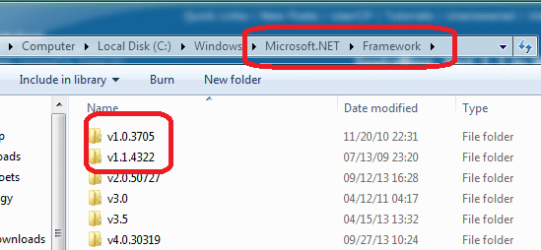
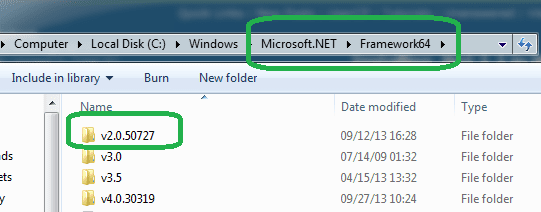
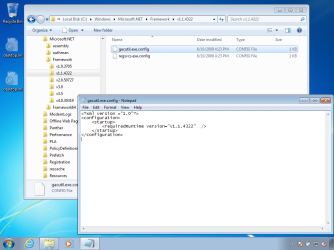
Just for kicks, I looked at my Windows .NET folders v1 and v1.1 only show up in the (x86) folder.
PgmFiles(x86) net.PNG PgmFiles net.PNG

I'm about 10 miles from Exton.
 

My Computer My Computer

At a glance

x64 (6.3.9600) Win8.1 Pro & soon dual boot x6...AMD A6-3420M APU with Radeon(tm) HD Graphics6.00 GBAMD Radeon(TM) HD 6520G
Computer type
Laptop
Computer Manufacturer/Model Number
HP Pavilion dv6-6c10us
OS
x64 (6.3.9600) Win8.1 Pro & soon dual boot x64 (6.1.7601) Win7_SP1 HomePrem
CPU
AMD A6-3420M APU with Radeon(tm) HD Graphics
Motherboard
Hewlett-Packard 1805
Memory
6.00 GB
Graphics Card(s)
AMD Radeon(TM) HD 6520G
Sound Card
(1) AMD High Definition Audio Device (2) IDT High Definiti
Monitor(s) Displays
HP W2072a 20" LCD (1600 x 900) @ 60 Hz
Screen Resolution
1366 x 768 x 32 bits (4294967296 colors) @ 60 Hz
Hard Drives
ST640LM0 00 HM641JI SATA Disk Device
Keyboard
Logitech k520 wireless KB
Mouse
Logitech m320 wireless mouse (bundled with KB)
Internet Speed
15/5 | 54 MB Wireless 'n'
Antivirus
Realtime: Defender or Avast | On-demand: Malwarebytes, ESET
Browser
IE 11 on Win8, IE 10 on win 7
Other Info
Media: [Gimp, Audacity, VLC] || Comm: [WEmail 2012, Skype] || Productivity: [OpenOffice,| Textpad] || Utils: [Sysinternals, cCleaner, Speccy, Defraggler]
~~~
I don't believe it will show up in CP -> Pgm & Feats. Possibly in the installed updates.
~~~

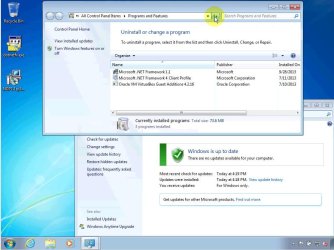
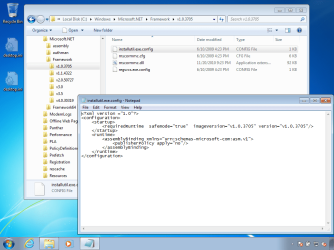
Glance at the video again :-)

W7 and .NET 1.1.jpg


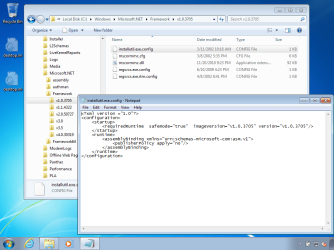
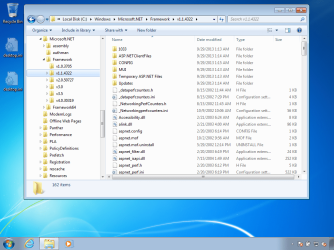
Those .NET folders don't have much in them until 1.1 is installed:
Before
before1.png

Before
before2.png


After
after1.png

After
after2.png


I installed .NET 1.1 and the SP1 update on a W7 pro 32bit VM and it worked fine. Maybe Process Monitor will show what is barfing during the OP's install/roll back.
 

My Computer My Computer

At a glance

W7 Pro SP1 64biti78GBIntel HD Graphics
Computer type
Laptop
Computer Manufacturer/Model Number
Employer provided Dell Latitude
OS
W7 Pro SP1 64bit
CPU
i7
Memory
8GB
Graphics Card(s)
Intel HD Graphics
Hard Drives
crappy SSD
Antivirus
Employer mandated Symantec Endpoint Protection
Browser
Pale Moon 64bit, IE11 64bit & Chrome 64bit
Thanks, Username

Based on the evidence before us, let me restate, with egg on my face :cry:, that .NET 1.1, once installed, will show up in the Pgm & Feats list, of this I have no doubt. ;)
~~~
I don't believe it will show up in CP -> Pgm & Feats.:o Possibly in the installed updates.
~~~
Glance at the video again :-)

I installed .NET 1.1 and the SP1 update on a W7 pro 32bit VM and it worked fine. Maybe Process Monitor will show what is barfing during the OP's install/roll back.
OP states that .NET 4.5 is not installed (only up to 4.0). I'm wondering if 4.5 were installed would that 'correct' the issue? Secondly, is only the profile installed, not the full blown client?

What flavor is installed on your machine Username? Are you up to 4.5 and do you have the full client or just the profile?

I'm not certain that 1.1 is really required, but OP seems fairly competent. I'd take this approach.
Install 4.5 - test app
Install full client - test app

Still not working?
Try to install 1.1 again, and if it fails to install we're back to where we started .

Bill


My Computer My Computer

At a glance

x64 (6.3.9600) Win8.1 Pro & soon dual boot x6...AMD A6-3420M APU with Radeon(tm) HD Graphics6.00 GBAMD Radeon(TM) HD 6520G
Computer type
Laptop
Computer Manufacturer/Model Number
HP Pavilion dv6-6c10us
OS
x64 (6.3.9600) Win8.1 Pro & soon dual boot x64 (6.1.7601) Win7_SP1 HomePrem
CPU
AMD A6-3420M APU with Radeon(tm) HD Graphics
Motherboard
Hewlett-Packard 1805
Memory
6.00 GB
Graphics Card(s)
AMD Radeon(TM) HD 6520G
Sound Card
(1) AMD High Definition Audio Device (2) IDT High Definiti
Monitor(s) Displays
HP W2072a 20" LCD (1600 x 900) @ 60 Hz
Screen Resolution
1366 x 768 x 32 bits (4294967296 colors) @ 60 Hz
Hard Drives
ST640LM0 00 HM641JI SATA Disk Device
Keyboard
Logitech k520 wireless KB
Mouse
Logitech m320 wireless mouse (bundled with KB)
Internet Speed
15/5 | 54 MB Wireless 'n'
Antivirus
Realtime: Defender or Avast | On-demand: Malwarebytes, ESET
Browser
IE 11 on Win8, IE 10 on win 7
Other Info
Media: [Gimp, Audacity, VLC] || Comm: [WEmail 2012, Skype] || Productivity: [OpenOffice,| Textpad] || Utils: [Sysinternals, cCleaner, Speccy, Defraggler]
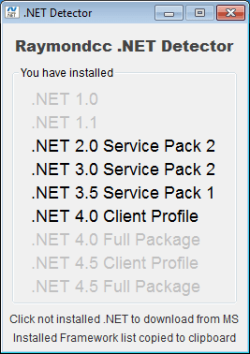
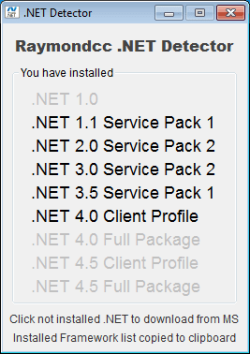
It's interesting that although versions from 2 to 4 are detected on my system, only 4 shows in installed programs.

2qx6a83.jpg


2yn19ba.jpg


http://www.sevenforums.com/software/149137-dot-net-4-problem.html#post1286949

A Guy
 

My Computer My Computer

At a glance

Windows 10 Home x64INTEL Core i5-750 Quad-Core 3.37GHzHyperX Fury Black Series 8GB (2 x 4GB) 1866MhzEVGA GeForce GTX 750 Superclocked 1GB 128-Bit...
Computer type
PC/Desktop
OS
Windows 10 Home x64
CPU
INTEL Core i5-750 Quad-Core 3.37GHz
Motherboard
ASUS P7P55D
Memory
HyperX Fury Black Series 8GB (2 x 4GB) 1866Mhz
Graphics Card(s)
EVGA GeForce GTX 750 Superclocked 1GB 128-Bit GDDR5
Monitor(s) Displays
LG 32MA68HY 32" IPS
Screen Resolution
1920 x 1080
Hard Drives
Samsung 840 Evo 120GB, SEAGATE 500GB Barracuda® 7200.12, SATA 3 Gb/s, 7200 RPM, 16MB cache
PSU
ANTEC TruePower New TP-550, 80 PLUS, 550W
Case
ANTEC Three Hundred Illusion
Cooling
COOLER MASTER Hyper 212 Plus, 4 x 120mm 1 x 140mm Noctua's
Internet Speed
85 + Mbps
Antivirus
Avast
Browser
Vivaldi
Hmmmmm, I began to look at this not from a .NET point of reference but from the Sterling Pro side. This link talks about an install issue, but it's worth checking: http://www.sterlingtrader.com/documents/Solution_DDE_LDNI.pdf
The solution to this problem is to manually add the /DDE switch to the Target Line of the shortcut’s Properties Sheet. That will enable the /DDE switch, thereby activating the "DDE Server" option reached by clicking on Actions à DDE Server from the Main Menu bar of Sterling Trader™ Pro or Sterling Trader™ Manager.
addendum: http://www.sterlingtrader.com/Support/RTD_Installation.html
9. Select .net framework no earlier than version 1.1 and no later than 3.5 SP1. These versions support the Sterling Trader Active X function. (If you have new versions, you do NOT need to uninstall them, you only need to make sure you also have a version between 1.1 and 3.5 SP1)
...
22. Start Sterling and Excel
23. Go to Add-Ins tab and select Sterling Trader Pro
24. Begin to set custom Excel monitor
25. In Sterling go to actions on the main toolbar under Windows>Utilities and check off DDE (DDE only)

From the Excel trust center
ActiveX Settings: Sent to Enable
Macro Settings: Enable all macros
External Content: Enable for both settings
 
Last edited:

My Computer My Computer

At a glance

x64 (6.3.9600) Win8.1 Pro & soon dual boot x6...AMD A6-3420M APU with Radeon(tm) HD Graphics6.00 GBAMD Radeon(TM) HD 6520G
Computer type
Laptop
Computer Manufacturer/Model Number
HP Pavilion dv6-6c10us
OS
x64 (6.3.9600) Win8.1 Pro & soon dual boot x64 (6.1.7601) Win7_SP1 HomePrem
CPU
AMD A6-3420M APU with Radeon(tm) HD Graphics
Motherboard
Hewlett-Packard 1805
Memory
6.00 GB
Graphics Card(s)
AMD Radeon(TM) HD 6520G
Sound Card
(1) AMD High Definition Audio Device (2) IDT High Definiti
Monitor(s) Displays
HP W2072a 20" LCD (1600 x 900) @ 60 Hz
Screen Resolution
1366 x 768 x 32 bits (4294967296 colors) @ 60 Hz
Hard Drives
ST640LM0 00 HM641JI SATA Disk Device
Keyboard
Logitech k520 wireless KB
Mouse
Logitech m320 wireless mouse (bundled with KB)
Internet Speed
15/5 | 54 MB Wireless 'n'
Antivirus
Realtime: Defender or Avast | On-demand: Malwarebytes, ESET
Browser
IE 11 on Win8, IE 10 on win 7
Other Info
Media: [Gimp, Audacity, VLC] || Comm: [WEmail 2012, Skype] || Productivity: [OpenOffice,| Textpad] || Utils: [Sysinternals, cCleaner, Speccy, Defraggler]

My Computer My Computer

At a glance

W7 Pro SP1 64biti78GBIntel HD Graphics
Computer type
Laptop
Computer Manufacturer/Model Number
Employer provided Dell Latitude
OS
W7 Pro SP1 64bit
CPU
i7
Memory
8GB
Graphics Card(s)
Intel HD Graphics
Hard Drives
crappy SSD
Antivirus
Employer mandated Symantec Endpoint Protection
Browser
Pale Moon 64bit, IE11 64bit & Chrome 64bit
@Usernameissues: Ok, thanks - re: your sucessful install of 1.1; that answers the question of 4.0 vs. 4.5 and Full package vs. Client profile.

I do recall having issues similar to OP with .NET on a Vista machine, way back when, but that was Vista. I forget which version of .NET was tied to the OS, but I eventually used the .NET removal tool and started over. I also forget which version of .NET 'removes' version 1.0 (and 1.1??).

Whle looking around on Aaron's blog, I found this: .NET troubleshooting guide
which took me to this: .NET installation error caused by DEP
and another read took me here: .NET Framework repair tool

The DEP issue seems as though it reflects OP issue:
The DEP feature was introduced after the .NET Framework 1.0 and 1.1 shipped and unfortunately the .NET Framework is not compatible with DEP without applying a service pack. Like the language settings bug, this DEP compatibility bug has been fixed in the .NET Framework 1.0 SP3 and 1.1 SP1. However, this bug causes the initial installation of the .NET Framework to fail and rollback, and you cannot install the service pack without first getting the product installed (unless you use a method like I describe here, which will work but is not "officially" supported).
Don't worry about references to XP and Vista in the article - the information applies to .NET 1.0 & 1.1 regardless of OS.

If the above suggestions don't help then the only other thing I can suggest is what I alluded to in post #7 - clean up and reinstall .NET

Download the versions from here:
http://www.microsoft.com/net/download/earlier-versions
http://www.microsoft.com/net/download/version-4

Uninstall Sterling Pro (backup config and data first).
Then starting with .NET 1.0SP3 (if this version fails, just move to 1.1) and work up from there with reboots between.

Then install Sterling Pro. It's a bit of work, but I can't think of anything else.
 

My Computer My Computer

At a glance

x64 (6.3.9600) Win8.1 Pro & soon dual boot x6...AMD A6-3420M APU with Radeon(tm) HD Graphics6.00 GBAMD Radeon(TM) HD 6520G
Computer type
Laptop
Computer Manufacturer/Model Number
HP Pavilion dv6-6c10us
OS
x64 (6.3.9600) Win8.1 Pro & soon dual boot x64 (6.1.7601) Win7_SP1 HomePrem
CPU
AMD A6-3420M APU with Radeon(tm) HD Graphics
Motherboard
Hewlett-Packard 1805
Memory
6.00 GB
Graphics Card(s)
AMD Radeon(TM) HD 6520G
Sound Card
(1) AMD High Definition Audio Device (2) IDT High Definiti
Monitor(s) Displays
HP W2072a 20" LCD (1600 x 900) @ 60 Hz
Screen Resolution
1366 x 768 x 32 bits (4294967296 colors) @ 60 Hz
Hard Drives
ST640LM0 00 HM641JI SATA Disk Device
Keyboard
Logitech k520 wireless KB
Mouse
Logitech m320 wireless mouse (bundled with KB)
Internet Speed
15/5 | 54 MB Wireless 'n'
Antivirus
Realtime: Defender or Avast | On-demand: Malwarebytes, ESET
Browser
IE 11 on Win8, IE 10 on win 7
Other Info
Media: [Gimp, Audacity, VLC] || Comm: [WEmail 2012, Skype] || Productivity: [OpenOffice,| Textpad] || Utils: [Sysinternals, cCleaner, Speccy, Defraggler]
I don't see in the thread what version of Sterling Trader Pro the OP has and where it was downloaded from.
From what I have found it is a pricey program paid per month for use. It also has demo's that can be downloaded.
This brings me to this.
Why would such a costly program use for trading activities use a very old
Net Framework 1.1.
Trading Platforms, Global Network, and Regulation Services: Sterling Trader

I did find this from here
Exit Sterling
Start Excel
Go to Excel Options
Go to Trust center > Trust center settings
Set trust center settings (see below)
Close Excel
Go to MSDN
Select downloads tab
Select .net framework no earlier than version 1.1 and no later than 3.5 SP1. These versions support the Sterling Trader Active X function. (If you have new versions, you do NOT need to uninstall them, you only need to make sure you also have a version between 1.1 and 3.5 SP1)
From the Start menu go to control panel
In classic view select User Accounts
Choose Change Your Account Type
Make the account an Administrator
Go back
Choose Change User Account Control settings
Turn off UAC or turn it all the way down
Go to Trading Platforms, Professional Trading: Sterling Trader and download Sterling Trader Pro from download tab.
Select Run on popup
Select Modify, Next
Check the box name DDE or RTD (not both), Next
It will install
Start Sterling and Excel
Go to Add-Ins tab and select Sterling Trader Pro
Begin to set custom Excel monitor
In Sterling go to actions on the main toolbar under Windows>Utilities and check off DDE (DDE only)

From the Excel trust center
ActiveX Settings: Sent to Enable
Macro Settings: Enable all macros
External Content: Enable for both settings
 

My Computer My Computer

At a glance

Windows 10 Pro. 64/ version 1709 Windows 7 Pr...Intel i7-6800K @ 4.3Corsair Platinum 16 gig @2400EVGA GTX 1070 OC
Computer type
PC/Desktop
Computer Manufacturer/Model Number
Home made Desktop
OS
Windows 10 Pro. 64/ version 1709 Windows 7 Pro/64
CPU
Intel i7-6800K @ 4.3
Motherboard
ASUS X-99 Deluxe II
Memory
Corsair Platinum 16 gig @2400
Graphics Card(s)
EVGA GTX 1070 OC
Monitor(s) Displays
Asus 27" LED LCD/VE278Q
Screen Resolution
1920-1080 or 1280-720 HDMI
Hard Drives
INTEL SSD 730-240 Gb Sata 3.0/
PSU
EVGA Platium 1200W
Case
Phanteks Luxe Tempered Glass 8 fans/ one radiator
Cooling
XSPC/ Water Cooled CPU
Keyboard
Das 4 Professional
Mouse
Logitech M705/MX Anywhere 2-S
Internet Speed
100 mbits
Antivirus
Microsoft Security Essentials/ Malwarebytes Premium 3.0/ SAS
Browser
I.E. 11 default/Firefox/ ISP Time Warner Cable/Spectrum
Other Info
LG BluRay Burner/
Sound system-KLipsch-THX/
Icy Dock ssd Hot Swap bays.
Thanks Layback Bear,

I use Sterling Trader in a developer mode that does not cost us anything, and I have the instructions you cite. It's the DDE connection to Excel that needs .Net 1.1. Apparently so few users use the DDE/Excel capability these days that Sterling has not put in the effort to update their application. Since the product/service is free for development, it's not for me to take them to task about it.

As I've noted before in this thread, the Excel application worked well, with DDE, on my PC before I found it necessary to do a clean reinstall of Win 7 Pro. .Net 1.1 was clearly visible before. So IMHO Sterling Trader, whatever its pros and cons, is not the issue. The issue is why I can't get 1.1 to install and be recognized on my "clean" PC. If I can't get it to work, I will look into using RTD instead of DDE.

Before I try Aaron Stebner's cleanup tool, which looks risky, I will try Process Monitor and other approaches that others in this thread have kindly suggested.
 

My Computer My Computer

At a glance

Windows 7 Pro 32-bitIntel 3GHz dual-core4GBIntel on-board chip, no separate card
Computer type
PC/Desktop
Computer Manufacturer/Model Number
custom build
OS
Windows 7 Pro 32-bit
CPU
Intel 3GHz dual-core
Motherboard
Intel 5 yrs old
Memory
4GB
Graphics Card(s)
Intel on-board chip, no separate card
Hard Drives
Seagate 500 GB
Western Digital 500 GB
Antivirus
Norton Internet Security Suite
Browser
FireFox as default; also IE9
Back
Top