
Buzz noise - SB Audigy 2 ZS

churin

New member
Power User
Local time
5:20 AM
Messages
341
Location
California
I am having buzz noise. It comes and goes while playing MP3. I have tried various drivers including SB Audigy Support Package2. I have installed Win7codecs 1.0 Alpha. Any suggestion would be appreciated.

My PC comes with integrated AC'97 sound card and it does not have the above problem. Only problem with this built-in sound card is that it does not come with sound equalizer software. Is there any equalizer software which works with AC'97?
 

My Computer My Computer

At a glance

W7 Ult x64, W8 Pro x64 and W10 Pro x64Phenom FX630016GB DDR3 1866 G.Skill F3-1866C9D-16GWM x2Radeon R7 360
Computer type
PC/Desktop
OS
W7 Ult x64, W8 Pro x64 and W10 Pro x64
CPU
Phenom FX6300
Motherboard
Gigabyte GA-970A-UD3 rev. 1.2
Memory
16GB DDR3 1866 G.Skill F3-1866C9D-16GWM x2
Graphics Card(s)
Radeon R7 360
Sound Card
Asus Xonar DS
Monitor(s) Displays
27" x2, Dell P2715Q
Screen Resolution
3840 x 2160
Hard Drives
Samsung 850Pro 1TB SSD - system
Samsung 4TB SSD - Data
PSU
Corsair CX450M
Case
Corsair 200R
Cooling
Zalman CNPS5X Performa
Internet Speed
400Mbps/12Mbps
Other Info
2nd machine: Same as above
3rd machine: Apple MacAir with W7 Ult installed
Try to install in compatibility mode for Vista.
 

My Computer My Computer

At a glance

Windows 7 Ultimate x64AMD Phenom II x48GBNVIDIA GeForce HD
Computer Manufacturer/Model Number
Self build
OS
Windows 7 Ultimate x64
CPU
AMD Phenom II x4
Motherboard
Gigabyte 880
Memory
8GB
Graphics Card(s)
NVIDIA GeForce HD
Sound Card
Realtek HD Audio
Screen Resolution
1920 x 1080
Hard Drives
2 x 1TB
PSU
Thermalake 550w
Case
XCase
Internet Speed
8MB
Thanks for your reply.
I know how to run softoware in compatibility mode whichi has been installed, but am not familiar with how to install software in compatibility mode.
Could you post how to do it? Do you mean SB Audigy drivers for Vista to be installed instead of SB Audigy Support Pack2 ?
 

My Computer My Computer

At a glance

W7 Ult x64, W8 Pro x64 and W10 Pro x64Phenom FX630016GB DDR3 1866 G.Skill F3-1866C9D-16GWM x2Radeon R7 360
Computer type
PC/Desktop
OS
W7 Ult x64, W8 Pro x64 and W10 Pro x64
CPU
Phenom FX6300
Motherboard
Gigabyte GA-970A-UD3 rev. 1.2
Memory
16GB DDR3 1866 G.Skill F3-1866C9D-16GWM x2
Graphics Card(s)
Radeon R7 360
Sound Card
Asus Xonar DS
Monitor(s) Displays
27" x2, Dell P2715Q
Screen Resolution
3840 x 2160
Hard Drives
Samsung 850Pro 1TB SSD - system
Samsung 4TB SSD - Data
PSU
Corsair CX450M
Case
Corsair 200R
Cooling
Zalman CNPS5X Performa
Internet Speed
400Mbps/12Mbps
Other Info
2nd machine: Same as above
3rd machine: Apple MacAir with W7 Ult installed

My Computer My Computer

At a glance

Windows 7 Ultimate x64AMD Phenom II x48GBNVIDIA GeForce HD
Computer Manufacturer/Model Number
Self build
OS
Windows 7 Ultimate x64
CPU
AMD Phenom II x4
Motherboard
Gigabyte 880
Memory
8GB
Graphics Card(s)
NVIDIA GeForce HD
Sound Card
Realtek HD Audio
Screen Resolution
1920 x 1080
Hard Drives
2 x 1TB
PSU
Thermalake 550w
Case
XCase
Internet Speed
8MB
So you appear to mean not installing in compatibility mode but running in compatibility mode.
Windows Media Player does not seem to be one of those which can be run in compatibility mode.
 

My Computer My Computer

At a glance

W7 Ult x64, W8 Pro x64 and W10 Pro x64Phenom FX630016GB DDR3 1866 G.Skill F3-1866C9D-16GWM x2Radeon R7 360
Computer type
PC/Desktop
OS
W7 Ult x64, W8 Pro x64 and W10 Pro x64
CPU
Phenom FX6300
Motherboard
Gigabyte GA-970A-UD3 rev. 1.2
Memory
16GB DDR3 1866 G.Skill F3-1866C9D-16GWM x2
Graphics Card(s)
Radeon R7 360
Sound Card
Asus Xonar DS
Monitor(s) Displays
27" x2, Dell P2715Q
Screen Resolution
3840 x 2160
Hard Drives
Samsung 850Pro 1TB SSD - system
Samsung 4TB SSD - Data
PSU
Corsair CX450M
Case
Corsair 200R
Cooling
Zalman CNPS5X Performa
Internet Speed
400Mbps/12Mbps
Other Info
2nd machine: Same as above
3rd machine: Apple MacAir with W7 Ult installed
I don't think running any application in compatibility mode will help you, it's not that application causing the buzz, it's the Audigy drivers. You can run the Audigy installer in compatibility mode, which I've done, but it didn't help me.
 

My Computer My Computer

At a glance

Windows 7, Windows Vista Ultimate, Ubuntu 9.042.4 Core24 GBnVidia 7950 GT
Computer Manufacturer/Model Number
Home made/ MSI Neo-F P965 Express
OS
Windows 7, Windows Vista Ultimate, Ubuntu 9.04
CPU
2.4 Core2
Motherboard
MSI P965 Neo
Memory
4 GB
Graphics Card(s)
nVidia 7950 GT
Sound Card
Audigy 4 with Klipsch Promedia THX 2.1
Monitor(s) Displays
Samsung 930b
Screen Resolution
1280 x 1024
Hard Drives
260 GB SATA, 500 GB SATA (Data)
PSU
400 W
Case
Ultra something or another
Cooling
Fans
Keyboard
Dell quite-key
Mouse
MS Optical USB
Internet Speed
Comcast Broadband 13 MBPS
I have the same sound card..and the same issue. I am running the latest beta driver. I was having the problem before I loaded it as well...
Just FYI. Other than that.. everything works..and works well.
Bleeds
 

My Computer My Computer

At a glance

Windows 7 (7000)
OS
Windows 7 (7000)
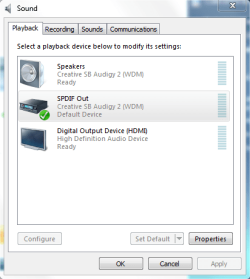
Try selecting SPDIF Out as your default device in the Sound settings in Control Panel. Fixed the issue for me.
 

Attachments

  • sound.PNG
    sound.PNG
    16 KB · Views: 383

My Computer My Computer

At a glance

Windows 7 Beta 1 b7000Intel Pentium 44GBATI Radeon HD3450
Computer Manufacturer/Model Number
Dell 8400
OS
Windows 7 Beta 1 b7000
CPU
Intel Pentium 4
Memory
4GB
Graphics Card(s)
ATI Radeon HD3450
Sound Card
Creative SoundBlaster Audigy 2
Monitor(s) Displays
Acer AL2016W
Screen Resolution
1680x1050
Hard Drives
1x500GB
1x100GB
Case
Dell 8400
Cooling
Standard
Keyboard
Dell Multimedia Keyboard
Mouse
Logitech MediaPlay
Internet Speed
Comcastic!
Thanks guys, I tried the SPDIF before, it didn't help and I lost all of my Windows sounds. I think it was before i had DanielK's drivers installed, I'll try it again.
 

My Computer My Computer

At a glance

Windows 7, Windows Vista Ultimate, Ubuntu 9.042.4 Core24 GBnVidia 7950 GT
Computer Manufacturer/Model Number
Home made/ MSI Neo-F P965 Express
OS
Windows 7, Windows Vista Ultimate, Ubuntu 9.04
CPU
2.4 Core2
Motherboard
MSI P965 Neo
Memory
4 GB
Graphics Card(s)
nVidia 7950 GT
Sound Card
Audigy 4 with Klipsch Promedia THX 2.1
Monitor(s) Displays
Samsung 930b
Screen Resolution
1280 x 1024
Hard Drives
260 GB SATA, 500 GB SATA (Data)
PSU
400 W
Case
Ultra something or another
Cooling
Fans
Keyboard
Dell quite-key
Mouse
MS Optical USB
Internet Speed
Comcast Broadband 13 MBPS
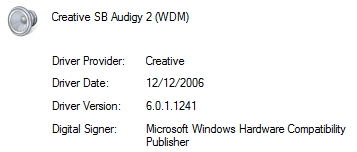
I'm using vanilla install driver (or whatever was download through Windows Update), not custom drivers here. (And did not use any kind of compatibility mode to install)
 

Attachments

  • driver.PNG
    driver.PNG
    3.2 KB · Views: 75

My Computer My Computer

At a glance

Windows 7 Beta 1 b7000Intel Pentium 44GBATI Radeon HD3450
Computer Manufacturer/Model Number
Dell 8400
OS
Windows 7 Beta 1 b7000
CPU
Intel Pentium 4
Memory
4GB
Graphics Card(s)
ATI Radeon HD3450
Sound Card
Creative SoundBlaster Audigy 2
Monitor(s) Displays
Acer AL2016W
Screen Resolution
1680x1050
Hard Drives
1x500GB
1x100GB
Case
Dell 8400
Cooling
Standard
Keyboard
Dell Multimedia Keyboard
Mouse
Logitech MediaPlay
Internet Speed
Comcastic!
Now I get no sound choosing SPDIF, shouldn't SPDIF not work if you have analog 2.1 connected?
 

My Computer My Computer

At a glance

Windows 7, Windows Vista Ultimate, Ubuntu 9.042.4 Core24 GBnVidia 7950 GT
Computer Manufacturer/Model Number
Home made/ MSI Neo-F P965 Express
OS
Windows 7, Windows Vista Ultimate, Ubuntu 9.04
CPU
2.4 Core2
Motherboard
MSI P965 Neo
Memory
4 GB
Graphics Card(s)
nVidia 7950 GT
Sound Card
Audigy 4 with Klipsch Promedia THX 2.1
Monitor(s) Displays
Samsung 930b
Screen Resolution
1280 x 1024
Hard Drives
260 GB SATA, 500 GB SATA (Data)
PSU
400 W
Case
Ultra something or another
Cooling
Fans
Keyboard
Dell quite-key
Mouse
MS Optical USB
Internet Speed
Comcast Broadband 13 MBPS
I don't know, it works for me. I found it somewhere else on these forums as a tip. Running 2.1 here, only cable running into my sound card is the one coming from my subwoofer.
 

My Computer My Computer

At a glance

Windows 7 Beta 1 b7000Intel Pentium 44GBATI Radeon HD3450
Computer Manufacturer/Model Number
Dell 8400
OS
Windows 7 Beta 1 b7000
CPU
Intel Pentium 4
Memory
4GB
Graphics Card(s)
ATI Radeon HD3450
Sound Card
Creative SoundBlaster Audigy 2
Monitor(s) Displays
Acer AL2016W
Screen Resolution
1680x1050
Hard Drives
1x500GB
1x100GB
Case
Dell 8400
Cooling
Standard
Keyboard
Dell Multimedia Keyboard
Mouse
Logitech MediaPlay
Internet Speed
Comcastic!
I appreciate the advice, and I know choosing SPDIF at least made sound before. I'm using an Audigy 4 with a 2.1 analog speaker system, I suppose it would help if we all posted what our setups are.
 

My Computer My Computer

At a glance

Windows 7, Windows Vista Ultimate, Ubuntu 9.042.4 Core24 GBnVidia 7950 GT
Computer Manufacturer/Model Number
Home made/ MSI Neo-F P965 Express
OS
Windows 7, Windows Vista Ultimate, Ubuntu 9.04
CPU
2.4 Core2
Motherboard
MSI P965 Neo
Memory
4 GB
Graphics Card(s)
nVidia 7950 GT
Sound Card
Audigy 4 with Klipsch Promedia THX 2.1
Monitor(s) Displays
Samsung 930b
Screen Resolution
1280 x 1024
Hard Drives
260 GB SATA, 500 GB SATA (Data)
PSU
400 W
Case
Ultra something or another
Cooling
Fans
Keyboard
Dell quite-key
Mouse
MS Optical USB
Internet Speed
Comcast Broadband 13 MBPS
Try selecting SPDIF Out as your default device in the Sound settings in Control Panel. Fixed the issue for me.
After this change, is there still audio out from the Speaker Out? Isn't that we have to use SPDIF out instead to drive the speaker system?
 

My Computer My Computer

At a glance

W7 Ult x64, W8 Pro x64 and W10 Pro x64Phenom FX630016GB DDR3 1866 G.Skill F3-1866C9D-16GWM x2Radeon R7 360
Computer type
PC/Desktop
OS
W7 Ult x64, W8 Pro x64 and W10 Pro x64
CPU
Phenom FX6300
Motherboard
Gigabyte GA-970A-UD3 rev. 1.2
Memory
16GB DDR3 1866 G.Skill F3-1866C9D-16GWM x2
Graphics Card(s)
Radeon R7 360
Sound Card
Asus Xonar DS
Monitor(s) Displays
27" x2, Dell P2715Q
Screen Resolution
3840 x 2160
Hard Drives
Samsung 850Pro 1TB SSD - system
Samsung 4TB SSD - Data
PSU
Corsair CX450M
Case
Corsair 200R
Cooling
Zalman CNPS5X Performa
Internet Speed
400Mbps/12Mbps
Other Info
2nd machine: Same as above
3rd machine: Apple MacAir with W7 Ult installed
I suppose it would help if we all posted what our setups are.
Indeed, I'm not sure if there's a spot for it, but it also helps if everyone fills out their system's specs in the User CP. Edit: Yes, there is a spot for it.

churin said:
After this change, is there still audio out from the Speaker Out? Isn't that we have to use SPDIF out instead to drive the speaker system?
Yes, there is still audio from the speaker out, at least in my experience. Your mileage may vary. Just figured I would post the tip in case it helps anyone else. Only thing I can suggest is to give it a shot, if it works, fantastic. If it doesn't, then put it pack to your Speakers and wait until another fix is suggested or Creative fixes it..
 

My Computer My Computer

At a glance

Windows 7 Beta 1 b7000Intel Pentium 44GBATI Radeon HD3450
Computer Manufacturer/Model Number
Dell 8400
OS
Windows 7 Beta 1 b7000
CPU
Intel Pentium 4
Memory
4GB
Graphics Card(s)
ATI Radeon HD3450
Sound Card
Creative SoundBlaster Audigy 2
Monitor(s) Displays
Acer AL2016W
Screen Resolution
1680x1050
Hard Drives
1x500GB
1x100GB
Case
Dell 8400
Cooling
Standard
Keyboard
Dell Multimedia Keyboard
Mouse
Logitech MediaPlay
Internet Speed
Comcastic!
Yes, there is still audio from the speaker out, at least in my experience. Your mileage may vary. Just figured I would post the tip in case it helps anyone else. Only thing I can suggest is to give it a shot, if it works, fantastic. If it doesn't, then put it pack to your Speakers and wait until another fix is suggested or Creative fixes it..

Creative JUST made decent drivers for Vista, so i won't hold my breath. I'd like to find another card that features bass and treble controls, that's all I really want out of a sound card.
 

My Computer My Computer

At a glance

Windows 7, Windows Vista Ultimate, Ubuntu 9.042.4 Core24 GBnVidia 7950 GT
Computer Manufacturer/Model Number
Home made/ MSI Neo-F P965 Express
OS
Windows 7, Windows Vista Ultimate, Ubuntu 9.04
CPU
2.4 Core2
Motherboard
MSI P965 Neo
Memory
4 GB
Graphics Card(s)
nVidia 7950 GT
Sound Card
Audigy 4 with Klipsch Promedia THX 2.1
Monitor(s) Displays
Samsung 930b
Screen Resolution
1280 x 1024
Hard Drives
260 GB SATA, 500 GB SATA (Data)
PSU
400 W
Case
Ultra something or another
Cooling
Fans
Keyboard
Dell quite-key
Mouse
MS Optical USB
Internet Speed
Comcast Broadband 13 MBPS
My girlfriend's father's brother works for Creative. Not sure what division. I can ask him if he knows of any plans for Windows 7, though I will probably get the generic answer.
 

My Computer My Computer

At a glance

Windows 7 Beta 1 b7000Intel Pentium 44GBATI Radeon HD3450
Computer Manufacturer/Model Number
Dell 8400
OS
Windows 7 Beta 1 b7000
CPU
Intel Pentium 4
Memory
4GB
Graphics Card(s)
ATI Radeon HD3450
Sound Card
Creative SoundBlaster Audigy 2
Monitor(s) Displays
Acer AL2016W
Screen Resolution
1680x1050
Hard Drives
1x500GB
1x100GB
Case
Dell 8400
Cooling
Standard
Keyboard
Dell Multimedia Keyboard
Mouse
Logitech MediaPlay
Internet Speed
Comcastic!
Creative JUST made decent drivers for Vista, so i won't hold my breath. I'd like to find another card that features bass and treble controls, that's all I really want out of a sound card.

You could disable Audigy for now, use the AC97 onboard card, and download the Vista drivers from Realtek. This will give you all the bass/treble options, including equalizer
 

My Computer My Computer

At a glance

Windows 7 RC 7100 32bit/64bitIntel Core2Duo E4500 2.20 GHz2x1GB Kinsgston DDR2 800MHzNvidia 8500GT
Computer Manufacturer/Model Number
ENIAC
OS
Windows 7 RC 7100 32bit/64bit
CPU
Intel Core2Duo E4500 2.20 GHz
Motherboard
ASUS P5LD2-X/1333
Memory
2x1GB Kinsgston DDR2 800MHz
Graphics Card(s)
Nvidia 8500GT
Sound Card
Onboard High Definition Audio Device
Monitor(s) Displays
Sony Bravia 42"
Case
LINKW 2222
Cooling
Standard Intel
Keyboard
Some cheap one
Mouse
Microsoft Intellimouse something
Internet Speed
24MBps ADSL
You could disable Audigy for now, use the AC97 onboard card, and download the Vista drivers from Realtek. This will give you all the bass/treble options, including equalizer

It's one of the Realtek HD cards, 883 I think, but I've never seen any of these with Bass/Treble controls, just the equalizer. I just find I get exactly the sound I want with the simple Bass/Treble adjustments. I may give it a try just the same, I'm becoming disenfrachised with Creative.

EDIT

I tried using the onboard sound, it offers four preset equalizer settings, no bands to adjust and no bass and treble. I'll have to wait for creative, or DanielK to write new drivers.
 
Last edited:

My Computer My Computer

At a glance

Windows 7, Windows Vista Ultimate, Ubuntu 9.042.4 Core24 GBnVidia 7950 GT
Computer Manufacturer/Model Number
Home made/ MSI Neo-F P965 Express
OS
Windows 7, Windows Vista Ultimate, Ubuntu 9.04
CPU
2.4 Core2
Motherboard
MSI P965 Neo
Memory
4 GB
Graphics Card(s)
nVidia 7950 GT
Sound Card
Audigy 4 with Klipsch Promedia THX 2.1
Monitor(s) Displays
Samsung 930b
Screen Resolution
1280 x 1024
Hard Drives
260 GB SATA, 500 GB SATA (Data)
PSU
400 W
Case
Ultra something or another
Cooling
Fans
Keyboard
Dell quite-key
Mouse
MS Optical USB
Internet Speed
Comcast Broadband 13 MBPS
I might have fixed my buzzing/hissing issue

Not 100% sure yet since it's only been a day and a half but changing the audio quality to 24 bit, 48000 hz (studio quality) seemed to have solved my buzzing problem (at least for now - I will update if it comes back). To get to the quality settings go to the 'advanced' tab of the speaker property dialog box.

Note: I have an audigy 4 so some other versions may not have 24 bit capability. In that case try the highest settings available. Good luck and report back here with the results.
 

My Computer My Computer

At a glance

windows 7 (beta-7000 build)
OS
windows 7 (beta-7000 build)
Back
Top