Sound Card for Win 7 in General, and Audigy 2 in Specific?

TDKMate

New member
Member
VIP
Local time
9:21 PM
Messages
335
Very long story short, I uninstalled Nahimic off my MSI motherboard and now my volume is way too low. MSI's forum has been unable to help. I have a thread here on getting the Realtek control panel back that also addresses the volume problem, but, Sadly, no luck.

One suggestion was to install a sound card. I Googled around and found more horror stories about Win 7 and sound cards than not. Seems like everyone hates modern Sound Blaster cards. I started with Sound Blaster cards way back when they first came out and love them; at least the older ones.

I'm not really set in getting a sound card, and I'd prefer to just have my volume back, but I'll consider one if that's what it takes to fix my problem.

So, in general, do you have any sound card recommendations? I don't need a high end card as my ears are not what they use to be. Just has to be as good as Realtek HD Audio.

Also, in Googling sound cards, it hit me that I have (going from memory) an old Audigy 2 ZS Platinum card in storage. I found some folks say it works great with Win 7, and a lot that say it doesn't.

Anybody get one to work with Win 7?

Running Klipsch 4.1 THX speakers on a MSI Z170A GAMING M7 motherboard's onboard Realtek HD Audio. And with my ears, the quality is more than good enough.
 

My Computer My Computer

At a glance

Win 7 Pro 64 SP1i7 6700K SkyLake32 GBnVidia GTX 970
Computer type
PC/Desktop
Computer Manufacturer/Model Number
home built
OS
Win 7 Pro 64 SP1
CPU
i7 6700K SkyLake
Motherboard
MSI Gaming M7
Memory
32 GB
Graphics Card(s)
nVidia GTX 970
Sound Card
onboard
Monitor(s) Displays
DELL U2711
Screen Resolution
2560x1440
Hard Drives
1 SSD OS, 2 WD Black Caviar data harddrives
PSU
EVGA Super Nova 850W G2 'Gold'
Case
Thermaltake Soprano Snow Edition
Cooling
Cooler Master Hyper 212 evo
Keyboard
Logitech K350
Mouse
Mad Kats RATT
Antivirus
Avast
Browser
Firefox
At one time SoundBlaster was "king of the hill" for sound cards. Not that way anymore. On board sound is as good as the SoundBlaster's in most cases. The SoundBlasters come with a suite of applications but if you don't need them there is no real reason to get the SoundBlaster. I have a home recording studio with high end recording gear, but for PC audio I use the on-board Realtek. I used to have an expensive Audigy model SoundBlaster and realistically the PC sound wasn't any better than the Realtek, plus the SoundBlaster interfered with my recording studio software so I removed it.

In ref to the old Audigy 2ZS, some of the older Audigy's work OK in Win 7 and some are not compatible. I remember this model from my days on the Dell forum but don't recall how well this model worked.

What was the reason to uninstall the Nahimic (software enhancement)?

My Realtek (just the Realtek, no added enhancement software) has plenty of volume.
 

My Computer My Computer

At a glance

Windows 10 64 bitIntel i7 6700K16GB Corsair DominatorIntel CPU Graphics
Computer type
PC/Desktop
Computer Manufacturer/Model Number
My Own Build
OS
Windows 10 64 bit
CPU
Intel i7 6700K
Motherboard
ASUS ROG Maximus VIII Hero
Memory
16GB Corsair Dominator
Graphics Card(s)
Intel CPU Graphics
Sound Card
RealTek
Monitor(s) Displays
27" Dell S2719dgf
Screen Resolution
2560X1440
Hard Drives
1 TB Samsung 850 EVO SSD for Win 10 Pro
500GB Samsung 850 EVO SSD for Win 10 Insider
2 TB drive for backup
PSU
EVGA Supernova 750G2
Case
BeQuiet Silent Base 600
Cooling
Deepcool Captain 120EX
Keyboard
Microsoft Wireless 2000
Mouse
Microsoft wireless
Internet Speed
100 MB/sec (Cable)
Antivirus
Microsoft Defender and Malwarebytes
Browser
Edge/Firefox
Other Info
Cakewalk (Sonar) by BandLab and Studio One 4.1 Pro recording studio software. MOTU 896Mk3 Hybrid recording interface, Frontier Tranzport wireless control unit, Behringer X-Touch Control Surface.
Five USB connected optical drives for CD Audio production using Nero BurningROM
At one time SoundBlaster was "king of the hill" for sound cards. Not that way anymore. On board sound is as good as the SoundBlaster's in most cases. The SoundBlasters come with a suite of applications but if you don't need them there is no real reason to get the SoundBlaster. I have a home recording studio with high end recording gear, but for PC audio I use the on-board Realtek. I used to have an expensive Audigy model SoundBlaster and realistically the PC sound wasn't any better than the Realtek, plus the SoundBlaster interfered with my recording studio software so I removed it.

In ref to the old Audigy 2ZS, some of the older Audigy's work OK in Win 7 and some are not compatible. I remember this model from my days on the Dell forum but don't recall how well this model worked.
OK, thanks. Hopefully I won’t have to mess with it…

What was the reason to uninstall the Nahimic (software enhancement)?
It was interfering with another program. That program’s Tech Support said they have had problems with Nahimic installed so that was the first thing we tried. I uninstalled Nahimic (sort of, there’s tons of Registry remnants left over!) and the other program now works fine.

My Realtek (just the Realtek, no added enhancement software) has plenty of volume.
That’s the rub. I can’t get the volume level back up to where it should be. It’s like Nahimic as some setting set too low and I can’t find how to fix it.

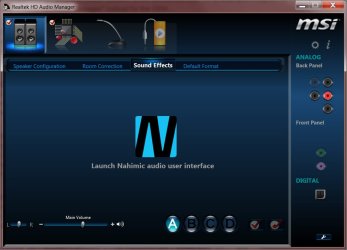
One tip was to go to the Sound Effect tab in Realtek HD Audio Manager and change a setting (I forget what it was called) but when I go there, the tab says to Launch Nahimic… which is uninstalled. See attached screenshot.

Any ideas?
.
 

Attachments

  • Realtek Show Nahimic for Sound Effects Module 5-24-16.jpg
    Realtek Show Nahimic for Sound Effects Module 5-24-16.jpg
    49.2 KB · Views: 0

My Computer My Computer

At a glance

Win 7 Pro 64 SP1i7 6700K SkyLake32 GBnVidia GTX 970
Computer type
PC/Desktop
Computer Manufacturer/Model Number
home built
OS
Win 7 Pro 64 SP1
CPU
i7 6700K SkyLake
Motherboard
MSI Gaming M7
Memory
32 GB
Graphics Card(s)
nVidia GTX 970
Sound Card
onboard
Monitor(s) Displays
DELL U2711
Screen Resolution
2560x1440
Hard Drives
1 SSD OS, 2 WD Black Caviar data harddrives
PSU
EVGA Super Nova 850W G2 'Gold'
Case
Thermaltake Soprano Snow Edition
Cooling
Cooler Master Hyper 212 evo
Keyboard
Logitech K350
Mouse
Mad Kats RATT
Antivirus
Avast
Browser
Firefox
update: I got brave and just used Revo Uninstaller Pro's feature to uninstall already uninstalled programs. It found a handful of Registry Remnants, which I deleted. No change in the screenshot above after rebooting. :(
 

My Computer My Computer

At a glance

Win 7 Pro 64 SP1i7 6700K SkyLake32 GBnVidia GTX 970
Computer type
PC/Desktop
Computer Manufacturer/Model Number
home built
OS
Win 7 Pro 64 SP1
CPU
i7 6700K SkyLake
Motherboard
MSI Gaming M7
Memory
32 GB
Graphics Card(s)
nVidia GTX 970
Sound Card
onboard
Monitor(s) Displays
DELL U2711
Screen Resolution
2560x1440
Hard Drives
1 SSD OS, 2 WD Black Caviar data harddrives
PSU
EVGA Super Nova 850W G2 'Gold'
Case
Thermaltake Soprano Snow Edition
Cooling
Cooler Master Hyper 212 evo
Keyboard
Logitech K350
Mouse
Mad Kats RATT
Antivirus
Avast
Browser
Firefox
Did you reboot after uninstalling with Revo Pro (what I also use). If you just ran Revo, uninstalled, but did not reboot the same thing can still be there.

Uninstall Realtek and Nahimic (if its still listed) using Revo, then reboot the PC. There should not be any Realtek driver so Windows should install the generic, basic function, High Definition Audio drivers. Check the volume. It should be OK. If it is, then install Realtek, using the driver from Realtek
and then check volume again.
 

My Computer My Computer

At a glance

Windows 10 64 bitIntel i7 6700K16GB Corsair DominatorIntel CPU Graphics
Computer type
PC/Desktop
Computer Manufacturer/Model Number
My Own Build
OS
Windows 10 64 bit
CPU
Intel i7 6700K
Motherboard
ASUS ROG Maximus VIII Hero
Memory
16GB Corsair Dominator
Graphics Card(s)
Intel CPU Graphics
Sound Card
RealTek
Monitor(s) Displays
27" Dell S2719dgf
Screen Resolution
2560X1440
Hard Drives
1 TB Samsung 850 EVO SSD for Win 10 Pro
500GB Samsung 850 EVO SSD for Win 10 Insider
2 TB drive for backup
PSU
EVGA Supernova 750G2
Case
BeQuiet Silent Base 600
Cooling
Deepcool Captain 120EX
Keyboard
Microsoft Wireless 2000
Mouse
Microsoft wireless
Internet Speed
100 MB/sec (Cable)
Antivirus
Microsoft Defender and Malwarebytes
Browser
Edge/Firefox
Other Info
Cakewalk (Sonar) by BandLab and Studio One 4.1 Pro recording studio software. MOTU 896Mk3 Hybrid recording interface, Frontier Tranzport wireless control unit, Behringer X-Touch Control Surface.
Five USB connected optical drives for CD Audio production using Nero BurningROM
Did you reboot after uninstalling with Revo Pro (what I also use). If you just ran Revo, uninstalled, but did not reboot the same thing can still be there.

Uninstall Realtek and Nahimic (if its still listed) using Revo, then reboot the PC. There should not be any Realtek driver so Windows should install the generic, basic function, High Definition Audio drivers. Check the volume. It should be OK. If it is, then install Realtek, using the driver from Realtek
and then check volume again.
Sorry for the brain-burp. Yes, I rebooted but somehow didn't mention it. I also normally run CCleaner afterwards, too, which I did.

I did as you recommended:
* Uninstall Realtek with Revo - no signs of Nahimic.
* Reboot and let Windows do it's thing.
* Volume Greatly improved!
* Rebooted a second time just for giggles.
* Installed Realtek drivers (latest as of a couple days ago)
* Reboot. Volume still a lot better, but not quite as high as Windows only drivers.

Went into the Sound Effects tab in Realtek HD Audio Manager and it still says to launch Nahimic as in the screenshot above.

Just ran CCleaner and there's a couple Realtek remnants: haven't removed them yet.

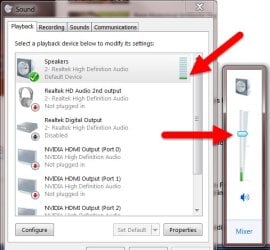
The first screenshot below is (I think) from an MSI post on how to remove Nahimic. Notice the Speakers single green bar. That's the highest it went. The Windows Volume is Way up from my normal, and the volume was still low.

The second shot is after the Realtek uninstall, with Windows only drivers, and testing the speakers. I got lucky in that green bars were at max levels when I took the screenshot, but it would bounce between 3/4 to max during the speaker test. A big difference.

I didn't take a screenshot of after the Realtek reinstall, but the green bars peak out right about midway. Still a big improvement over just one bar.

So I'm calling the volume problem fixed :) Thank you!!

I'd like the Launch Nahimic to go away, but at this point I don't know if somehow fixing that would hose things up again... Which is also my hesitancy in removing those Realtek entries CCleaner found.
.
 

Attachments

  • Realtek Playback Volume Compare 5-22-16.jpg
    Realtek Playback Volume Compare 5-22-16.jpg
    48 KB · Views: 23
  • Realtek Playback Volume Compare 5-26-16.jpg
    Realtek Playback Volume Compare 5-26-16.jpg
    22.7 KB · Views: 23

My Computer My Computer

At a glance

Win 7 Pro 64 SP1i7 6700K SkyLake32 GBnVidia GTX 970
Computer type
PC/Desktop
Computer Manufacturer/Model Number
home built
OS
Win 7 Pro 64 SP1
CPU
i7 6700K SkyLake
Motherboard
MSI Gaming M7
Memory
32 GB
Graphics Card(s)
nVidia GTX 970
Sound Card
onboard
Monitor(s) Displays
DELL U2711
Screen Resolution
2560x1440
Hard Drives
1 SSD OS, 2 WD Black Caviar data harddrives
PSU
EVGA Super Nova 850W G2 'Gold'
Case
Thermaltake Soprano Snow Edition
Cooling
Cooler Master Hyper 212 evo
Keyboard
Logitech K350
Mouse
Mad Kats RATT
Antivirus
Avast
Browser
Firefox
Sometimes to get an application to uninstall (or fully uninstall) it requires reinstalling the application and then uninstalling (use Revo Uninstaller Pro).

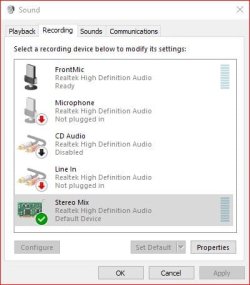
Do you have "Stereo Mix" set as default playback device? (if you don't you should). Also, there is a level control in stereo mix.
See these two screen shots of mine.
 

Attachments

  • Stereo Mix.JPG
    Stereo Mix.JPG
    31 KB · Views: 21
  • Level set.JPG
    Level set.JPG
    19.7 KB · Views: 21

My Computer My Computer

At a glance

Windows 10 64 bitIntel i7 6700K16GB Corsair DominatorIntel CPU Graphics
Computer type
PC/Desktop
Computer Manufacturer/Model Number
My Own Build
OS
Windows 10 64 bit
CPU
Intel i7 6700K
Motherboard
ASUS ROG Maximus VIII Hero
Memory
16GB Corsair Dominator
Graphics Card(s)
Intel CPU Graphics
Sound Card
RealTek
Monitor(s) Displays
27" Dell S2719dgf
Screen Resolution
2560X1440
Hard Drives
1 TB Samsung 850 EVO SSD for Win 10 Pro
500GB Samsung 850 EVO SSD for Win 10 Insider
2 TB drive for backup
PSU
EVGA Supernova 750G2
Case
BeQuiet Silent Base 600
Cooling
Deepcool Captain 120EX
Keyboard
Microsoft Wireless 2000
Mouse
Microsoft wireless
Internet Speed
100 MB/sec (Cable)
Antivirus
Microsoft Defender and Malwarebytes
Browser
Edge/Firefox
Other Info
Cakewalk (Sonar) by BandLab and Studio One 4.1 Pro recording studio software. MOTU 896Mk3 Hybrid recording interface, Frontier Tranzport wireless control unit, Behringer X-Touch Control Surface.
Five USB connected optical drives for CD Audio production using Nero BurningROM
OK, I set Stereo Mix up as default. I had thought about installing Nahimic with Revo to uninstall it but as I indicated above, since things are working right now, I'm a little gun shy about messing with things. Maybe after my next full back up I'll give it a try.

Nahimic also has a newer version out from what was installed with the motherboard drivers. You don't use it, but do you have an opinion on it? In other words, I was wondering if it is something I should try. Of course, if the new version still interferes with my other program, I'll have to go thru this uninstall BS again to get rid of it. I don't see a compelling reason to use it other than the 'control panel' functions. I have no use for all the gaming and other functions it has.
.
 

My Computer My Computer

At a glance

Win 7 Pro 64 SP1i7 6700K SkyLake32 GBnVidia GTX 970
Computer type
PC/Desktop
Computer Manufacturer/Model Number
home built
OS
Win 7 Pro 64 SP1
CPU
i7 6700K SkyLake
Motherboard
MSI Gaming M7
Memory
32 GB
Graphics Card(s)
nVidia GTX 970
Sound Card
onboard
Monitor(s) Displays
DELL U2711
Screen Resolution
2560x1440
Hard Drives
1 SSD OS, 2 WD Black Caviar data harddrives
PSU
EVGA Super Nova 850W G2 'Gold'
Case
Thermaltake Soprano Snow Edition
Cooling
Cooler Master Hyper 212 evo
Keyboard
Logitech K350
Mouse
Mad Kats RATT
Antivirus
Avast
Browser
Firefox
I have a Creative/SoundBlaster enhancement that was provided with my ASRock motherboard. I tried it and didn't find it did anything positive for the sound so I uninstalled it. One issue, I have a home recording studio and only use high end audio equipment with my recording studio and if I wanted "high end" audio from my PC I can use that (but I don't - just use Realtek for PC audio).
 

My Computer My Computer

At a glance

Windows 10 64 bitIntel i7 6700K16GB Corsair DominatorIntel CPU Graphics
Computer type
PC/Desktop
Computer Manufacturer/Model Number
My Own Build
OS
Windows 10 64 bit
CPU
Intel i7 6700K
Motherboard
ASUS ROG Maximus VIII Hero
Memory
16GB Corsair Dominator
Graphics Card(s)
Intel CPU Graphics
Sound Card
RealTek
Monitor(s) Displays
27" Dell S2719dgf
Screen Resolution
2560X1440
Hard Drives
1 TB Samsung 850 EVO SSD for Win 10 Pro
500GB Samsung 850 EVO SSD for Win 10 Insider
2 TB drive for backup
PSU
EVGA Supernova 750G2
Case
BeQuiet Silent Base 600
Cooling
Deepcool Captain 120EX
Keyboard
Microsoft Wireless 2000
Mouse
Microsoft wireless
Internet Speed
100 MB/sec (Cable)
Antivirus
Microsoft Defender and Malwarebytes
Browser
Edge/Firefox
Other Info
Cakewalk (Sonar) by BandLab and Studio One 4.1 Pro recording studio software. MOTU 896Mk3 Hybrid recording interface, Frontier Tranzport wireless control unit, Behringer X-Touch Control Surface.
Five USB connected optical drives for CD Audio production using Nero BurningROM
Well, I've got a new problem :( Everything I play, from YouTube videos to home movies, sounds I'm in an echo/reverb chamber. I can't get into the Sounds Effects tab as it says to Launch Nahimic, and I can't find the right place to turn it off.

Any ideas?
 

My Computer My Computer

At a glance

Win 7 Pro 64 SP1i7 6700K SkyLake32 GBnVidia GTX 970
Computer type
PC/Desktop
Computer Manufacturer/Model Number
home built
OS
Win 7 Pro 64 SP1
CPU
i7 6700K SkyLake
Motherboard
MSI Gaming M7
Memory
32 GB
Graphics Card(s)
nVidia GTX 970
Sound Card
onboard
Monitor(s) Displays
DELL U2711
Screen Resolution
2560x1440
Hard Drives
1 SSD OS, 2 WD Black Caviar data harddrives
PSU
EVGA Super Nova 850W G2 'Gold'
Case
Thermaltake Soprano Snow Edition
Cooling
Cooler Master Hyper 212 evo
Keyboard
Logitech K350
Mouse
Mad Kats RATT
Antivirus
Avast
Browser
Firefox
I figured out the reverb problem. At least partially. First, I noticed the effect would increase as I tuned up the volume, as in duration of the echo, not just the volume. Then I remembered that the only recent change was adding Stereo Mix. So I turn the volume slider down just in Stereo Mix, and the problem went away while playing videos.

But now recording volume in Audacity is very low. I turn up Stereo Mix, and Audacity's recording volume also goes up to where it should be, but the reverb effect is like doubled.

Any work around? I have to be missing something :(
 

My Computer My Computer

At a glance

Win 7 Pro 64 SP1i7 6700K SkyLake32 GBnVidia GTX 970
Computer type
PC/Desktop
Computer Manufacturer/Model Number
home built
OS
Win 7 Pro 64 SP1
CPU
i7 6700K SkyLake
Motherboard
MSI Gaming M7
Memory
32 GB
Graphics Card(s)
nVidia GTX 970
Sound Card
onboard
Monitor(s) Displays
DELL U2711
Screen Resolution
2560x1440
Hard Drives
1 SSD OS, 2 WD Black Caviar data harddrives
PSU
EVGA Super Nova 850W G2 'Gold'
Case
Thermaltake Soprano Snow Edition
Cooling
Cooler Master Hyper 212 evo
Keyboard
Logitech K350
Mouse
Mad Kats RATT
Antivirus
Avast
Browser
Firefox
Turning the volume down in Stereo Mix is just "masking" the problem, not fixing it.

You are going to have to get rid of Nahimic so you can disable any sound enhancements (if that is the problem) in the Realtek HD Audio Manager. Get back to "basics".
 

My Computer My Computer

At a glance

Windows 10 64 bitIntel i7 6700K16GB Corsair DominatorIntel CPU Graphics
Computer type
PC/Desktop
Computer Manufacturer/Model Number
My Own Build
OS
Windows 10 64 bit
CPU
Intel i7 6700K
Motherboard
ASUS ROG Maximus VIII Hero
Memory
16GB Corsair Dominator
Graphics Card(s)
Intel CPU Graphics
Sound Card
RealTek
Monitor(s) Displays
27" Dell S2719dgf
Screen Resolution
2560X1440
Hard Drives
1 TB Samsung 850 EVO SSD for Win 10 Pro
500GB Samsung 850 EVO SSD for Win 10 Insider
2 TB drive for backup
PSU
EVGA Supernova 750G2
Case
BeQuiet Silent Base 600
Cooling
Deepcool Captain 120EX
Keyboard
Microsoft Wireless 2000
Mouse
Microsoft wireless
Internet Speed
100 MB/sec (Cable)
Antivirus
Microsoft Defender and Malwarebytes
Browser
Edge/Firefox
Other Info
Cakewalk (Sonar) by BandLab and Studio One 4.1 Pro recording studio software. MOTU 896Mk3 Hybrid recording interface, Frontier Tranzport wireless control unit, Behringer X-Touch Control Surface.
Five USB connected optical drives for CD Audio production using Nero BurningROM
I'd love to get rid of Nahimic, but so far I've been unable to. In fact, trying to get rid of it is what started this whole mess anyway. Nahimic itself has not responded to my email. And MSI's own forum has not been able to help.

So I guess I'll try the reinstall Nahimic with Revo, then uninstall with Revo trick and see what happens. Now all I have to do is find my motherboard's driver disk (I think it's out in storage already...) so I can reinstall the same version of Nahimic. I do have the new version of it downloaded from MSI's site for a 'just in case.'
 

My Computer My Computer

At a glance

Win 7 Pro 64 SP1i7 6700K SkyLake32 GBnVidia GTX 970
Computer type
PC/Desktop
Computer Manufacturer/Model Number
home built
OS
Win 7 Pro 64 SP1
CPU
i7 6700K SkyLake
Motherboard
MSI Gaming M7
Memory
32 GB
Graphics Card(s)
nVidia GTX 970
Sound Card
onboard
Monitor(s) Displays
DELL U2711
Screen Resolution
2560x1440
Hard Drives
1 SSD OS, 2 WD Black Caviar data harddrives
PSU
EVGA Super Nova 850W G2 'Gold'
Case
Thermaltake Soprano Snow Edition
Cooling
Cooler Master Hyper 212 evo
Keyboard
Logitech K350
Mouse
Mad Kats RATT
Antivirus
Avast
Browser
Firefox
I would install Nahimic, then uninstall both Nahimic and Realtek with Revo Uninstaller (use the "Advanced" search mode to scan the registry and hunt for left over files). Reboot the PC and run CCleaner's Registry scan. Finally do a fresh install of Realtek using the driver direct from Realtek.
 

My Computer My Computer

At a glance

Windows 10 64 bitIntel i7 6700K16GB Corsair DominatorIntel CPU Graphics
Computer type
PC/Desktop
Computer Manufacturer/Model Number
My Own Build
OS
Windows 10 64 bit
CPU
Intel i7 6700K
Motherboard
ASUS ROG Maximus VIII Hero
Memory
16GB Corsair Dominator
Graphics Card(s)
Intel CPU Graphics
Sound Card
RealTek
Monitor(s) Displays
27" Dell S2719dgf
Screen Resolution
2560X1440
Hard Drives
1 TB Samsung 850 EVO SSD for Win 10 Pro
500GB Samsung 850 EVO SSD for Win 10 Insider
2 TB drive for backup
PSU
EVGA Supernova 750G2
Case
BeQuiet Silent Base 600
Cooling
Deepcool Captain 120EX
Keyboard
Microsoft Wireless 2000
Mouse
Microsoft wireless
Internet Speed
100 MB/sec (Cable)
Antivirus
Microsoft Defender and Malwarebytes
Browser
Edge/Firefox
Other Info
Cakewalk (Sonar) by BandLab and Studio One 4.1 Pro recording studio software. MOTU 896Mk3 Hybrid recording interface, Frontier Tranzport wireless control unit, Behringer X-Touch Control Surface.
Five USB connected optical drives for CD Audio production using Nero BurningROM
I would install Nahimic, then uninstall both Nahimic and Realtek with Revo Uninstaller (use the "Advanced" search mode to scan the registry and hunt for left over files). Reboot the PC and run CCleaner's Registry scan. Finally do a fresh install of Realtek using the driver direct from Realtek.
Sorry for the delay in replying, things have been crazy around here and I'm just now getting back to this.

My new confusion is which Realtek driver do I install? (Yes, I thought it would be a no-brainer, too)

There's a Win 7 64 version, and a 32/64 bit combo version. Do I need the 32 bit drivers on a 64 bit system?

Also, there's both .exe and .zip versions. The scary part here is that in looking in the .zip version, there are Nahimic components in it!!!!!!!

So I have to assume they are in the .exe version, too.

I spent about two hours this morning alone trying to get rid of Nahimic, so I sure would hate to have the problem pop up again because it's embedded in the Realtek drivers themselves!
 

My Computer My Computer

At a glance

Win 7 Pro 64 SP1i7 6700K SkyLake32 GBnVidia GTX 970
Computer type
PC/Desktop
Computer Manufacturer/Model Number
home built
OS
Win 7 Pro 64 SP1
CPU
i7 6700K SkyLake
Motherboard
MSI Gaming M7
Memory
32 GB
Graphics Card(s)
nVidia GTX 970
Sound Card
onboard
Monitor(s) Displays
DELL U2711
Screen Resolution
2560x1440
Hard Drives
1 SSD OS, 2 WD Black Caviar data harddrives
PSU
EVGA Super Nova 850W G2 'Gold'
Case
Thermaltake Soprano Snow Edition
Cooling
Cooler Master Hyper 212 evo
Keyboard
Logitech K350
Mouse
Mad Kats RATT
Antivirus
Avast
Browser
Firefox
I would use the driver directly from Realtek. That should be Realtek only, nothing else.
Download the 64bit High Definition Codecs driver R2.79

Realtek
 

My Computer My Computer

At a glance

Windows 10 64 bitIntel i7 6700K16GB Corsair DominatorIntel CPU Graphics
Computer type
PC/Desktop
Computer Manufacturer/Model Number
My Own Build
OS
Windows 10 64 bit
CPU
Intel i7 6700K
Motherboard
ASUS ROG Maximus VIII Hero
Memory
16GB Corsair Dominator
Graphics Card(s)
Intel CPU Graphics
Sound Card
RealTek
Monitor(s) Displays
27" Dell S2719dgf
Screen Resolution
2560X1440
Hard Drives
1 TB Samsung 850 EVO SSD for Win 10 Pro
500GB Samsung 850 EVO SSD for Win 10 Insider
2 TB drive for backup
PSU
EVGA Supernova 750G2
Case
BeQuiet Silent Base 600
Cooling
Deepcool Captain 120EX
Keyboard
Microsoft Wireless 2000
Mouse
Microsoft wireless
Internet Speed
100 MB/sec (Cable)
Antivirus
Microsoft Defender and Malwarebytes
Browser
Edge/Firefox
Other Info
Cakewalk (Sonar) by BandLab and Studio One 4.1 Pro recording studio software. MOTU 896Mk3 Hybrid recording interface, Frontier Tranzport wireless control unit, Behringer X-Touch Control Surface.
Five USB connected optical drives for CD Audio production using Nero BurningROM
Well... I'm giving up trying to get the Effects tab in the Realtek control panel to work. Yet again I've got many more hours in backing up, un/re-installing different flavors of Realtek driver, along with the new version of Nahimic, and so on.

Nahimic still does not play well with my other utility so it is again uninstalled.

I did figure out a fix for the reverb problem, though. The trick is that when Nahimic is uninstalled, whatever settings were in effect at that time, stay as set.

So I reinstalled it, set Reverb to zero, then to off. I also zeroed out things like Voice enhancement, which made watching YouTube videos a nightmare! (All sounds in the typical vocal range were boosted so the voice was blaring while the background music seemed muted somewhat. Terrible listening!)

Thanks for all the help!!!
 

My Computer My Computer

At a glance

Win 7 Pro 64 SP1i7 6700K SkyLake32 GBnVidia GTX 970
Computer type
PC/Desktop
Computer Manufacturer/Model Number
home built
OS
Win 7 Pro 64 SP1
CPU
i7 6700K SkyLake
Motherboard
MSI Gaming M7
Memory
32 GB
Graphics Card(s)
nVidia GTX 970
Sound Card
onboard
Monitor(s) Displays
DELL U2711
Screen Resolution
2560x1440
Hard Drives
1 SSD OS, 2 WD Black Caviar data harddrives
PSU
EVGA Super Nova 850W G2 'Gold'
Case
Thermaltake Soprano Snow Edition
Cooling
Cooler Master Hyper 212 evo
Keyboard
Logitech K350
Mouse
Mad Kats RATT
Antivirus
Avast
Browser
Firefox
Too bad. But after a while we get to the point its not worth going further.
 

My Computer My Computer

At a glance

Windows 10 64 bitIntel i7 6700K16GB Corsair DominatorIntel CPU Graphics
Computer type
PC/Desktop
Computer Manufacturer/Model Number
My Own Build
OS
Windows 10 64 bit
CPU
Intel i7 6700K
Motherboard
ASUS ROG Maximus VIII Hero
Memory
16GB Corsair Dominator
Graphics Card(s)
Intel CPU Graphics
Sound Card
RealTek
Monitor(s) Displays
27" Dell S2719dgf
Screen Resolution
2560X1440
Hard Drives
1 TB Samsung 850 EVO SSD for Win 10 Pro
500GB Samsung 850 EVO SSD for Win 10 Insider
2 TB drive for backup
PSU
EVGA Supernova 750G2
Case
BeQuiet Silent Base 600
Cooling
Deepcool Captain 120EX
Keyboard
Microsoft Wireless 2000
Mouse
Microsoft wireless
Internet Speed
100 MB/sec (Cable)
Antivirus
Microsoft Defender and Malwarebytes
Browser
Edge/Firefox
Other Info
Cakewalk (Sonar) by BandLab and Studio One 4.1 Pro recording studio software. MOTU 896Mk3 Hybrid recording interface, Frontier Tranzport wireless control unit, Behringer X-Touch Control Surface.
Five USB connected optical drives for CD Audio production using Nero BurningROM
Back
Top