Solved Can I delete this Partition and it will still boot ?

theurbanimp

New member
Local time
10:11 AM
Messages
6
Really would like to know if I can delete/format d drive and extend c drive into it, will my computer still boot up....thank you.

I have windows installed on c drive but just am a bit worried as I cannot lose what is now on c drive.

Thanks again.

http://img405.imageshack.us/img405/7733/m5m7.png
 

My Computer My Computer

At a glance

Ultimate 64 bit
Computer type
PC/Desktop
Computer Manufacturer/Model Number
HP
OS
Ultimate 64 bit
D has a system and active flag on it so deleting it will cause you problems.

You need to move those before going further, we have some pro's here who can walk you through that.

m5m7.png
 

My Computer My Computer

At a glance

Win 10 Pro x64Intel I5-2500K @3.3GHz16GB G.Skill Ripjaws X (4x4GB)EVGA GeForce 750 Ti SC 2GB
Computer type
PC/Desktop
Computer Manufacturer/Model Number
Self Built
OS
Win 10 Pro x64
CPU
Intel I5-2500K @3.3GHz
Motherboard
Asrock P67 Extreme4
Memory
16GB G.Skill Ripjaws X (4x4GB)
Graphics Card(s)
EVGA GeForce 750 Ti SC 2GB
Sound Card
ASUS Xonar DG 5.1 Channels 24-bit 96KHz PCI Interface Sound
Monitor(s) Displays
auria eq2367
Screen Resolution
1920 x 1080
Hard Drives
250GB Samsung 850 EVO SSD
1TB WD Blue
1TB Hitachi
PSU
SeaSonic X 650W 80 Plus Gold
Case
Corsair Obsidian 750D
Cooling
Corsair H60, Three 140mm case fans
Keyboard
Logitech Wireless Keyboard K520
Mouse
Logitech Wireless Mouse M310
Internet Speed
Wave Broadband ~ 100 dn 5 up
Antivirus
Windows Defender, Malwarebytes Premium
Browser
Edge, IE11, Chrome
Other Info
Laptop specs: HP g7-1365dx /
CPU: AMD A6-3420M APU with Radeon(tm) HD Graphics /
RAM: Crucial 8Gb (2x4Gb) /
SSD: Crucial M4-CT128M4SSD2 ATA Device/ FW 000F /
GFX: AMD Radeon HD 6520G /
OS: Windows 10 Pro x64
Reply to Reply.

I have a system installed on both C and D but my important files are now on C. I want it to run from C, so do I still follow the above reply until it moves the flag back to the 100mb System Partition. I will await your reply. Thank you.

Update : Do I shrink D to unallocated space ? Which one do I make active System Reserved or C ? Quite confused. Don't know if I have a repair disk. When I try to install from a full install disc it doesn't give me an option for repair or will it only give me that option when it sees whats wrong ?
 
Last edited:

My Computer My Computer

At a glance

Ultimate 64 bit
Computer type
PC/Desktop
Computer Manufacturer/Model Number
HP
OS
Ultimate 64 bit
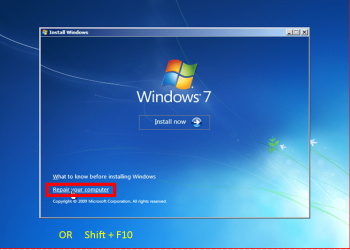
When I try to install from a full install disc it doesn't give me an option for repair or will it only give me that option when it sees whats wrong ?


Where do you buy your DVD from?

Shift F10.PNG
 

My Computer My Computer

At a glance

ME/XP/Vista/Win7
OS
ME/XP/Vista/Win7
I have a system installed on both C and D but my important files are now on C. I want it to run from C, so do I still follow the above reply until it moves the flag back to the 100mb System Partition. I will await your reply. Thank you.

Update : Do I shrink D to unallocated space ? Which one do I make active System Reserved or C ? Quite confused. Don't know if I have a repair disk.

I gave you the steps earlier to do exactly what you want. It clearly says that once you move the System Active flags to C that you can Delete D and even provides a tutorial showing exactly how that is done. So why would you ask if you should shrink it?

To move the System flag back to System Reserved, first Mark the 100mb Partition Active in Disk Mgmt.

Then run Startup Repair - Run up to 3 Separate Times until the System flag moves to the 100mb partition.

You can then delete D and extend C to the right: Partition or Volume - Delete
Partition or Volume - Extend


When I try to install from a full install disc it doesn't give me an option for repair or will it only give me that option when it sees whats wrong ?

You must boot the Win7 disk to run Startup Repair - Run up to 3 Separate Times or the Repair choice will not show up: How to Boot A Computer from CD or DVD - YouTube
 
Havent a clue what to do now.

I marked 100mb partition as active, then ran start up repair once and when it rebooted it gave me two option Win 7 and Win (recovered to boot from, I ran the first one and it was not the one I wanted, so I restarted and picked Option 2, let me just say that option 1 when I went into the disk management had system in 100mb, then d in middle, then c on right. option 2 had this image...please help..do I still delete d so I can boot from c

2itszd3.jpg
 

My Computer My Computer

At a glance

Ultimate 64 bit
Computer type
PC/Desktop
Computer Manufacturer/Model Number
HP
OS
Ultimate 64 bit
Do you have everything you need off of D now? Did you install any programs in Win7 that were placed on D? If so you may need to reinstall them after deleting D and extending C into the space.

Since you've successfully moved the System Active flags back to System Reserved which is now booting Win7 on C, you can proceed to delete D and extend C now.
Partition or Volume - Delete
Partition or Volume - Extend
 
I have stuff I cant lose that's all, all I am asking is, to me it looks like I have followed your command and the system flag has moved to the 100mb partition. All I am clarifying is that I have done as you directed and I can now delete d despite the warning. I know I may be annoying to you but for me, it is quite scary.

Just seen your answer above mine.
 

My Computer My Computer

At a glance

Ultimate 64 bit
Computer type
PC/Desktop
Computer Manufacturer/Model Number
HP
OS
Ultimate 64 bit
No you've done quite well and have successfully moved the System Active flags to System Reserved which is now correctly booting Win7 on C. There is no flag on D now that tells us it shouldn't be deleted.

But what I asked is if you backed up or moved all of your files off of D so you can delete it, and also if you might have installed programs to Windows 7 that were placed on D causing that Disk Mgmt warning prompt? If so then you'll have to reinstall them after deleting D.
 
Thank you everyone...

Greg, thank you for you patience and replies, I deleted d after checking once more ( I lie, I checked like 5 times, lol ) and have booted into c now, without a hitch and can see all my files in the folders they should be in. I cannot see anything that has stopped working so I can only deduce nothing was installed on d...

Again, thank you, you have been a diamond, and hope that if I find myself in trouble again with no confidence what to do you will show the same understanding that you have done on this occasion...

And so, for my final question, do I just mark this as solved ?

Thanks mate. Alan.
 

My Computer My Computer

At a glance

Ultimate 64 bit
Computer type
PC/Desktop
Computer Manufacturer/Model Number
HP
OS
Ultimate 64 bit
Glad to help, Alan.

Sorry if I am gruff but on these high wire operations need to emphasize how strictly attention must be paid. Nobody else on the web even tries operations this risky which we've helped to do thousands of times before without a single failure.

Remember if for some reason you were running a program from D it may require reinstall to C now. However the error is often something insignificant.
 
Top Job mate...
 

My Computer My Computer

At a glance

Ultimate 64 bit
Computer type
PC/Desktop
Computer Manufacturer/Model Number
HP
OS
Ultimate 64 bit
Back
Top