Scheduled Image Backup gives me strange warning before running.

Salgado3d

New member
Local time
11:43 PM
Messages
23
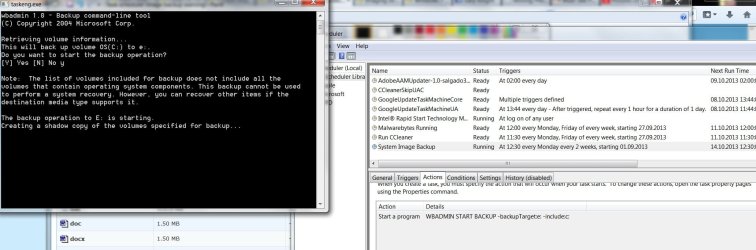
I have created a biweekly task to create an image backup of my system. I have partitioned my Hard drive to C: for windows & program files and all other data in a drive named P: When I go through the image backup through windows' 'backup and restore' to an external harddrive I get no errors, however, when I run it from the task I have created the following warning appears at the cmd prompt:(see screen)

I am now scared that it is not going to backup all the necessary files in case something goes wrong. Could this be because in my command I have not added the 'recovery' drive that Dell comes with which has a factory recovery Image? If so, how do I add it on the command line as it's not really a letter drive (like C: ) or maybe I don't need it at all? I'm a bit confused on this one. thanks.
 

Attachments
  • task scheduler image backup warning.jpg
    task scheduler image backup warning.jpg
    139.3 KB · Views: 10

My Computer My Computer

At a glance

Windows 7 home premium 64 bitIntel core i7 3612qm @ 2.10 ghz8gbNvidia GeForce gt 640M
Computer type
PC/Desktop
Computer Manufacturer/Model Number
Dell xps
OS
Windows 7 home premium 64 bit
CPU
Intel core i7 3612qm @ 2.10 ghz
Memory
8gb
Graphics Card(s)
Nvidia GeForce gt 640M
I don't have an answer for your backup, as I use Macrium.

However, think about this. If you partition your hard drive and do a "backup" to a partition on that hard drive, if that drive would fail completely any backups are lost. Back up to a physically separate drive for best reliability.
 

My Computer My Computer

At a glance

Windows 10 64 bitIntel i7 6700K16GB Corsair DominatorIntel CPU Graphics
Computer type
PC/Desktop
Computer Manufacturer/Model Number
My Own Build
OS
Windows 10 64 bit
CPU
Intel i7 6700K
Motherboard
ASUS ROG Maximus VIII Hero
Memory
16GB Corsair Dominator
Graphics Card(s)
Intel CPU Graphics
Sound Card
RealTek
Monitor(s) Displays
27" Dell S2719dgf
Screen Resolution
2560X1440
Hard Drives
1 TB Samsung 850 EVO SSD for Win 10 Pro
500GB Samsung 850 EVO SSD for Win 10 Insider
2 TB drive for backup
PSU
EVGA Supernova 750G2
Case
BeQuiet Silent Base 600
Cooling
Deepcool Captain 120EX
Keyboard
Microsoft Wireless 2000
Mouse
Microsoft wireless
Internet Speed
100 MB/sec (Cable)
Antivirus
Microsoft Defender and Malwarebytes
Browser
Edge/Firefox
Other Info
Cakewalk (Sonar) by BandLab and Studio One 4.1 Pro recording studio software. MOTU 896Mk3 Hybrid recording interface, Frontier Tranzport wireless control unit, Behringer X-Touch Control Surface.
Five USB connected optical drives for CD Audio production using Nero BurningROM
Replace -include:c: with -allCritical

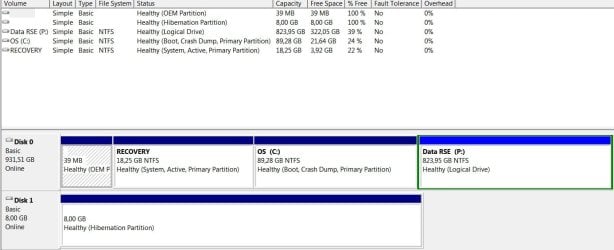
Post screenshot of diskmanagement please
 

My Computer My Computer

At a glance

Microsoft Windows 7 Home Premium 64-bits 7601...Intel(R) Core(TM) i3 CPU M 370 @ 2.40GHz4,00 GBATI Mobility Radeon HD 5400 Series
Computer type
Laptop
Computer Manufacturer/Model Number
ACER ASPIRE 5742G
OS
Microsoft Windows 7 Home Premium 64-bits 7601 Multiprocessor Free Service Pack 1
CPU
Intel(R) Core(TM) i3 CPU M 370 @ 2.40GHz
Motherboard
Acer Aspire 5742G
Memory
4,00 GB
Graphics Card(s)
ATI Mobility Radeon HD 5400 Series
Sound Card
(1) AMD High Definition Audio Device (2) Realtek High Defi
Screen Resolution
1366 x 768 x 32 bits (4294967296 colors) @ 60 Hz
Hard Drives
WDC WD5000BEVT-22ZAT0
Thanks,Kaktussoft will try that :)
 

My Computer My Computer

At a glance

Windows 7 home premium 64 bitIntel core i7 3612qm @ 2.10 ghz8gbNvidia GeForce gt 640M
Computer type
PC/Desktop
Computer Manufacturer/Model Number
Dell xps
OS
Windows 7 home premium 64 bit
CPU
Intel core i7 3612qm @ 2.10 ghz
Memory
8gb
Graphics Card(s)
Nvidia GeForce gt 640M

My Computer My Computer

At a glance

Microsoft Windows 7 Home Premium 64-bits 7601...Intel(R) Core(TM) i3 CPU M 370 @ 2.40GHz4,00 GBATI Mobility Radeon HD 5400 Series
Computer type
Laptop
Computer Manufacturer/Model Number
ACER ASPIRE 5742G
OS
Microsoft Windows 7 Home Premium 64-bits 7601 Multiprocessor Free Service Pack 1
CPU
Intel(R) Core(TM) i3 CPU M 370 @ 2.40GHz
Motherboard
Acer Aspire 5742G
Memory
4,00 GB
Graphics Card(s)
ATI Mobility Radeon HD 5400 Series
Sound Card
(1) AMD High Definition Audio Device (2) Realtek High Defi
Screen Resolution
1366 x 768 x 32 bits (4294967296 colors) @ 60 Hz
Hard Drives
WDC WD5000BEVT-22ZAT0
Of What exactly do you mean ?
 

My Computer My Computer

At a glance

Windows 7 home premium 64 bitIntel core i7 3612qm @ 2.10 ghz8gbNvidia GeForce gt 640M
Computer type
PC/Desktop
Computer Manufacturer/Model Number
Dell xps
OS
Windows 7 home premium 64 bit
CPU
Intel core i7 3612qm @ 2.10 ghz
Memory
8gb
Graphics Card(s)
Nvidia GeForce gt 640M

My Computer My Computer

At a glance

Microsoft Windows 7 Home Premium 64-bits 7601...Intel(R) Core(TM) i3 CPU M 370 @ 2.40GHz4,00 GBATI Mobility Radeon HD 5400 Series
Computer type
Laptop
Computer Manufacturer/Model Number
ACER ASPIRE 5742G
OS
Microsoft Windows 7 Home Premium 64-bits 7601 Multiprocessor Free Service Pack 1
CPU
Intel(R) Core(TM) i3 CPU M 370 @ 2.40GHz
Motherboard
Acer Aspire 5742G
Memory
4,00 GB
Graphics Card(s)
ATI Mobility Radeon HD 5400 Series
Sound Card
(1) AMD High Definition Audio Device (2) Realtek High Defi
Screen Resolution
1366 x 768 x 32 bits (4294967296 colors) @ 60 Hz
Hard Drives
WDC WD5000BEVT-22ZAT0
I'm backing up the images though to an external hard drive. I change the name of "WindowsImageBackup" so that i have a few different versions for example.
 

Attachments

  • disk management.jpg
    disk management.jpg
    69.7 KB · Views: 4

My Computer My Computer

At a glance

Windows 7 home premium 64 bitIntel core i7 3612qm @ 2.10 ghz8gbNvidia GeForce gt 640M
Computer type
PC/Desktop
Computer Manufacturer/Model Number
Dell xps
OS
Windows 7 home premium 64 bit
CPU
Intel core i7 3612qm @ 2.10 ghz
Memory
8gb
Graphics Card(s)
Nvidia GeForce gt 640M
I'm backing up the images though to an external hard drive. I change the name of "WindowsImageBackup" so that i have a few different versions for example.
Partition RECOVERY is ACTIVE/SYSTEM. It has the bootmanager and bootmenu. You have to backup that as well!! Did you try my trick already?

No need to rename WindowsImageBackup (even stupid).... only blocks modified will be saved. It's sort of "system restore"... you can go back in time to each backup you made.
 

My Computer My Computer

At a glance

Microsoft Windows 7 Home Premium 64-bits 7601...Intel(R) Core(TM) i3 CPU M 370 @ 2.40GHz4,00 GBATI Mobility Radeon HD 5400 Series
Computer type
Laptop
Computer Manufacturer/Model Number
ACER ASPIRE 5742G
OS
Microsoft Windows 7 Home Premium 64-bits 7601 Multiprocessor Free Service Pack 1
CPU
Intel(R) Core(TM) i3 CPU M 370 @ 2.40GHz
Motherboard
Acer Aspire 5742G
Memory
4,00 GB
Graphics Card(s)
ATI Mobility Radeon HD 5400 Series
Sound Card
(1) AMD High Definition Audio Device (2) Realtek High Defi
Screen Resolution
1366 x 768 x 32 bits (4294967296 colors) @ 60 Hz
Hard Drives
WDC WD5000BEVT-22ZAT0
I tried you trick and the warning didn't come up anymore so I believe it worked :)

So let's say I want to go back to the original image i backed up when i first installed windows and its programs, how does one go back ?
secondly, if I've fixed issues I've had with memory paging, drivers etc. one month later and at some point I want to go back to that particular image, how should I know which one it was if they are all called the same? Should I write myself a note of the date that I made it so that I can keep track or? Sorry if this all may seem obvious but I'm confused about it. Thanks
 

My Computer My Computer

At a glance

Windows 7 home premium 64 bitIntel core i7 3612qm @ 2.10 ghz8gbNvidia GeForce gt 640M
Computer type
PC/Desktop
Computer Manufacturer/Model Number
Dell xps
OS
Windows 7 home premium 64 bit
CPU
Intel core i7 3612qm @ 2.10 ghz
Memory
8gb
Graphics Card(s)
Nvidia GeForce gt 640M

My Computer My Computer

At a glance

Win 10 Pro x64Intel I5-2500K @3.3GHz16GB G.Skill Ripjaws X (4x4GB)EVGA GeForce 750 Ti SC 2GB
Computer type
PC/Desktop
Computer Manufacturer/Model Number
Self Built
OS
Win 10 Pro x64
CPU
Intel I5-2500K @3.3GHz
Motherboard
Asrock P67 Extreme4
Memory
16GB G.Skill Ripjaws X (4x4GB)
Graphics Card(s)
EVGA GeForce 750 Ti SC 2GB
Sound Card
ASUS Xonar DG 5.1 Channels 24-bit 96KHz PCI Interface Sound
Monitor(s) Displays
auria eq2367
Screen Resolution
1920 x 1080
Hard Drives
250GB Samsung 850 EVO SSD
1TB WD Blue
1TB Hitachi
PSU
SeaSonic X 650W 80 Plus Gold
Case
Corsair Obsidian 750D
Cooling
Corsair H60, Three 140mm case fans
Keyboard
Logitech Wireless Keyboard K520
Mouse
Logitech Wireless Mouse M310
Internet Speed
Wave Broadband ~ 100 dn 5 up
Antivirus
Windows Defender, Malwarebytes Premium
Browser
Edge, IE11, Chrome
Other Info
Laptop specs: HP g7-1365dx /
CPU: AMD A6-3420M APU with Radeon(tm) HD Graphics /
RAM: Crucial 8Gb (2x4Gb) /
SSD: Crucial M4-CT128M4SSD2 ATA Device/ FW 000F /
GFX: AMD Radeon HD 6520G /
OS: Windows 10 Pro x64
This is what I had read before, this is why now I'm confused as Kaktussoft says one can choose what image to go back to which makes me think one can do that through the software? I don't know which way to go on this now...Sorry I'm a newbie.
 

My Computer My Computer

At a glance

Windows 7 home premium 64 bitIntel core i7 3612qm @ 2.10 ghz8gbNvidia GeForce gt 640M
Computer type
PC/Desktop
Computer Manufacturer/Model Number
Dell xps
OS
Windows 7 home premium 64 bit
CPU
Intel core i7 3612qm @ 2.10 ghz
Memory
8gb
Graphics Card(s)
Nvidia GeForce gt 640M
I tried you trick and the warning didn't come up anymore so I believe it worked :)

So let's say I want to go back to the original image i backed up when i first installed windows and its programs, how does one go back ?
secondly, if I've fixed issues I've had with memory paging, drivers etc. one month later and at some point I want to go back to that particular image, how should I know which one it was if they are all called the same? Should I write myself a note of the date that I made it so that I can keep track or? Sorry if this all may seem obvious but I'm confused about it. Thanks

http://oakdome.com/k5/tutorials/windows-7-disk-imaging/restore-windows-7-from-backup.php
And yes you have to make a note.

BTW the OEM partition and P are NOT in the backup. If you restore, the disklayout must be the same as at time of backup.... otherwise the disk will be cleaned and repartitioned the way it was. So OEM and P will be destroyed if you restore after moving/creating/deleting partitions.
 

My Computer My Computer

At a glance

Microsoft Windows 7 Home Premium 64-bits 7601...Intel(R) Core(TM) i3 CPU M 370 @ 2.40GHz4,00 GBATI Mobility Radeon HD 5400 Series
Computer type
Laptop
Computer Manufacturer/Model Number
ACER ASPIRE 5742G
OS
Microsoft Windows 7 Home Premium 64-bits 7601 Multiprocessor Free Service Pack 1
CPU
Intel(R) Core(TM) i3 CPU M 370 @ 2.40GHz
Motherboard
Acer Aspire 5742G
Memory
4,00 GB
Graphics Card(s)
ATI Mobility Radeon HD 5400 Series
Sound Card
(1) AMD High Definition Audio Device (2) Realtek High Defi
Screen Resolution
1366 x 768 x 32 bits (4294967296 colors) @ 60 Hz
Hard Drives
WDC WD5000BEVT-22ZAT0

My Computer My Computer

At a glance

Windows 10 Pro x64 ; Xubuntu x64Intel i7 860 @ 2.80 GHz O/C'ed to 4.0GHz16GB Corsair Vengance DDR3 @ 661 MHz Dual Cha...EVGA NVidia GTX 560 1024MB
Computer type
PC/Desktop
Computer Manufacturer/Model Number
Golden Mk. I.4
OS
Windows 10 Pro x64 ; Xubuntu x64
CPU
Intel i7 860 @ 2.80 GHz O/C'ed to 4.0GHz
Motherboard
Gigabyte P55A-UD3R Rev.1. Award BIOS F13
Memory
16GB Corsair Vengance DDR3 @ 661 MHz Dual Channel (9-9-9-24)
Graphics Card(s)
EVGA NVidia GTX 560 1024MB
Sound Card
Realtek Integrated
Monitor(s) Displays
Dual Samsung SyncMaster 2494HS
Screen Resolution
1920*1080 and 1920*1080
Hard Drives
1*Samsung 840 EVO 120GB SSD;
1*OCZ Vertex 2 60GB SSD;
2*Samsung F3 SpinPoint 1TB in RAID0;
1*Samsung F1 SpinPoint 1TB;
2*Western Digital 1TB External USB 3.0
1*Western Digital 500GB External USB 3.0
1*Seagate 500GB External USB 2.0
PSU
Thermaltake ToughPower QFan 750W
Case
Thermaltake Element S VK60001W2Z
Cooling
Corsair H60 Water Cooling, 2*230mm and 2*80mm case fans
Keyboard
Logitech G110
Mouse
Logitech MX518

My Computer My Computer

At a glance

Windows 7 home premium 64 bitIntel core i7 3612qm @ 2.10 ghz8gbNvidia GeForce gt 640M
Computer type
PC/Desktop
Computer Manufacturer/Model Number
Dell xps
OS
Windows 7 home premium 64 bit
CPU
Intel core i7 3612qm @ 2.10 ghz
Memory
8gb
Graphics Card(s)
Nvidia GeForce gt 640M

My Computer My Computer

At a glance

Microsoft Windows 7 Home Premium 64-bits 7601...Intel(R) Core(TM) i3 CPU M 370 @ 2.40GHz4,00 GBATI Mobility Radeon HD 5400 Series
Computer type
Laptop
Computer Manufacturer/Model Number
ACER ASPIRE 5742G
OS
Microsoft Windows 7 Home Premium 64-bits 7601 Multiprocessor Free Service Pack 1
CPU
Intel(R) Core(TM) i3 CPU M 370 @ 2.40GHz
Motherboard
Acer Aspire 5742G
Memory
4,00 GB
Graphics Card(s)
ATI Mobility Radeon HD 5400 Series
Sound Card
(1) AMD High Definition Audio Device (2) Realtek High Defi
Screen Resolution
1366 x 768 x 32 bits (4294967296 colors) @ 60 Hz
Hard Drives
WDC WD5000BEVT-22ZAT0
I see, any way to also include the OEM in the image Backup in case I'd need it?
 

My Computer My Computer

At a glance

Windows 7 home premium 64 bitIntel core i7 3612qm @ 2.10 ghz8gbNvidia GeForce gt 640M
Computer type
PC/Desktop
Computer Manufacturer/Model Number
Dell xps
OS
Windows 7 home premium 64 bit
CPU
Intel core i7 3612qm @ 2.10 ghz
Memory
8gb
Graphics Card(s)
Nvidia GeForce gt 640M

My Computer My Computer

At a glance

Microsoft Windows 7 Home Premium 64-bits 7601...Intel(R) Core(TM) i3 CPU M 370 @ 2.40GHz4,00 GBATI Mobility Radeon HD 5400 Series
Computer type
Laptop
Computer Manufacturer/Model Number
ACER ASPIRE 5742G
OS
Microsoft Windows 7 Home Premium 64-bits 7601 Multiprocessor Free Service Pack 1
CPU
Intel(R) Core(TM) i3 CPU M 370 @ 2.40GHz
Motherboard
Acer Aspire 5742G
Memory
4,00 GB
Graphics Card(s)
ATI Mobility Radeon HD 5400 Series
Sound Card
(1) AMD High Definition Audio Device (2) Realtek High Defi
Screen Resolution
1366 x 768 x 32 bits (4294967296 colors) @ 60 Hz
Hard Drives
WDC WD5000BEVT-22ZAT0

My Computer My Computer

At a glance

Microsoft Windows 7 Home Premium 64-bits 7601...Intel(R) Core(TM) i3 CPU M 370 @ 2.40GHz4,00 GBATI Mobility Radeon HD 5400 Series
Computer type
Laptop
Computer Manufacturer/Model Number
ACER ASPIRE 5742G
OS
Microsoft Windows 7 Home Premium 64-bits 7601 Multiprocessor Free Service Pack 1
CPU
Intel(R) Core(TM) i3 CPU M 370 @ 2.40GHz
Motherboard
Acer Aspire 5742G
Memory
4,00 GB
Graphics Card(s)
ATI Mobility Radeon HD 5400 Series
Sound Card
(1) AMD High Definition Audio Device (2) Realtek High Defi
Screen Resolution
1366 x 768 x 32 bits (4294967296 colors) @ 60 Hz
Hard Drives
WDC WD5000BEVT-22ZAT0
So OEM partition isn't really needed. RECOVERY partition is just for "going back to factory defaults", so to go back to the state you bought it. That's not what you want!! All programs, documents, settings, patches will be be gone.

You make image backups instead, which is much better. Why keep RECOVERY and OEM?
 

My Computer My Computer

At a glance

Microsoft Windows 7 Home Premium 64-bits 7601...Intel(R) Core(TM) i3 CPU M 370 @ 2.40GHz4,00 GBATI Mobility Radeon HD 5400 Series
Computer type
Laptop
Computer Manufacturer/Model Number
ACER ASPIRE 5742G
OS
Microsoft Windows 7 Home Premium 64-bits 7601 Multiprocessor Free Service Pack 1
CPU
Intel(R) Core(TM) i3 CPU M 370 @ 2.40GHz
Motherboard
Acer Aspire 5742G
Memory
4,00 GB
Graphics Card(s)
ATI Mobility Radeon HD 5400 Series
Sound Card
(1) AMD High Definition Audio Device (2) Realtek High Defi
Screen Resolution
1366 x 768 x 32 bits (4294967296 colors) @ 60 Hz
Hard Drives
WDC WD5000BEVT-22ZAT0
Back
Top