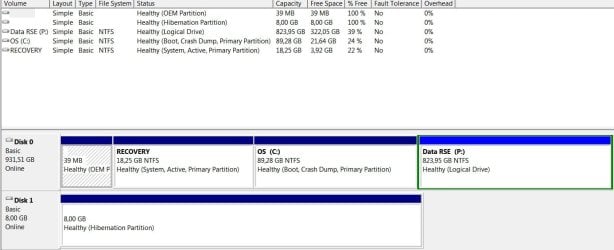
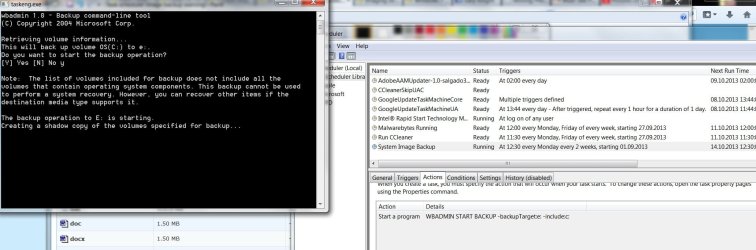
I have created a biweekly task to create an image backup of my system. I have partitioned my Hard drive to C: for windows & program files and all other data in a drive named P: When I go through the image backup through windows' 'backup and restore' to an external harddrive I get no errors, however, when I run it from the task I have created the following warning appears at the cmd prompt see screen)
I am now scared that it is not going to backup all the necessary files in case something goes wrong. Could this be because in my command I have not added the 'recovery' drive that Dell comes with which has a factory recovery Image? If so, how do I add it on the command line as it's not really a letter drive (like C: ) or maybe I don't need it at all? I'm a bit confused on this one. thanks.
see screen)I am now scared that it is not going to backup all the necessary files in case something goes wrong. Could this be because in my command I have not added the 'recovery' drive that Dell comes with which has a factory recovery Image? If so, how do I add it on the command line as it's not really a letter drive (like C: ) or maybe I don't need it at all? I'm a bit confused on this one. thanks.
Attachments
My Computer
At a glance
Windows 7 home premium 64 bitIntel core i7 3612qm @ 2.10 ghz8gbNvidia GeForce gt 640M
- Computer type
- PC/Desktop
- Computer Manufacturer/Model Number
- Dell xps
- OS
- Windows 7 home premium 64 bit
- CPU
- Intel core i7 3612qm @ 2.10 ghz
- Memory
- 8gb
- Graphics Card(s)
- Nvidia GeForce gt 640M