- Local time
- 11:41 PM
- Messages
- 163
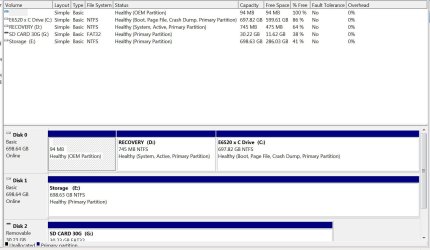
Right now I clone with Seagates free ultility made by Acronis. I clone the whole disk. In past crashes or corruptions I just took the cloned disk and installed it as the primary and away I went except for any changes made since I cloned. This is were selective back ups scheduled for certain days might shine for me. I should try to do that instead of cloneing. It takes a long time to clone. I got about 120 gb on my primary and it took almost 3 hours today.
My Dell media bay is used for storage now with a Hdd . I have to swap it with another HDD Caddy to do my back up for cloning every time. No big deal. Also I use an E sata external 2.5 HDD in an encloser to back up the storage. Maybe there is a simpler method to do my storage /primary backups.
I was thinking of buying a 256gb SSD. I have about 120 gb now and clone that to a 750gb HDD.
On a side note my primary is 750 MomentusXT Hybrid. Going SSD on the primary and using the 750 Hybrid might be better then what I have now. Alot of the files for the programs I use is on the storage drive.
My Dell media bay is used for storage now with a Hdd . I have to swap it with another HDD Caddy to do my back up for cloning every time. No big deal. Also I use an E sata external 2.5 HDD in an encloser to back up the storage. Maybe there is a simpler method to do my storage /primary backups.
I was thinking of buying a 256gb SSD. I have about 120 gb now and clone that to a 750gb HDD.
On a side note my primary is 750 MomentusXT Hybrid. Going SSD on the primary and using the 750 Hybrid might be better then what I have now. Alot of the files for the programs I use is on the storage drive.
As I wrote in previous post... there are no really neccesary changes to do.... except the alignment (is for speed).
With what software do you clone? And do you clone the whole disk, or just partition clones?
My Computer
At a glance
Win7 64 BitI-58 GBIntel 4000
- Computer type
- Laptop
- Computer Manufacturer/Model Number
- Dell Latitude 6530 Notebook ( 15.6 screen)
- OS
- Win7 64 Bit
- CPU
- I-5
- Memory
- 8 GB
- Graphics Card(s)
- Intel 4000
- Monitor(s) Displays
- FHD 1980 x 1080
- Screen Resolution
- 1980x1280
- Hard Drives
- Samsung 840 Pro 256 GB for OS Samsung Pro 840 256 GB for Storage.
- Keyboard
- Backlit Key's
- Internet Speed
- DSL 1.5 mbps