Solved Paragon Migrate OS to SSD

Right now I clone with Seagates free ultility made by Acronis. I clone the whole disk. In past crashes or corruptions I just took the cloned disk and installed it as the primary and away I went except for any changes made since I cloned. This is were selective back ups scheduled for certain days might shine for me. I should try to do that instead of cloneing. It takes a long time to clone. I got about 120 gb on my primary and it took almost 3 hours today.
My Dell media bay is used for storage now with a Hdd . I have to swap it with another HDD Caddy to do my back up for cloning every time. No big deal. Also I use an E sata external 2.5 HDD in an encloser to back up the storage. Maybe there is a simpler method to do my storage /primary backups.
I was thinking of buying a 256gb SSD. I have about 120 gb now and clone that to a 750gb HDD.
On a side note my primary is 750 MomentusXT Hybrid. Going SSD on the primary and using the 750 Hybrid might be better then what I have now. Alot of the files for the programs I use is on the storage drive.

As I wrote in previous post... there are no really neccesary changes to do.... except the alignment (is for speed).
With what software do you clone? And do you clone the whole disk, or just partition clones?
 

My Computer My Computer

At a glance

Win7 64 BitI-58 GBIntel 4000
Computer type
Laptop
Computer Manufacturer/Model Number
Dell Latitude 6530 Notebook ( 15.6 screen)
OS
Win7 64 Bit
CPU
I-5
Memory
8 GB
Graphics Card(s)
Intel 4000
Monitor(s) Displays
FHD 1980 x 1080
Screen Resolution
1980x1280
Hard Drives
Samsung 840 Pro 256 GB for OS Samsung Pro 840 256 GB for Storage.
Keyboard
Backlit Key's
Internet Speed
DSL 1.5 mbps
Indeed... better use backup/restore instead of cloning. Backups are smaller... they compress the files and don't backup useless things like pagefile/hibernation file. And they only backup the blocks that are really used on disk. My advise: Use macrium reflect free. I used it a lot of times. It can restore the partitions to another spot on disk and even shrink or extend, make it active, or make it an extended partition. It can even align the partition on restore. Backups can be made within windows! http://www.sevenforums.com/tutorials/73828-imaging-free-macrium.html

Partition Alignment

You don't need any other stuff
 

My Computer My Computer

At a glance

Microsoft Windows 7 Home Premium 64-bits 7601...Intel(R) Core(TM) i3 CPU M 370 @ 2.40GHz4,00 GBATI Mobility Radeon HD 5400 Series
Computer type
Laptop
Computer Manufacturer/Model Number
ACER ASPIRE 5742G
OS
Microsoft Windows 7 Home Premium 64-bits 7601 Multiprocessor Free Service Pack 1
CPU
Intel(R) Core(TM) i3 CPU M 370 @ 2.40GHz
Motherboard
Acer Aspire 5742G
Memory
4,00 GB
Graphics Card(s)
ATI Mobility Radeon HD 5400 Series
Sound Card
(1) AMD High Definition Audio Device (2) Realtek High Defi
Screen Resolution
1366 x 768 x 32 bits (4294967296 colors) @ 60 Hz
Hard Drives
WDC WD5000BEVT-22ZAT0
would I still need "paragon os to ssd" to get my operating system,applications,etc. to my new ssd. Then use the imageing with free macrium?
 

My Computer My Computer

At a glance

Win7 64 BitI-58 GBIntel 4000
Computer type
Laptop
Computer Manufacturer/Model Number
Dell Latitude 6530 Notebook ( 15.6 screen)
OS
Win7 64 Bit
CPU
I-5
Memory
8 GB
Graphics Card(s)
Intel 4000
Monitor(s) Displays
FHD 1980 x 1080
Screen Resolution
1980x1280
Hard Drives
Samsung 840 Pro 256 GB for OS Samsung Pro 840 256 GB for Storage.
Keyboard
Backlit Key's
Internet Speed
DSL 1.5 mbps

My Computer My Computer

At a glance

Microsoft Windows 7 Home Premium 64-bits 7601...Intel(R) Core(TM) i3 CPU M 370 @ 2.40GHz4,00 GBATI Mobility Radeon HD 5400 Series
Computer type
Laptop
Computer Manufacturer/Model Number
ACER ASPIRE 5742G
OS
Microsoft Windows 7 Home Premium 64-bits 7601 Multiprocessor Free Service Pack 1
CPU
Intel(R) Core(TM) i3 CPU M 370 @ 2.40GHz
Motherboard
Acer Aspire 5742G
Memory
4,00 GB
Graphics Card(s)
ATI Mobility Radeon HD 5400 Series
Sound Card
(1) AMD High Definition Audio Device (2) Realtek High Defi
Screen Resolution
1366 x 768 x 32 bits (4294967296 colors) @ 60 Hz
Hard Drives
WDC WD5000BEVT-22ZAT0
Actually you can use any cloning or backup/restore software. As long as it can shrink on restore/clone.... your SSD is most likely much smaller than your current harddisk!

Why are you hesitating?? You have a fine backup... isn't it
 

My Computer My Computer

At a glance

Microsoft Windows 7 Home Premium 64-bits 7601...Intel(R) Core(TM) i3 CPU M 370 @ 2.40GHz4,00 GBATI Mobility Radeon HD 5400 Series
Computer type
Laptop
Computer Manufacturer/Model Number
ACER ASPIRE 5742G
OS
Microsoft Windows 7 Home Premium 64-bits 7601 Multiprocessor Free Service Pack 1
CPU
Intel(R) Core(TM) i3 CPU M 370 @ 2.40GHz
Motherboard
Acer Aspire 5742G
Memory
4,00 GB
Graphics Card(s)
ATI Mobility Radeon HD 5400 Series
Sound Card
(1) AMD High Definition Audio Device (2) Realtek High Defi
Screen Resolution
1366 x 768 x 32 bits (4294967296 colors) @ 60 Hz
Hard Drives
WDC WD5000BEVT-22ZAT0
would I still need "paragon os to ssd" to get my operating system,applications,etc. to my new ssd. Then use the imageing with free macrium?
No you don't need paragon. But if you read my previous posts...you should already know.

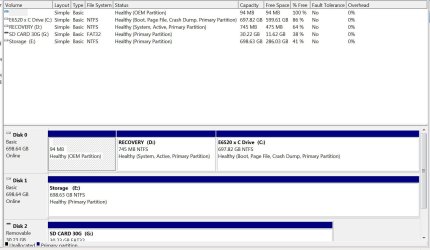
Please post screenshot of disk management of your current disk layout.
http://www.sevenforums.com/tutorials/274797-disk-management-post-screen-capture-image.html

What is the size of SSD?

My size would be 256 gb SSD. I only have 120 gb on my HDD primary as I store most data on the media bay drive in my Dell Latitude.

I read all of your posts but will read them again. As you think I'm missing something. You probably mean to image then restore the image to the new SSD instead of cloning my drive to the SSD. This is to get the SSD running I assume.
 

Attachments

  • disk management.JPG
    disk management.JPG
    117 KB · Views: 1

My Computer My Computer

At a glance

Win7 64 BitI-58 GBIntel 4000
Computer type
Laptop
Computer Manufacturer/Model Number
Dell Latitude 6530 Notebook ( 15.6 screen)
OS
Win7 64 Bit
CPU
I-5
Memory
8 GB
Graphics Card(s)
Intel 4000
Monitor(s) Displays
FHD 1980 x 1080
Screen Resolution
1980x1280
Hard Drives
Samsung 840 Pro 256 GB for OS Samsung Pro 840 256 GB for Storage.
Keyboard
Backlit Key's
Internet Speed
DSL 1.5 mbps
94MB partition isn't needed. Recovery partition not needed... it doesn't work anyway after relocation. But the problem is RECOVERY has the bootmanager on it and bootmenu.
So:
  1. Clone (not backup) C (697GB) only to SSD. Leave it a primary partition. It doesn't fit so will be shrunk automatically by macrium. Make it ACTIVE and align to 1MB
  2. Detach original HDD from system now!
  3. Do a startup repair 3 times from win7 install DVD (or win7 system repair CD) to recreate bootmanager and boot menu. http://www.sevenforums.com/tutorials/681-startup-repair.html
Partition Alignment make partition type PRIMARY ACTIVE. Set alignment as shown on that website.

Do you have a system repair cd/dvd? http://www.sevenforums.com/tutorials/2083-system-repair-disc-create.html
 

My Computer My Computer

At a glance

Microsoft Windows 7 Home Premium 64-bits 7601...Intel(R) Core(TM) i3 CPU M 370 @ 2.40GHz4,00 GBATI Mobility Radeon HD 5400 Series
Computer type
Laptop
Computer Manufacturer/Model Number
ACER ASPIRE 5742G
OS
Microsoft Windows 7 Home Premium 64-bits 7601 Multiprocessor Free Service Pack 1
CPU
Intel(R) Core(TM) i3 CPU M 370 @ 2.40GHz
Motherboard
Acer Aspire 5742G
Memory
4,00 GB
Graphics Card(s)
ATI Mobility Radeon HD 5400 Series
Sound Card
(1) AMD High Definition Audio Device (2) Realtek High Defi
Screen Resolution
1366 x 768 x 32 bits (4294967296 colors) @ 60 Hz
Hard Drives
WDC WD5000BEVT-22ZAT0

My Computer My Computer

At a glance

Microsoft Windows 7 Home Premium 64-bits 7601...Intel(R) Core(TM) i3 CPU M 370 @ 2.40GHz4,00 GBATI Mobility Radeon HD 5400 Series
Computer type
Laptop
Computer Manufacturer/Model Number
ACER ASPIRE 5742G
OS
Microsoft Windows 7 Home Premium 64-bits 7601 Multiprocessor Free Service Pack 1
CPU
Intel(R) Core(TM) i3 CPU M 370 @ 2.40GHz
Motherboard
Acer Aspire 5742G
Memory
4,00 GB
Graphics Card(s)
ATI Mobility Radeon HD 5400 Series
Sound Card
(1) AMD High Definition Audio Device (2) Realtek High Defi
Screen Resolution
1366 x 768 x 32 bits (4294967296 colors) @ 60 Hz
Hard Drives
WDC WD5000BEVT-22ZAT0
94MB partition isn't needed. Recovery partition not needed... it doesn't work anyway after relocation. But the problem is RECOVERY has the bootmanager on it and bootmenu.
So:
  1. Clone (not backup) C (697GB) only to SSD. Leave it a primary partition. It doesn't fit so will be shrunk automatically by macrium. Make it ACTIVE and align to 1MB
  2. Detach original HDD from system now!
  3. Do a startup repair 3 times from win7 install DVD (or win7 system repair CD) to recreate bootmanager and boot menu. http://www.sevenforums.com/tutorials/681-startup-repair.html
Partition Alignment make partition type PRIMARY ACTIVE. Set alignment as shown on that website.

Do you have a system repair cd/dvd? http://www.sevenforums.com/tutorials/2083-system-repair-disc-create.html

No repair disc yet. I will make one. I need to set ACHI in both windows and the bios?
 

My Computer My Computer

At a glance

Win7 64 BitI-58 GBIntel 4000
Computer type
Laptop
Computer Manufacturer/Model Number
Dell Latitude 6530 Notebook ( 15.6 screen)
OS
Win7 64 Bit
CPU
I-5
Memory
8 GB
Graphics Card(s)
Intel 4000
Monitor(s) Displays
FHD 1980 x 1080
Screen Resolution
1980x1280
Hard Drives
Samsung 840 Pro 256 GB for OS Samsung Pro 840 256 GB for Storage.
Keyboard
Backlit Key's
Internet Speed
DSL 1.5 mbps
94MB partition isn't needed. Recovery partition not needed... it doesn't work anyway after relocation. But the problem is RECOVERY has the bootmanager on it and bootmenu.


So:
  1. Clone (not backup) C (697GB) only to SSD. Leave it a primary partition. It doesn't fit so will be shrunk automatically by macrium. Make it ACTIVE and align to 1MB
  2. Detach original HDD from system now!
  3. Do a startup repair 3 times from win7 install DVD (or win7 system repair CD) to recreate bootmanager and boot menu. http://www.sevenforums.com/tutorials/681-startup-repair.html
Partition Alignment make partition type PRIMARY ACTIVE. Set alignment as shown on that website.

Do you have a system repair cd/dvd? http://www.sevenforums.com/tutorials/2083-system-repair-disc-create.html

No repair disc yet. I will make one. I need to set ACHI in both windows and the bios?
I already explained in #28 most likely it's already active. Yes it must be set in bios as well after changing the registry settings in win7 http://support.microsoft.com/kb/922976
 

My Computer My Computer

At a glance

Microsoft Windows 7 Home Premium 64-bits 7601...Intel(R) Core(TM) i3 CPU M 370 @ 2.40GHz4,00 GBATI Mobility Radeon HD 5400 Series
Computer type
Laptop
Computer Manufacturer/Model Number
ACER ASPIRE 5742G
OS
Microsoft Windows 7 Home Premium 64-bits 7601 Multiprocessor Free Service Pack 1
CPU
Intel(R) Core(TM) i3 CPU M 370 @ 2.40GHz
Motherboard
Acer Aspire 5742G
Memory
4,00 GB
Graphics Card(s)
ATI Mobility Radeon HD 5400 Series
Sound Card
(1) AMD High Definition Audio Device (2) Realtek High Defi
Screen Resolution
1366 x 768 x 32 bits (4294967296 colors) @ 60 Hz
Hard Drives
WDC WD5000BEVT-22ZAT0
94MB partition isn't needed. Recovery partition not needed... it doesn't work anyway after relocation. But the problem is RECOVERY has the bootmanager on it and bootmenu.


So:
  1. Clone (not backup) C (697GB) only to SSD. Leave it a primary partition. It doesn't fit so will be shrunk automatically by macrium. Make it ACTIVE and align to 1MB
  2. Detach original HDD from system now!
  3. Do a startup repair 3 times from win7 install DVD (or win7 system repair CD) to recreate bootmanager and boot menu. http://www.sevenforums.com/tutorials/681-startup-repair.html
Partition Alignment make partition type PRIMARY ACTIVE. Set alignment as shown on that website.

Do you have a system repair cd/dvd? http://www.sevenforums.com/tutorials/2083-system-repair-disc-create.html

No repair disc yet. I will make one. I need to set ACHI in both windows and the bios?
I already explained in #28 most likely it's already active. Yes it must be set in bios as well after changing the registry settings in win7 Error message occurs after you change the SATA mode of the boot drive


I cloned the SSD and booted it fine in the HDD mode with raid on. I then did the Reg edit in the link above setting both to 0. I then restarted and opened in bios mode. I turned on Achi and restarted but it wont start.
If I take the bios setting off of ACHI and put it back to Raid on it will start and run. The Samsung Pro SSD seems to run ok. but Samsungs performance software says it's good but ACHI needs to be set...
What to do? I typeing now with the ACHI settings done in windows but not in the bios.

Also I wish I made notes of the value settings in both so I could go back if needed at some point. Does anyone know what they might be?
 

My Computer My Computer

At a glance

Win7 64 BitI-58 GBIntel 4000
Computer type
Laptop
Computer Manufacturer/Model Number
Dell Latitude 6530 Notebook ( 15.6 screen)
OS
Win7 64 Bit
CPU
I-5
Memory
8 GB
Graphics Card(s)
Intel 4000
Monitor(s) Displays
FHD 1980 x 1080
Screen Resolution
1980x1280
Hard Drives
Samsung 840 Pro 256 GB for OS Samsung Pro 840 256 GB for Storage.
Keyboard
Backlit Key's
Internet Speed
DSL 1.5 mbps
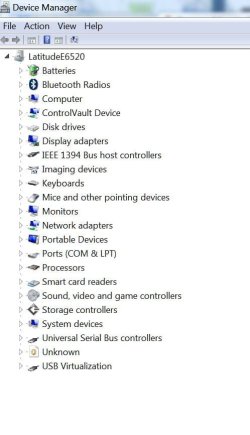
Post screenshot of device management with IDE ATA/API controllers-branch expanded
 

My Computer My Computer

At a glance

Microsoft Windows 7 Home Premium 64-bits 7601...Intel(R) Core(TM) i3 CPU M 370 @ 2.40GHz4,00 GBATI Mobility Radeon HD 5400 Series
Computer type
Laptop
Computer Manufacturer/Model Number
ACER ASPIRE 5742G
OS
Microsoft Windows 7 Home Premium 64-bits 7601 Multiprocessor Free Service Pack 1
CPU
Intel(R) Core(TM) i3 CPU M 370 @ 2.40GHz
Motherboard
Acer Aspire 5742G
Memory
4,00 GB
Graphics Card(s)
ATI Mobility Radeon HD 5400 Series
Sound Card
(1) AMD High Definition Audio Device (2) Realtek High Defi
Screen Resolution
1366 x 768 x 32 bits (4294967296 colors) @ 60 Hz
Hard Drives
WDC WD5000BEVT-22ZAT0
Post screenshot of device management with IDE ATA/API controllers-branch expanded

Don't see it as you mentioned. Were might it be under?? Heres what I have..
 

Attachments

  • dm.JPG
    dm.JPG
    51.1 KB · Views: 0

My Computer My Computer

At a glance

Win7 64 BitI-58 GBIntel 4000
Computer type
Laptop
Computer Manufacturer/Model Number
Dell Latitude 6530 Notebook ( 15.6 screen)
OS
Win7 64 Bit
CPU
I-5
Memory
8 GB
Graphics Card(s)
Intel 4000
Monitor(s) Displays
FHD 1980 x 1080
Screen Resolution
1980x1280
Hard Drives
Samsung 840 Pro 256 GB for OS Samsung Pro 840 256 GB for Storage.
Keyboard
Backlit Key's
Internet Speed
DSL 1.5 mbps

My Computer My Computer

At a glance

Microsoft Windows 7 Home Premium 64-bits 7601...Intel(R) Core(TM) i3 CPU M 370 @ 2.40GHz4,00 GBATI Mobility Radeon HD 5400 Series
Computer type
Laptop
Computer Manufacturer/Model Number
ACER ASPIRE 5742G
OS
Microsoft Windows 7 Home Premium 64-bits 7601 Multiprocessor Free Service Pack 1
CPU
Intel(R) Core(TM) i3 CPU M 370 @ 2.40GHz
Motherboard
Acer Aspire 5742G
Memory
4,00 GB
Graphics Card(s)
ATI Mobility Radeon HD 5400 Series
Sound Card
(1) AMD High Definition Audio Device (2) Realtek High Defi
Screen Resolution
1366 x 768 x 32 bits (4294967296 colors) @ 60 Hz
Hard Drives
WDC WD5000BEVT-22ZAT0
In registry goto HKEY_LOCAL_MACHINE\SYSTEM\CurrentControlSet\services\iaStorV what is the value of "Start" on the right?

Same for HKEY_LOCAL_MACHINE\SYSTEM\CurrentControlSet\services\iaStor (if key exists)
Same for HKEY_LOCAL_MACHINE\SYSTEM\CurrentControlSet\services\msahci
 

My Computer My Computer

At a glance

Microsoft Windows 7 Home Premium 64-bits 7601...Intel(R) Core(TM) i3 CPU M 370 @ 2.40GHz4,00 GBATI Mobility Radeon HD 5400 Series
Computer type
Laptop
Computer Manufacturer/Model Number
ACER ASPIRE 5742G
OS
Microsoft Windows 7 Home Premium 64-bits 7601 Multiprocessor Free Service Pack 1
CPU
Intel(R) Core(TM) i3 CPU M 370 @ 2.40GHz
Motherboard
Acer Aspire 5742G
Memory
4,00 GB
Graphics Card(s)
ATI Mobility Radeon HD 5400 Series
Sound Card
(1) AMD High Definition Audio Device (2) Realtek High Defi
Screen Resolution
1366 x 768 x 32 bits (4294967296 colors) @ 60 Hz
Hard Drives
WDC WD5000BEVT-22ZAT0
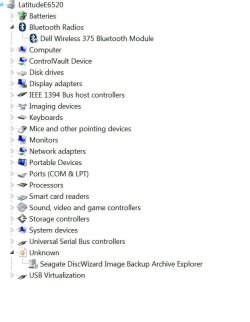
I haven't made any changes to the registry yet as I thought you might want to know what the unknown is.
also the dvd isn't in the media bay. My storage HDD is. Here is a shot of unknown.
 

Attachments

  • Capture.JPG
    Capture.JPG
    49.9 KB · Views: 1

My Computer My Computer

At a glance

Win7 64 BitI-58 GBIntel 4000
Computer type
Laptop
Computer Manufacturer/Model Number
Dell Latitude 6530 Notebook ( 15.6 screen)
OS
Win7 64 Bit
CPU
I-5
Memory
8 GB
Graphics Card(s)
Intel 4000
Monitor(s) Displays
FHD 1980 x 1080
Screen Resolution
1980x1280
Hard Drives
Samsung 840 Pro 256 GB for OS Samsung Pro 840 256 GB for Storage.
Keyboard
Backlit Key's
Internet Speed
DSL 1.5 mbps
I set the value to 0 for iaStorV and msahci
 

My Computer My Computer

At a glance

Win7 64 BitI-58 GBIntel 4000
Computer type
Laptop
Computer Manufacturer/Model Number
Dell Latitude 6530 Notebook ( 15.6 screen)
OS
Win7 64 Bit
CPU
I-5
Memory
8 GB
Graphics Card(s)
Intel 4000
Monitor(s) Displays
FHD 1980 x 1080
Screen Resolution
1980x1280
Hard Drives
Samsung 840 Pro 256 GB for OS Samsung Pro 840 256 GB for Storage.
Keyboard
Backlit Key's
Internet Speed
DSL 1.5 mbps
I set the value to 0 for iaStorV and msahci
But what start value has HKEY_LOCAL_MACHINE\SYSTEM\CurrentControlSet\services\iaStor (if key exists)??

I have no idea yet if system is using iaStorV or iaStor
 

My Computer My Computer

At a glance

Microsoft Windows 7 Home Premium 64-bits 7601...Intel(R) Core(TM) i3 CPU M 370 @ 2.40GHz4,00 GBATI Mobility Radeon HD 5400 Series
Computer type
Laptop
Computer Manufacturer/Model Number
ACER ASPIRE 5742G
OS
Microsoft Windows 7 Home Premium 64-bits 7601 Multiprocessor Free Service Pack 1
CPU
Intel(R) Core(TM) i3 CPU M 370 @ 2.40GHz
Motherboard
Acer Aspire 5742G
Memory
4,00 GB
Graphics Card(s)
ATI Mobility Radeon HD 5400 Series
Sound Card
(1) AMD High Definition Audio Device (2) Realtek High Defi
Screen Resolution
1366 x 768 x 32 bits (4294967296 colors) @ 60 Hz
Hard Drives
WDC WD5000BEVT-22ZAT0
I set the value to 0 for iaStorV and msahci
But what start value has HKEY_LOCAL_MACHINE\SYSTEM\CurrentControlSet\services\iaStor (if key exists)??

I have no idea yet if system is using iaStorV or iaStor

It has the iaStorV and IaStor the values are 0 in both as of now. I never got a loading aschi drivers screen folks mention when aschi changed.
 

My Computer My Computer

At a glance

Win7 64 BitI-58 GBIntel 4000
Computer type
Laptop
Computer Manufacturer/Model Number
Dell Latitude 6530 Notebook ( 15.6 screen)
OS
Win7 64 Bit
CPU
I-5
Memory
8 GB
Graphics Card(s)
Intel 4000
Monitor(s) Displays
FHD 1980 x 1080
Screen Resolution
1980x1280
Hard Drives
Samsung 840 Pro 256 GB for OS Samsung Pro 840 256 GB for Storage.
Keyboard
Backlit Key's
Internet Speed
DSL 1.5 mbps
Is this still going after 7 days? LOL. it is 3 clicks with paragon migrate program.

Maybe the OP should try your adaptive restore tutorial. There is a paragon freebie in there. It is not recent paragon version, but it only takes a few seconds - it is worth a go.
 

My Computers My Computers

  • At a glance

    7 X64i5 84002x8gb 3200mhz
    Computer type
    PC/Desktop
    OS
    7 X64
    CPU
    i5 8400
    Motherboard
    gigabyte b365m ds3h
    Memory
    2x8gb 3200mhz
    Hard Drives
    various
    PSU
    pure power 11 400w cm
    Case
    Coolermaster
    Cooling
    cryorig m9i
  • At a glance

    7x64g54008gb ddr4 2400
    Computer type
    PC/Desktop
    OS
    7x64
    CPU
    g5400
    Motherboard
    ga b365m ds3h
    Memory
    8gb ddr4 2400
    PSU
    xfx pro 450w
Back
Top