
Solved No Option to enable file sharing in firewall?

ThaChad

New member
Local time
11:03 PM
Messages
33
Hey all,

If I disable the windows firewall, I am able to turn on file sharing and network discovery. However, if I turn the firewall on, every time I try to enable file sharing and network discovery, they wont turn on..

I tried to go into the firewall settings and enable file sharing but it's not an option that's available?

Windows 7 has been one problem after another when trying to do anything that involves networking/sharing..

Thanks,

-TheChad
 

My Computer My Computer

OS
Windows 7 Professional x64
CPU
Intel Core 2 Duo E8400 Wolfdale 3.00GHz
Motherboard
GIGABYTE GA-EP35-DS3P
Memory
8GB OCZ Reaper HPC (4 x 2GB) DDR2 1066 (PC2 8500)
Graphics Card(s)
EVGA 512-P2-N757-TR GeForce 8600 GT 512MB 128-bit GDDR3
Sound Card
Built-In - Realtek ALC889A
Monitor(s) Displays
LG Flatron W2252TQ
Hard Drives
1 x Seagate Barracuda ST3000DM001 3TB 7200 RPM SATA 6.0Gb/s 3.5" Internal Hard Drive

1 x Seagate Barracuda ST3750330AS 750GB 7200 RPM SATA 3.0Gb/s 3.5" Internal Hard Drive
Hey all,

If I disable the windows firewall, I am able to turn on file sharing and network discovery. However, if I turn the firewall on, every time I try to enable file sharing and network discovery, they wont turn on..

I tried to go into the firewall settings and enable file sharing but it's not an option that's available?

Windows 7 has been one problem after another when trying to do anything that involves networking/sharing..

Thanks,

-TheChad

If network discovery isn't staying on then you have a bigger problem than just enabling sharing which is done through the Advanced Network Settings at the Network and Sharing Center.

This problem has come up many times and is typically fixable by repairing the base filtering engine which is the actual cause of the problem with network discovery not staying on.

The following link shows you how to fix this problem. :)

I receive the message that my ESET installation ended prematurely - ESET Knowledgebase
 

My Computer My Computer

Computer type
PC/Desktop
Computer Manufacturer/Model Number
Home built
OS
Windows 7 Ult, Windows 8.1 Pro,
CPU
Q9650-4.275GHz, E8600 4.5GHz, E6750-3.8GHz
Motherboard
Evga 780i FTW
Memory
G.Skill PC2 9600 1200Mhz 5 5 5 15 2T
Graphics Card(s)
GTX480
Sound Card
Asus Xonar D2
Monitor(s) Displays
HannsG
Screen Resolution
1680X1050
Hard Drives
GSkill Phoenix Pro 120GB SSD
PSU
ThermalTake Toughpower 1000Watt modular
Case
ThermalTake XaserV
Cooling
Xigmatek S1283
Keyboard
Logitech G15
Mouse
Logitech G9
Internet Speed
T1
Hey all,

If I disable the windows firewall, I am able to turn on file sharing and network discovery. However, if I turn the firewall on, every time I try to enable file sharing and network discovery, they wont turn on..

I tried to go into the firewall settings and enable file sharing but it's not an option that's available?

Windows 7 has been one problem after another when trying to do anything that involves networking/sharing..

Thanks,

-TheChad

If network discovery isn't staying on then you have a bigger problem than just enabling sharing which is done through the Advanced Network Settings at the Network and Sharing Center.

This problem has come up many times and is typically fixable by repairing the base filtering engine which is the actual cause of the problem with network discovery not staying on.

The following link shows you how to fix this problem. :)

I receive the message that my ESET installation ended prematurely - ESET Knowledgebase

My Base Filtering Agent is present, set to Automatic, and is "Started".

When I turn my firewall OFF I can turn on all the file sharing/network discovery, but when I turn the firewall ON, if I turn on sharing/network discovery ON then click apply, they all turn back OFF.

In the firewall Advanced tab there is NO option for file sharing/network discovery, there SHOULD be, but it's not there!

-TheChad
 

My Computer My Computer

OS
Windows 7 Professional x64
CPU
Intel Core 2 Duo E8400 Wolfdale 3.00GHz
Motherboard
GIGABYTE GA-EP35-DS3P
Memory
8GB OCZ Reaper HPC (4 x 2GB) DDR2 1066 (PC2 8500)
Graphics Card(s)
EVGA 512-P2-N757-TR GeForce 8600 GT 512MB 128-bit GDDR3
Sound Card
Built-In - Realtek ALC889A
Monitor(s) Displays
LG Flatron W2252TQ
Hard Drives
1 x Seagate Barracuda ST3000DM001 3TB 7200 RPM SATA 6.0Gb/s 3.5" Internal Hard Drive

1 x Seagate Barracuda ST3750330AS 750GB 7200 RPM SATA 3.0Gb/s 3.5" Internal Hard Drive
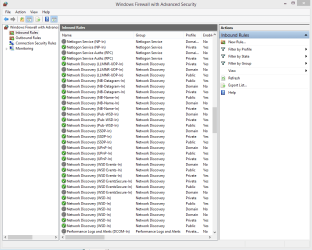
You mean there are no Network Discovery settings listed for inbound and outbound on the Windows firewall? There should be about 30 each way per the picture below shows default inbound rules.

In either event and after reading much about this problem in the past you still need to do run the fix for the base filtering engine as this is still the fix for this particular problem.

In fact many others only had a firewall problem with missing entries and the base filtering engine appeared to be intact, same complaints etc. but the base filtering repair still fixed the problem.

You need to run ServiceRepair.exe, this won't hurt anything if it's not the problem but it's most likely the only fix you will need for this problem.

I receive the message that my ESET installation ended prematurely - ESET Knowledgebase
 

Attachments

  • Firewall rules Network Discovery.PNG
    Firewall rules Network Discovery.PNG
    26 KB · Views: 1
Last edited:

My Computer My Computer

Computer type
PC/Desktop
Computer Manufacturer/Model Number
Home built
OS
Windows 7 Ult, Windows 8.1 Pro,
CPU
Q9650-4.275GHz, E8600 4.5GHz, E6750-3.8GHz
Motherboard
Evga 780i FTW
Memory
G.Skill PC2 9600 1200Mhz 5 5 5 15 2T
Graphics Card(s)
GTX480
Sound Card
Asus Xonar D2
Monitor(s) Displays
HannsG
Screen Resolution
1680X1050
Hard Drives
GSkill Phoenix Pro 120GB SSD
PSU
ThermalTake Toughpower 1000Watt modular
Case
ThermalTake XaserV
Cooling
Xigmatek S1283
Keyboard
Logitech G15
Mouse
Logitech G9
Internet Speed
T1
Worked! Thanks!

Isn't there a way to have Windows Firewall ask you every time it blocks something if you want to allow it threw the firewall?

Me next problem is that my Windows Live Mail keeps timing out checking my Gmail Via POP3, I've read this is firewall related.. I never use to have a problem with this..
 

My Computer My Computer

OS
Windows 7 Professional x64
CPU
Intel Core 2 Duo E8400 Wolfdale 3.00GHz
Motherboard
GIGABYTE GA-EP35-DS3P
Memory
8GB OCZ Reaper HPC (4 x 2GB) DDR2 1066 (PC2 8500)
Graphics Card(s)
EVGA 512-P2-N757-TR GeForce 8600 GT 512MB 128-bit GDDR3
Sound Card
Built-In - Realtek ALC889A
Monitor(s) Displays
LG Flatron W2252TQ
Hard Drives
1 x Seagate Barracuda ST3000DM001 3TB 7200 RPM SATA 6.0Gb/s 3.5" Internal Hard Drive

1 x Seagate Barracuda ST3750330AS 750GB 7200 RPM SATA 3.0Gb/s 3.5" Internal Hard Drive
Worked! Thanks!

Isn't there a way to have Windows Firewall ask you every time it blocks something if you want to allow it threw the firewall?

Me next problem is that my Windows Live Mail keeps timing out checking my Gmail Via POP3, I've read this is firewall related.. I never use to have a problem with this..

I figured that was the problem, apparently this problem can occur even if the base filtering engine service is working so the web site I linked too didn't get that part correct, but I knew that from last time.

Far as I know, if UAC is turned on it should be telling you when it blocks something, it ties in with Windows firewall.

Not sure about the live mail problem although this system once had a virus problem which is how the base filtering engine was corrupted in the first place so running a virus scan using Malwarebytes is a good idea, then try running the following command in an elevated command prompt, let me know what the scan says.

Code:
sfc /scannow
 
Last edited:

My Computer My Computer

Computer type
PC/Desktop
Computer Manufacturer/Model Number
Home built
OS
Windows 7 Ult, Windows 8.1 Pro,
CPU
Q9650-4.275GHz, E8600 4.5GHz, E6750-3.8GHz
Motherboard
Evga 780i FTW
Memory
G.Skill PC2 9600 1200Mhz 5 5 5 15 2T
Graphics Card(s)
GTX480
Sound Card
Asus Xonar D2
Monitor(s) Displays
HannsG
Screen Resolution
1680X1050
Hard Drives
GSkill Phoenix Pro 120GB SSD
PSU
ThermalTake Toughpower 1000Watt modular
Case
ThermalTake XaserV
Cooling
Xigmatek S1283
Keyboard
Logitech G15
Mouse
Logitech G9
Internet Speed
T1
Back
Top