PC Running Slow out of nowhere.

Miyoki

New member
Local time
10:44 AM
Messages
39
So.. recently i've been having issues with my pc running slow and generally acting up.

Figured it may be a graphic card issue (as my pc would give blue screen at the game "Team Fortress 2" on the mod "Man vs Machine") so i bought a new 1, but ended up in same result. While that said. my pc seemed to "lagg", so i upgraded from 8gb ram to 16gb ram.

it didn't change anything at all. so i ended up cleaning the harddisc and installing windows from scratch. Which didn't help much either.

so.. that's why i've come to this place, asking for help to this issue.

(i've filled my spec info and such)

EDIT : i did sfc /scannow and it returned : Windows resourceprotection found damaged files, but not all files could be repaired (it's in danish, so poorly translated sorry)
 
Last edited:

My Computer My Computer

Computer type
PC/Desktop
Computer Manufacturer/Model Number
Custom Build
OS
Windows 7 Ultimate 64bit
CPU
Intel Core i7 2600k @ 3.40ghz
Motherboard
ASRock Dual-Channel DDR3 @ 532mhz (7-7-7-20)
Memory
16GB Dual-Channel DDR3 @ 532mhz (7-7-7-20)
Graphics Card(s)
4095MB NVIDIA GeForce GT 630 (MSI)
Sound Card
NVIDIA High Definition Audio (on board)
Monitor(s) Displays
F22 (1920x1080@60Hz) and SyncMaster (1680x1050@60hz)
Screen Resolution
1920x1080@60Hz and 1680x1050@60hz
Hard Drives
932GB Western Digital WDC WD10EARS-00Y5B1 ATA Device (SATA)
Keyboard
Razer Arctosa
Mouse
Razer Naga Molten
Internet Speed
500/500mb
Antivirus
Microsoft Security Essentials
Browser
Firefox
Welcome to the forums.

Does your PC randomly reboot, or does it just blue screen on Team Fortress?
 

My Computer My Computer

Computer type
PC/Desktop
Computer Manufacturer/Model Number
Mellon Labs (custom build)
OS
Win 7 Pro x64/Win 10 Pro x64 dual boot
CPU
AMD FX 8350 Vishera @ 4200
Motherboard
ASUS M5A97 R2.0
Memory
16 GB Mushkin Blackline DDR3-2400 @ 1866 (9-10-10-10-31)
Graphics Card(s)
XFX Radeon R9 280 Double D Black Edition
Sound Card
Realtek HD Audio on MB. Sounds great.
Monitor(s) Displays
Acer 24", Acer 22"
Screen Resolution
3840 x 1080
Hard Drives
1 x Mushkin Chronos 120 GB SSD (Win 10)
1 x Samsung 850 EVO 250 GB SSD (Win 7)
1 x WD 1TB SATA Blue
1 x WD 1TB SATA Green
PSU
Corsair TX-750
Case
CoolerMaster HAF 912+
Cooling
Coolermaster Seidon 240M Liquid AIO. 6 case fans
Keyboard
Logitech G710+
Mouse
Logitech G500s
Internet Speed
Much better since I got fiber, but still way overpriced.
Antivirus
MSE, Malware Bytes for scanning
Browser
Firefox
Other Info
Corsair VOID USB headphones.

A Mellon Labs X-1 - LCD Smartie driven system status display.

Brought to you by the letter E
Welcome to the forums.

Does your PC randomly reboot, or does it just blue screen on Team Fortress?

nope. it just blue screens and die. tho, my graphic card is "overheating" of what i know. it can't run the game on 300fps. it needs to be thrown down to 30fps or so. it's the only game doing so, as it's fine with bf3, l4d2, loco and whatever game i throw at it.. it's just that single game it's being completely retarded at.
 

My Computer My Computer

Computer type
PC/Desktop
Computer Manufacturer/Model Number
Custom Build
OS
Windows 7 Ultimate 64bit
CPU
Intel Core i7 2600k @ 3.40ghz
Motherboard
ASRock Dual-Channel DDR3 @ 532mhz (7-7-7-20)
Memory
16GB Dual-Channel DDR3 @ 532mhz (7-7-7-20)
Graphics Card(s)
4095MB NVIDIA GeForce GT 630 (MSI)
Sound Card
NVIDIA High Definition Audio (on board)
Monitor(s) Displays
F22 (1920x1080@60Hz) and SyncMaster (1680x1050@60hz)
Screen Resolution
1920x1080@60Hz and 1680x1050@60hz
Hard Drives
932GB Western Digital WDC WD10EARS-00Y5B1 ATA Device (SATA)
Keyboard
Razer Arctosa
Mouse
Razer Naga Molten
Internet Speed
500/500mb
Antivirus
Microsoft Security Essentials
Browser
Firefox
Open Task Manager and under Processes Tab click on CPU column to see which processes is taking up the most CPU cycles and suspect it (if it is CPU related). Do this both with nothing running then with any program that seems slow.

it only takes up 1% cpu at the current time. but whenever i try to open something (whatever it is). it takes so long to open and if i have multiple stuff open, which takes about 0% cpu (just a speak way). it would end up causing strange laggs..

for example, if i have League of legends open, torrent (download 1-3 torrents), firefox open (with 5 tabs, using about 100mb ram and tops 1-3% cpu.) it will cause strange laggs.

when starting up windows (with about nothing to start up, it will take a whole world war to stop loading)
 

My Computer My Computer

Computer type
PC/Desktop
Computer Manufacturer/Model Number
Custom Build
OS
Windows 7 Ultimate 64bit
CPU
Intel Core i7 2600k @ 3.40ghz
Motherboard
ASRock Dual-Channel DDR3 @ 532mhz (7-7-7-20)
Memory
16GB Dual-Channel DDR3 @ 532mhz (7-7-7-20)
Graphics Card(s)
4095MB NVIDIA GeForce GT 630 (MSI)
Sound Card
NVIDIA High Definition Audio (on board)
Monitor(s) Displays
F22 (1920x1080@60Hz) and SyncMaster (1680x1050@60hz)
Screen Resolution
1920x1080@60Hz and 1680x1050@60hz
Hard Drives
932GB Western Digital WDC WD10EARS-00Y5B1 ATA Device (SATA)
Keyboard
Razer Arctosa
Mouse
Razer Naga Molten
Internet Speed
500/500mb
Antivirus
Microsoft Security Essentials
Browser
Firefox
when starting up windows (with about nothing to start up, it will take a whole world war to stop loading)
Have you looked at the cores and clock speeds with something like CPU-Z? http://www.cpuid.com/softwares/cpu-z/versions-history.html

My wife's quad suddenly started running on only one core for some reason and it was taking forever to load Windows. I had to fix it by going into MSConfig and setting the number of processors manually in the Boot tab.

It may be what's happening with your rig.
 

My Computer My Computer

Computer type
PC/Desktop
Computer Manufacturer/Model Number
Mellon Labs (custom build)
OS
Win 7 Pro x64/Win 10 Pro x64 dual boot
CPU
AMD FX 8350 Vishera @ 4200
Motherboard
ASUS M5A97 R2.0
Memory
16 GB Mushkin Blackline DDR3-2400 @ 1866 (9-10-10-10-31)
Graphics Card(s)
XFX Radeon R9 280 Double D Black Edition
Sound Card
Realtek HD Audio on MB. Sounds great.
Monitor(s) Displays
Acer 24", Acer 22"
Screen Resolution
3840 x 1080
Hard Drives
1 x Mushkin Chronos 120 GB SSD (Win 10)
1 x Samsung 850 EVO 250 GB SSD (Win 7)
1 x WD 1TB SATA Blue
1 x WD 1TB SATA Green
PSU
Corsair TX-750
Case
CoolerMaster HAF 912+
Cooling
Coolermaster Seidon 240M Liquid AIO. 6 case fans
Keyboard
Logitech G710+
Mouse
Logitech G500s
Internet Speed
Much better since I got fiber, but still way overpriced.
Antivirus
MSE, Malware Bytes for scanning
Browser
Firefox
Other Info
Corsair VOID USB headphones.

A Mellon Labs X-1 - LCD Smartie driven system status display.

Brought to you by the letter E
when starting up windows (with about nothing to start up, it will take a whole world war to stop loading)
Have you looked at the cores and clock speeds with something like CPU-Z? CPU-Z CPUID - System & hardware benchmark, monitoring, reporting

My wife's quad suddenly started running on only one core for some reason and it was taking forever to load Windows. I had to fix it by going into MSConfig and setting the number of processors manually in the Boot tab.

It may be what's happening with your rig.
4Od20.png


not sure exactly what i had to do.. but ^
 

My Computer My Computer

Computer type
PC/Desktop
Computer Manufacturer/Model Number
Custom Build
OS
Windows 7 Ultimate 64bit
CPU
Intel Core i7 2600k @ 3.40ghz
Motherboard
ASRock Dual-Channel DDR3 @ 532mhz (7-7-7-20)
Memory
16GB Dual-Channel DDR3 @ 532mhz (7-7-7-20)
Graphics Card(s)
4095MB NVIDIA GeForce GT 630 (MSI)
Sound Card
NVIDIA High Definition Audio (on board)
Monitor(s) Displays
F22 (1920x1080@60Hz) and SyncMaster (1680x1050@60hz)
Screen Resolution
1920x1080@60Hz and 1680x1050@60hz
Hard Drives
932GB Western Digital WDC WD10EARS-00Y5B1 ATA Device (SATA)
Keyboard
Razer Arctosa
Mouse
Razer Naga Molten
Internet Speed
500/500mb
Antivirus
Microsoft Security Essentials
Browser
Firefox
Your core speed is running at about half of what it should be. I'm not that familiar with Intel, but I think your bus speed should be about 200 MHz not 99. The good news is that it's seeing all of your cores, but basically the machine is running at half speed.

Do you have some power saving function running? Or maybe the Power Saver mode in Window's Power Options turned on?

Like I said, I'm not that familiar with Intel CPUs. On an AMD, there is something called "Cool and Quiet" and it runs the processor at lower speeds when the CPU demand is low. There is something similar for Intel, but I can't remember what it's called, sorry.

Until someone with some Intel experience jumps in here, maybe try checking the power options in Control Panel and make sure that you aren't running in Power Saver mode.
 

My Computer My Computer

Computer type
PC/Desktop
Computer Manufacturer/Model Number
Mellon Labs (custom build)
OS
Win 7 Pro x64/Win 10 Pro x64 dual boot
CPU
AMD FX 8350 Vishera @ 4200
Motherboard
ASUS M5A97 R2.0
Memory
16 GB Mushkin Blackline DDR3-2400 @ 1866 (9-10-10-10-31)
Graphics Card(s)
XFX Radeon R9 280 Double D Black Edition
Sound Card
Realtek HD Audio on MB. Sounds great.
Monitor(s) Displays
Acer 24", Acer 22"
Screen Resolution
3840 x 1080
Hard Drives
1 x Mushkin Chronos 120 GB SSD (Win 10)
1 x Samsung 850 EVO 250 GB SSD (Win 7)
1 x WD 1TB SATA Blue
1 x WD 1TB SATA Green
PSU
Corsair TX-750
Case
CoolerMaster HAF 912+
Cooling
Coolermaster Seidon 240M Liquid AIO. 6 case fans
Keyboard
Logitech G710+
Mouse
Logitech G500s
Internet Speed
Much better since I got fiber, but still way overpriced.
Antivirus
MSE, Malware Bytes for scanning
Browser
Firefox
Other Info
Corsair VOID USB headphones.

A Mellon Labs X-1 - LCD Smartie driven system status display.

Brought to you by the letter E
Your core speed is running at about half of what it should be. I'm not that familiar with Intel, but I think your bus speed should be about 200 MHz not 99. The good news is that it's seeing all of your cores, but basically the machine is running at half speed.

Do you have some power saving function running? Or maybe the Power Saver mode in Window's Power Options turned on?

Like I said, I'm not that familiar with Intel CPUs. On an AMD, there is something called "Cool and Quiet" and it runs the processor at lower speeds when the CPU demand is low. There is something similar for Intel, but I can't remember what it's called, sorry.

Until someone with some Intel experience jumps in here, maybe try checking the power options in Control Panel and make sure that you aren't running in Power Saver mode.
the powersupply / settings / well eh under control panel has min cpu usage to 10% and max to 100%.

aside from that, everything else is set to never turn off / always high quality thingie. basically it should use the maximum it can. of what i understand
 

My Computer My Computer

Computer type
PC/Desktop
Computer Manufacturer/Model Number
Custom Build
OS
Windows 7 Ultimate 64bit
CPU
Intel Core i7 2600k @ 3.40ghz
Motherboard
ASRock Dual-Channel DDR3 @ 532mhz (7-7-7-20)
Memory
16GB Dual-Channel DDR3 @ 532mhz (7-7-7-20)
Graphics Card(s)
4095MB NVIDIA GeForce GT 630 (MSI)
Sound Card
NVIDIA High Definition Audio (on board)
Monitor(s) Displays
F22 (1920x1080@60Hz) and SyncMaster (1680x1050@60hz)
Screen Resolution
1920x1080@60Hz and 1680x1050@60hz
Hard Drives
932GB Western Digital WDC WD10EARS-00Y5B1 ATA Device (SATA)
Keyboard
Razer Arctosa
Mouse
Razer Naga Molten
Internet Speed
500/500mb
Antivirus
Microsoft Security Essentials
Browser
Firefox
the powersupply / settings / well eh under control panel has min cpu usage to 10% and max to 100%.

aside from that, everything else is set to never turn off / always high quality thingie. basically it should use the maximum it can. of what i understand
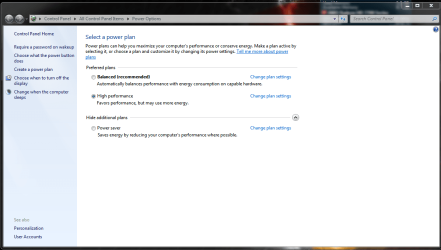
So you have the power setting set like this?

Power.PNG

That should run the processor at full speed. Other modes may not.
 

My Computer My Computer

Computer type
PC/Desktop
Computer Manufacturer/Model Number
Mellon Labs (custom build)
OS
Win 7 Pro x64/Win 10 Pro x64 dual boot
CPU
AMD FX 8350 Vishera @ 4200
Motherboard
ASUS M5A97 R2.0
Memory
16 GB Mushkin Blackline DDR3-2400 @ 1866 (9-10-10-10-31)
Graphics Card(s)
XFX Radeon R9 280 Double D Black Edition
Sound Card
Realtek HD Audio on MB. Sounds great.
Monitor(s) Displays
Acer 24", Acer 22"
Screen Resolution
3840 x 1080
Hard Drives
1 x Mushkin Chronos 120 GB SSD (Win 10)
1 x Samsung 850 EVO 250 GB SSD (Win 7)
1 x WD 1TB SATA Blue
1 x WD 1TB SATA Green
PSU
Corsair TX-750
Case
CoolerMaster HAF 912+
Cooling
Coolermaster Seidon 240M Liquid AIO. 6 case fans
Keyboard
Logitech G710+
Mouse
Logitech G500s
Internet Speed
Much better since I got fiber, but still way overpriced.
Antivirus
MSE, Malware Bytes for scanning
Browser
Firefox
Other Info
Corsair VOID USB headphones.

A Mellon Labs X-1 - LCD Smartie driven system status display.

Brought to you by the letter E
the powersupply / settings / well eh under control panel has min cpu usage to 10% and max to 100%.

aside from that, everything else is set to never turn off / always high quality thingie. basically it should use the maximum it can. of what i understand
So you have the power setting set like this?

View attachment 289348

That should run the processor at full speed. Other modes may not.
yeah. that 1.
 

My Computer My Computer

Computer type
PC/Desktop
Computer Manufacturer/Model Number
Custom Build
OS
Windows 7 Ultimate 64bit
CPU
Intel Core i7 2600k @ 3.40ghz
Motherboard
ASRock Dual-Channel DDR3 @ 532mhz (7-7-7-20)
Memory
16GB Dual-Channel DDR3 @ 532mhz (7-7-7-20)
Graphics Card(s)
4095MB NVIDIA GeForce GT 630 (MSI)
Sound Card
NVIDIA High Definition Audio (on board)
Monitor(s) Displays
F22 (1920x1080@60Hz) and SyncMaster (1680x1050@60hz)
Screen Resolution
1920x1080@60Hz and 1680x1050@60hz
Hard Drives
932GB Western Digital WDC WD10EARS-00Y5B1 ATA Device (SATA)
Keyboard
Razer Arctosa
Mouse
Razer Naga Molten
Internet Speed
500/500mb
Antivirus
Microsoft Security Essentials
Browser
Firefox
Hmmm. That's weird. I don't know enough about Intel boards to help you check your BIOS for the front side bus setting, but hopefully someone with an Intel rig will happen by this thread and be able to help more than I can.
 

My Computer My Computer

Computer type
PC/Desktop
Computer Manufacturer/Model Number
Mellon Labs (custom build)
OS
Win 7 Pro x64/Win 10 Pro x64 dual boot
CPU
AMD FX 8350 Vishera @ 4200
Motherboard
ASUS M5A97 R2.0
Memory
16 GB Mushkin Blackline DDR3-2400 @ 1866 (9-10-10-10-31)
Graphics Card(s)
XFX Radeon R9 280 Double D Black Edition
Sound Card
Realtek HD Audio on MB. Sounds great.
Monitor(s) Displays
Acer 24", Acer 22"
Screen Resolution
3840 x 1080
Hard Drives
1 x Mushkin Chronos 120 GB SSD (Win 10)
1 x Samsung 850 EVO 250 GB SSD (Win 7)
1 x WD 1TB SATA Blue
1 x WD 1TB SATA Green
PSU
Corsair TX-750
Case
CoolerMaster HAF 912+
Cooling
Coolermaster Seidon 240M Liquid AIO. 6 case fans
Keyboard
Logitech G710+
Mouse
Logitech G500s
Internet Speed
Much better since I got fiber, but still way overpriced.
Antivirus
MSE, Malware Bytes for scanning
Browser
Firefox
Other Info
Corsair VOID USB headphones.

A Mellon Labs X-1 - LCD Smartie driven system status display.

Brought to you by the letter E
Hmmm. That's weird. I don't know enough about Intel boards to help you check your BIOS for the front side bus setting, but hopefully someone with an Intel rig will happen by this thread and be able to help more than I can.

aight. thank you for trying :)
 
Last edited:

My Computer My Computer

Computer type
PC/Desktop
Computer Manufacturer/Model Number
Custom Build
OS
Windows 7 Ultimate 64bit
CPU
Intel Core i7 2600k @ 3.40ghz
Motherboard
ASRock Dual-Channel DDR3 @ 532mhz (7-7-7-20)
Memory
16GB Dual-Channel DDR3 @ 532mhz (7-7-7-20)
Graphics Card(s)
4095MB NVIDIA GeForce GT 630 (MSI)
Sound Card
NVIDIA High Definition Audio (on board)
Monitor(s) Displays
F22 (1920x1080@60Hz) and SyncMaster (1680x1050@60hz)
Screen Resolution
1920x1080@60Hz and 1680x1050@60hz
Hard Drives
932GB Western Digital WDC WD10EARS-00Y5B1 ATA Device (SATA)
Keyboard
Razer Arctosa
Mouse
Razer Naga Molten
Internet Speed
500/500mb
Antivirus
Microsoft Security Essentials
Browser
Firefox

My Computer My Computer

Computer type
PC/Desktop
Computer Manufacturer/Model Number
Custom Built
OS
Windows 10 Pro
CPU
AMD Ryzen 5 2400G Processor with Radeon RX Vega 11 Graphics
Motherboard
ASRock X470 Master SLI/AC AM4 AMD Promontory X470 SATA 6Gb/s
Memory
G.SKILL Ripjaws V Series 16GB (2 x 8GB) 288-Pin DDR4 SDRAM D
Graphics Card(s)
2047MB NVIDIA GeForce GTX 1060 6GB (EVGA)
Sound Card
Motherboard Built in
Monitor(s) Displays
Acer R240HY bidx 23.8-Inch IPS HDMI DVI VGA (1920 x 1080) Wi
Screen Resolution
1920 x 1080
Hard Drives
1TB Sandisk SSD PLUS (Main drive)
500 GB Seagate 7200 RPM (Games)
500 GB Western Digital 7200 RPM (Virtual Machines)
PSU
CORSAIR TX Series TX650M 650W 80+ Gold Modular Power Supply
Case
CORSAIR CARBIDE SPEC-02 Mid-Tower Gaming Case, Red LED Fan
Cooling
220mm, two 120mm, and four 60mm fans
Keyboard
Wired Dell keyboard
Mouse
Wireless Logitech mouse
Internet Speed
250mb down, 30mb up
Antivirus
Panda Cloud Antivirus
Browser
Chrome-ish x64
Other Info
Your awesome for reading this.

My Computer My Computer

Computer type
PC/Desktop
OS
Windows 10
CPU
Intel Core i5 3570K
Motherboard
Asus P8Z77V-PRO
Memory
16GB 1600Mhz G.Skill
Graphics Card(s)
Gigabyte GTX 970 G1-Gaming
PSU
Seasonic 1000W Platinum
Case
Fractal Design Define R4
Cooling
Noctua NH-D14

My Computer My Computer

Computer type
PC/Desktop
Computer Manufacturer/Model Number
Mellon Labs (custom build)
OS
Win 7 Pro x64/Win 10 Pro x64 dual boot
CPU
AMD FX 8350 Vishera @ 4200
Motherboard
ASUS M5A97 R2.0
Memory
16 GB Mushkin Blackline DDR3-2400 @ 1866 (9-10-10-10-31)
Graphics Card(s)
XFX Radeon R9 280 Double D Black Edition
Sound Card
Realtek HD Audio on MB. Sounds great.
Monitor(s) Displays
Acer 24", Acer 22"
Screen Resolution
3840 x 1080
Hard Drives
1 x Mushkin Chronos 120 GB SSD (Win 10)
1 x Samsung 850 EVO 250 GB SSD (Win 7)
1 x WD 1TB SATA Blue
1 x WD 1TB SATA Green
PSU
Corsair TX-750
Case
CoolerMaster HAF 912+
Cooling
Coolermaster Seidon 240M Liquid AIO. 6 case fans
Keyboard
Logitech G710+
Mouse
Logitech G500s
Internet Speed
Much better since I got fiber, but still way overpriced.
Antivirus
MSE, Malware Bytes for scanning
Browser
Firefox
Other Info
Corsair VOID USB headphones.

A Mellon Labs X-1 - LCD Smartie driven system status display.

Brought to you by the letter E
..............EDIT : i did sfc /scannow and it returned : Windows resourceprotection found damaged files, but not all files could be repaired (it's in danish, so poorly translated sorry)


I would do the following based on that result above.

Do a http://www.sevenforums.com/tutorials/3413-repair-install.html

been there, done that a few times already. nothing changed.

Miyoki, you said you replaced your GPU, upgraded your RAM, reinstalled Windows and you're still getting
BSOD's?

yes. i replaced it since i throught it "may" have been the issue. but yeah, nothing changed.

How about help us by uploading the file that the SFDT generates by following this tutorial.
http://www.sevenforums.com/bsod-help-support/96879-blue-screen-death-bsod-posting-instructions.html

erh.. what do i exactly pick for settings there ?.. complete, kernel or small? o.o
 

My Computer My Computer

Computer type
PC/Desktop
Computer Manufacturer/Model Number
Custom Build
OS
Windows 7 Ultimate 64bit
CPU
Intel Core i7 2600k @ 3.40ghz
Motherboard
ASRock Dual-Channel DDR3 @ 532mhz (7-7-7-20)
Memory
16GB Dual-Channel DDR3 @ 532mhz (7-7-7-20)
Graphics Card(s)
4095MB NVIDIA GeForce GT 630 (MSI)
Sound Card
NVIDIA High Definition Audio (on board)
Monitor(s) Displays
F22 (1920x1080@60Hz) and SyncMaster (1680x1050@60hz)
Screen Resolution
1920x1080@60Hz and 1680x1050@60hz
Hard Drives
932GB Western Digital WDC WD10EARS-00Y5B1 ATA Device (SATA)
Keyboard
Razer Arctosa
Mouse
Razer Naga Molten
Internet Speed
500/500mb
Antivirus
Microsoft Security Essentials
Browser
Firefox
Compare the install you did with the perfect install compiled in Clean Reinstall - Factory OEM Windows 7
which is same for retail. Pay close attention to how drivers are handled in Win7, the tools and methods which work best based on tens of thousands of installs we've helped with here.

Consider trying a diagnostic install testing performance immediately after install, then with only Updates drivers installed, then after all the rest of Updates are done with reboots, then after each program is installed. When does the problem begin? If it's just after install then you know it's hardware, if missing chipset drivers are already supplied via Updates or manually.
 
Compare the install you did with the perfect install compiled in Clean Reinstall - Factory OEM Windows 7
which is same for retail. Pay close attention to how drivers are handled in Win7, the tools and methods which work best based on tens of thousands of installs we've helped with here.

Consider trying a diagnostic install testing performance immediately after install, then with only Updates drivers installed, then after all the rest of Updates are done with reboots, then after each program is installed. When does the problem begin? If it's just after install then you know it's hardware, if missing chipset drivers are already supplied via Updates or manually.

when i reinstalled. i did try rush installing tf2 and test it out. where it gave same issues. compared to if reinstalled and got all driver + updates before testing.

it didn't matter what way i did...
 

My Computer My Computer

Computer type
PC/Desktop
Computer Manufacturer/Model Number
Custom Build
OS
Windows 7 Ultimate 64bit
CPU
Intel Core i7 2600k @ 3.40ghz
Motherboard
ASRock Dual-Channel DDR3 @ 532mhz (7-7-7-20)
Memory
16GB Dual-Channel DDR3 @ 532mhz (7-7-7-20)
Graphics Card(s)
4095MB NVIDIA GeForce GT 630 (MSI)
Sound Card
NVIDIA High Definition Audio (on board)
Monitor(s) Displays
F22 (1920x1080@60Hz) and SyncMaster (1680x1050@60hz)
Screen Resolution
1920x1080@60Hz and 1680x1050@60hz
Hard Drives
932GB Western Digital WDC WD10EARS-00Y5B1 ATA Device (SATA)
Keyboard
Razer Arctosa
Mouse
Razer Naga Molten
Internet Speed
500/500mb
Antivirus
Microsoft Security Essentials
Browser
Firefox
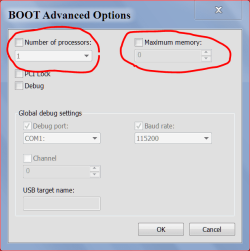
Your cpu is 3.4 and your core speed is 1596 about 1.6 speed.
Just about half of what it should be. Check the settings here.

ADVANCE OPTIONS 8 9 2013.PNG
 

My Computer My Computer

Computer type
PC/Desktop
Computer Manufacturer/Model Number
Home made Desktop
OS
Windows 10 Pro. 64/ version 1709 Windows 7 Pro/64
CPU
Intel i7-6800K @ 4.3
Motherboard
ASUS X-99 Deluxe II
Memory
Corsair Platinum 16 gig @2400
Graphics Card(s)
EVGA GTX 1070 OC
Monitor(s) Displays
Asus 27" LED LCD/VE278Q
Screen Resolution
1920-1080 or 1280-720 HDMI
Hard Drives
INTEL SSD 730-240 Gb Sata 3.0/
PSU
EVGA Platium 1200W
Case
Phanteks Luxe Tempered Glass 8 fans/ one radiator
Cooling
XSPC/ Water Cooled CPU
Keyboard
Das 4 Professional
Mouse
Logitech M705/MX Anywhere 2-S
Internet Speed
100 mbits
Antivirus
Microsoft Security Essentials/ Malwarebytes Premium 3.0/ SAS
Browser
I.E. 11 default/Firefox/ ISP Time Warner Cable/Spectrum
Other Info
LG BluRay Burner/
Sound system-KLipsch-THX/
Icy Dock ssd Hot Swap bays.

My Computer My Computer

Computer type
PC/Desktop
Computer Manufacturer/Model Number
Custom Build
OS
Windows 7 Ultimate 64bit
CPU
Intel Core i7 2600k @ 3.40ghz
Motherboard
ASRock Dual-Channel DDR3 @ 532mhz (7-7-7-20)
Memory
16GB Dual-Channel DDR3 @ 532mhz (7-7-7-20)
Graphics Card(s)
4095MB NVIDIA GeForce GT 630 (MSI)
Sound Card
NVIDIA High Definition Audio (on board)
Monitor(s) Displays
F22 (1920x1080@60Hz) and SyncMaster (1680x1050@60hz)
Screen Resolution
1920x1080@60Hz and 1680x1050@60hz
Hard Drives
932GB Western Digital WDC WD10EARS-00Y5B1 ATA Device (SATA)
Keyboard
Razer Arctosa
Mouse
Razer Naga Molten
Internet Speed
500/500mb
Antivirus
Microsoft Security Essentials
Browser
Firefox
Back
Top