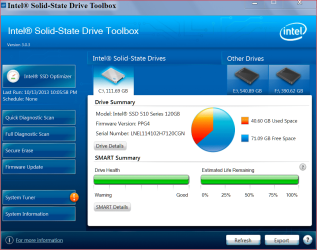
With smarter file systems and faster disks and PCs, file fragmentation isn’t the performance suck it once was. Older computers had a habit of splitting files and spreading the parts all over your hard drives, but modern ones don’t do this as much. Not even close. That said, a bimonthly pass with a capable defragger can help you maintain peak performance on a heavily used hard drive.
However, solid-state drives, which use flash memory instead of a hard-drive platter to store data, are another story: My tests showed little or no benefit from running a number of disk defragmenters on a heavily used SSD.
Conventional logic dictates that you should never defrag an SSD, because the SSD controller writes data in a scattershot-fashion to multiple NAND chips and locations, using algorithms that only the controller understands. The operating system sees it as a hard drive with sectors, but the data is spread all over the drive by the controller. Defragging these “sectors” is like trying to assemble a jigsaw puzzle blindfolded: You can feel parts of the pattern, but you can’t see the whole picture. In addition, NAND is good for only a few thousand write cycles, so defragging can reduce the SSD’s lifespan by unnecessarily writing data to it.
Despite those arguments, at least four defragging utilities purport to increase SSD performance through optimization: Auslogic’s Disk Defrag Pro, Condusiv’s Diskeeper, Raxco’s PerfectDisk, and SlimCleaner Intelligent Defrag. To understand how these might be of benefit, let’s review a few facts.
Used NAND cells (the parts of flash memory that holds the data) must be erased before they can be written to.
Early SSDs put off erasures, simply marking cells as no longer used when you deleted a file. When fresh cells ran out, having to erase the marked/used cells before rewriting to them slowed performance.
The advent of the TRIM command, which invokes a drive’s built-in garbage collection routines (including erasing unused, previously written cells), solved the problem.
Windows 7 and Windows 8 support the TRIM command.
If you read the documentation used to support most SSD optimization claims, you’ll notice that much of it predates Windows 7 and the TRIM command. Before that, free-space optimization could force an SSD into garbage collection and thereby regain lost performance. But on a modern SSD running with a modern operating system, many of these optimizations are no longer needed.
The issue: When I investigated, no SSD vendor would state unequivocally that the defragging programs would or wouldn’t benefit a modern SSD running on a modern TRIM-supporting operating system. I could find no hard evidence anywhere I looked, so I decided to gather my own....
Read more at: Fragging wonderful: The truth about defragging your SSD | PCWorld
My Computer
At a glance
64-bit Windows 11 Pro for WorkstationsIntel i7-8700K OC'd to 5 GHz64 GB (4x16GB) G.SKILL TridentZ RGB DDR4 3600...ASUS ROG-STRIX-GTX1080TI-O11G-GAMING
- Computer type
- PC/Desktop
- Computer Manufacturer/Model Number
- Self built custom
- OS
- 64-bit Windows 11 Pro for Workstations
- CPU
- Intel i7-8700K OC'd to 5 GHz
- Motherboard
- ASUS ROG Maximus XI Formula Z390
- Memory
- 64 GB (4x16GB) G.SKILL TridentZ RGB DDR4 3600 MHz
- Graphics Card(s)
- ASUS ROG-STRIX-GTX1080TI-O11G-GAMING
- Sound Card
- Integrated
- Monitor(s) Displays
- 2 x Samsung Odyssey G7 27"
- Screen Resolution
- 2560x1440
- Hard Drives
- 1TB Samsung 990 PRO M.2,
4TB Samsung 990 PRO PRO M.2,
TerraMaster F8 SSD Plus NAS
- PSU
- Seasonic Prime Titanium 850W
- Case
- Thermaltake Core P3
- Cooling
- Corsair Hydro H115i
- Keyboard
- Logitech wireless K800
- Mouse
- Logitech MX Master 4
- Internet Speed
- 2 Gb/s Download and 100 Mb/s Upload
- Antivirus
- Malwarebyte Anti-Malware Premium
- Browser
- Google Chrome
- Other Info
- Logitech Z625 speaker system,
Logitech BRIO 4K Pro webcam,
HP Color LaserJet Pro MFP M477fdn,
APC SMART-UPS RT 1000 XL - SURT1000XLI,
Galaxy S23 Plus phone