The Truth About SSDs

tw33k

New member
Guru
Gold Member
VIP
Local time
8:07 AM
Messages
3,028
The following are my views based on my own research. Sensible comments and discussion are welcomed.

The truth about SSDs
Pros
•Increased start up speed
•Increased application/game launching
•File fragmentation is negligible
•Consistent read rates
•Silent
•Lower power consumption and heat
•Increased reliability
•Small size and weight
•Less prone to failures (due to lack of moving parts)

Cons
•Expensive dollar per gigabyte
•Lower storage capacity (for now at least)

Random Read Rates:
SSDs outperform HDDs in this area by a wide margin (up to 100x faster than a typical HDD)

Sequential Read Rates:
SSDs can read sequentially at an average of around 200MB/s (almost twice as fast as most HDDs)

Random Writes & Flushes:
These rates, although generally much slower than read rates, are hardly noticeable in real world performance. (I recommend this article for more info)

Performance Degradation:
In Windows 7, if an SSD reports it supports TRIM, the file system can erase the relevant blocks without having to mix data that are subsequently written to that block which, in turn, reduces wear. Trim is also integrated with partition- and volume-level commands, truncating and compression, and with System Restore.

FAQs

“Which SSD should I buy?”
This really depends on your budget. You should get the SSD with the largest capacity you can afford. Manufacturers like to advertise the SSDs sequential read speed as this will produce the best case scenario (like when copying a file from one drive to another). The most important factor however, is the random 4k read speeds (booting the OS, program and game loading etc)

“I have a new SSD. What tweaks should I run to get the best performance?”

Contrary to the myriad of guides available on the internet, there is little to gain by any of these so called tweaks. There are however a few steps you should follow:

1. Make sure you have the latest firmware. Because firmware updates wipe out all data on the drive, you must do this operation as the first step; make sure to back up all existing data first. You’ll need to check with the drive manufacturer or the OEM, depending on whether you purchased the drive as a retail upgrade or as part of an OEM PC. Follow the instructions to complete the firmware update; this typically requires booting from removable media such as a USB flash drive.

2. Set the disk controller to AHCI mode. In the system BIOS, set the SATA controller for Advanced Host Controller Interface (AHCI) operation before installing Windows. This step is crucial. Using the legacy IDE or ATA mode prevents you from installing the proper disk controller driver later and will result in reduced performance.

3. For a used drive, you should consider performing a secure erase to restore the SSD to its original condition. HDDErase tool also works with many drives; see this tutorial for download links and instructions.

4. Unplug all other drives including external drives.

5. Boot from the Windows media and begin the clean install. Use the Windows Setup utility to create the partition. If you have a partition created using any other tool, delete it and use the Windows 7 disk tools to create a new one. This ensures that the partition is properly aligned.

6. Install the latest storage driver. If your system includes an Intel SATA controller, you should use the most recent version of the Intel Rapid Storage Technology driver, which is located here. AMD users will find the driver here.

7. After completing setup, check the Windows Experience Index. Click Start, click Computer, then click System Properties. On the System page, click Windows Experience Index, which takes you to the Performance Information and Tools page. The Primary hard disk score for a properly configured SSD should be over 7.0. If necessary, click Re-run the Assessment to refresh the numbers. To verify that all the features of the SSD are working properly, install the free CrystalDiskInfo utility.

When Windows 7 detects that you have a properly configured, fast SSD drive, it disables several unnecessary features, including Superfetch, Prefetch, and ReadyBoot. It also disables scheduled defragmentation operations for the SSD, which isn’t necessary, and can reduce the usable life of the drive. To check performance, download and run AS SSD

“If I use my SSD too much won’t it wear out?”
Most people will upgrade their SSD long before it reaches the end of its life cycle. Today SSDs have a life span of over 5 years or roughly 20GB of data written per day. How often will you fill it to capacity, erase it and start over again? Probably never. Oh! And the page file should be left on the SSD. Either leave it alone or shrink it but leave it on the SSD. There is no benefit what-so-ever for disabling it but there are consequences for not having one (eg: some programs/games won’t run without it and you will not get memory dumps if you don’t have a page file)
 
Last edited:

My Computer

Computer Manufacturer/Model Number
tw33k
OS
Windows 7 Ultimate (x64) SP1
CPU
Intel 3770k 4.6GHz
Motherboard
ASUS Maximus V Formula
Memory
8GB (2x 4GB) Crucial Ballistix
Graphics Card(s)
Sapphire 7950 (1060/1600)
Sound Card
On Board Realtek HD Audio
Monitor(s) Displays
27" Acer B273HU (via HDMI)
Screen Resolution
2048 x 1152
Hard Drives
Crucial M4 128GB
2TB WD Black
1TB Samsung F3 SATA
1TB WD Elite External
2TB WD USB 3.0
PSU
Corsair AX750 Gold
Case
Corsair Obsidian 800DW
Cooling
Corsair H100 (2x AP-121/2x UK-3000 push/pull)
Keyboard
Microsoft Wireless 5000
Mouse
Microsoft Wireless 5000
Internet Speed
5mb/s
Other Info
Logitech z-2300 2.1 speakers
Lamptron FC-5 v2
Nice summary. I would add "less heat" to the pros. That is one reason I will put an SSD into one of my laptops that runs very hot. And here is an extract to support your last point (since this is always subject of lengthy debates):

Should the pagefile be placed on SSDs?
Yes. Most pagefile operations are small random reads or larger sequential writes, both of which are types of operations that SSDs handle well.

In looking at telemetry data from thousands of traces and focusing on pagefile reads and writes, we find that
  • Pagefile.sys reads outnumber pagefile.sys writes by about 40 to 1,
  • Pagefile.sys read sizes are typically quite small, with 67% less than or equal to 4 KB, and 88% less than 16 KB.
  • Pagefile.sys writes are relatively large, with 62% greater than or equal to 128 KB and 45% being exactly 1 MB in size.
In fact, given typical pagefile reference patterns and the favorable performance characteristics SSDs have on those patterns, there are few files better than the pagefile to place on an SSD.

Source: http://blogs.msdn.com/e7/archive/2009/05/05/support-and-q-a-for-solid-state-drives-and.aspx
 

My Computer

Computer Manufacturer/Model Number
HP, Dell, Gateway, Toshiba - 4 laptops and 2 desktops
OS
Vista, Windows7, Mint Mate, Zorin, Windows 8
CPU
from 1.6GHz Duo to i7
Monitor(s) Displays
2x HP w2207
Hard Drives
5x HDD, 7x SSD, 12x Externals
Keyboard
with trackball - no mices
Mouse
Trackball mice
Internet Speed
DSL 6000
Thanks for the info tw33k
 

My Computer

Computer Manufacturer/Model Number
Custom
OS
Win7 HP (x64)/Win7 Ultimate (x64)
CPU
Core i7 920
Motherboard
Intel X58
Memory
6 x 2GB Corsair XMS3
Graphics Card(s)
CF HD4890
Sound Card
Asus Xonar
Monitor(s) Displays
Dell 2408WFP
Screen Resolution
1920 x 1200
Hard Drives
2 x 150GB WDC Velociraptors (Raid 0)
1 x 1TB Seagate
1 x 1.5TB Seagate
PSU
Corsair HX1000W
Case
Antec 1200
Keyboard
Razer Lycosa/N52te
Mouse
Razer Lachesis
Thanks WHS. I thought I put heat in there..(it is now)

Thanks Lomai and welcome to SevenForums :thumbsup:
 

My Computer

Computer Manufacturer/Model Number
tw33k
OS
Windows 7 Ultimate (x64) SP1
CPU
Intel 3770k 4.6GHz
Motherboard
ASUS Maximus V Formula
Memory
8GB (2x 4GB) Crucial Ballistix
Graphics Card(s)
Sapphire 7950 (1060/1600)
Sound Card
On Board Realtek HD Audio
Monitor(s) Displays
27" Acer B273HU (via HDMI)
Screen Resolution
2048 x 1152
Hard Drives
Crucial M4 128GB
2TB WD Black
1TB Samsung F3 SATA
1TB WD Elite External
2TB WD USB 3.0
PSU
Corsair AX750 Gold
Case
Corsair Obsidian 800DW
Cooling
Corsair H100 (2x AP-121/2x UK-3000 push/pull)
Keyboard
Microsoft Wireless 5000
Mouse
Microsoft Wireless 5000
Internet Speed
5mb/s
Other Info
Logitech z-2300 2.1 speakers
Lamptron FC-5 v2
I wonder if system memory makes a difference concerning SSDs and PageFiles.

I've been thinking about an SSD drive for my system (prices keep scaring me away for now) but I'm concerned about usage. I'll admit, I tend to format alot from an image, so between that and PF usage I'm concerned I'd wear out a drive long before it's time.

Any advice or suggestions (besides not formatting as often as I do - guess I'm kinda OCD in that way =) )


T
 

My Computer

OS
Win 7 SP1
CPU
Intel i7 920
Motherboard
Asus P6T
Memory
6g OCZ Triple Channel
Graphics Card(s)
nVidia GTX 275 868mg
Sound Card
Asus Xonar D2X PCI-e
Monitor(s) Displays
ASUS VE228H
Screen Resolution
1920 x 1080 (1080p - HD)
Hard Drives
Intel X-25M 80g SSD and 4x SATA II (2 WD, 2 Seagate)
Keyboard
Logitech G19
Internet Speed
Cable
I would not worry too much about wear and tear. I am sure it will last 3 years and then you want something new anyhow. And the page file you should leave on the SSD (delete the hibernation file though which is usually about the same size as the page file).
As for prices, I would recommend this $99 beauty. And 30GBs is ample for Win7 (mine has never exceeded 17.5GBs in 6 months). Just move your data files to a HDD partition.
 
Last edited:

My Computer

Computer Manufacturer/Model Number
HP, Dell, Gateway, Toshiba - 4 laptops and 2 desktops
OS
Vista, Windows7, Mint Mate, Zorin, Windows 8
CPU
from 1.6GHz Duo to i7
Monitor(s) Displays
2x HP w2207
Hard Drives
5x HDD, 7x SSD, 12x Externals
Keyboard
with trackball - no mices
Mouse
Trackball mice
Internet Speed
DSL 6000
Who cares about write performance IF you have "enable write-caching" enabled for said device? Dump data down channel into controller cache, channel-end/device-end and you're back to the application. No disc device delay whatsoever...
 

My Computer

Computer type
PC/Desktop
Computer Manufacturer/Model Number
Custom
OS
Windows 7
CPU
AMD Phenom II X2 (dual-core)
Motherboard
GA-MA785GM-US2H
Memory
4G
Graphics Card(s)
integrated ATI HD 4200
Sound Card
integrated
Monitor(s) Displays
Samsung 24"
Screen Resolution
1920x1080
Hard Drives
1 SSD - Samsung 840 - 500 GB - OS and DATA partitions
1 SSD - Intel 320 - 120 GB (used for backups) - Misc/BACKUP
1 SATA HD - WD, 500 GB - BACKUP
PSU
Ultra X4 500W
Case
Ultra X-blaster
Keyboard
Microsoft Digital Media Pro
Mouse
Logitech WIRED!
Internet Speed
15 Mbps FIOS
Nice.

I would add, Some can get TRIM support for RAID arrays w/the new Intel drivers.
 

My Computer

Computer Manufacturer/Model Number
Custom (Self Build)
OS
Windows 7 Home Premium 64bit
CPU
Intel Core i7 2700k
Motherboard
eVGA P67 SLI
Memory
8GB Mushkin Redline Ridgebacks @1866
Graphics Card(s)
EVGA GTX570 SC
Sound Card
XiFi Titanium HD
Monitor(s) Displays
LG W2453V
Screen Resolution
1920x1080
Hard Drives
Intel 320 80GB -- Intel X25-V 40GB --WD Black 1TB x2 -- WD Blue 640GB
PSU
Seasonic x750
Case
Corsair 600T SE White
Cooling
eVGA Superclocked CPU Cooler
Keyboard
Saitek Cyborg
Antivirus
Kaspersky
Browser
IE
Other Info
LG BD/DVD
Hi there
Things like Photoshop Scratch Files should also be placed on the SSD -- speeds things up HUGELY -- I'm a big user of photoshop CS4 -- the only reason I got an SSD was for Photoshop.

If you can afford it --SSD's MAGIC.

Next generation will be even cheaper, have more capacity and be faster.

To Jim L. about write performance.

For Photoshop files - especially if you are a professional photographer shooting in RAW- Professional DSLR's files can be HUGE -- many gigabytes for A3 and larger sizes - and don't forget you often have several LAYERS as well so WRITE performance IS IMPORTANT. You can't keep all this stuff in RAM.


Cheers
jimbo
 

My Computer

Computer type
PC/Desktop
Computer Manufacturer/Model Number
Custom built, several laptops HP/ASUS
OS
Linux CENTOS 7 / various Windows OS'es and servers
CPU
Intel i7 Intel i5
Memory
8GB, 16GB
Graphics Card(s)
On Motherboard
Sound Card
Realtek HD audio
Monitor(s) Displays
Apple Cinema display, Samsung LCD
Screen Resolution
1920 X 1080
Hard Drives
4 X 1TB SATA
Mouse
Toshiba wireless laser
Internet Speed
> 20MB up
Hi there
Things like Photoshop Scratch Files should also be placed on the SSD -- speeds things up HUGELY -- I'm a big user of photoshop CS4 -- the only reason I got an SSD was for Photoshop.

If you can afford it --SSD's MAGIC.

Next generation will be even cheaper, have more capacity and be faster.

To Jim L. about write performance.

For Photoshop files - especially if you are a professional photographer shooting in RAW- Professional DSLR's files can be HUGE -- many gigabytes for A3 and larger sizes - and don't forget you often have several LAYERS as well so WRITE performance IS IMPORTANT. You can't keep all this stuff in RAM.


Cheers
jimbo

Very good point about massive output files (write/seq). I don't do anything like that so I wasn't thinking along the lines of photo edit/video edit.
 

My Computer

Computer type
PC/Desktop
Computer Manufacturer/Model Number
Custom
OS
Windows 7
CPU
AMD Phenom II X2 (dual-core)
Motherboard
GA-MA785GM-US2H
Memory
4G
Graphics Card(s)
integrated ATI HD 4200
Sound Card
integrated
Monitor(s) Displays
Samsung 24"
Screen Resolution
1920x1080
Hard Drives
1 SSD - Samsung 840 - 500 GB - OS and DATA partitions
1 SSD - Intel 320 - 120 GB (used for backups) - Misc/BACKUP
1 SATA HD - WD, 500 GB - BACKUP
PSU
Ultra X4 500W
Case
Ultra X-blaster
Keyboard
Microsoft Digital Media Pro
Mouse
Logitech WIRED!
Internet Speed
15 Mbps FIOS
I do quite a bit of video editing/converting and the speed increase is very welcomed. Also..check out this
 

My Computer

Computer Manufacturer/Model Number
tw33k
OS
Windows 7 Ultimate (x64) SP1
CPU
Intel 3770k 4.6GHz
Motherboard
ASUS Maximus V Formula
Memory
8GB (2x 4GB) Crucial Ballistix
Graphics Card(s)
Sapphire 7950 (1060/1600)
Sound Card
On Board Realtek HD Audio
Monitor(s) Displays
27" Acer B273HU (via HDMI)
Screen Resolution
2048 x 1152
Hard Drives
Crucial M4 128GB
2TB WD Black
1TB Samsung F3 SATA
1TB WD Elite External
2TB WD USB 3.0
PSU
Corsair AX750 Gold
Case
Corsair Obsidian 800DW
Cooling
Corsair H100 (2x AP-121/2x UK-3000 push/pull)
Keyboard
Microsoft Wireless 5000
Mouse
Microsoft Wireless 5000
Internet Speed
5mb/s
Other Info
Logitech z-2300 2.1 speakers
Lamptron FC-5 v2
I do quite a bit of video editing/converting and the speed increase is very welcomed. Also..check out this
With your 945 you should not have any video editing performance problems anyhow. I already notice a big difference between my duo cores and my Q6600 (which is a lot slower than the 945 - but one day I am going to OC it).
 

My Computer

Computer Manufacturer/Model Number
HP, Dell, Gateway, Toshiba - 4 laptops and 2 desktops
OS
Vista, Windows7, Mint Mate, Zorin, Windows 8
CPU
from 1.6GHz Duo to i7
Monitor(s) Displays
2x HP w2207
Hard Drives
5x HDD, 7x SSD, 12x Externals
Keyboard
with trackball - no mices
Mouse
Trackball mice
Internet Speed
DSL 6000
I brought this up again looking for suggestions to update the post
 

My Computer

Computer Manufacturer/Model Number
tw33k
OS
Windows 7 Ultimate (x64) SP1
CPU
Intel 3770k 4.6GHz
Motherboard
ASUS Maximus V Formula
Memory
8GB (2x 4GB) Crucial Ballistix
Graphics Card(s)
Sapphire 7950 (1060/1600)
Sound Card
On Board Realtek HD Audio
Monitor(s) Displays
27" Acer B273HU (via HDMI)
Screen Resolution
2048 x 1152
Hard Drives
Crucial M4 128GB
2TB WD Black
1TB Samsung F3 SATA
1TB WD Elite External
2TB WD USB 3.0
PSU
Corsair AX750 Gold
Case
Corsair Obsidian 800DW
Cooling
Corsair H100 (2x AP-121/2x UK-3000 push/pull)
Keyboard
Microsoft Wireless 5000
Mouse
Microsoft Wireless 5000
Internet Speed
5mb/s
Other Info
Logitech z-2300 2.1 speakers
Lamptron FC-5 v2
Hey tweak,

Tis a good write-up. A few comments

What do you mean by higher data density? You can get higher density in a 2.5" HDD than a 2.5" SSD. You have a con that says lower capacity - they seem to contradict.

Increased application launching - do you mean decreased time to launch an application?

I don't know, HDD are pretty reliable. Do you still think SSD have increased reliability? It is only this month that a SSD manufacturer has given a 5 year warranty on their product. Tha has been the norm for while with HDD.

Cheers
 

My Computer

Computer type
PC/Desktop
Computer Manufacturer/Model Number
Home built (GeneO industries)/Model 4
OS
Windows 10 Pro. EFI boot partition, full EFI boot
CPU
i7 4770k 4.4GHz (44-44-43-43 turbo) @ 1.248V
Motherboard
ASUS Maximus VI Hero
Memory
16GB (8GBx2) @2200 MHz G.skill Sniper 10-11-10-30-1, 1.6V
Graphics Card(s)
MSI GTX 970 Gaming 4G
Sound Card
Onboard SupremeFX Audio
Monitor(s) Displays
NEC Spectraview 2490WUXi-SV
Screen Resolution
1920 x 1200
Hard Drives
Samsung 850 Pro 256GB (OS), Samsung 2x 128GB 840 Pro SSD in RAID0, 3x WD Blue 6Gb/s 1TB RAID0, WD 2TB Black external USB 3.0, 2TB WD20EARS Green external USB 3.0, 2x 500GB Seagate and 1 750 GB external USB, 1x 350GB external USB3
PSU
Seasonic X-850 (2012 KM3 model)
Case
Fractal Design Define R4
Cooling
NH-D14, NF-F12, NF-A15; NF-P14, NF-P12,NF-A14, S12A PWM
Keyboard
Cooler Master Storm Quickfire Rapid - Brown
Mouse
Logitech G602
Internet Speed
126.4 Mb/s down, 24.3 Mb/s up
Other Info
USB 3.0 x8 , SATA III x8, eSATA, USB 2.0 x6. Samsung DVD R/W drive.

WEI: CPU 7.8, Memory 7.9, Graphics 7.9, Disk 7.9
I don't know, HDD are pretty reliable.

The one and only reason that I now have a 120 GB Intel SSD 320 Series in my HP desktop computer is because the 1 TB Hitachi HDD that it came with failed after only 8 months of normal use.

Intel320X-Ray_F.png


~Maxx~
 
Last edited:

My Computer

Computer Manufacturer/Model Number
HP HPE 270f
OS
Windows 7 x64 Home Premium
CPU
Intel Core i7 930 @ 2.8 Ghz Socket 1366 LGA
Motherboard
Pegatron Truckee v1.04E41
Memory
8 GB 1366 Mhz DDR3 (PC3-10700) RAM
Graphics Card(s)
ATI Radeon 5770 1 GB DDR5 RAM
Sound Card
Realtech High Definition
Monitor(s) Displays
32" Sony Bravia
Screen Resolution
1366 X 768
Hard Drives
Intel 25nm 120 GB Series 320 SSD HD Tune- 265 MBps Read/ 130 MBps Write

LaCie 1TB + 1TB RAID 0 eSATA Drive HD Tune- 160 MBps Read/ 90 MBps Write
Keyboard
Logitech Illuminated
Mouse
Logitech MX Revolution
Internet Speed
36.4 Mbps Maximum on a 37 Mbps Motorola SB501 Modem
updated
 

My Computer

Computer Manufacturer/Model Number
tw33k
OS
Windows 7 Ultimate (x64) SP1
CPU
Intel 3770k 4.6GHz
Motherboard
ASUS Maximus V Formula
Memory
8GB (2x 4GB) Crucial Ballistix
Graphics Card(s)
Sapphire 7950 (1060/1600)
Sound Card
On Board Realtek HD Audio
Monitor(s) Displays
27" Acer B273HU (via HDMI)
Screen Resolution
2048 x 1152
Hard Drives
Crucial M4 128GB
2TB WD Black
1TB Samsung F3 SATA
1TB WD Elite External
2TB WD USB 3.0
PSU
Corsair AX750 Gold
Case
Corsair Obsidian 800DW
Cooling
Corsair H100 (2x AP-121/2x UK-3000 push/pull)
Keyboard
Microsoft Wireless 5000
Mouse
Microsoft Wireless 5000
Internet Speed
5mb/s
Other Info
Logitech z-2300 2.1 speakers
Lamptron FC-5 v2
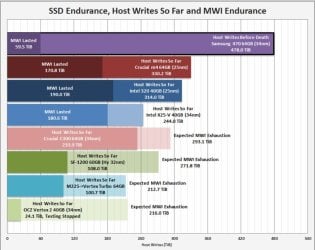
As far as durability goes, xtremesystems did a test with several brands of SSds to see howm many writes they could do before death. I was quite surprised. The first one to die had 525TB written to it. It's a long thread but very intresting. This is one of the charts they had long before the end.
ssd.JPG

Conversion base : 1 TB = 0.90949470177293 TiB
Conversion base : 1 TiB = 1.099511627776 TB
 

My Computers

System One System Two

  • Computer type
    PC/Desktop
    Computer Manufacturer/Model Number
    ALWAYS UNDER CONSTRUCTION
    OS
    Windows 11 Pro
    CPU
    Ryzen 9 5900X
    Motherboard
    Asus X570 Crosshair Viii Hero
    Memory
    32GB G Skill DDR4-3600
    Graphics Card(s)
    EVGA RTX 3080 FTW 3 Ultra
    Sound Card
    On Board/Sennheiser PC37X Headset
    Monitor(s) Displays
    3 X Asus 27"
    Screen Resolution
    2560x1440
    Hard Drives
    2 X 1 TB NVME drives
    PSU
    EVGA 850
    Case
    Phanteks Eclipse P400A
    Cooling
    EVGA 280 AIO
    Keyboard
    Logitech G510s/ Logitech G13
    Mouse
    Logitech G502
    Internet Speed
    24/1
    Antivirus
    ESET/MBAM Pro/SAS Pro
    Browser
    Chrome/ Firefox/ Edge
  • Computer type
    Laptop
    System Manufacturer/Model Number
    Dell 16 Plus
    OS
    Windows 11 Pro
    CPU
    Intel Ultra 9 288V
    Memory
    32 GB LPDDR5X 8533
    Monitor(s) Displays
    16" Mini-LED HDR600 Touch 90 Hz
    Screen Resolution
    2560X1600
    Hard Drives
    1 TB NVME
I'm still amazed that people are still scared to use their SSD for fear they'll wear it out.
 

My Computer

Computer Manufacturer/Model Number
tw33k
OS
Windows 7 Ultimate (x64) SP1
CPU
Intel 3770k 4.6GHz
Motherboard
ASUS Maximus V Formula
Memory
8GB (2x 4GB) Crucial Ballistix
Graphics Card(s)
Sapphire 7950 (1060/1600)
Sound Card
On Board Realtek HD Audio
Monitor(s) Displays
27" Acer B273HU (via HDMI)
Screen Resolution
2048 x 1152
Hard Drives
Crucial M4 128GB
2TB WD Black
1TB Samsung F3 SATA
1TB WD Elite External
2TB WD USB 3.0
PSU
Corsair AX750 Gold
Case
Corsair Obsidian 800DW
Cooling
Corsair H100 (2x AP-121/2x UK-3000 push/pull)
Keyboard
Microsoft Wireless 5000
Mouse
Microsoft Wireless 5000
Internet Speed
5mb/s
Other Info
Logitech z-2300 2.1 speakers
Lamptron FC-5 v2
im not scared! i shoved a corsair force 3 120gb in my gaming pc as my primary boot drive, and had BF3, red orchestra 2 and Skyrim installed on it.

I have about 60gb remaining, but am considering getting a second. As my only other drive in my pc is an aging sata 2 250gb (i say aging.. its never been used, its just old spec'd)

I think the only time ill use a mechanical drive again is for my home server, where obviously large sized drives are needed.
 

My Computer

Computer type
PC/Desktop
Computer Manufacturer/Model Number
Built by badgers!!!
OS
Windows 7 Ultimate x64, & Mac OS X 10.9.2
CPU
Intel Core i5 2500k
Motherboard
Asus P8z68 LE
Memory
Corsair Vengence 8gb 1866mhz
Graphics Card(s)
Nvidia GTX 770 OC
Monitor(s) Displays
2x ASUS LED 22" IPS
Screen Resolution
3840x1080
Hard Drives
240GB Crucial M500 SSD
120gb Corsair Force 3 SSD
1TB Western Digital
PSU
Corsair HX650w Modular
Case
Corsair Air 540
Cooling
Corsair H60 Push/Pull
Keyboard
Corsair K70/ Logitech G27 wheel
Mouse
Saitek R.A.T 9
Internet Speed
Too slow!
Other Info
AMD fusion E350N Home server-Windows Home Server 2011 (also made by badgers!)
2011 Macbook 2.4ghz Core2Duo, 4gb ddr3, 120gb Ocz Vertex SSD
im not scared! i shoved a corsair force 3 120gb in my gaming pc as my primary boot drive, and had BF3, red orchestra 2 and Skyrim installed on it.

I have about 60gb remaining, but am considering getting a second. As my only other drive in my pc is an aging sata 2 250gb (i say aging.. its never been used, its just old spec'd)

I think the only time ill use a mechanical drive again is for my home server, where obviously large sized drives are needed.
One spinner for Macrium or Paragon images is a good idea. (Which ever image software you use)
Even an old IDE in good working order will work for images.
You won't need it often but when you do????

So your 250GB spinner is a good idea for that purpose.
Mike
 

My Computer

Computer Manufacturer/Model Number
Hopalong/ Godzilla
OS
Windows7 Pro 64bit SP-1; Windows XP Pro 32bit
CPU
Intel Core i7-870 Lynnfield 2.93GHz LGA 1156 95W Quad-Core
Motherboard
ASUS P7P55D-E PRO
Memory
8GB@1400MHz Crucial Ballistix DDR3-1600 4x2GB
Graphics Card(s)
ASUS ENGTX460 DirectCU/2DI/1GD5 1GB 256-bit GDDR5
Sound Card
VIA Onboard
Monitor(s) Displays
Asus VS248H-P 24"; Samsung SyncMaster 941BW 19"ws
Screen Resolution
1920x1080; 1440x900
Hard Drives
Samsung 830 120GB SSD
Intel 320 120GB SSD
Western Digital Caviar Black WD7501AALS 750GB 7200 RPM SATA 3.0Gb/s
Western Digital Caviar Black WD6401AALS 640GB 7200 RPM SATA 3.0Gb/s
PSU
COOLER MASTER Silent Pro RS850-AMBAJ3-US 850W Modular
Case
COOLER MASTER HAF 932 RC-932-KKN5-GP Black
Cooling
Scythe "Mugen-2 Rev.B" (2 ScytheKaze-Jyuni PWM fans)
Keyboard
Logitech K-320
Mouse
Kensington
Antivirus
Avast Inernet Suite
Browser
IE 9 ; Chrome
Back
Top