Fragging wonderful: The truth about defragging your SSD

Brink

Administrator
Staff member
Local time
8:34 AM
Messages
74,898
Location
Oklahoma
With smarter file systems and faster disks and PCs, file fragmentation isn’t the performance suck it once was. Older computers had a habit of splitting files and spreading the parts all over your hard drives, but modern ones don’t do this as much. Not even close. That said, a bimonthly pass with a capable defragger can help you maintain peak performance on a heavily used hard drive.

However, solid-state drives, which use flash memory instead of a hard-drive platter to store data, are another story: My tests showed little or no benefit from running a number of disk defragmenters on a heavily used SSD.

Conventional logic dictates that you should never defrag an SSD, because the SSD controller writes data in a scattershot-fashion to multiple NAND chips and locations, using algorithms that only the controller understands. The operating system sees it as a hard drive with sectors, but the data is spread all over the drive by the controller. Defragging these “sectors” is like trying to assemble a jigsaw puzzle blindfolded: You can feel parts of the pattern, but you can’t see the whole picture. In addition, NAND is good for only a few thousand write cycles, so defragging can reduce the SSD’s lifespan by unnecessarily writing data to it.

Despite those arguments, at least four defragging utilities purport to increase SSD performance through optimization: Auslogic’s Disk Defrag Pro, Condusiv’s Diskeeper, Raxco’s PerfectDisk, and SlimCleaner Intelligent Defrag. To understand how these might be of benefit, let’s review a few facts.

Used NAND cells (the parts of flash memory that holds the data) must be erased before they can be written to.

Early SSDs put off erasures, simply marking cells as no longer used when you deleted a file. When fresh cells ran out, having to erase the marked/used cells before rewriting to them slowed performance.

The advent of the TRIM command, which invokes a drive’s built-in garbage collection routines (including erasing unused, previously written cells), solved the problem.

Windows 7 and Windows 8 support the TRIM command.

If you read the documentation used to support most SSD optimization claims, you’ll notice that much of it predates Windows 7 and the TRIM command. Before that, free-space optimization could force an SSD into garbage collection and thereby regain lost performance. But on a modern SSD running with a modern operating system, many of these optimizations are no longer needed.

The issue: When I investigated, no SSD vendor would state unequivocally that the defragging programs would or wouldn’t benefit a modern SSD running on a modern TRIM-supporting operating system. I could find no hard evidence anywhere I looked, so I decided to gather my own....


Read more at: Fragging wonderful: The truth about defragging your SSD | PCWorld
 

My Computer My Computer

At a glance

64-bit Windows 11 Pro for WorkstationsIntel i7-8700K OC'd to 5 GHz64 GB (4x16GB) G.SKILL TridentZ RGB DDR4 3600...ASUS ROG-STRIX-GTX1080TI-O11G-GAMING
Computer type
PC/Desktop
Computer Manufacturer/Model Number
Self built custom
OS
64-bit Windows 11 Pro for Workstations
CPU
Intel i7-8700K OC'd to 5 GHz
Motherboard
ASUS ROG Maximus XI Formula Z390
Memory
64 GB (4x16GB) G.SKILL TridentZ RGB DDR4 3600 MHz
Graphics Card(s)
ASUS ROG-STRIX-GTX1080TI-O11G-GAMING
Sound Card
Integrated
Monitor(s) Displays
2 x Samsung Odyssey G7 27"
Screen Resolution
2560x1440
Hard Drives
1TB Samsung 990 PRO M.2,
4TB Samsung 990 PRO PRO M.2,
TerraMaster F8 SSD Plus NAS
PSU
Seasonic Prime Titanium 850W
Case
Thermaltake Core P3
Cooling
Corsair Hydro H115i
Keyboard
Logitech wireless K800
Mouse
Logitech MX Master 4
Internet Speed
2 Gb/s Download and 100 Mb/s Upload
Antivirus
Malwarebyte Anti-Malware Premium
Browser
Google Chrome
Other Info
Logitech Z625 speaker system,
Logitech BRIO 4K Pro webcam,
HP Color LaserJet Pro MFP M477fdn,
APC SMART-UPS RT 1000 XL - SURT1000XLI,
Galaxy S23 Plus phone
This is the importand conclusion. There is really no need to prematurely wreck your SSD.

From my limited tests, I’m firmly convinced that the tiny difference that even the best SSD defragger makes is not worth reducing the life span of your SSD
 

My Computer My Computer

At a glance

Vista, Windows7, Mint Mate, Zorin, Windows 8from 1.6GHz Duo to i7
Computer Manufacturer/Model Number
HP, Dell, Gateway, Toshiba - 4 laptops and 2 desktops
OS
Vista, Windows7, Mint Mate, Zorin, Windows 8
CPU
from 1.6GHz Duo to i7
Monitor(s) Displays
2x HP w2207
Hard Drives
5x HDD, 7x SSD, 12x Externals
Keyboard
with trackball - no mices
Mouse
Trackball mice
Internet Speed
DSL 6000
I agree with whs, as does Microsoft. Normally Windows will not do a defrag on an SSD.
A defrag will do a massive number of disk writes in a relatively short period of time, far more than would take place with normal computer activity.

Device drivers and software that does direct access to the drive uses logical sector numbers. In a conventional drive there is a direct relationship between these numbers and the order they exist on the drive. In and SSD there is no such direct relationship. In fact, the actual order is essentially unknowable. I can't see how a defrag on an SSD would be of any benefit.
 

My Computer My Computer

At a glance

Windows 7 Pro 64 bitXeon W35208 GBNvidia Geforce 210
Computer type
PC/Desktop
Computer Manufacturer/Model Number
HP
OS
Windows 7 Pro 64 bit
CPU
Xeon W3520
Memory
8 GB
Graphics Card(s)
Nvidia Geforce 210
Nice summary Wolfgang. I have 2 SSDs installed and I'll leave them alone.
 

My Computer My Computer

At a glance

Windows 7x64 Home Premium SP1Intel i7 2600kG.Skill Ripjaws (DDR3-1600) 2x4GBNvidia GeForce GTS 450; Intel HD Graphics 300...
Computer type
PC/Desktop
Computer Manufacturer/Model Number
Own build
OS
Windows 7x64 Home Premium SP1
CPU
Intel i7 2600k
Motherboard
ASUS P8Z68 Deluxe
Memory
G.Skill Ripjaws (DDR3-1600) 2x4GB
Graphics Card(s)
Nvidia GeForce GTS 450; Intel HD Graphics 3000(GT2+)
Monitor(s) Displays
Dell Ultrasharp IPS panel U2311H, Samsung SyncMaster P2350
Screen Resolution
1920x1080
Hard Drives
Samsung 850 Pro SSD 256GB, Samsung SSD 840 120GB, Seagates 1TB Barracuda ST31000528AS x2
PSU
Seasonic M12II 520W
Case
Lian Li Lancool PC-K60
Cooling
Case: 1x120mm, 3x140mm CPU: Hyper 212+
Keyboard
Logitech MK520 (wireless)
Mouse
Logitech MK520
Internet Speed
6-7 Mbps
Antivirus
Norton Security Premium, Malwarebytes on 2 (MSE on 3rd PC)
Browser
FireFox
Other Info
Audio: Logitech Z523 2.1
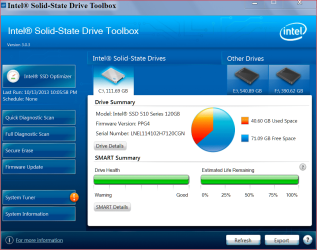
I do it simple. Intel recommends using it's little SSD tool box about once a week to optimize the SSD and that is what I use. I really don't know what it does but things work as they should.

intel tool box 10 14.PNG
 

My Computer My Computer

At a glance

Windows 10 Pro. 64/ version 1709 Windows 7 Pr...Intel i7-6800K @ 4.3Corsair Platinum 16 gig @2400EVGA GTX 1070 OC
Computer type
PC/Desktop
Computer Manufacturer/Model Number
Home made Desktop
OS
Windows 10 Pro. 64/ version 1709 Windows 7 Pro/64
CPU
Intel i7-6800K @ 4.3
Motherboard
ASUS X-99 Deluxe II
Memory
Corsair Platinum 16 gig @2400
Graphics Card(s)
EVGA GTX 1070 OC
Monitor(s) Displays
Asus 27" LED LCD/VE278Q
Screen Resolution
1920-1080 or 1280-720 HDMI
Hard Drives
INTEL SSD 730-240 Gb Sata 3.0/
PSU
EVGA Platium 1200W
Case
Phanteks Luxe Tempered Glass 8 fans/ one radiator
Cooling
XSPC/ Water Cooled CPU
Keyboard
Das 4 Professional
Mouse
Logitech M705/MX Anywhere 2-S
Internet Speed
100 mbits
Antivirus
Microsoft Security Essentials/ Malwarebytes Premium 3.0/ SAS
Browser
I.E. 11 default/Firefox/ ISP Time Warner Cable/Spectrum
Other Info
LG BluRay Burner/
Sound system-KLipsch-THX/
Icy Dock ssd Hot Swap bays.
I do it simple. Intel recommends using it's little SSD tool box about once a week to optimize the SSD and that is what I use. I really don't know what it does but things work as they should.

It only does a sweep with Trim
 

My Computer My Computer

At a glance

Windows Seven Ultimate x64Intel i7 4770K @ 4.5 @1.36vG-Skill TirentX 16Gb @ 2400mhz(SLI) 2 x Asus ENGTX 770 Direct CUII OC
Computer type
PC/Desktop
Computer Manufacturer/Model Number
Custom
OS
Windows Seven Ultimate x64
CPU
Intel i7 4770K @ 4.5 @1.36v
Motherboard
Asus Maximus VI Formula
Memory
G-Skill TirentX 16Gb @ 2400mhz
Graphics Card(s)
(SLI) 2 x Asus ENGTX 770 Direct CUII OC
Sound Card
Onboard
Monitor(s) Displays
Dell Wfp27 & Asus 27'
Screen Resolution
1920x1080
Hard Drives
1 x SSD Corsair Force GT 240Gb
1 x 2 TB WD Black
1 x 3 TB WD
4 x 2 TB RED NAS (RAID5)
PSU
Corsair AX1200i
Case
NZXT Phantom 820 (Mate Black)
Cooling
Corsair H100i push/pull
Keyboard
Logitech G510
Mouse
Logitech G500S
Internet Speed
Videotron Extreme 20MB
Other Info
BOSE 2.1-
Astro Gaming A50 Wireless Headset-
Asus Dark Night Router-
Nostromo N52TE-
NAS QNAP TS-469 Pro 4 x 2TB WD RED NAS (RAID5)-
I do it simple. Intel recommends using it's little SSD tool box about once a week to optimize the SSD and that is what I use. I really don't know what it does but things work as they should.

It only does a sweep with Trim

And I thought Trim was done automatically...
Ie when the pc has nothing better to do.
 

My Computer My Computer

At a glance

Win7 64
OS
Win7 64
As I understand it TRIM marks deleted/unneeded data in a cell and moves the "good data to another, empty cell. Garbage Collection (GC) follows up by erasing the previously marked deleted data. That's what the Intel toolbox/ Samsung Magician does on command.
I also understand emptying the Recycle bin will invoke TRIM, but I haven't confirmed this. As always, I may be full of it. :)
 

My Computer My Computer

At a glance

Windows 7 Ultimate X64 SP1Intel i5-2550K, Differing ~4.4-4.8GHz No buil...16GB G.Skill Sniper 1866MHz @ 2133MHz 2x8GBASUS GTX650TIB-DC2OC-2GD5, (650TI Boost)
Computer type
PC/Desktop
Computer Manufacturer/Model Number
Home Built Desktop By DataTech
OS
Windows 7 Ultimate X64 SP1
CPU
Intel i5-2550K, Differing ~4.4-4.8GHz No built in GPU
Motherboard
ASUS P8Z68-V PRO/GEN3
Memory
16GB G.Skill Sniper 1866MHz @ 2133MHz 2x8GB
Graphics Card(s)
ASUS GTX650TIB-DC2OC-2GD5, (650TI Boost)
Sound Card
Onboard Realtek 5-1
Monitor(s) Displays
Samsung P2570HD
Screen Resolution
1920x1080
Hard Drives
Samsung 840 Pro 256GB SSD for OS, 500GB Seagate Constellation (Enterprise drive) for Data
PSU
Corsair HX650W
Case
Inwin Dragon Rider
Cooling
Hyper 212 EVO w/two Noctua fans, push-pull, @1300 RPM
Keyboard
E-Z Eyes, bright yellow keys with large characters
Mouse
steelseries SENSEI Laser Pro Gaming
Internet Speed
48-51Mbs Mbs down, 11 Mbs up Xfinity Cable
Antivirus
Norton Internet Security 2013
Browser
IE 10, Opera, Pale Moon if needed
Other Info
4 case fans, LG BluRay-RE, ASUS DVD-RW, Mr. Fusion power supply, 1.21 gigawatts.
TRIM gets issued by the OS when it deletes data. TRIM does not moves any "good data" to another cell. It merely tells the SSD that the cells for the deleted data are no longer in use. Garbage collection moves data around to free up blocks /pages.
 

My Computer My Computer

At a glance

Windows 10 Pro. EFI boot partition, full EFI ...i7 4770k 4.4GHz (44-44-43-43 turbo) @ 1.248V16GB (8GBx2) @2200 MHz G.skill Sniper 10-11-1...MSI GTX 970 Gaming 4G
Computer type
PC/Desktop
Computer Manufacturer/Model Number
Home built (GeneO industries)/Model 4
OS
Windows 10 Pro. EFI boot partition, full EFI boot
CPU
i7 4770k 4.4GHz (44-44-43-43 turbo) @ 1.248V
Motherboard
ASUS Maximus VI Hero
Memory
16GB (8GBx2) @2200 MHz G.skill Sniper 10-11-10-30-1, 1.6V
Graphics Card(s)
MSI GTX 970 Gaming 4G
Sound Card
Onboard SupremeFX Audio
Monitor(s) Displays
NEC Spectraview 2490WUXi-SV
Screen Resolution
1920 x 1200
Hard Drives
Samsung 850 Pro 256GB (OS), Samsung 2x 128GB 840 Pro SSD in RAID0, 3x WD Blue 6Gb/s 1TB RAID0, WD 2TB Black external USB 3.0, 2TB WD20EARS Green external USB 3.0, 2x 500GB Seagate and 1 750 GB external USB, 1x 350GB external USB3
PSU
Seasonic X-850 (2012 KM3 model)
Case
Fractal Design Define R4
Cooling
NH-D14, NF-F12, NF-A15; NF-P14, NF-P12,NF-A14, S12A PWM
Keyboard
Cooler Master Storm Quickfire Rapid - Brown
Mouse
Logitech G602
Internet Speed
126.4 Mb/s down, 24.3 Mb/s up
Other Info
USB 3.0 x8 , SATA III x8, eSATA, USB 2.0 x6. Samsung DVD R/W drive.

WEI: CPU 7.8, Memory 7.9, Graphics 7.9, Disk 7.9
OK, thanks Gene, had it backasswards.:o
 

My Computer My Computer

At a glance

Windows 7 Ultimate X64 SP1Intel i5-2550K, Differing ~4.4-4.8GHz No buil...16GB G.Skill Sniper 1866MHz @ 2133MHz 2x8GBASUS GTX650TIB-DC2OC-2GD5, (650TI Boost)
Computer type
PC/Desktop
Computer Manufacturer/Model Number
Home Built Desktop By DataTech
OS
Windows 7 Ultimate X64 SP1
CPU
Intel i5-2550K, Differing ~4.4-4.8GHz No built in GPU
Motherboard
ASUS P8Z68-V PRO/GEN3
Memory
16GB G.Skill Sniper 1866MHz @ 2133MHz 2x8GB
Graphics Card(s)
ASUS GTX650TIB-DC2OC-2GD5, (650TI Boost)
Sound Card
Onboard Realtek 5-1
Monitor(s) Displays
Samsung P2570HD
Screen Resolution
1920x1080
Hard Drives
Samsung 840 Pro 256GB SSD for OS, 500GB Seagate Constellation (Enterprise drive) for Data
PSU
Corsair HX650W
Case
Inwin Dragon Rider
Cooling
Hyper 212 EVO w/two Noctua fans, push-pull, @1300 RPM
Keyboard
E-Z Eyes, bright yellow keys with large characters
Mouse
steelseries SENSEI Laser Pro Gaming
Internet Speed
48-51Mbs Mbs down, 11 Mbs up Xfinity Cable
Antivirus
Norton Internet Security 2013
Browser
IE 10, Opera, Pale Moon if needed
Other Info
4 case fans, LG BluRay-RE, ASUS DVD-RW, Mr. Fusion power supply, 1.21 gigawatts.
I don't touch my SSD and it seams quite happy :)
 

My Computer My Computer

At a glance

Win 7 Pro x64, Win 10 Pro x64, Linux Light x86Core i7 3770KCrucial Ballistix Sport 8GBASUS GeForce GTX 650 Ti
Computer type
PC/Desktop
Computer Manufacturer/Model Number
Home Built
OS
Win 7 Pro x64, Win 10 Pro x64, Linux Light x86
CPU
Core i7 3770K
Motherboard
Gigabyte GA-Z77P-D3
Memory
Crucial Ballistix Sport 8GB
Graphics Card(s)
ASUS GeForce GTX 650 Ti
Sound Card
On board
Monitor(s) Displays
ASUS 22 W/S
Screen Resolution
1920 x 1080
Hard Drives
Intel 320 Series SSD, WD Caviar Black 1TB
PSU
Corsair CX 750w
Case
Black Night
Cooling
120mm fans front/back, Coolermaster Hyper 212 Evo
Keyboard
Razer Blackwidow Expert 2013 Mechanical Keyboard
Mouse
Logitech G300 Gaming Mouse
Internet Speed
20mb Unlimited
Antivirus
ZA Antivirus + Firewall
Browser
Cyberfox
Other Info
Powered USB Hub, External Drives 3 x 1TB, Phone Dock.
Back
Top