Parrotfella
New member
- Local time
- 6:08 AM
- Messages
- 6
Hello.
**EDIT**
It appears, after some googling on my end, that this effect is called ARTIFACTS. They seem to be affecting my gpu on my graphics card. I have never overclocked anything on my graphics card to make this happen...so. Im kinda at a loss here.
I'm not entirely sure if its REALLY a hardware problem, but I think I've got it narrowed down a bit more.
Important to note: video drivers are up to date, as are my chipset drivers(i think...) and the artifacts do NOT occur during startup!
I'm new to these forums and Im sorry for the poor title!
If this thread is incorrectly posted or otherwise poor, please delete it and shoot me a pm to which subtopic it would be better suited for. I have saved the text and I can repost it there.
Before I begin, I would like to say that my issues happened after I moved into my new apartment. My computer skills are adequate, but I'm no genius.
There are many issues, and I am unsure how to diagnose them. I'll try to keep it short.
Essentially, what's being displayed on my monitor looks like junk. Here is a bullet list of things that are wrong.
-> Dead pixels.
They are colored green, red, and they are MOVING. In other words, changing the image on my monitor changes the dead pixel location. Here is a sample image.
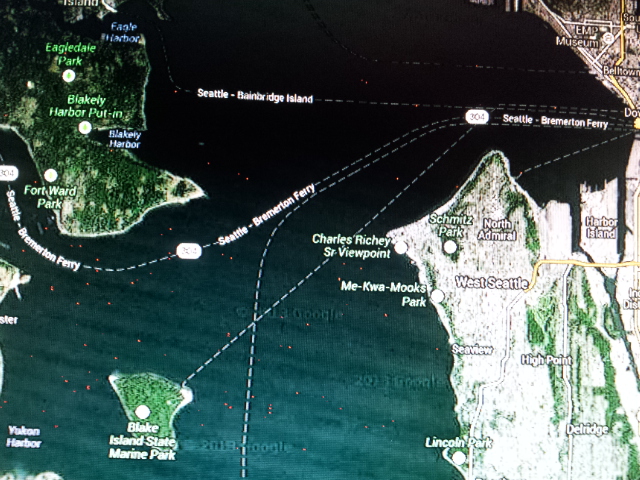
That was taken only a few days ago. This is the same google maps image, several days later, no differences in hardware or anything.
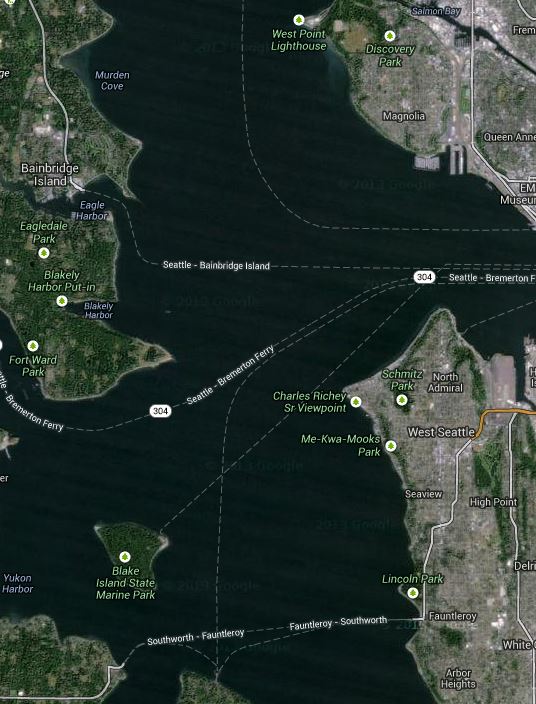
Please note: even viewing this image on your website, uploaded via imgur, I still see the jumping-red pixels.
So on my screen, I see flickering, randomly appearing red pixels over the water on google maps. If I close google maps, the red pixels disappear.
Sometimes, the pixels are green. Sometimes, they appear in netflix videos. Sometimes, they appear within a specific section of a webpage and stay in the same location on the webpage as I scroll up or down
These are my monitors specs: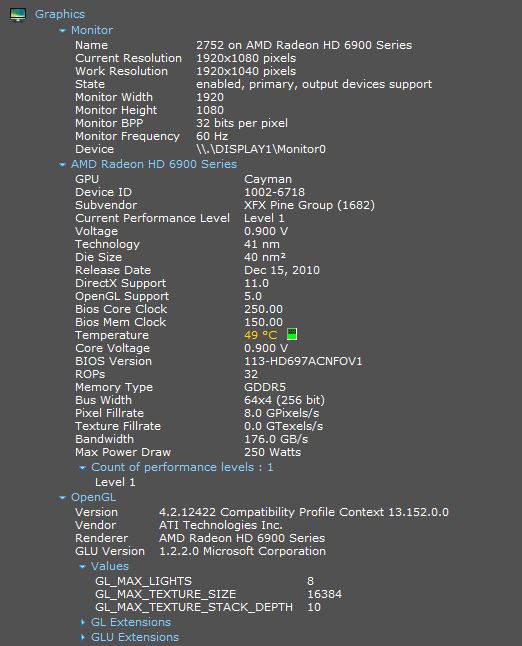
The monitor is set to its native resolution, and everything seems to be working fine according to my computer.
For a couple days, I had a message pop up on startup that a driver was being blocked due to incompatibility. I dont know what the driver was, and the message vanished.
As you can probably see, the image quality of the text is horrible. I was told to try and adjust the ClearType/Font (whatever its called) of my computer and still, no change.
I've even replaced the HDMI cable connected my card to my monitor. No change.
I installed the latest drivers for my graphics card, no change.
Under the catalyst control program, I reset all modifications to default.
To add insult to injury, my background images all suddenly became extremely pix elated and low quality as well.
I really have no idea what this could be. My monitor is still under warranty and I'm returning it as I type this.
----
My personal thoughts, I think its my graphics card... It seems to happen in clusters around certain colors. I have no idea. Either way, I'm really sad. Everything looks blocky, like a badly compressed jpg. Text looks awful. The pixel problem is annoying. And worst of all, I dont even know what the problem is CALLED, so I cant troubleshoot it! (very well, at least)
Any and all help towards fixing this would be greatly appreciated.
**EDIT**
It appears, after some googling on my end, that this effect is called ARTIFACTS. They seem to be affecting my gpu on my graphics card. I have never overclocked anything on my graphics card to make this happen...so. Im kinda at a loss here.
I'm not entirely sure if its REALLY a hardware problem, but I think I've got it narrowed down a bit more.
Important to note: video drivers are up to date, as are my chipset drivers(i think...) and the artifacts do NOT occur during startup!
I'm new to these forums and Im sorry for the poor title!
If this thread is incorrectly posted or otherwise poor, please delete it and shoot me a pm to which subtopic it would be better suited for. I have saved the text and I can repost it there.
Before I begin, I would like to say that my issues happened after I moved into my new apartment. My computer skills are adequate, but I'm no genius.
There are many issues, and I am unsure how to diagnose them. I'll try to keep it short.
Essentially, what's being displayed on my monitor looks like junk. Here is a bullet list of things that are wrong.
-> Dead pixels.
They are colored green, red, and they are MOVING. In other words, changing the image on my monitor changes the dead pixel location. Here is a sample image.
That was taken only a few days ago. This is the same google maps image, several days later, no differences in hardware or anything.
Please note: even viewing this image on your website, uploaded via imgur, I still see the jumping-red pixels.
So on my screen, I see flickering, randomly appearing red pixels over the water on google maps. If I close google maps, the red pixels disappear.
Sometimes, the pixels are green. Sometimes, they appear in netflix videos. Sometimes, they appear within a specific section of a webpage and stay in the same location on the webpage as I scroll up or down
These are my monitors specs:
The monitor is set to its native resolution, and everything seems to be working fine according to my computer.
For a couple days, I had a message pop up on startup that a driver was being blocked due to incompatibility. I dont know what the driver was, and the message vanished.
As you can probably see, the image quality of the text is horrible. I was told to try and adjust the ClearType/Font (whatever its called) of my computer and still, no change.
I've even replaced the HDMI cable connected my card to my monitor. No change.
I installed the latest drivers for my graphics card, no change.
Under the catalyst control program, I reset all modifications to default.
To add insult to injury, my background images all suddenly became extremely pix elated and low quality as well.
I really have no idea what this could be. My monitor is still under warranty and I'm returning it as I type this.
----
My personal thoughts, I think its my graphics card... It seems to happen in clusters around certain colors. I have no idea. Either way, I'm really sad. Everything looks blocky, like a badly compressed jpg. Text looks awful. The pixel problem is annoying. And worst of all, I dont even know what the problem is CALLED, so I cant troubleshoot it! (very well, at least)
Any and all help towards fixing this would be greatly appreciated.
Last edited:
My Computer
At a glance
w7 64bit home premium SP1Intel Core i7 2600K @ 3.40GHz -- sandybridge8.00 GB Dual-Channel DDR3 @ 665MHz (9-9-9-24)2752 (1920x1080@60Hz) AMD Radeon HD 6900 Series
- Computer type
- PC/Desktop
- Computer Manufacturer/Model Number
- Custom Build - Corsair
- OS
- w7 64bit home premium SP1
- CPU
- Intel Core i7 2600K @ 3.40GHz -- sandybridge
- Motherboard
- Gigabyte Technology Co., Ltd. Z68XP-UD3P (Socket 1155)
- Memory
- 8.00 GB Dual-Channel DDR3 @ 665MHz (9-9-9-24)
- Graphics Card(s)
- 2752 (1920x1080@60Hz) AMD Radeon HD 6900 Series
- Hard Drives
- 977GB Seagate ST31000524AS ATA Device (SATA)
59GB Corsair Force 3 SSD ATA Device (SATA-SSD)
- Antivirus
- None
- Browser
- Crome