Should i get an SSD ? [Please Read]

AlanTech

New member
Local time
3:11 PM
Messages
48
Heard quite a few things about SSD's lately but currently dont own one myself, my current Acer OEM PC is age-ing (specs on image below) - everything is stock parts from when Acer built it apart from the PSU that i replaced with another generic brand) Would it be worth me getting say a 120GB SSD for use with this computer ?

551329_10201573762100204_49189517_n.jpg


Also if i should , what model ?

Kind Regards

AlanTech
 

My Computer

Computer type
PC/Desktop
Computer Manufacturer/Model Number
ACER
OS
Windows 7 Home Premium 64bit SP1
CPU
QUAD Q8300 2.5GHZ
Motherboard
ACER EG43M - Gigabyte - http://tinyurl.com/AlanTech
Memory
4GB 399MHZ RAM DDR2 (2x2GB)
Graphics Card(s)
Sapphire Nvidia Geforce GT230 1.5GB DDR2
Hard Drives
SAMSUNG 750GB SATA II
Antivirus
Microsoft Security Essentials and Malwarebytes PRO
Browser
Google Chrome
You can still keep your HDD inside your PC as a storage, and get an SSD for your OS, you can buy any 64gb SSDs (find a cheaper one)
 

My Computer

Computer type
PC/Desktop
Computer Manufacturer/Model Number
ASUS X550ZE
OS
Windows 7 Home Premium 64-BIT
CPU
AMD A8 7200P
Motherboard
N/A
Memory
8GB 1600mhz
Graphics Card(s)
Radeon R5 (APU) + Radeon R5 M230 2GB Dual Graphics
Sound Card
Realtek ALC269 with SonicMaster
Monitor(s) Displays
Laptop Display
Screen Resolution
1920 x 1080 @60hz
Hard Drives
WDC WD50 00LPVX-80V0TT0 (500GB)
PSU
Laptop Charger
Mouse
ARMAGGEDON TEXTRON SCORPION 7
Internet Speed
100 mbps DOWN / 50 mbps UP
Antivirus
Windows Defender
Browser
Mozzila FireFox, Valve Steam in-game internet browser
What RoasterMen said except I would suggest one that is 120-128GB and get good, if not best, quality to ensure reliability. You can always transfer the SSD to a new machine when you decide to upgrade in the future.

I personally prefer the Samsung 840 Pro series (I have a 128GB 840 pro in my desktop machine) although the 840 EVOs (less expensive than the Pros) have been getting good reviews.
 

My Computer

Computer type
PC/Desktop
Computer Manufacturer/Model Number
Custom Build
OS
Win 7 Ultimate 64 bit
CPU
Intel i7-3930K
Motherboard
ASUS P9X79 WS
Memory
Kingston HyperX Genesis 32GB Kit (8x4GB Modules) 1600MHz DDR
Graphics Card(s)
MSI R7850 Twin Frozr 2GD5/OC Radeon HD 7850 2GB 256-bit GDDR
Sound Card
Asus Xonar Essence STX
Monitor(s) Displays
3x Asus VG248QE 24", Vizio 32" TV
Screen Resolution
1920 x 1080, ?
Hard Drives
Samsung 128GB 840 Pro SSD (1),
Samsung 4TB 850 EVO SSDs (4)
Samsung 4TB 850 EVO SSDs (16) external backup drives used in 2.5" hot swap bays in the computer.
PSU
Corsair HX750w
Case
Antec Two Hundred v2 (modified)
Cooling
Cooler Master GeminII S524 120mm (fan replaced with a 140mm)
Keyboard
Logitech G510s
Mouse
Logitech M525 (two in use)
Internet Speed
=< 32Mbps down, 8Mbps up
Antivirus
AVAST!, MBAM, SAS, Spybot S&D (all but MBAM free) Glary Util
Browser
IE11
Other Info
LSI 9211-8i HBA card (8 SATA III ports), 2.5" & 3.5" Hot Swap Bays, HooToo HT-CR001 PCI-E to USB 3.0 Internal Hub + 6 Slot Card Reader, and LG Model CH12LS28 BD-ROM Optical Drive. Also, ScanSnap S1500 ADF duplexing scanner, Canon 9000F flat bed scanner, Corsair SP2500 2.1 speakers, Samsung CLP 415nw laser color printer, Cyberpower PP2200SW UPS
I just received yesterday, the Samsung EVO-120GB for my laptop. It's noticeably faster than the very fast Western Digital Scorpio it replaced. Price, as of today, is $100US.

I remember what a 13GB (no typo, largest available) HDD cost 14 years ago...$200US.
 

My Computer

Computer type
PC/Desktop
Computer Manufacturer/Model Number
Dell Inspiron 660
OS
Windows 7 Home Premium 64bit
CPU
Intel Core i3-3240
Motherboard
Dell 084J0R
Memory
8GB DDR3 SDRAM
Graphics Card(s)
EVGA GeForce GT 620
Sound Card
Intel Panther Point PCH High Definition Audio
Monitor(s) Displays
Acer G205HV
Screen Resolution
1600 x 900
Hard Drives
Sandisk SSD 64GB SDSSDP064G
Seagate HDD 1TB ST1000DM003-1CH162
PSU
Dell 300W
Case
Dell Inspiron
Keyboard
Logitech Wireless K320/B350
Mouse
Microsoft
Internet Speed
25Mbps/4Mbps
Antivirus
Avast
Browser
Mozilla Firefox
Thanks for the responses, on Saturday night i sent a demand to Flubit.com (UK Company that gives you a better price than amazon with no obligation to buy) which takes up to 48 hours for a response, if not ill be buying it where its cheapest :)
 

My Computer

Computer type
PC/Desktop
Computer Manufacturer/Model Number
ACER
OS
Windows 7 Home Premium 64bit SP1
CPU
QUAD Q8300 2.5GHZ
Motherboard
ACER EG43M - Gigabyte - http://tinyurl.com/AlanTech
Memory
4GB 399MHZ RAM DDR2 (2x2GB)
Graphics Card(s)
Sapphire Nvidia Geforce GT230 1.5GB DDR2
Hard Drives
SAMSUNG 750GB SATA II
Antivirus
Microsoft Security Essentials and Malwarebytes PRO
Browser
Google Chrome
Sure, as has been said, an SSD would be helpful to an aging machine. I agree to not to "cheap out" on one. I also have A Samsung 940 Pro and EVO, both 256GB. The Pro is more durable I think but the EVO can be must faster, it can use Rapid Mode with the Samsung Magician software.

You have single channel memory too I notice? It may not be worth it if you're going to upgrade since it's DDR2, but putting in a matched pair of RAM sticks would help you too.
 

My Computer

Computer type
PC/Desktop
Computer Manufacturer/Model Number
Home Built Desktop By DataTech
OS
Windows 7 Ultimate X64 SP1
CPU
Intel i5-2550K, Differing ~4.4-4.8GHz No built in GPU
Motherboard
ASUS P8Z68-V PRO/GEN3
Memory
16GB G.Skill Sniper 1866MHz @ 2133MHz 2x8GB
Graphics Card(s)
ASUS GTX650TIB-DC2OC-2GD5, (650TI Boost)
Sound Card
Onboard Realtek 5-1
Monitor(s) Displays
Samsung P2570HD
Screen Resolution
1920x1080
Hard Drives
Samsung 840 Pro 256GB SSD for OS, 500GB Seagate Constellation (Enterprise drive) for Data
PSU
Corsair HX650W
Case
Inwin Dragon Rider
Cooling
Hyper 212 EVO w/two Noctua fans, push-pull, @1300 RPM
Keyboard
E-Z Eyes, bright yellow keys with large characters
Mouse
steelseries SENSEI Laser Pro Gaming
Internet Speed
48-51Mbs Mbs down, 11 Mbs up Xfinity Cable
Antivirus
Norton Internet Security 2013
Browser
IE 10, Opera, Pale Moon if needed
Other Info
4 case fans, LG BluRay-RE, ASUS DVD-RW, Mr. Fusion power supply, 1.21 gigawatts.
Sure, as has been said, an SSD would be helpful to an aging machine. I agree to not to "cheap out" on one. I also have A Samsung 940 Pro and EVO, both 256GB. The Pro is more durable I think but the EVO can be must faster, it can use Rapid Mode with the Samsung Magician software.

You have single channel memory too I notice? It may not be worth it if you're going to upgrade since it's DDR2, but putting in a matched pair of RAM sticks would help you too.

They are the same ram so not sure why its not dual-channel and so you think its not really worth getting an SSD for this computer then or ? ( I wont be upgrading to a new pc till this PC dies completely)

Kind Regards
 

My Computer

Computer type
PC/Desktop
Computer Manufacturer/Model Number
ACER
OS
Windows 7 Home Premium 64bit SP1
CPU
QUAD Q8300 2.5GHZ
Motherboard
ACER EG43M - Gigabyte - http://tinyurl.com/AlanTech
Memory
4GB 399MHZ RAM DDR2 (2x2GB)
Graphics Card(s)
Sapphire Nvidia Geforce GT230 1.5GB DDR2
Hard Drives
SAMSUNG 750GB SATA II
Antivirus
Microsoft Security Essentials and Malwarebytes PRO
Browser
Google Chrome
No, SSD definitely YES!
RAM, not so much.
Is the RAM two sticks?
 

My Computer

Computer type
PC/Desktop
Computer Manufacturer/Model Number
Home Built Desktop By DataTech
OS
Windows 7 Ultimate X64 SP1
CPU
Intel i5-2550K, Differing ~4.4-4.8GHz No built in GPU
Motherboard
ASUS P8Z68-V PRO/GEN3
Memory
16GB G.Skill Sniper 1866MHz @ 2133MHz 2x8GB
Graphics Card(s)
ASUS GTX650TIB-DC2OC-2GD5, (650TI Boost)
Sound Card
Onboard Realtek 5-1
Monitor(s) Displays
Samsung P2570HD
Screen Resolution
1920x1080
Hard Drives
Samsung 840 Pro 256GB SSD for OS, 500GB Seagate Constellation (Enterprise drive) for Data
PSU
Corsair HX650W
Case
Inwin Dragon Rider
Cooling
Hyper 212 EVO w/two Noctua fans, push-pull, @1300 RPM
Keyboard
E-Z Eyes, bright yellow keys with large characters
Mouse
steelseries SENSEI Laser Pro Gaming
Internet Speed
48-51Mbs Mbs down, 11 Mbs up Xfinity Cable
Antivirus
Norton Internet Security 2013
Browser
IE 10, Opera, Pale Moon if needed
Other Info
4 case fans, LG BluRay-RE, ASUS DVD-RW, Mr. Fusion power supply, 1.21 gigawatts.

My Computer

Computer type
PC/Desktop
Computer Manufacturer/Model Number
ACER
OS
Windows 7 Home Premium 64bit SP1
CPU
QUAD Q8300 2.5GHZ
Motherboard
ACER EG43M - Gigabyte - http://tinyurl.com/AlanTech
Memory
4GB 399MHZ RAM DDR2 (2x2GB)
Graphics Card(s)
Sapphire Nvidia Geforce GT230 1.5GB DDR2
Hard Drives
SAMSUNG 750GB SATA II
Antivirus
Microsoft Security Essentials and Malwarebytes PRO
Browser
Google Chrome
Odd why Speccy shows single channel then. go ahead and get the SSD and enjoy it. ;)
 

My Computer

Computer type
PC/Desktop
Computer Manufacturer/Model Number
Home Built Desktop By DataTech
OS
Windows 7 Ultimate X64 SP1
CPU
Intel i5-2550K, Differing ~4.4-4.8GHz No built in GPU
Motherboard
ASUS P8Z68-V PRO/GEN3
Memory
16GB G.Skill Sniper 1866MHz @ 2133MHz 2x8GB
Graphics Card(s)
ASUS GTX650TIB-DC2OC-2GD5, (650TI Boost)
Sound Card
Onboard Realtek 5-1
Monitor(s) Displays
Samsung P2570HD
Screen Resolution
1920x1080
Hard Drives
Samsung 840 Pro 256GB SSD for OS, 500GB Seagate Constellation (Enterprise drive) for Data
PSU
Corsair HX650W
Case
Inwin Dragon Rider
Cooling
Hyper 212 EVO w/two Noctua fans, push-pull, @1300 RPM
Keyboard
E-Z Eyes, bright yellow keys with large characters
Mouse
steelseries SENSEI Laser Pro Gaming
Internet Speed
48-51Mbs Mbs down, 11 Mbs up Xfinity Cable
Antivirus
Norton Internet Security 2013
Browser
IE 10, Opera, Pale Moon if needed
Other Info
4 case fans, LG BluRay-RE, ASUS DVD-RW, Mr. Fusion power supply, 1.21 gigawatts.

My Computer

Computer type
PC/Desktop
Computer Manufacturer/Model Number
ACER
OS
Windows 7 Home Premium 64bit SP1
CPU
QUAD Q8300 2.5GHZ
Motherboard
ACER EG43M - Gigabyte - http://tinyurl.com/AlanTech
Memory
4GB 399MHZ RAM DDR2 (2x2GB)
Graphics Card(s)
Sapphire Nvidia Geforce GT230 1.5GB DDR2
Hard Drives
SAMSUNG 750GB SATA II
Antivirus
Microsoft Security Essentials and Malwarebytes PRO
Browser
Google Chrome
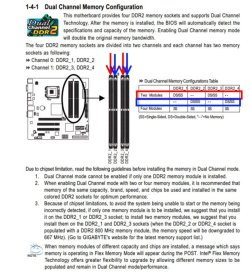
I may have figured it out. The two stick may be in the wrong slots, see the snip from your manual. They should be in either the slots I marked in red or the ones in blue.

Capture.JPG
 

My Computer

Computer type
PC/Desktop
Computer Manufacturer/Model Number
Home Built Desktop By DataTech
OS
Windows 7 Ultimate X64 SP1
CPU
Intel i5-2550K, Differing ~4.4-4.8GHz No built in GPU
Motherboard
ASUS P8Z68-V PRO/GEN3
Memory
16GB G.Skill Sniper 1866MHz @ 2133MHz 2x8GB
Graphics Card(s)
ASUS GTX650TIB-DC2OC-2GD5, (650TI Boost)
Sound Card
Onboard Realtek 5-1
Monitor(s) Displays
Samsung P2570HD
Screen Resolution
1920x1080
Hard Drives
Samsung 840 Pro 256GB SSD for OS, 500GB Seagate Constellation (Enterprise drive) for Data
PSU
Corsair HX650W
Case
Inwin Dragon Rider
Cooling
Hyper 212 EVO w/two Noctua fans, push-pull, @1300 RPM
Keyboard
E-Z Eyes, bright yellow keys with large characters
Mouse
steelseries SENSEI Laser Pro Gaming
Internet Speed
48-51Mbs Mbs down, 11 Mbs up Xfinity Cable
Antivirus
Norton Internet Security 2013
Browser
IE 10, Opera, Pale Moon if needed
Other Info
4 case fans, LG BluRay-RE, ASUS DVD-RW, Mr. Fusion power supply, 1.21 gigawatts.
I may have figured it out. The two stick may be in the wrong slots, see the snip from your manual. They should be in either the slots I marked in red or the ones in blue.

Thatll be why then haha :D
 

My Computer

Computer type
PC/Desktop
Computer Manufacturer/Model Number
ACER
OS
Windows 7 Home Premium 64bit SP1
CPU
QUAD Q8300 2.5GHZ
Motherboard
ACER EG43M - Gigabyte - http://tinyurl.com/AlanTech
Memory
4GB 399MHZ RAM DDR2 (2x2GB)
Graphics Card(s)
Sapphire Nvidia Geforce GT230 1.5GB DDR2
Hard Drives
SAMSUNG 750GB SATA II
Antivirus
Microsoft Security Essentials and Malwarebytes PRO
Browser
Google Chrome
I find it intuitive to install RAM next to each other, board makers have other ways though.
 

My Computer

Computer type
PC/Desktop
Computer Manufacturer/Model Number
Home Built Desktop By DataTech
OS
Windows 7 Ultimate X64 SP1
CPU
Intel i5-2550K, Differing ~4.4-4.8GHz No built in GPU
Motherboard
ASUS P8Z68-V PRO/GEN3
Memory
16GB G.Skill Sniper 1866MHz @ 2133MHz 2x8GB
Graphics Card(s)
ASUS GTX650TIB-DC2OC-2GD5, (650TI Boost)
Sound Card
Onboard Realtek 5-1
Monitor(s) Displays
Samsung P2570HD
Screen Resolution
1920x1080
Hard Drives
Samsung 840 Pro 256GB SSD for OS, 500GB Seagate Constellation (Enterprise drive) for Data
PSU
Corsair HX650W
Case
Inwin Dragon Rider
Cooling
Hyper 212 EVO w/two Noctua fans, push-pull, @1300 RPM
Keyboard
E-Z Eyes, bright yellow keys with large characters
Mouse
steelseries SENSEI Laser Pro Gaming
Internet Speed
48-51Mbs Mbs down, 11 Mbs up Xfinity Cable
Antivirus
Norton Internet Security 2013
Browser
IE 10, Opera, Pale Moon if needed
Other Info
4 case fans, LG BluRay-RE, ASUS DVD-RW, Mr. Fusion power supply, 1.21 gigawatts.
I find it intuitive to install RAM next to each other, board makers have other ways though.

Yeah it makes perfect sense for them to be next to each other , cant wait for my SSD now , never had an SSD before , anything i should know ? I heard stuff about setting them up in a different mode like AHCI and setting them into RAID0 etc to get the best performance out of them which im confused about
 

My Computer

Computer type
PC/Desktop
Computer Manufacturer/Model Number
ACER
OS
Windows 7 Home Premium 64bit SP1
CPU
QUAD Q8300 2.5GHZ
Motherboard
ACER EG43M - Gigabyte - http://tinyurl.com/AlanTech
Memory
4GB 399MHZ RAM DDR2 (2x2GB)
Graphics Card(s)
Sapphire Nvidia Geforce GT230 1.5GB DDR2
Hard Drives
SAMSUNG 750GB SATA II
Antivirus
Microsoft Security Essentials and Malwarebytes PRO
Browser
Google Chrome
My main advice is to do a fresh install to get the most from it. Also it should be the only drive connected during the install or the boot manager can end up on a different drive. Here's some tips.
http://www.sevenforums.com/tutorials/91339-ssd-hdd-optimize-windows-reinstallation.html#post787192

http://www.sevenforums.com/tutorials/70822-ssd-tweaks-optimizations-windows-7-a.html

If you decide to keep your current OS:

http://www.sevenforums.com/tutorials/149969-ssd-install-transfer-operating-system.html
 

My Computer

Computer type
PC/Desktop
Computer Manufacturer/Model Number
Home Built Desktop By DataTech
OS
Windows 7 Ultimate X64 SP1
CPU
Intel i5-2550K, Differing ~4.4-4.8GHz No built in GPU
Motherboard
ASUS P8Z68-V PRO/GEN3
Memory
16GB G.Skill Sniper 1866MHz @ 2133MHz 2x8GB
Graphics Card(s)
ASUS GTX650TIB-DC2OC-2GD5, (650TI Boost)
Sound Card
Onboard Realtek 5-1
Monitor(s) Displays
Samsung P2570HD
Screen Resolution
1920x1080
Hard Drives
Samsung 840 Pro 256GB SSD for OS, 500GB Seagate Constellation (Enterprise drive) for Data
PSU
Corsair HX650W
Case
Inwin Dragon Rider
Cooling
Hyper 212 EVO w/two Noctua fans, push-pull, @1300 RPM
Keyboard
E-Z Eyes, bright yellow keys with large characters
Mouse
steelseries SENSEI Laser Pro Gaming
Internet Speed
48-51Mbs Mbs down, 11 Mbs up Xfinity Cable
Antivirus
Norton Internet Security 2013
Browser
IE 10, Opera, Pale Moon if needed
Other Info
4 case fans, LG BluRay-RE, ASUS DVD-RW, Mr. Fusion power supply, 1.21 gigawatts.
My main advice is to do a fresh install to get the most from it. Also it should be the only drive connected during the install or the boot manager can end up on a different drive. Here's some tips.
http://www.sevenforums.com/tutorials/91339-ssd-hdd-optimize-windows-reinstallation.html#post787192

http://www.sevenforums.com/tutorials/70822-ssd-tweaks-optimizations-windows-7-a.html

If you decide to keep your current OS:

http://www.sevenforums.com/tutorials/149969-ssd-install-transfer-operating-system.html

Thanks for the links , just had a look at my mobo manual and apparently my mobo only has SATA 3/GBS ports and SATA II , would that greatly effect the performance of an SSD ?
 

My Computer

Computer type
PC/Desktop
Computer Manufacturer/Model Number
ACER
OS
Windows 7 Home Premium 64bit SP1
CPU
QUAD Q8300 2.5GHZ
Motherboard
ACER EG43M - Gigabyte - http://tinyurl.com/AlanTech
Memory
4GB 399MHZ RAM DDR2 (2x2GB)
Graphics Card(s)
Sapphire Nvidia Geforce GT230 1.5GB DDR2
Hard Drives
SAMSUNG 750GB SATA II
Antivirus
Microsoft Security Essentials and Malwarebytes PRO
Browser
Google Chrome
It's not likely you'd notice a difference except in a benchmark. Compared to your current setup you should see a big performance boost. The SSDs are backwards compatible to SATA 3Gbs.
 

My Computer

Computer type
PC/Desktop
Computer Manufacturer/Model Number
Home Built Desktop By DataTech
OS
Windows 7 Ultimate X64 SP1
CPU
Intel i5-2550K, Differing ~4.4-4.8GHz No built in GPU
Motherboard
ASUS P8Z68-V PRO/GEN3
Memory
16GB G.Skill Sniper 1866MHz @ 2133MHz 2x8GB
Graphics Card(s)
ASUS GTX650TIB-DC2OC-2GD5, (650TI Boost)
Sound Card
Onboard Realtek 5-1
Monitor(s) Displays
Samsung P2570HD
Screen Resolution
1920x1080
Hard Drives
Samsung 840 Pro 256GB SSD for OS, 500GB Seagate Constellation (Enterprise drive) for Data
PSU
Corsair HX650W
Case
Inwin Dragon Rider
Cooling
Hyper 212 EVO w/two Noctua fans, push-pull, @1300 RPM
Keyboard
E-Z Eyes, bright yellow keys with large characters
Mouse
steelseries SENSEI Laser Pro Gaming
Internet Speed
48-51Mbs Mbs down, 11 Mbs up Xfinity Cable
Antivirus
Norton Internet Security 2013
Browser
IE 10, Opera, Pale Moon if needed
Other Info
4 case fans, LG BluRay-RE, ASUS DVD-RW, Mr. Fusion power supply, 1.21 gigawatts.
It's not likely you'd notice a difference except in a benchmark. Compared to your current setup you should see a big performance boost. The SSDs are backwards compatible to SATA 3Gbs.

So running it on SATA II and on a 3/GBPS port i should still feel a big difference yeah ?
 

My Computer

Computer type
PC/Desktop
Computer Manufacturer/Model Number
ACER
OS
Windows 7 Home Premium 64bit SP1
CPU
QUAD Q8300 2.5GHZ
Motherboard
ACER EG43M - Gigabyte - http://tinyurl.com/AlanTech
Memory
4GB 399MHZ RAM DDR2 (2x2GB)
Graphics Card(s)
Sapphire Nvidia Geforce GT230 1.5GB DDR2
Hard Drives
SAMSUNG 750GB SATA II
Antivirus
Microsoft Security Essentials and Malwarebytes PRO
Browser
Google Chrome
Yes, definitely so. Since you have Intel be sure to check the Gigabyte support page for your board for any updated Intel storage driver (iastor.sys).
 

My Computer

Computer type
PC/Desktop
Computer Manufacturer/Model Number
Home Built Desktop By DataTech
OS
Windows 7 Ultimate X64 SP1
CPU
Intel i5-2550K, Differing ~4.4-4.8GHz No built in GPU
Motherboard
ASUS P8Z68-V PRO/GEN3
Memory
16GB G.Skill Sniper 1866MHz @ 2133MHz 2x8GB
Graphics Card(s)
ASUS GTX650TIB-DC2OC-2GD5, (650TI Boost)
Sound Card
Onboard Realtek 5-1
Monitor(s) Displays
Samsung P2570HD
Screen Resolution
1920x1080
Hard Drives
Samsung 840 Pro 256GB SSD for OS, 500GB Seagate Constellation (Enterprise drive) for Data
PSU
Corsair HX650W
Case
Inwin Dragon Rider
Cooling
Hyper 212 EVO w/two Noctua fans, push-pull, @1300 RPM
Keyboard
E-Z Eyes, bright yellow keys with large characters
Mouse
steelseries SENSEI Laser Pro Gaming
Internet Speed
48-51Mbs Mbs down, 11 Mbs up Xfinity Cable
Antivirus
Norton Internet Security 2013
Browser
IE 10, Opera, Pale Moon if needed
Other Info
4 case fans, LG BluRay-RE, ASUS DVD-RW, Mr. Fusion power supply, 1.21 gigawatts.
Back
Top