Windows 7 default in BIOS after 30 sec when i boot PC

eurosport360

New member
Local time
1:41 PM
Messages
26
Hello to all
First off, Windows 7 is very cool; I might use it more than vista now that I got internet for it, but that will have to wait for a month or two. My first question is: when I boot up my comp, and I have to pick either vista or W7 (I have W7 on another partition), I usually leave the room while my comp is booting, so after 30 seconds the BIOS picks Windows 7 as the default OS because its first. I would really like to boot up my pc while doing something else, and I would love for the BIOS to pick Vista after 30 seconds instead of W7 because I use Vista for games and such. Is there some way of doing that or do I have to sit around throughout the start up and manually pick Vista?

My second question seems a little picky or over the edge, but when I boot up my comp and have to pick an OS, it prints "Windows 7" while underneath it it prints out "Microsoft Windows Vista". Is there some way to add 'Microsoft' in front of Windows 7 when Im picking in the BIOS? It doesn't look as good without the Microsoft.

Thanks
 

My Computer My Computer

Computer Manufacturer/Model Number
HP Pavilion M9350F
OS
Vista x64 | Windows 7 Ultimate x64 build 7000
CPU
AMD Phenom X4 9850 @ 2500 MHz
Motherboard
PEGATRON CORPORATION VIOLA
Memory
6144 MB DDR2 (6gigs)
Graphics Card(s)
NVIDIA Geforce 9800 GT 512 MB
Sound Card
intergrated
Monitor(s) Displays
SONY SDM-HS94P - 19 inches
Screen Resolution
1280x1024
Hard Drives
1x 750GB SATA 7200RPM
PSU
at least 450W
Case
Stock
Cooling
Stock
Keyboard
Logitech
Mouse
Logitech
Internet Speed
54 Mbps
sorry, just found tutorial on how to change default OS, can anyone answer second question?
 

My Computer My Computer

Computer Manufacturer/Model Number
HP Pavilion M9350F
OS
Vista x64 | Windows 7 Ultimate x64 build 7000
CPU
AMD Phenom X4 9850 @ 2500 MHz
Motherboard
PEGATRON CORPORATION VIOLA
Memory
6144 MB DDR2 (6gigs)
Graphics Card(s)
NVIDIA Geforce 9800 GT 512 MB
Sound Card
intergrated
Monitor(s) Displays
SONY SDM-HS94P - 19 inches
Screen Resolution
1280x1024
Hard Drives
1x 750GB SATA 7200RPM
PSU
at least 450W
Case
Stock
Cooling
Stock
Keyboard
Logitech
Mouse
Logitech
Internet Speed
54 Mbps
Hello eurosport360.


You can change the default OS in msconfig; you may have some luck with the second question using EasyBCD, I haven't tried it myself.

Please post back with the outcome, as I'm interested if you can.


Later :shock: Ted
 

My Computer My Computer

Computer Manufacturer/Model Number
* BFK Customs *
OS
W 7 64-bit Ultimate
CPU
Intel Q9550 Yorkfield
Motherboard
ASUS P5Q Pro
Memory
8GB Dominator 8500C5D
Graphics Card(s)
ATI : XFX 5870
Sound Card
Realtek HD Audio 7-1
Monitor(s) Displays
1x 47" LCD HDMI & 3x 26" LCD HDMI
Screen Resolution
1920x1080P & 1920x1200
Hard Drives
1x 80GB Intel X25-M G2 SSD : 1x 500GB & 1x 640GB WD Caviar Black(s)
PSU
Corsair 620HX
Case
Cooler Master RC-690
Cooling
Tuniq Tower 120, 2x 140mm and 3x 120mm case fans
Keyboard
Microsoft 500
Mouse
Razer Diamondback 3G
Internet Speed
14 Mb/s
Other Info
1x Koutech 3Gb/s SATA HDD Hot Swap Rack
or to do it the manual way:

Open CMD with administrator rights

type :

bcdedit {enter}

Find your Windows 7 Installation, it should look something like:


Code:
Windows Boot Loader
-------------------
identifier              {4c218259-e04b-11dd-b760-00195b61617a}
device                  partition=C:
path                    \Windows\system32\winload.exe
description             Windows 7 Beta 32bit
locale                  en-US
inherit                 {bootloadersettings}
osdevice                partition=C:
systemroot              \Windows
resumeobject            {4c218259-e04b-11dd-b760-00195b61617a}nx                      OptIn

Next to identifier above, you'll find your Windows 7 UUID. So now type:
note: change my UUID in {} BELOW with yours.

bcdedit /set {4c218259-e04b-11dd-b760-00195b61617a} description "Microsoft Windows 7"
 

My Computer My Computer

Computer Manufacturer/Model Number
ENIAC
OS
Windows 7 RC 7100 32bit/64bit
CPU
Intel Core2Duo E4500 2.20 GHz
Motherboard
ASUS P5LD2-X/1333
Memory
2x1GB Kinsgston DDR2 800MHz
Graphics Card(s)
Nvidia 8500GT
Sound Card
Onboard High Definition Audio Device
Monitor(s) Displays
Sony Bravia 42"
Case
LINKW 2222
Cooling
Standard Intel
Keyboard
Some cheap one
Mouse
Microsoft Intellimouse something
Internet Speed
24MBps ADSL
Thanks limneos; I'm going to give this a go myself.


Later ;) Ted
 

My Computer My Computer

Computer Manufacturer/Model Number
* BFK Customs *
OS
W 7 64-bit Ultimate
CPU
Intel Q9550 Yorkfield
Motherboard
ASUS P5Q Pro
Memory
8GB Dominator 8500C5D
Graphics Card(s)
ATI : XFX 5870
Sound Card
Realtek HD Audio 7-1
Monitor(s) Displays
1x 47" LCD HDMI & 3x 26" LCD HDMI
Screen Resolution
1920x1080P & 1920x1200
Hard Drives
1x 80GB Intel X25-M G2 SSD : 1x 500GB & 1x 640GB WD Caviar Black(s)
PSU
Corsair 620HX
Case
Cooler Master RC-690
Cooling
Tuniq Tower 120, 2x 140mm and 3x 120mm case fans
Keyboard
Microsoft 500
Mouse
Razer Diamondback 3G
Internet Speed
14 Mb/s
Other Info
1x Koutech 3Gb/s SATA HDD Hot Swap Rack
Thank you so much bare foot kid, very easy to do with that app
Capture.JPG

btw limneos, your method works fine too, I think I remember doing that once before, but I didn't know this program^^ was so easy to mess around with stuff, thanks anyways.
 

My Computer My Computer

Computer Manufacturer/Model Number
HP Pavilion M9350F
OS
Vista x64 | Windows 7 Ultimate x64 build 7000
CPU
AMD Phenom X4 9850 @ 2500 MHz
Motherboard
PEGATRON CORPORATION VIOLA
Memory
6144 MB DDR2 (6gigs)
Graphics Card(s)
NVIDIA Geforce 9800 GT 512 MB
Sound Card
intergrated
Monitor(s) Displays
SONY SDM-HS94P - 19 inches
Screen Resolution
1280x1024
Hard Drives
1x 750GB SATA 7200RPM
PSU
at least 450W
Case
Stock
Cooling
Stock
Keyboard
Logitech
Mouse
Logitech
Internet Speed
54 Mbps

My Computer My Computer

Computer Manufacturer/Model Number
Dell XPS420
OS
Vista Ult 64 bit Seven Ult RTM x64
CPU
Intel Core2 Quad Q6600 2.40 gigahertz
Memory
Crucial Ballistix 4x2GB PC2 6400
Graphics Card(s)
NVIDIA GeForce 8600 GTS 256 MB
Sound Card
Creative SB X-Fi audio
Monitor(s) Displays
HP w2207 + HPvs15
Screen Resolution
1680x1050 + 1024x768
Hard Drives
2-WD5000AAKS-500 GB
WD5000AAV-500 GB external
Keyboard
Microsoft Comfort Curve
Mouse
MX Revolution
Other Info
Wacom Intuos 2 Graphics Tablet
Experience Index=5.5
Hello eurosport360.


I'm pleased you've found a solution that worked for you. EasyBCD is a piece of cake.

Thanks limneos!


Later ;) Ted
 

My Computer My Computer

Computer Manufacturer/Model Number
* BFK Customs *
OS
W 7 64-bit Ultimate
CPU
Intel Q9550 Yorkfield
Motherboard
ASUS P5Q Pro
Memory
8GB Dominator 8500C5D
Graphics Card(s)
ATI : XFX 5870
Sound Card
Realtek HD Audio 7-1
Monitor(s) Displays
1x 47" LCD HDMI & 3x 26" LCD HDMI
Screen Resolution
1920x1080P & 1920x1200
Hard Drives
1x 80GB Intel X25-M G2 SSD : 1x 500GB & 1x 640GB WD Caviar Black(s)
PSU
Corsair 620HX
Case
Cooler Master RC-690
Cooling
Tuniq Tower 120, 2x 140mm and 3x 120mm case fans
Keyboard
Microsoft 500
Mouse
Razer Diamondback 3G
Internet Speed
14 Mb/s
Other Info
1x Koutech 3Gb/s SATA HDD Hot Swap Rack
Hey limneos; you know you're making me want to learn bcdedit with all your tips about it.

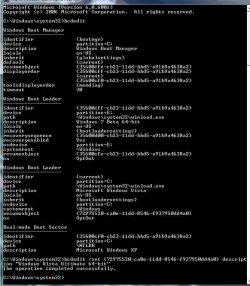
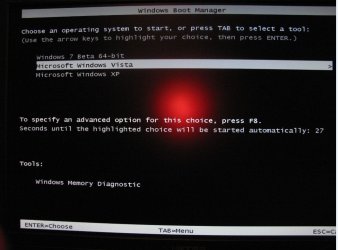
I've been able to change the Windows 7 boot entry but I've tried twice to change the Vista entry and both times I get "the operation completed successfully" and nothing changes at the boot menu. See pics below.

Thank you for your time.

Command.JPG ...Boot Menu.JPG


Later ;) Ted
 

My Computer My Computer

Computer Manufacturer/Model Number
* BFK Customs *
OS
W 7 64-bit Ultimate
CPU
Intel Q9550 Yorkfield
Motherboard
ASUS P5Q Pro
Memory
8GB Dominator 8500C5D
Graphics Card(s)
ATI : XFX 5870
Sound Card
Realtek HD Audio 7-1
Monitor(s) Displays
1x 47" LCD HDMI & 3x 26" LCD HDMI
Screen Resolution
1920x1080P & 1920x1200
Hard Drives
1x 80GB Intel X25-M G2 SSD : 1x 500GB & 1x 640GB WD Caviar Black(s)
PSU
Corsair 620HX
Case
Cooler Master RC-690
Cooling
Tuniq Tower 120, 2x 140mm and 3x 120mm case fans
Keyboard
Microsoft 500
Mouse
Razer Diamondback 3G
Internet Speed
14 Mb/s
Other Info
1x Koutech 3Gb/s SATA HDD Hot Swap Rack
Hi Ted,

try this:

bcdedit /set {current} description "Windows Vista Ultimate 64 bit"

Hope it helps

SIW2
 

My Computers My Computers

System One System Two

  • Computer type
    PC/Desktop
    OS
    7 X64
    CPU
    i5 8400
    Motherboard
    gigabyte b365m ds3h
    Memory
    2x8gb 3200mhz
    Hard Drives
    various
    PSU
    pure power 11 400w cm
    Case
    Coolermaster
    Cooling
    cryorig m9i
  • Computer type
    PC/Desktop
    OS
    7x64
    CPU
    g5400
    Motherboard
    ga b365m ds3h
    Memory
    8gb ddr4 2400
    PSU
    xfx pro 450w
try this:

bcdedit /set {current} description "Windows Vista Ultimate 64 bit"

Hope it helps

SIW2


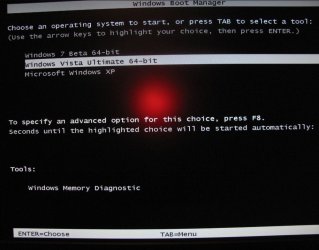
Hello SIW2, cool, that did it! Thanks! (yes, that was the "identifier")

Boot Menu2.JPG


Later :) Ted
 

My Computer My Computer

Computer Manufacturer/Model Number
* BFK Customs *
OS
W 7 64-bit Ultimate
CPU
Intel Q9550 Yorkfield
Motherboard
ASUS P5Q Pro
Memory
8GB Dominator 8500C5D
Graphics Card(s)
ATI : XFX 5870
Sound Card
Realtek HD Audio 7-1
Monitor(s) Displays
1x 47" LCD HDMI & 3x 26" LCD HDMI
Screen Resolution
1920x1080P & 1920x1200
Hard Drives
1x 80GB Intel X25-M G2 SSD : 1x 500GB & 1x 640GB WD Caviar Black(s)
PSU
Corsair 620HX
Case
Cooler Master RC-690
Cooling
Tuniq Tower 120, 2x 140mm and 3x 120mm case fans
Keyboard
Microsoft 500
Mouse
Razer Diamondback 3G
Internet Speed
14 Mb/s
Other Info
1x Koutech 3Gb/s SATA HDD Hot Swap Rack
Glad you had it sorted out, Barefootkit.

Bcdedit is really powerful, it's only problem is that it cannot boot via the bootsector written on the disk or partition, it needs a boot loader file to do that, unlike GRUB or others.

Bcdedit edits a file called bcd , which is currently located in the hidden partition under \boot\bcd.

By typing just bcdedit to list you entries, you see next to the idenfiers their UUIDs in {}.

The standard identifiers are explained below:

{bootmgr} = the boot manager
{current} = the OS you selected to boot at startup.
{default} = the default OS selected to boot the PC.
{ntldr} = Windows Legacy OS Loader (for windows xp)

there are others like {memdiag} or {ramdisk} but they can't be of much use.


IMPORTANT: make a backup of your bcd file first. To do that, type:

bcdedit /export C:\SAVEDBCD

This will create a file c:\savebcd which is your boot entry backup.
If you mess up, you can always undo changes by:

bcdedit /import c:\savedbcd


Now to see how we can control the above entries, here are some examples:

bcdedit /set {current} description "My edited Windows Boot Entry"
This changes the title of the boot menu entry {current}

bcdedit /set {ntldr} device partition=E:
This tells bcd that windows xp partition is on drive E:

bcdedit /set {ntldr} path \ntldr
this tells bcd that the ntldr file which is the winxp bootloader is on root folder \ (of drive e: )

bcdedit /displayorder {ntldr} /addfirst
this places winxp as the first (default) OS on the menu list.

bcdedit /displayorder {33342343-3424-2342342342-2344} /addlast
This tells bcd that the boot entry with UUID 3334... should be the last entry on the menu.

You can copy your existing VISTA or W7 boot entry to another identical. Then you can change settings on the new entry to experiment. You will always have the first entry available, so it's safe.

bcdedit /copy {current} /d "New boot entry I just copied!"
this will give you a line:
The entry was successfully copied to {4c21825f-e04b-11dd-b760-00195b61617a}.

"/d" means "new description to give:"...

The {4c21825f-e04b-11dd-b760-00195b61617a} is the UUID of the new entry that the system just created. Yours will be different than mine! This is its identifier and you should use this to address that entry. Example:

bcdedit /set {4c21825f-e04b-11dd-b760-00195b61617a} numpoc 2
This adds the 2 CPU Core support during boot, like you do in msconfig.

bcdedit /deletevalue {4c21825f-e04b-11dd-b760-00195b61617a} numproc
This deletes the numproc parameter from entry {4c21825f....}

You can always type just bcdedit to see your current settings.

Now that we've learnt a few things, let's see how we could move the BOOT LOADER from the hidden partition to drive C: , and delete the hidden partition completely!!!

1. Assign a drive letter to your hidden partition, e.g. E:

2. Copy all of its contents to the root of C: (including hidden files! -> Folder options , Show hidden files and folders, and uncheck "Hide protected operating system files". We choose copy "here" and not "move" , for security reasons. If it works, we can then delete them.

3. Tell the {bootmgr} entry that C: is the new partition, instead of the hidden one on which it looks right now.
bcdedit /set {bootmgr} device partition=C:

4. That's it. If you copied the boot files from your hidden partition, which you unhide first, to C: (including the \bootmgr file), you should boot now having C: as you only needed drive to boot. You can then delete the extra 200MB partition completely.

Final note: BCDEDIT works from installation boot dvd too. If you mess up with a setting and you cannot boot, just boot from DVD and enter Repair Computer, then go to command prompt and there you go. You can play again with bcdedit to restore your system back.


edit: You gave me the idea and I just posted this as a turotial.
http://www.sevenforums.com/tutorials/2676-bcdedit-how-use.html?ltr=B
 
Last edited:

My Computer My Computer

Computer Manufacturer/Model Number
ENIAC
OS
Windows 7 RC 7100 32bit/64bit
CPU
Intel Core2Duo E4500 2.20 GHz
Motherboard
ASUS P5LD2-X/1333
Memory
2x1GB Kinsgston DDR2 800MHz
Graphics Card(s)
Nvidia 8500GT
Sound Card
Onboard High Definition Audio Device
Monitor(s) Displays
Sony Bravia 42"
Case
LINKW 2222
Cooling
Standard Intel
Keyboard
Some cheap one
Mouse
Microsoft Intellimouse something
Internet Speed
24MBps ADSL
I've seen too much bcdedit since I screwed up my MBR twice :p
 

My Computer My Computer

Computer Manufacturer/Model Number
Dell Vostro 1510
OS
Windows 7 Build 7100 32-bit, Windows Vista 32-bit
CPU
Intel Core Duo T8100 2,1GHz
Memory
3GB
Graphics Card(s)
NVIDIA GeForce 8400M GS
Screen Resolution
1440x900
Hard Drives
250GB
Thanks limneos. The tutorial looks nice. Glad to know more about this.

Gary
 

My Computer My Computer

Computer Manufacturer/Model Number
Dell XPS420
OS
Vista Ult 64 bit Seven Ult RTM x64
CPU
Intel Core2 Quad Q6600 2.40 gigahertz
Memory
Crucial Ballistix 4x2GB PC2 6400
Graphics Card(s)
NVIDIA GeForce 8600 GTS 256 MB
Sound Card
Creative SB X-Fi audio
Monitor(s) Displays
HP w2207 + HPvs15
Screen Resolution
1680x1050 + 1024x768
Hard Drives
2-WD5000AAKS-500 GB
WD5000AAV-500 GB external
Keyboard
Microsoft Comfort Curve
Mouse
MX Revolution
Other Info
Wacom Intuos 2 Graphics Tablet
Experience Index=5.5
The 7BCD is is too similar to the Vista one.. MS should try a gui driven BCD next time.. lol
 

My Computer My Computer

OS
Windows 7 x64, XP x64
CPU
Corei7 965
Motherboard
EVGA Classified
Memory
12GBCorsair Dom. GT 2Ghz
Graphics Card(s)
3xGainward GeForce GTX 295 1792MB
Sound Card
Asus Xonar HDAV1.3 Sound Card
Monitor(s) Displays
Dell Ultrasharp 3008WFP 30"
Screen Resolution
2560x1600 XHD
Hard Drives
2x OCZ Vertex Extreme Series 60GB
4x Western Digital RE4-GP 2TB w\64MB Cache
PSU
CoolerMaster Real Power 1250w
Case
Lian Li PC-201A
Internet Speed
20m/bit virgin

My Computer My Computer

Computer Manufacturer/Model Number
ENIAC
OS
Windows 7 RC 7100 32bit/64bit
CPU
Intel Core2Duo E4500 2.20 GHz
Motherboard
ASUS P5LD2-X/1333
Memory
2x1GB Kinsgston DDR2 800MHz
Graphics Card(s)
Nvidia 8500GT
Sound Card
Onboard High Definition Audio Device
Monitor(s) Displays
Sony Bravia 42"
Case
LINKW 2222
Cooling
Standard Intel
Keyboard
Some cheap one
Mouse
Microsoft Intellimouse something
Internet Speed
24MBps ADSL
The 7BCD is is too similar to the Vista one.. MS should try a gui driven BCD next time.. lol

What? WHY?? There's a reason general users never knew about FDISK or DISKPART, etc. This is why Microsoft abandoned the text-based BOOT.INI from Windows 2000 and Windows XP - it was too easy for normal users to screw things up.

Now you want to give them a GUI to one of the most powerfull boot configurations tools ever included in the box with Windows???

BCDEDIT by its very nature is designed for system admins and power users, In honesty, slapping a GUI on the thing will likely slow them down!
 

My Computer My Computer

Computer type
PC/Desktop
Computer Manufacturer/Model Number
Virtual Machine
OS
Windows 7 Professional 32-bit SP1
CPU
AMD A4/A6
Motherboard
Intel Corporation 440BX Desktop Reference Platform
Memory
3.00GB EDO
Graphics Card(s)
VMware SVGA 3D
Sound Card
High Definition Audio Device
Monitor(s) Displays
Generic Non-PnP Monitor on VMware SVGA 3D
Screen Resolution
1440x900
Hard Drives
1 x 60GB VMware Virtual SATA Hard Drive ATA Device
Antivirus
Kaspersky Total Security
Hello to all
First off, Windows 7 is very cool; I might use it more than vista now that I got internet for it, but that will have to wait for a month or two. My first question is: when I boot up my comp, and I have to pick either vista or W7 (I have W7 on another partition), I usually leave the room while my comp is booting, so after 30 seconds the BIOS picks Windows 7 as the default OS because its first. I would really like to boot up my pc while doing something else, and I would love for the BIOS to pick Vista after 30 seconds instead of W7 because I use Vista for games and such. Is there some way of doing that or do I have to sit around throughout the start up and manually pick Vista?

My second question seems a little picky or over the edge, but when I boot up my comp and have to pick an OS, it prints "Windows 7" while underneath it it prints out "Microsoft Windows Vista". Is there some way to add 'Microsoft' in front of Windows 7 when Im picking in the BIOS? It doesn't look as good without the Microsoft.

Thanks


You know what I'm the same way I would also add the"Microsoft" in the front so they matched. Glad to read I'm not the only one. :D
 

My Computer My Computer

Computer Manufacturer/Model Number
Toshiba L355D-7901
OS
Windows 7 X64
CPU
AMD Turion™ X2 Dual-Core Mobile Processor RM-72
Motherboard
AMD M780G chipset
Memory
4GB PC6400 DDR2 SDRAM
Graphics Card(s)
ATI Radeon™ 3100 Graphics
Sound Card
Realtek High Definition Audio
Monitor(s) Displays
17.0” diagonal widescreen TruBrite® TFT LCD
Screen Resolution
1440x900
Hard Drives
250GB (5400 RPM) Serial ATA
Mouse
Microsoft Bluetooth Notebook Mouse 5000
Hi,

That can be done easily with bcdedit - if you are not comfortable with that, download Easybcd free from here

Download EasyBCD 1.7.2 - NeoSmart Technologies

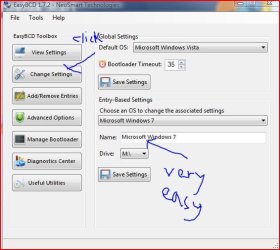
EASYBCD2009-01-23_142941.jpg

Click Change Settings, select the name to change in the drop-downflap, Cilck on Name and type the name you want, Click Save Settings.

Hope it helps

SIW2
 

My Computers My Computers

System One System Two

  • Computer type
    PC/Desktop
    OS
    7 X64
    CPU
    i5 8400
    Motherboard
    gigabyte b365m ds3h
    Memory
    2x8gb 3200mhz
    Hard Drives
    various
    PSU
    pure power 11 400w cm
    Case
    Coolermaster
    Cooling
    cryorig m9i
  • Computer type
    PC/Desktop
    OS
    7x64
    CPU
    g5400
    Motherboard
    ga b365m ds3h
    Memory
    8gb ddr4 2400
    PSU
    xfx pro 450w
great tutorial limneos

i'm gonna try this one.

thanks
 

My Computer My Computer

OS
Windows 7 Beta
CPU
Athlon XP +1700 1.47Ghz
Motherboard
M7VIQ
Memory
1.0 Gb DDR
Graphics Card(s)
GeForce N6200 DDR 128Mb 64Bit
Sound Card
C-Media 8738 6Ch
Monitor(s) Displays
15" VGA
Screen Resolution
1028X728 70Hz
Hard Drives
Maxtor 20Gb
Hitachi 30Gb
Back
Top